
Choosing the right optical drive for archiving means balancing media support, connection type, reading and writing reliability, and long-term ease of use. The best option depends on whether you are preserving CDs, DVDs, Blu-ray discs, or a mix of formats.
This roundup covers portable USB drives, internal SATA burners, and higher-capacity Blu-ray hardware so you can match your archive workflow to your computer and collection.
Best 10 Optical Disc Drives for Archiving Picks for 2026
Best M-DISC Portable Pick

- M-DISC support for long-term DVD archiving
- USB-C connectivity for modern laptops
- Password and hidden-folder features on Windows
Best For: Portable DVD archiving with M-DISC support
Best Blu-ray Archiving Option

- Burns Blu-ray, DVD, and CD media
- USB 3.0 and USB-C dual connectivity
- Works with Windows, Mac, and Linux
Best For: Portable high-capacity Blu-ray and optical-media archiving
Best Internal Desktop Archiver
Optiarc AD-5290S SATA DVD Writer

- Internal 5.25-inch Serial ATA design
- Supports M-DISC archival media
- Up to 24x DVD and 48x CD writing
Best For: Desktop archiving and repeated DVD duplication
Best Budget Travel Burner

- Portable USB 3.0 and USB-C design
- Burns CDs up to 24x and DVDs up to 8x
- Works with many Windows, Mac, and Linux systems
Best For: Portable everyday CD/DVD backups and burning
Versatile Archive Hub

- CD/DVD burning up to 24x CD and 8x DVD
- Adds SATA, SD, Micro SD, and USB connectivity
- Broad Windows, Linux, and macOS compatibility
Best For: Multi-format backups and portable archiving
Simple Backup Companion

- USB 3.0 and USB-C connectivity
- Reads and writes common CD/DVD formats
- Includes USB hubs and SD/TF card support
Best For: Portable photo, video, and document backups
SSD-Ready Archive Station
Unitek External CD DVD Drive with M.2

- Includes an M.2 NVMe slot and card readers
- Supports direct M.2-to-CD and SD-to-CD recording
- Burns CDs up to 24x and DVDs up to 8x
Best For: Multi-source backups with M.2 SSD storage
Best Internal Archive Workhorse

- Supports major CD and DVD recordable formats
- Native SATA 3.0 desktop connection
- Quiet operation with vibration damping
Best For: Desktop CD/DVD backups and installations
Best Portable Compatibility Pick
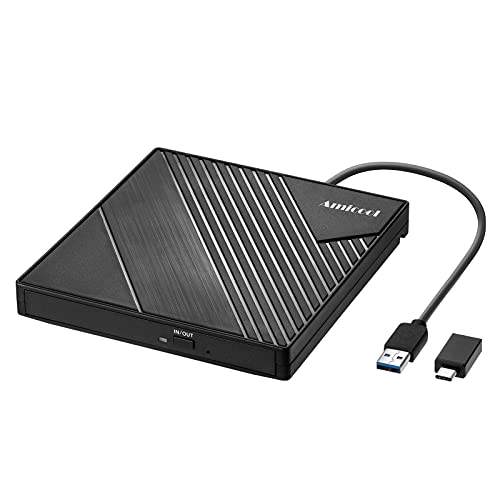
- USB-A and USB-C interfaces
- Works with Windows, Linux, and macOS
- Slim portable design with built-in cable
Best For: Portable laptop and Mac archiving
Best Simple External Backup Drive

- USB-C and USB-A cables included
- Listed read/write speeds up to 24x
- Supports Windows, Linux, and macOS
Best For: Compact external CD/DVD backups
Best M-DISC Portable Pick – ASUS ZenDrive U8M
For optical disc drives for archiving, the ASUS ZenDrive U8M is a compact DVD writer with USB-C connectivity and M-DISC support. It is designed for laptops and desktops running Windows or macOS, with straightforward drag-and-drop burning on Windows.
Best For: Laptop users who want portable DVD archiving with M-DISC support and USB-C compatibility.
Pros:
- Supports M-DISC media for long-term data, photo, and video storage.
- USB-C interface suits modern thin laptops, including ASUS ZenBook models.
- Password protection and hidden-folder features add security on Windows.
- Supports DVD writing up to 8x and CD writing up to 24x.
Cons:
- DVD-focused design does not support Blu-ray media.
- Some security features are specified for Windows rather than macOS.
This is a practical choice when portability, USB-C access, and M-DISC compatibility matter more than Blu-ray capacity.
Best Blu-ray Archiving Option – GOOBOX External Blu-ray Drive
Among optical disc drives for archiving, this GOOBOX external Blu-ray drive stands out for higher-capacity BD media alongside DVD and CD support. Its USB 3.0 and USB-C connections work across Windows, macOS, and Linux, though playback software is required for Blu-ray use.
Best For: Users who need Blu-ray, DVD, and CD burning in a portable drive for Windows, Mac, or Linux computers.
Pros:
- Writes BD media at up to 6x, DVD at 8x, and CD at 24x.
- Dual USB 3.0 and USB-C connectors support newer and traditional computers.
- Supports BD-R/RE, DVD formats, DVD-RAM, and CD-R/RW.
- Compact design includes integrated cable storage and shock-absorbing pads.
Cons:
- Blu-ray playback requires third-party software.
- Low-power devices may need the included external power cable.
- Not compatible with Chromebooks, TVs, tablets, iPads, or car systems.
Choose this model when archival capacity and broad optical-format support are priorities, and you are comfortable supplying suitable Blu-ray software.
Best Internal Desktop Archiver – Optiarc AD-5290S SATA DVD Writer
For a permanent desktop setup, the Optiarc AD-5290S is an internal SATA DVD writer suited to optical disc drives for archiving. It supports common CD and DVD formats, M-DISC media, and consistent recording for duplication workflows.
Best For: Desktop PC builders and duplication users who prefer an internal 5.25-inch SATA DVD burner.
Pros:
- Supports 1000-year M-DISC media for long-term DVD storage.
- Records DVD media at up to 24x and CDs at up to 48x.
- Recording stabilization helps produce more consistent duplicate discs.
- Industrial-style tray components are designed for durability.
Cons:
- Requires a desktop PC with an available 5.25-inch bay and Serial ATA connection.
- Does not support Blu-ray media.
- Supplied as a bulk internal drive without external-drive portability.
This model makes the most sense for a desktop archive station or repeated disc-duplication work rather than occasional laptop use.
Best Budget Travel Burner – Ziweo External CD/DVD Drive
The Ziweo external drive is a simple option for optical disc drives for archiving when you need portable CD and DVD writing without a built-in optical bay. It offers USB 3.0 and USB-C compatibility, plug-and-play operation, and a slim design for travel.
Best For: Laptop and desktop users who need an inexpensive, portable CD/DVD burner for backups and everyday disc tasks.
Pros:
- Supports CD and DVD reading and writing, including up to 24x CD and 8x DVD speeds.
- USB 3.0 and USB-C connectivity supports many Windows, Mac, and Linux computers.
- Plug-and-play design requires no external power supply according to the supplied notes.
- Slim, shock-resistant design is convenient for travel.
Cons:
- Does not support Blu-ray discs.
- Compatibility excludes cars, TVs, phones, Chromebooks, Surface Pro, and Ubuntu.
- Power or USB-hub limitations may cause recognition or playback issues.
This is a practical general-purpose DVD/CD burner, but users seeking dedicated long-term archival media support should consider an M-DISC-compatible model instead.
Versatile Archive Hub – Alxum External CD DVD Drive
For shoppers comparing optical disc drives for archiving, the Alxum stands out as a multifunctional option. It combines CD/DVD reading and burning with SATA 2.5-inch, SD, Micro SD, and USB connectivity, making it useful for consolidating data from several storage types.
Best For: Users who want disc archiving plus SATA and memory-card transfer features in one portable device.
Pros:
- Supports CD/DVD burning at up to 24x for CDs and 8x for DVDs.
- Includes three USB 2.0 ports, SATA 2.5, SD, and Micro SD functionality.
- Supports Windows, Linux, and macOS systems and reads both 80mm and 120mm discs.
Cons:
- The included power cable should be connected to a separately purchased USB wall adapter for reliable burning and simultaneous slot use.
- USB 2.0 connectivity may be less convenient for large transfers than newer USB standards.
- Some video files may require VLC or PotPlayer for playback.
The Alxum is a strong choice when archiving involves more than optical discs. Its broad media compatibility is practical, but plan for a wall adapter and third-party playback or burning software when needed.
Simple Backup Companion – BPAKDU 8-in-1 External Drive
The BPAKDU is a practical pick for optical disc drives for archiving, pairing CD/DVD reading and writing with USB 3.0, USB-C, USB hubs, and card-reader functionality. Its plug-and-play design is aimed at laptop and desktop users who need a straightforward way to back up photos, videos, and other files.
Best For: Laptop and desktop users seeking a portable, broadly compatible disc burner with faster USB 3.0 connectivity.
Pros:
- Supports CD/DVD reading and writing, including CD±R/RW, DVD±R/RW, DVD-RAM, VCD, and SVCD.
- Offers USB 3.0, USB-C, three USB 2.0 ports, and an SD/TF card reader.
- Portable plug-and-play design with stated support for Windows, macOS, and Linux.
Cons:
- SD and TF cards cannot be used at the same time.
- Some Windows 10/11 systems may need the extra power cable if the drive is not recognized.
- It does not support Blu-ray discs, TVs, cars, tablets, smartphones, or projectors.
The BPAKDU balances archiving features and convenience, especially for transferring camera-card files to discs. Its device exclusions and possible power requirement are worth checking before purchase.
SSD-Ready Archive Station – Unitek External CD DVD Drive with M.2
For optical disc drives for archiving with expanded storage flexibility, the Unitek combines CD/DVD burning with an M.2 NVMe slot, SD and Micro SD readers, and USB ports. It also supports direct M.2-to-CD and SD-to-CD recording, which can simplify transfers between storage media.
Best For: Photographers, offices, and users who want optical backups alongside M.2 SSD and memory-card workflows.
Pros:
- Integrates CD/DVD burning, an M.2 NVMe slot, SD and Micro SD slots, and three USB ports.
- Supports up to 24x CD and 8x DVD burning speeds.
- Works with Windows, Linux, and Mac OS and supports both 80mm and 120mm discs.
Cons:
- The power cable should connect to a USB charger, which is not included, for stable performance during demanding tasks.
- USB 3.0 performance and simultaneous feature use may still depend on adequate external power.
- DVD video files may require VLC or PotPlayer if built-in players lack codecs.
The Unitek is the most storage-oriented option in this group, offering a useful bridge between optical media, memory cards, and M.2 storage. It is particularly appealing for organized multi-source backups, provided you have a suitable USB charger.
Best Internal Archive Workhorse – SATA DVD Burner
For desktop users seeking optical disc drives for archiving, this internal DVD burner offers a native SATA 3.0 connection and broad CD/DVD format support. It is designed for data backup, media archiving, and operating-system installation, with vibration damping and automatic speed adjustment for quieter operation.
Best For: Desktop PCs that need a built-in drive for routine CD and DVD backups or installations.
Pros:
- Supports DVD±R/RW, DVD±R DL, CD-R/RW, and other major formats.
- SATA 3.0 interface provides a direct internal connection with up to 6Gb/s bandwidth.
- Compatible with Windows 10/11, Linux, and legacy Windows systems.
- Vibration damping and automatic speed adjustment help reduce noise.
Cons:
- Requires a compatible desktop computer with a 5.25-inch drive bay and SATA connection.
- Not a portable solution for laptops or computers without internal expansion space.
This is a practical choice when dependable internal access matters more than portability. Its format coverage makes it suitable for everyday disc archiving, while the standard desktop form factor keeps installation familiar.
Best Portable Compatibility Pick – Amicool External DVD Drive
This Amicool model is a flexible option among optical disc drives for archiving when you need to work across laptops and desktops. Its USB 3.0 and USB-C interfaces, plug-and-play setup, and support for Windows, Linux, and macOS make it convenient for portable CD and DVD reading and burning.
Best For: Laptop and Mac users who want a lightweight external drive for occasional disc backups and access.
Pros:
- Includes both USB 3.0 and Type-C connectivity for a wide range of computers.
- Supports DVD+R, DVD-R, CD-R, and CD-RW media.
- Compatible with Windows, Linux, and Intel or Apple Silicon macOS systems.
- Slim body and integrated cable make it convenient for travel.
Cons:
- Does not support Blu-ray, DVD-RAM, ChromeOS, tablets, TVs, or game consoles.
- Direct connection is recommended; hubs or extension cables may cause insufficient power.
- Maximum listed speeds are 8x for DVD and 24x for CD operations.
Its main advantage is broad computer compatibility in a compact package. For reliable use, connect it directly to the computer, particularly when using a laptop or an Apple Silicon Mac.
Best Simple External Backup Drive – USB DVD Writer
This compact Rioddas drive provides a straightforward external option for optical disc drives for archiving. It connects through USB 3.0 Type-C, includes USB-C and USB-A cables, and supports CD/DVD reading and writing on Windows, Linux, and macOS computers.
Best For: Users who want a compact external CD/DVD writer with both USB-C and USB-A connection options.
Pros:
- Supports up to 24x listed CD/DVD read and write speeds.
- Includes both USB-C and USB-A cables for flexible computer connections.
- Compatible with laptops, desktops, PCs, MacBooks, Windows, Linux, and macOS.
- Portable form factor is easy to use with different computers.
Cons:
- Some scratched, aged, unusually recorded, or copy-protected discs may not read properly.
- External USB operation depends on compatible playback or disc-management software.
- The supplied details do not indicate Blu-ray support.
This drive is appealing for basic disc access and backup tasks when portability and connection flexibility are priorities. Keep expectations realistic with damaged or encrypted media, since disc condition and recording format can affect recognition.
How We Picked the Best Optical Disc Drives for Archiving
We focused on compatibility, connection options, disc-format support, portability, and practical usability. The selection includes external drives for laptops and modern USB-C systems, internal SATA models for desktop upgrades, and a Blu-ray burner for users who need greater capacity per disc.
For archival work, a drive should read your existing media consistently and write supported discs without requiring unusual adapters or software. We also considered features such as M-DISC support, USB 3.0 performance, slim designs, bundled connectivity, and compatibility with Windows or macOS where specified.
Quick Comparison
| Drive type | Best for | Main advantage |
|---|---|---|
| External DVD drive | Laptops and occasional archiving | Portable and easy to connect |
| External Blu-ray drive | Large photo, video, and data archives | Higher disc capacity |
| Internal SATA DVD drive | Desktop computers | Permanent, direct installation |
| USB-C multifunction drive | Modern laptops and flexible setups | Broad connectivity |
Key Buying Factors for Optical Disc Drives for Archiving
Disc Format and Capacity
Confirm whether you need CD, DVD, or Blu-ray support. DVD drives cannot write Blu-ray discs, while Blu-ray models usually handle CD and DVD media as well. For substantial archives, Blu-ray can reduce the number of discs required.
Connection and Compatibility
External drives are simplest for laptops, but check whether the model uses USB-A, USB-C, or both. Some drives may need a hub or adapter. Internal models require an available SATA data connection, power connector, and suitable drive bay.
Writing Reliability and Archival Media
Drive quality matters, but the discs themselves are equally important. Use reputable archival-grade media, write at a conservative supported speed, verify completed discs, and keep more than one copy in separate locations. M-DISC support can be useful if your chosen media and software support it.
Power, Noise, and Portability
Most slim external DVD drives draw power through USB, while some Blu-ray burners may benefit from more power than a single port provides. Consider cable length, operating noise, vibration, and whether the drive will travel between computers.
Who Should Buy Which Optical Disc Drives for Archiving?
- Choose a slim external DVD drive if you archive CDs and DVDs with a laptop or need an affordable occasional-use writer.
- Choose an external Blu-ray burner if you store large video libraries, photo collections, or system backups and want more capacity per disc.
- Choose an internal SATA drive for a desktop workstation that will handle frequent disc reading or writing.
- Choose a USB-C or multifunction model if your laptop lacks USB-A ports or you want a portable drive with broader connectivity.
Before buying, check your computer’s ports, operating system, preferred media type, and available backup software. For valuable archives, always verify the data after writing and maintain an additional copy on another storage medium.