
The best right-angle Thunderbolt cables make cramped desk setups, laptop docks, external drives, and monitors easier to connect without putting unnecessary strain on the port. The options below cover compact short cables, coiled designs, long runs, and USB4 models supporting up to 40Gbps or 80Gbps.
Before buying, match the cable’s data rate, power delivery, display support, connector orientation, and length to your devices. A right-angle plug can improve cable management, but only when it exits in the direction your setup requires.
Best 10 Right Angle Thunderbolt Cables Picks for 2026
Best Overall
Silkland 40Gbps Right Angle USB4 Cable
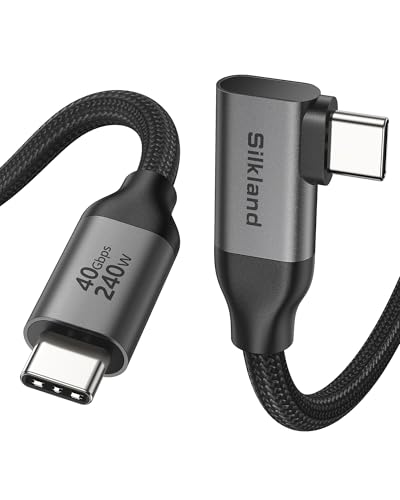
- 40Gbps data and up to 240W PD 3.1 charging
- Supports 8K, 5K, 4K 144Hz, and dual 4K displays
- Braided, shielded build with a space-saving 90-degree connector
Best For: Desks, docks, SSDs, and nearby high-performance connections
Best for Cars and Tethering
Coiled Right Angle Thunderbolt 4 Cable

- Portable 3.3-foot coiled design for cars and travel
- 40Gbps data, 240W charging, and 8K video support
- Suitable for cameras, SSDs, eGPUs, phones, and chargers
Best For: Car charging, camera tethering, and compact mobile setups
Best for Thunderbolt 5
Silkland 80Gbps Right Angle Cable
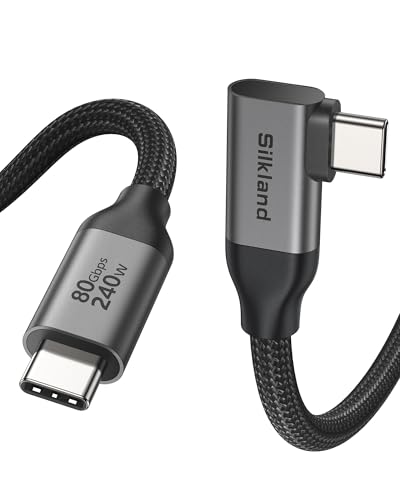
- Up to 80Gbps bidirectional data transfer
- Up to 120Gbps display bandwidth for advanced setups
- 240W charging and durable 4-foot braided construction
Best For: Thunderbolt 5 workstations, creators, gamers, and multi-display systems
Best Value Pair
JBTOP 40Gbps Right-Angle Cable 2-Pack

- Two 1.5-foot cables
- 40Gbps data and 240W charging
- Up to 8K video support
Best For: Compact setups needing two short cables
Best Long-Reach Option
6.6-Foot 40Gbps Right-Angle USB-C Cable

- 6.6-foot length
- 40Gbps and 240W PD 3.1
- Single 8K or dual 4K support
Best For: Longer desktop and docking-station connections
Best Balanced Length
Silkland 40Gbps Right-Angle Cable
- Moderate 4-foot reach
- 40Gbps and 240W charging
- Up to 8K and dual 4K support
Best For: Everyday desk, monitor, and dock connections
Best Dual-Angle Value
OVAW USB4 240W Right-Angle Cable 2-Pack

- 240W charging and 40Gbps data transfer
- Includes side-angle and vertical-angle cables
- Supports Thunderbolt 4/3, USB4, and 8K video
Best For: Flexible laptop, dock, and desk setups
Best Heavy-Duty Pick
Silkland 40Gbps Right-Angle USB4 Cable 1FT

- Compact 1-foot length reduces desk clutter
- Supports 40Gbps, 8K video, and 240W PD
- Braided design with aluminum housing and E-marker
Best For: Close laptop-to-dock or charger connections
Best Long Reach
Silkland 40Gbps Right-Angle USB4 Cable 6.6FT
- 6.6-foot length supports flexible device placement
- 40Gbps data, 8K video, and up to 240W PD
- Right-angle connector with braided, aluminum-shelled build
Best For: Home offices and entertainment setups
Best Overall – Silkland 40Gbps Right Angle USB4 Cable
For shoppers comparing right angle thunderbolt cables, this Silkland USB4 option balances fast data transfer, high-resolution display support, and powerful charging in a practical 3.3-foot length. Its 90-degree connector is well suited to organized desk, dock, and charging setups.
Best For: Workstations, docking stations, external SSDs, and users who want one cable for 40Gbps data, displays, and up to 240W charging.
Pros:
- Supports up to 40Gbps data transfer with Thunderbolt 4/3 and USB4 compatibility.
- Handles single 8K, 5K, or 4K at 144Hz displays, plus dual 4K at 60Hz when devices support it.
- Offers PD 3.1 charging up to 240W and includes a braided, triple-protected construction.
Cons:
- Only 3.3 feet long, so it may not suit distant or floor-mounted connections.
- Maximum performance requires compatible 40Gbps, display, and charging hardware.
- The connector is specified for cases under 1.5mm thick.
This is a strong all-purpose pick when you need a right-angle cable for a nearby monitor, dock, laptop, or SSD. Its feature set is broad, though users with longer cable-routing needs should consider a longer model.
Best Short Cable – 5.5-Inch Dual Right Angle USB4 Cable
This compact option stands out among right angle thunderbolt cables because its 5.5-inch length and dual L-shaped connectors minimize excess cable around portable devices. It is designed for close connections between laptops, SSDs, docks, power banks, and monitors.
Best For: Portable SSDs, power banks, phones, tablets, and tightly spaced USB-C or Thunderbolt connections.
Pros:
- Ultra-short 5.5-inch dual right-angle design keeps connections low-profile and reduces clutter.
- Advertises USB4 V2.0 speeds up to 80Gbps and compatibility with Thunderbolt 5/4 setups.
- Supports up to 240W PD 3.1 charging and 8K at 60Hz or dual 4K displays when supported.
- Stepped connectors are designed to clear most phone cases.
Cons:
- The very short length leaves little flexibility for devices that are not positioned closely together.
- Actual data, video, and charging performance depends on the connected devices and ports.
- The notes advise handling the connector head rather than pulling the flat cable.
Choose this cable when excess length is the main problem. It is especially practical for magnetically mounted SSDs and portable setups, but its compact format is less suitable for conventional desk cable runs.
Best for Cars and Tethering – Coiled Right Angle Thunderbolt 4 Cable
Among right angle thunderbolt cables, this 3.3-foot coiled model is tailored to mobile use. The stretchable design helps keep car chargers, cameras, phones, and laptops organized while the angled connector reduces strain in tight spaces.
Best For: Car charging, CarPlay-style setups, camera tethering, portable SSDs, and users who prefer a cable that stores compactly.
Pros:
- Coiled 3.3-foot design is portable, space-saving, and resistant to loose cable clutter.
- Supports up to 40Gbps data transfer, 240W PD 3.1 charging, and high-resolution video.
- Handles 8K at 60Hz, 4K at 144Hz, and dual 4K at 60Hz when compatible equipment supports it.
- Works with phones, Mac mini M4, MacBook Pro, SSDs, eGPUs, chargers, and cameras.
Cons:
- Its coiled form may not be ideal when a straight, fixed-length cable is preferred.
- Reaching 40Gbps or 240W requires compatible devices and power-delivery support.
- The product notes describe one straight-to-angled connector arrangement rather than dual right-angle ends.
This is a useful choice for users moving between home, office, car, and shooting locations. The coiled construction adds portability, while the high bandwidth covers charging, data, display, and tethering needs.
Best for Thunderbolt 5 – Silkland 80Gbps Right Angle Cable
For the highest-bandwidth option in this roundup of right angle thunderbolt cables, this 4-foot Silkland cable supports Thunderbolt 5 and USB4 data rates up to 80Gbps. Its 90-degree connector also helps keep longer desk and docking-station runs neat.
Best For: Thunderbolt 5 workstations, demanding creative workflows, high-refresh gaming, multi-monitor setups, and longer connections.
Pros:
- Supports bidirectional data transfer up to 80Gbps.
- Offers up to 120Gbps display bandwidth for dual 8K/6K, triple 4K at 144Hz, or single 4K at 540Hz configurations when supported.
- Provides up to 240W PD 3.1 charging and backward compatibility with Thunderbolt 4/3 and USB-C devices.
- Uses a braided nylon exterior, aluminum shell, triple shielding, and testing rated beyond 5,000 bends.
Cons:
- Full 80Gbps data and 120Gbps display capabilities require compatible Thunderbolt 5 hardware.
- At 4 feet, it is longer and potentially less compact than short-cable alternatives.
- The notes do not list specific smartphone models for compatibility.
This is the forward-looking pick for users building around Thunderbolt 5 hardware or advanced multi-display systems. It costs some compactness in exchange for greater bandwidth and a useful 4-foot reach.
Best Value Pair – JBTOP 40Gbps Right-Angle Cable 2-Pack
For shoppers comparing right angle thunderbolt cables, this JBTOP two-pack offers a compact 1.5-foot design for short, tidy connections. It supports up to 40Gbps data transfer, 240W charging, and 8K video when the connected devices support those capabilities.
Best For: Short cable runs, compact desks, and buyers who want a spare cable included.
Pros:
- Two 1.5-foot cables provide a convenient backup or second connection.
- Supports up to 40Gbps data transfer and 240W USB-C Power Delivery.
- Supports up to 8K at 60Hz video output with compatible DisplayPort Alt Mode devices.
- Compatible with Thunderbolt 4, Thunderbolt 3, USB4, and older USB standards.
Cons:
- At 1.5 feet, the cables may be too short for distant devices.
- Maximum performance depends on the connected device, charger, and display.
This is a practical choice when you need two short right-angle cables for a laptop, dock, SSD, or monitor setup. Its main limitation is reach, but the two-pack adds flexibility for compact workstations.
Best Long-Reach Option – 6.6-Foot 40Gbps Right-Angle USB-C Cable
This 6.6-foot option stands out among right angle thunderbolt cables when extra reach matters. It combines 40Gbps transfer speeds, 240W PD 3.1 charging, and support for single 8K or dual 4K displays in a longer, braided cable.
Best For: Larger desks, docking stations, and setups where devices are spaced farther apart.
Pros:
- 6.6-foot length provides more placement flexibility than short cables.
- Supports up to 40Gbps data transfer and up to 240W PD 3.1 charging.
- Supports one 8K display or dual 4K displays with compatible hardware.
- Nylon braiding, quadruple shielding, and a zinc alloy shell are designed for durability.
Cons:
- Dual-monitor setups require two cables, according to the supplied product notes.
- Full speed and video performance require compatible Thunderbolt 4 or USB-C devices.
- The longer cable may be less convenient for highly portable setups.
Choose this two-pack if cable reach and workstation organization are priorities. The right-angle connectors help reduce side protrusion, while the longer length suits monitors, docks, and desktop computers.
Best Balanced Length – Silkland 40Gbps Right-Angle Cable
Silkland’s 4-foot cable offers a middle ground for shoppers choosing right angle thunderbolt cables. It supports 40Gbps transfers, up to 240W PD 3.1 charging, and high-resolution display connections in a durable braided design.
Best For: Desk workstations that need moderate reach, strong charging support, and display connectivity.
Pros:
- Four-foot length suits moderate-distance connections on desks and workstations.
- Supports up to 40Gbps data transfer and 240W PD 3.1 charging.
- Supports single 8K, 5K, or 4K at 144Hz, plus dual 4K at 60Hz with compatible devices.
- Braided construction, aluminum housing, and EMI-resistant shielding support durability and signal quality.
Cons:
- Devices must support the relevant speeds and DisplayPort Alt Mode for maximum results.
- Only one cable is included.
- The connector is specified for cases under 1.5mm thick.
This is a well-rounded pick for a laptop-to-dock, monitor, or external-SSD setup. Its 4-foot length avoids the extremes of very short and very long cables, while the 24-month customer support adds reassurance.
Best Dual-Angle Value – OVAW USB4 240W Right-Angle Cable 2-Pack
For shoppers comparing right angle thunderbolt cables, this OVAW 2-pack stands out for its combination of USB4 performance, high-wattage charging, and two connector orientations. The side-angle and vertical-angle designs can help fit different laptop, dock, and desk configurations.
Best For: Users who want two short right-angle cables with different bend directions for charging, docking, and high-speed data connections.
Pros:
- Supports up to 240W charging and 40Gbps data transfer with compatible equipment.
- Includes both side-angle and vertical-angle USB-C cable designs.
- Supports 8K video and compatibility with Thunderbolt 4, Thunderbolt 3, USB4, and USB-C devices.
- Includes a storage pouch and nylon-braided construction rated for 10,000+ bends.
Cons:
- The supplied details list the item length as 1.6 feet, while the product notes also refer to 3.3-foot cables; verify the exact package length before ordering.
- Maximum charging and transfer speeds require compatible chargers and devices.
This is a flexible choice when port orientation matters more than having a single long cable. Its two connector styles add practical versatility, while USB4 and Thunderbolt compatibility support demanding data and display setups.
Best Heavy-Duty Pick – Silkland 40Gbps Right-Angle USB4 Cable 1FT
This 1-foot Silkland model is a compact option among right angle thunderbolt cables. Its short length is designed for close connections between a laptop, dock, charger, monitor, or nearby storage device, helping limit excess cable clutter.
Best For: Compact workstations and laptop-to-dock connections where a short, tidy cable is preferable.
Pros:
- Provides up to 40Gbps data transfer and supports Thunderbolt 4/3 and USB4 devices.
- Supports 8K, 5K, and 4K display configurations, including dual 4K at 60Hz when devices support the required modes.
- Supports up to 240W PD 3.1 charging with compatible equipment.
- Uses an E-marker chip, aluminum shell, braided exterior, and 24-month customer support.
Cons:
- The 1-foot length may be too short for spread-out equipment.
- The connector is specified for cases under 1.5mm thick.
- Full 40Gbps, display, and 240W performance depends on the connected devices and charger.
Choose this version when neat cable routing and minimal slack are priorities. It offers strong USB4 and Thunderbolt performance in a compact format, but its short reach makes it less suitable for entertainment centers or distant peripherals.
Best Long Reach – Silkland 40Gbps Right-Angle USB4 Cable 6.6FT
For setups that need more reach, this 6.6-foot Silkland cable combines a 90-degree connector with USB4 and Thunderbolt compatibility. It is suited to home offices and entertainment areas where devices such as laptops, TVs, consoles, docks, and monitors may not sit close together.
Best For: Longer connections between computers, displays, docks, storage devices, and entertainment equipment.
Pros:
- Offers 6.6 feet of reach for more flexible device placement.
- Supports up to 40Gbps data transfer and compatibility with Thunderbolt 4/3 and USB4.
- Supports up to 240W PD 3.1 charging and 8K at 60Hz with compatible devices.
- Includes a right-angle connector, braided construction, aluminum housing, and E-marker chip.
Cons:
- Longer cable length can be less convenient than a short cable in tightly packed desk setups.
- The connector is specified for cases under 1.5mm thick.
- Advertised charging, data, and display capabilities require compatible source devices and accessories.
This is the better Silkland option when a one-foot cable cannot span the gap between components. The angled connector can help with cable management, while the longer length gives TVs, consoles, monitors, and laptops more placement flexibility.
How We Picked the Best Right Angle Thunderbolt Cables
We focused on cables with practical right-angle USB-C connectors and specifications suited to Thunderbolt 3, Thunderbolt 4, Thunderbolt 5, and USB4 setups. The selection includes models rated for high-speed data, up to 240W USB Power Delivery, and high-resolution display output where advertised. We also considered length, pack size, portability, and use cases such as docking stations, external SSDs, Mac laptops, phones, and compact desktop workspaces.
Specifications can vary by host device, charger, dock, monitor, and cable direction. Verify compatibility before relying on maximum advertised speeds or display resolutions.
Quick Comparison
- Best for most Thunderbolt 4 setups: A 40Gbps cable with 240W support offers a strong balance of speed, charging capacity, and compatibility.
- Best for Thunderbolt 5: An 80Gbps USB4 cable is the forward-looking choice when both connected devices support the newer standard.
- Best for tight spaces: Five-inch, one-foot, or 1.5-foot cables reduce slack around docks, hubs, and mini PCs.
- Best for long cable runs: Four-foot and 6.6-foot options provide more flexibility for monitors and accessories positioned farther away.
- Best value: Two-packs are useful when connecting several peripherals or keeping a spare in a travel bag.
Key Buying Factors for Right-Angle Thunderbolt Cables
Speed and Standard
Choose 40Gbps for most Thunderbolt 4 docks, fast external SSDs, and high-resolution displays. An 80Gbps cable is more appropriate for Thunderbolt 5 equipment, but it will not make older hardware operate beyond its own limit. USB4 labeling does not automatically guarantee every Thunderbolt feature, so check the full product specification.
Power Delivery
A 240W rating provides substantial headroom for compatible laptops and accessories, but the charger, computer, and cable must all support the required power profile. The cable’s rating alone does not increase a device’s charging limit.
Length and Connector Direction
Short cables keep portable setups tidy, while longer models are better for monitors, docks, and desktop storage. Confirm whether the plug turns left, right, upward, or downward relative to the device port. This detail matters as much as cable length in a crowded workspace.
Durability and Flexibility
Look for reinforced connectors, a flexible jacket, and strain relief near the angled plug. Coiled designs can reduce clutter, but they may introduce pulling force if stretched too far.
Who Should Buy Which Right Angle Thunderbolt Cables?
Buy a compact 40Gbps model if you are connecting a laptop to a nearby dock, hub, phone, or portable SSD. Choose a 4-foot cable for a monitor or desktop dock that needs moderate reach, and select a 6.6-foot option when routing around a desk. A two-pack makes sense for multi-device workstations or as a backup. Choose the 80Gbps option only when your Thunderbolt 5 hardware can use its additional bandwidth; otherwise, a well-built 40Gbps cable is usually the more practical value.