
Switching a keyboard, mouse, printer, or webcam between two laptops does not need to mean unplugging cables every time. The right USB switch box lets you share peripherals and change computers with a button, remote, or selector.
This roundup compares 10 options across USB-A and USB-C compatibility, port counts, transfer speeds, computer support, and specialized features such as HDMI KVM switching.
Best 10 USB Switch Boxes for Laptops Picks for 2026
Best USB-C Flexibility

- Shares four USB devices between two computers
- Combines USB-C and USB-A ports
- Includes button and remote switching
Best For: Mixed USB-C and USB-A laptop workstations
Best for Displays

- Shares one monitor and controls between two computers
- Supports 4K at 60Hz
- Includes HDMI and USB cables
Best For: Two-computer HDMI monitor workstations
Best High-Speed Capacity
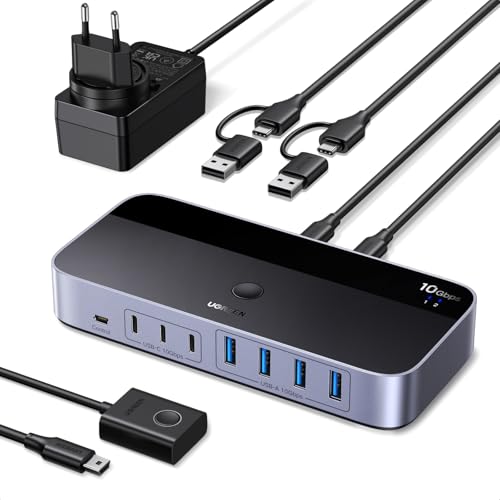
- Shares seven USB devices between two computers
- Offers USB-A and USB-C connectivity
- Delivers transfer speeds up to 10Gbps
Best For: Large, high-speed peripheral setups
Best Value Essentials

- Shares four USB devices between two computers
- Supports 5Gbps transfers
- Includes remote, button, and LED controls
Best For: Everyday home-office peripheral sharing
Best Overall USB Switch
UGREEN 2-Computer USB 3.0 Switch

- Shares four USB devices between two computers
- USB-C and USB-A connectivity with 5Gbps transfers
- Button and controller switching; optional USB-C power
Best For: Two-computer setups using mixed USB peripherals
Best High-Speed USB Switch

- USB 3.2 Gen 2 speeds up to 10Gbps
- Shares four USB ports between two USB-C computers
- Includes remote and button switching
Best For: USB-C laptops and fast peripheral file transfers
Best for Three Computers
THXCDBID 3-Computer USB 3.0 Switch

- Shares four USB-A devices across three computers
- 5Gbps USB 3.0 data transfer
- Includes IR remote, three input cables, and power cable
Best For: Three-computer workspaces using USB-A peripherals
Best Overall
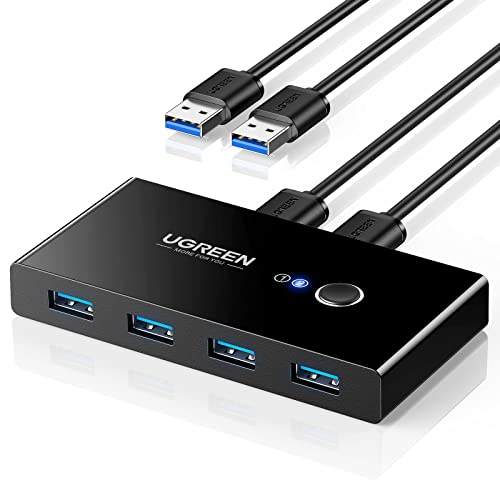
- Shares four USB devices between two computers
- USB 3.0 speeds up to 5Gbps
- Optional USB-C power for demanding peripherals
Best For: Multi-device workstations using two laptops or computers
Best Compact Option

- Shares two USB devices between two computers
- Supports USB 3.0 transfers up to 5Gbps
- Includes two 5-foot connection cables
Best For: Simple two-peripheral laptop workstations
Best Budget USB 2.0 Pick

- Shares four peripherals between two computers
- Includes two USB A-to-A cables
- Optional micro-USB power input improves stability
Best For: Basic office accessories and lower-speed sharing needs
Best USB-C Flexibility – UGREEN 4-Port USB Switch
If you need usb switch boxes for laptops and want to share peripherals between a USB-C computer and another system, this UGREEN model offers a practical setup. It switches four USB devices between two computers, with one USB-C port, three USB-A ports, button control, and a remote.
Best For: Laptop users sharing keyboards, mice, webcams, headphones, or other USB peripherals between two computers.
Pros:
- Supports four shared USB devices across two computers.
- Includes one USB-C and three USB-A device ports.
- Offers up to 5Gbps data transfer and plug-and-play compatibility.
- Provides both button and remote switching.
Cons:
- It does not support monitor or video transmission.
- Optional USB-C power may be needed for multiple or high-power devices.
- USB ports are intended primarily for data transfer, not charging.
This is a strong choice for a clean two-computer peripheral setup, especially when USB-C connectivity and remote switching matter. Choose another type of switch if you need to share a display.
Best for Displays – Jancane 4K HDMI KVM Switch
For shoppers comparing usb switch boxes for laptops that also need display control, this Jancane KVM switch adds HDMI switching to shared keyboard and mouse control. It connects two computers to one monitor and supports up to 4K at 60Hz.
Best For: Workstations, gaming setups, and home offices that need to share one HDMI monitor, keyboard, and mouse between two computers.
Pros:
- Controls two computers with one monitor, keyboard, and mouse.
- Supports UHD 4K at 60Hz, plus 4K at 30Hz and 1080p.
- Includes two USB cables and two HDMI cables.
- Driver-free compatibility includes Windows, macOS, Linux, and Chrome OS.
Cons:
- It is designed around HDMI connections rather than USB-only peripheral sharing.
- Its included USB connections are USB 2.0 cables.
- Compatibility depends on the computers and display having suitable HDMI connections.
Unlike a basic USB peripheral switch, this model is appropriate when video switching is part of the requirement. Its included cables and one-button control can simplify a two-computer desk.
Best High-Speed Capacity – UGREEN 7-Port USB 3.2 Switch
If your laptop setup uses many peripherals, this UGREEN switch is one of the more capable usb switch boxes for laptops. It lets two computers share seven devices, combines USB-A and USB-C ports, and reaches transfer speeds of up to 10Gbps.
Best For: Users with large mixed-port setups involving storage drives, printers, keyboards, mice, and other USB devices.
Pros:
- Shares up to seven devices between two computers.
- Provides four USB-A and three USB-C device connections.
- Supports USB 3.2 Gen 2 speeds up to 10Gbps.
- Includes a power adapter for more stable high-power device use.
Cons:
- It does not provide video output and is not a KVM display switch.
- Audio device connections are not recommended according to the supplied notes.
- Its minimum listed operating systems are Windows 10 and macOS 10.12 Sierra.
This model makes the most sense for a busy desk where port count and transfer speed are priorities. The included power adapter is useful when several demanding peripherals are connected.
Best Value Essentials – BENFEI 4-Port USB Switch
This BENFEI model is a straightforward option among usb switch boxes for laptops, allowing two computers to share three USB 3.0 devices and one USB-C device. It adds remote and button switching, LED status indication, and optional USB-C power for demanding peripherals.
Best For: Home-office users who want an affordable way to share everyday USB peripherals between a laptop and another computer.
Pros:
- Shares four peripherals between two computers.
- Supports up to 5Gbps data transfer and USB 2.0 backward compatibility.
- Includes both button and remote switching with LED indication.
- Works with Windows, macOS, Linux, and Chrome OS.
Cons:
- The supplied notes specify using a BENFEI USB-A-to-USB-A cable when connected.
- Optional extra power is recommended for high-consumption devices.
- It does not switch video or monitor signals.
For basic peripheral sharing, this BENFEI switch covers the essentials without adding display hardware. Its warranty and flexible operating-system support make it a practical choice for a typical two-computer desk.
Best Overall USB Switch – UGREEN 2-Computer USB 3.0 Switch
If you need usb switch boxes for laptops that share several peripherals between a work computer and a personal computer, this UGREEN model is a practical option. It connects two computers to four USB devices, including a mix of USB-C and USB-A equipment, and supports up to 5Gbps data transfer.
Best For: Two-computer laptop or desktop setups sharing keyboards, mice, printers, scanners, headphones, or USB cameras.
Pros:
- Shares four USB devices between two computers.
- Includes one USB-C port and three USB-A ports.
- Offers button and wired-controller switching, plus optional USB-C power for higher-power devices.
- Works with Windows, macOS, Chrome OS, and Linux without requiring drivers.
Cons:
- It is not a KVM and cannot connect or switch a monitor.
- The USB-C port does not support video output.
- Optional power may be needed when several devices are connected.
Choose this switch when flexible device-port options and broad operating-system compatibility matter more than display switching. Its 5Gbps performance is suitable for everyday peripherals and data devices, while the remote-style controller can help keep the desktop tidy.
Best High-Speed USB Switch – UGREEN 10Gbps USB-C Switch
For laptop users prioritizing faster peripheral data transfers, this UGREEN model is one of the more capable usb switch boxes for laptops. It connects two USB-C computers to four shared USB ports and supports USB 3.2 Gen 2 speeds up to 10Gbps.
Best For: USB-C laptop users who share keyboards, mice, printers, hard drives, or other compatible USB peripherals between two computers.
Pros:
- Provides up to 10Gbps transfer speeds through four USB 3.2 Gen 2 ports.
- Includes two USB-C-to-C data cables for connecting USB-C computers.
- Offers one USB-C port and three USB-A ports for shared devices.
- Supports button and remote switching in a compact aluminum enclosure.
Cons:
- It is not a KVM and does not support monitor connections.
- Audio device connections are not recommended according to the supplied notes.
- USB-C computer compatibility is required for the included connection setup.
This is the strongest fit of the three for users who regularly move large files through connected USB storage. Its stated 10Gbps ceiling can improve transfer times, while the four-port layout keeps common laptop accessories connected to a single switch.
Best for Three Computers – THXCDBID 3-Computer USB 3.0 Switch
If your workspace includes three computers, this THXCDBID model expands beyond the usual two-system design. Among usb switch boxes for laptops, it stands out by sharing four USB-A peripherals across three computers at speeds up to 5Gbps.
Best For: Multi-computer workspaces that need to share a keyboard, mouse, printer, scanner, or other USB-A devices across three systems.
Pros:
- Shares four USB-A devices among three computers.
- Supports USB 3.0 transfer speeds up to 5Gbps.
- Includes three USB-A input cables, an IR remote, and a Micro USB power cable.
- Supports Windows, Linux, and Mac operating systems with plug-and-play setup.
Cons:
- It is not a KVM and cannot switch monitor connections.
- Hotkey switching is not supported.
- The IR remote requires batteries, which are not included.
This model makes the most sense when three computers must access the same USB-A accessories without repeatedly moving cables. The included power cable can help stabilize operation with demanding peripherals, but high-power devices may still require separate power.
Best Overall – UGREEN 4-Port USB 3.0 Switch
For shoppers comparing usb switch boxes for laptops, this UGREEN model is a strong all-around option when two computers need to share several peripherals. It connects up to four USB devices, supports USB 3.0 speeds up to 5Gbps, and switches between computers with one button. It does not support monitors or video transmission.
Best For: Workspaces where two laptops or computers share keyboards, mice, storage devices, printers, scanners, or other USB peripherals.
Pros:
- Four USB 3.0 device ports support data speeds up to 5Gbps.
- Includes two USB 3.0 cables for connecting the computers.
- Plug-and-play compatibility with Windows, macOS, Chrome OS, and Linux.
- Optional USB-C power input helps support higher-power devices.
Cons:
- It is not a KVM switch and cannot carry monitor or video signals.
- Power adapter is not included.
- USB-C-only laptops may require a USB-C-to-A adapter.
This is the most flexible pick of the three for users who need four shared USB connections and faster USB 3.0 transfers. Add external power when several or higher-power devices are connected.
Best Compact Option – UGREEN 2-Port USB 3.0 Switch
This compact UGREEN switch is a practical choice among usb switch boxes for laptops when you only need to share two peripherals. Its USB 3.0 connection supports transfers up to 5Gbps, while the front-facing button and LED make switching between two computers straightforward. It handles USB data only, not video.
Best For: Two-laptop setups that share a keyboard and mouse, printer, webcam, or another pair of USB devices.
Pros:
- Two USB 3.0 ports support data rates up to 5Gbps.
- Includes two 5-foot USB 3.0 A-to-A cables.
- Driver-free operation works with Windows, macOS, Chrome OS, and Linux.
- One-button switching and an LED indicator simplify daily use.
Cons:
- Only two USB devices can be shared at once.
- It is not a KVM switch and does not support monitor or video transfer.
- USB OUT ports are for data transfer only.
Choose this model when a smaller two-device setup matches your needs. It avoids unnecessary extra ports while retaining USB 3.0 performance and broad operating-system compatibility.
Best Budget USB 2.0 Pick – UGREEN 4-Port USB 2.0 Switch
If your shared accessories do not need USB 3.0 speeds, this UGREEN box offers four USB 2.0 ports for two computers at a potentially simpler, value-focused setup. It uses one-button swapping and includes two USB A-to-A cables. Like the other options here, it is a peripheral switch rather than a video-capable KVM.
Best For: Sharing several standard USB accessories, such as keyboards, mice, printers, scanners, card readers, or flash drives, between two computers.
Pros:
- Four USB 2.0 ports allow two computers to share multiple peripherals.
- One-button switching and an LED show the active computer.
- Driver-free compatibility covers Windows, macOS, Linux, and Chrome OS.
- Separate micro-USB power input can improve stability with multiple devices.
Cons:
- USB 2.0 is slower than the USB 3.0 alternatives.
- It does not support monitors or video transmission.
- Power cable and charger are not included.
This is a sensible match for basic office peripherals where maximum transfer speed is not important. Consider the USB 3.0 models instead if you regularly move files through storage devices or need faster USB performance.
How We Picked These USB Switch Boxes for Laptops
We focused on the features that matter most in a shared laptop workspace: the number and type of host connections, available peripheral ports, USB generation, switching method, and compatibility with common accessories. The selection includes compact USB 2.0 models, faster USB 3.0 and USB 3.2 switchers, USB-C-focused designs, multi-computer options, and an HDMI KVM model for setups that also need monitor switching.
We also considered practical details such as support for printers, scanners, webcams, microphones, keyboards, and mice. A USB switch does not automatically provide charging or video output, so those capabilities should be confirmed before purchase.
Quick Comparison
- Best for standard office peripherals: A four-port USB 3.0 switch offers a useful balance of speed, compatibility, and simplicity.
- Best for USB-C laptops: Choose a model with native USB-C host or device ports to avoid unnecessary adapters.
- Best for high-speed storage: USB 3.2 models with 10Gbps support are better suited to fast external drives and demanding accessories.
- Best for three computers: Select a switch specifically rated for three host devices rather than trying to expand a two-computer model.
- Best for monitor control: An HDMI KVM switch can share a display along with USB peripherals, provided its video specifications match your monitor.
Key Buying Factors for USB Switch Boxes for Laptops
Host and Peripheral Connections
Count both sides of the setup. Some products connect two computers and share four USB devices, while others support three computers or combine USB-A and USB-C ports. Make sure the included host cables reach both laptops, or budget for compatible replacements.
USB Speed and Compatibility
USB 2.0 is generally sufficient for keyboards, mice, and basic printers. USB 3.0 or USB 3.2 is preferable for webcams, storage, scanners, and other devices that transfer more data. Faster labeling does not guarantee faster performance if the laptop, cable, or connected peripheral uses an older standard.
Switching Method and Power
A desktop button is simple and dependable, while a wired remote can place switching within easier reach. Check whether the switch needs an external power supply, especially when using multiple bus-powered devices or high-draw accessories.
Video Requirements
Most USB-only switchers control peripherals, not displays. If you want one keyboard, mouse, and monitor shared between laptops, choose a KVM model and verify resolution, refresh-rate, HDMI version, and USB compatibility.
Who Should Buy Which USB Switch Boxes for Laptops?
Choose a basic four-port USB 2.0 or USB 3.0 model for a home office that mainly shares a keyboard, mouse, printer, and scanner. Pick a USB-C-compatible switch for newer laptops or mixed USB-C and USB-A workstations. A 10Gbps USB 3.2 option makes more sense when external storage or high-bandwidth accessories are part of the workflow. For a three-laptop setup, use the dedicated three-computer model. Finally, choose the HDMI KVM when switching the display is as important as switching peripherals.