
The right computer accessory can make his workday smoother, his desk more comfortable, or his downtime more enjoyable. These Christmas gift ideas span home offices, travel, gaming, and creative work, with options for different setups and budgets.
11 Computer Accessory Christmas Gift Ideas
1. INNOCN 34-Inch Ultrawide Monitor
A Bigger Canvas for Work and Play
INNOCN 34-Inch Ultrawide Monitor

- 21:9 WQHD display offers room for side-by-side windows and wide editing timelines.
- 180Hz refresh rate and Adaptive-Sync support suit fast-paced gaming.
- PIP/PBP modes can show two connected devices on one screen.
Best For: A multitasker, remote worker, or gamer who wants more screen space.
2. 15.6-Inch Portable Laptop Screen Extender
3. HUANUO Dual Monitor Arm
A Cleaner Multi-Screen Desk

- Supports two 13–40-inch monitors up to 26.4 pounds per arm, with compatible VESA mounts.
- Arms swivel, tilt, rotate, and extend for adjustable screen positioning.
- Clamp or grommet mounting and built-in USB ports help organize a desk.
Best For: Someone with two monitors and a desk that supports clamp or grommet mounting.
4. Plugable 9-in-1 USB-C Hub
More Connections in a Compact Hub

- Adds HDMI, USB-A and USB-C, Ethernet, and SD/microSD readers to a compatible laptop.
- Supports one external display up to 4K at 60Hz when the USB-C port supports DisplayPort Alt Mode.
- Power delivery depends on the laptop, charger, and cable.
Best For: A laptop owner who connects storage, displays, and other peripherals.
5. EMEET NOVA 4K Autofocus Webcam
A Sharper Look for Video Calls
EMEET NOVA 4K Autofocus Webcam

- Supports 4K video at 30fps, with resolution set to 1080p by default.
- PDAF autofocus, automatic light adjustment, and two built-in microphones support video calls.
- Includes a privacy cover and adjustable stand; connects through USB-A.
Best For: A remote worker or frequent video caller with a USB-A port.
6. Nylavee Bluetooth Desktop Speakers
A Sound Upgrade for His Desk
Nylavee Bluetooth Desktop Speakers
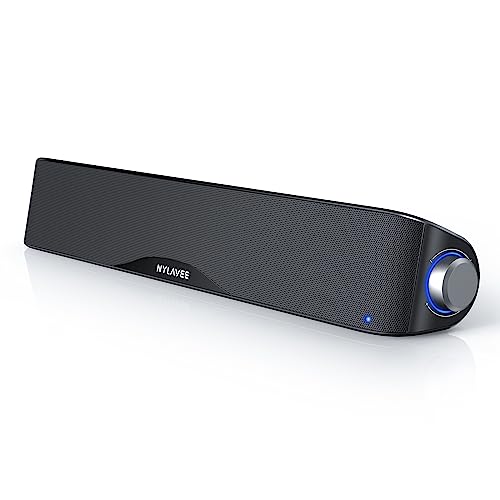
- Desktop soundbar offers Bluetooth 5.0 and 3.5mm AUX connections.
- USB-powered design has no built-in battery and uses a side control knob.
- Compatible with computers, gaming consoles, phones, and tablets.
Best For: A music listener or gamer who wants speakers at his desk.
7. HUION Bluetooth Programmable Keydial Mini
Shortcuts at His Fingertips
HUION Bluetooth Programmable Keydial Mini

- 18 customizable keys and a programmable dial can speed up supported creative shortcuts.
- Bluetooth 5.0 enables cable-free use, with a stated range up to 10 meters.
- Works with Mac and Windows; custom shortcuts require setup in compatible software.
Best For: A creator, editor, or gamer who enjoys customizing controls.
8. Nulea Wireless Ergonomic Trackball Mouse
A Different Way to Navigate
Nulea Wireless Ergonomic Trackball Mouse

- Thumb-operated trackball moves the cursor without moving the mouse across the desk.
- Connects to up to three devices through Bluetooth or a USB receiver.
- Rechargeable design has six buttons; the buttons are not programmable.
Best For: A desk worker curious about an alternative mouse style.
9. Plugable Thunderbolt 4 Dock
10. SanDisk 2TB Extreme Portable SSD
Portable Space for Big Files
SanDisk 2TB Extreme Portable SSD
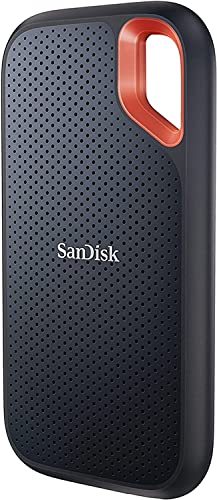
- 2TB capacity and USB-C connectivity suit portable file storage.
- Rated for read speeds up to 1050MB/s and write speeds up to 1000MB/s, depending on the host device and other factors.
- Includes password protection with 256-bit AES hardware encryption and a carabiner loop.
Best For: A photographer, gamer, or professional who carries large files.
11. KINESIS Freestyle Edge RGB Plus Split Keyboard
A Split Layout for Long Sessions
KINESIS Freestyle Edge RGB Plus Split Keyboard

- Split mechanical keyboard includes detachable palm support and a lift kit.
- Fully programmable keys and RGB lighting allow setup customization.
- Connects by USB-A; listed as compatible with Windows 10 and later.
Best For: A frequent typist, coder, or gamer interested in a split keyboard.
Choosing a Computer Accessory for Him
Start with how he uses his computer. A gamer may appreciate a large, high-refresh-rate display or desktop speakers. Someone who edits photos or video might make better use of an ultrawide screen, a shortcut keypad, or portable storage for working files. For a remote worker, a webcam, hub, or dock can make calls and desk connections easier. If he already has a well-equipped workspace, a trackball or split keyboard offers a more personal change to the way he interacts with it.
Take note of the equipment he already owns before choosing. A monitor is a visible, substantial upgrade, but it needs desk space and suitable video connections. A monitor arm can free the desktop and adjust screen position, provided the monitors have compatible VESA mounting holes and the desk supports the clamp or grommet base. A portable screen is useful for travel, though its laptop video ports need to match the extender’s connection requirements.
Match the Gift to Your Budget
A small accessory can still solve a daily annoyance. A USB-C hub adds common connections in a compact format, while a trackball changes cursor control without needing a larger desk. Speakers and webcams are practical upgrades for calls, gaming, and entertainment. If you are considering a dock, monitor, or keyboard, think through the recipient’s routine: the best value is usually the item he will use often and that fits his current setup.
For a larger gift, consider whether it can serve more than one purpose. An ultrawide display can give room to work with documents and play games. A Thunderbolt dock can bring several peripherals and displays to one laptop desk, if the computer supports its display features. Portable storage is useful across work and personal projects, but capacity and connection speed only help when they fit the devices and files he uses.
Check Compatibility and Personalize the Choice
Computer accessories rely on specific connections and standards, so check the model of his laptop or desktop when possible. Look for USB-C video support for display hubs, and verify Thunderbolt or USB4 support and operating-system display limits for docks. Pay attention to the number and type of available ports. For monitors, consider the space on his desk, the screen size he prefers, and whether his computer can drive the intended resolution and refresh rate.
Personalization can come from matching the accessory to a habit rather than choosing a festive design. A creator who uses editing software may appreciate programmable shortcuts. A frequent traveler may value a portable screen or drive. Someone who works at a fixed desk may prefer a dual-monitor arm or a docking station. If you cannot check his setup, choose an item with clearly stated compatibility and keep the packaging easy to exchange.
Timing and Last-Minute Decisions
Order early when a gift requires checking ports, desk measurements, or monitor mounts. That gives time to confirm fit and avoid a disappointing surprise on Christmas morning. For a last-minute decision, choose an accessory whose usefulness is easier to judge from what you already know, such as a portable drive for someone who regularly handles large files or speakers for a desk that has none. Avoid guessing about a laptop’s display support or a monitor’s mounting pattern.
You can also make the gift feel considered with a simple note explaining why you picked it: more room for his creative work, fewer cables at his desk, or easier travel between workspaces. The thoughtfulness comes from matching an ordinary, useful accessory to the way he spends time at his computer.