
When it comes to streamlining your office’s document management, the right book scanner can make all the difference. With so many options available, you’ll want to focus on features like resolution, speed, and portability. The top models on the market are designed to enhance efficiency and maintain quality. Curious about which scanners stand out and how they can transform your workflow? Let’s explore the best choices for your office needs.
CZUR ET MAX Book Scanner
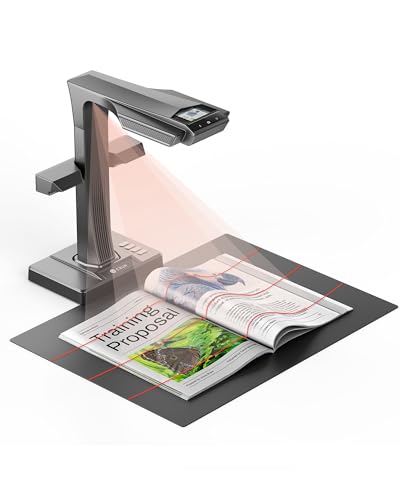
The CZUR ET MAX Book Scanner is the ideal choice for offices, libraries, and educators looking to digitize bound or fragile materials effortlessly. With its 38MP high-resolution overhead design, you can scan without applying pressure on delicate pages. Thanks to advanced curve-flattening technology, it captures images at 410 DPI, eliminating spine distortion and shadows. You’ll appreciate its ultra-fast scanning speed of 1.5 seconds per page, along with features like auto-cropping and intelligent page detection for batch processing. Plus, built-in OCR supports over 180 languages, allowing you to convert scans into searchable files, making research and archiving a breeze.
Best For: The CZUR ET MAX Book Scanner is best for offices, libraries, and educators seeking an efficient and high-quality solution for digitizing bound and fragile materials.
Pros:
- High-resolution 38MP imaging ensures detailed scans without damaging pages.
- Ultra-fast scanning speed of 1.5 seconds per page enhances productivity for large batch processing.
- Built-in OCR supports over 180 languages, facilitating easy conversion to searchable and editable files.
Cons:
- OCR does not support Thai, Arabic, or Hebrew, limiting accessibility for users of these languages.
- The initial setup may require technical knowledge for optimal use across different operating systems.
- The price point may be higher compared to basic scanners, which could be a consideration for budget-conscious users.
CZUR Shine Ultra Pro Document Scanner
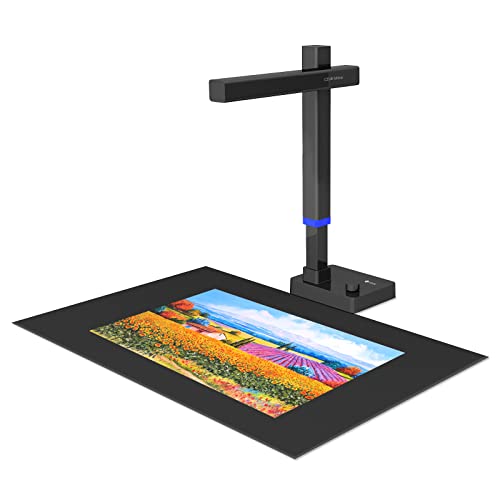
Looking for a reliable and portable solution for digitizing your documents? The CZUR Shine Ultra Pro Document Scanner could be your answer. Weighing just 2 lbs and featuring a foldable design, it’s easy to transport and set up in any space. With a 24MP camera and a maximum DPI of 440, it captures high-quality images and flattens 3D surfaces for perfect scans. You can save documents in multiple formats, including searchable PDFs and Word files. Compatible with various operating systems, it’s ideal for remote learning or web conferencing. However, avoid scanning glossy materials for best results.
Best For: Individuals and professionals seeking a portable, high-quality document scanner for digitizing various types of documents, especially in remote learning or conferencing settings.
Pros:
- High-Quality Scans: The 24MP camera and 440 DPI ensure clear and detailed images.
- Portable Design: Weighs only 2 lbs and features a foldable design for easy transport.
- Versatile File Formats: Supports saving documents in multiple formats, including searchable PDFs and Word files.
Cons:
- Limited for Glossy Materials: Not recommended for scanning glossy items like photos or magazines.
- Professional Use Limitation: For higher professional scanning needs, the CZUR ET model may be more suitable.
- Weight and Size Constraints: Although portable, it may still take up space in smaller work areas when set up.
CZUR Shine Ultra Smart Portable Document Scanner

For those seeking an efficient and versatile scanning solution, the CZUR Shine Ultra Smart Portable Document Scanner shines with its ultra-fast scanning speed of approximately one second per page. This lightweight scanner captures A3 and A4 documents using a 13MP CMOS camera, ensuring high-resolution output. With patented flattening technology, it handles curved book pages effortlessly. You can also utilize its OCR capability to convert scans into searchable PDFs, Word, and Excel files in over 180 languages. Plus, its foldable design and height adjustment make it easy to use, whether for office tasks or remote teaching.
Best For: Individuals and professionals seeking a fast and efficient document scanning solution for both personal and remote teaching purposes.
Pros:
- Ultra-fast scanning speed of approximately one second per page, enhancing productivity.
- Patented flattening technology effectively handles curved book pages, making it suitable for various books.
- Versatile OCR capability supports over 180 languages and converts scans into multiple file formats, including searchable PDFs and Word documents.
Cons:
- Not compatible with Android and iOS devices, limiting mobile usability.
- Slightly heavier at 4.88 pounds compared to other portable scanners, which may affect portability.
- Limited functionality for thicker books, as the ET series is recommended for those, potentially requiring an additional purchase.
NetumScan 13MP Book Document Camera for Teachers

Teachers seeking a versatile tool for enhancing classroom engagement will find the NetumScan 13MP Book Document Camera invaluable. This lightweight device captures A3/A4 sizes and features a 1300W CMOS sensor for clear images. With one-key automatic correction and multi-language OCR technology, you can easily convert scanned documents into editable text. Its real-time projection and video recording capabilities are perfect for distance learning. Plus, the portable, foldable design makes it easy to set up anywhere. With USB connectivity and adjustable height, it’s user-friendly. Elevate your teaching experience with this efficient document camera that supports your educational needs.
Best For: Teachers looking for a versatile and portable document camera to enhance classroom engagement and facilitate distance learning.
Pros:
- High-quality image capture with a 1300W CMOS sensor for clear visuals.
- Multi-language OCR technology allows for easy conversion of scanned documents into editable text.
- Real-time projection and video recording capabilities enhance teaching and learning experiences.
Cons:
- Customer reviews indicate a moderate satisfaction level with a 3.7 out of 5 stars rating.
- May require software installation for full functionality, which could be a hurdle for some users.
- Limited to A3/A4 capture sizes, which may not suit all scanning needs.
CZUR Aura Pro Portable Book Scanner

The CZUR Aura Pro Portable Book Scanner stands out as the ideal choice for busy professionals who need efficiency and quality in their document digitization. With its A3 scanning capability, it scans any material smaller than A3 in just two seconds, utilizing advanced AI and auto-flatten technology for flawless images. Its smart features, like auto-detect page turn and a foot pedal, make scanning a breeze. Plus, the supplemental side lights reduce glare, while the multifunction desk lamp eases eye fatigue. Weighing only 7.13 pounds, it’s portable and easy to set up, making it a must-have for your office.
Best For: Busy professionals and students who require efficient and high-quality document digitization.
Pros:
- Fast Scanning Speed: Scans documents in just two seconds, making it ideal for high-volume tasks.
- Smart Features: Auto-detect page turn and foot pedal enhance user convenience and efficiency.
- Supplemental Lighting: Side lights minimize glare on glossy papers, and the multifunction desk lamp reduces eye fatigue.
Cons:
- Weight: At 7.13 pounds, it may be less portable for users who need to carry it frequently.
- Limited Material Size: Can only scan materials smaller than A3, which may be restrictive for some users.
- Price Point: As a premium product, it may be considered expensive compared to basic scanners.
IRIScan Desk Document Scanner (v7pro)

With its advanced OCR technology, the IRIScan Desk Document Scanner (v7pro) transforms your document management experience, making it ideal for professionals who need editable text from scanned documents. This compact scanner, weighing just 1.46 pounds, offers 4K UltraHD resolution and captures documents in as little as one second. Its asymmetrical lighting enhances clarity, while AI flattening guarantees books are scanned seamlessly. You can easily save files in multiple formats, including PDF and Office documents. Plus, with cloud integration, sharing your scans is a breeze. The user-friendly interface makes it perfect for everyone, regardless of technical skill.
Best For: Professionals and students who require a compact, high-quality scanner for converting documents into editable text quickly and efficiently.
Pros:
- High-resolution scanning with 4K UltraHD and 18MP output for clear and detailed images.
- Fast scanning speed of just one second per document, enhancing productivity.
- User-friendly interface designed for non-technical users, making it easy to operate.
Cons:
- Limited to A3 landscape size, which may not accommodate all document types.
- Cloud integration features may require internet access, limiting functionality in offline scenarios.
- Relatively heavy for a portable scanner at 1.46 pounds, which could be a concern for frequent travelers.
Portable Handheld Scanner for A4 Documents

Looking for a reliable scanning solution that fits seamlessly into your busy lifestyle? The Portable Handheld Scanner for A4 documents is perfect for you. This lightweight device weighs only 9.6 ounces and scans various materials like photos, receipts, and books. With no software installation needed, it offers plug-and-play functionality. Choose between JPEG or PDF formats and select from three image resolutions: 300, 600, or 900 DPI. It includes a 16GB Micro SD card and operates on 2 AA batteries. Ideal for professionals, students, and travelers, this scanner makes your document organization quick and hassle-free.
Best For: This portable handheld scanner is best for professionals, students, and travelers who need a convenient and efficient way to scan documents on the go.
Pros:
- Compact and lightweight design makes it easy to carry and store.
- No software installation required, allowing for quick and easy plug-and-play functionality.
- Multiple scan modes and resolutions provide flexibility for various scanning needs.
Cons:
- Requires 2 AA batteries, which are not included, adding to the overall cost.
- Limited storage capacity, as it supports only up to 32GB on the Micro SD card.
- Customer ratings indicate mixed feedback, with a moderate average score of 3.9 out of 5 stars.
ScanSnap SV600 Overhead Book and Document Scanner, Black

Designed for professionals who need to digitize delicate documents and valuable books, the ScanSnap SV600 Overhead Book and Document Scanner offers an innovative overhead scanning solution. Weighing only 6.61 pounds, its compact design fits easily in your office. With the ability to scan items up to 30mm thick, you can safely digitize everything from magazines to rare books. It features multi-document detection for up to 10 items at once and auto book correction to guarantee clear, even images. Plus, the LED illumination minimizes blurriness, making your scanning experience efficient and hassle-free. Enjoy effortless document management with this reliable scanner.
Best For: Professionals and enthusiasts looking to digitize delicate documents, valuable books, and multi-page materials without damaging them.
Pros:
- Overhead scanning technology allows for safe digitization of thick items up to 30mm without cutting or damage.
- Multi-document detection enables the scanning of up to 10 items simultaneously, enhancing efficiency.
- Auto book correction and LED illumination ensure high-quality, clear images with minimal blurriness.
Cons:
- It may be heavier than some portable scanners, weighing 6.61 pounds.
- The scanning speed may vary depending on the number of documents and size of the items being scanned.
- Limited to overhead scanning, which may not be suitable for all traditional scanning needs.
CZUR ET24 Pro Professional Book Scanner

The CZUR ET24 Pro Professional Book Scanner stands out as an ideal choice for busy professionals who need to digitize a variety of materials efficiently. With its 24MP HD camera and advanced flattening technology, you’ll achieve high-quality scans of documents up to A3 size. It supports multiple formats, including PDF and Word, thanks to ABBYY’s OCR technology that recognizes over 180 languages. Plus, the 2.0-inch preview screen lets you monitor the scanning process in real-time. Weighing just 3.3 pounds, it’s portable yet powerful, making it perfect for your office needs. Enjoy seamless connectivity with HDMI support for faster data transfers.
Best For: Busy professionals and students who need to efficiently digitize various materials, including documents and books.
Pros:
- High-quality scans with a 24MP HD camera and advanced flattening technology.
- Versatile compatibility with multiple operating systems including Windows, macOS, and Linux.
- Real-time monitoring of the scanning process through a convenient 2.0-inch preview screen.
Cons:
- Limited document size capability, only supporting up to A3 size.
- Potential learning curve for users unfamiliar with OCR technology or scanning devices.
- Weight may be a consideration for those looking for a more portable scanning solution.
IRIScan Desk Document Scanner (v7Bus: 4K UltraHD, 24MP, 600dpi)

For professionals who need high-quality document scanning in their office, the IRIScan Desk Document Scanner (v7Bus) stands out with its impressive 24MP resolution and 600dpi output. This document camera scans at an incredible speed of 60 pages per minute, making it perfect for busy environments. With features like AI flattening for books and OCR capabilities supporting over 130 languages, you’ll easily convert documents into editable text. Its user-friendly interface simplifies the scanning process, while multiple output formats, including PDF and JPG, guarantee versatility. Plus, you can scan directly to popular cloud services for ultimate convenience.
Best For: Professionals and educators who require fast, high-quality document scanning with advanced features for versatility and accessibility.
Pros:
- High Resolution: 24MP and 600dpi output ensures crisp, clear scans.
- Fast Scanning Speed: Capable of scanning 60 pages per minute, ideal for busy work environments.
- User-Friendly Interface: Simplifies the scanning process, making it accessible for non-technical users.
Cons:
- Cost: The advanced features may come at a higher price point compared to basic scanners.
- Software Compatibility: Limited to specific operating systems, which may exclude some users.
- Size: Being a document camera, it may require more desk space than portable scanners.
Factors to Consider When Choosing a Book Scanner for Office
When you’re choosing a book scanner for your office, you’ll want to think about several key factors. Scanning speed and image quality are vital, but don’t overlook compatibility with your operating systems and the design features that impact portability. Additionally, consider the OCR capabilities and file formats to guarantee the scanner meets your specific needs.
Scanning Speed and Efficiency
Choosing the right book scanner for your office hinges on scanning speed and efficiency, which can greatly impact your workflow. A scanner that can digitize a page in just 1 second saves you valuable time. Look for models with auto page detection technology, allowing for continuous scanning without manual intervention. High-speed scanners can process up to 60 pages per minute, making them perfect for high-volume tasks. Additionally, intelligent features like auto-cropping and auto-tilt correction enhance efficiency by ensuring accurate image capture. Opt for scanners that offer quick file output formats like PDF and searchable PDFs to streamline document access and organization. Prioritizing these factors will considerably boost productivity in your office.
Image Quality and Resolution
While selecting a book scanner, you can’t overlook the importance of image quality and resolution. The scanner’s resolution, measured in DPI (dots per inch), markedly affects the clarity of your images. Look for options with higher DPI values, like 410 or 600, for detailed results. Advanced imaging technologies, such as curve-flattening, can help eliminate distortions, ensuring you get the best representation of your documents. Additionally, consider scanners with high megapixel counts, like 24MP or 38MP, which capture intricate details and produce sharper images. It’s also essential to choose scanners that support multiple formats, maintaining high quality. Finally, effective lighting solutions, like LED illumination, enhance clarity and reduce shadows, making your scanning process seamless and efficient.
Compatibility With Operating Systems
Confirming your book scanner works seamlessly with your operating systems is crucial for a smooth workflow. Check that the scanner is compatible with the systems you use, like Windows (XP, 7, 8, 10, and 11), macOS (10.13 or later), and various Linux distributions. Keep in mind that some scanners might not support mobile operating systems, such as Android or iOS, which can limit your on-the-go scanning options. Look for specific compatibility requirements, like Intel processor support, to guarantee peak performance. Choose scanners that integrate well with multiple operating systems to facilitate easy file sharing and management. Finally, verify the availability of necessary software or drivers for your chosen operating system to confirm everything functions properly.
Portability and Design Features
Portability and design features play an essential role when selecting a book scanner for your office. A lightweight design, ideally under 5 pounds, makes it easier to move the scanner between locations or store it when not in use. Look for foldable features that allow for a compact 90-degree configuration, facilitating convenient storage without sacrificing functionality. Adjustable height settings accommodate various document sizes and guarantee ergonomic use during scanning tasks. Compact dimensions are vital for fitting into limited office spaces, maximizing your workspace effectively. Additionally, consider a scanner with a foot pedal, as it enhances user experience by enabling hands-free operation, allowing for greater efficiency during your scanning sessions.
OCR and File Formats
When choosing a book scanner for your office, consider the importance of Optical Character Recognition (OCR) technology and the variety of file formats it supports. OCR lets you convert scanned documents into editable and searchable text, enabling you to work efficiently. Look for scanners that support high OCR accuracy, ideally over 98%, to guarantee usability when digitizing important documents. Some advanced models even support multi-language OCR capabilities, making it easier to handle documents in various languages without needing extra software. Additionally, check the supported file formats; common ones like PDF, Searchable PDF, JPEG, Word, and Excel enhance productivity by allowing easy revisions and data manipulation. These features can greatly streamline your workflow and improve your office’s efficiency.