
When it comes to choosing the best all-in-one business color printer for 2025, it’s essential to know what features matter most for your needs. With various models available, from fast printing speeds to advanced connectivity options, the right choice can greatly enhance your workflow. In this overview, you’ll find a comparison of ten top contenders that balance performance and cost efficiency, helping you make an informed decision for your office. Which one will suit you best?
HP Color LaserJet Pro MFP 3301sdw Wireless All-in-One Printer

If you’re part of a small team looking for a reliable and efficient printing solution, the HP Color LaserJet Pro MFP 3301sdw Wireless All-in-One Printer is an excellent choice. With print speeds of up to 26 pages per minute, it guarantees you won’t be waiting long for your documents. Its advanced features like auto 2-sided printing and an auto document feeder streamline your workflow. You’ll appreciate the vivid color output thanks to the next-gen TerraJet toner, delivering professional-quality results. Plus, it’s built for reliability, requiring minimal maintenance and periodic firmware updates to keep everything running smoothly.
Best For: Small teams in need of a reliable and efficient all-in-one color laser printer that delivers high-quality output.
Pros:
- Fast print speeds of up to 26 pages per minute for both black and color documents.
- Auto 2-sided printing and an auto document feeder enhance productivity and streamline workflow.
- Professional-quality color output thanks to next-generation TerraJet toner.
Cons:
- Compatibility issues with non-HP toner cartridges, limiting options for replacements.
- Requires periodic firmware updates for optimal performance, which may be inconvenient for some users.
- Designed primarily for small teams, which may not meet high-volume printing needs for larger organizations.
Brother MFC-L3720CDW Wireless Color Laser Printer

The Brother MFC-L3720CDW Wireless Color Laser Printer stands out as an ideal choice for small to medium-sized businesses looking for efficiency and versatility in one device. With print speeds up to 19 ppm and stunning laser-quality output, it enhances your document presentation. Its 250-sheet adjustable paper tray and 50-sheet auto document feeder guarantee uninterrupted performance. You’ll appreciate the dual-band wireless networking and Wi-Fi Direct for seamless connectivity across multiple devices. The intuitive 3.5-inch color touchscreen offers 48 customizable shortcuts, while direct access to cloud services and a mobile app makes printer management easy and efficient.
Best For: Small to medium-sized businesses seeking an efficient and versatile all-in-one printer for high-quality document output.
Pros:
- Fast print speeds of up to 19 ppm, enhancing productivity for business needs.
- Dual-band wireless networking and Wi-Fi Direct facilitate seamless connectivity across multiple devices.
- User-friendly 3.5-inch color touchscreen with 48 customizable shortcuts for easy operation.
Cons:
- May have a higher initial cost compared to basic printers.
- Limited printing volume may not cater to very high-demand environments.
- Large footprint may require significant desk space in smaller offices.
HP OfficeJet Pro 9125e Wireless All-in-One Printer

For busy professionals seeking an efficient and reliable printing solution, the HP OfficeJet Pro 9125e Wireless All-in-One Printer stands out with its impressive print speeds of up to 18 pages per minute in color and 22 in black. This versatile printer not only prints but also scans, copies, and faxes, making it a true all-in-one device. With a 250-sheet input tray and auto document feeder, you won’t be constantly refilling. The 2.7-inch color touchscreen simplifies navigation, while the mobile capabilities let you print from anywhere. Plus, the built-in security features guarantee your data stays protected.
Best For: Busy professionals and small businesses looking for a versatile, efficient, and secure all-in-one printing solution.
Pros:
- Fast print speeds of up to 22 pages per minute in black and 18 in color, enhancing productivity.
- Includes mobile printing capabilities via the HP App, allowing users to print from smartphones, tablets, or PCs.
- Built-in security features protect sensitive data and networks from cyber threats.
Cons:
- The printer is designed to work only with HP cartridges, which may limit third-party ink options.
- Monthly fees for the ink subscription service after the trial period can add to ongoing costs.
- The 250-sheet input capacity may not be sufficient for very high-volume printing needs.
Brother MFC-L3780CDW Wireless Digital Color All-in-One Printer

Designed with small businesses in mind, the Brother MFC-L3780CDW Wireless Digital Color All-in-One Printer delivers impressive performance across multiple functions. With print speeds up to 31 ppm and scanning speeds of 29 ipm (black) and 22 ipm (color), you’ll enjoy fast, laser-quality output. Its single-pass duplex feature boosts efficiency for copying and scanning. Connectivity options are robust, including dual-band wireless and Gigabit Ethernet. Plus, you can easily control it with Alexa for voice-activated printing. The Refresh EZ Print Subscription Service even offers a free trial to keep your toner stocked. This printer truly supports your business needs!
Best For: Small businesses looking for a reliable, multifunction color printer that offers fast printing and scanning capabilities.
Pros:
- Fast print and scan speeds with up to 31 ppm printing and 29 ipm scanning for black and 22 ipm for color.
- Versatile connectivity options including dual-band wireless, Gigabit Ethernet, and USB for flexible installation.
- Voice-activated printing capability with Alexa integration for added convenience.
Cons:
- Initial cost may be higher compared to basic printers, which could be a consideration for budget-conscious users.
- Toner subscription service may not be suitable for those who prefer traditional purchasing methods.
- Larger footprint compared to compact printers, which may not fit in smaller office spaces.
HP OfficeJet Pro 8125e Wireless All-in-One Printer

If you’re seeking a reliable all-in-one solution for your home office, the HP OfficeJet Pro 8125e stands out with its impressive print speeds of up to 20 pages per minute in black and 10 in color. This printer features auto 2-sided printing, an auto document feeder, and a 225-sheet input tray for efficiency. With its 2.7-inch touchscreen, managing settings is a breeze. You’ll enjoy professional-quality prints for reports and flyers, while HP’s AI optimizes layouts. Plus, wireless printing and a three-month Instant Ink trial make it convenient. Security features protect your data, ensuring a smooth, sustainable printing experience.
Best For: Home office users looking for a reliable all-in-one printer that delivers professional-quality prints and efficient functionality.
Pros:
- Up to 20 ppm black and 10 ppm color print speeds for high efficiency.
- Features like auto 2-sided printing and an auto document feeder enhance productivity.
- Wireless connectivity and mobile printing capabilities for convenience and ease of use.
Cons:
- Monthly fees for Ink subscription service post-trial may add to ongoing costs.
- Limited to HP cartridges, which may restrict choice for ink replacement.
- Firmware updates for security could impact compatibility with third-party supplies.
HP Color Laserjet Pro MFP 4301fdw Wireless All-in-One Printer
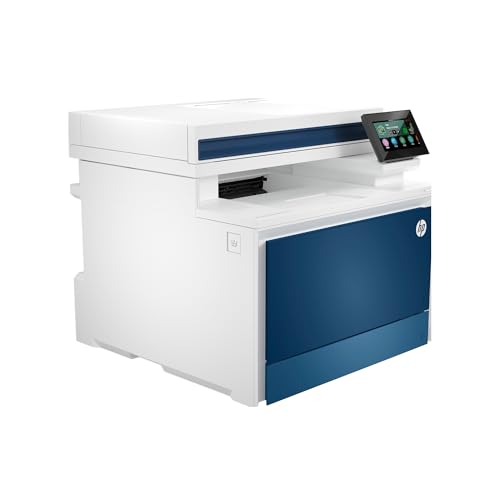
The HP Color Laserjet Pro MFP 4301fdw is the ideal choice for small teams seeking a powerful all-in-one solution that doesn’t compromise on quality or speed. With the ability to print, scan, and copy professional-quality color documents at up to 35 pages per minute, it’s designed to enhance productivity. The auto document feeder and double-sided printing streamline your workflow, making it perfect for up to 10 users. Plus, you can connect effortlessly via intelligent Wi-Fi, Ethernet, or Bluetooth. Security features like HP Wolf Pro keep your data safe, ensuring peace of mind while you focus on your business.
Best For: Small teams looking for a reliable all-in-one printer that delivers professional quality and speed.
Pros:
- High-speed printing: Prints up to 35 color pages per minute, boosting productivity.
- Versatile functionality: Combines printing, scanning, copying, and faxing in one device.
- Robust security features: HP Wolf Pro Security helps protect sensitive data and documents.
Cons:
- Limited to small teams: Best suited for up to 10 users, which may not meet larger office needs.
- Requires original HP cartridges: Non-HP chips or circuitry are blocked, potentially increasing long-term costs.
- Initial setup may require technical knowledge: Some users may find the setup process complex if unfamiliar with networking.
Canon Color imageCLASS MF665Cdw All-in-One Wireless Laser Printer

For small to medium-sized businesses seeking a reliable and efficient printing solution, the Canon Color imageCLASS MF665Cdw All-in-One Wireless Laser Printer stands out with its impressive print speed of up to 26 pages per minute. With a 250-sheet standard cassette and a 50-sheet duplex Automatic Document Feeder, it handles your printing needs effortlessly. You’ll appreciate the easy wireless setup and mobile connectivity options, including Apple AirPrint and the Canon PRINT app. The intuitive 5-inch color touchscreen simplifies navigation, while high-capacity toner guarantees quality output. Plus, its ENERGY STAR certification helps keep operating costs low.
Best For: Small to medium-sized businesses looking for a reliable and efficient all-in-one wireless laser printer.
Pros:
- Fast print speed of up to 26 pages per minute for both color and monochrome.
- Convenient wireless and mobile connectivity options including Apple AirPrint and Canon PRINT app.
- High-capacity toner ensures high-quality output and reduces frequent replacements.
Cons:
- Initial setup may require some technical knowledge for optimal configuration.
- The printer size may be larger than typical desktop models, requiring more space.
- Ongoing toner costs can be higher compared to inkjet printers, especially for high-volume printing.
Canon Color imageCLASS MF652Cw Wireless Laser Printer

Looking for a reliable all-in-one printer that delivers speed and versatility? The Canon Color imageCLASS MF652Cw is perfect for you. This wireless laser printer handles printing, scanning, and copying with ease, achieving 22 pages per minute in both color and black-and-white. You’ll appreciate the fast first print time of just 10.3 seconds. With a 250-sheet standard cassette and a 1-sheet multipurpose tray, it’s built for efficiency. Plus, it’s mobile-ready, compatible with the Canon PRINT app, and even works with Chromebooks. Enjoy professional design tools like Poster Artist Online, all backed by a 3-year limited warranty.
Best For: Small to medium-sized businesses or home offices that require a reliable, efficient, and multifunctional printer.
Pros:
- Offers fast printing speeds of 22 pages per minute for both color and black-and-white.
- Mobile-ready and compatible with the Canon PRINT app for convenient printing from smartphones and tablets.
- Includes professional design tools like Poster Artist Online, enhancing creative capabilities.
Cons:
- The 250-sheet standard cassette may be insufficient for high-volume printing needs.
- Initial setup may require some technical knowledge for wireless connectivity.
- Limited to laser printing technology, which may not be suitable for users looking for inkjet features like photo printing.
Brother MFC-L8930CDW Business Color Laser All-in-One Printer

Compact yet powerful, the Brother MFC-L8930CDW Business Color Laser All-in-One Printer is ideal for small to medium-sized businesses seeking efficiency without sacrificing quality. With print and copy speeds up to 33 pages per minute, it delivers high-quality color and black output. Its compact design saves space, while advanced scanning features allow high-speed, two-sided scanning up to 104 images per minute. Plus, you’ll enjoy cost efficiency with super high yield toner options. With flexible connectivity and a user-friendly 7” touchscreen, managing tasks becomes effortless. Plus, its eco-friendly design and security features help protect your business and the environment.
Best For: Small to medium-sized businesses seeking an efficient, high-quality all-in-one printing solution.
Pros:
- Fast print and copy speeds of up to 33 pages per minute enhance productivity.
- Advanced scanning features enable high-speed, two-sided scanning and document creation.
- Cost-efficient toner options with super high yield cartridges help reduce printing costs.
Cons:
- Initial cost may be higher compared to basic printers, impacting budget constraints.
- Compact design may limit the size of paper trays and output capacity.
- Advanced features may require a learning curve for users unfamiliar with multifunction printers.
Canon Color imageCLASS MF751Cdw II Wireless Duplex Laser Printer

The Canon Color imageCLASS MF751Cdw II Wireless Duplex Laser Printer stands out as an ideal choice for small to medium-sized businesses that need reliable performance without sacrificing quality. With print speeds of up to 35 pages per minute and a quick first print time of about 7 seconds, you won’t be waiting long. Its 5-inch color touchscreen simplifies navigation, while the application library lets you customize your frequently used functions. Enjoy seamless wireless connectivity and mobile printing options. Plus, the automatic 2-sided printing feature helps you reduce paper usage, making it both efficient and eco-friendly.
Best For: Small to medium-sized businesses looking for a reliable, multifunction printer that offers efficient performance and quality printing.
Pros:
- Fast Print Speeds: Prints up to 35 pages per minute in both color and monochrome.
- User-Friendly Interface: Features a 5-inch color touchscreen and customizable application library for easy navigation.
- Eco-Friendly: Automatic 2-sided printing reduces paper usage.
Cons:
- Initial Cost: Higher upfront cost compared to basic printers.
- Size: May take up more space than compact printer models.
- Toner Replacement: Requires Canon Genuine Toner, which can be more expensive than third-party options.
Factors to Consider When Choosing a Business Color Printer All in One
When you’re choosing a business color printer, there are several key factors to keep in mind. You’ll want to contemplate print speed, connectivity options, and toner cost efficiency to guarantee it meets your needs. Additionally, think about paper handling capacity and a user-friendly interface to streamline your workflow.
Print Speed Importance
Print speed can make or break your business’s productivity, especially in fast-paced environments where every second counts. Choosing a printer with a higher speed can greatly enhance your team’s efficiency by reducing wait times for document output. Many business color printers offer speeds ranging from 19 to 35 pages per minute (ppm), which is vital for handling high-volume printing tasks. In busy offices, quick access to printed documents is essential, especially with multiple users needing them simultaneously. Pay attention to the time to first print; some printers deliver the first page in as little as 7 seconds, minimizing delays for urgent jobs. Consistent print speeds keep your workflow uninterrupted, helping you meet tight deadlines and maintain operational efficiency.
Connectivity Options Available
Connectivity options play an essential role in selecting the right all-in-one business color printer for your needs. Look for models that offer dual-band wireless networking (2.4GHz/5GHz) to enhance performance and minimize interference. Support for Wi-Fi Direct lets you print directly from your mobile device without the hassle of connecting to a network, simplifying the process. USB interfaces are also important for a reliable connection, ensuring compatibility with various computers. Additionally, check if the printer supports mobile printing apps like Apple AirPrint and Google Cloud Print for seamless printing from smartphones and tablets. Finally, if you’re in a networked environment, an Ethernet connection is vital for allowing multiple users to access the printer simultaneously, boosting productivity.
Toner Cost Efficiency
Toner cost efficiency is a crucial factor that can greatly impact your business’s bottom line. When choosing a printer, consider the page yield of toner cartridges; higher yields mean less frequent replacements and lower long-term costs. Opting for high-yield toner cartridges can considerably reduce your cost per page compared to standard options. If your printing needs are high, high-capacity cartridges are generally more cost-efficient. Additionally, look into subscription services for toner delivery, which can stabilize your monthly expenses and prevent unexpected shortages, ensuring smooth operations. By monitoring toner usage and implementing proactive management strategies, you can further optimize printing costs and reduce waste, making your overall printing process more efficient and budget-friendly.
Paper Handling Capacity
When selecting an all-in-one business color printer, paper handling capacity is a key factor that can greatly enhance your workflow. A higher capacity means fewer interruptions during printing tasks, essential for busy offices that produce large volumes of documents. Most printers have a standard input tray capacity of around 250 sheets, but models with additional trays can markedly boost this for bulk printing. Look for printers with Automatic Document Feeders (ADFs) to streamline multi-page scanning, copying, or faxing. Duplex printing capabilities help reduce paper usage and costs, while expandability options, like additional trays or large-capacity cassettes, allow you to adapt your printer to evolving business needs.
User-Friendly Interface
A user-friendly interface can make all the difference in how efficiently you operate your all-in-one business color printer. Look for a color touchscreen that offers intuitive navigation, letting you access frequently used functions quickly. Customizable shortcuts can streamline your repetitive tasks, saving you time and effort. Mobile printing capabilities are essential too, allowing you to print directly from your smartphone or tablet for added convenience. Clear, easy-to-read menu options and icons help reduce the learning curve, making it simple for anyone to use without extensive training. Additionally, an application library on the interface can provide direct access to cloud services and third-party apps, enhancing your document management and printing workflows. Choose wisely to boost productivity!
Security Features Required
As you choose an all-in-one business color printer, it’s essential to prioritize robust security features that protect your sensitive data. Look for printers with built-in security options like encryption, secure boot, and firmware integrity checking. Customizable security settings, such as user authentication with password protection or NFC badge access, are vital for restricting access to authorized personnel only. Additionally, opt for models that automatically update firmware to address vulnerabilities and guard against emerging threats. Choosing printers that require original manufacturer cartridges can further enhance security by blocking non-genuine alternatives. Finally, consider devices with advanced security protocols, like HP Wolf Security, which deliver thorough protection against malware and network attacks, ensuring your business remains safe and secure.
Additional Functionality Offered
Robust security features are just one aspect of selecting the right all-in-one business color printer; additional functionality can greatly enhance your office’s productivity. Multifunction capabilities allow you to print, scan, copy, and fax, saving both space and time. Look for models with automatic document feeders (ADF) to quickly scan or copy multiple pages without manual effort, especially in busy environments. Auto duplex printing helps reduce paper usage, aligning with sustainability goals. User-friendly interfaces, like color touchscreens, make navigation easy and cut down on staff training time. Finally, verify your printer has strong connectivity options, including wireless networking and mobile printing, so you can effortlessly print from smartphones, tablets, and PCs.