
When it comes to Zoom meetings, having the right microphone can make all the difference in your sound quality and overall communication. Whether you’re a podcaster, content creator, or part of a large team, there’s a microphone tailored for your needs. Let’s explore the top 10 microphones that can elevate your virtual interactions, ensuring you’re heard clearly and effectively. You might be surprised by the options available.
FIFINE Dynamic Microphone for Podcast Recording

If you’re looking for a reliable microphone that delivers professional-quality audio for your Zoom meetings, the FIFINE Dynamic Microphone K688 is an excellent choice. This versatile XLR/USB microphone features a metal construction and a directional cardioid pattern, minimizing background noise for clear communication. With a high sensitivity of 80 dB and an impressive SPL of 130 dB, your voice will resonate beautifully. Its dual connectivity allows seamless plug-and-play with Windows and Mac, while the tap-to-mute feature guarantees you can control sound easily. Plus, at only 1.12 pounds, it’s lightweight and easy to set up for any meeting.
Best For: Podcasters and professionals seeking a high-quality microphone for clear audio during recordings and virtual meetings.
Pros:
- High sensitivity and SPL ensure excellent audio quality with clear vocal resonance.
- Dual connectivity options (XLR and USB) provide versatility for various recording setups.
- Lightweight design and easy setup make it ideal for on-the-go use.
Cons:
- Gain control and monitoring features are only available via USB connection.
- Requires an XLR to XLR cable for optimal performance when using the XLR output.
- Some users may find the price point higher compared to entry-level microphones.
FIFINE Studio Condenser USB Microphone Kit (T669)

The FIFINE Studio Condenser USB Microphone Kit (T669) is an excellent choice for professionals who want crisp and clear audio during Zoom meetings. With its plug-and-play USB output, you won’t need extra hardware or drivers. The cardioid condenser capsule captures your voice while minimizing background noise, ensuring your message comes through loud and clear. Plus, the included scissor arm allows for easy positioning without obstructing your face. You’ll also appreciate the shock mount and double pop filter, which help reduce unwanted noise. Whether for podcasts or online communication, this mic kit elevates your audio quality effortlessly.
Best For: Content creators, podcasters, and professionals seeking high-quality audio for online communication and recordings.
Pros:
- Excellent sound quality with a cardioid condenser capsule that captures clear audio while minimizing background noise.
- Plug-and-play setup with USB output, eliminating the need for additional hardware or drivers.
- Versatile accessory package includes a scissor arm, shock mount, and double pop filter for optimal recording conditions.
Cons:
- Incompatible with Xbox, limiting use for gamers on that platform.
- Requires a USB port, which may be a limitation for devices with fewer ports.
- Boom arm may require adjustment for optimal positioning, which could be cumbersome for some users.
Logitech Blue Yeti USB Microphone for Gaming and Streaming

For professionals seeking a high-quality audio experience during Zoom meetings, the Logitech Blue Yeti USB Microphone stands out with its custom three-capsule array that delivers broadcast-quality sound. With four pickup patterns—cardioid, omni, bidirectional, and stereo—you can tailor your audio capture to suit various needs. Onboard controls let you adjust headphone volume, select patterns, and mute instantly for precise management. Plus, Blue VOICE software enhances your recordings with clear vocals and effects. Its adjustable stand and no-latency monitoring guarantee ideal positioning and real-time voice tracking, making it perfect for Zoom meetings, gaming, and streaming alike.
Best For: Professionals seeking high-quality audio for Zoom meetings, gaming, streaming, and content creation.
Pros:
- Custom three-capsule array provides broadcast-quality sound.
- Versatile four pickup patterns accommodate various recording needs.
- Onboard audio controls and Blue VOICE software enhance audio management and vocal clarity.
Cons:
- May be more expensive than basic USB microphones.
- Requires USB connectivity, limiting use with non-USB devices.
- Larger size may not be ideal for portable setups or small desks.
EMEET USB Speakerphone M1A with AI Mics for Zoom

Designed specifically for teams of 5-8 people, the EMEET USB Speakerphone M1A with AI microphones stands out as an excellent choice for business professionals engaged in Zoom meetings. With 360° voice pickup and two omnidirectional mics, it guarantees clear communication among participants. Its VoiceIA Tech minimizes background noise and enhances audio quality. Enjoy easy connectivity via USB Type C-A and a user-friendly touch control panel, complete with nine volume levels. Plus, the fast mute option keeps your discussions private. Rated 4.4 out of 5 stars, this speakerphone is ideal for various sectors, elevating your online meeting experience.
Best For: The EMEET USB Speakerphone M1A is best for small teams of 5-8 people looking to enhance their online communication during meetings.
Pros:
- Excellent 360° voice pickup with AI microphones for clear audio.
- VoiceIA Tech reduces background noise and improves overall sound quality.
- Fast mute option ensures privacy during discussions.
Cons:
- Limited to a small group size, not ideal for larger teams.
- Requires a corded power source, which may limit placement options.
- Plastic material may not be as durable as other premium options.
EMEET Conference Speakerphone M0 Plus with 4 AI Mics

With its 4 AI microphones offering 360° voice pickup, the EMEET Conference Speakerphone M0 Plus is an excellent choice for teams seeking seamless communication during Zoom meetings. This speakerphone features advanced noise reduction and echo cancellation, ensuring crystal-clear audio. It supports up to 8 participants, with the option to daisy chain for 16. Connecting via USB-C or Bluetooth 5.0, you won’t need any drivers for setup. With over 10 hours of battery life, it’s perfect for all-day meetings. Compact and lightweight, it’s ideal for various environments, whether you’re in a conference room or working remotely.
Best For: Teams seeking seamless communication during virtual meetings with up to 16 participants.
Pros:
- 360° voice pickup with 4 AI microphones ensures clear audio from all directions.
- Easy connectivity via USB-C and Bluetooth 5.0 without the need for additional drivers.
- Long battery life of over 10 hours, making it suitable for extended meetings.
Cons:
- Limited range of Bluetooth connectivity, capping at 10 meters.
- Expansion requires additional units for larger groups beyond 8 participants.
- Compact design may limit audio output volume in larger spaces.
Logitech C920e HD 1080p Mic-Enabled Webcam

The Logitech C920e HD 1080p Mic-Enabled Webcam stands out as an excellent choice for professionals who demand high-quality video and audio during Zoom meetings. With its 78° fixed field of view, you’ll always be framed perfectly. The two integrated omnidirectional microphones pick up crystal-clear audio from up to one meter away, ensuring everyone hears you. Plus, the built-in HD autofocus and automatic light correction adapt to different environments, enhancing your visual presence. Compatible with major platforms like Zoom and Microsoft Teams, it’s versatile and user-friendly, making it an essential tool for remote work at a competitive price.
Best For: The Logitech C920e HD 1080p Mic-Enabled Webcam is best for professionals and remote workers seeking high-quality video and audio for virtual meetings.
Pros:
- Excellent video quality with 1080p HD resolution and built-in autofocus.
- Dual omnidirectional microphones for clear audio capture from a distance.
- Compatible with major video conferencing platforms, including Zoom and Microsoft Teams.
Cons:
- Fixed field of view may not suit all users’ framing preferences.
- May require additional lighting in poorly lit environments for optimal performance.
- Privacy screen feature may not be ideal for all users who prefer a more permanent solution.
Conference Speaker and Microphone for Conference Rooms

For teams of 10 to 15 people looking to enhance their Zoom meetings, the BALILA Conference Speaker and Microphone stands out as an ideal solution. With 10 AI mics and 360° voice pickup, it captures every voice clearly while reducing background noise. Its wireless range of up to 20 meters allows for flexible positioning, and the quick USB-C setup means you can get started without hassle. Enjoy over 10 hours of talk time on a single charge, making it perfect for extended meetings. Plus, with a 2-year warranty and 24/7 customer support, you’re well-covered for any concerns.
Best For: Teams of 10 to 15 people seeking an effective audio solution for virtual meetings.
Pros:
- Superior Audio Quality: 10 AI mics with 360° voice pickup and noise reduction for clear communication.
- Long Battery Life: Over 10 hours of talk time on a single charge, ideal for lengthy meetings.
- Easy Setup: Quick USB-C connection with no drivers required for seamless integration.
Cons:
- Limited to Conference Room Use: Best suited for specific settings like meeting rooms, which may limit versatility.
- Price Point: May be more expensive compared to basic conference microphones.
- Wireless Range Limitations: While competitive, the 20-meter range may not be sufficient for larger spaces.
Anker PowerConf S330 USB Speakerphone for Home Office
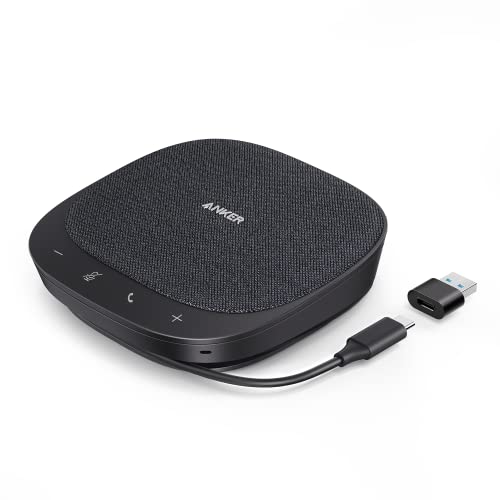
When you’re working from home and need clear communication during Zoom meetings, the Anker PowerConf S330 USB Speakerphone stands out with its smart voice enhancement feature. This device eliminates background noise, ensuring your voice is crystal clear. With 360° voice coverage thanks to four high-sensitivity microphones, it captures sound from up to 3 meters away. You’ll appreciate the superior audio quality produced by its 1.75” driver and passive bass radiators. Plus, its compact design fits perfectly on your desk. Plug it in with the USB-C connection, and you’re ready to go—no hassle, just seamless communication.
Best For: Individuals working from home who require high-quality audio for virtual meetings and clear communication.
Pros:
- Smart Voice Enhancement feature effectively eliminates background noise for clearer conversations.
- 360° Voice Coverage provided by four high-sensitivity microphones ensures voices are picked up from all directions.
- Compact Design makes it suitable for small home office spaces without compromising on performance.
Cons:
- Wired connection limits mobility compared to wireless options.
- May not be ideal for larger meeting rooms due to its design and coverage range.
- Requires a USB-C port or adapter, which may not be available on all devices.
FIFINE USB Microphone for PC and Mac

Ideal for professionals seeking clear communication in virtual settings, the FIFINE USB Microphone delivers impressive sound quality and ease of use. This metal condenser mic, model K669S, is compatible with both Windows and Mac, making it versatile for any setup. Its compact design is perfect for home offices or travel. With a directional condenser that captures faint sounds, you’ll enjoy richer audio during meetings. Plus, the front gain control knob allows for quick adjustments. Plug it in, and it’s ready to go—no complicated setup needed. With a solid 4.5-star rating, it’s a reliable choice for enhancing your Zoom experience.
Best For: Professionals seeking clear communication in virtual meetings and online classes.
Pros:
- High sound quality with greater clarity and noise reduction.
- Compact and portable design, ideal for home office and travel.
- Easy plug & play functionality with front gain control for quick adjustments.
Cons:
- Incompatible with Xbox.
- Limited to USB connection, which may restrict mobility.
- May not meet the needs of users seeking high-end studio quality.
Conference Speaker and Microphone, 360° Omnidirectional USB Speakerphone

The Q95mini USB speakerphone stands out as the perfect solution for professionals who need seamless communication during virtual meetings. With its 360° omnidirectional microphone, it captures voices from all directions, ensuring everyone’s heard. You’ll enjoy HD voice clarity, thanks to DSP technology, Acoustic Echo Cancellation, and Automatic Noise Suppression. Setting it up is a breeze—just plug in the USB cable and you’re ready to go. Plus, it’s compatible with major platforms like Zoom and Teams. The physical mute button gives you quick control over your microphone, making it an essential tool for any virtual conference or meeting.
Best For: Professionals seeking high-quality communication tools for virtual meetings and conference calls.
Pros:
- 360° omnidirectional microphone captures voices from all angles, ensuring clear communication.
- HD voice clarity enhanced by DSP technology, Acoustic Echo Cancellation, and Automatic Noise Suppression.
- Plug-and-play setup with USB connection makes it easy to use with no driver installation required.
Cons:
- The physical mute button only controls the microphone, not the speaker, which may lead to unintended audio issues.
- Limited effective voice pick-up range of up to 3 meters may not accommodate larger meeting spaces.
- Some users may find the design less portable for on-the-go use compared to smaller alternatives.
Factors to Consider When Choosing a Business Microphone for Zoom
When choosing a business microphone for Zoom, you need to evaluate several key factors. Think about the importance of audio quality, the connectivity options that suit your setup, and the type of microphone that best fits your needs. Also, pay attention to noise cancellation features and how portable the microphone is for your workspace.
Audio Quality Importance
Effective communication hinges on audio quality, especially during Zoom meetings, where clarity can make or break the conversation. To enhance your sound, consider a microphone with a directional cardioid pattern. This feature minimizes background noise, letting your voice shine through while cutting out distractions like fans or keyboards. Pay attention to the signal-to-noise ratio; a microphone with an S/N ratio above 70 dB captures clear audio while reducing unwanted sounds. Also, look for SPL ratings up to 130 dB to handle loud discussions without distortion. Finally, a wide frequency response range of 20 Hz to 20 kHz captures the full spectrum of your voice, making your conversations more natural and engaging. Investing in quality audio equipment is key.
Connectivity Options Available
Choosing the right connectivity options for your business microphone can greatly impact your Zoom meetings. First, consider USB connectivity, which allows for easy plug-and-play functionality—no extra drivers needed. If you’re looking for professional audio quality, XLR connections are a solid choice, especially when paired with an audio interface or mixer. For added versatility, opt for microphones with dual connectivity options, allowing you to switch between USB and XLR as needed. Real-time monitoring through a headphone jack is another essential feature, enabling you to hear your audio while speaking. Finally, verify the microphone cable length is sufficient—many USB models offer around 8.2 feet, giving you the freedom to set up without restrictions.
Microphone Type Selection
Selecting the right type of microphone can greatly enhance your Zoom meetings, especially considering factors like background noise and audio quality. Dynamic microphones are excellent for minimizing background noise, while condenser microphones capture a broader frequency range, providing more detail. If you want to focus on your voice, directional microphones with a cardioid pattern are ideal, as they primarily pick up sound from you and reduce ambient noise. USB microphones offer plug-and-play convenience, making them perfect for quick setups in remote work scenarios. On the other hand, XLR microphones deliver higher audio quality but require additional equipment, complicating setup. Finally, look for features like onboard controls for gain adjustment and mute functions to enhance usability during conversations.
Noise Cancellation Features
When you’re in the midst of a Zoom meeting, the last thing you want is background noise distracting from your message. That’s why noise cancellation features are essential in business microphones. Look for models that use advanced technology, like AI algorithms, to filter out ambient noise and echo, ensuring your voice remains clear. Directional patterns, such as cardioid, are designed to capture sound primarily from the front, minimizing unwanted noise from sides and rear. Additionally, some microphones include built-in noise suppression capabilities that tackle disturbances from sources like computer fans or traffic. A high signal-to-noise ratio (S/N ratio) also matters, as it indicates clearer audio with less background interference, making your communication more effective.
Size and Portability
Background noise isn’t the only factor that can disrupt your Zoom meetings; the size and portability of your microphone play a crucial role too. When choosing a business microphone, consider its dimensions and weight. A compact, lightweight model enhances portability for on-the-go professionals. Smaller designs easily fit into laptop bags or backpacks, making them ideal for remote work or travel. Look for user-friendly setups, like plug-and-play functionality, to guarantee smooth operation during meetings. Models with adjustable mounts or stands provide flexible positioning for various environments. The best portable microphones often feature integrated cables or storage solutions, minimizing clutter and streamlining your setup. Prioritizing size and portability can notably elevate your online communication experience.
Budget Considerations
Setting a budget for a business microphone for Zoom meetings can feel overwhelming, especially with prices varying widely. Basic models start around $30, while professional-grade options can exceed $200. Don’t forget to factor in additional costs like boom arms or shock mounts, which can add $20 to $100 to your budget. Think about the long-term investment; a higher-priced microphone often provides better sound quality and durability, saving you from future replacements. Prioritize microphones with good customer ratings, as these typically indicate better performance and value for money. Finally, compare features relevant to your needs—some budget microphones might lack essential functionalities like noise cancellation or adjustable gain controls, impacting your overall audio quality.
Compatibility With Software
Choosing a business microphone for Zoom meetings goes beyond just budget considerations; you also need to guarantee it works seamlessly with your software. Look for microphones that feature plug-and-play functionality, allowing easy connections with Zoom, Microsoft Teams, and Skype without requiring additional drivers. It’s wise to select devices certified for specific platforms, ensuring peak performance during your calls. Make sure the microphone supports both Windows and Mac operating systems to cater to different user setups. Universal compatibility with major conferencing platforms is essential for smooth integration. Finally, check for USB-C or USB-A connections, as these are commonly supported by modern computers and laptops, ensuring hassle-free connectivity for your meetings.
Control Features Offered
When it comes to selecting a business microphone for Zoom meetings, control features play an essential role in enhancing your audio experience. Look for microphones with a tap-to-mute feature, which lets you easily silence your audio without disrupting the flow of the meeting. Gain control knobs are also beneficial for adjusting input volume levels, providing the flexibility you need in different environments. Real-time monitoring options, like a 3.5mm headphone jack, allow you to hear your own audio feedback, guaranteeing superior sound quality during calls. Instant mute buttons help you maintain privacy and reduce background noise quickly. Finally, confirm your microphone is compatible with popular software platforms for seamless integration and ease of use.