
When it comes to choosing the right thermal receipt printer for your business in 2025, you’ll want to focus on speed, connectivity, and cost-effectiveness. Some models, like the Rongta RP326 and NetumScan, offer impressive performance that can keep up with your busy environment. But there are other factors to evaluate before making a decision that could impact your operations. Let’s explore the top picks that can meet your needs efficiently.
Rongta 80mm USB Thermal Receipt Printer (RP326)
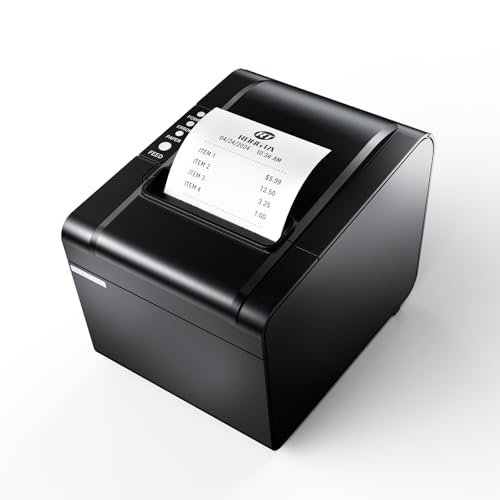
The Rongta 80mm USB Thermal Receipt Printer (RP326) stands out as an ideal choice for busy restaurant kitchens, thanks to its high-speed printing capability of 250mm/sec and auto cutter feature. You’ll appreciate the easy paper installation and maintenance, making your workflow seamless. With a print width of 79.5±0.5mm, it uses standard 80mm thermal paper, ensuring compatibility with most systems. Plus, its wall-mounted design saves space while maintaining functionality. You won’t need to worry about costly ink or ribbons, as it offers low operating costs. Just plug it in, and you’re ready to go—perfect for your fast-paced environment!
Best For: The Rongta 80mm USB Thermal Receipt Printer (RP326) is best for busy restaurant kitchens and retail environments that require fast and efficient receipt printing.
Pros:
- High-speed printing at 250mm/sec enhances workflow efficiency.
- Wall-mounted design saves valuable counter space.
- Low operating costs with no need for ink or ribbons.
Cons:
- Not compatible with popular delivery platforms like UberEats and Grubhub.
- Limited to USB, LAN, and SERIAL PORT interfaces; may not suit all setups.
- Requires standard thermal paper, which might not be readily available in all locations.
Epson TM-T20III,Monochrome Thermal POS Printer C31CH51001

For small businesses looking for an efficient and reliable point-of-sale solution, the Epson TM-T20III stands out as a top choice. This monochrome thermal POS printer (Model: C31CH51001) offers simplicity with its USB interface, making it compatible with Square Stand and Square Register. However, it doesn’t support Bluetooth or Wi-Fi, so you’ll need to connect it directly via USB. To guarantee peak performance, make sure to keep your Square app updated if you’re not using the Square hardware. The TM-T20III delivers consistent, high-quality receipts, making it a practical addition to your business setup.
Best For: Small businesses seeking a reliable and straightforward point-of-sale printing solution.
Pros:
- Fast and efficient printing ensures quick transaction processing.
- USB connectivity simplifies setup and reduces connectivity issues.
- High-quality receipt output enhances customer satisfaction with clear and legible receipts.
Cons:
- No wireless connectivity options limit placement flexibility.
- Requires Square Stand or Square Register to function, which may not suit all setups.
- Not compatible with Bluetooth, restricting mobile printing capabilities.
NetumScan USB POS Receipt Printer (80mm Thermal with Auto Cutter)

Looking for a reliable receipt printer that can keep up with your busy restaurant or retail environment? The NetumScan USB POS Receipt Printer is your solution. With a print speed of 300mm/s and an auto cutter, it efficiently handles high-volume transactions. This 80mm thermal printer works seamlessly with Windows, Mac, and Linux, but do check compatibility with your systems, as it doesn’t support Square POS or mobile devices. Its user-friendly design includes a large paper compartment for easy loading and overheating protection for durability. Plus, you’ll appreciate the wall mount option to save space in your workspace.
Best For: Busy restaurants, retail environments, and other high-volume transaction settings looking for a reliable and efficient receipt printing solution.
Pros:
- High print speed of 300mm/s, making it ideal for handling large volumes of receipts rapidly.
- User-friendly design with an auto cutter and large paper compartment for easy maintenance and loading.
- Overheating protection ensures durability and reliable performance over time.
Cons:
- Not compatible with Square POS, iOS devices, or mobile platforms, limiting its usability for some users.
- USB-only interface means no options for LAN, Wi-Fi, or Bluetooth connectivity.
- Wall mount option may not be suitable for all workspaces, potentially limiting placement flexibility.
Rongta Thermal Receipt Printer

With a rapid printing speed of 300mm/sec, the Rongta Thermal Receipt Printer stands out as an ideal choice for busy establishments like supermarkets and restaurants where efficiency is essential. This printer supports 80mm thermal paper and features an auto cutter, ensuring seamless transactions. Its wall-hanging design and easy one-button open cover make installation and maintenance a breeze. Compatible with Windows, Mac, and Linux systems, it offers USB, LAN, and Serial interfaces for versatile connectivity. Plus, you won’t need ribbons or ink cartridges, keeping your operating costs low. Count on Rongta for reliable performance in high-volume environments.
Best For: Busy establishments like supermarkets, restaurants, and hotels that require efficient and high-speed printing for transactions.
Pros:
- High printing speed of 300mm/sec, ideal for high-volume environments.
- Cost-effective with no need for ribbons or ink cartridges, lowering operating costs.
- Versatile connectivity options with USB, LAN, and Serial interfaces, compatible with multiple operating systems.
Cons:
- No wireless connectivity options like Wi-Fi or Bluetooth.
- Not compatible with popular delivery platforms such as Grubhub and Doordash.
- Limited print width of 79.5±0.5mm, which may not suit all printing needs.
Rongta Thermal Receipt Printer (80mm High-Speed POS Printer)

The Rongta Thermal Receipt Printer stands out as an excellent choice for small businesses and busy kitchens, thanks to its impressive printing speed of 250mm/s, which translates to a remarkable 43 receipts per minute. This printer offers flexible connectivity options with USB, LAN, and SERIAL ports, making it compatible with various operating systems like Windows, Linux, and MacOS. Its compact design allows for easy paper loading and wall mounting, optimizing your workspace. Plus, the inkless operation keeps costs low, while the durable print head guarantees longevity, handling up to 150 kilometers of continuous printing.
Best For: Small businesses and busy kitchens looking for a high-speed, cost-effective receipt printing solution.
Pros:
- High printing speed of 250mm/s, producing 43 receipts per minute.
- Flexible connectivity options with USB, LAN, and SERIAL ports; compatible with multiple operating systems.
- Durable print head designed to handle up to 150 kilometers of continuous printing, ensuring long-term reliability.
Cons:
- Not compatible with popular services like Square, Ubereats, Grubhub, and Clover.
- Lacks WiFi and Bluetooth connectivity options, limiting wireless use.
- May require specific setup for optimal performance in certain operating systems.
Star Micronics TSP143IIIU USB Thermal Receipt Printer
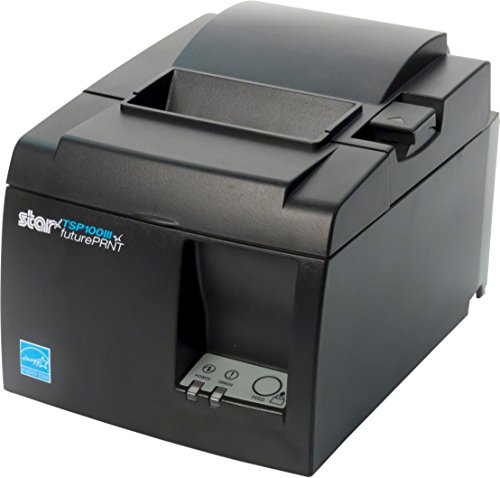
For busy retail environments or restaurants, the Star Micronics TSP143IIIU USB Thermal Receipt Printer stands out with its impressive speed of 43 receipts per minute, making it an ideal choice for businesses that need to keep up with high customer traffic. Its compact design and embedded power supply save valuable counter space. You’ll appreciate the easy USB connection, which allows for quick setup on iOS, Android, and Windows devices. The Drop-In and Print feature guarantees fast paper loading, while the patented De-Curl function keeps your receipts flat. Plus, it’s certified with popular platforms like Postmates and Square for added convenience.
Best For: Businesses in busy retail environments or restaurants that require fast and efficient receipt printing.
Pros:
- High-speed printing of 43 receipts per minute, ideal for high customer traffic.
- Compact design with an embedded power supply saves valuable counter space.
- Easy USB connection for quick setup across multiple platforms (iOS, Android, Windows).
Cons:
- Limited to USB connectivity, which may not suit all users.
- The printer may require specific paper types that could increase ongoing costs.
- Some users may find the clamshell design less durable compared to traditional printers.
Volcora Thermal Receipt Printer (White)

When you need a reliable and efficient solution for printing receipts, the Volcora Thermal Receipt Printer stands out with its impressive maximum printing speed of 260mm/s. This 80mm POS printer features an auto cutter that lasts up to 1.5 million cuts, ensuring durability. It’s compatible with various systems, including Windows, Mac, and Linux, and supports both USB and Ethernet interfaces. The wall mount option makes installation a breeze in any setting, from restaurants to food trucks. Plus, you’ll appreciate the sharp 203 dpi resolution and the limited lifetime warranty, backed by U.S.-based customer support for added peace of mind.
Best For: Businesses in need of a high-speed, reliable receipt printer for various operating systems and environments, such as restaurants, retail stores, and food trucks.
Pros:
- High-speed printing at 260mm/s for quick transaction processing.
- Durable auto cutter with a lifespan of up to 1.5 million cuts.
- Compatible with multiple operating systems and offers easy installation with wall mount options.
Cons:
- USB interface is limited to specific operating systems (Windows, Mac, Linux, VirtualCom, Android).
- Not compatible with popular delivery service apps like Ubereats, Grubhub, or Doordash.
- May require additional setup for optimal use in certain environments.
Mini Thermal Receipt Printer, Portable USB with 58mm Print Paper Roll

Looking for a compact solution to streamline your business transactions? The Mini Thermal Receipt Printer is your ideal match. This portable USB printer works seamlessly with 58mm print paper rolls, making it perfect for retail and restaurants. It connects via Bluetooth or USB, fitting Android and Windows devices, though it’s not compatible with Mac OS or Square POS. With high-speed printing at 70mm/s and a 203dpi resolution, your receipts will be clear and professional. Plus, the rechargeable 1500mAh battery guarantees you can print anywhere without worrying about ink or ribbons, keeping your costs low and efficiency high.
Best For: Retailers, restaurants, and businesses looking for a portable and efficient receipt printing solution.
Pros:
- High-speed printing at 70mm/s with 203dpi resolution for clear receipts.
- Portable design with a 1500mAh rechargeable battery, allowing for printing anywhere.
- No need for ink or ribbons, leading to lower operational costs.
Cons:
- Incompatible with Mac OS and Square POS systems, limiting usage options.
- Limited smartphone compatibility; only works with specific apps.
- Requires driver installation for use with computers, which may be inconvenient for some users.
Rongta 80mm Direct Thermal Receipt Printer (RP332)

The Rongta 80mm Direct Thermal Receipt Printer (RP332) stands out as an excellent choice for businesses seeking efficiency and reliability in their transaction processes. With a printing speed of 250mm/s and a maximum resolution of 203 dpi, it guarantees crisp receipts in no time. This printer supports various platforms, including Windows, Mac, and Linux, making it versatile for different setups. It features USB, serial, and Ethernet connectivity, along with easy installation via a USB disk. Though it has limitations with certain POS systems, its robust features and user-friendly design, including wall mounting options, make it a solid investment.
Best For: Businesses looking for a fast and reliable receipt printer that is compatible with multiple operating systems.
Pros:
- High printing speed of 250mm/s ensures quick transaction processing.
- Versatile connectivity options (USB, Serial, Ethernet) for easy integration.
- User-friendly design with wall mounting capabilities and adjustable settings.
Cons:
- Not compatible with popular POS systems like Square and PayPal.
- Limited warranty information may be a concern for some buyers.
- Customer reviews indicate mixed satisfaction, with an average rating of 3.9 out of 5 stars.
Rongta 80mm Thermal POS Receipt Printer

For small businesses and restaurants seeking efficiency, the Rongta 80mm Thermal POS Receipt Printer stands out with its high-speed printing capability of 250mm/sec. It features an auto cutter for quick receipt handling and an 80mm printing width that guarantees clarity. The sturdy design includes a one-button open cover and a spacious paper warehouse, making setup and maintenance a breeze. With multi-interface options like USB, Serial, and Ethernet, connecting to cash drawers is simple. Plus, you won’t need ribbons or ink cartridges, keeping your operating costs low while delivering reliable performance—perfect for a cost-effective solution in retail environments.
Best For: Small businesses and restaurants looking for an efficient and cost-effective receipt printing solution.
Pros:
- High-speed printing at 250mm/sec enhances efficiency in busy environments.
- Auto cutter functionality streamlines receipt handling.
- Low operating costs due to the lack of ribbons or ink cartridges.
Cons:
- Not compatible with popular delivery services like Square, Doordash, Uber Eats, or GrubHub.
- Limited to 80mm printing width, which may not suit all receipt sizes.
- Requires a separate power supply and setup for different connectivity options.
Factors to Consider When Choosing a Business Thermal Receipt Printer
When choosing a thermal receipt printer for your business, you’ve got several key factors to think about. Consider the printing speed, compatibility with your systems, and the design and installation process. Don’t forget to weigh the connectivity options and overall cost-effectiveness to guarantee you make the best choice for your needs.
Printing Speed Importance
Printing speed plays a crucial role in guaranteeing your business runs smoothly, especially in high-volume environments. With speeds typically ranging from 250mm/s to 300mm/s, faster printers allow you to process receipts quickly, reducing customer wait times considerably. This enhancement in efficiency not only boosts customer satisfaction but also increases throughput during peak hours. In settings like restaurants and retail, quick service is essential for keeping customers happy and encouraging repeat business. Additionally, high-speed printers can lower operational costs by minimizing the time your staff spends managing transactions, allowing them to focus on other important tasks. Consistent high-speed performance guarantees your business can handle busy periods without compromising print quality or reliability.
Compatibility With Systems
Choosing a thermal receipt printer that seamlessly integrates with your existing systems is essential for maintaining operational efficiency. First, verify the printer supports the operating systems you use, like Windows, Mac, or Linux. Check compatibility with your Point of Sale (POS) system—some printers don’t work with popular platforms such as Square, Uber Eats, or Clover. Look for printers that offer multiple connectivity options, including USB, Serial, and Ethernet, giving you flexibility in setup. Additionally, review the printer’s documentation for support of ESC/POS commands, which can impact compatibility with various software. Finally, confirm any limitations regarding specific applications or devices to avoid potential disruptions in your business operations.
Design and Installation
Design and installation play an essential role in the efficiency of your thermal receipt printer, especially in busy business environments. Consider opting for a wall-mounted design with hanging holes to save counter space and optimize your workspace. Look for models that feature easy paper installation, like a one-button open cover or clamshell design, which allows for quick maintenance and loading. A compact footprint guarantees the printer fits comfortably on your desk or countertop without taking up excessive room. Additionally, a user-friendly design with features like auto cutters can enhance efficiency by preventing receipts from falling and streamlining the printing process. Make certain to check the installation options to assure compatibility with your existing systems and devices.
Connectivity Options Available
When it comes to selecting a thermal receipt printer, connectivity options are essential for ensuring smooth integration into your existing systems. You’ll typically find USB, Serial, and Ethernet interfaces, which offer flexibility in connecting to various POS setups. If you choose a printer that only supports USB, be aware that it may limit compatibility to specific operating systems like Windows, Mac, or Linux. For enhanced mobility, consider models with wireless options such as Bluetooth and Wi-Fi. It’s vital to verify compatibility with your current systems before making a purchase, as not all printers support every connectivity type. Multi-interface support can also facilitate seamless communication with devices like cash drawers and barcode scanners, boosting your operational efficiency.
Cost-Effectiveness Considerations
While evaluating thermal receipt printers, cost-effectiveness plays an essential role in guaranteeing your investment pays off. Opting for a printer that requires no ribbons or ink cartridges can drastically lower your operating costs, as thermal printers run much cheaper than traditional ones. Look for high-speed printing capabilities exceeding 250mm/sec to boost efficiency, especially during busy periods. Durability is key—selecting a model designed for extensive use can save you from frequent replacements. Features like overheating protection can further extend lifespan, cutting down maintenance costs. Additionally, a wall-mounted design can optimize your counter space, potentially increasing revenue by improving your business layout. Making these smart choices guarantees you get the best value for your money.
Maintenance and Support Services
Choosing a thermal receipt printer isn’t just about cost-effectiveness; maintenance and support services are equally important to keep your operations running smoothly. Reliable maintenance minimizes downtime, guaranteeing your printer operates efficiently. Look for manufacturers that provide installation videos and user guides, as these resources can help you troubleshoot common issues and perform routine maintenance yourself. Access to customer support via phone, email, or live chat is crucial for quickly resolving technical problems and getting setup guidance. Consider printers that come with a warranty covering repairs and replacements, offering peace of mind. Finally, regular software updates and driver support can enhance performance and guarantee compatibility with various point-of-sale systems, making your investment worthwhile.