
Camera external recorders can turn a compatible DSLR, mirrorless, or cinema camera into a more capable production system. The right model may improve recording formats, monitoring, storage flexibility, and workflow efficiency without replacing your camera.
Our 2026 roundup covers compact HDMI recorders, monitor-recorders, capture devices, and camera-to-cloud options. Compare resolution, codecs, media support, connectivity, and power requirements before choosing.
Best 10 Camera External Recorders Picks for 2026
Best ProRes RAW Monitor

- 1500-nit 5.2-inch HDR touchscreen
- Records ProRes and ProRes RAW
- Camera control plus professional monitoring tools
Best For: Filmmakers using HDMI or mirrorless cameras who need RAW recording and advanced monitoring
Best Compact 4K Capture Interface
Blackmagic UltraStudio Mini Recorder 12G

- 12G-SDI and HDMI inputs
- Supports UHD 4K60 video
- Thunderbolt 4 computer output
Best For: Computer-based capture, streaming, and production workflows
Best Flexible HDMI Recorder

- ProRes RAW capture up to 8K 30P
- Supports ProRes, DNxHD, and H.265
- Dual RAW recording for Camera to Cloud workflows
Best For: HDMI-camera users needing flexible codecs and high-resolution recording
Best Bright Budget Monitor
Blackmagic Video Assist 5-inch 3G

- 2500-nit 5-inch LCD touchscreen
- Professional scopes and focus assistance
- Supports 3D LUTs and HDR
Best For: Camera users prioritizing bright monitoring and practical focus and exposure tools
ProRes Field Monitor
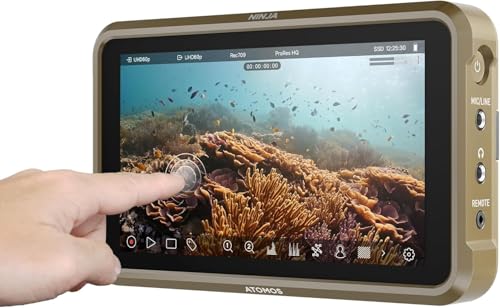
- Records 4Kp60 and up to 6Kp30 ProRes RAW
- Supports ProRes, DNxHD, and H.265
- Lightweight 5.2-inch, 1000-nit monitor
Best For: On-camera monitoring and professional HDMI recording
Standalone HDMI DVR
ClonerAlliance UHD Pro 4K Recorder

- Records 4K video without a PC
- Supports H.264 and H.265 codecs
- Provides 4K60 passthrough and pause/resume recording
Best For: Simple standalone HDMI capture and playback
Cloud-Ready Cinema Monitor
Atomos Ninja TX Camera-to-Cloud Recorder

- Records to CFexpress Type B with broad codec support
- Offers 4K60 I/O and up to 8K30 ProRes RAW
- Adds Wi-Fi 6, timecode sync, and uploading
Best For: Professional camera-to-cloud and cinema workflows
Compact Full HD Pick
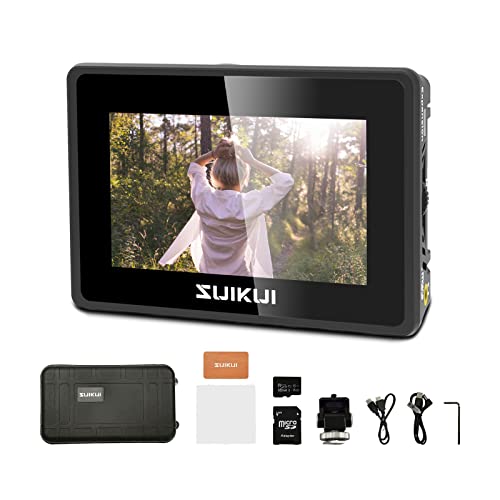
- 1080p30 H.264 recording
- 3.5-inch, 600-nit LCD
- Records to microSD or USB
Best For: Simple Full HD camera and computer recording
Professional Codec Choice
Atomos Ninja TX GO Monitor-Recorder

- 1500-nit 5-inch touchscreen
- Up to 6K RAW capture
- ProRes, DNx, H.265, and H.264
Best For: Professional monitoring, RAW capture, and networked workflows
Ready-to-Record Bundle
Atomos Ninja 5.2-inch 4K Recorder

- 4Kp60 recording support
- 240GB SE4 SSD included
- Up to 6Kp30 ProRes RAW
Best For: DSLR, cinema, and mirrorless camera recording
Best ProRes RAW Monitor – Atomos Ninja RAW
For filmmakers seeking camera external recorders with robust monitoring and camera-control features, the Atomos Ninja RAW combines a bright 5.2-inch HDR display with ProRes and ProRes RAW recording. It records to CFexpress Type B media or external USB-C storage and supports HDMI-compatible cameras.
Best For: Mirrorless and HDMI-camera users who want RAW recording, detailed scopes, and direct camera control in a compact production monitor.
Pros:
- Bright 1500-nit HDR touchscreen for outdoor and production use
- Records ProRes RAW, ProRes, and multiple ProRes 422 formats
- Camera control and professional tools including waveform, focus peaking, and EL Zone false color
- Runs from NP-F batteries, USB-C power banks, or a DC adapter
Cons:
- Storage media and some network accessories are sold separately
- Its advanced feature set may be more than basic recording setups require
The Ninja RAW is a strong choice when recording flexibility and on-set monitoring matter as much as portability. Its broad NLE compatibility and multiple power options make it practical for mobile productions.
Best Compact 4K Capture Interface – Blackmagic UltraStudio Mini Recorder 12G
The Blackmagic UltraStudio Mini Recorder 12G is a compact option among camera external recorders for routing video to a computer. It accepts 12G-SDI and HDMI inputs, supports common codecs up to UHD 4K60, and connects through Thunderbolt 4.
Best For: Creators and production teams capturing camera feeds into DaVinci Resolve, OBS, Wirecast, vMix, or other supported computer software.
Pros:
- Supports both 12G-SDI and HDMI inputs
- Handles video up to UHD 4K60
- Works with popular production and streaming software
- Provides uncompressed or compressed 10-bit 4:2:2 YUV and 4:4:4 RGB quality
Cons:
- Requires a computer with Thunderbolt 4 output support
- Designed as a computer-connected interface rather than a standalone field recorder
Choose this model when your workflow centers on a computer rather than removable recording media. Its compact design and broad software compatibility make it well suited to studio capture and streaming environments.
Best Flexible HDMI Recorder – Atomos Ninja Ultra
The Atomos Ninja Ultra is a versatile choice for camera external recorders, pairing a lightweight 5.2-inch monitor with HDMI recording and a broad codec lineup. It can capture ProRes RAW up to specified high-resolution frame rates and supports ProRes, DNxHD, and H.265.
Best For: Camera operators who need flexible recording formats, high-resolution RAW capture, and a portable monitor-recorder for HDMI cameras.
Pros:
- Supports ProRes RAW capture up to 8K 30P, 6K 60P, and 4K 120P
- Offers ProRes RAW, ProRes, DNxHD, and H.265 recording options
- Can record 4Kp60 ProRes RAW and H.265 simultaneously for Camera to Cloud workflows
- Lightweight 360-gram design with monitoring and recording features
Cons:
- Connectivity is centered on HDMI rather than a listed SDI input
- The supplied details do not specify included recording media
The Ninja Ultra stands out for codec flexibility and ambitious resolution support. It is especially useful when one camera setup must serve both high-quality master recording and more streamlined delivery workflows.
Best Bright Budget Monitor – Blackmagic Video Assist 5-inch 3G
Blackmagic Design Video Assist 5'' 3G Portable Monitor, Recorder, Scope, and Viewfinder
Check Price On AmazonThe Blackmagic Video Assist 5-inch 3G adds a bright touchscreen, recording capability, scopes, and viewfinder functions to compatible camera setups. For buyers comparing camera external recorders, it offers a practical monitoring-focused design with HDMI connectivity and 3D LUT and HDR support.
Best For: Consumer broadcast and camera users who want a bright 5-inch monitor with recording, focus assistance, scopes, and viewfinder features.
Pros:
- Very bright 2500-nit LCD display for clear monitoring
- Includes professional scopes and focus-assist features
- Supports 3D LUTs and HDR
- Provides a 1920×1080 display and HDMI connectivity
Cons:
- At 771 grams, it is heavier than the supplied Atomos monitor-recorders
- Its listed resolution is Full HD rather than 4K
- The supplied details do not identify a broad codec lineup
The Video Assist 5-inch 3G is a sensible pick when screen brightness and monitoring aids are priorities. Its scopes, focus assistance, and LUT support make it more capable than a basic external display.
ProRes Field Monitor – Atomos Ninja 5.2" 4K Recorder
For creators comparing camera external recorders, the Atomos Ninja combines a compact 5.2-inch monitor with HDMI recording and professional codec support. It records up to 4Kp60 in ProRes, DNxHD, and H.265, while ProRes RAW recording reaches up to 6Kp30 with compatible cameras.
Best For: Camera operators who want a lightweight on-camera monitor and recorder with broad HDMI compatibility.
Pros:
- Records up to 4Kp60 and supports up to 6Kp30 ProRes RAW.
- Supports Apple ProRes, Avid DNxHD, and H.265 recording.
- Lightweight 210 g design with a matte 1000-nit display.
- AtomOS 11 adds improved responsiveness, memory management, and workflow tools.
Cons:
- Its native display resolution is 1920×1080, despite supporting higher-resolution recording.
- Recording features depend on a compatible HDMI-output camera and suitable storage.
The Ninja is a practical choice when monitoring and high-quality recording need to share one compact camera-mounted device. Its codec range and workflow features make it more production-focused than a basic HDMI capture box.
Standalone HDMI DVR – ClonerAlliance UHD Pro 4K Recorder
The ClonerAlliance UHD Pro is a standalone option among camera external recorders, capturing HDMI video directly to USB storage or a TF card without a computer. It records up to 4K at 24fps, supports 4K passthrough at 60fps, and includes H.264 and H.265 encoding.
Best For: Users who want simple, computer-free HDMI recording for cameras, camcorders, presentations, or other compatible sources.
Pros:
- Standalone operation requires no PC for recording or playback.
- Supports 4K recording up to 30fps and 4K@60fps HDMI passthrough.
- Offers H.264 and H.265 codecs, pause/resume recording, and scheduled tasks.
- Works with a wide range of HDMI sources, including DSLRs and camcorders.
Cons:
- 4K recording is limited to 24fps, with recording up to 30fps depending on the selected mode.
- Windows-only editing and conversion software is included; Mac is not supported.
- HDCP-protected sources, HDR, and Dolby audio formats are not supported for recording.
This recorder favors convenience over an integrated camera monitor. It is a sensible fit for straightforward HDMI capture, especially when pause/resume recording and standalone operation matter more than on-camera display features.
Cloud-Ready Cinema Monitor – Atomos Ninja TX Camera-to-Cloud Recorder
The Atomos Ninja TX is a premium camera external recorder built around a bright 5.2-inch touchscreen and flexible 4K60 HDMI 2.0 and 12G-SDI connectivity. It records to CFexpress Type B, supports multiple professional codecs, and adds Wi-Fi, timecode synchronization, and uploading features for connected production workflows.
Best For: Professional crews needing a bright monitor, advanced I/O, CFexpress recording, and camera-to-cloud capabilities.
Pros:
- Records Apple ProRes, Avid DNx, and H.265/H.264 formats.
- Supports 4K60 input/output and up to 8K30 ProRes RAW recording.
- Bright 1500-nit touchscreen is suited to demanding monitoring conditions.
- Includes Wi-Fi 6, timecode sync, uploading, NDI, and cross conversion.
Cons:
- Its advanced feature set may be more than needed for basic HDMI recording.
- Recording requires CFexpress Type B media or a compatible USB-C workflow.
- It weighs 0.67 kg, making it heavier than a lightweight field recorder.
The Ninja TX is the most workflow-oriented option in this group. Its connectivity, bright display, and cloud-focused tools suit professional production, while the high-resolution ProRes RAW support leaves room for demanding cinema-camera setups.
Compact Full HD Pick – RH35 Camera Monitor-Recorder
The SUIKUI RH35 is a compact option for shoppers comparing camera external recorders for straightforward 1080p workflows. Its 3.5-inch LCD records 1080p30 H.264 video without a stated recording limit and supports microSD cards or USB flash drives.
Best For: Basic camera, computer, smartphone, meeting, medical, game, and sports recording where Full HD capture is sufficient.
Pros:
- Accepts 1080p60 HDMI input/output and records 1080p30 in H.264.
- Includes useful monitoring tools such as peaking, zebra, waveform, focus assist, exposure assist, and false color.
- Lightweight 3.5-inch design with 600-nit brightness and 178-degree viewing angle.
- Records to microSD cards or USB flash drives in MP4 format.
Cons:
- The 800×480 display is less detailed than higher-resolution monitor-recorders.
- Recording is limited to 1080p30 rather than 4K capture.
- Only one HDMI port and one USB port are listed.
The RH35 emphasizes affordability, portability, and essential exposure aids rather than advanced codecs or high-resolution recording. It is a practical fit for users who need dependable Full HD capture in a small package.
Professional Codec Choice – Atomos Ninja TX GO Monitor-Recorder
Atomos Ninja TX GO 5-inch Camera Monitor-Recorder, HDMI CFexpress Wi-Fi HDR Touchscreen ProRes RAW
Check Price On AmazonThe Atomos Ninja TX GO is a premium choice among camera external recorders, pairing a bright 5-inch touchscreen with professional recording formats and wireless connectivity. It can capture up to 6K RAW to compatible CFexpress Type B or USB-C storage, depending on the connected camera and drive.
Best For: Camera operators and production teams needing HDR monitoring, ProRes RAW or other professional codecs, external storage flexibility, and network or NDI features.
Pros:
- 1500-nit touchscreen supports camera control, touch-to-focus, and professional monitoring tools.
- Records ProRes, ProRes RAW, Avid DNx, H.265, and H.264, with codecs pre-loaded.
- Captures up to 6K RAW to CFexpress Type B or compatible USB-C storage.
- Includes HDMI input/output, Wi-Fi 6E, NDI streaming support, and two USB-C ports.
Cons:
- Compatible external drives, network adapters, and calibration probes may be sold separately.
- Its professional feature set may be excessive for basic 1080p recording.
- Power options include USB-C, NP-F battery, or AC adapter, but the notes do not indicate that all accessories are included.
With its broad codec support, bright display, and up-to-6K RAW workflow, the Ninja TX GO is built for demanding production use. Confirm camera compatibility and storage requirements before buying.
Ready-to-Record Bundle – Atomos Ninja 5.2-inch 4K Recorder
This Atomos Ninja bundle gives shoppers a camera external recorder with a 5.2-inch monitor and included 240GB SE4 SSD. It supports HDMI cameras and records up to 4Kp60 in Apple ProRes, Avid DNxHD, or H.265, while ProRes RAW recording can reach up to 6Kp30 with a compatible camera.
Best For: DSLR, cinema, and mirrorless camera users who want a portable 4K recorder with included SSD storage.
Pros:
- Records up to 4Kp60 in ProRes, Avid DNxHD, and H.265.
- Supports up to 6Kp30 ProRes RAW with compatible HDMI-output cameras.
- Includes a 240GB SE4 2.5-inch SSD for an immediately usable recording setup.
- AtomOS 11 adds a refreshed interface, improved responsiveness, RecordAssist, and PlayBackAssist.
Cons:
- The recorder relies on HDMI connectivity, so camera compatibility should be checked.
- The included SSD provides less capacity than larger professional media options.
- Only one USB port is listed in the supplied specifications.
This bundle balances high-resolution recording with useful workflow features and included storage. It is a strong middle ground for creators who want more than basic Full HD without moving to the Ninja TX GO feature set.
How We Picked These Camera External Recorders
We selected products across several common use cases, including on-camera 4K recording, ProRes and ProRes RAW workflows, HDMI capture, live production, streaming, and portable monitoring. We considered each recorder’s supported input resolution and frame rates, available codecs, recording media, display features, camera-control options, connectivity, and overall portability.
Compatibility matters as much as headline specifications. Before buying, verify that your camera provides a clean HDMI output at the resolution and frame rate you need, and confirm that the recorder supports the camera’s signal type. Some features, such as RAW recording, timecode, camera control, or HDR monitoring, depend on both the camera and the recorder.
Quick Comparison
| Best For | Look For |
|---|---|
| Professional on-camera recording | 4K HDMI, ProRes, RAW support, bright display, reliable media |
| Budget HDMI capture | Supported input resolution, H.264/H.265 encoding, simple operation |
| Live streaming or studio capture | Computer connectivity, sustained recording, compatible capture software |
| Remote and collaborative workflows | Wi-Fi, camera-to-cloud features, upload support, stable networking |
| Portable field production | Compact design, battery options, sunlight visibility, durable construction |
Key Buying Factors for Camera External Recorders
Resolution, Frame Rate, and Signal Compatibility
Choose a recorder that accepts your camera’s actual HDMI output, not merely the camera’s maximum internal resolution. Check 4K frame-rate limits, progressive versus interlaced signals, bit depth, HDR formats, and whether recording is available at the desired frame rate.
Codec and Recording Media
ProRes can simplify editing, while ProRes RAW preserves more flexibility for compatible post-production systems. H.264 and H.265 generally produce smaller files and may suit delivery or long recordings. Also check whether the unit uses SSDs, CFexpress, SD cards, or an external drive, and budget for media with sufficient sustained write speed.
Monitoring and Production Tools
A good recorder can also serve as a field monitor. Evaluate screen size and brightness, focus assist, false color, waveform, vectorscope, LUT support, HDR viewing, framing guides, and touchscreen usability. Camera-control support can reduce the need to operate the camera body directly.
Power, Storage, and Connectivity
External recorders add power and cable requirements. Confirm battery compatibility, runtime, charging options, HDMI cable type, audio inputs, timecode connections, and mounting needs. For streaming or remote delivery, check network stability and whether the device works with your preferred platform or computer.
Who Should Buy Which Camera External Recorders?
Choose a professional monitor-recorder if you shoot commercial, documentary, or narrative work and need robust codecs, exposure tools, and dependable 4K recording. Choose a simple HDMI capture recorder for presentations, archiving, streaming, or occasional recording where advanced monitoring is less important. Choose a camera-to-cloud model when rapid remote review, collaboration, or upload workflows matter more than the lowest cost.
For run-and-gun shooters, prioritize a bright display, efficient battery use, secure mounting, and straightforward media handling. For studio users, prioritize sustained recording, computer compatibility, connectivity, and predictable thermal performance. Whichever model you select, test the complete camera, cable, media, power, and post-production workflow before an important shoot.