
When it comes to choosing the right commercial color laser printer for your business in 2026, you’ll find a wide array of options that promise high-quality prints and impressive features. From multifunction capabilities to enhanced security, these machines are designed to meet diverse needs. But with so many choices, how do you determine which one is the best fit for you? Let’s explore the top contenders and what they bring to the table.
HP Color LaserJet Pro MFP 3301sdw All-in-One Color Laser Printer

The HP Color LaserJet Pro MFP 3301sdw All-in-One Color Laser Printer is the perfect choice for small teams and office environments that need a reliable, multifunctional printing solution. With print speeds of up to 26 pages per minute, you’ll breeze through tasks. Its automatic duplex printing and 250-sheet input tray make handling large jobs easy. Plus, you can connect via built-in Wi-Fi or Ethernet for seamless operation. Using Original HP toner cartridges guarantees crisp, vibrant prints every time. Rated 4.2 out of 5 stars by customers, this printer combines efficiency and quality, making it a top pick for any office.
Best For: Small teams and office environments that require a reliable and efficient multifunctional printer.
Pros:
- Fast print speeds of up to 26 pages per minute for both black and color.
- Automatic duplex printing and a 250-sheet input tray streamline large printing jobs.
- Built-in Wi-Fi and Ethernet connectivity options for easy integration into office networks.
Cons:
- Limited maximum print resolution of 600×600 DPI may not meet the needs of users requiring high-quality graphics.
- Heavier weight at 37.7 pounds may pose challenges for mobility or placement.
- Requires Original HP toner cartridges, which can be more expensive than third-party options.
Brother MFC-L3720CDW Wireless Color Laser Printer

For small to medium-sized businesses seeking a reliable all-in-one solution, the Brother MFC-L3720CDW Wireless Color Laser Printer stands out with its multifunction capabilities. It prints, scans, copies, and faxes, ensuring you’ve got everything covered. With print speeds up to 19 pages per minute and a 50-sheet auto document feeder, efficiency is at your fingertips. Plus, its dual-band wireless connectivity and mobile printing options let you print from anywhere. The 3.5” color touchscreen simplifies navigation, while the automatic duplex printing helps conserve paper. ENERGY STAR® compliant, it’s a smart choice for both performance and eco-friendliness.
Best For: Small to medium-sized businesses looking for a reliable all-in-one printer that can handle various tasks efficiently.
Pros:
- Multifunctionality: Combines printing, scanning, copying, and faxing in one device, saving space and resources.
- Fast Performance: Prints up to 19 pages per minute and scans at impressive speeds, enhancing productivity.
- Eco-Friendly Features: ENERGY STAR® compliant and includes automatic duplex printing to reduce paper usage.
Cons:
- Weight: At 44 pounds, it may be challenging to move or reposition without assistance.
- Initial Cost: The upfront price may be higher compared to basic printers, which could be a consideration for budget-conscious buyers.
- Limited Memory: With only 64 MB of storage, it may not handle large print jobs as efficiently as some competitors.
Canon Color imageCLASS MF751Cdw II Wireless Duplex Laser Printer

Looking for a reliable multifunction printer that keeps pace with your busy office? The Canon Color imageCLASS MF751Cdw II is your perfect match. It offers fast print speeds of up to 35 pages per minute and a quick first print time of just 7 seconds. With its 5-inch color touchscreen, maneuvering through features is a breeze. Plus, you can print, scan, and copy with ease using mobile devices through the Canon PRINT app. Its expandable paper capacity and automatic duplex printing help save on resources. Supported by Canon’s service network, this printer guarantees quality and reliability for your business needs.
Best For: Busy offices and small businesses that require fast, reliable printing, scanning, and copying capabilities.
Pros:
- Fast print speeds of up to 35 pages per minute for both color and monochrome.
- Intuitive 5-inch color touchscreen for easy navigation and access to features.
- Expandable paper capacity up to 850 sheets, along with automatic duplex printing to save resources.
Cons:
- Weighing 59.9 pounds, it may be cumbersome to move or reposition.
- Initial page print time of 7 seconds may be slower compared to some competitors.
- Limited to a maximum color print resolution of 600 x 600 dpi, which may not meet high-end printing requirements.
Brother MFC-L8730CDW Business Color Laser All-in-One Printer

Designed for busy offices, the Brother MFC-L8730CDW Business Color Laser All-in-One Printer excels in delivering high-quality output and impressive performance. With print speeds up to 33 pages per minute, you’ll appreciate the swift, vibrant color and sharp black printing. Its 3.5-inch color touchscreen simplifies navigation and lets you customize shortcuts. Plus, the duplex scanning feature scans two-sided documents at an incredible 104 images per minute. Connectivity options like dual-band wireless and Gigabit Ethernet guarantee seamless integration into your network. With advanced security features and eco-friendly certifications, this printer is a reliable choice for your business needs.
Best For: Businesses and offices that require high-quality color printing, fast performance, and advanced security features.
Pros:
- High print speeds of up to 33 pages per minute, enhancing productivity.
- Advanced scanning capabilities with two-sided scanning at 104 images per minute.
- Robust security features including triple-layer security and NFC card reader for authentication.
Cons:
- Heavy weight at 67.9 pounds, making it less portable.
- Initial cost may be higher compared to basic printers.
- Limited to legal-sized media, which may not meet all printing needs.
Brother Color Laser Printer (HL-L3220CDW)

The Brother Color Laser Printer HL-L3220CDW stands out as an excellent choice for professionals working from home who need reliable, high-quality printing. With print speeds of up to 19 pages per minute and a maximum resolution of 2400 x 600 dpi, you’ll enjoy crisp text and vibrant graphics. Its 250-sheet paper tray minimizes refills, while automatic duplex printing saves time and resources. Advanced wireless capabilities let you print effortlessly from your devices, and built-in security protocols keep your documents safe. Compact and user-friendly, this printer enhances productivity in any workspace, making it a smart investment for your business.
Best For: Professionals working from home who require reliable and high-quality color printing.
Pros:
- High print speed of up to 19 pages per minute, making it efficient for busy work environments.
- Automatic duplex printing saves time and reduces paper usage by producing double-sided documents effortlessly.
- Advanced wireless capabilities allow for seamless printing from various devices, enhancing convenience and flexibility.
Cons:
- Relatively heavy at 24.7 pounds, which may make it less portable than lighter models.
- Initial cost may be higher compared to basic printers, impacting budget-conscious buyers.
- Limited maximum media size of 8.5 x 14 inches may restrict printing options for larger projects.
HP Color Laserjet Pro MFP 4301fdw Wireless All-in-One Printer
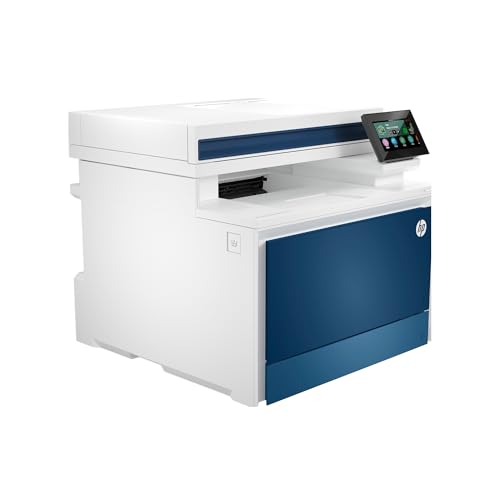
For small teams of up to 10 users, the HP Color LaserJet Pro MFP 4301fdw Wireless All-in-One Printer stands out as an exceptional choice, offering a seamless blend of printing, scanning, copying, and faxing capabilities. With a print speed of up to 35 color pages per minute, it guarantees efficiency. Its intelligent Wi-Fi and multiple connectivity options, including Bluetooth and AirPrint, make wireless printing effortless. Security features like HP Wolf Pro Security keep your data safe, while its compact design (16.6 x 23.5 x 15.1 inches) fits neatly in any workspace. Enjoy high-quality prints that elevate your business’s professionalism.
Best For: Small teams of up to 10 users looking for an efficient all-in-one printing solution.
Pros:
- High print speed of up to 35 color pages per minute, enhancing productivity.
- Multiple connectivity options including Wi-Fi, Bluetooth, and AirPrint for versatile usage.
- Robust security features like HP Wolf Pro Security to protect sensitive data.
Cons:
- Weighs 45 pounds, which may be cumbersome to move.
- Limited to a maximum media size of 8.5 x 14 inches, which may not suit larger printing needs.
- Requires original HP cartridges, restricting the use of third-party supplies.
Canon imageCLASS MF753Cdw All-in-One Color Laser Printer

Small to medium-sized businesses seeking efficiency and versatility will find the Canon imageCLASS MF753Cdw All-in-One Color Laser Printer an excellent choice. With its 4-in-1 functionality, you can print, scan, copy, and fax seamlessly. It prints up to 35 pages per minute and supports automatic duplex printing and scanning. The 5-inch color touchscreen makes navigation intuitive, while its expandable paper capacity guarantees you won’t run out during busy days. Plus, it’s ENERGY STAR Certified, saving on energy costs. With a three-year limited warranty, you’ll have peace of mind knowing you’ve made a smart investment for your business.
Best For: Small to medium-sized businesses looking for an efficient all-in-one color laser printer that offers versatile functionality.
Pros:
- High print speed of up to 35 pages per minute for both black and color prints.
- 4-in-1 functionality (print, scan, copy, fax) with automatic duplex capabilities.
- Intuitive 5-inch color touchscreen for easy navigation and control.
Cons:
- Weighs 48.5 pounds, making it less portable than some lighter alternatives.
- Standard paper capacity may require frequent replenishment during high-volume printing.
- Higher initial cost compared to basic printers, which may be a consideration for budget-sensitive businesses.
Canon Color imageCLASS MF665Cdw All-in-One Wireless Laser Printer

If you need a versatile printing solution for your business, the Canon Color imageCLASS MF665Cdw All-in-One Wireless Laser Printer stands out with its impressive 4-in-1 functionality, allowing you to print, scan, copy, and fax effortlessly. You’ll appreciate the swift print speed of up to 26 pages per minute, and the first print time is around 10.3 seconds. With a 250-sheet capacity and a 50-sheet duplex ADF, managing documents is a breeze. The 5-inch color touchscreen simplifies navigation, while mobile printing options keep you connected. Plus, Canon’s high-capacity toner guarantees high-quality prints and fewer replacements.
Best For: Businesses and home offices looking for an efficient, all-in-one wireless laser printer that provides high-quality printing, scanning, copying, and faxing capabilities.
Pros:
- Fast print speed of up to 26 pages per minute for both color and monochrome documents.
- User-friendly 5-inch color touchscreen for easy navigation and operation.
- High-capacity toner and automatic document feeder enhance productivity and reduce maintenance.
Cons:
- Weighs 60.7 pounds, which may make it difficult to move or reposition.
- Print resolution is limited to 600 x 600 dpi, which may not meet the needs for extremely high-quality prints.
- Initial cost may be higher compared to basic printers, which could be a consideration for small budgets.
Canon Color imageCLASS MF753Cdw II Wireless Duplex Laser Printer

The Canon Color imageCLASS MF753Cdw II Wireless Duplex Laser Printer is an ideal choice for busy offices seeking efficiency and versatility. With print speeds of up to 35 pages per minute and a first print time of just 7 seconds, you won’t waste time waiting for documents. Its 5-inch color touchscreen allows easy access to features, while mobile printing compatibility keeps you connected. The 50-sheet duplex ADF enhances productivity, and the 250-sheet capacity can expand to 850 sheets. With vibrant print quality, utilizing Canon Genuine Toner guarantees high yields, making this printer a reliable asset for your business.
Best For: Busy offices that require efficient, high-quality printing and versatile functionality in a compact design.
Pros:
- Fast print speed of up to 35 pages per minute, reducing wait times for documents.
- Versatile all-in-one functionality that includes printing, scanning, copying, and faxing.
- Expandable paper capacity of up to 850 sheets, accommodating high-volume printing needs.
Cons:
- Weight of 60.9 pounds may make it difficult to move or relocate.
- Initial cost may be higher compared to basic printers, impacting budget-conscious buyers.
- Toner replacement costs could add up over time, especially for high-volume users.
Brother MFC-L8930CDW Business Color Laser All-in-One Printer

Designed with busy professionals in mind, the Brother MFC-L8930CDW Business Color Laser All-in-One Printer delivers exceptional performance and versatility for any office environment. It prints and copies at speeds up to 33 pages per minute while maintaining sharp color and black output. With a compact design, it’s 25% smaller than its predecessor. The advanced scanning capabilities allow high-speed, two-sided scanning up to 104 images per minute, making document management seamless. Plus, its flexible connectivity options and user-friendly 7” touchscreen guarantee easy navigation. Security features protect your data, while cost-effective toner options help maximize your printing budget.
Best For: Busy professionals and small to medium-sized businesses looking for a reliable and efficient all-in-one printing solution.
Pros:
- High-speed printing and copying capabilities up to 33ppm.
- Advanced scanning features, including high-speed two-sided scanning up to 104ipm.
- Flexible connectivity options with a user-friendly 7” color touchscreen.
Cons:
- Initial cost may be higher compared to entry-level printers.
- Toner cartridges can be expensive to replace, despite high yield options.
- Compact design may limit some advanced paper handling options.
Factors to Consider When Choosing a Commercial Color Laser Printer
When choosing a commercial color laser printer, you’ll want to think about several key factors. Consider your print speed requirements, media handling capacity, and the connectivity options that best fit your workflow. Don’t forget to evaluate toner costs, yield, and any security features that might be important for your business.
Print Speed Requirements
Choosing the right print speed is essential for any business, especially if you handle high-volume tasks. Commercial color laser printers typically offer speeds ranging from 19 to 35 pages per minute (ppm). If your workflow demands quick turnaround times, opt for a model with higher speeds to keep operations running smoothly. Consider the initial page print time, too; many printers can deliver the first page in as little as 7 seconds, which boosts overall productivity. Additionally, verify your printer can handle both color and black & white jobs at comparable speeds. Regularly evaluating your print speed needs helps you select a printer that aligns with your daily requirements and budget, guaranteeing efficient document retrieval and a seamless workflow.
Media Handling Capacity
After evaluating print speed requirements, the next key factor to take into account is media handling capacity. This refers to how much paper your printer can hold at once, with standard capacities ranging from 250 sheets to over 850 sheets, depending on the model. You’ll want to check the maximum media size it supports; many commercial printers handle up to legal size (8.5 x 14 inches). If your business requires multi-page tasks, consider printers with automatic document feeders (ADF) that hold 50 to 80 sheets. Additionally, verify the printer can handle various media types, such as envelopes, labels, and specialty paper, to meet your diverse printing needs effectively.
Connectivity Options Available
As you explore options for a commercial color laser printer, it’s vital to reflect on the connectivity features that will best suit your business needs. Look for models with built-in Wi-Fi, Ethernet, and USB interfaces to guarantee flexible network integration. Many printers also support mobile printing through popular apps like Apple AirPrint and Google Cloud Print, making it easy for you to print on the go. Dual-band wireless networking can improve connectivity and reduce interference, resulting in a stable printing experience. Additionally, Wi-Fi Direct allows for direct connections to mobile devices, simplifying the process. Don’t forget to take into account printers with advanced security features like encryption and secure printing to protect sensitive information during transmission.
Toner Cost and Yield
When selecting a commercial color laser printer, toner cost and yield play a significant role in your overall operating expenses. Standard yield cartridges typically yield around 1,000 to 3,000 pages, while high-yield options can increase that to 4,500 to 7,500 pages. It’s essential to evaluate the price per page, as lower-priced cartridges might lead to higher long-term costs due to fewer prints. Be aware that some printers use proprietary toner cartridges, which can limit availability and drive up costs. Additionally, regular firmware updates can enhance compatibility and maintain toner efficiency. To find the most cost-effective solution, calculate your printing volume and balance initial cartridge costs with overall yield and print quality.
Security Features Included
Choosing a commercial color laser printer isn’t just about print quality and toner costs; security features are vital too. Look for models that include advanced encryption protocols to protect sensitive documents during transmission and storage. Customizable security settings are a must, letting you set up user authentication methods to limit access to confidential tasks. Regular firmware updates are essential for maintaining security, addressing vulnerabilities and adapting to new threats. Some printers even have built-in firewalls and secure print release functions, requiring users to enter a code before their documents print—this reduces unauthorized access. Finally, compliance with standards like EPEAT Silver or ENERGY STAR often signals a printer’s commitment to both security and sustainable practices.
Size and Weight Considerations
Considering size and weight is vital for finding the right commercial color laser printer for your office. Models can vary greatly, ranging from compact designs at 15.7D x 15.7W x 9.4H inches to larger options exceeding 21 inches in depth and width. Weighing factors are just as important; some printers are as light as 24.7 pounds, while others exceed 67 pounds, affecting both portability and placement. Assess your available office space, as larger units may need dedicated areas, while smaller ones fit more easily. Also, consider the size of the paper trays; standard capacities around 250 sheets may expand your printer’s footprint. Generally, heavier printers suggest robust construction and higher printing capacities, beneficial for high-volume environments.
User Interface Design
A well-designed user interface can make a significant difference in your experience with a commercial color laser printer. Look for a user-friendly interface, like a color touchscreen, which enhances navigation and lets you access frequently used features quickly. Customizable shortcuts can streamline your tasks, boosting productivity for repetitive functions. The size and clarity of the display matter too; larger touchscreens often provide a more intuitive experience. Mobile printing compatibility is essential for modern workflows, allowing you to print seamlessly from various devices. Finally, an intuitive setup process can reduce installation time, enabling you to get your printer operational quickly. Prioritizing these aspects in user interface design will greatly enhance your printing experience.
Warranty and Support Options
When evaluating commercial color laser printers, it’s crucial to pay attention to warranty and support options, as they can greatly impact your long-term satisfaction. Warranties can range from one to three years, influencing your overall costs. Also, consider the level of customer support offered—availability via online, phone, or live chat can help you resolve issues quickly and minimize downtime. Extended warranties may be available for additional peace of mind, protecting you from defects and failures. Some manufacturers even provide specialized service agreements that cover maintenance and repairs, enhancing your printer’s lifespan. Finally, check customer reviews to gauge the quality of warranty service and support, as user experiences can guide your decision.