
In today’s fast-paced business environment, securing your premises is more essential than ever. With the rise of smart technology, commercial smart locks have become a game-changer for security and convenience. These innovative solutions offer features like biometric access and remote monitoring, making it easier for you to manage entry points. So, what are the top smart locks of 2026 that can help you protect your business? Let’s explore your options.
Kwikset SmartCode 955 Electronic Keypad Lock

The Kwikset SmartCode 955 Electronic Keypad Lock is an ideal choice for small businesses and high-traffic areas, thanks to its customizable access features. You can manage up to 30 user codes, plus a one-time code for visitors. The bright LED lights make code entry easy, even in low light. With a 3-year battery life and the ability to handle 500,000 cycles, it’s built for durability. Security is exceptional, with a Grade 2 certification and an intrusion alert after three incorrect entries. Plus, installation is a breeze with just a screwdriver and the helpful BILT app for guidance.
Best For: The Kwikset SmartCode 955 Electronic Keypad Lock is best for small businesses and high-traffic areas that require secure and convenient access management.
Pros:
- Customizable access with up to 30 user codes and a one-time visitor code.
- Durable design tested to withstand 500,000 cycles, ensuring reliability in busy environments.
- Easy installation process supported by the BILT app for interactive guidance.
Cons:
- Requires a 9V battery which will need replacement after approximately 3 years.
- The keypad may become less responsive if exposed to harsh weather conditions over time.
- Intrusion alert can be inconvenient if multiple users frequently enter incorrect codes.
Schlage Encode Century WiFi Smart Keyless Entry Door Lock

For businesses seeking a blend of security and convenience, the Schlage Encode Century WiFi Smart Keyless Entry Door Lock stands out with its built-in WiFi compatibility, allowing you to manage access remotely. You can control and monitor your entry points via the Schlage Home app, managing up to 100 access codes effortlessly. Its secure, encrypted connection and customizable alarm system provide peace of mind against unauthorized entry. Installation is a breeze—just grab a screwdriver! With features like auto-lock and a fingerprint-resistant touchscreen, you’ll enjoy both safety and user-friendly convenience in one sleek, bright chrome design.
Best For: Businesses and homeowners seeking a secure, convenient, and modern keyless entry solution with remote access capabilities.
Pros:
- Built-in WiFi for easy remote management via the Schlage Home app.
- Supports up to 100 access codes, perfect for multiple users.
- Easy installation without hardwiring and features like auto-lock for added security.
Cons:
- May require WiFi connectivity to access all features effectively.
- Fingerprint-resistant touchscreen may still smudge with frequent use.
- Limited compatibility with doors outside the specified thickness and backset dimensions.
Keypad Door Lock with Handle – Digital Keyless Entry Lock (2 Pack)

If you’re looking for a reliable and convenient locking solution, the Keypad Door Lock with Handle – Digital Keyless Entry Lock (2 Pack) is ideal for busy commercial environments. This lock offers a 3-in-1 functionality with passcode, key fob, and emergency key options, ensuring easy access for your team. With anti-peep support and automatic locking after incorrect attempts, security’s a top priority. Installation is a breeze, taking just 15 minutes, and it fits most standard doors. Built from durable zinc alloy and rated IP65, it’s designed to withstand harsh conditions, making it a smart choice for any commercial setting.
Best For: This product is best for busy commercial environments that require reliable and secure access solutions for multiple users.
Pros:
- 3-in-1 functionality offers versatility with passcode, key fob, and emergency key access.
- Durable construction from zinc alloy ensures lasting performance even in harsh conditions.
- Easy installation can be completed in approximately 15 minutes, fitting most standard residential doors.
Cons:
- Requires battery replacement which may be inconvenient if not monitored regularly.
- Automatic locking feature may lock users out temporarily after multiple incorrect attempts.
- Limited compatibility with non-standard door sizes or designs.
Kwikset SmartCode 955 Electronic Lever with Keyless Entry
Offering unmatched convenience, the Kwikset SmartCode 955 Electronic Lever with Keyless Entry is ideal for busy commercial environments where quick access is essential. With a keypad entry, you can securely enter without fumbling for keys. You can customize up to 30 user codes, including one-time access for guests. Its bright LED lights make code entry easy, even in low light. The lock boasts a robust 3-year battery life and withstands 500,000 cycles, ensuring reliability. Plus, with three lock modes and SmartKey security, you’ll have peace of mind knowing your business is well-protected against unauthorized access.
Best For: Businesses and commercial environments that require quick and secure keyless access for multiple users.
Pros:
- Customizable with up to 30 user codes, including a one-time access code for guests.
- Bright LED lights facilitate easy code entry in low light conditions.
- Durable with a 3-year battery life and tested to withstand 500,000 cycles.
Cons:
- Requires a 9V battery replacement after three years, which may lead to inconvenience.
- Alarm feature may cause annoyance if incorrect codes are frequently entered.
- Initial setup may be complex for users unfamiliar with electronic locks.
ULTRALOQ U-Bolt Pro WiFi Smart Lock with Fingerprint ID
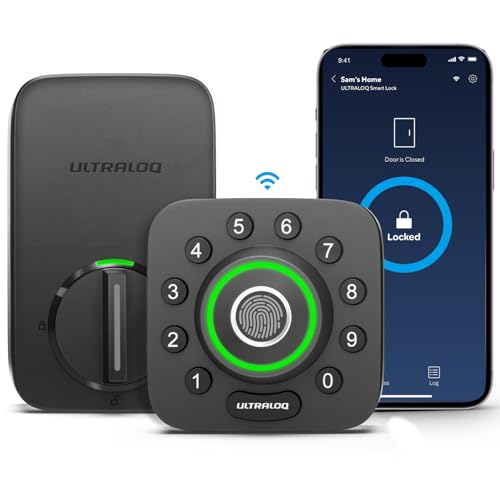
The ULTRALOQ U-Bolt Pro WiFi Smart Lock with Fingerprint ID is perfect for business owners seeking a robust and reliable security solution. With 8-in-1 keyless entry features, including fingerprint recognition and app control, you can manage access effortlessly. Its built-in WiFi eliminates the need for extra hubs, allowing you to lock, release, and check entry logs from anywhere. Auto-locking and door status alerts enhance security, while compatibility with Alexa and Google Assistant adds convenience. Easy to install in about 10 minutes, this durable lock meets ANSI Grade 1 standards and is IP65 rated for weather resistance. Secure your business with confidence!
Best For: Business owners seeking a reliable and secure keyless entry solution for their premises.
Pros:
- 8-in-1 keyless entry features provide multiple access options, including fingerprint ID and app control.
- Built-in WiFi allows for remote locking, unlocking, and access management without the need for extra hubs.
- Durable construction meets ANSI Grade 1 standards and is IP65 rated, ensuring long-lasting performance in various weather conditions.
Cons:
- Requires a stable WiFi connection for optimal functionality, which may not be available in all locations.
- Initial setup may take time for users unfamiliar with smart lock technology and app configurations.
- Higher upfront cost compared to traditional locks, which may be a consideration for budget-conscious users.
ULTRALOQ Latch 5 Smart Lock with Built-in WiFi and Fingerprint
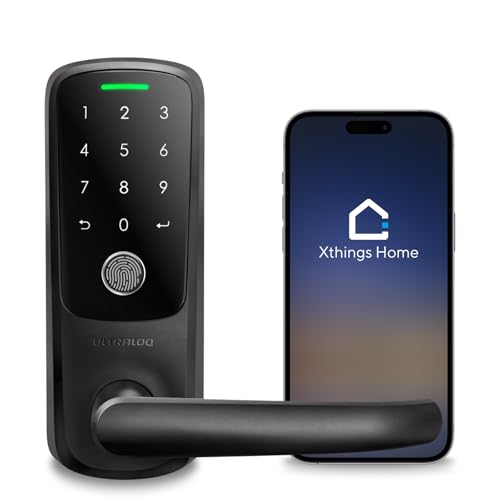
For rental hosts and homeowners seeking a seamless security solution, the ULTRALOQ Latch 5 Smart Lock stands out with its built-in WiFi and versatile 5-in-1 keyless entry system. You can access it using your fingerprint, smartphone app, code, or a mechanical key—perfect for sharing temporary access with guests. Compatible with both iOS and Android, you can manage user access and receive real-time notifications effortlessly. Built from sturdy zinc alloy, it withstands various weather conditions, ensuring durability. Plus, its easy DIY installation means no drilling or wiring is required. Just grab a screwdriver, and you’re all set!
Best For: Rental hosts and homeowners looking for a versatile and secure keyless entry solution for their properties.
Pros:
- 5-in-1 keyless entry offers multiple unlocking methods including fingerprint, app, code, and mechanical key.
- Durable construction with weatherproof zinc alloy ensures longevity and reliability in various conditions.
- Easy DIY installation requires no wiring or drilling, making it accessible for anyone.
Cons:
- Dependency on WiFi may lead to accessibility issues in areas with poor internet connection.
- Battery life could be a concern if used frequently, requiring regular replacements.
- Limited compatibility with some smart home systems may restrict integration options.
Philips Wi-Fi Door Lock, Keyless Entry Smart Lock

Accessing your door has never been more convenient with the Philips Wi-Fi Door Lock, designed specifically for busy households and commercial spaces. You can open it using an app, passcode, fingerprint, or even voice commands via Alexa or Google Assistant. With the ability to store multiple fingerprints and create up to 100 custom passcodes for guests, managing access is a breeze. The built-in Wi-Fi lets you lock or open remotely, and you’ll receive real-time alerts for door activity. Plus, its auto-lock feature and Away Mode guarantee extra security when you’re not around. Installation is straightforward, compatible with most doors.
Best For: Busy households and commercial spaces looking for a convenient and secure keyless entry solution.
Pros:
- Flexible unlocking options including app, passcode, fingerprint, and voice commands.
- Remote access and control with real-time alerts for door activity.
- Easy DIY installation compatible with most door sizes.
Cons:
- Requires batteries that are not included in the package.
- Limited to a 65ft distance for optimal remote control.
- May be less suitable for doors outside the specified thickness range.
Lockly Guard Deadbolt Smart Lock (PGD728WPU)

Designed with high-traffic environments in mind, the Lockly Guard Deadbolt Smart Lock (PGD728WPU) stands out as the ideal choice for property managers and business owners seeking robust security solutions. Its 3D Fingerprint Recognition with AI precision allows access in just 0.3 seconds. You’ll appreciate the Hack-Proof PIN Genie Keypad, which randomizes number positions to thwart code theft. With remote management through the Lockly Manager app, you can oversee access effortlessly. The Secure Link Wi-Fi Hub enables remote control, while compatibility with Alexa and Google Assistant enhances your convenience. Built to last, it guarantees security without sacrificing performance.
Best For: Property managers and business owners in need of a secure, high-traffic access solution.
Pros:
- 3D Fingerprint Recognition allows quick access in just 0.3 seconds.
- Hack-Proof PIN Genie Keypad prevents code theft and shoulder surfing.
- Remote management capabilities through the Lockly Manager app enable easy oversight of access.
Cons:
- Requires subscription for full access to remote management features.
- Dependent on batteries, which may require periodic replacement for continuous operation.
- Limited to commercial-grade environments, potentially excessive for residential use.
Philips Built-in WiFi Smart Lock with Digital Keypad and Fingerprint Access

The Philips Built-in WiFi Smart Lock stands out as an ideal choice for businesses and homeowners alike, thanks to its advanced fingerprint access that opens in just 0.3 seconds. You can easily manage users and access history through the Philips Home Access App, or use hands-free voice commands with Alexa or Google Assistant. This lock supports up to 50 fingerprints and offers flexible PIN codes via its digital keypad. With an auto-lock feature and easy installation, it fits most doors without extra hardware. Plus, you’ll receive reliable customer support whenever you need it. Secure your premises with confidence!
Best For: The Philips Built-in WiFi Smart Lock is best for homeowners and businesses seeking a secure, convenient, and technologically advanced locking solution.
Pros:
- Fast and Reliable Access: Opens in just 0.3 seconds using advanced fingerprint recognition.
- Versatile Control Options: Allows management through the Philips Home Access App and voice commands with Alexa or Google Assistant.
- User-Friendly Installation: Fits most doors without requiring extra hardware, making setup easy.
Cons:
- Dependence on WiFi: Requires a stable 2.4GHz Wi-Fi connection for full functionality.
- Fingerprint Recognition Limitations: May have issues with recognition in certain conditions, such as wet or dirty fingers.
- Potential Compatibility Issues: While it fits most doors, some specific door types may not be compatible without modifications.
Lockly Guard Deadbolt Smart Lock (PGD728WPU)

For businesses operating in high-traffic environments like offices and schools, the Lockly Guard Deadbolt Smart Lock (PGD728WPU) stands out as a superior choice. With its 3D Fingerprint Recognition technology, you’ll enjoy quick access—just 0.3 seconds! The patented Hack-Proof PIN Genie Keypad keeps your codes secure, preventing theft and shoulder surfing. You can easily manage access remotely through the Lockly Manager app and LocklyOS cloud platform, ideal for property managers. Plus, installation is seamless with the included Secure Link Wi-Fi Hub, and its rekeyable cylinder simplifies maintenance, ensuring long-lasting security for your business.
Best For: Businesses operating in high-traffic environments such as offices, schools, and multi-unit buildings.
Pros:
- Advanced 3D Fingerprint Recognition allows for quick access in just 0.3 seconds.
- Patented Hack-Proof PIN Genie Keypad enhances security by randomizing number positions.
- Remote access management via the Lockly Manager app and LocklyOS cloud platform simplifies key control.
Cons:
- Requires a subscription for full access to the LocklyOS cloud platform features.
- Operates on 8 AA batteries, which may require regular replacement.
- Installation may require professional assistance for optimal setup in commercial environments.
Factors to Consider When Choosing a Commercial Smart Lock
When choosing a commercial smart lock, you need to reflect on several vital factors. Security features, durability, and ease of installation are just the beginning. You’ll also want to evaluate access control options and how well the lock integrates with your existing systems.
Security Features Importance
Choosing a commercial smart lock means prioritizing security features that effectively protect your business. Look for locks with advanced options like 3D fingerprint recognition and AI precision, which guarantee quick access while blocking unauthorized entry. A randomized keypad entry system can greatly reduce the risk of code theft and shoulder surfing, especially in shared access environments. Enhanced features like customizable alarms for door movement and forced entry attempts provide real-time alerts, adding another layer of protection. Additionally, integration with remote management apps allows you to monitor and manage access permissions instantly. Finally, verify the locks have robust certifications, such as UL10B/10C fire ratings and BHMA grading, to meet industry standards for security in high-traffic areas.
Durability and Reliability
While selecting a commercial smart lock, you can’t overlook durability and reliability, as these factors play a significant role in ensuring long-term performance. Look for locks designed to withstand heavy usage, ideally tested for at least 500,000 cycles, particularly in high-traffic areas. Many options are made from robust materials like zinc alloy, providing resistance to harsh weather and wear. An IP65 waterproof rating is essential, ensuring functionality in various conditions, from heavy rain to extreme temperatures. Additionally, consider locks with a battery life of three years or longer to minimize maintenance. Finally, choosing locks that meet ANSI Grade 1 or Grade 2 standards guarantees the durability and security your business needs.
Installation Process Ease
Considering the installation process is vital when selecting a commercial smart lock, as a straightforward setup can save you time and hassle. Most locks can be installed with just a screwdriver, making them perfect for DIY enthusiasts. Many models come with easy-to-follow instructions available via apps, offering 3D interactive guidance that simplifies the process. Designed to fit standard door sizes, these locks typically require no additional hardwiring, enhancing convenience. Some even allow for quick installation in just 10 to 15 minutes, minimizing downtime in your business. It’s also important to guarantee compatibility with various door types and thicknesses, as most commercial smart locks accommodate common specifications for ease of installation. Choose wisely for a seamless setup!
Access Control Options
After guaranteeing a smooth installation process, the next step is evaluating the access control options your commercial smart lock offers. Look for locks that provide multiple access methods like fingerprint recognition, keypad entry, smartphone app control, and traditional keys. This versatility guarantees that all users can access the lock conveniently. Make sure the smart lock can support a high number of user codes—ideally up to 100—to accommodate a larger workforce or frequent visitors. Advanced features, such as anti-peep password support and randomizing keypads, can enhance security. Additionally, consider locks with automatic locking functions and customizable alarm settings, particularly in high-traffic areas, to bolster security and minimize unauthorized access risks.
Connectivity and Integration
How can you guarantee seamless connectivity and integration when choosing a commercial smart lock? Start by looking for smart locks with built-in WiFi capabilities, which simplify installation and allow remote access without needing an additional hub. Make sure the lock is compatible with smartphone apps for real-time management, user access control, and notifications about door activity. It’s also beneficial to select locks that integrate with popular voice assistants like Alexa and Google Assistant for hands-free control. Consider various access methods, including mobile apps, keypad codes, and fingerprint recognition, to give users flexibility. Finally, evaluate remote management features that let administrators efficiently grant, modify, or revoke access permissions, especially in high-traffic commercial environments.
Battery Life Considerations
When choosing a commercial smart lock, battery life is an essential factor that can greatly impact your security system’s reliability. Many smart locks run on batteries, with some lasting up to three years. If you’re in a high-traffic environment, look for locks that can endure up to 500,000 cycles to prevent frequent replacements. Opt for models with low battery indicators or smart reminders to keep you informed about battery status. Additionally, consider locks with external power options, like a Type-C interface, for emergency situations when batteries drain unexpectedly. Finally, evaluate the type and number of batteries required, as this can affect maintenance and operational costs. Prioritize battery life to guarantee uninterrupted security for your business.