
Finding effective cooling on a budget does not mean settling for noisy fans or poor thermal performance. The best computer air coolers under $100 cover everything from laptop cooling pads to capable desktop CPU tower coolers.
This roundup compares ten budget-friendly options by design, compatibility, noise, airflow, and installation needs so you can choose the right cooler for your system.
Best 10 Computer Air Coolers Under 100 Picks for 2026
Balanced CPU Cooling

- Four heat pipes with copper base
- Quiet 120mm PWM fan
- AM5/AM4 and LGA1851/1700 support
Best For: Mainstream desktop PC builders
Five-Fan Laptop Cooling

- Five quiet USB-powered fans
- Six adjustable height settings
- Dual USB hub and 12–17-inch support
Best For: Adjustable cooling for larger laptops
Quiet Tower Performance

- Four 6mm AGHP heat pipes
- 66.17 CFM stated airflow
- 148mm height with broad socket support
Best For: Quiet cooling in medium-sized desktop cases
Portable Laptop Airflow
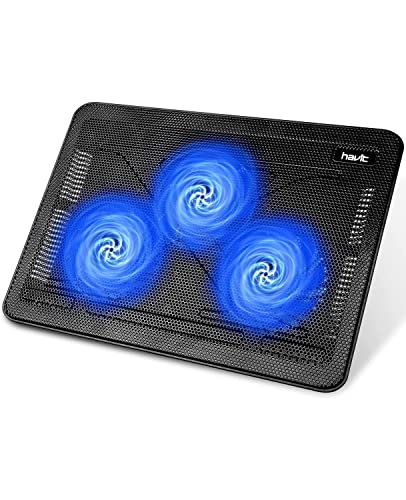
- Three quiet USB-powered fans
- Slim and lightweight design
- Two height settings and extra USB port
Best For: Portable cooling for 15.6–17-inch laptops
Best Overall Value
Thermalright Peerless Assassin 120 SE

- Dual-tower design with six AGHP heat pipes
- Two 120mm PWM fans included
- Supports Intel and AMD sockets
Best For: Performance desktop builds with full-size cooler clearance
Best Low-Profile Pick
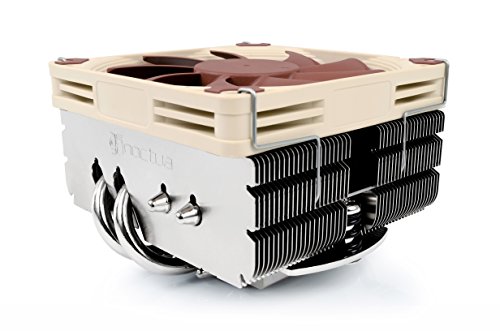
- Only 65mm tall for compact builds
- Avoids RAM and PCIe overhang on most boards
- Includes slim PWM fan and NT-H1 paste
Best For: ITX, HTPC, and small-form-factor computers
Best Feature-Rich Cooler
Thermalright Peerless Assassin 120 Vision MAX

- Built-in 5-inch IPS monitoring display
- Dual-tower design with six heat pipes
- Two fans reach 2,150 RPM and 69 CFM
Best For: ATX builds wanting cooling plus customizable monitoring
Best Balanced Cooling

- Patented 3DHP heat-pipe design
- Pre-installed Mobius 120 PWM fan
- Intel and AMD socket support
Best For: Mainstream gaming and productivity desktops
Best Premium Quiet Cooling
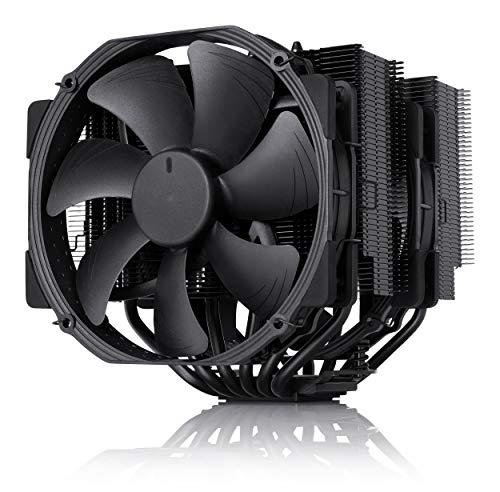
- Dual-tower cooler with six heatpipes
- Two quiet 140 mm PWM fans
- Six-year manufacturer warranty
Best For: Overclockers and quiet-PC enthusiasts
Best Compact RGB Design

- Compact 133 mm tower height
- Four direct-touch 6 mm heatpipes
- Customizable ARGB top cover
Best For: Compact Intel or AMD desktops with RGB builds
Balanced CPU Cooling – Hyper 212 Black
The Cooler Master Hyper 212 Black is a practical choice for shoppers comparing computer air coolers under 100. Its four heat pipes, copper base, and 120mm PWM fan provide a capable cooling setup for compatible AMD and Intel desktop processors, while the 152mm height supports broad chassis compatibility.
Best For: Desktop builders wanting a proven, easy-to-install CPU air cooler for AMD AM5/AM4 or Intel LGA1851/1700 systems.
Pros:
- Four heat pipes and a copper base support effective heat transfer.
- Quiet PWM fan operates from 690 to 2,500 RPM.
- Supports current AMD and Intel platforms and includes thermal paste.
Cons:
- The 152mm height still requires checking your case’s CPU-cooler clearance.
- It is intended for desktop CPUs, not laptops.
With straightforward mounting hardware, a compact tower design, and a two-year warranty, the Hyper 212 Black is a sensible all-around option for mainstream desktop cooling.
Five-Fan Laptop Cooling – Kootek Cooling Pad
The Kootek Laptop Cooling Pad is a flexible option among computer air coolers under 100 for laptop users. It combines five USB-powered fans with six adjustable height settings, letting you improve airflow and viewing comfort while supporting laptops from 12 to 17 inches.
Best For: Laptop users who want adjustable cooling, ergonomic positioning, and extra USB connectivity.
Pros:
- Five fans provide broad cooling coverage, with selectable fan operation.
- Six height settings support more comfortable gaming, viewing, or work.
- Built-in dual USB hub adds convenient peripheral connectivity.
- Front stoppers help keep 12- to 17-inch laptops secure.
Cons:
- The included cable uses USB-to-USB; Type-C devices need an adapter.
- Best fan performance requires connection to a 5V, 1A adapter.
- Blue LEDs may not suit every desk setup.
Its metal-mesh surface, adjustable stand, and selectable fan controls make this a versatile cooling pad for larger laptops, provided you plan for its USB power requirements.
Quiet Tower Performance – Assassin X120 Refined SE
The Thermalright Assassin X120 Refined SE is a strong value-focused pick among computer air coolers under 100. Its four 6mm heat pipes, aluminum heatsink, and 120mm PWM fan deliver a compact tower design with stated airflow of up to 66.17 CFM and noise rated up to 25.6 dB(A).
Best For: Desktop builders seeking quiet, compact air cooling for compatible AMD AM4/AM5 or Intel platforms.
Pros:
- Four AGHP heat pipes are designed to maintain performance across mounting orientations.
- 148mm height suits many medium-sized computer cases.
- Supports a wide range of Intel and AMD sockets, including LGA1851 and AM5.
- 120mm PWM fan combines high stated airflow with low rated noise.
Cons:
- Case clearance should still be verified before installation.
- Its broad socket compatibility may require selecting the correct included mounting hardware.
At 0.645 kg and under six inches tall, the Assassin X120 Refined SE offers a well-balanced combination of compatibility, airflow, and quiet operation for everyday desktop builds.
Portable Laptop Airflow – havit HV-F2056 Cooling Pad
The havit HV-F2056 is a slim, portable option for shoppers looking at computer air coolers under 100 for larger laptops. Three USB-powered fans circulate air beneath 15.6- to 17-inch notebooks, while the metal-mesh surface and two height settings add stability and basic ergonomic adjustment.
Best For: Laptop owners who prioritize a lightweight cooling pad with quiet fans and simple height adjustment.
Pros:
- Three ultra-quiet fans support airflow under the laptop.
- Thin, lightweight design is convenient for carrying.
- Two adjustable height settings can improve viewing and typing comfort.
- Extra USB port and power switch add convenience.
Cons:
- It is designed for 15.6- to 17-inch laptops rather than smaller models.
- Type-C devices require a Type-C-to-USB adapter for the included cable.
- Only two height settings are provided.
The HV-F2056 keeps the design simple and portable, making it a practical everyday cooling stand when you want quiet airflow without a bulky setup.
Best Overall Value – Thermalright Peerless Assassin 120 SE
For shoppers comparing computer air coolers under 100, the Thermalright Peerless Assassin 120 SE stands out as a strong performance-focused option. Its dual-tower design, six heat pipes, and two 120mm PWM fans provide substantial cooling capacity, while the 155mm height suits many mainstream desktop cases. Check your case and motherboard clearance before buying.
Best For: Gaming and performance-oriented desktop builds that have room for a full-size dual-tower cooler.
Pros:
- Dual-tower heatsink with six 6mm AGHP heat pipes and a pure copper base.
- Includes two 120mm PWM fans rated at up to 66.17 CFM and 1,550 RPM.
- Supports Intel LGA 115x, 1200, 1700, and 17XX platforms plus AMD AM4 and AM5.
- Specified noise level is up to 25.6 dB(A).
Cons:
- The 155mm height and 125mm by 135mm footprint require careful case and motherboard clearance checks.
- AMD installation uses the motherboard’s original backplate, which is not included.
The Peerless Assassin 120 SE is a practical choice when cooling capacity matters more than a compact footprint. Its included dual-fan setup and broad socket support make it versatile, provided your case can accommodate its size.
Best Low-Profile Pick – Noctua NH-L9x65
The Noctua NH-L9x65 is a sensible choice among computer air coolers under 100 for compact systems. At just 65mm tall, it is designed for HTPC, ITX, and small-form-factor builds, with a layout that avoids overhanging RAM or PCIe slots on most current motherboards.
Best For: Small-form-factor, ITX, and HTPC systems using processors with low to moderate heat dissipation.
Pros:
- Compact 65mm height helps it fit in space-constrained cases.
- Designed not to overhang RAM or PCIe slots on most current motherboards.
- Includes a PWM-controlled NF-A9x14 slim fan, Low-Noise Adaptor, NT-H1 thermal paste, and SecuFirm2 mounting system.
- Supports Intel LGA1851, LGA1700, LGA1200, LGA115x, and AMD AM4 and AM5.
Cons:
- Its low-profile design is recommended for CPUs with low to moderate heat dissipation rather than demanding high-heat workloads.
- The 92mm slim fan has less airflow capacity than the larger dual-fan coolers in this roundup.
Choose the NH-L9x65 when physical clearance and quiet operation are the priorities. Its compact dimensions and included installation accessories simplify small-system builds, but users with high sustained CPU loads should consider a larger cooler.
Best Feature-Rich Cooler – Thermalright Peerless Assassin 120 Vision MAX
For buyers seeking computer air coolers under 100 with a distinctive feature set, the Thermalright Peerless Assassin 120 Vision MAX combines a dual-tower heatsink with a built-in 5-inch IPS display. It pairs six heat pipes and two high-speed fans with system monitoring and customizable visuals through TRCC software, but its 164mm height makes clearance especially important.
Best For: ATX desktop builders who want strong air cooling plus an integrated monitoring display and customizable screen content.
Pros:
- Dual-tower design uses six copper heat pipes, a nickel-plated copper base, and two 120mm fans.
- Built-in 5-inch IPS screen supports system monitoring, custom backgrounds, and video playback through TRCC software.
- Fans reach up to 2,150 RPM with 69 CFM airflow and a specified noise level of up to 27 dB(A).
- Supports Intel LGA1851, 1700, 115x, 1200 and AMD AM4 and AM5.
Cons:
- At 164mm tall, it needs more case clearance than the Peerless Assassin 120 SE.
- The display requires power and data connection through the motherboard’s 9-pin USB interface.
- AMD installation requires the motherboard’s original backplate, which is not included.
The Vision MAX is aimed at builders who want their cooler to add both performance and visual functionality. It is a compelling premium-style option when your case supports its height and you are comfortable connecting and configuring the display.
Best Balanced Cooling – Cooler Master Hyper 212 3DHP
If you want one of the more versatile computer air coolers under 100, the Cooler Master Hyper 212 3DHP combines a compact tower design with a pre-installed PWM fan. Its patented 3DHP heat pipes are designed to improve cooling over standard designs, while broad Intel and AMD socket support makes it a practical choice for many desktop builds.
Best For: Mainstream gaming and productivity desktops that need capable, quieter air cooling with straightforward installation.
Pros:
- Patented 3DHP design is rated for 30% better cooling than standard designs.
- Pre-installed Mobius 120 PWM fan helps simplify installation and manage noise.
- Supports Intel LGA1851/1700 and AMD AM5/AM4 sockets.
- Includes a five-year manufacturer warranty.
Cons:
- Its 158 mm height may not fit especially narrow cases.
- The notes do not specify a TDP rating.
The Hyper 212 3DHP is a sensible all-around option when you want updated cooling hardware, wide platform compatibility, and a relatively simple installation without moving to liquid cooling.
Best Premium Quiet Cooling – Noctua NH-D15 chromax.Black
The Noctua NH-D15 chromax.Black is a premium pick among computer air coolers under 100 when low noise and high cooling capacity are priorities. Its large dual-tower heatsink, six heatpipes, and two 140 mm PWM fans are designed for demanding desktops, including systems using enthusiast-grade Intel and AMD processors.
Best For: Overclockers and quiet-PC enthusiasts with spacious cases who want high-performance air cooling.
Pros:
- Dual-tower design uses six heatpipes and dual 140 mm fans.
- Listed noise level is 24.6 dB, with Low-Noise Adaptors included.
- Supports Intel LGA1851, LGA1700, LGA1200, LGA115x and AMD AM5/AM4.
- Includes NT-H1 thermal paste, SecuFirm2 mounting, and a six-year warranty.
Cons:
- Its 168 mm height requires a case with sufficient CPU-cooler clearance.
- The dual-tower, 1.3 kg design is less compact than simpler air coolers.
The NH-D15 chromax.Black is best suited to buyers who can accommodate its substantial size and want a feature-rich, quiet cooler backed by a long warranty and a complete accessory kit.
Best Compact RGB Design – Gamma A40 ARGB
The Gamma A40 ARGB is a compact option for shoppers comparing computer air coolers under 100 for smaller cases. Its 133 mm tower height, four direct-touch heatpipes, and 100 mm PWM fan provide a space-conscious cooling setup, while the ARGB top cover adds customizable lighting for display-focused builds.
Best For: Compact Intel or AMD desktops that need modest tower cooling and integrated ARGB styling.
Pros:
- 133 mm height is designed to fit a broad range of cases.
- Four 6 mm direct-touch heatpipes increase the contact area.
- Supports up to 200W TDP according to the supplied specifications.
- ARGB top cover supports customizable effects and device synchronization.
Cons:
- The 100 mm fan has a listed airflow capacity of 41 CFM, below larger-fan designs.
- Its listed 29.5 dB noise level is higher than the Noctua option in this roundup.
- The cooler uses a 3-pin power connector rather than a 4-pin connector.
Choose the Gamma A40 ARGB when case clearance and lighting matter more than maximum heatsink size. It offers mainstream socket compatibility and a compact, visually distinctive design.
How We Picked the Best Computer Air Coolers Under 100
We selected products across the main categories shoppers consider: desktop CPU air coolers, low-profile models for compact builds, and laptop cooling pads. We looked for useful cooling hardware, broad device compatibility, practical fan control, and designs suited to different performance and space requirements.
Because these products serve different purposes, we did not treat a laptop pad and a tower CPU cooler as interchangeable. Instead, each option is judged by how well it fits its intended system, whether that means improving laptop ventilation or handling sustained desktop processor loads.
Quick Comparison
| Type | Best For | What to Prioritize |
|---|---|---|
| Single-tower CPU cooler | Everyday and midrange desktops | Socket support, heatsink size, and fan control |
| Dual-tower CPU cooler | High-performance processors | Case clearance, RAM clearance, and thermal capacity |
| Low-profile CPU cooler | Small-form-factor PCs | Cooler height and motherboard compatibility |
| Laptop cooling pad | Gaming and demanding laptop use | Laptop size, fan placement, angle, and USB connectivity |
Key Buying Factors for Computer Air Coolers Under 100
Compatibility and Clearance
Check CPU socket support before buying a desktop cooler, including whether the included mounting hardware supports your AMD or Intel platform. Also measure cooler height against your case and check for interference with tall memory modules or graphics cards. For laptop pads, confirm the supported screen-size range and make sure the base fits your laptop securely.
Cooling Capacity
More heat pipes, larger fin stacks, and additional fans can improve heat dissipation, but they also increase size and weight. A compact single-tower cooler is often sufficient for an everyday or midrange CPU, while demanding processors benefit from a larger dual-tower design. Laptop pads mainly improve airflow beneath the chassis rather than replacing the laptop’s internal cooling system.
Noise and Fan Control
PWM fans can adjust speed according to temperature, helping balance cooling and acoustics. Look for quiet-focused designs if the computer sits close to your workspace, but remember that any cooler may become louder under sustained heavy loads.
Installation and Maintenance
Large desktop coolers require careful installation and enough room around the motherboard. Confirm that the mounting system matches your build and clean dust from the fins and fan periodically. Laptop pads are easier to install but may use one or more USB ports and add to the system’s travel footprint.
Who Should Buy Which Computer Air Coolers Under 100?
Choose a laptop cooling pad if you use a portable computer for gaming, video work, or long sessions and want to improve airflow without opening the chassis. A single-tower CPU cooler is the practical choice for most budget and mainstream desktop upgrades.
Small-form-factor builders should focus on a low-profile cooler and verify every clearance measurement before ordering. If you run a power-hungry processor, overclock, or prioritize lower sustained temperatures, a dual-tower model offers greater thermal headroom—provided your case and motherboard can accommodate it.
Finally, treat appearance features such as ARGB lighting or display panels as secondary considerations. Compatibility, cooling performance, noise, and installation fit should determine your purchase.