
A dependable power supply is the foundation of a stable PC, whether you are building a budget gaming system, upgrading to a modern graphics card, or replacing an aging unit. The right model balances wattage, efficiency, connector support, noise, and long-term reliability without exceeding your budget.
We selected 10 computer power supplies under $200 across several power levels and feature sets, including ATX 3.1 models with PCIe 5.1 support, fully modular gaming PSUs, and lower-cost options for mainstream systems.
Best 10 Computer Power Supplies Under 200 Picks for 2026
Best All-Around Choice

- ATX 3.1 and PCIe 5.1 ready
- Fully modular with native 12V-2x6 cable
- Quiet 120mm fan and seven-year warranty
Best For: Modern gaming and performance PCs needing 850W
Best Quiet Premium Option

- Platinum efficiency ratings
- Semi-passive 140mm cooling
- ATX 3.1 with native 12V-2x6 connector
Best For: Quiet, efficient 750W gaming and workstation PCs
Best High-Capacity Pick

- 1000W capacity for demanding systems
- ATX 3.1 and PCIe 5.1 ready
- Fully modular with native 12V-2x6 cable
Best For: High-performance desktops and future upgrades
Budget Bronze Choice

- 500W 80 PLUS Bronze output
- Five-year warranty and protection features
- Quiet fan with black non-modular cables
Best For: Budget-conscious everyday PC builds
Modular Gaming Value

- 650W 80+ Gold certified output
- Semi-modular cable design
- 135mm thermal fan and GPU connectors
Best For: Gaming PCs with compatible ATX components
Next-Gen Ready Pick
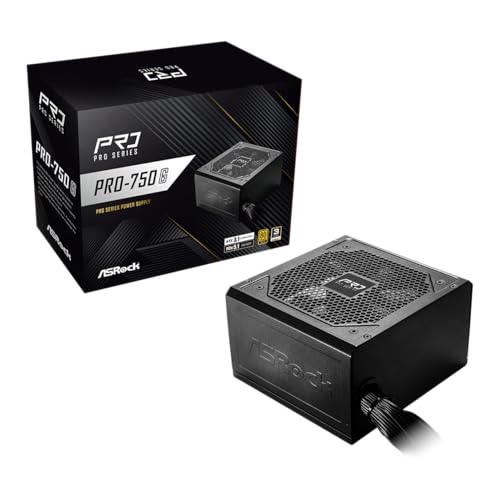
- 750W 80 Plus Gold certified output
- ATX 3.1 and PCIe 5.1 compliant
- Native 12V-2x6 connector
Best For: Modern mid-range and high-end PC builds
Reliable Value Pick

- 500W continuous ATX output
- 80 PLUS certified with Active PFC
- Five-year warranty and built-in protections
Best For: Budget desktop PCs with moderate power needs
Modern Gaming Upgrade

- 750W 80 PLUS Gold output
- Fully modular ATX 3.1 design
- Native 12V-2x6 cable and 10-year warranty
Best For: Current-generation gaming PCs and GPU upgrades
Compact Next-Gen Choice

- 750W 80 PLUS Gold output
- Compact, fully modular chassis
- PCIe 5.1 12V-2x6 cable included
Best For: Compact gaming PCs with newer GPUs
Best All-Around Choice – CORSAIR RM850e 850W
For shoppers comparing computer power supplies under 200, the CORSAIR RM850e offers a strong balance of capacity, modern compatibility, and manageable noise. Its 850W output suits many performance-focused desktop builds, while fully modular cabling helps reduce unnecessary cable clutter.
Best For: Modern gaming and performance PCs needing 850W of ATX 3.1 power.
Pros:
- ATX 3.1 and PCIe 5.1 ready with a native 12V-2×6 cable.
- Fully modular design connects only the cables your build requires.
- 120mm rifle-bearing fan and calculated fan curve help limit noise.
- 105°C-rated capacitors and a seven-year manufacturer warranty support long-term use.
Cons:
- The 850W capacity may be more than needed for basic systems.
- It uses a 120mm fan rather than the larger 140mm fan found on some alternatives.
The RM850e is a practical middle-ground option when you want current GPU connectivity, flexible installation, and dependable 850W capacity without stepping up to a 1000W unit.
Best Quiet Premium Option – be quiet! Power Zone 2 750W
Among computer power supplies under 200, the be quiet! Power Zone 2 750W stands out for efficiency-focused and noise-conscious builds. Its Platinum certifications, semi-passive cooling, and modern GPU support make it well suited to powerful desktops where quiet operation matters.
Best For: Quiet, efficient gaming or workstation PCs with a 750W power requirement.
Pros:
- 80 PLUS Platinum and Cybenetics Platinum efficiency ratings.
- 140mm Pure Wings 3 fan can stop completely at low loads.
- ATX 3.1 design includes native 12V-2×6 and three PCIe 6+2-pin connectors.
- Handles transient power excursions up to double its rated power and includes a 10-year warranty.
Cons:
- Its 750W output provides less headroom than the 850W and 1000W options.
- Post-ventilation may keep the fan running for two to five minutes after demanding use.
This is an appealing choice for buyers prioritizing high efficiency and low noise, especially when 750W is sufficient for the planned CPU and graphics card combination.
Best Proven Value – Cooler Master MWE Gold 850 V2
The Cooler Master MWE Gold 850 V2 is a straightforward option for shoppers seeking computer power supplies under 200 with 850W capacity and flexible installation. Its fully modular design, flat cables, and dual EPS connectors make it convenient for current desktop builds.
Best For: Mainstream performance PCs that need flexible 850W power delivery.
Pros:
- 80 PLUS Gold efficiency with stated 90% efficiency.
- Fully modular flat black cables help with routing and airflow.
- Two EPS connectors support broad motherboard compatibility.
- Designed for operation in temperatures up to 50°C and includes semi-fanless low-noise operation.
Cons:
- Its five-year warranty is shorter than the warranties on the other listed models.
- The supplied notes do not identify ATX 3.1 or PCIe 5.1 support.
- At 6.1 pounds, it is heavier than the listed Corsair 850W model.
The MWE Gold 850 V2 is a sensible fit for a conventional 850W system where modular cabling and Gold-level efficiency matter more than the newest GPU power standards.
Best High-Capacity Pick – CORSAIR RM1000e 1000W
For buyers comparing computer power supplies under 200 who need substantial headroom, the CORSAIR RM1000e delivers 1000W in a fully modular ATX design. It combines modern graphics-card connectivity with low-noise operation and efficient low-load behavior.
Best For: High-performance desktops with demanding processors, graphics cards, or future upgrade plans.
Pros:
- 1000W output provides more capacity for demanding components and upgrades.
- ATX 3.1 and PCIe 5.1 ready with a native 12V-2×6 cable.
- Fully modular cabling simplifies installation and cable management.
- 120mm rifle-bearing fan, 105°C-rated capacitors, and a seven-year warranty support dependable use.
Cons:
- 1000W capacity may be unnecessary for lower-power or midrange builds.
- It uses a 120mm fan, rather than a larger 140mm cooling fan.
The RM1000e is the strongest capacity choice in this group, making it a practical option when your system has high power demands or you want extra room for future component upgrades.
Budget Bronze Choice – ARESGAME AGV 500W
For shoppers comparing computer power supplies under 200, the ARESGAME AGV Series offers a straightforward 500W ATX option with 80 PLUS Bronze efficiency. Its non-modular design, black cables, quiet 120mm fan, and five-year warranty suit practical everyday builds.
Best For: Budget-conscious PCs and mainstream systems that need a dependable 500W ATX power supply.
Pros:
- 500W continuous output with 80 PLUS Bronze certification.
- Includes OVP, UVP, OPP, and SCP protection.
- Five-year manufacturer warranty and a 120mm ultra-quiet fan.
- Black cables provide a cleaner appearance than multicolored alternatives.
Cons:
- Non-modular cables can make cable management more challenging.
- Its 500W capacity may be limiting for higher-power gaming configurations.
The AGV Series is a sensible low-cost choice when your components fit within a 500W budget and you prefer warranty coverage over modular convenience.
Modular Gaming Value – Apevia Galaxy 650W
Among computer power supplies under 200, the Apevia ATX-GX650W stands out for combining 650W capacity, 80+ Gold certification, and a semi-modular layout. It is designed for gaming-oriented systems that benefit from flexible cabling and a single 12V output.
Best For: Gaming PCs and performance builds needing 650W with semi-modular cable management.
Pros:
- 650W output with 80+ Gold certification.
- Semi-modular design helps reduce unused cables inside the case.
- 135mm thermally controlled fan is designed for quieter cooling.
- Includes PCI-E connectors and supports SLI/Crossfire configurations.
Cons:
- The listed design supports ATX 12V 2.3 rather than newer standards.
- Users must connect the appropriate internal cables; plugging in the wall cord alone will not start the PC.
With its higher wattage and semi-modular format, the Galaxy 650W is a flexible option for compatible gaming builds, provided its connector requirements match your components.
Next-Gen Ready Pick – ASRock PRO 750G
For buyers seeking computer power supplies under 200 with newer connectivity, the ASRock PRO 750G pairs 750W output with 80 Plus Gold certification, ATX 3.1, and PCIe 5.1 compliance. Its native 12V-2×6 connector is designed for compatible modern graphics cards.
Best For: Mid-range to high-end PCs using current-generation components and compatible graphics cards.
Pros:
- 750W capacity with up to 90% energy efficiency.
- ATX 3.1 and PCIe 5.1 compliant for newer hardware standards.
- Native 12V-2×6 connector supports up to 450W power delivery.
- 120mm low-noise fan and three-year manufacturer warranty.
Cons:
- Non-modular design may complicate cable management.
- Compatibility and chassis space should be verified before purchase.
- The listed input-voltage range is 100–120V AC.
The PRO 750G is the most forward-looking option here, especially for a modern GPU build, but confirm case clearance, input voltage, and total system requirements first.
Reliable Value Pick – Thermaltake Smart 500W
For buyers comparing computer power supplies under 200, the Thermaltake Smart 500W is a straightforward choice for compatible personal computers that need dependable, continuous ATX power without modular-cable complexity. It combines 80 PLUS efficiency, a 120mm cooling fan, and standard system protections.
Best For: Budget-conscious desktop builds and everyday systems with moderate power requirements.
Pros:
- Provides 500W of continuous output at 40°C.
- 80 PLUS certified with Active PFC.
- Includes two PCIe 6+2-pin connectors.
- Backed by a five-year warranty and multiple protection features.
Cons:
- Non-modular cabling can make installation and cable management less flexible.
- Its 500W capacity is less suited to high-power configurations.
The Smart 500W makes sense when affordability and basic compatibility matter more than modular design or newer graphics-card power standards. Confirm your system’s connector and wattage requirements before buying.
Modern Gaming Upgrade – MSI MAG A750GL PCIE5
Among computer power supplies under 200, the MSI MAG A750GL PCIE5 stands out for gaming systems that need more headroom and current-generation connectivity. Its 750W output, 80 PLUS Gold certification, fully modular design, and ATX 3.1 and PCIe 5.1 support target newer component configurations.
Best For: Modern gaming PCs and builders who want modular installation with next-generation GPU compatibility.
Pros:
- Delivers 750W with 80 PLUS Gold certification.
- Fully modular design helps simplify cable management.
- Supports ATX 3.1 and PCIe 5.1 standards.
- Includes a native dual-color 12V-2×6 cable and a 10-year limited warranty.
Cons:
- Its higher wattage may be unnecessary for basic office systems.
- The supplied details do not specify the complete connector count or fan behavior.
This MSI unit is a strong fit for buyers planning a contemporary gaming build and wanting long-term warranty coverage. Verify case clearance and the exact power connectors required by your graphics card.
Compact Next-Gen Choice – Rosewill VMG 750W
The Rosewill VMG 750W is a flexible option for shoppers seeking computer power supplies under 200 with modern GPU support and a compact chassis. It pairs 80 PLUS Gold efficiency with full modularity, ATX 3.0 and 3.1 compatibility, and a dedicated PCIe 5.1 12V-2×6 cable.
Best For: Compact gaming builds and users preparing for newer graphics cards.
Pros:
- 750W 80 PLUS Gold-certified output.
- Full modular design and a compact 140×150×86mm chassis.
- Dedicated PCIe 5.1 12V-2×6 cable supports up to 600W direct GPU power.
- Includes a 120mm FDB fan, Japanese electrolytic capacitors, and six protection features.
Cons:
- Its five-year warranty is shorter than the MSI model’s listed coverage.
- ATX form factor may still require careful case compatibility checks despite the compact chassis.
Choose the VMG750 when compact dimensions, modular cabling, and next-generation GPU connectivity are priorities. Its thermal features and protection suite add useful reassurance for performance-oriented builds.
How We Picked the Best Computer Power Supplies Under 200
We focused on units that offer useful value for current PC builds rather than judging wattage alone. Our selection considers rated output, 80 PLUS or Cybenetics efficiency claims, modular cable design, ATX and PCIe generation support, native 12V-2×6 connectivity, fan noise features, physical size, warranty coverage, and suitability for different graphics cards.
The list includes established high-capacity options from Corsair, be quiet!, Cooler Master, MSI, ASRock, Thermaltake, Rosewill, Apevia, and ARESGAME. Always verify the exact specification and warranty terms before buying, since regional versions and refreshed models can differ.
Quick Comparison
| Power range | Best suited for | Features to prioritize |
|---|---|---|
| 500W–650W | Office PCs and entry-level gaming | Reliable protections, adequate PCIe cables, quiet cooling |
| 750W–850W | Mainstream and high-performance gaming | ATX 3.1, PCIe 5.1, modular cables, Gold efficiency |
| 1000W | Powerful GPUs, workstation builds, upgrades | Transient-load handling, native 12V-2×6 support, strong warranty |
Key Buying Factors for Computer Power Supplies Under $200
Wattage and Headroom
Choose a PSU that exceeds your system’s typical load rather than matching it exactly. A 500W model can suit an office PC or modest graphics card, while 750W is a flexible starting point for many modern gaming builds. High-end GPUs and heavily upgraded systems may justify 850W or 1000W. Check the graphics card maker’s recommendation and account for CPU boost behavior.
ATX 3.1 and GPU Connectors
ATX 3.1 and PCIe 5.1 support can improve compatibility with newer graphics cards. A native 12V-2×6 cable is generally preferable to relying on adapters, provided it is connected fully and routed without sharp bends near the plug.
Efficiency, Modularity, and Noise
Gold or Platinum-rated units can reduce wasted energy and heat, although efficiency ratings do not guarantee overall build quality. Fully modular PSUs make cable management easier; semi-modular designs can save money while retaining flexibility. Look for a fan mode or low-noise fan if the computer will sit near your desk.
Protection and Warranty
Prioritize documented protections such as over-voltage, over-current, short-circuit, and over-temperature protection. A longer warranty can also indicate greater manufacturer confidence, but it should not replace checking independent testing and the model’s exact platform.
Who Should Buy Which Computer Power Supplies Under 200?
For an entry-level or office PC: A 500W or 650W unit is usually sufficient, provided it has the necessary CPU and graphics-card connectors and comes from a reputable seller.
For most gaming builds: A 750W Gold-rated modular PSU offers a strong balance of capacity, efficiency, cable management, and upgrade flexibility.
For newer or demanding GPUs: Choose an 850W or 1000W ATX 3.1 model with PCIe 5.1 and a native 12V-2×6 connection. This is especially useful if you want to avoid future cable or adapter changes.
For compact or tidy builds: Check the unit’s depth before ordering. A shorter fully modular model may simplify installation, but confirm that the included cables reach every component without extensions.