
The right microphone can make voiceover sound clearer, fuller, and more professional without requiring a complicated studio. This roundup compares 10 condenser microphones for voiceover across USB, XLR, and hybrid setups.
Whether you are recording audiobooks, videos, podcasts, e-learning, or auditions, focus on connection type, room conditions, monitoring, and the kind of control you need during recording.
Best 10 Condenser Microphones for Voiceover Picks for 2026
Studio-Ready Vocal Pick
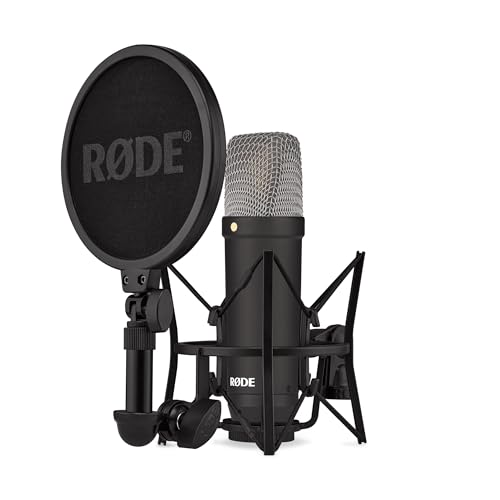
- Complete XLR vocal package with shock mount and pop filter
- Very low 4.5 dBA self-noise
- Tight cardioid pattern helps reject room sound
Best For: Interface-based voiceover and vocal recording
Best USB Control Suite

- USB-C plug-and-play connection for PC and Mac
- Clipguard 2.0 and Auto Gain simplify level management
- Built-in DSP, headphone monitoring, and tap-to-mute
Best For: Streaming and computer-based voiceover
Classic Budget Studio Choice
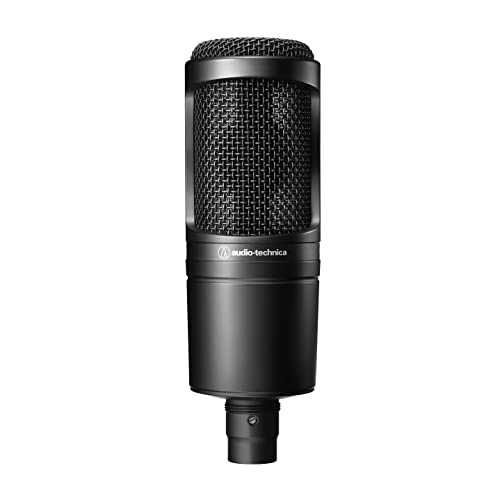
- Cardioid XLR design for home and project studios
- High SPL handling and wide dynamic range
- Low-mass diaphragm supports detailed transient response
Best For: Entry-level interface-based voiceover recording
Simple Desktop Voiceover Pick

- Plug-and-play USB setup with included tripod stand
- Cardioid pickup focuses on the main voice
- Built-in volume knob and durable metal construction
Best For: Beginner computer-based voiceover and streaming
Balanced Studio Value

- Detailed 20 Hz–20 kHz vocal response
- Cardioid pattern helps reduce room noise
- Includes shock mount and carrying case
Best For: XLR home studios, podcasting, and voiceover
Plug-and-Play Starter Kit

- USB setup requires no external sound card
- Includes arm, shock mount, pop filter, and windscreen
- 192 kHz/24-bit chipset for high-resolution recording
Best For: Beginner computer-based voiceover and podcasting
Flexible Studio Control
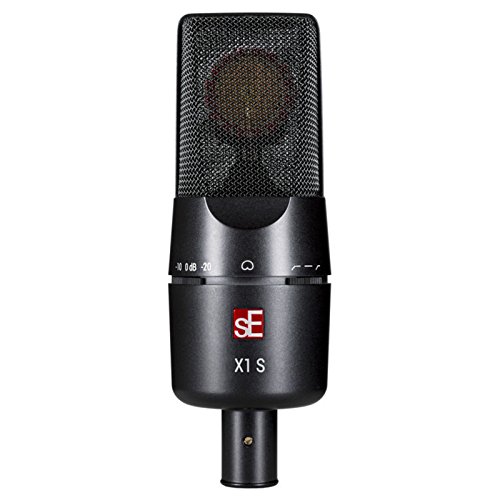
- One-inch hand-tuned capsule for detailed sound
- Switchable high-pass filters manage rumble
- Pads and 160 dB SPL handling suit dynamic sources
Best For: XLR voiceover studios and versatile recording
Best Hybrid Kit

- USB and XLR connectivity
- 192kHz/24-bit USB recording
- Complete arm-stand accessory kit
Best For: Voiceover creators who want flexible USB and XLR recording
Best Multipattern Option

- Simple USB plug-and-play setup
- Four selectable pickup patterns
- Built-in controls and headphone monitoring
Best For: Beginners recording voiceover and varied computer audio
Best Budget Recording Bundle

- Plug-and-play USB recording
- Cardioid capsule for front-facing vocals
- Boom arm and double pop filter included
Best For: Home voiceover and podcasting with a ready-to-use kit
Studio-Ready Vocal Pick – RØDE NT1 Signature Series
For shoppers seeking condenser microphones for voiceover, the RØDE NT1 Signature Series is a complete XLR vocal setup with a large-diaphragm design, tight cardioid pattern, and notably low self-noise. It includes the key accessories needed to begin recording once paired with an audio interface.
Best For: Voiceover artists, vocalists, and streamers building an interface-based home studio.
Pros:
- Includes SM6 shock mount, pop filter, 6-meter XLR cable, and dust cover.
- 4.5 dBA self-noise helps keep quiet recordings clean.
- Cardioid pickup focuses on the voice and rejects sound from the room.
- Legendary NT1 voicing in a durable metal enclosure.
Cons:
- Requires an audio interface and XLR connection.
- Does not offer direct USB connectivity.
The NT1 Signature is a strong choice when you want a traditional studio microphone package rather than a plug-and-play USB solution. Its included accessories make the transition into voiceover recording simpler.
Best USB Control Suite – Elgato Wave:3 MK.2
The Elgato Wave:3 MK.2 is a convenient option among condenser microphones for voiceover if you want USB-C setup, direct monitoring, and software-based audio control. Its cardioid condenser capsule is paired with automatic gain and Clipguard 2.0 protection to reduce setup guesswork.
Best For: Streamers, creators, and voiceover users who prefer a computer-connected USB microphone with onboard controls.
Pros:
- Connects directly to a PC or Mac through USB-C.
- Clipguard 2.0 helps prevent clipping, while Auto Gain sets levels quickly.
- Built-in voice enhancer, compressor, EQ, and Wave Link routing.
- Multifunction dial, tap-to-mute control, LED feedback, and headphone monitoring.
Cons:
- USB connectivity is less suited to an existing XLR interface setup.
- Its software and DSP features may be more than a simple recording workflow requires.
Choose the Wave:3 MK.2 when fast computer recording and hands-on control matter more than a traditional XLR chain. The integrated effects and monitoring features are particularly useful for streaming and repeated voice sessions.
Classic Budget Studio Choice – Audio-Technica AT2020
The Audio-Technica AT2020 remains a straightforward pick among condenser microphones for voiceover, offering a cardioid XLR design for project and home studios. Its high SPL handling, wide dynamic range, and low-mass diaphragm support a versatile recording setup when paired with phantom power.
Best For: Home-studio users who want a proven, affordable XLR microphone for voice and recording applications.
Pros:
- Cardioid pattern reduces pickup from the sides and rear.
- High SPL handling and wide dynamic range provide recording flexibility.
- Low-mass diaphragm supports extended frequency and transient response.
- Uses a standard three-pin XLRM output.
Cons:
- Requires an audio interface and phantom power.
- Microphone-only package does not list a shock mount, pop filter, or cable.
The AT2020 is a practical foundation for a project studio, especially if you already own an interface and supporting accessories. Its focused pickup and versatile handling make it suitable for general voice recording without unnecessary features.
Simple Desktop Voiceover Pick – FIFINE K669B USB Microphone
The FIFINE K669B is a practical choice among condenser microphones for voiceover when you need a direct USB desktop setup. It includes a tripod stand, USB cable, and volume knob, while its cardioid pattern is designed to focus on the main speaker for recording, streaming, and meetings.
Best For: Beginners, streamers, online-course creators, and voiceover users recording directly on a computer.
Pros:
- Plug-and-play USB connection with USB-A/C compatibility through the included cable.
- Includes a stable tripod stand and convenient microphone volume knob.
- Cardioid condenser design captures the main voice and reduces background pickup.
- Durable metal construction and compatibility with PC, Mac, PS4, and PS5.
Cons:
- Not compatible with Xbox or phones according to the supplied notes.
- USB desktop format offers fewer traditional studio connection options than XLR.
- Application settings may need adjustment to prevent automatic volume changes.
The K669B suits users who want to start recording without a 48V phantom-power supply or audio interface. Its included stand and volume control make it especially convenient for desk-based voiceover and streaming.
Balanced Studio Value – MXL 990
The MXL 990 is a practical choice among condenser microphones for voiceover when you want detailed XLR sound for a home studio, podcast setup, or recording space. Its cardioid pattern helps focus on the speaker while reducing sound from the sides and rear, and the included shock mount and carrying case add useful setup value.
Best For: Voiceover artists, podcasters, singers, and home-studio users with an audio interface or preamp that supplies +48V phantom power.
Pros:
- Large-diaphragm condenser design with a 20 Hz–20 kHz response for detailed vocal recording.
- Cardioid pattern helps reject unwanted room sound from the sides and back.
- Includes a shock mount, stand adapter, and carrying case.
- Balanced XLR output and metal enclosure suit a traditional studio setup.
Cons:
- Requires +48V phantom power, so it cannot connect directly to a standard computer without compatible equipment.
- XLR connectivity involves more setup than a plug-and-play USB microphone.
The MXL 990 makes sense for buyers building an expandable XLR recording chain and wanting a versatile microphone for voiceover and other vocal work. Confirm that your interface or preamp provides phantom power before buying.
Plug-and-Play Starter Kit – MAONO A04 USB Microphone
The MAONO A04 is one of the more convenient condenser microphones for voiceover if you record directly to a computer. Its USB connection needs no separate sound card or driver software, while the included arm stand, pop filter, windscreen, and shock mount provide a complete starting setup.
Best For: Beginners, remote workers, podcasters, streamers, and voiceover creators who want a USB microphone for computers, compatible consoles, or mobile devices.
Pros:
- USB plug-and-play connectivity avoids the need for an external audio interface.
- 192 kHz/24-bit chipset supports high-resolution recording.
- 16 mm condenser capsule and cardioid pattern are designed for clear speech capture.
- Kit includes an adjustable arm, shock mount, pop filter, foam windscreen, and USB cables.
Cons:
- Not compatible with Xbox according to the supplied notes.
- The desk clamp is intended for desktops less than 2.1 inches thick.
- Its 30 Hz–16 kHz frequency range is narrower than the range listed for some studio XLR options.
Choose the A04 when simple computer recording and included accessories matter more than a modular studio signal chain. It is especially convenient for getting started with voiceover without buying an interface separately.
Flexible Studio Control – sE Electronics X1 S
The sE Electronics X1 S is a strong option among condenser microphones for voiceover when you want studio-grade control over low-frequency rumble and loud sources. Its hand-tuned one-inch capsule, low self-noise, cardioid pattern, and switchable filters make it adaptable for voice recording and broader studio work.
Best For: Serious voiceover users, recording engineers, vocalists, and home studios equipped with an XLR interface or microphone preamp.
Pros:
- Hand-crafted one-inch capsule is designed for clear, balanced, detailed sound.
- 80 Hz and 160 Hz high-pass filters help manage rumble and proximity effect.
- -10 dB and -20 dB pads provide additional control for loud sources.
- Handles up to 160 dB SPL and uses a rugged metal housing with a gold-plated XLR output.
Cons:
- Requires an XLR recording setup and is not a direct USB microphone.
- The supplied notes do not list a shock mount or other accessory bundle.
- Its advanced controls may be more than a beginner needs for basic voice recording.
The X1 S is the most control-oriented choice here for users who want to shape the recording at the microphone. Its filters and pads add useful flexibility, while the cardioid design and low self-noise support detailed voiceover capture.
Best Hybrid Kit – MAONO A04 Gen2
The MAONO A04 Gen2 is a flexible choice among condenser microphones for voiceover, especially if you want both computer-friendly USB recording and traditional XLR connectivity. Its 16mm capsule, cardioid pickup, included pop filter, shock mount, and arm stand make it a practical home-recording package.
Best For: Voiceover creators who want USB convenience now and the option to expand into an XLR interface or mixer setup later.
Pros:
- Offers both USB and XLR connections for flexible recording setups.
- Supports up to 192kHz/24-bit recording in USB mode.
- Includes an arm stand, shock mount, pop filter, and foam windscreen.
- MAONO Link adds gain, noise reduction, EQ presets, compressor, and limiter controls in USB mode.
Cons:
- XLR cable is not included.
- Software controls are available only in USB mode.
- Not compatible with Xbox.
For voiceover work, the A04 Gen2 stands out as an all-in-one option with useful upgrade flexibility. Its cardioid pattern and included noise-reducing accessories can help focus recordings on the speaker, while the software provides extra control when recording over USB.
Best Multipattern Option – Logitech Blue Yeti
The Logitech Blue Yeti is a straightforward USB pick among condenser microphones for voiceover, with a three-capsule array and plug-and-play setup for Mac or PC. Its adjustable desktop stand and onboard controls make it convenient for recording, streaming, meetings, and other computer-based audio.
Best For: Voiceover beginners and creators who want an easy USB microphone with multiple pickup patterns and built-in controls.
Pros:
- Plug-and-play USB setup works with Mac and PC.
- Four pickup patterns support cardioid, omni, bidirectional, and stereo recording.
- Onboard gain, mute, headphone volume, and pattern controls are convenient.
- Supports zero-latency monitoring through headphones.
Cons:
- Uses USB connectivity rather than XLR.
- Its multipattern design may offer more flexibility than a voiceover-only setup requires.
- Desktop stand and microphone weigh 3.5 pounds, which may be a consideration for mounting.
The Blue Yeti is a strong choice when ease of use matters most. Cardioid mode is the natural starting point for solo voiceover, while the additional patterns make the microphone more versatile for interviews, instruments, or collaborative recordings.
Best Budget Recording Bundle – FIFINE T669
The FIFINE T669 is a practical USB bundle for anyone comparing condenser microphones for voiceover and wanting the main accessories included. Its cardioid capsule is designed to capture sound from the front, while the boom arm, shock mount, and double pop filter support a more organized home-recording setup.
Best For: Home voiceover, podcasting, and dubbing users who want a ready-to-use USB microphone kit with a flexible boom arm.
Pros:
- USB connection provides direct plug-and-play recording on PCs and laptops.
- Cardioid pickup helps focus on the front-facing speaker and reduce ambient sound.
- Includes a steel boom arm, shock mount, double pop filter, and 8.2-foot cable.
- Arm offers up to a 30-inch reach and adjustable positioning.
Cons:
- USB-only connectivity limits use with traditional XLR interfaces.
- Not compatible with Xbox.
- The included cable is USB-B to USB-A/C, so setup depends on the available computer port.
The T669 makes sense for creators who want to start recording without assembling a separate accessory list. Its front-facing cardioid design and dual pop filter are particularly useful for close voiceover positioning, while the adjustable arm keeps the microphone off the desktop.
How We Picked These Condenser Microphones for Voiceover
We selected microphones that cover the main voiceover use cases: plug-and-play USB recording, traditional XLR studio setups, and hybrid models that support both. We considered pickup pattern, recording detail, monitoring options, controls, included accessories, setup complexity, and suitability for untreated rooms. The list includes established studio microphones as well as affordable options for beginners, so buyers can match performance and features to their budget.
Quick Comparison
| Type | Best For | What to Expect |
|---|---|---|
| USB | Beginners and portable recording | Simple setup with direct computer connection |
| XLR | Home studios and long-term upgrades | Requires an audio interface or mixer |
| USB/XLR hybrid | Flexible workflows | Convenient now, expandable later |
Key Buying Factors for Condenser Microphones for Voiceover
USB, XLR, or Both?
USB microphones are usually the easiest choice for a laptop or desktop setup because they combine the microphone and conversion hardware in one unit. XLR microphones can offer a more upgradeable path, but they need an audio interface, cable, and sometimes a stand or shock mount. Hybrid microphones are useful if you want USB convenience today and the option to move to an interface later.
Room Noise and Pickup Pattern
Most models here use a cardioid pattern, which prioritizes sound from the front and reduces some rear-room noise. Condenser microphones are sensitive, so they reveal fans, traffic, keyboard noise, and room reflections. A quiet, lightly treated room may matter more than small differences in microphone specifications.
Monitoring and Recording Controls
Headphone monitoring, a mute button, gain control, and onboard processing can make recording easier, especially for streaming or frequent retakes. For straightforward voiceover, clean conversion and reliable placement may be more valuable than extra effects.
Accessories and Setup
Check whether the package includes a stand, boom arm, shock mount, pop filter, or windscreen. Keep the microphone roughly 6 to 10 inches from your mouth, use a pop filter, and aim it slightly off-axis to reduce plosives. An adjustable stand or boom arm can help maintain consistent distance.
Who Should Buy Which Condenser Microphones for Voiceover?
Choose a USB model if you want the fastest route to recording on a computer, need portability, or are starting a podcast, channel, or home voiceover workflow. Models with headphone monitoring and onboard controls are especially practical for solo creators.
Choose an XLR model if you already own an interface, want more control over preamps and future equipment, or are building a dedicated recording space. This route typically requires more setup but gives you a clearer upgrade path.
Choose a hybrid model if your needs may change. USB can handle immediate computer recording, while XLR lets you connect to studio hardware later. Regardless of format, prioritize a quiet room, stable microphone placement, and proper gain levels for the cleanest results.