
When it comes to maximizing your productivity, the right docking station can make all the difference. Imagine effortlessly connecting multiple displays, transferring data at lightning speed, and utilizing various peripherals tailored to your needs. Whether you’re working from home or in the office, selecting the right device is essential. Let’s explore the top 10 docking stations that could elevate your workflow to new heights.
Anker Laptop Docking Station Dual Monitor (8-in-1 USB C Hub)

If you’re a business professional needing seamless connectivity for dual monitors, the Anker Laptop Docking Station is a standout choice. This 8-in-1 USB-C hub offers impressive features, including dual HDMI ports that support 4K streaming at 60Hz. You’ll enjoy robust connectivity with two USB-A data ports, an Ethernet hub, and an SD card reader, all through a single USB-C port. With 85W power delivery, it keeps your devices charged while functioning efficiently. Just remember, it doesn’t come with a charger. Compatible with various systems, this dock enhances your productivity, making multitasking effortless and efficient.
Best For: Business professionals seeking seamless connectivity and efficient multitasking with dual monitors.
Pros:
- Massive expansion with multiple ports including dual HDMI, USB-A, Ethernet, and SD card reader.
- 4K display capability allows for high-quality streaming and mirroring at impressive refresh rates.
- 85W power delivery ensures devices stay charged while in use, enhancing productivity.
Cons:
- Charger not included, requiring an additional purchase for optimal use.
- Limited compatibility as it does not support Linux operating systems.
- MacOS users may face limitations with identical content displayed on both external monitors.
Anker Prime Docking Station, 14-Port with 160W Max Output

The Anker Prime Docking Station stands out as an exceptional choice for professionals who need versatile connectivity and robust power management. With 14 ports, including three USB-C and one USB-A, you’ll enjoy fast data transfer speeds up to 10Gbps. Its impressive 160W output lets you charge up to four devices simultaneously, ensuring everything stays powered. Plus, you can connect dual HDMI displays for seamless streaming or mirroring at high resolutions. Compatible with Windows, ChromeOS, and select laptops, this docking station is a must-have for enhancing your productivity and managing your workspace efficiently.
Best For: Professionals and power users who require versatile connectivity and efficient power management for multiple devices.
Pros:
- Fast Data Transfer: Enjoy data transfer speeds of up to 10Gbps across 11 versatile ports.
- High Power Output: Capable of charging up to four devices simultaneously with a total output of 160W.
- Dual Display Support: Connect two HDMI displays for seamless streaming or mirroring at high resolutions.
Cons:
- Limited Compatibility: Not compatible with Linux operating systems.
- Display Restrictions: Does not support 5120*1440 monitors, which may limit display options for some users.
- Identical Monitor Content on macOS: External monitors display identical content rather than extending the desktop, which may not suit all macOS users.
HP USB-C Dock G5-11-in-1 Adapter

For professionals seeking a versatile solution to streamline their workspace, the HP USB-C Dock G5-11-in-1 Adapter stands out with its ability to connect multiple devices through a single USB-C cable. This compact dock, measuring just 4.8 x 4.8 x 1.77 inches, minimizes desk clutter while supporting up to three displays. It’s perfect for HP laptops, MacBooks, and other USB-C enabled notebooks, facilitating charging, networking, and data transfers. With advanced management features like Wake-on LAN, it enhances network security. Rated 4.2 out of 5 stars, it’s a top choice for boosting productivity in any business environment.
Best For: Professionals looking to enhance their workspace efficiency with a compact and versatile docking solution compatible with multiple devices.
Pros:
- Compact design reduces desk clutter and is easy to transport.
- Supports multiple displays (up to three) for improved multitasking capabilities.
- Advanced management features like Wake-on LAN enhance network security.
Cons:
- Limited compatibility with non-HP laptops may restrict some users.
- Charging speed may vary depending on the laptop’s specifications.
- Weight (1.65 pounds) might be considered heavy for some portable setups.
Plugable USB 3.0 and USB-C Universal Laptop Docking Station

Designed with versatility in mind, the Plugable USB 3.0 and USB-C Universal Laptop Docking Station is perfect for professionals who need seamless connectivity. With dual HDMI ports, it allows you to connect two monitors, even if your device has just one output. Enjoy resolutions up to 1920×1200 and leverage wired Gigabit Ethernet for stable internet. You’ll find two USB 3.0 ports and four USB 2.0 ports for all your peripherals. Compatible with Windows, macOS, and ChromeOS, it’s ideal for productivity tasks. Plus, you’ll have a two-year warranty and lifetime support from a North American-based team.
Best For: Professionals and home users who need efficient dual monitor support and multiple connectivity options for productivity tasks.
Pros:
- Dual HDMI ports enable connection of two monitors, enhancing multitasking capabilities.
- Wired Gigabit Ethernet provides stable and fast internet connectivity.
- Two-year warranty and lifetime support offer peace of mind and assistance when needed.
Cons:
- Not compatible with Linux operating systems.
- Does not support HDCP, limiting playback of encrypted or copy-protected content.
- Not recommended for gaming due to performance limitations.
Acer Premium 13-in-1 Docking Station

Elevate your productivity with the Acer Premium 13-in-1 Docking Station, a powerhouse tailored for professionals who rely on seamless connectivity and multi-monitor setups. With dimensions of 7.89 x 3.25 x 0.94 inches and weighing just 2.33 pounds, it’s compact yet powerful. Enjoy triple 4K @ 30Hz output through dual HDMI and DisplayPort, perfect for multitasking. The 110W power adapter delivers 85W to your laptop, ensuring stability. Plus, its sleek aluminum design reduces cable clutter while providing essential ports, including USB-C and Gigabit Ethernet. Secure your setup with the integrated security slot, and stay productive wherever you work.
Best For: Professionals seeking seamless connectivity and efficient multi-monitor setups.
Pros:
- Versatile Connectivity: Offers 13 ports including dual HDMI, DisplayPort, USB-C, and Gigabit Ethernet for extensive device compatibility.
- Triple Monitor Support: Capable of supporting triple 4K displays at 30Hz for enhanced productivity.
- Sleek Design: Compact aluminum body minimizes cable clutter and promotes effective heat dissipation.
Cons:
- Limited macOS Functionality: macOS only supports mirroring, lacking the full capabilities available on Windows.
- Weight: At 2.33 pounds, it may not be as portable as lighter alternatives.
- Security Lock Sold Separately: Integrated security slot requires an additional purchase for full protection.
Anker 13-in-1 USB-C Laptop Docking Station

The Anker 13-in-1 USB-C Laptop Docking Station stands out as an ideal choice for professionals juggling multiple tasks and devices. With support for triple display through two HDMI ports and one DisplayPort, you can seamlessly multitask across three monitors at 1080p@60Hz. Its extensive connectivity includes an 85W USB-C laptop charging port, three USB-A ports, an Ethernet port, and SD/microSD card slots, ensuring you have everything you need at your fingertips. Plus, simultaneous charging for your laptop and mobile device keeps you powered up. Compatible with Windows and ChromeOS, this docking station truly enhances your productivity.
Best For: Professionals and multitaskers who need to connect multiple devices and displays for enhanced productivity.
Pros:
- Supports triple display with two HDMI ports and one DisplayPort for seamless multitasking.
- Extensive connectivity options including multiple USB ports, Ethernet, and card slots.
- Simultaneous charging capability for both laptop and mobile devices.
Cons:
- Not compatible with Linux operating systems.
- macOS and iPadOS only support Single-Stream Transport mode, limiting display functionality.
- May require additional setup for optimal use with certain devices.
Lenovo USB-C Universal Docking Station

For professionals juggling multiple tasks and devices, the Lenovo USB-C Universal Docking Station stands out as an ideal solution. With support for dual 4K monitors through 1 DP 1.4 and 1 HDMI 2.0, your visual productivity soars. It includes a 90W power adapter, rapidly charging your laptop up to 65W. Its nine expansion ports—3 USB-A and 2 USB-C—enable quick data transfers and easy connections. Designed for USB-C Alt-Mode or Thunderbolt devices, this compact dock combines a sleek storm grey finish with functionality, reducing workspace clutter while enhancing your efficiency in any hybrid work environment.
Best For: Professionals needing a versatile docking solution for multiple devices and dual 4K displays.
Pros:
- Supports dual 4K monitors for enhanced visual productivity.
- Includes multiple USB-A and USB-C ports for quick data transfers and device connectivity.
- Sleek and compact design reduces workspace clutter while maintaining functionality.
Cons:
- Limited to devices that support USB-C Alt-Mode or Thunderbolt protocols.
- Rapid charging is capped at 65W with the included adapter; higher charging requires an optional adapter.
- May not be compatible with older laptops lacking USB-C ports.
Dell Pro Dock WD25 – USB Type-C Docking Station
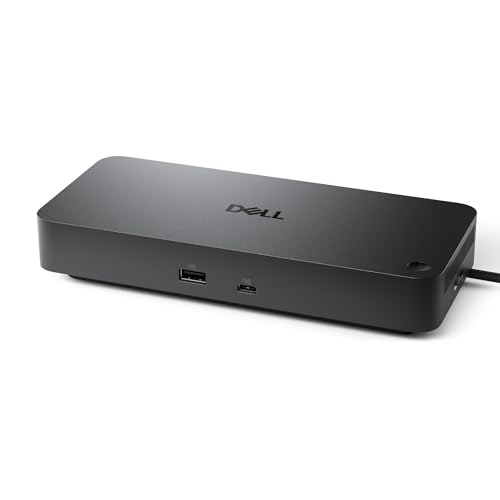
Designed to boost productivity in any AI PC workplace, the Dell Pro Dock WD25 – USB Type-C Docking Station is perfect for professionals who need seamless connectivity and powerful performance. With support for up to four high-resolution displays and connectivity options like DisplayPort, HDMI, and USB 3.2 Gen2, you can effortlessly connect all your essential devices. It delivers up to 100W of power to both Dell and non-Dell PCs, enhancing your workflow. Plus, its eco-friendly design, incorporating 65% post-consumer recycled materials, guarantees you’re making a sustainable choice while maximizing IT efficiency in your work environment.
Best For: Professionals seeking seamless connectivity and powerful performance in AI PC workplaces.
Pros:
- Supports up to four high-resolution displays, enhancing multitasking capabilities.
- Delivers up to 100W power to both Dell and non-Dell PCs, ensuring efficient charging.
- Eco-friendly design with 65% post-consumer recycled materials promotes sustainability.
Cons:
- Limited compatibility with older devices that do not support USB Type-C.
- May require additional adapters for certain display connections.
- Higher price point compared to basic docking stations.
USB C Laptop Docking Station Dual Monitor Adapter (14 in 1)

If you’re a professional who juggles multiple tasks and needs seamless connectivity, the USB C Laptop Docking Station Dual Monitor Adapter (14 in 1) is a game-changer. This versatile adapter expands a single USB C port into 14 essential connections, including dual 4K HDMI outputs, a DisplayPort, and multiple USB ports for high-speed data transfer. You can effortlessly connect dual monitors for enhanced productivity or utilize triple displays for an immersive experience. Plus, with 100W power delivery and stable Ethernet, staying connected and powered up is a breeze. Compatible with a wide range of laptops, it’s perfect for any workstation.
Best For: Professionals and multitaskers who require extensive connectivity options for enhanced productivity and seamless operation across multiple displays.
Pros:
- Supports dual and triple monitor setups, allowing for enhanced multitasking capabilities.
- High-speed data transfer with USB A 3.1 ports and SD card reader for quick file access.
- 100W power delivery for charging laptops, ensuring devices stay powered during use.
Cons:
- Limited to mirrored displays on MacBook laptops, which may not suit all users.
- Does not support converter usage, which can restrict compatibility with certain devices.
- Power cable and adapter not included, which may require additional purchases.
Plugable Universal Laptop Docking Station (UD-3900)

The Plugable Universal Laptop Docking Station (UD-3900) is an excellent choice for professionals who rely on dual monitors for enhanced productivity. This versatile docking station connects via USB 3.0 or USB-C, offering dual HDMI outputs that support resolutions up to 2560×1440. With six USB ports and a wired Gigabit Ethernet connection, you’ll have all the connectivity you need. While it’s perfect for web and productivity tasks, keep in mind it’s not ideal for gaming. Plus, with a 2-year warranty and lifetime support, you can count on Plugable’s commitment to quality and customer satisfaction.
Best For: Professionals who need dual monitor setups for enhanced productivity and efficient multitasking.
Pros:
- Offers dual HDMI outputs supporting high resolutions for better visual experience.
- Includes multiple USB ports and a wired Gigabit Ethernet connection for extensive connectivity options.
- Backed by a 2-year warranty and lifetime support from a responsive customer service team.
Cons:
- Not suitable for gaming or handling HDCP protected content.
- Requires manual driver installation for macOS users, which may be an inconvenience.
- Does not charge the host laptop, limiting its functionality as a power source.
Factors to Consider When Choosing a Docking Station for Business Laptop
When choosing a docking station for your business laptop, you need to think about several key factors. Consider the variety and types of ports, display capabilities, and power delivery options that suit your work needs. Don’t forget compatibility with your devices and data transfer speeds, as these can greatly impact your efficiency.
Port Variety and Types
Choosing the right docking station for your business laptop starts with understanding the variety of ports available. You’ll want to evaluate how many ports you need; options can range from 8 to 14, providing ample connectivity for your peripherals. Make sure the docking station supports different USB types, including USB-C, USB-A, and Thunderbolt, ensuring compatibility with your devices. Look for multiple video outputs like HDMI and DisplayPort, which allow for dual or triple monitor setups, boosting your productivity. Don’t overlook data transfer speeds, as some docking stations offer up to 10Gbps for USB 3.1 connections. Finally, check for additional features like Ethernet ports for stable internet and card readers for easy access to storage devices.
Display Capabilities
A solid docking station can greatly elevate your workspace by enabling multiple monitor setups, which boosts your productivity and multitasking capabilities. When choosing a docking station, consider its support for dual or triple displays to enhance your workflow. Look for options that deliver high resolutions like 4K at 60Hz or dual 1080p, guaranteeing clear visuals for your business applications. Check for compatibility with display protocols like DisplayPort or HDMI, as this affects how well it integrates with your monitors. If you’re using macOS, verify the station can handle specific needs like mirroring across external displays. Finally, align the docking station’s specifications with your laptop’s capabilities, especially for features like MST for seamless multi-monitor setups.
Power Delivery Options
Enhanced display capabilities are just one piece of the puzzle; power delivery options are equally important when selecting a docking station for your business laptop. You’ll find that power delivery typically ranges from 85W to 160W, allowing efficient charging while you work. Many stations support USB-C Power Delivery, enabling fast charging and the ability to power multiple devices at once. It’s vital to take into account the maximum wattage your laptop requires to avoid power shortages during heavy use. Some docking stations come with dedicated power delivery ports, providing over 100W to keep your laptop charged. Always verify that the docking station’s power delivery specifications align with your laptop’s needs for seamless operation and enhanced productivity.
Compatibility With Devices
When selecting a docking station for your business laptop, ensuring compatibility with your devices is essential. Start by confirming that the docking station supports the specific USB-C or Thunderbolt protocols your laptop uses. Check the compatibility with your operating system; some stations may not work with Linux while others are tailored for Windows and macOS. Look for options that offer multiple ports to connect various peripherals, as laptops often have different port configurations. Additionally, verify the power delivery capabilities, since some stations may only charge specific devices or provide limited wattage. Finally, consider if the docking station supports dual or multiple displays, especially if your laptop is restricted to a single video output. This can greatly enhance your productivity.
Data Transfer Speeds
Choosing the right docking station can greatly impact your data transfer speeds. Look for ports that support high-speed protocols like USB 3.1, which offers speeds up to 10 Gbps, compared to the much slower USB 2.0 at 480 Mbps. If you need peak performance, consider options with USB-C or Thunderbolt capabilities for faster file transfers. Additionally, dual HDMI ports can affect throughput depending on their resolutions and refresh rates when connecting multiple displays. Don’t overlook Gigabit Ethernet ports; they provide stable internet connectivity at speeds up to 1 Gbps, ideal for data-heavy tasks. Finally, verify the docking station is compatible with your laptop’s specifications, as this can limit your data transfer speeds considerably.
Design and Size
A well-designed docking station can make all the difference in your workspace efficiency. Look for a compact and lightweight model that minimizes desk clutter and enhances portability. A sleek, modern aesthetic not only complements your professional environment but also helps organize your devices and peripherals effectively. Confirm the dimensions fit seamlessly into your setup, allowing for efficient use of available desk space. Built-in cable management features can notably reduce tangling and disorganization, contributing to a streamlined workspace. Finally, consider a durable construction with materials that support heat dissipation, guaranteeing longevity and reliability in high-use business environments. By prioritizing these design and size factors, you’ll boost your productivity and create a more organized workspace.