
In today’s fast-paced educational and professional environments, having the right tools can make all the difference. Document cameras are becoming essential for clear and effective presentations. With advancements in technology, 2025 offers a range of options that cater to various needs. From high-resolution imaging to portable designs, these devices can elevate your teaching or presentation game. Curious about the top models that can enhance your experience? Let’s explore the best document cameras available this year.
IPEVO V4K Ultra High Definition Document Camera

The IPEVO V4K Ultra High Definition Document Camera is an excellent choice for educators and professionals who need high-quality visuals for live demos, web conferencing, and remote teaching. With its 8MP resolution, it captures stunning images up to 3264 x 2448 pixels, ensuring clarity in every detail. You’ll appreciate the fast focusing feature that eliminates interruptions, making changes smooth. It’s effective even in dim lighting, and its maximum shooting area of 13.46 x 10.04 inches provides ample space for various materials. Compatible with Mac, Windows, and Chromebooks, it’s a versatile solution for all your visual presentation needs.
Best For: Educators and professionals seeking high-quality visuals for live demos, web conferencing, and remote teaching.
Pros:
- High Resolution: Captures images with 8MP clarity up to 3264 x 2448 pixels.
- Fast Focusing: Minimizes interruptions for smooth material transitions.
- Versatile Compatibility: Works with Mac, Windows, and Chromebook systems.
Cons:
- Limited Frame Rate at Max Resolution: Streams at only 15 fps when using maximum resolution.
- Requires Specific System Requirements: Needs high-performance CPUs and dedicated video memory for optimal functionality.
- Weight and Size: At 1.28 pounds and its dimensions, it may not be as portable as other options.
INSWAN INS-1 USB Document Camera – 8MP Ultra HD

For educators seeking a versatile tool to enhance their classroom experience, the INSWAN INS-1 USB Document Camera stands out with its impressive 8 Megapixel Ultra HD resolution. It captures stunning images at a resolution of 3264 x 2448 pixels and streams video at 30 fps. Its multi-joint design guarantees durability while saving space. The bundled INSWAN Documate software offers features like digital zoom, image annotation, and video recording. Plus, it’s compatible with various operating systems. With a built-in microphone, this document camera is perfect for distance learning, remote teaching, and live demonstrations, making your presentations truly engaging.
Best For: Educators and professionals seeking an effective tool for distance learning, remote teaching, and live presentations.
Pros:
- High-resolution 8 Megapixel Ultra HD imaging ensures clear and detailed visuals.
- Versatile compatibility with multiple operating systems, including Windows, Mac, iPad, and Chromebook.
- Built-in microphone enhances audio quality during presentations, making it ideal for interactive sessions.
Cons:
- Limited autofocus range, as it only captures objects as close as 3.9 inches.
- Dependence on USB connection, which may restrict mobility and placement options.
- Software updates require internet access, which might not be available in all settings.
USB Document Camera for Teachers

Teachers seeking an efficient tool for engaging lessons will find the USB Document Camera for Teachers an invaluable resource. This versatile 3-in-1 device acts as a document camera, visualizer, and webcam, making it perfect for remote teaching and video conferencing. With a foldable design, it’s easy to transport and store, reaching a height of 20.4 inches with a 360-degree rotation for flexible angles. Enjoy high-definition images at 1080P and 30 fps, thanks to its manual focus and CMOS sensor. Compatible with major platforms, it seamlessly integrates into your teaching toolkit, enhancing clarity in every presentation.
Best For: Teachers and educators looking for a multifunctional tool to enhance remote teaching and video conferencing experiences.
Pros:
- Versatile 3-in-1 functionality as a document camera, visualizer, and webcam, catering to various teaching needs.
- High-definition quality with 1080P resolution and 30 fps, ensuring clear and professional presentations.
- Portable and compact design that is easy to transport and store, making it suitable for both classroom and home use.
Cons:
- Manual focus may require adjustments during use, which could be less convenient for some users.
- Limited built-in features compared to more advanced document cameras, which may not meet all professional needs.
- Compatibility issues may arise with some lesser-known platforms or older operating systems.
INSWAN INS-2 4K USB Document Camera

Looking for a reliable document camera that excels in both classroom and professional settings? The INSWAN INS-2 4K USB Document Camera is your answer. With its impressive 13MP sensor and dual auto-focus, it captures stunning 4K Ultra HD images. Its compact design and multi-joint arm make it perfect for A3-size documents, art teaching, and exhibitions. You’ll appreciate the built-in LED lighting and anti-glare sheet that guarantee peak viewing. Plus, it’s compatible with various operating systems and plug-and-play ready for easy setup. With a 4.5-star rating, the INS-2 is a top choice for enhancing your presentations.
Best For: The INSWAN INS-2 4K USB Document Camera is best for educators, artists, and professionals needing high-quality document and image capture in various settings.
Pros:
- High Image Quality: Captures stunning 4K Ultra HD images with a 13MP sensor.
- Versatile Design: Compact and flexible multi-joint arm allows for easy A3-size document capture.
- User-Friendly Setup: Plug-and-play compatibility with multiple operating systems and popular webinar software.
Cons:
- Weight: At 2.33 pounds, it may be less portable compared to lighter document cameras.
- Limited Macro Functionality: The macro function is optimized for shots as close as 10 cm, which may not suit all needs.
- Availability of Warranty Information: Warranty details are only available upon request, which may be inconvenient for users.
OKIOCAM S-4K Document Camera and Webcam

The OKIOCAM S-4K Document Camera and Webcam stands out as an essential tool for educators aiming to elevate their teaching experience. With its 8-megapixel CMOS sensor, you can capture stunning Ultra High Definition images up to 3264 x 2448p. The device offers lag-free streaming at 30fps, ensuring smooth presentations. Its compact design allows you to easily display letter-sized materials, while the optional OKIO Pouch enhances portability. You’ll appreciate the intuitive four-button controls for focus, exposure, and zoom adjustments. Plus, its software compatibility with various platforms means you can engage your students dynamically, making learning interactive and fun.
Best For: Educators seeking a versatile and high-quality document camera to enhance classroom engagement and interactivity.
Pros:
- High Image Quality: Captures stunning Ultra High Definition images with an 8-megapixel sensor for clear presentations.
- Portability: Compact design and optional carrying pouch make it easy to transport and store.
- User-Friendly Controls: Intuitive four-button controls simplify adjustments for focus, exposure, and zoom.
Cons:
- Limited Frame Rate at Max Resolution: Streams at only 15fps at maximum resolution, which may not be ideal for fast-moving presentations.
- Price Point: May be on the higher end compared to basic document cameras, potentially limiting accessibility for some users.
- Compatibility Issues: Although it supports multiple platforms, some users may experience connectivity issues with specific devices or software.
THUSTAR 8MP Document Camera & Webcam 4K
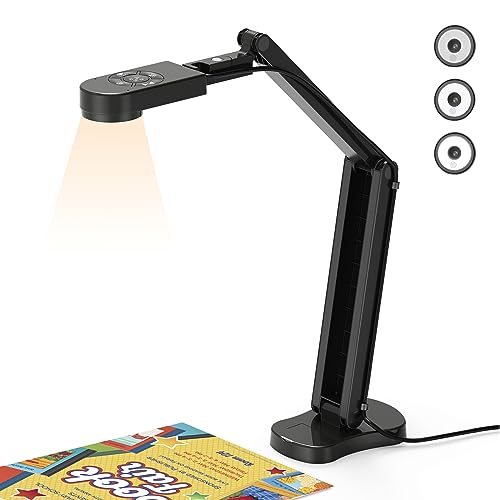
For educators and professionals seeking high-quality visual clarity, the THUSTAR 8MP Document Camera & Webcam 4K stands out with its impressive 30fps ultra-high-definition image and video transmission. You’ll appreciate the macro capability, capturing objects as close as 3.94 inches. With adjustable image reversal and manual brightness control, you can tailor visuals to your needs effortlessly. Its foldable design guarantees portability, while multi-joint support lets you capture both 2D and 3D objects from various angles. Plus, enjoy seamless compatibility with major operating systems and platforms like Zoom and Google Meet, enhanced by built-in microphones for clear audio during live presentations.
Best For: Educators and professionals needing high-quality visual presentations in virtual meetings and live demos.
Pros:
- High-resolution 8MP camera with 30fps for clear image and video quality.
- Portable, foldable design with flexible angle adjustments for versatile usage.
- Built-in dual microphones improve sound quality, enhancing communication during presentations.
Cons:
- Limited macro capability may not suffice for extremely detailed close-ups.
- Requires a USB connection, which may limit placement options.
- May not be ideal for users who prefer advanced software features or controls.
AlKOR USB Document Camera for Teaching & Distance Learning

Educators and remote workers seeking a versatile tool will find the AlKOR USB Document Camera an excellent choice for teaching and distance learning. This lightweight, 2MP 3-in-1 device serves as a webcam, document camera, and visualizer, perfect for video chats and live demonstrations. With a 360-degree adjustable lens and manual focus, you can easily capture clear images from various angles. Compatible with USB-C devices and major conferencing software like Zoom, it fits seamlessly into any setup. Customers rate it 4.4 out of 5 stars, making it a reliable option for your teaching needs.
Best For: Educators and remote workers seeking a versatile tool for teaching and distance learning.
Pros:
- Lightweight and portable design makes it easy to set up and transport.
- 1080P full HD resolution ensures clear image quality for video conferencing and demonstrations.
- Compatible with major web conferencing software, enhancing productivity in virtual environments.
Cons:
- Manual focus may require adjustments during use, which could be inconvenient for some users.
- Limited versatility as a document camera compared to more specialized models.
- Customer reviews indicate some users may experience initial setup challenges.
Document Camera for Teachers with Mic and LED Lights

Teachers looking to enhance their online instruction will find the 3-in-1 USB document camera, webcam, and visualiser an essential tool. With an HD sensor and a maximum resolution of 2592×1944P, it captures every detail clearly. The adjustable hose structure allows you to position it at any angle for video chats or presentations. Plus, the built-in LED light features a five-level fill light, ensuring visibility in dim settings. Its one-touch autofocus and image inversion functions make it easy to switch between views. Compatible with various devices, this document camera is perfect for any teaching environment.
Best For: Teachers and educators looking to enhance their online instruction and presentations with a versatile, high-quality camera.
Pros:
- High-resolution image quality with HD sensor (2592×1944P) for clear visuals.
- Adjustable hose structure allows for flexible positioning at any angle during use.
- Built-in LED light with multiple brightness levels enhances visibility in low-light environments.
Cons:
- Limited compatibility with devices that do not have a USB-C interface.
- Potential learning curve for users unfamiliar with camera settings and features.
- Dependent on lighting conditions for optimal image quality; dim environments may affect performance without adequate light.
OKIOCAM S2 Pro USB Document Camera
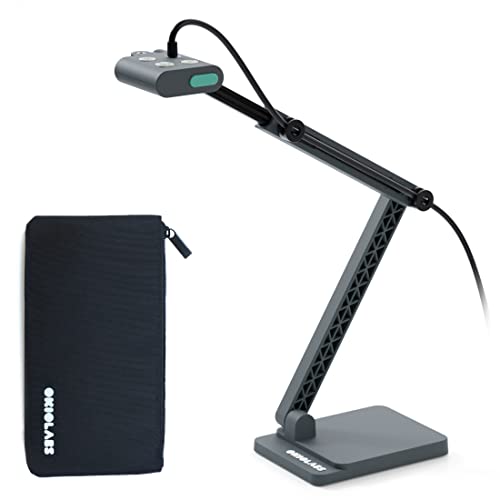
If you’re looking to elevate your presentations, the OKIOCAM S2 Pro USB Document Camera stands out with its stunning true 4K resolution and high frame rate. With a 13MP sensor, you’ll enjoy crystal-clear images at 30 fps. Its fast autofocus guarantees smooth shifts, while the OKIOPoint feature tracks documents effortlessly. Plus, the included OKIOCAM Live software enhances interactivity, letting you zoom and focus seamlessly. Designed for durability, it boasts a weighted metal base and a glass-fiber arm that withstands over 10,000 rotations. Plug and play compatibility with major platforms makes it a versatile choice for any presenter.
Best For: Educators and professionals seeking a high-quality document camera for engaging presentations and interactive lessons.
Pros:
- True 4K resolution delivers exceptional clarity and detail for documents and visuals.
- Fast autofocus ensures smooth transitions between different materials during presentations.
- Plug and play compatibility with major platforms makes it easy to set up and use.
Cons:
- Limited to USB connection, which may require additional adapters for some devices.
- Higher price point compared to basic document cameras on the market.
- Weight and size may not be ideal for mobile presenters needing a lightweight solution.
8MP USB Document Camera (KB700)

The Gawervan KB700, with its impressive 8MP resolution, is a game-changer for anyone looking to enhance classroom engagement. You’ll appreciate the instant image control features, including mirroring and flip functions, which make presentations seamless. Its touch-type 3-level LED light adapts to any classroom environment, while the 10-stage exposure adjustment reduces glare effectively. This portable camera captures A3-sized documents and folds into a slim 10” profile for easy transport. Plus, the built-in dual microphones guarantee clear audio during hybrid lessons. With a simple plug-and-play setup, the KB700 is perfect for educators wanting reliability and clarity in their teaching tools.
Best For: Educators and professionals seeking a reliable document camera to enhance classroom engagement and facilitate hybrid learning.
Pros:
- High-quality 8MP resolution for clear and detailed images, ideal for presentations and live streaming.
- Adjustable LED lighting and exposure settings enhance visibility and reduce glare in various classroom environments.
- Portable and versatile design, folding into a slim profile and allowing for flexible angle capture.
Cons:
- Limited compatibility with non-USB-C devices may require additional adapters for older systems.
- Potential learning curve for users unfamiliar with plug-and-play setups or software configurations.
- Reliance on USB power may restrict placement options away from outlets.
Factors to Consider When Choosing a Document Camera
When you’re choosing a document camera, you should consider several key factors. Image quality, compatibility with your devices, and portability play essential roles in your decision. Additionally, don’t overlook lighting features and software support that can enhance your overall experience.
Image Quality and Resolution
Choosing a document camera that boasts high image quality and resolution can make a significant difference in your presentations. Look for models with resolutions ranging from 2MP to 13MP, offering detailed captures up to 3840×2160 pixels. High frame rates, like 30 fps for full HD, guarantee smooth video streaming, which is essential during live demonstrations. Autofocus features help maintain clarity as you switch between materials, minimizing interruptions. Advanced sensors, such as CMOS technology, enhance noise reduction and improve color reproduction, providing clearer images, especially in low light. Additionally, consider the maximum viewing area; larger capture zones accommodate extensive documents or multiple items, assuring your audience sees everything clearly. Prioritizing these factors will elevate your presentation quality.
Compatibility With Devices
How can you guarantee your document camera integrates smoothly with your existing devices? First, check its compatibility with your operating system, whether it’s Windows, Mac OS, Chromebook, or iPad. Look for specific version requirements—like OS X 10.10 or higher for Mac and Windows 10 for PCs. Plug-and-play functionality is a huge plus, as it simplifies setup and avoids driver installations. If you’re using newer devices, make certain the camera supports USB-C connectivity. Finally, verify that it works seamlessly with popular webinar and video conferencing software like Zoom, Google Meet, and Microsoft Teams. By considering these factors, you’ll guarantee a hassle-free experience during your presentations and maximize the value of your document camera.
Portability and Design
Portability and design are key factors that can make or break your experience with a document camera. When selecting one, consider a foldable design that makes transport and storage a breeze, especially if you’re on the go. A lightweight model, weighing as little as 1.1 pounds, guarantees you can easily move it between locations. Look for a multi-joint arm design that allows flexible angle adjustments, accommodating various presentation needs. Additionally, a maximum viewing area of at least 13.46 inches x 10.04 inches is essential for capturing detailed documents effectively. Finally, a compact footprint is beneficial for limited workspaces, ensuring your document camera fits seamlessly in small classrooms or home offices without sacrificing functionality.
Lighting and Focus Features
Effective lighting and focus features are essential for maximizing your document camera’s performance, especially in various presentation settings. Look for models with built-in LED lights and adjustable brightness levels to enhance visibility in dim environments. Fast autofocus capabilities guarantee your content remains clear during changes, minimizing interruptions. Additionally, some cameras offer manual brightness control and multiple exposure adjustments to adapt to changing lighting conditions and reduce glare. Features like adjustable image inversion help mirror images for video calls, improving viewer experience. Advanced models may include anti-glare sheets and specialized lighting options that optimize image quality, guaranteeing vibrant colors and reduced noise during streaming. Prioritizing these features will greatly enhance your presentations.
Software and Application Support
While great lighting and focus features enhance your document camera’s performance, the software and application support can make all the difference in usability. Make sure your document camera is compatible with major operating systems like Windows, Mac OS, and Chromebook for seamless integration. Look for bundled software features such as digital zoom, image annotation, and video recording that enhance functionality. It’s also important to check if the camera supports popular conferencing platforms like Zoom and Google Meet to simplify remote presentations. Opt for plug-and-play functionality to ease setup without extra driver installations. Finally, verify that the software receives regular updates with free downloads for new features and tutorials, ensuring your device remains adaptable to your evolving needs.