
The best earbuds for working from home make video calls clearer, reduce household distractions, and stay comfortable through long stretches of meetings and focused work.
This roundup compares 10 options across true wireless earbuds, wired USB headsets, open-ear designs, and dedicated work headsets so you can match features to your setup and routine.
Best 10 Earbuds for Working from Home Picks for 2026
Premium Apple Pick

- Strong active noise cancellation for focused work
- Up to 8 hours with ANC on
- Five ear-tip sizes and Apple device switching
Best For: Apple users wanting premium ANC and seamless device integration
Reliable Wired Work Pick

- USB-A and USB-C plug-and-play connection
- Noise-canceling microphone for clearer calls
- Lightweight on-ear design with inline controls
Best For: Laptop-based meetings where wired reliability is a priority
Long-Battery Wireless Pick

- Up to 48 hours with the charging case
- Adaptive ANC, Ambient Aware, and TalkThru
- Six microphones for customized calls
Best For: Wireless work-and-entertainment use with minimal charging
Remote-Call Specialist

- AI noise cancellation for busy environments
- 270-degree rotatable boom microphone
- USB dongle and dedicated mute button
Best For: Frequent work calls in noisy home-office settings
Most Comfortable Open-Ear Pick
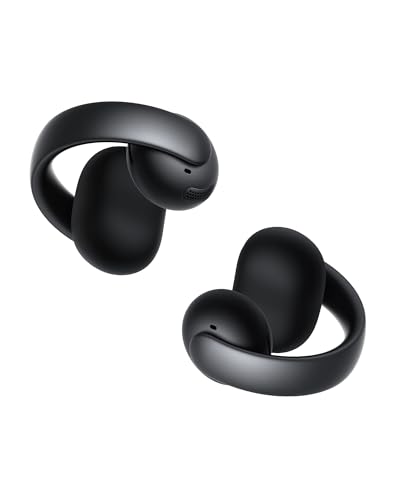
- Open-ear clip design for extended comfort
- Four-mic system with AI call support
- App features include EQ and Spatial Audio
Best For: Open-ear comfort and staying aware during work
Best Dedicated Call Headset
EKVANBEL A6L Bluetooth Headset

- Dual-mic noise cancellation for calls
- Includes a USB dongle for PCs
- Charging case has a battery display
Best For: Remote work calls and hands-free computer use
Best Wired Budget Option

- USB-A plug for simple computer connection
- In-line mic, volume, and mute controls
- 7.5-foot cable for desktop setups
Best For: Fixed home-office workstations and online meetings
Best for Long Calls
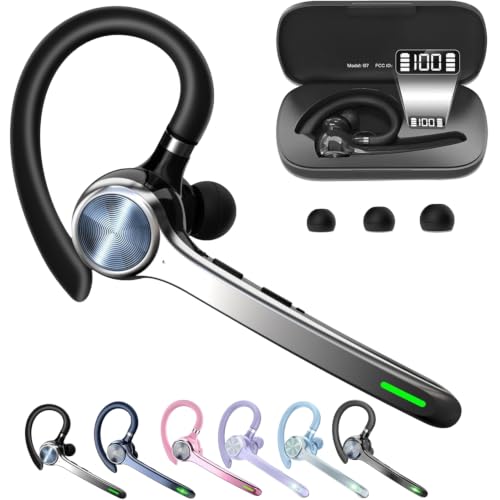
- Dedicated phone-call mute button
- Up to 72 hours with charging case
- Supports dual Bluetooth connections
Best For: Frequent phone calls and extended work sessions
Best for Staying Aware

- Open-ear design preserves awareness
- Up to 80 hours of total playtime
- Bluetooth 5.4 and touch controls
Best For: Work-from-home listening when you need to hear your surroundings
Premium Apple Pick – AirPods Pro 3
For shoppers seeking earbuds for working from home, the Apple AirPods Pro 3 pair strong active noise cancellation with detailed, three-dimensional audio. Their secure fit, device switching, and hearing-focused features make them especially practical for Apple users moving between focused work and conversations.
Best For: Apple users who want premium noise cancellation, immersive sound, and seamless switching between devices.
Pros:
- Active noise cancellation removes up to twice as much unwanted noise as AirPods Pro 2, according to the supplied product information.
- Up to 8 hours of listening with ANC on from a single charge.
- Five ear-tip sizes support a more personalized, secure fit.
- Automatic Switching works across Apple devices, while Hearing Health features support clearer communication.
Cons:
- Several highlighted features, including Live Translation and Workout Buddy, depend on Apple Intelligence or an iPhone.
- In-ear earbuds may not suit users who prefer an over-ear or on-ear design.
AirPods Pro 3 are a feature-rich choice for a home office, particularly if you already use Apple devices. Their combination of strong ANC, extended battery life, and adjustable fit makes them well suited to long focus sessions and calls.
Reliable Wired Work Pick – Jabra Evolve 20
The Jabra Evolve 20 is a straightforward option for earbuds for working from home when dependable computer connectivity matters more than wireless freedom. Its USB-A/USB-C setup, noise-canceling microphones, and inline controls are designed for everyday meetings and calls.
Best For: Remote workers who want a lightweight, wired headset for laptop-based meetings.
Pros:
- Advanced noise-canceling microphones are designed to help you hear and be heard clearly.
- USB-A or USB-C plug-and-play connectivity supports laptops with either port type.
- Lightweight 132-gram on-ear design includes foam or leatherette ear cushions.
- Inline call and volume controls simplify meeting management.
Cons:
- Wired connectivity limits movement compared with Bluetooth earbuds or headsets.
- Passive noise cancellation is less adjustable than active noise cancellation.
- The on-ear design may provide less isolation than sealed in-ear earbuds.
Choose the Evolve 20 if you prefer a simple connection and do not want to manage charging or wireless pairing. It is a practical office headset for frequent calls, with broad compatibility across leading meeting platforms.
Long-Battery Wireless Pick – JBL Tune Buds 2
The JBL Tune Buds 2 are versatile earbuds for working from home, combining adaptive noise cancellation, multiple ambient-sound modes, and extensive battery life. Six microphones and app-based controls make them useful for both meetings and entertainment during breaks.
Best For: Home workers who want wireless earbuds with long battery life and adjustable noise control.
Pros:
- Adaptive Noise Cancelling, Ambient Aware, and TalkThru let you adjust how much of the surroundings you hear.
- Six microphones use environmental noise cancellation and echo suppression for calls.
- Up to 48 hours of total playback, including the charging case.
- JBL Pure Bass and Spatial Sound support music, movies, and games as well as calls.
Cons:
- As Bluetooth earbuds, they require wireless pairing rather than a wired computer connection.
- The supplied specifications list three ear-tip sizes, offering less fit variety than some alternatives.
- Playback and feature performance can vary depending on whether ANC is enabled.
The Tune Buds 2 are a strong all-around choice when you want one pair for meetings, concentration, and downtime. Their long runtime reduces charging interruptions, while the JBL app provides control over noise and ambient settings.
Remote-Call Specialist – Wireless Headset with Mic
This wireless headset is built for earbuds for working from home shoppers who prioritize clear voice pickup and fast call controls. Its AI-powered noise cancellation, rotatable boom microphone, USB dongle, and dedicated mute button target busy home offices with background noise.
Best For: Remote professionals handling frequent Zoom, Teams, Skype, or Google Meet calls in noisy surroundings.
Pros:
- AI-powered noise cancellation is designed to reduce barking dogs, children, traffic, keyboard noise, and office chatter.
- The 270-degree rotatable microphone helps separate voice audio from environmental sounds.
- USB dongle provides driver-free, lag-free computer connectivity, including for systems without Bluetooth.
- Physical power and mute controls make back-to-back calls easier to manage.
Cons:
- The over-ear work-headset format is bulkier than compact true wireless earbuds.
- PC mute control through the USB dongle is not available via computer Bluetooth, according to the supplied notes.
- The supplied information does not specify battery runtime.
If call clarity and quick mute access are your main concerns, this headset is more purpose-built than typical music-focused earbuds. The included dongle and boom microphone also make it a practical choice for older or Bluetooth-free computers.
Most Comfortable Open-Ear Pick – Soundcore AeroClip
If you want earbuds for working from home that let you stay aware of your surroundings, the Soundcore AeroClip uses an open-ear, clip-on design that rests around rather than inside the ear canal. Its lightweight fit, directional audio, and call-focused features make it a flexible option for workdays that include music, calls, and movement.
Best For: Open-ear comfort, background awareness, and work calls at home.
Pros:
- Open-ear clip design is built for extended wear without entering the ear canal.
- Four microphones and AI-boosted call technology support clearer voice pickup.
- Directional acoustic technology helps reduce sound leakage and maintain listening privacy.
- Soundcore app support includes HearID, EQ modes, Spatial Audio, and firmware updates.
Cons:
- Open-ear construction may provide less isolation than in-ear earbuds.
- The best listening experience requires updating the Soundcore app.
The AeroClip is a strong fit for home workers who dislike sealed earbuds or need to hear what is happening around them. Its open design prioritizes comfort and awareness, while the microphones and app features add useful flexibility for calls and daily listening.
Best Dedicated Call Headset – EKVANBEL A6L Bluetooth Headset
For earbuds for working from home centered on calls, the EKVANBEL A6L combines a wireless earpiece with dual microphones, an independent mute button, and a USB dongle for computers without built-in Bluetooth. Its charging case and long stated battery runtime also suit extended remote-work sessions.
Best For: Remote workers who prioritize hands-free calls, muting, and computer compatibility.
Pros:
- AI environmental noise cancellation microphones are designed to reduce ambient noise during calls.
- Independent mute button makes call control quick and practical.
- USB dongle supports desktop computers without Bluetooth, while Bluetooth 5.3 supports two-device connections.
- Charging case has a 1000mAh capacity and an LED battery display.
Cons:
- The headset cannot be used while charging.
- Connection issues may require resetting the headset according to the instructions.
- Its in-ear design may not suit users who prefer open-ear earbuds.
The A6L is designed more for communication than casual listening. The mute control, included dongle, and two-device support are particularly useful for a home office setup, though buyers should be comfortable with an in-ear fit and the stated connection-reset procedure.
Best Wired Budget Option – AIAUXAI USB Earbuds
These wired USB earbuds are a straightforward choice for earbuds for working from home, especially if you use a desktop computer. The USB-A connection, in-line microphone and controls, and extra-long 7.5-foot cable provide simple plug-and-play access for meetings, calls, and everyday computer audio.
Best For: Desktop users who want a lightweight wired headset with long cable reach.
Pros:
- USB-A plug offers instant connectivity without adapters or drivers on supported devices.
- In-line controls handle volume, playback, microphone muting, and other functions.
- Integrated microphone is designed for calls, conferences, and online meetings.
- 7.5-foot cable can reach a desktop USB port under a desk.
Cons:
- The wired design limits movement compared with wireless earbuds.
- Compatibility is centered on USB-A devices rather than USB-C-only ports.
- They are not water resistant.
The AIAUXAI earbuds make sense when reliability and simplicity matter more than wireless freedom. Their long cable and in-line controls are convenient for a fixed workstation, while the USB-A connection may require an adapter for newer computers with USB-C ports only.
Best for Long Calls – HEIBAS Bluetooth Headset
If you need earbuds for working from home that prioritize extended call time and simple call controls, the HEIBAS G7 is a practical single-ear option. It includes a dedicated mute button for phone calls, dual-device support, and a charging case rated for up to 72 hours of total music or talk time.
Best For: Remote workers who take frequent phone calls and want a lightweight, single-ear headset with long battery life.
Pros:
- Dedicated mute button for phone calls
- Up to 18–23 hours of talking time from the single headset
- 500mAh case provides up to 72 hours of music or talk time
- Supports dual connection with phones, computers, and other Bluetooth devices
Cons:
- Mute function works only during phone calls
- Single-ear design may not suit users seeking stereo audio
- No AC adapter is included
The HEIBAS stands out for call-focused home-office use, especially when battery endurance and an easy-to-find mute control matter more than immersive music listening.
Best for Staying Aware – Open-Ear T6 Wireless Earbuds
For earbuds for working from home that let you remain aware of your surroundings, these open-ear T6 earbuds use an earhook design rather than sealing the ear canal. Bluetooth 5.4, touch controls, and a charging case rated for up to 80 hours make them convenient for switching between work, exercise, and everyday listening.
Best For: Home workers who want open-ear comfort and environmental awareness while listening to audio or taking calls.
Pros:
- Open-ear design helps keep you aware of surrounding sounds
- Up to 80 hours of total playtime with the charging case
- Bluetooth 5.4 supports quick pairing and stable connections
- Touch controls handle playback, calls, volume, and voice assistants
Cons:
- Open-ear construction may provide less isolation than in-ear earbuds
- 90-day manufacturer warranty is relatively short
- Earhook style may be less discreet than traditional earbuds
The T6 is a flexible choice if you dislike plugged-ear designs or need to hear what is happening around you, though its open construction is not intended for maximum noise isolation.
Best for Video Calls – JLab Work Buds
The JLab Work Buds are purpose-built earbuds for working from home, combining in-ear wireless audio with a detachable noise-canceling boom mic. Bluetooth multipoint, active noise cancellation, and a USB-C charging dock make them suited to desk setups where you move between calls, music, and multiple devices.
Best For: Remote professionals who want a dedicated boom microphone and convenient switching between Bluetooth devices.
Pros:
- Detachable noise-canceling boom mic is designed for calls
- Bluetooth multipoint supports connection to multiple devices
- Up to 55 hours of total playtime
- Includes a USB-C charging dock and active noise cancellation
Cons:
- Bluetooth 5 rather than a newer Bluetooth version
- Battery life is listed as 10 hours for the earbuds, with 45 hours from the case
- In-ear fit may not be comfortable for every user during extended wear
With its detachable boom microphone and multipoint pairing, the Work Buds are the most office-oriented option here for people who regularly handle computer calls and need a more deliberate voice setup.
How We Picked the Best Earbuds for Working from Home
We focused on the features that matter most in a home-office setup: microphone clarity, connection reliability, comfort, background-noise control, battery life, and compatibility with computers and phones. The selection includes both conventional earbuds and work-focused headsets because no single design suits every remote worker.
We also considered practical details such as USB connectivity, Bluetooth support, charging-case capacity, boom-mic availability, open-ear awareness, and controls that are easy to use during meetings. Product claims such as talk time or playtime should be treated as estimates that vary with volume, call length, and connection conditions.
Quick Comparison
| Best For | Recommended Type | What to Prioritize |
|---|---|---|
| Frequent video calls | Headset with boom microphone | Voice pickup, mute controls, comfort |
| Shared or noisy homes | Noise-cancelling earbuds | ANC, microphone noise reduction, fit |
| All-day computer use | Wired USB headset or earbuds | Plug-and-play setup, no charging |
| Awareness of surroundings | Open-ear earbuds | Comfort, stable fit, sound leakage |
| Phone-and-PC flexibility | Bluetooth earbuds or headset | Multipoint pairing, battery life |
Key Buying Factors for Earbuds for Working from Home
Microphone and Call Quality
For meetings, microphone performance is often more important than music quality. A boom microphone usually places the pickup closer to your mouth, while wireless earbuds rely on small built-in microphones and software processing. Look for noise reduction, sidetone, mute controls, and consistent voice pickup when you turn your head.
Connection and Compatibility
Bluetooth is convenient for switching between a computer and phone, but pairing and multipoint support vary. USB models are often simpler for a dedicated workstation and avoid battery concerns. Check whether your computer supports the required Bluetooth profiles or has the right USB port or adapter.
Comfort, Fit, and Awareness
In-ear tips can provide isolation but may cause fatigue for some users. Open-ear and clip-on designs reduce pressure inside the ear and let you hear your surroundings, though they may provide less isolation and can leak sound. For long workdays, prioritize a secure, lightweight fit over maximum specifications.
Battery Life and Controls
Choose enough runtime for your longest meeting schedule, and consider whether the case can recharge the earbuds between calls. Physical buttons may be easier to operate than touch controls, especially when you need to mute quickly. Wired models remain useful if you never want to manage charging.
Who Should Buy Which Earbuds for Working from Home?
Choose a noise-cancelling true wireless model if you want one compact option for calls, music, and commuting. Choose a wired USB headset for a reliable desk setup with minimal configuration. Choose a boom-mic work headset if clear speech and meeting controls are your top priorities. Choose open-ear earbuds if you need to hear family members, deliveries, or other sounds around the house. Choose a single-ear Bluetooth headset if you spend much of the day on calls and want one ear free.
Before buying, confirm the return policy and test the microphone in your preferred meeting app. The best Earbuds for Working from Home are the ones that remain comfortable, connect consistently, and make your voice easy for others to understand.