
If you need fast portable storage with serious data protection, an external SSD with hardware encryption is the right place to start. These drives combine solid-state speed with built-in security features designed to help keep sensitive files private.
Below, we focus on encrypted SSDs that balance performance, durability, and ease of use, so you can choose the best fit for business, travel, and confidential backups.
Best 10 External SSD with Hardware Encryption Picks for 2026
Portable Speed with Built-In Security

- Up to 1050MB/s read speed
- 256-bit AES hardware encryption
- Drop resistant up to 6.5ft
Best For: Fast everyday backup and travel
Phone-Unlocked Rugged Security

- 256-bit AES-XTS hardware encryption
- Phone unlock with no password
- IP67 plus 3M drop resistance
Best For: High-security portable storage
Password-Protected Secure SSD

- PIN access with no software required
- AES-XTS 256-bit hardware encryption
- IP56 dust and splash resistance
Best For: PIN-locked encryption across many platforms
Bootable Security SSD Utility Drive

- AES256-XTS with long PIN support
- Bootable virtual ODD/HDD features
- Write protect and decoy PIN mode
Best For: Power users needing encrypted utility features
Keyed Security Pick
SecureDrive Duo 1TB Hardware Encrypted Drive
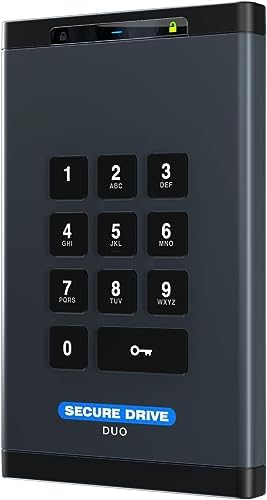
- Hardware encryption with keypad or phone-app unlock
- Includes USB-C and USB-A cables
- Built-in pouch and shock-resistant protection
Best For: Users wanting simple encrypted storage with broad compatibility
Speed-and-Display Pick
Touchscreen Encrypted External SSD

- Up to 2,000MB/s read speed
- Built-in touchscreen shows drive status
- Hardware encryption with password protection
Best For: Creators and power users needing fast secure storage
Rugged Pro Security Pick
G-DRIVE ArmorLock 2TB Encrypted NVMe SSD

- ArmorLock security with phone-based unlock
- Up to 1000MB/s read and write
- Supports multi-user and multi-drive management
Best For: Teams and professionals needing secure rugged storage
Government-Grade Portable SSD
DataLocker DL4 FE 1TB Secure Touchscreen Drive

- FIPS 140-3 validated and TAA compliant
- AES 256-bit XTS hardware encryption
- Touchscreen password setup with USB-C/USB-A cables
Best For: Government and enterprise buyers needing compliant encrypted portable storage
Rugged Keypad Encryption Drive
Glyph SecureDrive+ 1TB SSD with Keypad

- XTS-AES 256-bit hardware encryption
- 10+1 keypad with Admin/User modes
- Rugged tamper-proof enclosure and auto-lock
Best For: Mobile professionals who want keypad access and rugged encrypted storage
Desktop Compliance SSD
BUSlink CipherShield 2TB Encrypted Desktop SSD

- 256-bit AES hardware encryption with key access
- FIPS 140-2 Level 2 validated and TAA-compliant
- USB 3.0 and eSATA for modern and legacy systems
Best For: Desktop users in regulated environments who need secure, key-controlled storage
Portable Speed with Built-In Security – WD My Passport SSD 1TB
If you want an external ssd with hardware encryption that balances speed, portability, and simple protection, the WD My Passport SSD is an easy fit. It uses NVMe technology for fast transfers and adds password-enabled 256-bit AES hardware encryption for keeping files secured on the go.
Best For: Everyday backup, travel, and users who want fast USB-C storage with built-in encryption.
Pros:
- Up to 1050MB/s read and 1000MB/s write speeds for quick file transfers
- Password-enabled 256-bit AES hardware encryption
- Drop resistant up to 6.5ft and shock/vibration resistant
- USB 3.2 Gen 2 with USB-C, plus USB-A support for older systems
Cons:
- Requires reformatting for some operating systems
- Storage capacity is 1TB, which may be limiting for larger archives
This is a strong all-around portable SSD if you want fast performance and straightforward encryption without a bulky design. It’s especially practical for backup and cross-device use.
Phone-Unlocked Rugged Security – G-Technology ArmorLock 2TB
If you need an external ssd with hardware encryption built for serious protection, the G-Technology ArmorLock is designed around security first. It uses 256-bit AES-XTS hardware encryption and a phone-based unlock system, so you can access the drive without a password workflow.
Best For: Security-focused users who want rugged encrypted storage and phone-based unlocking.
Pros:
- 256-bit AES-XTS hardware encryption
- Simple unlock with your phone, no password needed
- Up to 1000MB/s read and write performance
- IP67 dust/water resistance with up to 3M drop and 1000lb crush resistance
Cons:
- Security features may be more than casual users need
- Requires smartphone-based unlocking for the main workflow
This model stands out when encryption and physical durability matter as much as speed. It’s a specialized option, but a compelling one for high-security portable storage.
Password-Protected Secure SSD – iStorage diskAshur2 1TB
The iStorage diskAshur2 is a practical external ssd with hardware encryption for users who want PIN-based access and broad compatibility. It uses AES-XTS 256-bit hardware encryption, and all data is encrypted in real time without software required.
Best For: Compliance-minded users and anyone who wants PIN-locked portable encryption across many platforms.
Pros:
- 7-15 digit PIN authentication with no software required
- AES-XTS 256-bit hardware encryption and real-time protection
- Compatible with Windows, macOS, Linux, Chrome, Android, Thin Clients, and more
- Dust and splashproof IP56-rated rugged design
Cons:
- Top speeds are lower than some newer NVMe-based drives
- Uses USB 3.0, so it is not the fastest interface in this group
This drive is less about raw speed and more about straightforward, secure access across many device types. It makes sense if you value password/PIN protection and compatibility over maximum throughput.
Bootable Security SSD Utility Drive – iodd ST400 2TB
If you want an external ssd with hardware encryption plus advanced utility features, the iodd ST400 goes beyond basic portable storage. It offers AES256-XTS encryption, password protection, write protect options, and bootable virtual ODD/HDD support for users who need more control.
Best For: Power users who want encrypted storage with bootable virtual drive functions and write protection.
Pros:
- AES256-XTS encryption with up to a 76-digit PIN system
- Decoy PIN and plausible deniability mode
- Bootable virtual ODD/HDD support, including ISO selection
- Write protect, Win To Go, and USB Type-C support
Cons:
- Feature set is complex compared with standard portable SSDs
- Performance listed at up to 500MB/s, which is lower than faster NVMe drives
This is the most specialized option here, aimed at users who need encryption, bootable media, and drive-management tools in one device. It’s compelling if versatility matters more than simplicity.
Keyed Security Pick – SecureDrive Duo 1TB Hardware Encrypted Drive
If you need an external ssd with hardware encryption for general business or personal use, the SecureData SecureDrive Duo is built around simple physical and app-based unlocking. It comes with USB-C and USB-A cables, supports USB 3.2/3.1/3.0/2.0 devices, and includes hardware encryption plus password protection without requiring drivers or software to validate the drive.
Best For: Users who want a straightforward encrypted external drive with broad device support and included accessories.
Pros:
- Hardware encryption with unlock options via keypad or phone app
- Includes both USB-C and USB-A cables for flexible connectivity
- Compatible with Mac, Windows, and Linux reformatting options
- Includes a splash-proof pouch and water-resistant, shockproof case
Cons:
- Listed transfer speed is only up to 5MB/s
- Uses a 1TB mechanical/SSD-described drive rather than a clearly specified high-speed SSD
- Antivirus software included requires online activation and subscription after the first year
For buyers prioritizing security and convenience over performance, this drive focuses on practical protection features and easy compatibility. It is a better fit as a secure portable storage solution than as a speed-first backup drive.
Speed-and-Display Pick – Touchscreen Encrypted External SSD
If you’re shopping for an external ssd with hardware encryption and want faster transfers, this touchscreen model stands out with up to 2,000MB/s read speed. It combines hardware encryption, password protection, and a smart touchscreen that shows transfer speed, temperature, and storage capacity in real time.
Best For: Creators and power users who want fast encrypted storage with onboard status monitoring.
Pros:
- Up to 2,000MB/s read and 1,800MB/s write performance
- Smart touchscreen displays speed, temperature, and storage capacity
- Hardware encryption plus password protection for sensitive files
- Compatible with Windows, Mac, iPhone, iPad, Android, cameras, and consoles
Cons:
- USB 3.2 Gen 2×2 speeds depend on host device support
- Some features are best suited to USB-C workflows
- Magnetic mounting is useful, but not essential for every user
This is the most performance-focused pick in the group, especially if you want quick file transfers and a live status display. Its mix of speed, encryption, and wide compatibility makes it well suited to modern mobile and creator setups.
Rugged Pro Security Pick – G-DRIVE ArmorLock 2TB Encrypted NVMe SSD
For buyers who want an external ssd with hardware encryption and a more professional security workflow, the SanDisk Professional G-DRIVE ArmorLock SSD uses ArmorLock security technology and phone-based unlocking instead of a password. It delivers up to 1000MB/s read and write speeds, uses USB-C, and is built for multi-user and multi-drive management.
Best For: Teams and professionals who need rugged encrypted storage with simplified access control.
Pros:
- ArmorLock security technology with simple phone unlock
- Auto Unlock feature for pre-authorized devices
- Up to 1000MB/s read and write speeds
- Includes USB-C cable and USB-C to USB-A cable
Cons:
- Speed is lower than the fastest USB 3.2 Gen 2×2 options
- Focuses more on security management than on extra hardware features
- USB-C connection may require adapters for some older systems
This model is a strong fit when security workflow matters as much as storage performance. Its phone-based access and multi-drive management features make it especially appealing for shared or professional environments.
Government-Grade Portable SSD – DataLocker DL4 FE 1TB Secure Touchscreen Drive
If you need an external ssd with hardware encryption for regulated environments, the DataLocker DL4 FE is built around security-first management and access control. It combines AES 256-bit XTS encryption, FIPS 140-3 validation, TAA compliance, and touchscreen password entry, while staying OS independent for straightforward use across Mac and PC.
Best For: Government, enterprise, and compliance-focused users who want portable encrypted storage with strong policy alignment.
Pros:
- FIPS 140-3 validated and TAA compliant for strict procurement requirements
- AES 256-bit XTS hardware encryption with password protection
- Touchscreen setup supports complex alphanumeric passwords
- Includes USB-C to USB-C and USB-C to USB-A cables for flexible connectivity
Cons:
- SafeConsole remote management features require a separate license
- 1TB capacity may be limiting for larger media or archival needs
Overall, this drive stands out when compliance matters as much as encryption. It is less about casual portability and more about delivering controlled, auditable access in a compact SSD form factor.
Rugged Keypad Encryption Drive – Glyph SecureDrive+ 1TB SSD with Keypad
Glyph SecureDrive+ Professional Encrypted Rugged Mobile Hard Drive with Keypad (1TB SSD)
Check Price On AmazonThe Glyph SecureDrive+ is an external ssd with hardware encryption aimed at users who want simple, keypad-based access plus rugged physical protection. It features XTS-AES 256-bit encryption, brute-force prevention, Admin/User modes, and inactivity auto-lock, with ExFAT formatting for broad cross-platform compatibility out of the box.
Best For: Teams and professionals who want quick keypad access, strong encryption, and a tough enclosure for mobile use.
Pros:
- XTS-AES 256-bit hardware encryption with brute-force protection
- Integrated 10+1 keypad supports Admin and User codes
- Rugged, tamper-proof enclosure for added physical security
- USB 3.2 Gen 1 connectivity with cables included
Cons:
- Uses a microB port, so it is not as modern as USB-C native drives
- Sold here as 1TB SSD, so higher-capacity needs may require another configuration
This model is a practical choice if you prefer hardware-authenticated access over software-based password workflows. Its biggest strengths are convenience, portability, and the extra layer of brute-force resistance.
Desktop Compliance SSD – BUSlink CipherShield 2TB Encrypted Desktop SSD
If you want an external ssd with hardware encryption for a desktop setup, the BUSlink CipherShield emphasizes device-level security and compliance. It uses 256-bit AES hardware encryption, FIPS 140-2 Level 2 validation, and key-based access, with automatic lock-and-encrypt behavior when the key is removed or power is lost.
Best For: Regulated offices, shared workstations, and users who need a desktop encrypted SSD with legacy interface support.
Pros:
- 256-bit AES hardware encryption at the device level
- FIPS 140-2 Level 2 validated and TAA-compliant
- USB 3.0 and eSATA support for modern and legacy systems
- 2TB capacity suits larger secure storage needs
Cons:
- Desktop form factor is less portable than pocket-sized SSDs
- Requires a CipherKey for access, which adds another item to manage
For buyers prioritizing controlled access and compliance over ultra-portability, this drive is well positioned. Its desktop design and interface options make it a strong fit for fixed installations that still need SSD speed and encryption.
How We Picked the Best External SSD with Hardware Encryption
We prioritized hardware-encrypted models that offer secure unlocking, strong build quality, and practical everyday usability. We also looked for clear security claims such as AES encryption, keypad or app-based authentication, and business-friendly certifications where available. Because an External SSD with Hardware Encryption is often used for sensitive data, we gave extra weight to ruggedness, portability, and setup simplicity.
Quick Comparison
The main differences in this roundup are capacity, speed, unlock method, and compliance focus. Some models are designed for straightforward portable use with password protection, while others emphasize advanced controls like keypads, phone-based unlocking, or FIPS validation. High-speed options are a better fit for large media files and active project work, while more security-centric drives suit compliance-heavy environments.
Key Buying Factors for External SSD with Hardware Encryption
Security Method
Look at how the drive unlocks. Keypad-based models can be convenient when you want standalone access, while app-assisted options may suit users who prefer managed workflows. For regulated environments, check for FIPS or other compliance claims that match your requirements.
Encryption Standard
AES 256-bit hardware encryption is a common benchmark and a strong choice for most buyers. Hardware-based encryption is preferable to software-only protection because it keeps security functions handled by the drive itself.
Speed and Interface
USB-C and USB 3.2 are the most useful interfaces for modern systems. If you move large video, photo, or engineering files, pay attention to sustained transfer performance rather than peak marketing numbers alone.
Durability and Portability
Rugged shells, dust and water resistance, and compact designs matter if the drive will travel often. For office-only use, desktop models may be acceptable if they trade portability for added storage or management features.
Compatibility and Workflow
Make sure the drive works with your operating system and matches how you plan to use it. Some drives are ideal for solo users who want quick private storage, while others are better for managed teams that need stricter access control.
Who Should Buy Which External SSD with Hardware Encryption?
Choose a compact portable encrypted SSD if you want private everyday storage for laptops, client files, or travel backups. Pick a rugged, high-speed model if you handle large media projects or move between work sites. If compliance and controlled access are your top priorities, consider a business-oriented External SSD with Hardware Encryption that supports keypad unlocks, audit-friendly features, or certification claims. For desktop-style secure storage, larger encrypted drives can offer a better balance of capacity and control.