
If you have boxes of negatives, slides, or old prints, the right scanner can turn them into usable digital files without a complicated workflow. The best film scanners for digitizing photos make it easier to preserve family memories, organize archives, and share images online.
In this roundup, we focus on models that balance image quality, speed, ease of use, and compatibility so you can choose a scanner that fits your collection and your budget.
Best 10 Film Scanners for Digitizing Photos Picks for 2026
All-in-One Versatility
Magnasonic FS71 24MP Film Scanner

- Supports 35mm, 110, 126, and Super 8 formats
- 5" LCD and on-device editing keep scanning simple
- Saves JPEGs directly to SD card up to 128GB
Best For: Users who want a computer-free scanner for mixed film archives
Streamlined Tray Feeding

- Tray design reduces constant film repositioning
- Supports slides and negatives in 135/110/126 formats
- Direct SD saving keeps the process computer-free
Best For: People who want fast, straightforward digitizing with minimal fuss
Fast Photo Batch Scanning

- Scans 4x6 prints in about 2 seconds
- Auto crop and deskew reduce manual cleanup
- Supports Windows and Mac
Best For: Large collections of printed photos rather than film
Compact Slide Conversion

- Handles 135, 110, and 126mm negatives plus 50mm slides
- 5" LCD helps preview and edit scans on the device
- Quick-feeding tray and single-touch editing simplify use
Best For: Home users who want an easy standalone slide and negative scanner
All-in-One Memory Converter
Photo, Slide & Negative Scanner with 5” Large Screen

- Scans slides, negatives, printed photos, and business cards
- 5-inch HD screen with instant preview and editing
- Standalone design with SD card saving and included accessories
Best For: Families and casual users wanting an easy offline digitizer
High-Format Home Scanner
22MP Film & Slide Scanner with 5" LCD, Converts 35mm 126 110

- 22MP scanning with support for multiple legacy formats
- 5-inch LCD for instant preview, editing, and playback
- HDMI and USB outputs with included holders and accessories
Best For: Users with mixed legacy formats wanting higher-resolution scans
Simple TV-Ready Digitizer
Slide & Negative Film Scanner, Converts 35mm Slides to Digital JPEG Photos

- 22MP JPEG scanning for negatives and slides
- 5-inch LCD with gallery mode for desktop display
- USB and HDMI connectivity with one-touch controls
Best For: Buyers wanting easy controls and TV-ready viewing
Quick Convert Pick
ClearClick QuickConvert 2.0 photo and film scanner
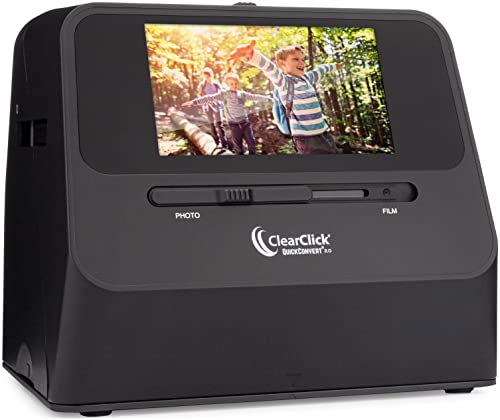
- No computer or drivers required
- Scans 4x6 photos, slides, and negatives
- Built-in battery with 5" preview screen
Best For: People who want fast, portable scanning for standard-sized photos and film
Versatile Archive Choice
KEDOK 4-in-1 photo, slide, and negative scanner

- Scans photos, slides, negatives, and business cards
- 5" LCD with simple on-screen adjustments
- Includes 8GB SD card and accessories
Best For: Users who want an all-in-one scanner for family archives and office use
High-Resolution Film Pick
PORTTA 22MP film and slide scanner with HDMI

- 16MP or enhanced 22MP scanning
- Supports 135, 126, 110, and slides
- 5" LCD plus SD card and HDMI output
Best For: Home archivists who want flexible resolution and easy TV previewing
All-in-One Versatility – Magnasonic FS71 24MP Film Scanner
If you want film scanners for digitizing photos without relying on a computer, the Magnasonic FS71 is built for a straightforward workflow. It converts 35mm, 110, 126, and Super 8 film plus several slide formats into 24MP JPEG files, making it a flexible choice for mixed archives.
Best For: Home users who want an easy, standalone scanner for multiple film and slide formats.
Pros:
- Scans negatives and slides in several formats, including 35mm, 110, 126, and Super 8.
- 5″ LCD display lets you preview scans directly on the unit.
- SD card support up to 128GB keeps the process computer-free.
- Simple brightness and RGB color correction controls are built in.
Cons:
- SD card is not included.
- HDMI cable is not included for external viewing.
- Requires Windows 7 or newer for the stated system support.
The FS71 is a practical pick if your priority is convenience and format flexibility over a software-heavy workflow. Its on-device controls and quick scan process make it well suited to batch digitizing older family media.
Streamlined Tray Feeding – KODAK Slide N Scan Max
For shoppers comparing film scanners for digitizing photos, the KODAK Slide N Scan Max focuses on speed and an easy tray-based workflow. It supports 135mm, 110mm, and 126mm film, plus slides and negatives, and saves directly to SD cards so you can keep scanning without a computer.
Best For: Users who want simple, fast scanning with minimal repositioning.
Pros:
- Smooth-moving tray helps feed film continuously.
- Supports 135mm, 110mm, and 126mm slides and negatives.
- Saves directly to SD/SDHC cards up to 32GB.
- 13MP CMOS sensor captures up to 4208 x 3120 resolution with interpolation up to 22MP.
Cons:
- SD card is not included.
- Maximum supported card size is 32GB.
- USB connection is listed, but the workflow is centered on standalone use.
This model makes sense if you value speed and low-friction operation more than advanced manual control. It is a strong fit for turning a stack of old film into digital files with less setup and fewer steps.
Fast Photo Batch Scanning – Plustek ePhoto Z300
The Plustek ePhoto Z300 is a photo scanner rather than a film scanner, but it is a strong option if your goal is digitizing printed photos quickly. It scans 4×6 photos in about 2 seconds, supports sizes up to 8×10, and is designed to process stacks of family prints far faster than a flatbed.
Best For: People digitizing large collections of printed photos on Mac or PC.
Pros:
- Very fast for prints, with about 2 seconds per 4×6 photo.
- Supports 3×5, 4×6, 5×7, 8×10, letter, and A4 sizes.
- Auto crop and deskew help clean up scans automatically.
- Works with both Windows and Mac systems.
Cons:
- It is for photos and documents, not film negatives or slides.
- Single-sheet feed means one item at a time.
- Best performance is tied to its supported photo sizes and scan settings.
If your archive is mostly printed pictures instead of film, this Plustek model is a productivity tool more than a traditional scanner. Its speed and automatic correction features make large home photo collections much easier to digitize.
Compact Slide Conversion – KODAK Slide N Scan 22MP
The KODAK Slide N Scan is a compact pick for people shopping film scanners for digitizing photos and slides at home. It handles 135, 110, and 126mm negatives plus 50mm slides, and its 5″ LCD makes it easy to preview and edit scans directly on the device.
Best For: Users who want a stylish standalone scanner for common slide and negative formats.
Pros:
- Supports 135, 110, and 126mm film plus 50mm slides.
- 5″ LCD display provides a clear preview and gallery mode.
- Quick-feeding tray supports continuous loading.
- Single-touch editing makes resizing and converting simple.
Cons:
- SD or SDHC card is not included.
- Maximum supported card size is 32GB.
- Limited to the listed film and slide formats.
This model stands out if you want a compact scanner with easy on-device editing and a polished look. It is a sensible fit for converting older home slides and negatives without building a computer-based workflow.
All-in-One Memory Converter – Photo, Slide & Negative Scanner with 5” Large Screen
If you want film scanners for digitizing photos without needing a computer, this all-in-one unit is built for simple home archiving. It handles 35mm slides, 135 and 110 negatives, printed photos, and business cards, then saves JPEGs directly to the included SD card for easy transfer later.
Best For: Families and casual users who want an easy standalone scanner for mixed photo and film formats.
Pros:
- Supports slides, negatives, printed photos, and business cards in one device
- 5-inch HD screen makes previewing and editing straightforward
- Standalone operation means no software, apps, or drivers to install
- Includes SD card, holders, cleaning brush, cables, and a 3-year warranty
Cons:
- Resolution is listed as 1080P, so it may not suit users wanting the highest-detail archival scans
- Best suited to smaller batch scanning rather than high-volume workflows
Overall, this is a practical pick if you value convenience, broad media support, and a simple screen-based workflow. It is especially appealing for users who want to digitize family keepsakes quickly and keep the process offline.
High-Format Home Scanner – 22MP Film & Slide Scanner with 5" LCD, Converts 35mm 126 110
For buyers comparing film scanners for digitizing photos, this model stands out for its 22MP capture and broad format support. It converts 35mm/135, 110, 126 negatives, 50mm slides, and Super 8 film, while the 5-inch LCD lets you preview and edit scans right on the device.
Best For: Users with mixed legacy formats who want a simple scanner with higher-resolution output.
Pros:
- 22MP scanning for higher-resolution digital files
- Supports negatives, slides, and Super 8 film
- 5-inch LCD with real-time preview and playback
- Includes HDMI, USB, film holders, and a full accessory kit
Cons:
- Built-in memory is only 128MB, so external storage is likely needed for regular use
- SD card is not included
This is a strong all-around option if you need format flexibility and want a more detailed scan than basic entry-level units. The included adapters and direct TV/PC connectivity make it convenient for both scanning and sharing.
Simple TV-Ready Digitizer – Slide & Negative Film Scanner, Converts 35mm Slides to Digital JPEG Photos
This compact pick for film scanners for digitizing photos focuses on quick, one-touch conversion and easy viewing. It scans 135/110 negatives and 135/110/126/Super 8 slides into JPEG files, with a 5-inch LCD and gallery mode for using it as a desktop photo frame when you are not scanning.
Best For: Buyers who want a straightforward scanner with TV display support and simple onboard controls.
Pros:
- 22MP scanner with JPEG output for negatives and slides
- 5-inch HD screen plus gallery mode for photo-frame use
- One-touch scanning with onboard brightness and color controls
- USB and HDMI connections make PC transfer and TV viewing easy
Cons:
- SD card is not included and must support FAT32 or EXFAT up to 64GB
- Must remain plugged into power during use
It is a sensible choice for users who want a simple, self-contained scanner that can also double as a display. The bundled adapters and 36-month warranty add useful value for home archiving.
Quick Convert Pick – ClearClick QuickConvert 2.0 photo and film scanner
If you want film scanners for digitizing photos without setting up a computer, the ClearClick QuickConvert 2.0 is built for quick one-at-a-time conversion. It scans 4×6 photos or smaller plus 35mm, 110, and 126 film, and saves JPEG files directly to an SD card, making it a straightforward option for preserving old prints and negatives.
Best For: Home users who want a portable, no-computer scanner for 4×6 photos, slides, and common film formats.
Pros:
- No computer or drivers required.
- Fast 2-3 second scans for photos, slides, or negatives.
- Built-in rechargeable battery and 5″ preview LCD.
- Can scan photos in albums or mounts without removing them.
Cons:
- Scans one item at a time; no autofeeder.
- Does not support 5×7 photos.
- Best suited to smaller prints and common film sizes only.
The ClearClick focuses on convenience over complexity, which makes it appealing for quick archiving jobs. If your priority is simple digital conversion of family photos and standard film formats, this model keeps the process fast and easy.
Versatile Archive Choice – KEDOK 4-in-1 photo, slide, and negative scanner
For shoppers comparing film scanners for digitizing photos, the KEDOK model stands out for mixing photo, slide, negative, and business card conversion in one unit. It works without a computer, includes an 8GB SD card, and uses a large 5″ LCD so you can preview and edit before saving digital JPEG files.
Best For: Families, home offices, and gift buyers who want a versatile scanner with included storage and easy on-screen editing.
Pros:
- Supports negatives, slides, photos, and business cards.
- Large 5″ LCD for previewing and sharing.
- Includes 8GB SD card and internal memory.
- Single-touch editing for color, brightness, and resolution.
Cons:
- One-at-a-time scanning only.
- Bulkier than basic handheld-style options.
- Best performance is tied to supported photo sizes and film types.
The KEDOK is a practical all-rounder if you want to preserve memories and also digitize occasional business cards. Its included accessories and simpler controls make it easy to start scanning right away.
High-Resolution Film Pick – PORTTA 22MP film and slide scanner with HDMI
If you need film scanners for digitizing photos at home with a bit more resolution flexibility, the PORTTA film scanner is a strong fit. It scans 135, 126, and 110 film plus slides, offers 16MP or enhanced 22MP output, and stores images directly to SD card without needing a computer.
Best For: Users who want a no-computer scanner with adjustable resolution and HDMI preview for home archiving.
Pros:
- Chooses between 16MP standard and 22MP enhanced scans.
- Supports 135, 126, 110, and Super 8 photo-only scanning.
- 5″ LCD makes previewing and alignment easy.
- SD card storage plus HDMI output for viewing on a TV.
Cons:
- Does not list support for loose printed photo sizes like larger flat photos.
- One-at-a-time scanning workflow.
- Designed more for film and slides than broad photo scanning.
The PORTTA is a good choice when you want a dedicated film-and-slide workflow with useful image controls. Its higher-resolution option and HDMI output make it especially handy for reviewing scans as you go.
How We Picked the Best Film Scanners for Digitizing Photos
We focused on scanners that are practical for home archiving: straightforward operation, support for common formats, and enough resolution to produce useful digital copies. We also looked at display size, scan speed, computer-free use, and whether the scanner is better for loose photos, slides, or film strips.
Quick Comparison: Which Type Fits Your Archive?
If you mostly have loose 4×6 prints, a dedicated photo scanner like the Plustek-style option is usually the fastest path. If your collection is mostly negatives and slides, a film scanner with a built-in screen and direct-to-memory-card workflow is often the simplest choice. For mixed archives, an all-in-one unit is more flexible, especially if you want to handle 35mm, 110, 126, and some Super 8 material in one device.
Key Buying Factors for Film Scanners for Digitizing Photos
Supported Formats
Make sure the scanner handles the media you actually own. Some models are focused on 35mm film and slides, while others also support 110, 126, and larger format options. If your archive is mixed, broad compatibility matters more than a slightly higher headline resolution.
Resolution and Output Quality
Resolution affects how much detail you retain, but marketing numbers do not tell the whole story. For casual archiving and sharing, many 22MP-class units are sufficient. If you expect to crop, print, or restore older images, prioritize consistent sharpness, good color handling, and decent exposure control.
Ease of Use
Built-in LCD screens, HDMI output, and standalone saving to SD cards make scanning easier for non-technical users. These features can save time if you do not want to depend on software setup or a constantly connected computer.
Speed Vs. Flexibility
Speed matters when you have hundreds of images, but the fastest scanner is not always the best fit. Quick feed scanners work well for loose prints, while film scanners with trays and holders tend to be better for negatives and slides that need careful alignment.
Who Should Buy Which Film Scanners for Digitizing Photos?
Choose a film scanner with a large display and broad media support if you want an all-purpose family archive solution. Pick a print-focused model if your main goal is digitizing boxes of photos quickly. If you are scanning a large number of 4×6 prints, prioritize auto-crop and deskew features; if you are preserving film, prioritize holder stability and support for the exact frame sizes in your collection.
For most buyers, the best choice is the scanner that matches the format you own most often and gives you the simplest workflow. That usually leads to better results than paying for features you will rarely use.