
When it comes to enhancing your office security, keypad door locks offer a blend of safety and convenience that can’t be overlooked. With features like keyless entry and customizable codes, these locks simplify access for both employees and visitors. But with so many options available, how do you choose the right one for your specific needs? Let’s explore the top contenders that might just redefine your approach to office security.
SCHLAGE FE575 PLY 626 ELA Plymouth Keypad Entry with Auto-Lock

If you’re looking for a reliable and secure locking solution for your office, the SCHLAGE FE575 PLY 626 ELA Plymouth Keypad Entry with Auto-Lock is an excellent choice. This brushed chrome keypad offers keyless entry, eliminating the hassle of lost or forgotten keys. With the auto-lock feature, your door will re-secure after just five seconds, ensuring your space stays safe. The illuminated keypad provides visibility at night, while the inside lever remains open for easy access. You can easily add or delete user codes directly at the keypad, making management simple and user-friendly for everyone in your office.
Best For: This product is best for office environments that require secure, keyless entry and easy management of access codes.
Pros:
- Keyless entry eliminates the risk of lost or forgotten keys, enhancing security.
- Auto-Lock feature ensures the door re-locks automatically after five seconds, providing peace of mind.
- Illuminated keypad allows for easy visibility in low-light conditions, improving user experience.
Cons:
- The inside lever remains unlocked, which may pose a security risk in some situations.
- Requires a compatible door thickness of 1-3/8 to 1-3/4 inches, limiting installation options.
- Dependency on a battery for operation may require periodic maintenance or battery replacements.
TEEHO TE004 Keyless Entry Keypad Door Lock

The TEEHO TE004 Keyless Entry Keypad Door Lock is perfect for busy office environments where convenience and security matter most. You’ll love its three access methods: 20 user codes, one-time temporary codes, and two physical keys. This lock features an anti-peeking option, ensuring your code stays secure, while automatic shutdown after 10 failed attempts protects against unauthorized access. With a durable, weather-resistant design, it withstands harsh conditions. Plus, the quick installation is a breeze, fitting standard door holes. Enjoy the flexibility of passage mode and a reliable 1-year warranty, along with lifetime support for peace of mind.
Best For: The TEEHO TE004 Keyless Entry Keypad Door Lock is best for busy offices and homes where convenience and enhanced security are essential.
Pros:
- Supports multiple unlocking methods, including user codes and physical keys, providing flexibility for various users.
- Anti-peeking feature and automatic shutdown enhance security by preventing unauthorized access.
- Quick and easy installation with minimal tools required, suitable for standard door sizes.
Cons:
- Limited to a maximum of 20 user codes, which may not suffice for larger organizations.
- Passage mode may compromise security in sensitive areas if not monitored.
- Requires batteries for operation, which means periodic maintenance is needed to ensure functionality.
Keypad Door Lock with Handle: Keyless Entry Smart Lock

Looking for a seamless way to enhance security in your office? The Keypad Door Lock with Handle: Keyless Entry Smart Lock is your solution. With the ability to create up to 20 unique access codes, you can easily manage entry for family and friends. Guests benefit from temporary codes, while you still have two physical keys for emergencies. The backlit keypad guarantees visibility at night, and low-battery alerts keep you informed. Installation takes just five minutes, requiring no extra drilling. Plus, its adjustable auto-lock feature and water-resistant design offer reliability and convenience for your busy workspace. Upgrade your security effortlessly!
Best For: Individuals or businesses looking for an efficient and secure keyless entry solution for their front or interior doors.
Pros:
- Allows for up to 20 unique access codes, making it easy to manage entry for multiple users.
- Quick and easy installation with no additional drilling required, taking only five minutes.
- Features like low-battery alerts and water-resistant design enhance functionality and durability.
Cons:
- Requires 4 AA batteries which are not included, adding to initial setup costs.
- May not be compatible with all door types, requiring verification of door thickness and hole size prior to purchase.
- The auto-lock feature, while convenient, may require adjustment to suit individual preferences.
Kucacci Smart Door Handle Lock with Keypad

For busy office environments, the Kucacci Smart Door Handle Lock with Keypad stands out as a secure and convenient solution. This electronic lock allows up to 20 users to access your space with personalized 4-8 digit codes. Installation takes just 10 minutes with a screwdriver, making it hassle-free. You’ll appreciate features like the backlit keypad for nighttime use, customizable auto-lock settings, and silent mode for discretion. Plus, it’s weather-resistant, ensuring durability. With a lifetime warranty and 30-day money-back guarantee, you can trust the Kucacci lock to enhance your office security effortlessly. Enjoy peace of mind with this reliable locking system!
Best For: The Kucacci Smart Door Handle Lock with Keypad is best for busy office environments that require secure and convenient access for multiple users.
Pros:
- Easy installation: Can be set up in just 10 minutes with a screwdriver.
- User-friendly: Accommodates up to 20 users with customizable access codes and backlit keypad for nighttime use.
- Durable design: Weather-resistant and includes features like auto-lock and silent mode for added convenience.
Cons:
- Battery requirement: Requires 4 AA batteries (not included), which may need to be replaced periodically.
- Limited code length: One-time codes are restricted to 4-8 digits, which may not be sufficient for all security needs.
- Potential connectivity issues: As an electronic device, it may experience occasional technical glitches or require app access for some features.
Fingerprint Smart Door Lock with Handle & Keypad

Gaining access to your office door with just a fingerprint or a keypad makes it an ideal choice for busy professionals and families alike. This Fingerprint Smart Door Lock offers keyless entry, letting you open the door using your fingerprint, keypad, app, FOB, or even a traditional key. It’s perfect for everyone, from kids to the elderly. Plus, if you manage rental properties, you can generate guest access codes instantly. Installation is a breeze—no extra drilling needed. With Bluetooth and smart home compatibility, you can control access remotely, enhancing both security and convenience at your office.
Best For: Busy professionals, families, and rental property managers looking for a convenient and secure keyless entry solution.
Pros:
- Multiple unlocking methods (fingerprint, keypad, app, FOB, key) provide flexibility and convenience.
- Easy DIY installation with no extra drilling required, fitting most standard doors.
- Remote access and management features are ideal for rental property hosts, enhancing security and control.
Cons:
- Reliance on technology may pose challenges for users not comfortable with smart devices.
- Requires a power source for the keypad and fingerprint scanner, which could be a concern during power outages.
- Optional WiFi Gateway needed for full remote access features may incur additional costs.
Evanshow Fingerprint Door Lock Biometric Door Knob
The Evanshow Fingerprint Door Lock Biometric Door Knob is perfect for busy offices that prioritize both security and convenience. This 4-in-1 smart lock offers fingerprint access, a keypad, two mechanical keys, and four IC cards, accommodating up to 100 fingerprints and passwords. With an upgraded fingerprint sensor that recognizes in just 0.5 seconds, you’ll enjoy quick, accurate access while minimizing false rejections. Installation is a breeze, requiring no drilling or wiring and fitting doors 1.18-1.97 inches thick. Enhance your office security effortlessly with advanced technology that prevents unauthorized access while ensuring a seamless entry experience for your team.
Best For: Busy offices and homes seeking a secure and convenient keyless entry solution.
Pros:
- Versatile Access Options: Offers multiple entry methods including fingerprint, keypad, mechanical keys, and IC cards.
- Fast Recognition: Upgraded fingerprint sensor ensures quick access with a 0.5-second recognition time.
- Easy Installation: No drilling or wiring required, making it simple to install on various door types.
Cons:
- Limited to Specific Door Thickness: Only fits doors between 1.18-1.97 inches thick, which may not accommodate all doors.
- Dependency on Power: Requires batteries for operation, which may need regular replacement.
- Potential Tech Issues: As with any technology, there may be occasional malfunctions or compatibility issues.
Kwikset SmartCode 917 Keyless Entry Lock with Halifax Door Handle

If you’re looking for a secure and convenient entry solution for your office, the Kwikset SmartCode 917 Keyless Entry Lock with Halifax Door Handle stands out with its ability to program up to 30 customizable user access codes. This electronic lever lock features SmartKey Security and boasts a BHMA certified AAA rating for enhanced security and durability. You can easily lock or gain access to it via a touch-operated keypad or key, and enjoy the auto-lock feature that secures your door after every use. With a sleek design available in various finishes, it’s a stylish and practical choice for any office setting.
Best For: Individuals or businesses seeking a secure and convenient keyless entry solution for their doors.
Pros:
- Up to 30 customizable user access codes for flexible access management.
- Auto-lock feature enhances security by locking the door automatically after each use.
- Available in various finishes to match different decor styles.
Cons:
- Requires battery replacement every few years, which may be inconvenient.
- Touch-operated keypad may not be suitable for users with mobility issues.
- Higher upfront cost compared to traditional locks.
Yamiry Fingerprint Smart Door Lock with Keypad

For landlords and property managers seeking a reliable and modern solution for securing their properties, the Yamiry Fingerprint Smart Door Lock with Keypad stands out. This smart lock offers six access methods, including fingerprint recognition and Bluetooth app control, making entry easy for you and your tenants. Installation is quick, taking about 10 minutes, and it’s compatible with standard wooden doors. With the mobile app, you can manage access, generate temporary passcodes, and track entry records. Weighing just 2.64 pounds and made from durable materials, it’s a practical choice for enhancing security and convenience in any property.
Best For: Landlords, property managers, and Airbnb hosts looking for a secure and convenient keyless entry solution for their properties.
Pros:
- Offers six versatile unlocking methods for ease of access.
- Quick and straightforward installation process, compatible with standard wooden doors.
- Mobile app allows for remote access management and tracking of entry records.
Cons:
- Requires a separate WiFi gateway for Alexa voice unlock functionality.
- Lithium Ion batteries are not included, adding to initial setup costs.
- Some users may prefer traditional lock mechanisms over smart technology.
Evanshow Biometric Fingerprint Door Lock with Keyless Entry

Evanshow’s Biometric Fingerprint Door Lock with Keyless Entry is perfect for those who prioritize security and convenience in their office environments. With its 5-in-1 functionality, you can access your office using your fingerprint, a password, mechanical keys, an IC card, or even through the Tuya app. Its upgraded fingerprint sensor recognizes prints in under 0.5 seconds, minimizing false rejections. You’ll appreciate the easy installation—no drilling or wiring needed. Made of durable zinc alloy, this lock fits standard wooden doors and includes features like anti-peeping passwords and auto-lock. With a solid customer rating, it’s a reliable choice for your security needs.
Best For: Individuals and businesses seeking a secure and convenient keyless entry solution for their doors.
Pros:
- 5-in-1 functionality allows multiple access methods including fingerprint, password, and app control.
- Fast fingerprint recognition in under 0.5 seconds reduces the chance of false rejections.
- Easy installation without the need for drilling or wiring makes it accessible for anyone to set up.
Cons:
- Requires a compatible smartphone for full app functionality, which may not suit all users.
- Limited to wooden doors within specific thickness ranges, potentially excluding some types of doors.
- May require battery replacements over time, which adds to maintenance.
HIDALIFE Keyless Entry Door Lock with Keypad and Handle
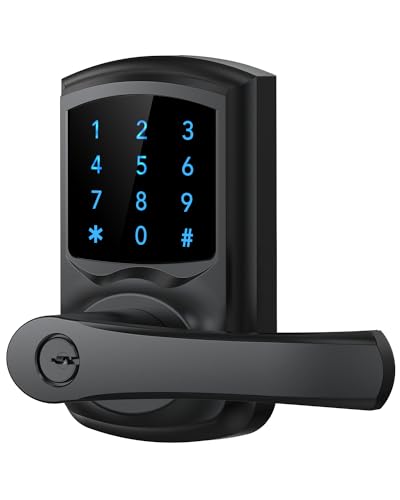
Looking for a convenient and secure solution for your office entry? The HIDALIFE Keyless Entry Door Lock with Keypad and Handle delivers just that. Its touchscreen keypad, complete with a blue backlight, makes password entry effortless, even in the dark. With anti-peep security, you can enter random digits, keeping your code confidential. Plus, it automatically locks within five seconds for added safety. Installation is a breeze, taking about 15 minutes with standard tools. Each member can have a unique 4-digit code, perfect for families or rental properties. Enjoy easy access and enhanced security with this stylish door lock!
Best For: Families, rental property owners, and outdoor enthusiasts seeking a secure and convenient entry solution.
Pros:
- Touchscreen keypad with blue backlight allows easy password entry in low light.
- Anti-peep security feature ensures privacy when entering codes.
- Quick installation that takes around 15 minutes with basic tools.
Cons:
- Compatibility limitations as it does not fit 38mm door holes.
- Requires battery power, which may need periodic replacement.
- Limited to 4-digit codes, which might not be as secure as longer codes.
Factors to Consider When Choosing a Keypad Door Lock for Office
When choosing a keypad door lock for your office, you need to take into account several key factors. Security features, user access management, and installation ease can greatly impact your decision. Don’t forget about weather resistance and smart lock functionality, as these elements can enhance convenience and safety.
Security Features Importance
Choosing the right keypad door lock for your office is essential, as security features can greatly impact your safety and convenience. Look for locks with anti-peeking technology, which lets you enter random digits before or after your actual code, making it harder for intruders to guess. Automatic shutdown protocols that lock you out after several failed attempts can considerably deter unauthorized access. The ability to create multiple user codes, including temporary ones for visitors, adds flexibility. Keyless entry eliminates the hassles of lost keys, enhancing security. Finally, consider auto-lock features, which re-lock the door after a set time, ensuring that doors aren’t inadvertently left unlatched, providing peace of mind for everyone in your office.
User Access Management
To guarantee effective user access management in your office, it’s vital to prioritize keypad door locks that allow for multiple unique access codes. This feature enables you to manage who can enter the premises efficiently. Look for locks that support temporary or one-time codes for guests or service personnel, giving you flexible access without compromising security. Also, choose a lock that facilitates easy addition and deletion of user codes directly at the keypad, making it simple to update for changing personnel. A model with access tracking logs is important, providing an audit trail of entries and exits. Finally, opt for user-friendly interfaces, ensuring that both technical and non-technical staff can manage codes effortlessly.
Installation Ease and Compatibility
Installing a keypad door lock should be straightforward and hassle-free, especially if you consider certain compatibility factors. First, verify the lock fits standard door thicknesses, typically between 1-3/8 to 1-3/4 inches, for proper installation. Check the size of your existing door holes; most locks require a 2-1/8 inch (54mm) diameter. Look for models that promise easy installation, ideally needing just a screwdriver and taking no more than 10-15 minutes. It’s also essential to choose locks with adjustable latches to fit various backset sizes, commonly 2-3/8 or 2-3/4 inches. Finally, confirm that the lock is reversible for left- and right-handed doors, giving you flexibility for different office layouts.
Weather Resistance Considerations
When selecting a keypad door lock for your office, considering weather resistance is essential, especially if your entrance is exposed to the elements. Look for locks with an IP rating of at least IP54, guaranteeing protection against dust and splashes of water. Materials like zinc alloy or aluminum enhance durability and resist corrosion, making them ideal for outdoor or semi-exposed settings. Some locks are designed to keep electronic components functional, even in extreme weather, such as freezing temperatures or heavy rain. Additionally, regular maintenance and checks can help guarantee the keypad and locking mechanism work properly in varying conditions, prolonging the lifespan of your lock. Prioritize weather resistance to maintain security and convenience year-round.
Smart Lock Functionality
As you explore keypad door locks for your office, smart lock functionality should be a top consideration due to its versatility and enhanced security features. These locks often support multiple access methods, such as keypads, fingerprints, mobile apps, and physical keys, giving you flexibility for different users and situations. You can create temporary access codes for guests, easily deleting them after use—perfect for managing visitor access. Advanced security features, like anti-peeking technology, protect your entry codes from unauthorized observation. Plus, with remote management capabilities through mobile apps, you can monitor access logs and control lock functions from anywhere. Installation is typically straightforward, requiring just basic tools and fitting standard door measurements, making upgrades a breeze.