
Keeping office files organized is easier when every folder, binder, and archive box is clearly labeled. The right label printer saves time, cuts down on misfiles, and helps your workspace look professional.
In this roundup, we focus on the best label printers for office files in 2026, with options for simple everyday use, mobile printing, and more advanced business labeling needs.
Best 8 Label Printers for Office Files Picks for 2026
Best for Shared Office Labeling
Brother PT-D610BT Connected Label Maker

- Bluetooth and USB for shared office use
- Strong template and font options for custom labels
- Memory, preview, and cutter improve workflow
Best For: Shared offices and admin teams that need polished file labels with multiple users.
Best for Quick Labeling

- Portable handheld design for labeling on the go
- QWERTY keyboard with one-touch smart keys
- Includes 3 D1 label cassettes to get started fast
Best For: Small offices or home users who need a simple, portable label maker for files and folders.
Best for Office File Labeling
Brother PT-D210 Label Maker Bundle

- Includes 4 tapes for immediate setup
- Easy one-touch controls and preview screen
- Compact, portable design for desk or on-the-go use
Best For: Small offices and home offices organizing files, folders, and supplies.
Best for Office Files
SUPVAN T50M Pro Bluetooth Label Maker

- 3/4" to 2" labels handle folders and office supplies
- Free app offers 30+ fonts, 50+ frames, and 660+ icons
- Inkless, Bluetooth design keeps labeling simple and tidy
Best For: Offices and small businesses that need flexible labels for files, supplies, and organization.
Best for Small Office Labeling
Brother P-Touch PTD220 Label Maker

- Durable laminated TZe labels for files and storage
- Easy QWERTY input with fonts, frames, and symbols
- Saves up to 30 frequently used labels for reprints
Best For: Small offices and home users who need an easy label maker for files and workspace organization.
Best for Quick Date Labeling
NIIMBOT B2 Portable Bluetooth Label Maker

- One-button offline printing for dates and saved templates
- Lightweight 348g portable design with inkless thermal printing
- Bluetooth plus USB support for phones and Windows PCs
Best For: Offices needing a portable label maker for file folders, dates, and everyday organization.
Best for Easy Setup
NIIMBOT B1 Thermal Label Maker
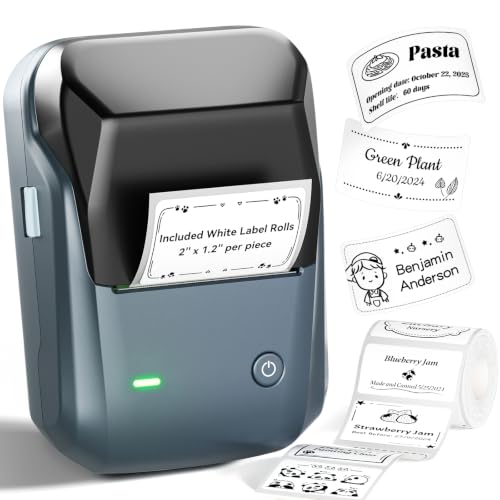
- Bluetooth pairing on iOS and Android
- App auto-detects label sizes
- Inkless thermal printing reduces upkeep
Best For: Small offices and home users who want fast, simple file labeling.
Best for Fast Office Labeling
SUPVAN E11 Bluetooth Label Maker

- Keyboard plus app control for fast office labeling
- Rich customization with fonts, frames, and icons
- Rechargeable and compact for portable use
Best For: Small offices and home offices that need quick, customizable file labels.
Best for Shared Office Labeling – Brother PT-D610BT Connected Label Maker
Brother P-Touch PT-D610BT Business Professional Connected Label Maker with Bluetooth®
Check Price On AmazonIf you need label printers for office files that can be shared across a team, the Brother P-Touch PT-D610BT is built for fast, polished labeling from both desktop and mobile devices. Bluetooth and USB connectivity make it flexible in busy offices, while the large screen, built-in templates, and high-resolution printing help keep file labels neat and consistent.
Best For: Shared workspaces, admin teams, and offices that want easy-to-read file labels with multiple users.
Pros:
- Bluetooth and USB support for printing from computers or mobile devices
- Loads of design options, including fonts, frames, symbols, and templates
- Built-in memory for up to 90 frequently used labels speeds up repeat jobs
- Automatic cutter and preview screen reduce waste and mistakes
Cons:
- More feature-rich than a basic labeler, so it may be overkill for simple tasks
- Works best if you plan to use the software and templates regularly
For offices that want a more organized filing system, this Brother model stands out among label printers for office files because it balances speed, customization, and team-friendly connectivity. It’s a practical fit when you need labels that look professional and stay consistent across departments.
Best for Quick Labeling – DYMO LabelManager 160 Bundle
If you want a simple handheld option for label printers for office files, this DYMO LabelManager 160 bundle keeps the basics fast and practical. The QWERTY keyboard and one-touch smart keys make it easy to create file labels quickly, while the included label cassettes add immediate value right out of the box.
Best For: Small offices or home users who want a portable, easy-to-use label maker for filing cabinets, folders, and general organization.
Pros:
- Portable handheld design makes it easy to label files wherever you work.
- QWERTY keyboard and smart keys speed up text entry and formatting.
- Bundle includes three D1 label cassettes, so you can start labeling immediately.
- Over 20 text formats and 200+ symbols offer useful customization.
Cons:
- Handheld format is less ideal for high-volume office printing.
- Uses specific DYMO D1 tapes, which adds ongoing supply costs.
Overall, this is a solid pick if you need straightforward, portable label printers for office files without a steep learning curve. It shines most for everyday filing and light office organization rather than heavy-duty labeling.
Best for Office File Labeling – Brother PT-D210 Label Maker Bundle
Brother P-Touch, PTD210, Easy-to-Use Label Maker Bundle (4 Label Tapes Included), White, Small
Check Price On AmazonIf you need reliable label printers for office files, the Brother P-Touch PT-D210 is a simple, practical pick for folders, binders, and supply organization. It’s easy to use, offers plenty of formatting options, and includes multiple tapes so you can start labeling right away.
Best For: Small offices, home offices, and anyone who wants a straightforward label maker for file folders and desk organization.
Pros:
- Includes 4 tapes, so you can begin organizing immediately
- One-touch keys make fonts, symbols, frames, and templates easy to access
- Preview screen helps reduce misprints before you print
- Compact and portable for desk use or moving between work areas
Cons:
- Batteries are sold separately
- No built-in rechargeable battery
- Basic model lacks advanced network or app-based printing
For simple, durable labeling, this Brother model covers the essentials without making the workflow complicated. It’s a strong fit if you want one of the most practical label printers for office files and everyday document organization.
Best for Office Files – SUPVAN T50M Pro Bluetooth Label Maker
If you want a compact, inkless option for label printers for office files, the SUPVAN T50M Pro is a practical choice for folders, documentation, cable tags, and everyday organization. Its app-based design makes it easy to create clear labels from your phone, with enough customization to keep office filing neat and consistent.
Best For: Offices, home workspaces, and small businesses that need fast, flexible labeling for files and supplies.
Pros:
- Supports 3/4" to 2" labels for file folders, storage bins, and more
- Free app includes 30+ fonts, 50+ frames, and 660+ icons
- Inkless printing helps reduce ongoing supply hassles
- Compatible with file, cable, round, and square labels
Cons:
- Bluetooth/app workflow may be less convenient than a simple standalone printer
- Best results depend on using the mobile app for setup and editing
For buyers comparing label printers for office files, this model stands out for its mix of versatility and easy customization. It is especially appealing if you want a simple way to keep folders, supplies, and small-business items organized without dealing with ink or toner.
Best for Small Office Labeling – Brother P-Touch PTD220 Label Maker
If you want a straightforward option among label printers for office files, the Brother P-Touch PTD220 is a practical pick for small offices, home offices, and everyday file organization. It makes durable laminated labels in a handy 1/2-inch width, with enough formatting flexibility to keep folders, binders, drawers, and storage boxes neatly standardized.
Best For: Small offices and home users who need an easy-to-use label maker for organizing files, supplies, and workspace storage.
Pros:
- Prints durable Brother TZe labels that hold up well on office files and containers
- QWERTY keyboard, templates, fonts, frames, and symbols make setup simple and flexible
- Built-in memory saves up to 30 frequently used labels for quick reprints
- Compact, battery-powered design works well for light-duty office organization
Cons:
- Uses 1/2-inch max label width, which may be limiting for larger file labels
- AAA batteries and AC adapter are sold separately
- Not as feature-rich as higher-end office label printers
For buyers comparing label printers for office files, the PTD220 stands out as a simple, reliable choice rather than a heavy-duty business machine. It’s a good fit if you want clean, durable labels without a steep learning curve or a complicated setup.
Best for Quick Date Labeling – NIIMBOT B2 Portable Bluetooth Label Maker
For teams that need fast, flexible label printers for office files, the NIIMBOT B2 stands out with one-button offline printing, so you can print dates or saved templates without opening the app every time. Its compact, inkless design and broad label-width support make it practical for file folders, archive boxes, cable tags, and other everyday office organization jobs.
Best For: Offices that want a portable label maker for file folders, storage bins, and quick date or template printing.
Pros:
- One-button offline printing is handy for fast date and template labels.
- Portable 348g design makes it easy to move between desks, rooms, or workstations.
- Works with iOS, Android, and Windows, plus USB computer printing.
- Supports a wide range of label styles and widths for office and storage use.
Cons:
- Not compatible with iPads.
- Some advanced editing still depends on the NIIMBOT app.
Overall, the B2 is a smart pick if you want simple, portable label printers for office files without paying for a larger desktop unit. It’s especially useful when quick turnaround, date stamping, and cross-device printing matter more than heavy-duty output.
Best for Easy Setup – NIIMBOT B1 Thermal Label Maker
If you want one of the more approachable label printers for office files, the NIIMBOT B1 is a practical pick. It pairs quickly over Bluetooth, auto-detects label sizes in the app, and uses thermal printing, so there’s no ink to replace.
Best For: Small offices, home offices, and business users who want quick, tidy file labels with minimal setup.
Pros:
- Easy Bluetooth setup with iOS and Android
- Auto-detects label size in the app for faster formatting
- Inkless thermal printing keeps maintenance simple
- Compact design suits desks, shelves, and supply bins
Cons:
- Not compatible with tablets
- PC use requires a USB connection and driver
- Label output is best for text-based organization, not wide-format needs
For basic filing and shelf labeling, this NIIMBOT model covers the essentials without adding clutter or complexity. It’s a solid fit if you want label printers for office files that are simple to use, easy to carry, and quick to reprint when your system changes.
Best for Fast Office Labeling – SUPVAN E11 Bluetooth Label Maker
The SUPVAN E11 is a practical pick for label printers for office files when you want quick, tidy labeling without a learning curve. Its built-in keyboard handles repeat jobs fast, while the app adds more design control for color-coded folders, shelf tags, and other office organization tasks.
Best For: Small offices, home offices, and anyone who needs fast, customizable file labels with both keyboard and app control.
Pros:
- Keyboard and Bluetooth app printing give you both speed and flexibility.
- 30+ fonts, 50+ frames, and 660+ icons make office labels easy to customize.
- Compact, lightweight design with rechargeable battery for portable use.
- Low-margin printing helps reduce wasted label tape on frequent jobs.
Cons:
- Best suited to label printing, not broader document management.
- App-based features may take a little setup time for first-time users.
For label printers for office files, the E11 stands out as a convenient, budget-friendly way to keep folders, binders, and storage boxes organized. If you want a compact label maker that can handle both quick one-off labels and more polished designs, this is an easy one to shortlist.
How We Picked These Label Printers for Office Files
We looked for Label Printers for Office Files that balance speed, readability, tape or label availability, ease of use, and overall value. We also prioritized models that are practical for common filing tasks such as folder tabs, storage bins, shelving, archive boxes, and supply labels.
Because office use varies, the list includes handheld, Bluetooth, and app-based models so you can choose based on workflow and volume rather than one-size-fits-all features.
Quick Comparison: Which Type Fits Your Workflow?
If you want a simple desk-friendly label maker, a basic keypad model is often enough. If you frequently label from a phone or manage a shared workspace, Bluetooth-connected options are more flexible. For larger labels or more design control, app-driven printers are the better fit.
Best for Simple File Labels
Choose a compact, tape-based model if your main job is labeling folders, drawers, and supplies with clear black-on-white text.
Best for Faster, More Flexible Labeling
Choose a Bluetooth model if you want to create labels from your phone, reuse templates, or switch between tasks without navigating a built-in keyboard.
Key Buying Factors for Label Printers for Office Files
Label size matters first. For office files, you usually need narrow, highly legible labels that fit on folders and tabs without crowding the text. Tape compatibility is also important, since some printers use proprietary cartridges while others support wider label formats.
Ease of input is another major factor. A QWERTY keyboard is quick for short labels, while app-based controls are better for templates, icons, and formatting. If multiple people will use the printer, choose one with a straightforward interface and saved settings.
Also consider portability, battery or power options, and whether the printer uses durable labels that resist smudging, peeling, or fading. For busy offices, those small durability gains add up over time.
Who Should Buy Which Label Printers for Office Files?
Buy a basic handheld printer if you need a dependable, no-fuss tool for occasional file labeling. Choose a Bluetooth or app-connected model if you label often, need more formatting control, or want to print from a phone in shared office spaces.
If your office labels extend beyond files into bins, cables, shelving, or asset tags, a more versatile printer is usually the smarter long-term purchase. The best Label Printers for Office Files are the ones that match your volume, label size needs, and day-to-day workflow.