
If you want desktop-class speed in a tiny footprint, a mini PC with Thunderbolt is one of the smartest upgrades you can make. It gives you high-bandwidth connectivity for fast storage, docks, external GPUs, and multi-display workflows.
In this roundup, we focus on compact systems that balance performance, expandability, and real-world value, so you can quickly find the right fit for work, home, or creative projects.
Best 10 Mini PC with Thunderbolt Picks for 2026
Thunderbolt-Focused Value Pick

- Dual Thunderbolt 4 ports for expansion
- Up to two 4K displays plus 8K output support
- 16GB RAM and 512GB NVMe SSD included
Best For: Compact productivity and flexible Thunderbolt 4 setups
Performance-First Creator Option

- Core i9-13900HK with 14C/20T hybrid design
- Thunderbolt 4 with 40Gbps data and 100W PD
- 32GB DDR5 and 1TB SSD included
Best For: Creators and power users needing top-end mini PC performance
Compact Upgrade-Friendly Pick
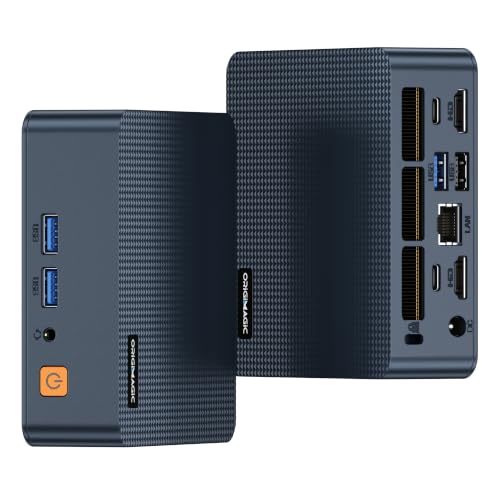
- Dual Thunderbolt 4 ports for docking and expansion
- Up to two 4K displays plus 8K output support
- 16GB RAM, 512GB SSD, and Windows 11 Pro
Best For: Everyday productivity with Thunderbolt 4 flexibility
Premium Barebones Business Choice

- Thunderbolt 4 with support for four 4K displays
- Wi-Fi 7 and Bluetooth 5.4 included
- Tool-less chassis with easy upgrade access
Best For: Professional users wanting a premium, upgradeable mini PC
Thunderbolt Productivity Pick

- Dual Thunderbolt 4 ports with 40Gbps expansion
- Supports up to four 4K displays or dual 8K displays
- Includes 2.5G Ethernet, Wi-Fi 6, 16GB RAM, 512GB SSD
Best For: Office and multi-monitor users who want strong Thunderbolt connectivity
Premium Business Choice

- Thunderbolt 4 and HDMI 2.1 support up to four 4K displays
- Wi-Fi 7, Bluetooth 5.4, and tool-less upgrade access
- Comes with 16GB DDR5 RAM and a 512GB PCIe 4.0 SSD
Best For: Professionals wanting a premium, Thunderbolt-ready business mini PC
Performance Value Pick
GMKtec M7 Ultra Gaming Mini PC

- Ryzen 7 PRO 6850U with Radeon 680M graphics
- Dual USB4, HDMI 2.1, and OCuLink for expansion
- 32GB DDR5, dual 2.5GbE LAN, and Wi-Fi 6E included
Best For: Gamers and creators who want strong performance and expansion flexibility
Compact Office Performer
MSI Cubi 5 Professional Mini Desktop

- Thunderbolt 4 and 3-display support
- 16GB RAM with 512GB SSD
- Windows 11 Pro business features
Best For: Office multitasking and compact work setups
Power-First Network Mini

- Core i7-12700H with 32GB RAM
- USB4 with Thunderbolt 4 support
- Dual 2.5GbE and triple 4K output
Best For: Performance, networking, and multi-monitor setups
Quiet Business All-Rounder

- Two Thunderbolt ports plus dual HDMI
- Core i5-13420H for business multitasking
- Wi-Fi 6E and Bluetooth 5.3
Best For: Quiet office and conference-room computing
Thunderbolt-Focused Value Pick – C7 Mini PC with Core 3 100U
If you want a mini pc with thunderbolt for a compact office or creator setup, the C7 stands out for its dual Thunderbolt 4 ports and balanced Intel Core 3 100U performance. It’s designed to handle everyday multitasking, streaming, and productivity while still leaving room for expansion through external GPUs and multi-display workflows.
Best For: Home office users, light creators, and buyers who want Thunderbolt 4 expansion in a compact Windows 11 Pro mini PC.
Pros:
- Dual Thunderbolt 4 ports with support for high-speed peripherals and expansion
- Up to two 4K displays and 8K Thunderbolt output support
- 16GB DDR4 RAM and 512GB NVMe SSD included
- 2.5Gb Ethernet, Wi-Fi 6, and Bluetooth 5.2 for modern connectivity
Cons:
- 16GB RAM may be limiting for heavier creative workloads out of the box
- Not positioned as a high-end gaming machine without added expansion
Overall, the C7 is a practical Thunderbolt 4 mini PC if you want a small desktop that can grow with your setup. Its cooling, upgrade options, and clean VESA-friendly design make it easy to fit into a long-term workspace.
Performance-First Creator Option – Beelink GTi13 Core i9 Mini PC
If you’re shopping for a mini pc with thunderbolt and need serious horsepower, the Beelink GTi13 is built around the Intel Core i9-13900HK and Thunderbolt 4 support. It’s aimed at demanding workloads like 3D modeling, video editing, rendering, programming compilation, and fast external expansion through a docking station.
Best For: Power users, creators, and business buyers who want strong CPU performance plus Thunderbolt 4 and PCIe expansion.
Pros:
- Intel Core i9-13900HK with 14 cores and 20 threads
- Thunderbolt 4 with 40Gbps data, 100W PD charging, and video output
- 32GB memory and 1TB SSD included, with large upgrade ceilings
- 2x 2.5G LAN, Wi-Fi 6, and multiple USB 3 ports for fast connectivity
Cons:
- Barebones-style expansion features may be overkill for simple office use
- Higher-performance design can be more than casual users need
In practical terms, this is the most workstation-like option in the group. If your priority is raw speed, Thunderbolt 4 versatility, and room to scale storage and graphics, the GTi13 is easy to justify.
Compact Upgrade-Friendly Pick – C7 Mini PC with Core 100U
This mini pc with thunderbolt mirrors the C7 formula with a compact footprint, Intel Core 3 100U hybrid architecture, and dual Thunderbolt 4 ports. It’s a sensible choice if you want a small desktop for office work, media, or multi-monitor productivity, while keeping the option open for faster external connectivity and expansion later.
Best For: Buyers who want a compact Windows 11 Pro mini PC with Thunderbolt 4, upgrade headroom, and everyday productivity focus.
Pros:
- Dual Thunderbolt 4 ports for docks, peripherals, and expansion
- Supports up to two 4K displays and 8K Thunderbolt output
- 16GB DDR4 RAM and 512GB SSD included
- Wi-Fi 6, Bluetooth 5.2, and 2.5Gb Ethernet built in
Cons:
- Same general-purpose platform as the other C7 model, so it’s not a performance monster
- Best suited to productivity rather than heavy gaming or pro media workloads
For shoppers who want the Thunderbolt 4 advantage without stepping up to a high-cost workstation box, this C7 configuration is straightforward and practical. It focuses on connectivity, quiet operation, and simple long-term usability.
Premium Barebones Business Choice – ASUS NUC 15 Pro Tall
The ASUS NUC 15 Pro Tall is a premium mini pc with thunderbolt built for business users who want modern connectivity and upgrade flexibility. With Intel Core Ultra 5 225H, Thunderbolt 4, Wi-Fi 7, and support for up to four 4K displays, it’s aimed at compact professional setups that need strong display and networking capability.
Best For: Business and everyday users who want a modern barebones mini PC with Thunderbolt 4, Wi-Fi 7, and easy internal upgrades.
Pros:
- Thunderbolt 4 plus HDMI 2.1 for up to four 4K displays
- Wi-Fi 7 and Bluetooth 5.4 for newer wireless connectivity
- Tool-less chassis access makes upgrades easier
- 24/7 reliability focus with MIL-STD-810H certification
Cons:
- Barebones configuration means you still need to add memory and storage
- Higher-end business features may push it beyond casual-budget territory
For buyers who want a polished, modern mini workstation with strong port and display support, the NUC 15 Pro Tall is the most premium option here. Its combination of Thunderbolt 4, Wi-Fi 7, and tool-less access makes it especially appealing for long-term business deployment.
Thunderbolt Productivity Pick – Intel 100U Dual-TB4 Mini PC
If you want a mini pc with thunderbolt for a compact work setup, this C7 model is built around connectivity and multi-display output. Its dual Thunderbolt 4 ports, dual HDMI 2.0 outputs, and 2.5G networking make it a strong fit for desks that need fast peripherals, multiple monitors, and tidy cable management.
Best For: Office users, traders, creators, and anyone who wants lots of I/O in a small footprint.
Pros:
- Two Thunderbolt 4 ports with up to 40Gbps transfer and 8K output support
- Dual HDMI 2.0 plus Thunderbolt can drive up to four 4K displays or dual 8K displays
- 16GB dual-channel DDR4 and 512GB NVMe SSD included, with room for a second drive
- 2.5G Ethernet and Wi-Fi 6 for faster wired and wireless networking
Cons:
- Ships with DDR4 rather than newer DDR5 memory
- Storage starts at 512GB, which may be tight for heavy media libraries
- Designed more for productivity than graphics-heavy gaming
Overall, this is a practical Thunderbolt-equipped mini PC for users who care more about displays, docking-style expansion, and network speed than raw gaming features. It delivers a lot of ports for the size.
Premium Business Choice – ASUS NUC 15 Pro Slim
This ASUS NUC is a polished mini pc with thunderbolt for users who want a business-ready system with modern wireless and simple upgrade access. It combines an Intel Core 7 240H, Thunderbolt 4, Wi-Fi 7, and tool-less chassis access in a very compact design.
Best For: Business users, professionals, and anyone who wants a premium compact PC with strong connectivity.
Pros:
- Thunderbolt 4 plus HDMI 2.1 supports up to four 4K displays
- Wi-Fi 7 and Bluetooth 5.4 offer very current wireless connectivity
- Tool-less chassis makes upgrades and maintenance easier
- Includes 16GB DDR5 RAM, 512GB PCIe 4.0 NVMe SSD, and VESA mount
Cons:
- No OS is pre-installed
- Uses integrated graphics, so it is not aimed at dedicated GPU workloads
- Higher-power business platform may be more than casual users need
For buyers who value stability, current connectivity, and a clean mini-PC footprint, this NUC stands out. It is especially appealing if you want Thunderbolt-based display and docking flexibility in a business-oriented machine.
Performance Value Pick – GMKtec M7 Ultra Gaming Mini PC
If you are shopping for a mini pc with thunderbolt alternatives for high-bandwidth accessories, the M7 Ultra is aimed at performance users who want even more expansion flexibility. It uses dual USB4, OCuLink, and HDMI 2.1 to support demanding gaming and creator setups in a small form factor.
Best For: Gamers, creators, and power users who want strong graphics and external expansion options.
Pros:
- Ryzen 7 PRO 6850U with Radeon 680M graphics for capable everyday and gaming performance
- Dual USB4, HDMI 2.1, and OCuLink for high-bandwidth display and expansion use
- Supports quad-screen output and up to 8K@60Hz via HDMI 2.1
- 32GB DDR5 RAM, 512GB SSD, dual 2.5GbE LAN, and Wi-Fi 6E included
Cons:
- It uses USB4 rather than Thunderbolt 4
- Storage starts at 512GB, which may require expansion for larger game libraries
- Performance modes and BIOS features may be more than basic users need
This model is a better fit if you want strong expansion and graphics performance rather than a traditional Thunderbolt-only docking setup. The OCuLink and dual USB4 combo make it unusually flexible for its size.
Compact Office Performer – MSI Cubi 5 Professional Mini Desktop
If you want a mini pc with thunderbolt for everyday work, the MSI Cubi 5 Professional keeps things simple and capable. Its Core i3-1215U, 16GB RAM, and 512GB SSD are aimed at smooth multitasking, while Thunderbolt 4 and dual display outputs make it easy to build a tidy desk setup.
Best For: Office users, home workers, and buyers who want a compact Windows 11 Pro system with flexible display support.
Pros:
- Thunderbolt 4 plus HDMI and DisplayPort support for multi-monitor setups.
- 16GB DDR4 memory and 512GB PCIe SSD for responsive daily use.
- Windows 11 Pro with BitLocker, Remote Desktop, and business-friendly tools.
- Wi-Fi 6 and dual RJ45 ports add flexibility for wired or wireless networking.
Cons:
- Integrated Intel UHD graphics limit it to basic graphics workloads.
- Designed around productivity rather than heavy creative or gaming use.
Overall, this Cubi 5 is a practical pick if you need a small business desktop with Thunderbolt 4 and straightforward expansion for a clean, efficient workspace.
Power-First Network Mini – BOSGAME P2 Plus Mini PC
This mini pc with thunderbolt leans harder into performance, networking, and expandability. The BOSGAME P2 Plus uses a Core i7-12700H, 32GB RAM, and 512GB NVMe SSD, and it adds USB4 support for Thunderbolt 4 along with dual 2.5GbE LAN for demanding work setups.
Best For: Users who want a faster mini PC for productivity, light design work, triple monitors, or network-heavy tasks.
Pros:
- Core i7-12700H with 8 cores and 16 threads for stronger overall performance.
- USB4 supports Thunderbolt 4, paired with HDMI and DisplayPort for triple 4K output.
- Dual 2.5GbE LAN is useful for stable, high-speed wired networking.
- Two NVMe M.2 slots and 32GB RAM give it good room for storage and multitasking.
Cons:
- Integrated graphics mean it is better for light design and general use than heavy gaming.
- The base storage is only 512GB before expansion.
If your priority is performance plus connectivity, the P2 Plus stands out as a versatile mini desktop with Thunderbolt-capable USB4, strong networking, and serious multitasking headroom.
Quiet Business All-Rounder – ASUS NUC 13 Pro Tall Mini PC
The ASUS NUC 13 Pro Tall is a polished mini pc with thunderbolt built for business desks that need more display flexibility. With a Core i5-13420H, 16GB RAM, a 512GB PCIe SSD, and two Thunderbolt ports, it fits neatly into office workflows that benefit from quiet operation and compact size.
Best For: Business users, conference rooms, and productivity setups that need a compact, quiet desktop with strong display options.
Pros:
- Two Thunderbolt ports and two HDMI 2.1 ports support flexible multi-monitor layouts.
- 13th Gen Core i5-13420H is suited to business apps and everyday multitasking.
- Wi-Fi 6E and Bluetooth 5.3 provide modern wireless connectivity.
- Windows 11 Pro and quiet operation make it office-friendly.
Cons:
- 16GB is the listed maximum RAM, so memory headroom is limited.
- Storage starts at 512GB in the supplied details, which may be modest for some users.
This NUC 13 Pro is a strong fit if you want a compact, professional desktop with Thunderbolt, reliable connectivity, and a clean setup for work-focused use.
How We Picked the Best Mini PC with Thunderbolt
We focused on Mini PC with Thunderbolt models that offer a practical mix of processing power, memory support, storage speed, and external connectivity. Priority went to systems with proven Thunderbolt 4 or USB4 support, modern Intel or Ryzen platforms, and enough headroom for multitasking, docking, and external peripherals.
We also considered chassis size, port selection, upgradability, and whether the system is better suited to office work, content creation, light gaming, or general everyday use.
Quick Comparison
For straightforward productivity, compact Intel Core-based systems with 16GB RAM and 512GB SSDs are usually the easiest value pick. If you need heavier multitasking or creator workflows, step up to 32GB RAM, faster CPUs, and stronger graphics support. If your setup depends on docks, dual monitors, or high-speed external storage, Thunderbolt 4 and USB4 should be at the top of your checklist.
Key Buying Factors for a Mini PC with Thunderbolt
Port Standard and Speed
Not all fast ports are the same. Thunderbolt 4 offers excellent compatibility for docks, storage, and display output, while USB4 can be a solid alternative when it supports similar high-bandwidth features. Check the exact specification rather than assuming every Type-C port has the same capabilities.
CPU and Thermal Headroom
Processor choice affects sustained performance more than peak benchmark numbers. A stronger CPU helps with multitasking, browser-heavy workloads, spreadsheets, light editing, and virtualization. In a compact chassis, cooling quality matters just as much as chip class.
Memory and Storage
16GB RAM is the practical baseline for most buyers, while 32GB or more is better if you keep many apps open or work with large files. NVMe SSDs improve boot and app load times, and dual-storage support can be useful if you want room to expand later.
Display and Docking Needs
If you plan to run two or three monitors, verify the native display outputs and the Thunderbolt video path. A Mini PC with Thunderbolt is especially useful when you want a single-cable dock for power, display, Ethernet, and peripherals.
Who Should Buy Which Mini PC with Thunderbolt?
Buy a value-focused 16GB/512GB system if you mainly need office work, streaming, web apps, or a quiet home PC. Choose a higher-end Intel Core Ultra, Core i7, or i9 model if you want stronger multitasking, longer-term headroom, and better docked workstation performance. Pick a USB4 or Thunderbolt 4 machine with more ports and memory support if you plan to build a clean dual-monitor desk setup, use fast external SSDs, or connect expansion accessories regularly.
If your priority is the best balance of compact size, modern connectivity, and flexible performance, Thunderbolt-equipped mini PCs are among the most future-friendly small form factor desktops available in 2026.