
If you’re looking to boost your productivity, a dual monitor setup can make a significant difference. With the right monitors, you can streamline your workflow and enhance efficiency. From vibrant displays to ergonomic designs, various options cater to different needs. But which monitors stand out in the crowded market? Let’s explore the top choices that could transform your workspace.
ViewSonic VA2456A-MHD Dual Monitor Pack (1080p IPS Frameless)

If you’re looking for an affordable yet high-quality dual monitor setup, the ViewSonic VA2456A-MHD pack is an excellent choice. These 24-inch Full HD monitors boast a 1080p IPS display, delivering stunning visuals with vibrant colors thanks to SuperClear technology. The thin bezels provide a sleek appearance, while the frameless design enhances your workspace. Plus, with VESA mount compatibility, you can easily customize your setup. Enjoy features like Flicker-Free technology and a Blue Light Filter to reduce eye strain. Connectivity is a breeze with HDMI, DisplayPort, and VGA options, making these monitors perfect for laptops, PCs, and Macs alike.
Best For: Those who need an affordable dual monitor setup for enhanced productivity and immersive viewing experiences.
Pros:
- High-quality visuals with vibrant colors and consistent brightness due to SuperClear IPS technology.
- Sleek design with thin bezels and a frameless layout that saves space and enhances aesthetics.
- Multiple connectivity options including HDMI, DisplayPort, and VGA, making it versatile for various devices.
Cons:
- Sold without monitor stands, which may require additional purchases for setup.
- Limited height adjustment options due to VESA mount dependency, which might not suit all users.
- No built-in speakers, which could be a drawback for those seeking an all-in-one solution.
Kado Dual Monitor Setup – 2-Pack 27″ Curved Monitors

The Kado Dual Monitor Setup, featuring two 27″ curved monitors, is perfect for gamers and professionals seeking an immersive workspace. With a 1500R curve, these monitors reduce eye strain and neck fatigue, letting you work or play longer without discomfort. Enjoy fast response times and a 75Hz refresh rate for sharp visuals during intense gaming sessions. Plus, the 100% sRGB color gamut guarantees vibrant colors for accurate multimedia work. Built-in speakers save desk space while delivering robust audio. Custom gaming modes enhance your experience, whether you’re diving into FPS or RTS games. Elevate your setup with Kado’s exceptional performance.
Best For: Gamers and professionals looking for an immersive dual monitor setup that enhances productivity and gaming experiences.
Pros:
- Fast response times and a 75Hz refresh rate provide sharp visuals, ideal for fast-paced gaming.
- The 1500R curved design reduces eye strain and neck fatigue, enhancing comfort during extended use.
- Built-in speakers save desk space while delivering robust audio for both work and gaming.
Cons:
- The 1920×1080 resolution may not meet the expectations of users seeking higher pixel density for detailed graphics.
- Limited adjustability options could affect ergonomics for some users.
- The curvature may not suit everyone’s preference, especially for those accustomed to flat screens.
Kado Dual Monitor Setup – 2-Pack 27″ Curved Monitors

For gamers and creative professionals seeking an immersive experience, the Kado Dual Monitor Setup featuring two 27″ curved monitors stands out. Their 1500R curvature reduces peripheral distortion, enhancing your viewing comfort and minimizing eye strain. With fast response times and a 75Hz refresh rate, you’ll enjoy sharp visuals during fast-paced gaming or detailed work. Plus, the 100% sRGB color gamut guarantees vibrant, accurate colors for all your multimedia tasks. Custom gaming modes adapt to different genres, while built-in speakers save desk space. This setup is perfect for anyone looking to elevate their workspace efficiency and enjoyment.
Best For: Gamers and creative professionals looking for an immersive dual monitor experience with vibrant colors and ergonomic comfort.
Pros:
- Enhanced comfort with a 1500R curved design, reducing eye strain and neck fatigue.
- Fast response times and a 75Hz refresh rate provide sharp visuals for gaming and work.
- 100% sRGB color gamut ensures vibrant and accurate colors for multimedia tasks.
Cons:
- The size may be too large for smaller desks or limited workspace.
- Built-in speakers may not deliver the best audio quality compared to dedicated external speakers.
- Limited adjustment options for height and tilt may affect optimal viewing angles for some users.
Kado Dual Monitor Setup – 27″ 1920×1080 Computer Monitors (2-Pack)

Experience seamless multitasking with the Kado Dual Monitor Setup, featuring two 27″ 1920×1080 monitors that are perfect for both gamers and professionals. With an enhanced 75Hz refresh rate and fast response time, you’ll enjoy smooth visuals with minimal ghosting. The 100% sRGB color gamut guarantees vibrant colors, making it ideal for immersive gaming and detailed work. Tailored gaming modes optimize your experience, while built-in speakers provide robust audio. This space-saving design fits perfectly in any workspace, enhancing productivity and creativity. Elevate your setup and tackle tasks with ease using these powerful monitors.
Best For: Gamers and professionals seeking an immersive dual monitor setup for enhanced productivity and visual performance.
Pros:
- Enhanced 75Hz refresh rate ensures smooth visuals with minimal ghosting.
- 100% sRGB color gamut delivers vibrant and true-to-life colors.
- Built-in speakers provide robust audio, saving space in your workspace.
Cons:
- Limited to a 1920×1080 resolution, which may not satisfy users seeking higher resolutions.
- The space-saving design may compromise features like adjustable stands.
- Dual monitor setups require additional desk space, which could be a constraint in smaller work environments.
Dell S2425HS 23.8 Inch FHD Monitor

Looking for a sleek and vibrant addition to your dual monitor setup? The Dell S2425HS 23.8 Inch FHD Monitor offers stunning visuals with a 1920×1080 resolution and 99% sRGB color coverage. Its ultrathin bezels enhance your workspace, while integrated dual 5W speakers add audio convenience. With a 100Hz refresh rate and TÜV Rheinland Eye Comfort certification, it’s perfect for extended use. You’ll appreciate the ergonomic adjustments for a tailored viewing experience and dual HDMI ports for easy device switching. Weighing just 7.03 pounds, it’s a stylish and efficient choice for any modern workspace.
Best For: Users seeking a stylish and versatile monitor for both work and entertainment with excellent color accuracy and ergonomic comfort.
Pros:
- High refresh rate of 100Hz for smoother visuals, ideal for gaming and video playback.
- TÜV Rheinland Eye Comfort certification helps reduce eye fatigue during extended use.
- Integrated dual 5W speakers provide convenient audio without the need for external speakers.
Cons:
- Limited resolution of 1920×1080, which may not meet the needs of users seeking ultra-high-definition displays.
- Weight of 7.03 pounds may make it less portable compared to lighter monitors.
- Adjustability options may not meet all ergonomic needs for every user, especially those requiring extensive height adjustment.
Dell P2225H 22″ Full HD IPS LED Monitor (Dual Screen Setup)

The Dell P2225H 22″ Full HD IPS LED Monitor is an excellent choice for professionals and students seeking a dual monitor setup to boost productivity. With a resolution of 1920×1080 and a 100Hz refresh rate, you’ll enjoy clear visuals and vibrant colors from wide viewing angles. The ultra-slim bezel enhances your workspace’s minimalist aesthetic, while the tilt-adjustable stands guarantee ergonomic comfort. Connectivity is a breeze with two USB-C cables, allowing seamless multitasking. Plus, ComfortView Plus technology reduces blue light for eye comfort during long hours. You’ll appreciate the included professional LCD cleaning kit for maintaining pristine displays.
Best For: Professionals and students seeking an efficient dual monitor setup to enhance productivity and comfort during long work hours.
Pros:
- High-resolution visuals with 1920×1080 resolution and 100Hz refresh rate for clear and vibrant images.
- Ergonomic design featuring tilt-adjustable stands and ultra-slim bezels that complement a minimalist workspace.
- ComfortView Plus technology that minimizes blue light exposure, promoting eye comfort during extended use.
Cons:
- Limited connectivity options as it primarily includes USB-C cables and may require adapters for other ports.
- Size may be small for users accustomed to larger monitors for extensive multitasking or design work.
- Requires additional space on the desk for a dual monitor setup, which may not be feasible in smaller work areas.
Kado Dual Monitor Setup – 2-Pack 22″ 1920×1080 Monitors

If you’re seeking a dual monitor setup that balances performance and affordability, the Kado Dual Monitor Setup featuring two 22″ 1920×1080 monitors is an excellent choice. With a 75Hz refresh rate and fast response time, you’ll enjoy sharp visuals during gaming and detailed work. The true-to-life colors and custom gaming modes enhance your experience, making it perfect for creative tasks or competitive gaming. Plus, built-in speakers save desk space while providing robust audio. Weighing just 16.5 pounds and VESA mount compatible, these monitors fit seamlessly into any workspace, making them a top pick among users with a 4.5-star rating.
Best For: Those looking for an affordable dual monitor setup that excels in performance for gaming and creative tasks.
Pros:
- Seamless dual monitor experience: Ideal for gaming and multitasking, enhancing productivity.
- Vibrant visuals: 100% sRGB color gamut for true-to-life colors, perfect for creative work.
- Space-saving design: Built-in speakers reduce clutter on your desk.
Cons:
- Limited size: At 22 inches, may not be suitable for users preferring larger screens.
- Refresh rate: While 75Hz is decent, some gamers may prefer higher refresh rates for competitive play.
- Weight: At 16.5 pounds, they may be heavier than some users prefer for wall mounting.
VIVO Dual Monitor Stand (STAND-V002O)
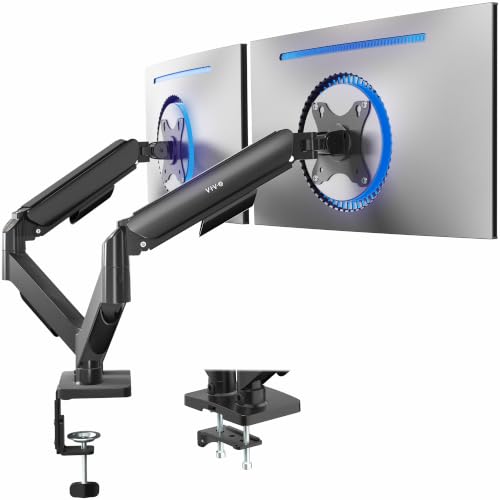
For those seeking a versatile solution to enhance their dual monitor setup, the VIVO Dual Monitor Stand (STAND-V002O) stands out with its fully adjustable arms designed to accommodate screens ranging from 17 to 32 inches. This mechanical desk mount supports weights from 4.4 lbs to 19.8 lbs per monitor and features VESA mounting patterns for easy installation. With tool-less adjustments offering +90° to -90° tilt, 180° swivel, and 360° rotation, you can customize your viewing angles effortlessly. Plus, it elevates your screens to free up valuable desk space, making it perfect for both gaming and office environments.
Best For: Those looking to optimize their workspace with adjustable dual monitor setups for gaming or office use.
Pros:
- Fully adjustable arms allow for personalized screen positioning with tilt, swivel, and rotation features.
- Space-saving design elevates monitors, freeing up valuable desk area for a cleaner workspace.
- Easy installation with included hardware and clear instructions, making setup quick and hassle-free.
Cons:
- May not be suitable for extremely heavy monitors exceeding the weight limit of 19.8 lbs each.
- The C-clamp may not fit all desk surfaces, limiting installation options for some users.
- Some users may find the adjustment mechanism requires a bit of effort to achieve the desired position.
Kado Dual Monitor Setup – 2-Pack 24″ Curved Monitors

Looking for an immersive dual monitor setup? The Kado Dual Monitor Setup features two 24″ curved monitors with a 1500R design that minimizes peripheral distortion, making your gaming and work experience more comfortable. With a resolution of 1920×1080 and a 75Hz refresh rate, you’ll enjoy vibrant visuals thanks to the 100% sRGB color gamut. These monitors are VESA mount compatible and include built-in speakers for robust audio. Their ergonomic design reduces eye strain during extended use, while custom gaming modes guarantee peak performance in FPS and RTS games. Elevate your workspace efficiency with this space-saving, high-performance duo!
Best For: Gamers and professionals seeking an immersive and ergonomic dual monitor setup for extended use.
Pros:
- High-quality visuals with 100% sRGB color gamut for vibrant colors.
- Ergonomic design that minimizes eye strain and neck fatigue during long sessions.
- Built-in speakers provide robust audio, eliminating the need for external speakers.
Cons:
- Limited refresh rate of 75Hz may not satisfy competitive gamers who prefer higher rates.
- Curved design may not be suitable for all users, particularly those who prefer flat screens.
- Space-saving design may still require adequate desk space for both monitors.
Dell P2725H 27″ Full HD IPS LED Monitor (Dual Monitor Setup)

The Dell P2725H 27″ Full HD IPS LED Monitor stands out as an excellent choice for professionals and gamers alike, thanks to its impressive 100Hz refresh rate that guarantees smooth visuals during fast-paced activities. With a 1920×1080 resolution and vivid color consistency, it enhances your viewing experience. The slim bezel design allows for a sleek dual monitor setup, keeping your workspace organized. Plus, ComfortView Plus technology minimizes eye strain, making long hours more comfortable. You’ll appreciate the adjustable height, tilt, and swivel features for ergonomic comfort. Each monitor comes with USB-C cables for easy connectivity and a cleaning kit for maintenance.
Best For: Professionals and gamers seeking a high-performance dual monitor setup with vibrant visuals and ergonomic features.
Pros:
- High Refresh Rate: 100Hz refresh rate ensures smooth visuals during fast-paced activities.
- Eye Care Technology: ComfortView Plus minimizes eye strain for comfortable long hours of use.
- Ergonomic Design: Adjustable height, tilt, and swivel features enhance user comfort.
Cons:
- Limited Resolution: Full HD (1920×1080) may not meet the needs of users requiring higher resolutions for detailed work.
- Connectivity Options: While USB-C is included, additional ports may be limited for some users’ setups.
- Price Point: Dual monitor setups can be a significant investment compared to single monitor alternatives.
Factors to Consider When Choosing a Monitor for a Dual Monitor Setup
When picking monitors for your dual setup, you’ll want to evaluate several key factors. Screen size, refresh rate, and resolution can greatly impact your experience, while the type of panel technology affects color and viewing angles. Don’t forget about ergonomics and comfort, as you’ll be spending a lot of time in front of those screens.
Screen Size Selection
Choosing the right screen size for your dual monitor setup can considerably impact your productivity and comfort. For most users, monitors between 24 to 27 inches strike the perfect balance, offering ample workspace for multitasking without overwhelming you. A popular choice is the 27-inch monitor, which provides a cohesive viewing experience, minimizing excessive eye movement across displays. If you’re working on tasks that demand continuity, like coding or graphic design, using dual monitors of the same size can enhance visual alignment. However, if desk space is limited, a smaller 22-inch monitor can still suffice, giving you enough screen real estate for basic multitasking. Just remember to maintain the same screen resolution across both monitors for consistent visual quality and reduced eye strain.
Refresh Rate Importance
Alongside screen size, refresh rate plays an essential role in your dual monitor setup. Measured in hertz (Hz), the refresh rate indicates how often your monitor updates its image per second. A standard 60Hz is fine for everyday tasks, but if you’re gaming or watching fast-paced content, consider monitors with 120Hz or higher. Higher refresh rates, like 75Hz or 144Hz, offer smoother visuals and reduce motion blur, enhancing your experience. It’s vital to match the refresh rates of both monitors for a consistent visual experience, which helps reduce eye strain during prolonged use. Additionally, higher refresh rates work better with adaptive sync technologies, minimizing screen tearing and stuttering, especially in gaming environments. Choose wisely to maximize your efficiency!
Resolution Considerations
Resolution is a key factor to evaluate for your dual monitor setup, as it directly impacts your viewing experience. Aim for both monitors to have the same resolution to guarantee a consistent visual flow. Full HD (1920×1080) is common, but higher resolutions like 2560×1440 or 4K (3840×2160) offer sharper images and more screen space, enhancing multitasking. Consider the aspect ratio, too; while 16:9 is standard, ultrawide options (21:9 or 32:9) can create an immersive experience with fewer bezels. Don’t forget to check if your graphics card can handle the combined resolution, especially with high-res displays in demanding applications. Finally, higher pixel density (PPI) is crucial for precision tasks like graphic design or video editing.
Panel Technology Types
When setting up a dual monitor configuration, the type of panel technology you choose plays a notable role in your overall experience. If you’re into creative work, IPS panels offer superior color accuracy and wide viewing angles. For those who prioritize speed, TN panels provide fast response times at a lower cost, but expect poorer color reproduction. If you’re gaming or watching movies in dim environments, VA panels deliver better contrast and deeper blacks. Meanwhile, OLED technology offers exceptional color vibrancy and true blacks due to individual pixel illumination, though it can be pricier. Each panel type has unique strengths and weaknesses that can notably influence your productivity and enjoyment in a dual monitor setup.
Ergonomics and Comfort
Ergonomics and comfort are essential factors to take into account when selecting monitors for your dual setup, as they directly impact your productivity and overall well-being. Look for monitors with adjustable height, tilt, and swivel features so you can customize your viewing angles, reducing neck and eye strain. Curved designs, like a 1500R curvature, minimize peripheral distortion and enhance your immersive experience. Opt for monitors equipped with eye care technologies, like blue light filters and flicker-free displays, to combat eye fatigue during long hours. Additionally, lightweight and ultra-slim bezels create an organized workspace, further boosting comfort. Monitors built for ergonomic use allow for extended periods of work or gaming without discomfort, making them ideal for your dual monitor setup.
Connectivity Options Available
Choosing the right connectivity options is essential for a seamless dual monitor setup. First, verify your monitors have compatible input ports like HDMI, DisplayPort, or VGA to connect easily to your computer. Check how many input ports your graphics card or laptop has, as some devices may only support one output port. If you want to reduce cable clutter, look for monitors that support daisy chaining via DisplayPort, letting you connect multiple screens through a single output. Additionally, consider monitors with USB-C ports, which can handle both video output and power delivery, simplifying your setup. Finally, confirm both monitors support the same resolution and refresh rates to maintain peak visual performance across your screens.
Color Accuracy and Gamut
After ensuring you have the right connectivity options for your dual monitor setup, it’s time to focus on color accuracy and gamut. If you’re involved in photo editing, graphic design, or video production, precise color representation is essential for your final output. Look for monitors that offer a wide color gamut; a minimum of 100% sRGB is standard for general use, but consider models that cover Adobe RGB or DCI-P3 for more vibrant colors. Consistency across both monitors is vital to maintain a uniform visual experience, especially for color-sensitive tasks. IPS panels are highly recommended due to their superior color accuracy and wide viewing angles, making them ideal for those who prioritize color fidelity in their work.