
When it comes to enhancing team collaboration and boosting productivity, choosing the right NAS device can make all the difference. With a variety of options available, each tailored to meet specific storage needs, you can streamline workflows and improve data management. But how do you know which NAS device is the best fit for your team? Let’s explore some top contenders that could transform your collaborative efforts.
UGREEN NAS DXP2800 2-Bay Desktop Network Attached Storage

The UGREEN NAS DXP2800 2-Bay Desktop Network Attached Storage is perfect for small teams and tech enthusiasts looking for a reliable, high-performance solution. With its Intel N100 Quad-core CPU and 8GB DDR5 RAM, this NAS guarantees smooth operation. You’ll enjoy fast data transfers through its 2.5GbE network port and benefit from ample storage capacity of up to 76TB. Plus, the user-friendly app simplifies setup and file sharing across devices. Enjoy enhanced data security with advanced encryption and avoid costly cloud subscriptions. With a 2-year warranty, you can trust UGREEN to meet your needs for collaboration and storage.
Best For: Small teams and tech enthusiasts seeking a reliable and high-performance network storage solution.
Pros:
- User-friendly app for easy setup and file sharing across multiple devices.
- Advanced encryption ensures enhanced data security and control over local storage.
- High storage capacity of up to 76TB, making it ideal for large data needs.
Cons:
- Storage hard drives are sold separately, which may add to initial costs.
- Limited to 2 bays, potentially restricting future storage expansion.
- Relatively high upfront investment compared to some cloud storage options.
MINISFORUM N5 Air Desktop NAS (Barebone)
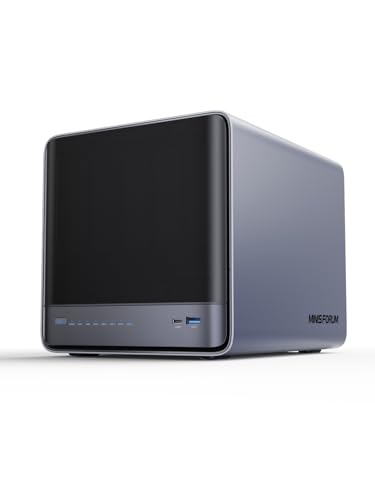
For teams needing robust performance and scalable storage, the MINISFORUM N5 Air Desktop NAS (Barebone) stands out as an ideal solution. Powered by an AMD Ryzen 7 255 processor, it handles multiple users and simultaneous file access effortlessly. With five SATA HDD slots and three M.2 NVMe SSD slots, you can expand to a staggering 174TB. The dual 10GbE and 5GbE ports guarantee lightning-fast transfers, perfect for collaboration. Plus, its innovative design allows for easy upgrades and supports various operating systems. Experience seamless teamwork with features like ZFS snapshots and Docker apps, all in a compact, efficient package.
Best For: Teams and businesses requiring high-performance computing and scalable storage solutions for collaborative projects.
Pros:
- Powerful AMD Ryzen 7 255 processor provides excellent multitasking capabilities.
- Supports high-speed network connectivity with dual 10GbE and 5GbE ports for fast data transfers.
- Expandable storage options with multiple RAID configurations ensure data security and flexibility.
Cons:
- Initial setup and configuration may be complex for non-technical users.
- Requires additional investments in HDDs and SSDs for maximum storage capacity.
- Compact design may limit airflow under heavy loads, necessitating careful cooling management.
UGREEN NAS DXP8800 Plus 8-Bay Desktop NAS

If you’re part of a demanding business team that needs robust data management and collaboration, the UGREEN NAS DXP8800 Plus 8-Bay Desktop NAS is an excellent choice. With its Intel i5 1235u 10-core CPU and 8GB DDR5 RAM, it delivers exceptional performance. You can expand storage up to 256TB using 8 SATA and 2 M.2 NVMe bays, while dual 10GbE ports guarantee fast data transfers up to 2500MB/s. The all-in-one app simplifies access to files and security features, including encryption and multi-factor authentication. Plus, it’s compatible with various operating systems, making it a versatile solution for your team’s needs.
Best For: Businesses requiring high-performance data management and extensive storage for collaborative work.
Pros:
- Exceptional Performance: Powered by an Intel i5 1235u 10-core CPU and 8GB DDR5 RAM, ensuring smooth operations.
- High Storage Capacity: Supports up to 256TB with multiple drive bays for extensive data needs.
- Fast Data Transfer: Dual 10GbE ports enable download speeds up to 2500MB/s, facilitating quick access and sharing.
Cons:
- Diskless Design: Storage hard drives are not included and must be purchased separately.
- Weight and Size: The unit is relatively heavy (20.7 pounds) and may require a dedicated space.
- Higher Initial Investment: The enterprise-grade features may come at a cost that could be prohibitive for smaller businesses or individual users.
UGREEN NAS DXP6800 Pro 6-Bay Desktop NAS

Designed specifically for businesses needing high performance and extensive storage, the UGREEN NAS DXP6800 Pro 6-Bay Desktop NAS stands out with its powerful Intel i5 1235u 10-core CPU and the capacity to support up to 196TB of storage. With dual 10GbE network ports, you can achieve download speeds up to 2500MB/s, making file transfers a breeze. The NAS supports various RAID configurations, ensuring your data remains secure and accessible. Plus, the user-friendly NAS App simplifies storage management across devices. It’s compatible with major hard drive brands, so you can customize your setup to fit your needs.
Best For: Businesses requiring high-performance storage solutions with extensive capacity and robust security features.
Pros:
- High Performance: Equipped with a powerful Intel i5 1235u 10-core CPU for enhanced processing capabilities.
- Massive Storage Capacity: Supports up to 196TB across six SATA and two M.2 NVMe drive bays with various RAID configurations.
- Fast Data Transfer: Dual 10GbE network ports enable download speeds of up to 2500MB/s for efficient file transfers.
Cons:
- Diskless Design: Storage hard drives must be purchased separately, which could increase the overall cost.
- Complex Setup: Initial setup may require technical knowledge, particularly for RAID configurations.
- Limited Portability: Being a desktop NAS, it may not be suitable for businesses needing a portable solution.
TERRAMASTER F4-425 Plus NAS Storage (Diskless)

The TERRAMASTER F4-425 Plus NAS Storage stands out as an excellent choice for video editors and creative teams, thanks to its powerful Intel N150 Quad-Core processor and impressive read/write speeds of up to 1020 MB/s. With a capacity of up to 144TB, it supports multiple HDDs and M.2 SSDs, enabling you to manage large files seamlessly. The durable aluminum-alloy chassis and easy Direct Data Drive Mounting guarantee hassle-free integration with existing storage. Plus, its dual 5GbE LAN ports enhance connectivity, making it perfect for small business offices and multimedia streaming. Experience optimized performance and data protection for your workflow today!
Best For: Video editors, creative teams, and small business offices looking for high-performance NAS storage solutions.
Pros:
- High performance: Features an Intel N150 Quad-Core CPU and read/write speeds of up to 1020 MB/s for efficient file management.
- Large capacity: Supports up to 144TB of storage with multiple HDDs and M.2 SSDs for managing large files seamlessly.
- User-friendly design: Durable aluminum-alloy chassis with Direct Data Drive Mounting simplifies integration with existing storage.
Cons:
- Diskless model: Requires separate purchase of HDDs/SSDs, which could increase initial setup costs.
- Limited warranty information: Warranty details are not readily available, which may concern potential buyers.
- Potential complexity: May require technical knowledge for advanced features like Docker and Virtual Machines.
Synology 5-Bay DiskStation DS1525+ (Diskless)

For teams seeking efficient collaboration and robust data management, the Synology 5-Bay DiskStation DS1525+ (Diskless) stands out with its impressive performance capabilities. With sequential read/write speeds of up to 1,181/1,180 MB/s, you’ll experience stable data transfers that enhance productivity. Its built-in 2.5GbE ports, along with support for 10GbE, guarantee fast connectivity for all your team members. Plus, you can expand your storage considerably by adding two DX525 units, accommodating up to 300 TB of raw storage. Backed by a 3-year limited hardware warranty, this NAS solution is perfect for growing teams.
Best For: Teams seeking efficient collaboration and robust data management with high-performance storage solutions.
Pros:
- Impressive performance with sequential read/write speeds of up to 1,181/1,180 MB/s for stable data transfers.
- Fast connectivity with built-in 2.5GbE ports and support for 10GbE.
- Expandable storage options allow for up to 300 TB of raw storage with additional DX525 units.
Cons:
- Diskless design requires users to purchase drives separately, which may add to initial costs.
- Limited built-in features may necessitate additional software purchases for advanced data management.
- Potential complexity in setup and configuration for users unfamiliar with NAS systems.
Synology 1-Bay DiskStation DS124 (Diskless)

If you’re part of a small team needing a reliable and efficient way to manage and share data, the Synology 1-Bay DiskStation DS124 (Diskless) is an excellent choice. It allows you to consolidate all your data with complete ownership and provides multi-platform access, making collaboration effortless. You can sync and share files across various devices and operating systems seamlessly. Plus, the built-in data protection features guarantee your files are backed up to multiple destinations. With surveillance capabilities, you can even create a thorough video monitoring system that scales with your team’s needs. Enjoy a 2-year warranty for peace of mind!
Best For: Small teams needing a reliable and efficient solution for data management and sharing.
Pros:
- Centralized data management allows for complete ownership and easy access across multiple platforms.
- Effortless collaboration through seamless syncing and sharing of files across various devices and operating systems.
- Built-in data protection features ensure reliable backups to multiple destinations.
Cons:
- Diskless model requires purchasing a hard drive separately, which may incur additional costs.
- Limited to one bay, which may restrict storage capacity for larger teams or growing data needs.
- Surveillance capabilities may require additional hardware or software for optimal performance.
QNAP TS-453E 4 Bay Desktop NAS

Ideal for small to medium-sized teams, the QNAP TS-453E 4 Bay Desktop NAS excels in enhancing collaboration with its robust dual 2.5GbE ports. Powered by an Intel Celeron J6412 Quad-core processor and 8 GB of DDR4 RAM, it handles multiple tasks efficiently. The dual M.2 PCIe slots let you boost performance with SSD cache acceleration, making large file transfers a breeze. Plus, with USB 3.2 Gen 2 ports, you can connect modern drives for fast media management. It’s a versatile solution that helps you store, organize, and share photos, music, and videos effortlessly among your team.
Best For: Small to medium-sized teams looking to enhance collaboration and efficiently manage media files.
Pros:
- High-performance processing with an Intel Celeron J6412 Quad-core processor and 8 GB of RAM for multitasking capabilities.
- Fast network connectivity through dual 2.5GbE ports, facilitating quick file transfers and sharing across devices.
- Versatile media management options, allowing users to store, organize, and share various media types seamlessly.
Cons:
- Limited to 4 bay storage, which may not be sufficient for larger enterprises needing extensive storage solutions.
- Initial setup may require technical knowledge, potentially posing a challenge for non-technical users.
- M.2 SSDs sold separately, adding to the overall cost of enhancing performance with cache acceleration.
TERRAMASTER F2-425 Plus NAS Storage

The TERRAMASTER F2-425 Plus NAS Storage stands out as an exceptional choice for creative teams and small businesses that demand high performance and flexibility. With its Intel N150 Quad-Core CPU and 8GB DDR5 RAM, you’ll experience seamless multitasking. The dual 5GbE LAN ports allow for rapid data transfers, achieving up to 1020 MB/s. You can expand your storage to 84TB using HDDs and M.2 SSDs. Plus, features like TerraSync for two-way syncing and thorough data protection guarantee your files are safe. Its robust design and convenient hot-plugging capabilities make it ideal for both professionals and families.
Best For: Creative teams, small businesses, and families seeking high-performance, flexible storage solutions with robust data protection.
Pros:
- High performance with Intel N150 Quad-Core CPU and dual 5GbE LAN ports for rapid data transfers up to 1020 MB/s.
- Flexible storage options supporting up to 84TB capacity with HDDs and M.2 SSDs, ideal for demanding applications.
- Comprehensive data protection features, including SPC security module and CloudSync compatibility for safe file management.
Cons:
- Diskless design requires additional purchases of HDDs or SSDs for operation, increasing initial setup costs.
- Limited to 2-bay configuration, which may not meet the needs of users requiring more extensive storage solutions.
- No built-in redundancy like RAID configurations unless separately set up, potentially risking data loss without proper backup strategies.
LincStation N2 6-Bay NAS Storage

For creative professionals and tech enthusiasts seeking robust storage solutions, the LincStation N2 6-Bay NAS Storage stands out with its powerful Intel Alder Lake-N N100 processor and ultra-fast 10 Gigabit Ethernet connectivity. With 16GB of LPDDR5 memory, it handles 4K media streaming and rapid backups effortlessly. You can mix and match drives in its six bays, including two SATA and four M.2 NVMe slots, enhancing for high-capacity and performance. Plus, its compact design guarantees peak thermal performance for 24/7 operation. Enjoy a 2-year warranty and 24/7 support, making it an excellent choice for small offices and creative teams.
Best For: Creative professionals, tech enthusiasts, and small offices looking for powerful and versatile storage solutions.
Pros:
- High Performance: Equipped with an Intel Alder Lake-N N100 processor and 10 Gigabit Ethernet for fast data transfer and multitasking.
- Flexible Storage Options: Six bays allow for a mix of SATA and NVMe drives, accommodating varied storage needs and speeds.
- Compact Design: Optimized thermal performance and durable metal shell make it suitable for 24/7 operation.
Cons:
- Potential Complexity: Users may need to familiarize themselves with Unraid OS for optimal setup and management.
- Initial Investment: The cost of the unit may be higher compared to simpler storage solutions.
- Limited to 6 Bays: Some users may find the 6-bay configuration less scalable for larger storage requirements.
Factors to Consider When Choosing Nas for Team Collaboration
When choosing a NAS for team collaboration, you’ll want to take into account several key factors. Think about your storage capacity needs, network speed, and data security measures, as these can greatly impact your team’s efficiency. Don’t forget to check for a user-friendly interface and compatibility with your devices to guarantee smooth integration.
Storage Capacity Requirements
Choosing the right storage capacity for your NAS device is essential for effective team collaboration. Start by evaluating your team’s collective storage needs; smaller models support up to 76TB, while enterprise options can handle up to 256TB. Consider the number of users and the types of files being stored. If you’re dealing with high-resolution media or extensive databases, larger capacities are a must. Don’t forget to assess future scalability—look for NAS systems that allow for additional drives or RAID configurations. Supported RAID setups can optimize storage efficiency and enhance data redundancy, ensuring security for your collaboration needs. Finally, keep in mind that higher capacities may require faster connections for smooth performance during peak usage.
Network Speed Options
Since network speed greatly impacts team collaboration, selecting the right option for your NAS device is vital. You’ll find choices ranging from 1GbE to 10GbE, each offering different performance levels to meet your team’s needs. If your group handles large files or requires simultaneous access, consider NAS devices with dual LAN ports for link aggregation, which can effectively double your bandwidth. For high-speed data transfers, look for options with 2.5GbE or higher, minimizing wait times for uploads and downloads. It’s important to factor in the number of users and the tasks at hand; higher speeds are a must for video editing or data analysis. Finally, confirm all network components are compatible with your chosen NAS speed to maximize performance.
Data Security Measures
As you evaluate NAS devices for team collaboration, prioritizing data security measures is essential to protect sensitive information. Look for advanced encryption protocols that guarantee your data is secure during transmission and storage. Implementing multi-factor authentication adds another layer of protection, requiring users to verify their identity before accessing files. Local storage solutions can minimize risks associated with data leaks and surveillance common in cloud services. Consider RAID configurations for data redundancy; they allow recovery in case of drive failure, reducing the chance of data loss. Finally, regular data backup strategies and built-in snapshot technologies help safeguard against accidental deletions and corruption, guaranteeing your collaborative efforts remain intact and secure.
User-Friendly Interface
While ensuring data security is essential for team collaboration, the user-friendly interface of NAS devices plays a significant role in maximizing productivity. A streamlined setup and intuitive file-sharing options mean your team can access necessary resources without needing extensive training. Look for devices that are compatible with various operating systems like Windows and macOS to enhance accessibility for everyone. Integrated apps that consolidate storage management and collaboration tools simplify workflows, making it easier to stay organized. A responsive design allows secure access from different devices, whether in the office or working remotely. Additionally, features like AI-powered organization and automatic duplicate removal can save you time and reduce clutter, keeping your team’s focus on what truly matters.
Compatibility With Devices
When selecting a NAS device for team collaboration, compatibility with various devices is essential to guarantee everyone can access and share information effortlessly. Make sure your NAS supports multiple operating systems like Windows, macOS, Linux, iOS, and Android for seamless collaboration. Look for devices that work with web browsers and smart TVs, so all team members can connect, regardless of their tech setup. Integration with third-party applications can also boost efficiency, letting you use familiar tools for file sharing and project management. Don’t forget to check compatibility with third-party hard drives, as many NAS models support popular brands like Western Digital and Seagate. Finally, user-friendly apps for file management can greatly enhance your team’s collaboration experience.
Expandability and Upgrades
Selecting a NAS device that offers expandability and upgrade options is essential for supporting your team’s evolving collaboration needs. First, consider the number of drive bays; more bays mean increased storage capacity to handle growing data demands. Look for NAS devices that feature multiple M.2 NVMe slots for adding high-speed SSDs, which enhances performance and speeds up access to frequently used files. Evaluate maximum RAM capacity and upgradeable memory slots to improve multitasking and support simultaneous users effectively. Additionally, check for various RAID configurations, providing flexibility for data protection. Finally, a NAS with PCIe expansion slots allows for future upgrades, such as extra network interfaces, boosting connectivity options and overall functionality.