
When it comes to optimizing your office’s energy efficiency, choosing the right energy consumption monitor is essential. These devices not only track usage in real-time but also help you analyze historical data for better decision-making. With options that offer customizable alerts and user-friendly interfaces, you can easily identify areas for improvement. Let’s explore the top contenders that could transform your workplace’s energy management strategy.
Emporia Vue 3 Home Energy Monitor
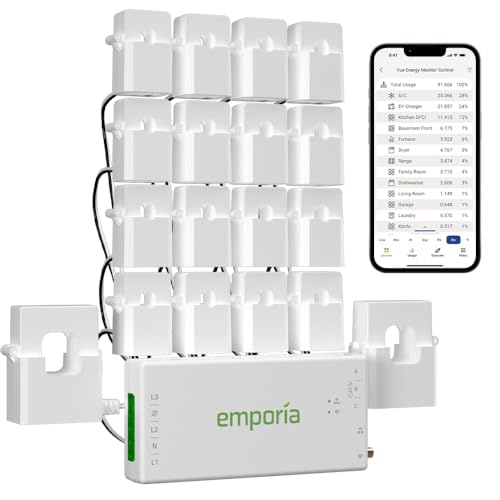
If you’re looking to take control of your office’s energy usage, the Emporia Vue 3 Home Energy Monitor is an excellent choice. This smart device installs easily in your circuit panel and connects via clamp-on sensors, making it compatible with various electrical systems. With its UL Listing, you can trust its reliability and safety. The Emporia Energy App helps you track real-time consumption, automate settings, and receive notifications to cut costs. Plus, with sixteen sensors, you can monitor critical appliances accurately. It’s designed to help you optimize energy management and ultimately reduce those pesky electric bills.
Best For: Those looking to effectively monitor and manage their energy consumption to reduce electricity bills and optimize energy usage in their homes or offices.
Pros:
- Easy installation with clamp-on sensors and compatibility with various electrical systems.
- Real-time monitoring through the Emporia Energy App, allowing users to track consumption and receive actionable notifications.
- Accurate appliance monitoring with sixteen sensors for critical loads, enhancing energy management capabilities.
Cons:
- Requires a 2.4 GHz Wi-Fi connection for full functionality, which may limit some users.
- An additional 200A sensor is needed for 3-wire systems, increasing overall costs.
- Data retention for minute and hour usage is limited, with only 1 minute of data available for 7 days.
Upgraded Watt Power Meter Plug for Home Electrical Usage Monitoring
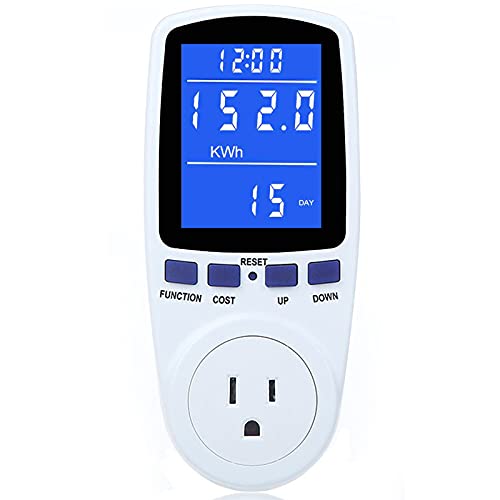
The upgraded Watt Power Meter Plug is an ideal choice for homeowners looking to effectively monitor their electrical usage and costs. It tracks various parameters like power, energy, volts, amps, and even cumulative costs. With seven display modes and a 2.36 x 1.85 inch backlit LCD, you can easily read the data from any angle, day or night. Its overload protection feature guarantees safety by displaying an “OVERLOAD” warning if limits are exceeded. Plus, it retains data even after disconnection, helping you manage your energy consumption and save on bills efficiently. Optimize your home’s energy use today!
Best For: Homeowners seeking to monitor and manage their electrical usage and costs efficiently.
Pros:
- Monitors multiple parameters including power, energy, and cost for comprehensive usage analysis.
- Features an adjustable backlight and a clear LCD display for easy reading from any angle.
- Retains data even after disconnection, making it easy to track electricity consumption over time.
Cons:
- May require adjustment of overload settings for optimal safety based on individual appliance needs.
- Limited to a maximum overload protection of 3680W, which may not be sufficient for high-demand appliances.
- Some users may find the setup and adjustment of settings to be slightly complicated.
Smart Home Energy Monitor with Circuit Sensor

For homeowners looking to optimize their energy usage, the Smart Home Energy Monitor with Circuit Sensor stands out with its ability to track real-time energy consumption across multiple circuits. With ETL certification, it features two main circuit sensors and 16 branch sensors, making installation easy in most circuit panels. The Refoss app offers 24/7 monitoring, helping you save 10%-20% on energy bills by optimizing usage. Plus, it integrates seamlessly with solar systems, automating energy use during surplus. Set personalized targets and receive alerts for unusual spikes to fine-tune your energy habits and improve efficiency effortlessly.
Best For: Homeowners and solar energy users looking to monitor and optimize their energy consumption efficiently.
Pros:
- Real-time tracking of energy consumption across multiple circuits, aiding in efficient energy management.
- Seamless integration with solar systems, maximizing the use of excess solar energy and reducing utility bills.
- User-friendly app with detailed data retention and personalized alert features for optimizing energy usage.
Cons:
- API support is not available, limiting integration with other smart home systems.
- Requires a firmware update to integrate with Home Assistant, which may be inconvenient for some users.
- Local data storage may not appeal to users accustomed to cloud-based solutions for remote access.
Emporia Vue 3 Home Energy Monitor

Designed for homeowners enthusiastic to optimize their energy usage, the Emporia Vue 3 Home Energy Monitor offers real-time tracking and management of power consumption. It’s UL Listed, ensuring safety and reliability while preventing hazards like overheating. Installation is a breeze with clamp-on sensors compatible with most homes. With 24/7 monitoring, you can automate energy management to prevent costly repairs. The Emporia Energy App allows you to track solar energy and configure settings for peak demand. Plus, you can add up to sixteen sensors for detailed appliance monitoring, keeping your energy efficiency at its best.
Best For: Homeowners looking to optimize their energy usage and manage power consumption effectively.
Pros:
- UL Listed for safety: Ensures reliability and compliance with rigorous safety standards, preventing hazards.
- Real-time monitoring: Provides accurate energy data with a retention period for both minute and hourly information.
- Expandable system: Ability to add up to sixteen sensors for comprehensive appliance monitoring and energy management.
Cons:
- Requires Wi-Fi connection: Needs a 2.4 GHz Wi-Fi internet connection for access to monitoring features.
- Additional sensors sold separately: Some features, like appliance monitoring, require purchasing additional sensors.
- Limited to specific systems: Compatibility is restricted to certain electrical systems, potentially requiring extra sensors for complex setups.
Home Energy Monitor – Real Time Electricity Usage Monitor
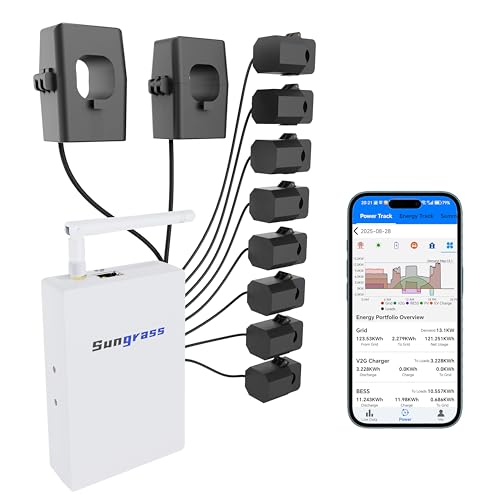
If you’re looking to optimize energy use in your home, the Home Energy Monitor stands out with its real-time electricity tracking capabilities. With 10 circuit monitoring channels, you can easily identify energy hogs and excess use. Its app provides one-second data for active use and retains minute data for 45 days, along with monthly summaries for 36 months. Installation is straightforward, and it’s compatible with standard circuit panels. Plus, its safety certifications guarantee reliable operation. Whether you prefer WiFi or Ethernet, you’ll have access to your energy data anytime, making it a smart investment for energy efficiency.
Best For: Homeowners looking to optimize energy consumption and track electricity usage in real-time.
Pros:
- Real-time monitoring with 1-second data updates allows for immediate identification of energy usage patterns.
- User-friendly app provides detailed analysis and summaries, helping users to pinpoint energy hogs and excess consumption.
- Easy installation in standard circuit panels with plug-and-play functionality ensures quick setup and compatibility.
Cons:
- Limited to monitoring 10 circuits unless bundling multiple units, which may not suffice for larger homes.
- Requires WiFi or Ethernet connectivity, which may not be ideal for users in areas with unreliable internet access.
- Some users may find the initial setup and app configuration complex without prior technical knowledge.
Emporia Vue 3 Home Energy Monitor
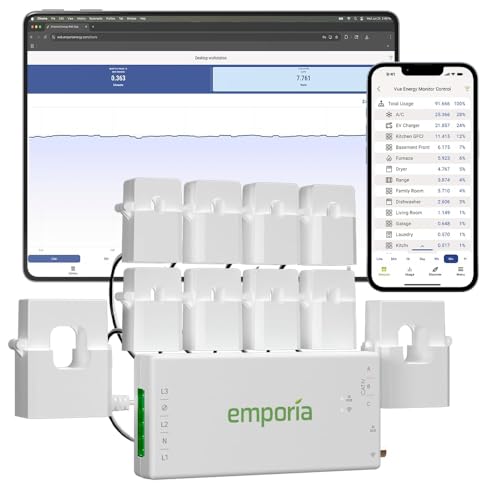
The Emporia Vue 3 Home Energy Monitor stands out as an ideal choice for tech-savvy homeowners seeking real-time insights into their electricity usage. With UL certification, it promises safety and reliability while monitoring your energy consumption. Installation is straightforward, fitting into most circuit panels using clamp-on sensors, and it supports various electrical systems. You can manage your energy 24/7 through the Emporia Energy App, allowing you to automate controls and monitor costs effectively. Plus, it helps identify savings opportunities with real-time notifications. This monitor guarantees you stay informed and in control of your energy expenses, optimizing your home’s efficiency.
Best For: Tech-savvy homeowners seeking real-time insights into their electricity usage and energy management.
Pros:
- UL Certified for safety and reliability, ensuring compliance with rigorous standards.
- User-friendly installation with clamp-on sensors that fit most circuit panels.
- Real-time monitoring and notifications through the Emporia Energy App enable effective energy management and cost savings.
Cons:
- Requires a 2.4 GHz Wi-Fi connection for functionality.
- Additional 200A sensor may be necessary for certain configurations, sold separately.
- Real-time data is only available when the app is actively open, which may limit immediate access.
2 Pack Upgraded Watt Meter Plug Electricity Usage Monitor

For anyone looking to take control of their energy usage, the Pack Upgraded Watt Meter Plug Electricity Usage Monitor stands out with its thorough monitoring features. You can track power, energy, volts, and even costs over time, thanks to its eight display modes. Plus, it offers overload protection, alerting you with a flashing display and alarm if you exceed the set limits. The LCD screen’s backlight guarantees visibility day and night, while the durable design fits all US appliances. With data retention even during power outages, you can effectively manage your energy consumption and save money efficiently.
Best For: Individuals and households looking to monitor and manage their energy usage effectively to save on electricity costs.
Pros:
- Comprehensive monitoring features including power, energy, volts, and costs.
- Overload protection with visual and audible alerts for safety.
- Data retention during power outages allows for effective tracking of consumption.
Cons:
- Adjustable overload limit may require setup for optimal use.
- Backlight timing settings might not suit all user preferences.
- Requires a standard US socket, limiting use in non-US regions.
Smart Home Energy Monitor with Live Electricity Usage Tracking

Looking to take control of your energy consumption? The Smart Home Energy Monitor offers live electricity usage tracking with two 120A CTs, ensuring you get accurate data on voltage, current, and total energy use. Installation’s a breeze, thanks to pluggable terminals and compact split-core CTs. Plus, it integrates seamlessly with the Smart Life app, giving you real-time insights and customizable alerts. You’ll even benefit from bi-directional monitoring for solar setups, optimizing your home energy management. With features like Dynamic Load Balancing, you can maximize efficiency and minimize electricity costs effortlessly. Take charge of your energy today!
Best For: Homeowners looking to optimize their energy consumption and integrate smart technology for enhanced energy management.
Pros:
- Accurate Monitoring: Provides precise tracking of voltage, current, power, and total energy consumption, ensuring reliable data.
- Easy Installation: Features pluggable terminals and compact split-core CTs for quick and hassle-free setup.
- Smart Integration: Compatible with the Smart Life app, offering real-time data analysis, alerts, and customizable automation scenes.
Cons:
- Limited to Single-Phase Systems: Only supports single-phase 3-wire systems, which may not suit all households.
- Requires Wi-Fi: Dependent on a stable 2.4GHz Wi-Fi connection for functionality, which might be a limitation in areas with poor connectivity.
- Initial Cost: The upfront cost of purchasing the monitor may be a barrier for some users looking for budget-friendly solutions.
Briidea Electricity Usage Monitor with LCD Display

Designed to help businesses monitor energy usage, the Briidea Electricity Usage Monitor with LCD Display is perfect for office environments where multiple devices often run simultaneously. You can track up to four appliances at once, identifying which ones are energy-hungry and costing you money. This monitor accurately measures power, voltage, current, frequency, power factor, energy (kWh), and runtime, providing detailed insights into consumption. Its smart backlit LCD display guarantees clear readings, even in low light, and it conserves energy with an automatic shut-off. Safety features include overload alerts, while the memory function retains data during outages for hassle-free monitoring.
Best For: The Briidea Electricity Usage Monitor is best for businesses looking to optimize energy consumption and reduce costs by tracking multiple appliances simultaneously.
Pros:
- Allows simultaneous tracking of up to four devices, helping to identify energy-hungry appliances.
- Provides accurate and detailed insights into power usage, including voltage, current, and energy consumption.
- User-friendly with a smart backlit LCD display and energy-conserving automatic shut-off feature.
Cons:
- Limited to monitoring only four devices at a time, which may not be sufficient for larger setups.
- Requires access to a power outlet, which may limit placement options in some office environments.
- Overload alerts may be triggered if appliances are not properly managed, requiring attention to avoid disruptions.
Smart Home Energy Monitor Dual-Channel Electricity Usage Monitoring
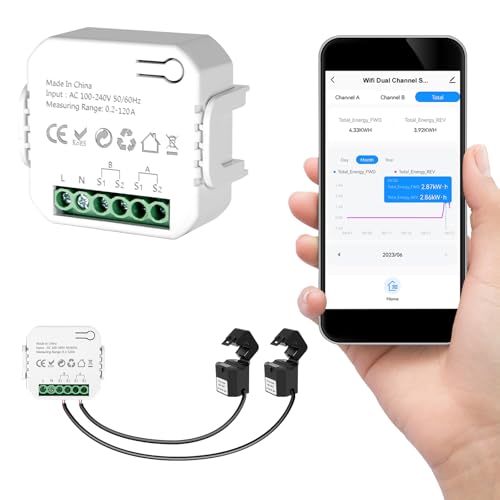
The Smart Home Energy Monitor 2×120A is perfect for homeowners who want to take control of their electricity usage. With dual-channel real-time monitoring, you can track the energy consumption of major appliances like air conditioners and EV chargers. The bi-directional energy tracking feature is especially useful if you have solar panels, giving you insights into your overall power flow. Installation is a breeze, thanks to clamp-style sensors that don’t require cutting wires. Plus, you can manage everything via the Tuya or Smart Life app. This monitor helps you optimize energy use effectively and efficiently.
Best For: Homeowners looking to monitor and optimize their electricity usage with real-time insights into their energy consumption.
Pros:
- Dual-channel monitoring allows tracking of multiple high-power appliances simultaneously.
- Bi-directional energy tracking provides valuable insights for homes with solar panels or backup systems.
- Easy installation with clamp-style sensors eliminates the need for cutting wires, and app control simplifies setup.
Cons:
- The best sellers rank suggests it may not be as widely recognized compared to other products.
- Compatibility might be limited to specific apps (Tuya/Smart Life), which may not suit all users.
- The weight and size may be a consideration for some buyers who prefer a more compact device.
Factors to Consider When Choosing an Office Energy Consumption Monitor
When choosing an office energy consumption monitor, you’ll want to take into account several key factors. Monitoring accuracy and ease of installation are vital, as is the ability to access real-time data. Additionally, features like energy management options and alerts can enhance your overall experience and efficiency.
Monitoring Accuracy and Precision
Choosing an office energy consumption monitor requires careful consideration of monitoring accuracy and precision, as these factors directly impact your ability to track energy usage effectively. Most energy monitors achieve an accuracy within ±2%, providing you reliable data on your consumption. Precision is key when identifying specific appliance usage, helping you spot minor variations that might indicate inefficiencies. If you’re using solar systems, look for advanced monitors with bi-directional tracking to guarantee accurate data on both consumption and energy fed back into the grid. Real-time monitoring capabilities can offer updates every second, enabling you to make quick adjustments. Additionally, consider the retention of historical data for thorough analysis and long-term energy management insights.
Installation and Compatibility Ease
Considering the ease of installation and compatibility is vital for selecting an office energy consumption monitor that meets your needs. Look for models that easily install in existing circuit panels, especially those using clamp-on sensors for a quick setup without complicated wiring. It’s also important to guarantee the monitor supports various electrical systems, including single-phase, split-phase, and any unique configurations your office may have. Opt for plug-and-play functionality to get started immediately without extensive installation. Additionally, assess if the monitor integrates with your home automation systems, as this can streamline energy management. Finally, make sure the design accommodates different circuit types, including those needing extra sensors for thorough monitoring.
Real-Time Data Access
How can real-time data access transform your energy management strategy? With continuous monitoring, you can track energy consumption as it happens, gaining immediate insights into your electricity usage. Many energy monitors come with mobile apps or web interfaces that display real-time metrics like power, energy, voltage, and current, enabling quick analysis. This instantaneous feedback helps you identify energy spikes and inefficiencies promptly, allowing you to take corrective actions without delay. Additionally, some devices store minute data for several days and hourly data indefinitely, helping you analyze trends over time. Access to real-time data can greatly enhance your energy management strategy, potentially leading to cost savings on your utility bills.
Energy Management Features
Real-time data access not only provides immediate insights into your energy usage but also highlights the importance of selecting the right energy management features for your office energy consumption monitor. Look for monitors that offer real-time tracking, helping you identify peak consumption times and cut unnecessary expenses. Opt for devices that allow automation and scheduling, so you can run high-energy appliances during off-peak hours. Consider monitors with solar and net metering capabilities to further optimize consumption and reduce grid reliance. A user-friendly app is essential for accessing detailed analytics and exporting data. Finally, select monitors that provide customizable alerts for unusual energy spikes, enabling you to detect equipment malfunctions or inefficient usage patterns quickly.
Alerts and Notifications
When you choose an office energy consumption monitor, alerts and notifications play an essential role in keeping you informed about your energy usage. By setting customizable thresholds for power consumption, you can receive notifications when your usage exceeds these limits, prompting timely action to check for malfunctions or adjust habits. Real-time alerts help you manage energy consumption effectively, potentially leading to savings on electricity bills by optimizing usage during peak and off-peak times. Many systems offer push notifications through mobile apps, ensuring you stay updated on important changes, no matter where you are. Advanced monitors even provide alerts for specific appliances, helping you identify energy hogs and encouraging proactive energy management in your office.
Cost and Budget Considerations
Selecting the right office energy consumption monitor involves careful consideration of costs and budgeting. Start by evaluating the initial purchase price against potential energy savings, which can reach 10%-20%. Don’t forget to budget for installation costs, especially if you need an electrician for complex setups. Look for monitors that provide a clear return on investment—calculate your projected savings based on the efficiency improvements you expect. Also, consider any ongoing costs, such as subscription fees for app access or cloud storage that could impact your long-term budget. Finally, evaluate warranties and customer support options; these can save you money on repairs or replacements if issues arise during the warranty period.