
When it comes to running a successful business, having the right point of sale register is essential. In 2025, the best POS systems offer advanced features that streamline transactions and improve customer experiences. From all-in-one solutions like the Square Register to mobile options such as the WEICNE Tablet POS, there’s a variety of choices tailored to your needs. So, what factors should you consider to find the perfect fit for your business?
Square Register – Powered by Square POS

The Square Register, powered by Square POS, is the ideal choice for small to medium-sized businesses looking for an all-in-one solution. You won’t need extra tablets or apps, as it combines payment processing, POS software, and hardware seamlessly. With two customizable touchscreen displays, both you and your customers can engage easily. Enjoy quick fund deposits, often by the next business day, and use the Offline Mode to accept payments even without Wi-Fi. Plus, you’ll benefit from expert support, protection against chargebacks, and a 2-year warranty, making it a solid investment for your business’s growth and efficiency.
Best For: Small to medium-sized businesses seeking an all-in-one payment processing and POS solution.
Pros:
- Combines hardware and software, eliminating the need for extra devices.
- Offers quick fund deposits, often by the next business day.
- Provides expert support and a 2-year limited warranty for peace of mind.
Cons:
- May be more expensive compared to traditional POS systems that use separate hardware and software.
- Limited to Square’s ecosystem, which may not suit all business needs.
- Some users may find the customizable features overwhelming initially.
All-in-One SmartPOS-129 Professional Cash Register for Small Business

For small business owners looking for an extensive solution, the All-in-One SmartPOS-129 Professional Cash Register stands out as a top choice. This system features a 15-inch cashier touchscreen and customer display, ensuring a smooth checkout process. With no hidden fees or forced subscriptions, you can rely on its thorough functionalities without extra costs. Plus, it integrates with over 50 card processors, giving you flexibility. You’ll also benefit from a free setup call with specialists to guide you. The included Retail360 mobile app lets you manage products and prices effortlessly, making it a powerful tool for your business.
Best For: Small business owners seeking an all-in-one cash register solution that simplifies the checkout process without hidden fees.
Pros:
- Comprehensive features including a touchscreen, customer display, cash drawer, scanner, and printer for an efficient checkout experience.
- No hidden fees or forced subscriptions, providing clear cost transparency.
- Free mobile app (Retail360) for easy product management and price adjustments on-the-go.
Cons:
- May be more expensive upfront compared to basic cash register options.
- Limited to the functionalities provided by the integrated system, which might not suit all business needs.
- Reliance on the initial setup call for optimal configuration could be a potential barrier for some users.
System for 10-inch Amazon Fire Tablet Complete Cash Register

Designed with small businesses in mind, the System for the 10-inch Amazon Fire Tablet complete cash register offers an efficient and compact solution for retailers and quick-service restaurants. This system includes a receipt printer, cash drawer, and stand, making it easy to set up. For just $64 a month, you gain access to software, updates, support, and warranty—no long-term contract required. While the Amazon Fire Tablet isn’t included, you can download the Datio Point of Sale software from the App Store. Ideal for processing payments through Worldpay, it also allows cash transactions with your own credit card terminal.
Best For: Small businesses, retail shops, and quick-service restaurants looking for a compact cash register solution.
Pros:
- Compact and efficient design that fits well in limited spaces.
- Monthly subscription includes software, updates, support, and warranty without long-term commitments.
- Flexible payment options allow for credit card processing through Worldpay or cash transactions with your own terminal.
Cons:
- Amazon Fire Tablet not included, requiring an additional purchase.
- Limited to Datio Point of Sale software, which may not suit all business needs.
- Credit card processing is restricted to Worldpay, potentially limiting options for some users.
Square Terminal – Credit Card Machine to Accept All Payments | Mobile POS

Square Terminal stands out as an ideal choice for small to medium-sized businesses looking for a versatile and efficient mobile POS solution. This all-in-one device lets you ring up sales, accept all major credit and debit cards, and print receipts seamlessly. With chip card processing in just two seconds, you won’t face hidden fees or long-term contracts. Plus, you can enjoy mobility with its all-day battery life. Funds are available as soon as the next business day, while 24/7 fraud prevention and phone support guarantee secure transactions. Customize it with tailored services to fit your specific business needs.
Best For: Small to medium-sized businesses seeking a versatile and efficient mobile POS solution.
Pros:
- Accepts all major credit and debit cards with quick chip card processing in just two seconds.
- No hidden fees or long-term contracts, ensuring a transparent pricing structure.
- Cordless operation with an all-day battery, allowing for mobility within the store.
Cons:
- May not be as feature-rich as some larger, dedicated POS systems for high-volume businesses.
- Limited customization options compared to other POS systems that offer extensive integrations.
- Businesses may need to subscribe to additional services for specific needs, potentially increasing overall costs.
Volcora Electronic Cash Register Drawer for Point of Sale (POS) System
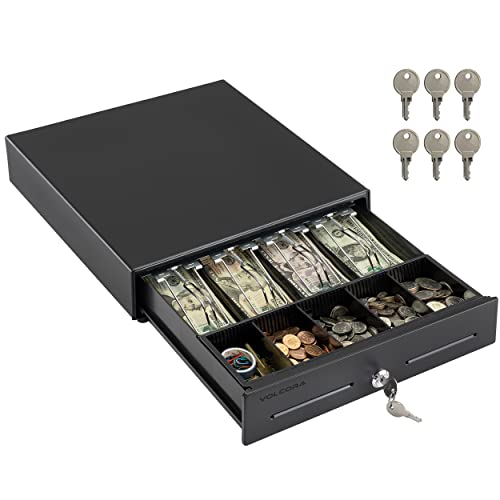
The Volcora Electronic Cash Register Drawer is an ideal choice for small business owners seeking a reliable and secure point of sale solution. Measuring 13×13.25×4 inches, this sturdy metal drawer weighs just 9.6 pounds and offers 686.4 cubic inches of storage. With a built-in cash tray featuring four bill slots and five coin slots, organization’s a breeze. Its three-position key lock system enhances security, ensuring peace of mind. Plus, it connects easily to major receipt printers via RJ11/RJ12 cables. With a 4.6-star rating and a lifetime guarantee, you can trust Volcora for your cash management needs.
Best For: Small business owners looking for a secure and efficient cash management solution.
Pros:
- Durable metal construction ensures long-lasting use.
- Ample storage with multiple bill and coin slots for easy organization.
- High customer satisfaction rating with a 100% lifetime guarantee.
Cons:
- Limited connectivity options, only compatible with RJ11/RJ12 cables.
- Not suitable for businesses that require USB connection for printers.
- Slightly heavier than some other cash drawer options on the market.
PYY Cash Register for Small Businesses

For small businesses like supermarkets, convenience stores, and restaurants, the PYY Cash Register stands out as an essential tool for efficient operations. With its all-in-one design, featuring an integrated receipt printer and dual displays, you’ll speed up transactions and reduce customer wait times. The fast checkout process allows quick sales with extensive reporting on items and cashiers. It supports multiple devices and offers secure access for up to 50 cashiers. Plus, its durable, waterproof design guarantees longevity. You’ll receive everything needed, including thermal paper and a user manual, along with a year of technical support to keep your business running smoothly.
Best For: Small businesses such as supermarkets, convenience stores, and restaurants looking for an efficient and multifunctional cash register solution.
Pros:
- Integrated receipt printer and dual displays streamline the checkout process, reducing customer wait times.
- Supports up to 50 cashiers with individual password access, enhancing security and management.
- Comprehensive sales reporting features provide valuable insights into business performance.
Cons:
- May be more complex to set up initially due to its multifunctional capabilities.
- Physical size may not be ideal for very small retail spaces.
- Limited to certain device connections, which may restrict compatibility with some peripherals.
Volcora Cash Register Drawer for POS System

If you’re looking for a reliable and secure cash register drawer for your POS system, the Volcora Cash Register Drawer stands out with its heavy-duty metal frame, perfect for commercial use. Measuring 16”x16”x3.5”, it offers adjustable and removable coin slots with five bill slots and seven coin slots. The front panel includes a media slot for storing large bills and receipts without opening the drawer. Secured with a 3-position key lock, it connects easily to your printer via RJ11/RJ12. Plus, you get a 100% lifetime guarantee, ensuring your investment is protected for the long run.
Best For: Small to medium-sized businesses looking for a durable and efficient cash management solution for their POS systems.
Pros:
- Heavy-duty metal frame ensures durability for commercial usage.
- Adjustable and removable coin slots provide customizable storage for cash handling.
- 100% lifetime guarantee offers peace of mind for your investment.
Cons:
- No USB port limits connectivity options, requiring a printer for operation.
- Size may not fit all retail setups, especially in smaller spaces.
- Manual key lock may not be as convenient as electronic locking systems.
Volcora POS Terminal Machine for Small Business

Designed specifically for small businesses, the Volcora POS Terminal Machine stands out with its sleek, compact form factor that maximizes counter space. Powered by an Intel Core i5 CPU, it guarantees high performance for your transactions. The 15.6” capacitive touchscreen offers a high-resolution display, making it easy to read and use. With multiple connectivity options, including USB and Ethernet ports, it adapts to your needs seamlessly. Plus, you’ll appreciate the heavy-duty metal base for stability. Enjoy peace of mind with a lifetime warranty and support from a US-based team, assuring your business runs smoothly.
Best For: Small businesses such as retail stores, quick service restaurants, and cafes looking for a compact and efficient point of sale solution.
Pros:
- High-performance Intel Core i5 CPU ensures fast transaction processing.
- Sleek and compact design optimizes counter space without compromising functionality.
- Lifetime warranty and US-based customer support provide peace of mind for users.
Cons:
- Hardware-only setup may require additional investments for software and peripherals.
- Limited memory (4 GB) and storage (128 GB) might not meet the needs of larger businesses.
- The touchscreen resolution (1366×768) may not be as sharp as competitors with higher resolutions.
Electronic Cash Register for Small Businesses
Small businesses looking for an efficient and reliable way to manage transactions will find the electronic cash register an ideal solution. This register supports up to 10,000 items and 200 departments, making it easy to organize your sales. With four bill compartments and five coin trays, cash handling becomes a breeze. The user-friendly design features clear markings and dual displays, ensuring everyone can operate it smoothly. Plus, it’s secure, working offline to prevent crashes. Built from durable materials, it’s energy-efficient and offers 24/7 support, making it a smart investment for your business’s future.
Best For: Small businesses seeking an efficient, reliable, and user-friendly cash management solution.
Pros:
- Supports a large number of items and departments, allowing for organized sales management.
- User-friendly design with clear button markings and dual displays, making it easy for all employees to use.
- Offline operation enhances security and reliability, preventing potential data leaks or crashes.
Cons:
- Limited to 50 clerks, which may not be sufficient for larger businesses.
- May require additional external devices like scanners and printers for full functionality.
- Energy efficiency, while beneficial, may not be a selling point for all businesses compared to more advanced systems.
Mobile Tablet POS Cash Register Monitor (15.6in Touch Screen)
The WEICNE Mobile Tablet POS Cash Register Monitor stands out as an excellent choice for bustling small businesses like restaurants and food trucks. With its 15.6-inch touch screen, you’ll enjoy a responsive interface that works seamlessly with fingers, styluses, or even gloved hands. Powered by a dual-core i5 processor and 8GB of memory, it enhances performance considerably. The built-in thermal receipt printer simplifies transactions, while multiple connectivity options keep you equipped. Plus, its ergonomic design guarantees comfort during long working hours. This system’s reliability and ease of use make it an invaluable asset for any fast-paced environment.
Best For: Small businesses, restaurants, and mobile food vendors seeking a reliable and efficient POS system.
Pros:
- Responsive 15.6-inch touch screen that accommodates various input methods including fingers, styluses, and gloved hands.
- Enhanced performance with a dual-core i5 processor and 8GB of memory, allowing for smooth transaction processing.
- Built-in thermal receipt printer for quick and easy transaction documentation, minimizing setup time.
Cons:
- Weight of 27.3 pounds may make it less portable compared to lighter alternatives.
- Limited storage capacity of 128GB SSD might not be sufficient for businesses with extensive data needs.
- Warranty information not readily available, requiring customers to inquire for details which could hinder purchase confidence.
Factors to Consider When Choosing a Point of Sale Register
When you’re choosing a point of sale register, think about how well it’ll integrate with your existing hardware and how fast it processes payments. A user-friendly interface can make a big difference, especially during busy hours. Plus, consider the ease of setup and the support options available to guarantee you’re covered when you need help.
Hardware Compatibility Options
Choosing the right point of sale register involves several key factors, with hardware compatibility topping the list. Evaluate how well the POS system integrates with your existing hardware, like receipt printers, cash drawers, and barcode scanners. This guarantees seamless operations. Check for multiple connection types, such as USB and RJ11/RJ12, to facilitate communication with peripheral devices. Consider systems that support integration with mobile devices or tablets, enhancing your setup’s flexibility. It’s also essential to look for options that allow adding hardware as your business grows, assuring scalability. Finally, verify that the POS system can function offline or in areas with low connectivity, maintaining its usefulness regardless of internet access.
Payment Processing Speed
As you evaluate hardware compatibility, don’t overlook the importance of payment processing speed. Faster transactions are essential for enhancing customer satisfaction, as they reduce wait times at checkout. Look for systems that process chip card payments in just a few seconds; this can markedly improve your checkout efficiency. Additionally, choosing a point-of-sale register that enables you to receive funds as soon as the next business day can help maintain your cash flow and financial stability. Some advanced systems even offer offline modes, allowing you to accept payments without internet connectivity. Remember, faster payment processing can lead to increased sales volume, as customers are more likely to finalize their purchases when transaction times are minimized.
User-Friendly Interface
A user-friendly interface is crucial for any point of sale register, especially if you want to streamline operations and enhance customer satisfaction. Look for clear button markings and logical layouts that make navigation intuitive, even for beginners. Touchscreen displays can further improve usability, allowing quick access to functions and reducing transaction times. Consider dual displays, one for you and one for customers, to facilitate communication during checkout. Customizable permission levels for different clerks help simplify operations and guarantee security, tailoring access based on roles. Finally, a user-friendly interface should include extensive reporting tools that present sales data in an accessible format, empowering you to make informed business decisions efficiently.
Setup and Installation Ease
An intuitive user interface sets the stage for a smooth experience, but the setup and installation ease of a point of sale register can make a significant difference in your overall operation. You want a system that offers a quick, straightforward setup, ideally using plug-and-play technology to minimize hassle. Look for options that provide initial setup assistance or free consultation calls, so you can configure the register without needing technical expertise. Verify the system integrates seamlessly with peripherals like cash drawers, printers, and scanners to enhance the checkout process. A user-friendly interface with clear instructions helps staff get acquainted quickly. Finally, consider ongoing software updates to guarantee smooth operation after the initial setup.
Support and Warranty Services
Choosing the right point of sale register involves more than just features and price; you’ll want to prioritize support and warranty services as well. Make certain the system offers expert phone support, so you can quickly resolve any issues that arise. A warranty period, ideally up to two years, provides peace of mind against defects and malfunctions. Look for services that protect against eligible chargebacks, which can help shield you from financial losses due to disputed transactions. Free initial setup calls or personalized guidance can enhance your experience and guarantee everything runs smoothly from the start. Finally, continuous software updates and ongoing technical support are vital for maintaining peak performance and adapting to your business’s evolving needs.
Integration With Other Tools
When evaluating a point of sale register, compatibility with other tools is crucial for enhancing your business operations. You’ll want to choose a system that seamlessly integrates with various payment processors and accounting software, streamlining your financial management. Look for options that connect with inventory management tools, allowing you to track stock levels and sales data in real time. Some POS systems even offer mobile app integrations, enabling you to manage prices and sales on-the-go without extra costs. Additionally, verify the register can connect with hardware peripherals like barcode scanners, receipt printers, and cash drawers for a thorough checkout experience. Finally, consider whether the POS system supports third-party applications to enhance functionality tailored to your specific needs.
Cost Structure Transparency
Understanding the cost structure of a point of sale register is essential for making an informed decision that won’t strain your budget. Look for a clear breakdown of all potential fees, including transaction fees, subscription costs, and hardware expenses, to avoid unexpected charges. Transparent pricing models usually feature no hidden fees or long-term contracts, helping you budget effectively. Some systems offer extensive functionalities without additional costs, so you won’t face extra expenses later on. Pay close attention to payment processing fees and terms, as they can greatly impact your overall costs and profit margins. Also, evaluate support and warranty options to gain insight into any future maintenance and service expenses.
Scalability for Growth
As your business grows, selecting a point of sale (POS) register that can scale with your needs becomes vital. A scalable POS system adapts seamlessly to increased transaction volumes and integrates various hardware and software options. This flexibility allows you to add features like inventory management, customer relationship management, and advanced reporting tools as needed. Many systems have modular designs, letting you start with essential features and expand over time without overhauling your entire system. Additionally, scalable solutions support multiple locations and channels, ensuring centralized management of sales and inventory. Finally, having diverse payment processing options is vital, enabling you to accept various payment methods and keep up with emerging technologies.