
When it comes to enhancing your meetings, the right presentation system can make all the difference. You want tools that not only deliver high-quality visuals and audio but also foster collaboration. With so many options available, choosing the best one for your conference room can be overwhelming. Let’s explore the top systems that can transform your meetings into a more professional and engaging experience.
Logitech MeetUp Video Conferencing System

If you’re looking to enhance collaboration in small conference or huddle rooms, the Logitech MeetUp Video Conferencing System is your best bet. This compact, all-in-one solution offers Ultra HD resolution with a 120° field of view and 5x HD zoom, ensuring everyone’s visible. With its motorized pan and tilt feature, you can easily capture every participant. The three beamforming microphones pick up voices clearly from up to 4 meters away, while the custom-tuned speaker delivers excellent audio. Plus, its USB plug-and-play setup makes it compatible with major video conferencing apps, making meetings seamless and efficient.
Best For: Small conference and huddle rooms that require high-quality video and audio for effective collaboration.
Pros:
- Compact all-in-one design for easy setup and deployment.
- Ultra HD 4K resolution with a wide field of view and 5x HD zoom for clear visibility of participants.
- Compatibility with major video conferencing platforms ensures seamless connectivity.
Cons:
- Limited to small spaces, may not be suitable for larger conference rooms.
- Expansion microphone sold separately, adding to the overall cost.
- Requires specific operating systems and USB ports for optimal performance.
Epson Pro EX9270 Wireless 1080p 3LCD Projector

The Epson Pro EX9270 Wireless 1080p 3LCD Projector is an ideal choice for professionals seeking high-quality presentations in well-lit conference rooms. With a stunning image size of up to 300 inches and Full HD 1080p resolution, your visuals will be vibrant and clear. Its 4,100 lumens of color and white brightness guarantee exceptional visibility, even in daylight. You’ll appreciate the built-in speaker for audio needs, plus wireless streaming capabilities via Apple AirPlay and Miracast. With multiple connectivity options, including two HDMI ports, it effortlessly connects to laptops or streaming devices, enhancing your meetings and video conferencing experiences.
Best For: Professionals seeking high-quality presentations in well-lit environments.
Pros:
- Exceptional image quality with Full HD 1080p resolution and vibrant colors.
- High brightness of 4,100 lumens ensures visibility in daylight settings.
- Wireless streaming capabilities with Apple AirPlay and Miracast for seamless presentations.
Cons:
- Built-in speaker may not provide sufficient audio quality for larger audiences.
- Limited to two HDMI ports, which may restrict simultaneous device connections.
- Larger footprint compared to portable projectors, making it less ideal for mobile use.
Logitech Wireless Presenter R400 PowerPoint Clicker

For professionals who frequently present in conference rooms, the Logitech Wireless Presenter R400 PowerPoint clicker stands out with its intuitive touch keys and bright red laser pointer. You’ll appreciate its 2.4GHz RF wireless technology, which offers a 50-foot range, allowing you to engage with your audience while moving freely. Setup is a breeze; just plug the USB receiver into your computer and you’re ready to go—no software installation required. Plus, its built-in docking bay keeps the receiver secure during transport. With AAA batteries recommended for peak performance, you’ll have a reliable tool to enhance your presentations effortlessly.
Best For: Professionals who frequently present in conference settings and require a reliable, easy-to-use presentation tool.
Pros:
- Intuitive touch keys allow for seamless slideshow control.
- Bright red laser pointer is visible against various backgrounds, enhancing audience engagement.
- Plug-and-play setup with a wireless range of up to 50 feet offers freedom of movement during presentations.
Cons:
- Requires AAA batteries, which may need to be replaced frequently.
- Limited compatibility with devices that lack USB-A ports, potentially necessitating adapters.
- No advanced features such as customizable buttons or built-in rechargeable batteries.
Tenveo 4K PTZ Conference Room Camera System

Designed for businesses and organizations seeking seamless virtual communication, the Tenveo 4K PTZ Conference Room Camera System stands out with its impressive 12x optical zoom and AI Auto-Tracking features. It captures true-to-life 4K visuals with a 78° viewing angle, making every detail clear. You’ll appreciate the omnidirectional audio pickup and intelligent noise reduction, perfect for large rooms. Plus, its plug-and-play design guarantees effortless setup. Compatible with major platforms like Zoom and Teams, this all-in-one solution delivers unbeatable value. With a 30-day money-back guarantee and lifetime support, you can trust Tenveo for your conference room needs.
Best For: Organizations and businesses that require high-quality virtual communication solutions for medium to large conference rooms.
Pros:
- High-quality visuals with 4K resolution and 12x optical zoom for clear detail capture.
- Effortless setup with plug-and-play design and compatibility with major conferencing platforms.
- Comprehensive audio capabilities featuring omnidirectional pickup and intelligent noise reduction for large spaces.
Cons:
- Requires connection to the Hub for operation, which may limit flexibility in setup.
- Potentially overkill for small meetings due to its features designed for larger groups.
- Initial investment cost may be high for smaller organizations or startups.
Epson Pro EX11000 Wireless Full HD 1080p Projector
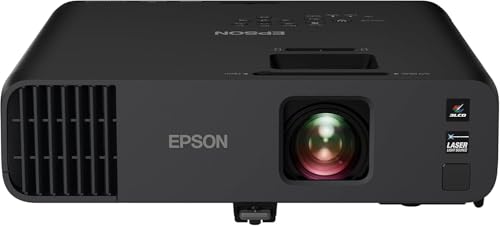
With its impressive 4,600 lumens brightness and Full HD 1080p resolution, the Epson Pro EX11000 Wireless Laser Projector is the ideal choice for professionals who need to deliver impactful presentations in well-lit conference rooms. This projector offers a remarkable 20,000 hours of maintenance-free use, ensuring reliability. You’ll appreciate the stunning color accuracy, thanks to its True 3-Chip 3LCD technology. Plus, with two HDMI ports and wireless screen mirroring via Miracast, connecting your devices is a breeze. Weighing just 9.5 pounds, it’s easy to set up, making it perfect for enhancing collaboration during your meetings.
Best For: Professionals seeking a high-quality projector for impactful presentations in well-lit environments.
Pros:
- Exceptional brightness with 4,600 lumens, ideal for video conferences and presentations.
- Long-lasting laser light source with 20,000 hours of maintenance-free use.
- Easy connectivity options including two HDMI ports and wireless screen mirroring via Miracast.
Cons:
- Weighs 9.5 pounds, which may be heavier compared to some portable projectors.
- Requires a wireless network connection of 5 Mbps or faster for streaming.
- Limited to Full HD 1080p resolution, which may not meet the needs of users looking for 4K projection.
TONGVEO 20x Zoom Conference Room Camera System

The TONGVEO 20x Zoom Conference Room Camera System is an ideal solution for businesses looking to enhance their video conferencing capabilities in large meeting spaces. With a 20x optical zoom and Full HD 1920x1080P video at 60fps, you’ll enjoy crystal-clear visuals. The all-in-one system features a Bluetooth speakerphone and a 360° omnidirectional microphone that captures voices from up to 20 feet away. Setup is a breeze with USB or HDMI connections, and it’s compatible with most video conferencing apps. Plus, the built-in battery guarantees long meetings run smoothly. Elevate your conference experience with TONGVEO’s impressive technology.
Best For: Businesses and organizations looking to enhance their video conferencing experience in large meeting rooms.
Pros:
- High-quality video: Offers Full HD 1920x1080P video at 60fps for crystal-clear visuals.
- Versatile connectivity: Easy connection options via USB or HDMI, compatible with most video conferencing applications.
- Long battery life: The built-in 8000mAh battery provides up to 17 hours of usage, ideal for extended meetings.
Cons:
- Limited range for microphone: The microphone may struggle to pick up voices beyond 20 feet effectively.
- Size limitations: Best suited for rooms up to 60 square meters, which may not accommodate larger spaces.
- Wired camera setup: The PTZ camera requires a wired connection, which might restrict placement options.
BenQ MW632ST Business Projector

For professionals seeking a reliable presentation tool, the BenQ MW632ST Business Projector stands out with its impressive brightness of 3200 lumens. This projector delivers a WXGA resolution of 1280×800, ensuring clear visuals in well-lit rooms. With a short throw lens (0.9), you can project large images from close distances, making it perfect for small conference rooms. Enjoy extended lamp life of up to 10,000 hours, allowing for over ten years of daily use. Plus, the two HDMI ports and wireless capability enhance connectivity options. Whether it’s for business meetings or classrooms, this projector elevates your presentations effortlessly.
Best For: Professionals seeking a reliable and bright projector for business meetings and classroom presentations.
Pros:
- High brightness of 3200 lumens, making it effective in well-lit environments.
- Extended lamp life of up to 10,000 hours, ensuring long-term use without frequent replacements.
- Short throw lens allows for large image projection from close distances, ideal for small spaces.
Cons:
- WXGA resolution (1280×800) may not meet the needs of users requiring higher resolution for detailed visuals.
- Limited zoom capability of 1.2X may restrict flexibility in image size adjustments.
- Wireless connectivity may introduce potential latency or connection issues in some environments.
Epson EpiqVision Flex CO-FH02 Full HD Smart Portable Projector

Ideal for both business professionals and home entertainers, the Epson EpiqVision Flex CO-FH02 Full HD Smart Portable Projector transforms any space into an enchanting viewing experience. With its impressive 3,000 lumens of brightness and 3-chip 3LCD technology, you’ll enjoy vibrant images up to 300 inches—perfect for impactful presentations. The built-in Android TV gives you instant access to popular streaming services like Netflix and YouTube, while the lightweight design makes it easy to carry. Plus, the high-quality 5W speaker guarantees that your audio matches the stunning visuals, making it ideal for any setting.
Best For: Business professionals and home entertainers looking for a portable projector that delivers high-quality visuals and streaming capabilities.
Pros:
- High Brightness: 3,000 lumens ensure clear and vibrant images even in various lighting conditions.
- Smart Streaming: Built-in Android TV provides access to popular streaming services like Netflix and YouTube.
- Portable Design: Lightweight and compact, making it easy to transport for presentations or movie nights.
Cons:
- Limited Audio Output: The built-in 5W speaker may not be sufficient for larger rooms or outdoor use.
- Price Point: Higher cost compared to standard projectors without smart features.
- Setup Time: Initial setup and configuration may take some time for new users to familiarize themselves with the interface.
Samsung QB43R 43 inch 4K UHD LED Commercial Signage Display

Offering stunning 4K UHD picture quality, the Samsung QB43R is perfect for businesses looking to elevate their conference room presentations. With a 43-inch display and vibrant Dynamic Crystal Color, your visuals will be lifelike and engaging. The intelligent UHD upscaling guarantees every detail shines through, while 350 nit brightness keeps content clear in various lighting conditions. Plus, built-in Wi-Fi, Bluetooth support, and HDMI compatibility make connectivity a breeze. Its slim design allows for easy mounting, and the system-on-chip technology offers an all-in-one digital signage solution. You’ll love the seamless integration with Cisco WebEx for enhanced conferencing experiences.
Best For: Businesses looking to enhance their conference room presentations with high-quality visuals and seamless connectivity.
Pros:
- Stunning 4K UHD resolution ensures lifelike and engaging visuals.
- Built-in Wi-Fi and Bluetooth support facilitate easy connectivity with various devices.
- Slim design and clean cable management allow for simple installation and a neat appearance.
Cons:
- Brightness of 350 nit may not be sufficient for very bright environments.
- Limited to a 43-inch size, which may not suit larger conference rooms.
- Requires additional setup for full integration with conferencing systems.
Pyle 4K USB Video Conference Room Camera System

The Pyle 4K USB Video Conference Room Camera System stands out with its impressive 120° field of view and 5X zoom, making it perfect for both large conference rooms and cozy home offices. You’ll appreciate the crystal-clear 4K video quality that enhances remote communication, while the 8-meter voice pickup range guarantees everyone’s heard, thanks to advanced noise-canceling technology. With a simple plug-and-play setup, it’s easy to connect to Zoom, Skype, and Microsoft Teams. The AI auto-framing feature provides an immersive experience, adapting seamlessly to your meeting environment, whether you’re on a PC, Mac, phone, or tablet.
Best For: The Pyle 4K USB Video Conference Room Camera System is best for professionals seeking high-quality video and audio solutions for remote meetings in both large conference rooms and small home offices.
Pros:
- Easy plug-and-play setup for quick activation on popular platforms like Zoom, Skype, and Microsoft Teams.
- Advanced noise-canceling technology ensures clear audio within an 8-meter voice pickup range.
- AI auto-framing feature enhances the immersive experience during meetings.
Cons:
- Some users may find the 5X zoom insufficient for very large meeting spaces.
- Limited compatibility with certain older devices or software versions.
- The product’s weight (2.27 pounds) may be considered hefty for portable use.
Factors to Consider When Choosing a Presentation System for Conference Rooms
When choosing a presentation system for your conference room, you’ve got to evaluate several key factors. Think about the size of your room, the importance of audio quality, and the video resolution you need. Don’t forget to look at connectivity options and how easy the setup will be for your team.
Room Size Considerations
Choosing the right presentation system hinges on room size, as it directly affects both image and audio quality. In small to medium-sized conference rooms, opt for a projector with at least 3,000 lumens to guarantee visibility in various lighting conditions. For larger spaces, consider systems with significant optical zoom capabilities, like 12x or higher, to ascertain everyone can see details clearly from the back. Your audio setup should also match the room size; omnidirectional microphones or multiple mics help capture voices from all areas. Finally, make certain your presentation system supports the necessary connectivity options for devices typically used in your space, accommodating multiple presenters or remote participants seamlessly.
Audio Quality Importance
Effective communication hinges on audio quality in conference rooms, as poor sound can lead to misunderstandings. When choosing a presentation system, consider high-quality audio essential for collaboration among participants. Look for systems equipped with beamforming microphones that capture voices from a distance, ensuring everyone is heard clearly, even in larger spaces. Advanced features like echo cancellation and noise reduction enhance audio clarity, making your presentations more professional and engaging. It’s also important to select systems that pick up voices from various angles and distances, accommodating multiple speakers and diverse room layouts. Investing in superior audio quality can greatly boost participant engagement and satisfaction during meetings, creating a more productive environment overall.
Video Resolution Needs
As you assess video resolution needs for your conference room presentation system, remember that clarity is essential for impactful communication. Full HD (1080p) is the minimum standard for professional settings, providing sharp images and text. However, if your room has large screens or requires detailed visuals, consider upgrading to Ultra HD (4K), which offers four times the pixel count of 1080p. Higher resolution can enhance participant engagement by creating a more immersive experience, especially with graphics or video content. Keep in mind that 4K video demands a stable internet connection of at least 25 Mbps for peak performance. Also, check compatibility with your video conferencing software, as many platforms support only up to 1080p, while few can handle 4K streaming effectively.
Connectivity Options Available
When selecting a presentation system for your conference room, consider the variety of connectivity options available to guarantee a seamless experience. Look for systems with multiple connections like HDMI, USB, and wireless capabilities to ascertain compatibility with various devices. Supporting screen mirroring technologies such as Apple AirPlay and Miracast is essential for easy content sharing from mobile devices and laptops. It’s beneficial to choose systems that offer both wired and wireless methods to cater to different user preferences. Additionally, USB plug-and-play functionality simplifies connections, allowing quick access to PCs without extra software. Finally, evaluate built-in streaming capabilities for popular services to enhance versatility and engage remote participants effectively.
Ease of Setup
Selecting a presentation system that’s easy to set up can greatly enhance your conference room experience. Look for systems that offer plug-and-play functionality to cut down on setup time and avoid technical complications. Consider options with simple wireless connectivity, allowing quick connections to various devices without the hassle of extensive cabling. Systems featuring auto-adjustment capabilities, like automatic vertical correction or image adjustments, can further streamline your initial setup. Make sure the system integrates seamlessly with major video conferencing platforms for hassle-free use during meetings. Finally, check for included setup guides or intuitive controls that enhance user experience, making installation straightforward and efficient. With these features, you’ll spend less time setting up and more time focusing on your presentation.
Compatibility With Software
Choosing a presentation system that’s compatible with various software is vital for a smooth conference room experience. First, make sure it supports major video conferencing platforms like Microsoft Teams, Zoom, and Google Meet for seamless integration. You’ll also want to check for USB plug-and-play functionality, simplifying connectivity with PCs, Macs, and tablets. Compatibility with operating systems is important, too; verify it works with specific versions like Windows 7/8.1/10 or macOS 10.10 and higher. Look for multiple connectivity options, including HDMI, USB, and wireless capabilities, to accommodate diverse devices. Finally, confirm the system can handle streaming protocols like AirPlay or Miracast for easy wireless streaming from your mobile devices. This guarantees a versatile and efficient meeting setup.
Budget and Cost-effectiveness
After ensuring compatibility with key software and devices, the next step is to evaluate your budget and cost-effectiveness. Start by determining the total cost of ownership, including the initial purchase price, installation, maintenance, and potential upgrades. Look for multi-functional devices that combine video conferencing, presentation capabilities, and audio systems to save money. Assess the longevity and warranty terms of the equipment; investing in durable products can lead to significant long-term savings. Consider the scalability of the system to meet future needs without hefty additional investments. Finally, factor in the potential return on investment (ROI) from enhanced collaboration and productivity, as an effective presentation system can greatly improve meeting outcomes and efficiency.