
As you explore the landscape of data storage in 2026, you’ll find that rackmount NAS devices have evolved considerably. These advanced solutions not only offer impressive performance but also cater to the growing needs of businesses and tech enthusiasts. With a range of options available, it’s essential to understand which models stand out. Let’s take a closer look at the top contenders shaping the future of data management.
Synology 4-Bay Rackmount NAS RackStation RS422+ (Diskless),Black

If you’re a small business owner or running a home lab, the Synology 4-Bay Rackmount NAS RackStation RS422+ is an excellent choice for your data management needs. This compact 1U rackmount NAS, powered by Synology DiskStation Manager (DSM), offers impressive sequential read/write speeds of over 601/516 MB/s. Its dual 1GbE ports guarantee network reliability through failover and load balancing, while the space-saving design fits neatly into your setup. With a solid customer rating of 4.6 out of 5 stars, it’s clear that users appreciate its performance and efficiency. Plus, you can easily expand connectivity with plug-and-play network upgrade modules.
Best For: Small business owners and home lab enthusiasts looking for reliable data management solutions.
Pros:
- High performance with sequential read/write speeds of over 601/516 MB/s.
- Dual 1GbE ports provide network failover and load balancing for enhanced reliability.
- Compact design allows for easy integration into space-constrained environments.
Cons:
- Diskless configuration requires additional investment in hard drives.
- Limited built-in connectivity options without purchasing upgrade modules.
- Weight of 13.28 pounds may be cumbersome for some installations.
QNAP TS-832PXU-4G 8 Bay High-Speed SMB Rackmount NAS

The QNAP TS-832PXU-4G 8 Bay High-Speed SMB Rackmount NAS is an excellent choice for small to medium-sized businesses seeking efficient data management and high-speed performance. Powered by a quad-core 1.7GHz AnnapurnaLabs Alpine AL324 processor, it guarantees smooth operation. With 4GB of RAM (expandable to 16GB) and 8 storage bays supporting SATA speeds of up to 6Gb/s, you’ll enjoy ample storage capacity. The dual 2.5 Gigabit Ethernet ports and dual 10 Gigabit SFP+ ports enhance your networking capabilities. Plus, its 2U rackmount form factor makes it a sleek addition to your server setup, assuring you maximize space effectively.
Best For: Small to medium-sized businesses looking for efficient data management and high-speed networking capabilities.
Pros:
- High-speed performance with a quad-core 1.7GHz processor and expandable RAM up to 16GB.
- Ample storage capacity with 8 x 3.5-inch SATA bays supporting speeds up to 6Gb/s.
- Enhanced networking features with dual 2.5 Gigabit Ethernet and dual 10 Gigabit SFP+ ports.
Cons:
- Diskless configuration means users must purchase drives separately.
- Limited initial RAM at 4GB may require an upgrade for heavier workloads.
- 2U rackmount form factor may not fit all small server setups or spaces.
QNAP TS-832PXU-RP-4G 8 Bay Rackmount NAS

Designed for small to medium-sized businesses, the QNAP TS-832PXU-RP-4G 8 Bay Rackmount NAS offers exceptional performance with its powerful AnnapurnaLabs Alpine AL324 processor and generous storage capacity. With eight bays for 3.5-inch SATA drives, you can easily expand your storage needs. You’ll appreciate the dual 2.5 Gigabit and 10 Gigabit Ethernet SFP+ ports for speedy network connectivity. Plus, its PCIe slot and multiple USB 3.2 ports offer flexibility for additional expansion. The 2U rackmount design and redundant power supply guarantee reliability, making this NAS an ideal choice for efficient data management and seamless operations in your business.
Best For: Small to medium-sized businesses looking for a reliable and high-performance NAS solution for efficient data management.
Pros:
- High storage capacity with eight bays for 3.5-inch SATA drives, allowing for easy expansion.
- Fast network connectivity through dual 2.5 Gigabit and 10 Gigabit Ethernet SFP+ ports.
- Redundant power supply ensures reliability and minimizes downtime.
Cons:
- Diskless configuration means additional costs for purchasing drives separately.
- Limited maximum RAM capacity of 16GB may not meet the needs of highly demanding applications.
- 2U rackmount design may require additional space in server environments.
Ubiquiti UniFi UNAS Pro 8 Rackmount NAS with 8 HDD Bays (UNAS-Pro-8)
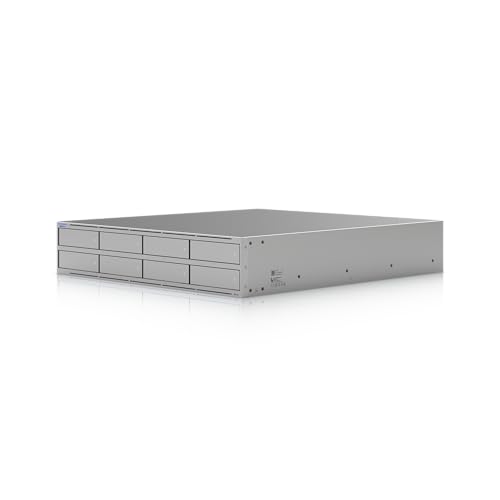
For businesses needing robust storage solutions, the Ubiquiti UniFi UNAS Pro 8 Rackmount NAS stands out with its impressive capacity of eight 3.5″ drive bays and two M.2 NVMe bays. It supports both HDD and SSD, providing flexibility for your data needs. With dual 10G networking interfaces, you can enjoy blazing-fast data transfers. The 250W power consumption is efficiently managed with hot-swappable AC/DC power modules, ensuring uptime. Weighing 11.5 kg, it’s compact enough for a 2U rack. Plus, the quad-core processor and 16 GB of memory guarantee smooth operation, making it a top choice for serious data management.
Best For: Businesses requiring a high-capacity, efficient, and reliable storage solution for data management.
Pros:
- Flexible storage options with support for both HDD and SSD in 8 bays and 2 M.2 NVMe bays.
- High-speed networking capabilities with dual 10G SFP+ interfaces for rapid data transfers.
- Hot-swappable power modules ensure minimal downtime and increased reliability.
Cons:
- Higher initial cost compared to lower-capacity NAS solutions.
- Weight and size may be a consideration for smaller rack environments.
- Limited to rack mount form factor, which may not suit all setups or preferences.
BUFFALO TeraStation Essentials 4-Bay NAS (16TB)

Looking for a reliable solution to organize, store, and back up your important files? The BUFFALO TeraStation Essentials 4-Bay NAS packs a robust 16TB capacity with four 4TB hard drives, ensuring ample space for all your data. With 256-bit drive encryption and flexible RAID options, your files are secure and easily manageable. Enjoy high-speed file transfers through its native 2.5GbE port, without needing cable upgrades. Plus, it integrates seamlessly with cloud services like Amazon S3 and Dropbox, offering enhanced scalability. Supported by a 3-year warranty and 24/7 US-based assistance, this NAS is a dependable choice for data protection.
Best For: Businesses and professionals seeking a reliable and secure NAS solution for organizing, storing, and backing up large volumes of important data.
Pros:
- High-capacity storage of 16TB with RAID options for data redundancy.
- Fast file transfer speeds with a native 2.5GbE port, ensuring efficient data access.
- Seamless integration with popular cloud services for enhanced scalability and backup options.
Cons:
- Initial setup may require technical knowledge for optimal RAID configuration.
- Limited to the included hard drives; expanding storage may require additional purchases.
- Some users may find the 256-bit encryption unnecessary for non-sensitive data.
QNAP TS-435XeU Rackmount NAS

The QNAP TS-435XeU Rackmount NAS stands out as an ideal choice for businesses seeking robust performance and scalability. With its Marvell OCTEON TX2 quad-core processor and 4GB of DDR4 RAM (expandable to 32GB), you’ll experience seamless multitasking. Dual 2.5GbE ports enhance file sharing, while future-proofing comes with dual 10GbE networking. The 4-bay design allows for versatile storage setups, and dual M.2 PCIe slots provide options for cache acceleration. Plus, you can safeguard your data with extensive backup solutions and utilize QVR Pro for 24/7 surveillance, ensuring your operations run smoothly and securely.
Best For: Businesses seeking a high-performance, scalable storage solution with robust backup and surveillance capabilities.
Pros:
- Powerful Performance: Equipped with a quad-core processor and expandable RAM for efficient multitasking.
- Flexible Networking Options: Dual 2.5GbE ports and future-proof dual 10GbE networking enhance file sharing and connectivity.
- Comprehensive Data Protection: Offers extensive backup solutions and ransomware protection for secure data management.
Cons:
- Diskless Design: Requires additional investment for hard drives to utilize the storage capacity fully.
- Initial Setup Complexity: May require technical expertise for optimal configuration and setup.
- Limited Built-in RAM: Starts with 4GB of RAM, which may not be sufficient for all users without expansion.
QNAP TL-R400S 4 Bay Rackmount SATA Storage Enclosure

Designed for efficient storage expansion, the QNAP TL-R400S 4 Bay Rackmount SATA Storage Enclosure is perfect for businesses and tech enthusiasts who need reliable data management. With four 3.5-inch SATA drive bays and a PCIe SATA interface card, you can easily connect it to QNAP NAS, Windows, or Ubuntu systems. Its robust design guarantees consistent read/write performance, making it ideal for backup tasks. Weighing 12.57 pounds and measuring 21.34 x 16.34 x 7.05 inches, it fits seamlessly into your rack. Plus, with a strong customer rating of 4.3 stars, it’s a solid choice for expanding your storage capabilities.
Best For: Businesses and tech enthusiasts looking for reliable and efficient storage expansion solutions.
Pros:
- Robust design ensures consistent read/write performance for backup and storage tasks.
- Easy connectivity with QNAP NAS, Windows, and Ubuntu systems through the included PCIe SATA interface card.
- Compact size and lightweight nature make it easy to fit into standard racks.
Cons:
- Diskless design requires purchasing drives separately, which can increase overall costs.
- Cannot combine with existing pools or volumes on a QNAP NAS, limiting flexibility in storage management.
- Limited support for other operating systems beyond QNAP, Windows, and Ubuntu.
4U Rackmount Server Case Chassis with 24 Hot-Swappable SATA/SAS Drive Bays

For those seeking robust storage solutions, the 4U Rackmount Server Case Chassis stands out with its impressive 24 hot-swappable SATA/SAS drive bays. This chassis supports both 3.5 and 2.5-inch drives, making it versatile for your storage needs. With dimensions of 26.6 x 16.9 x 7 inches and a weight of 39.3 pounds, it fits comfortably into your rack setup. The cooling system features five fans, ensuring excellent airflow. You’ll also appreciate the easy access switches and USB 3.0 ports for quick connectivity. Rated 4.1 out of 5 stars, it’s a reliable choice for your data storage solutions.
Best For: Those in need of a high-capacity server chassis that supports extensive data storage with hot-swappable drive options.
Pros:
- Versatile Drive Compatibility: Accommodates both 3.5 and 2.5-inch SATA/SAS drives, allowing for flexible storage configurations.
- Efficient Cooling System: Equipped with five fans that ensure optimal airflow and temperature regulation for the drives.
- User-Friendly Interface: Features easy-to-access power switches and USB 3.0 ports for convenient connectivity.
Cons:
- Weight: At 39.3 pounds, it may be cumbersome for some users to handle during installation.
- Additional Components Needed: Requires a 4-pin Molex power adapter and OS drive mounting bracket that are not included.
- Limited Internal Connectors: Only six SFF-8087 Mini SAS connectors, which may restrict expandability for some setups.
TERRAMASTER U4-500 NAS Storage (Diskless)

If you’re seeking a powerful and flexible storage solution for your business or home server, the TERRAMASTER U4-500 NAS Storage stands out with its diskless design. Featuring an Intel Core i3-1215U processor, it delivers impressive performance with up to 4.4GHz turbo speeds and 8GB DDR5 RAM. You can configure it with up to 96TB using four 24TB HDDs, and its advanced RAID options guarantee data security. With dual 10GbE ports, you’ll enjoy lightning-fast transfer rates of 20Gbps. Plus, built-in backup features like CloudSync and ransomware protection make it a reliable choice for safeguarding your data.
Best For: The TERRAMASTER U4-500 NAS Storage is best for businesses and tech-savvy individuals looking for a high-performance, customizable storage solution.
Pros:
- High-speed performance with Intel Core i3-1215U processor and dual 10GbE ports allowing for fast data transfer.
- Flexible storage capacity supporting up to 96TB with various RAID configurations for enhanced data protection.
- Advanced backup features including CloudSync and ransomware protection to ensure data integrity and security.
Cons:
- Diskless design requires additional investment in hard drives to utilize the storage capabilities.
- Potentially complex setup for users unfamiliar with NAS configurations and RAID setups.
- Limited initial RAM of 8GB may require upgrades for heavy workloads or demanding applications.
Rosewill 4U Server Chassis Rackmount Case (RSV-R4100U)

The Rosewill 4U Server Chassis Rackmount Case (RSV-R4100U) stands out as an ideal choice for those seeking robust and flexible storage solutions in a compact design. With dimensions that fit ATX and CEB motherboards, this chassis offers seven internal bays for 3.5” HDDs and space for two 5.25” devices. You’ll appreciate the effective cooling system, featuring three pre-installed fans that guarantee optimal airflow while keeping noise levels low. The user-friendly front panel includes LED indicators and two USB 3.0 ports, while a front panel lock enhances security for your server components. It’s built to meet your data storage needs.
Best For: Those looking for a reliable and spacious server chassis that can accommodate multiple hard drives while providing efficient cooling and security features.
Pros:
- Ample storage capacity with seven 3.5” HDD bays and space for two 5.25” devices.
- Effective cooling system featuring three pre-installed fans for optimal airflow and low noise levels.
- User-friendly front panel with LED indicators and USB 3.0 ports for easy access and monitoring.
Cons:
- Limited to 4U form factor, which may not fit all server setups.
- Only supports ATX and CEB motherboards, reducing compatibility with other motherboard sizes.
- Front panel lock may not be sufficient for high-security environments.
Factors to Consider When Choosing a Rackmount NAS
When you’re choosing a rackmount NAS, it’s essential to take into account several key factors. Think about your storage capacity needs, performance requirements, and how fast you need your data to transfer. Additionally, evaluate the network connectivity options, redundancy features, and whether the form factor fits your existing setup.
Storage Capacity Needs
Choosing the right rackmount NAS requires careful consideration of your storage capacity needs, especially since it can greatly impact your data management strategy. Start by evaluating the number of drive bays available; options typically range from 4 to 8 bays or more. Each bay’s maximum capacity also matters—some NAS devices support up to 24TB per drive, allowing substantial total storage when fully populated. Evaluate RAID configuration support for enhanced data redundancy and performance, which can affect usable storage capacity. Additionally, check the compatibility of storage drives, like SATA or NVMe, as this influences both speed and capacity. Finally, consider your current and future storage needs, ensuring the NAS has the scalability options to accommodate potential data growth.
Performance and Speed
Performance and speed are essential factors in selecting the right rackmount NAS for your needs. Look for a model with a sequential read/write throughput exceeding 600 MB/s, especially if you’re running high-demand applications. The processor type and clock speed matter too; a quad-core processor with a clock speed of 1.7GHz or higher will considerably boost multitasking and data processing. Don’t overlook RAM—aim for at least 4GB to guarantee smoother operation when handling multiple tasks and users. Finally, consider support for advanced storage technologies like NVMe, which can drastically improve IOPS performance, making your NAS even more efficient for high-speed data access. Investing in these features will enhance your overall experience and productivity.
Network Connectivity Options
High-performance capabilities are only part of the equation when it comes to selecting the best rackmount NAS. You’ll want to take into account the number of Ethernet ports available; devices with dual ports offer network failover and load balancing for enhanced reliability. Look for systems featuring higher-speed networking options like 10GbE ports, which greatly boost data transfer rates compared to standard 1GbE connections. Pay attention to supported network interfaces; SFP+ ports can cater to advanced setups and higher bandwidth needs. Make sure your NAS is compatible with both wired and wireless protocols for seamless integration. Finally, future-proof your investment by choosing models that allow for plug-and-play network upgrade modules to adapt to evolving connectivity needs.
Redundancy and Backup Features
When considering a rackmount NAS, it’s crucial to prioritize redundancy and backup features to protect your data. Look for configurations like RAID 1, RAID 5, or RAID 6, which safeguard your data by storing duplicate copies across multiple drives. Advanced NAS solutions may offer snapshot capabilities, allowing you to create point-in-time data copies for quick recovery from accidental deletions or corruption. Additionally, cloud integration enhances your data security by enabling automatic syncing with services like Amazon S3 or Dropbox for offsite backups. Don’t overlook disk encryption, such as 256-bit encryption, to secure sensitive information. Finally, seek out NAS devices that include automated backup software or disaster recovery planning to guarantee your data is consistently protected and can be restored efficiently.
Form Factor Compatibility
Choosing the right form factor for your rackmount NAS is essential for compatibility with your server rack. Common sizes include 1U (1.75 inches high), 2U (3.5 inches), and 4U (7 inches). Make sure the NAS fits within your available rack space, keeping in mind both height and depth, as these can vary among models. The weight of the NAS is also important; heavier units may need sturdier mounting solutions to support their load. Additionally, check for motherboard compatibility, as different units may support ATX or CEB sizes. Finally, consider cooling requirements, since smaller form factors often have limited airflow options compared to larger models, which could affect performance and longevity.
Power Efficiency Considerations
Power efficiency is an essential factor in selecting a rackmount NAS, as it directly influences your operational costs and environmental impact. Start by checking the power consumption ratings; they can vary considerably between models, affecting your long-term expenses. Look for NAS units with efficient power supplies, ideally 80 PLUS certified, since they use less energy and generate less heat. Assess the total wattage, especially when fully loaded with drives, to verify it fits your power supply capabilities. Don’t overlook cooling requirements—devices with better airflow management operate more efficiently. Finally, evaluate power redundancy features like hot-swappable power supplies, which enhance reliability and minimize downtime during power failures, guaranteeing your data remains accessible.