
Resin printing can give students sharper details and faster iteration than many hobby FDM setups, making it a strong fit for design, science, and engineering programs.
This roundup of the best resin printers for schools focuses on practical classroom needs: consistent results, manageable upkeep, and accessories or materials that support shared use.
Best 10 Resin Printers for Schools Picks for 2026
Classroom-Friendly Starter Pick
ELEGOO Mars 5 Resin 3D Printer

- One-click automatic leveling simplifies setup.
- Self-check and alarms help catch print issues early.
- 4K mono LCD supports detailed classroom models.
Best For: Teachers and school labs that want a simpler resin printer workflow.
Durable Material Choice

- Tough formula suits parts that need durability.
- Lower viscosity makes handling easier.
- Lower odor may fit shared classrooms better.
Best For: Schools printing functional parts, shells, and reusable models.
Advanced Multi-Material Option
ANYCUBIC Photon P1 Resin 3D Printer

- Dual-color and dual-material printing expands projects.
- Smart Leveling 3.0 reduces manual calibration.
- AI monitoring adds useful print checks.
Best For: Advanced STEM labs and makerspaces exploring multi-material resin printing.
Budget-Friendly Everyday Resin
SUNLU Standard 3D Printer Resin Plus

- Affordable standard resin for routine classroom use.
- Low shrinkage supports accurate parts.
- Light odor and easy cleanup help workflow.
Best For: Budget-minded school labs and beginners needing a general-purpose resin.
Classroom-Ready Detail

- 7" 10K mono LCD with 9024 x 5120 resolution
- Uniform LighTurbo lighting for smoother surfaces
- Pre-calibrated setup and resume printing after outages
Best For: Schools needing high-detail resin prints in a compact machine
Balanced Tabletop Choice

- 52µm XY resolution with a 4K mono LCD
- Compact 7.9" x 4.9" x 8.7" build volume
- Reinforced dual linear rails for smoother Z motion
Best For: Classroom makers who need compact, detailed resin prints
Safer Post-Print Workflow
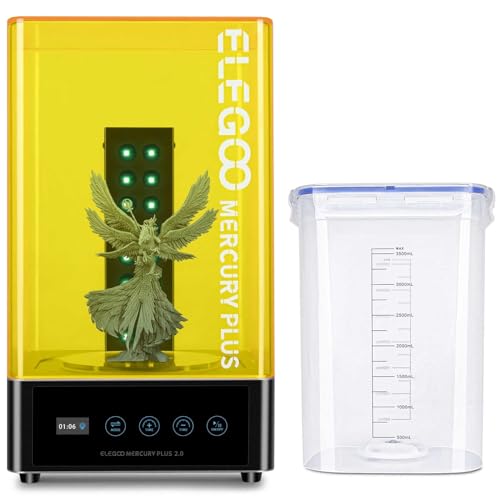
- Sealed washing and anti-UV lid for safer handling
- 16 UV LEDs with rotating turntable for even curing
- Works with many LCD/DLP/SLA resin printers
Best For: School labs that need cleaner resin post-processing
Entry-Level Classroom Option
MALYAN S100 Mini Resin 3D Printer

- Auto leveling helps simplify setup for beginners.
- 2K LCD screen supports fine detail and textures.
- Small build area keeps it compact for classroom desks.
Best For: Beginner classrooms and small school labs
Material Pick

- Low shrinkage supports accuracy and smooth surfaces.
- Compatible with all DLP/LCD 3D printers.
- Quick curing helps reduce forming time.
Best For: Schools needing a reliable general-purpose resin
Durable Resin Choice
Siraya Tech Fast ABS-Like Resin

- Non-brittle formula adds toughness for student handling.
- Low odor and easy cleaning suit shared spaces.
- Compatible with most LCD and DLP printers.
Best For: Classrooms printing small, durable student models
Classroom-Friendly Starter Pick – ELEGOO Mars 5 Resin 3D Printer
For buyers comparing resin printers for schools, the ELEGOO Mars 5 focuses on simplicity, safety, and dependable print setup. Its one-click automatic leveling, self-check routine, and built-in alarms help reduce the kind of setup errors that can slow down classroom projects.
Best For: Teachers, makerspaces, and school labs that want an easier-to-manage resin printer with automated checks.
Pros:
- One-click automatic leveling helps students and staff get started quickly.
- Self-check function verifies components before each print.
- Residue detection, resin shortage alarms, and leveling failure alerts support more consistent operation.
- 4K mono LCD with COB light source is designed to capture fine detail.
Cons:
- Builds are limited by the Mars-series desktop size.
- Resin printing still requires supervision and post-processing.
- Overheat protection is a safety feature, but it does not remove the need for careful classroom handling.
The Mars 5 is a practical choice when ease of use matters more than advanced classroom production features. For schools that need a straightforward resin printer with fewer calibration headaches, it offers a well-balanced mix of automation and detail.
Durable Material Choice – Siraya Tech Blu Tough Resin
When evaluating resin printers for schools, the resin itself matters just as much as the machine. Siraya Tech Blu Tough Resin is built for durable, usable parts and is a strong option when students need prints that can handle handling, assembly, and repeated use.
Best For: School labs, clubs, and makerspaces printing tough parts, shells, and durable models.
Pros:
- Improved workability makes it easier to handle and faster to cure.
- Lower viscosity than Original Blu helps with easier resin handling.
- Tough formula is designed for fragile parts and structures that need added durability.
- Lower odor than Original Blu may be more comfortable in shared spaces.
Cons:
- It is a resin material, so schools still need proper washing and curing workflows.
- Not a printer, so it must be matched to compatible resin printing hardware.
- Best results still depend on careful settings and post-processing.
This is a useful material upgrade for educational settings that need sturdier printed parts instead of decorative models alone. If your school program values strength and usability, Blu Tough is a smart resin to keep on hand.
Advanced Multi-Material Option – ANYCUBIC Photon P1 Resin 3D Printer
For schools looking at resin printers for schools with more advanced classroom potential, the ANYCUBIC Photon P1 stands out for dual-color and dual-material printing. It also adds factory-calibrated leveling, AI monitoring, and a stable motion system to support more reliable results.
Best For: Advanced school programs, STEM labs, and makerspaces that want dual-material printing and more automation.
Pros:
- Dual-color and dual-material printing expands creative classroom projects.
- Factory-calibrated Smart Leveling 3.0 reduces manual setup work.
- AI monitoring checks build plate installation, bottom layer separation, resin level, and residue detection.
- Wave Release Technology helps models detach more easily and lowers failure rates.
Cons:
- It is a larger, more advanced printer than a basic classroom starter model.
- Dual-material printing may be more than many introductory programs need.
- Industrial-resin support is useful, but it also raises the importance of careful material management.
The Photon P1 is best suited to schools that want to push beyond basic prints and explore more complex resin projects. Its automation and monitoring features make it appealing where reliability and experimentation both matter.
Budget-Friendly Everyday Resin – SUNLU Standard 3D Printer Resin Plus
If you are comparing resin printers for schools and need an affordable everyday material, SUNLU Standard Resin Plus is built around ease of use and broad compatibility. Its low shrinkage, light odor, and simple cleanup make it a practical resin for introductory classroom printing and routine projects.
Best For: Budget-conscious school labs and beginners who want an easy-to-use standard resin.
Pros:
- Strong fluidity and broad printer compatibility make it easy to work with.
- Low shrinkage helps preserve part size and shape.
- Easy cleanup with isopropyl alcohol or ethanol supports a simpler workflow.
- Light odor and relatively low cost are helpful for shared educational spaces.
Cons:
- Standard resin may not offer the toughness of specialty engineering resins.
- Schools still need proper ventilation and post-processing procedures.
- Color choice depends on the specific variant purchased.
This is a sensible pick when the goal is to keep material costs down without giving up usability. For schools that want a dependable all-purpose resin, SUNLU offers a straightforward balance of value and compatibility.
Classroom-Ready Detail – ANYCUBIC Photon Mono 4
If you’re comparing resin printers for schools, the ANYCUBIC Photon Mono 4 is a strong fit when fine detail and straightforward startup matter. Its 10K monochrome LCD, stable light source, and pre-tested setup are aimed at producing crisp models with less fuss, which can help in classroom and lab workflows where consistency counts.
Best For: Schools that want a highly detailed resin printer with a compact build size and easy first prints.
Pros:
- 7″ 10K mono LCD with 9024 x 5120 resolution for very fine detail
- LighTurbo matrix light source for more uniform lighting and smoother surfaces
- Re-engineered build platform designed to reduce lifting and warping
- Pre-assembled, calibrated, and tested before shipment for simpler setup
Cons:
- Build volume is more compact than larger-format resin printers
- Resin printing still requires cleanup and post-processing support
- Best suited to smaller projects and models rather than oversized parts
The Photon Mono 4 focuses on precision and reliable day-to-day printing, making it a practical choice for schools that need detailed prototypes, models, or classroom demonstrations without a complicated setup process.
Balanced Tabletop Choice – Phrozen Sonic Mighty 4K
For buyers comparing resin printers for schools, the Phrozen Sonic Mighty 4K offers a useful middle ground between print quality and tabletop-friendly size. Its 4K monochrome LCD, 52µm XY resolution, and reinforced dual linear rails are geared toward reliable results for miniatures, prototypes, and detailed parts in a classroom maker space.
Best For: Schools, clubs, and labs that want a compact resin printer for detailed small-format projects.
Pros:
- 52µm XY resolution with a sharp 4K monochrome LCD
- 7.9″ x 4.9″ x 8.7″ build volume for tabletop-sized projects
- Reinforced dual linear rails for steadier Z-axis movement
- Works with most third-party 405nm UV resins
Cons:
- Build volume is limited for larger school projects
- Resin workflow still involves post-processing and cleanup
- Better suited to small parts than broad, high-volume production
This is a well-rounded option if your school wants detail and reliability without moving into a larger, more demanding resin setup. It is especially appealing for miniatures, action figures, and prototype parts where precision matters.
Safer Post-Print Workflow – ELEGOO Mercury Plus 2.0
If your school already uses resin printers, the ELEGOO Mercury Plus 2.0 helps streamline the messy part of the workflow. This wash and cure station is built for sealed washing, UV-protected curing, and simple controls, making it a practical companion for classrooms that need a more organized post-processing setup.
Best For: Schools that need an all-in-one wash and cure station to support resin printing labs.
Pros:
- Sealed washing helps reduce alcohol vapor during cleaning
- Anti-UV lid blocks 99.95% of ultraviolet rays
- Built-in 16 UV LEDs and 360-degree rotating turntable for even curing
- Flexible washing modes for either the basket or mounted build plate
Cons:
- Washing is not ideal for water-washable resin
- It is an accessory, not a printer, so it does not create parts on its own
- Requires extra bench space for post-processing
For schools managing resin printers, this station can improve consistency and reduce handling during cleanup and curing. It is a practical add-on when you want a more controlled, classroom-friendly post-print workflow.
Entry-Level Classroom Option – MALYAN S100 Mini Resin 3D Printer
For schools looking at resin printers for schools, the MALYAN S100 is a compact entry-level pick that focuses on simple setup and fine detail. Its 5.5-inch 2K LCD screen is aimed at crisp model reproduction, while one-click calibration and auto leveling can make it easier for beginners to get started without a lot of manual tuning.
Best For: Beginner classrooms, small lab stations, and teachers who want an easier resin printer to introduce students to high-detail printing.
Pros:
- Auto calibrates and levels the print platform when a print starts.
- 5.5-inch 2K LCD screen is designed for high-precision detail and textures.
- Magnetic build plate makes removal and cleanup easier between print jobs.
- Upgraded 57W parallel LED array aims for more uniform lighting and smoother surfaces.
Cons:
- Small 115 x 65 x 110 mm build volume limits larger classroom projects.
- Resin printers still require careful parameter matching for different resins.
- Best suited to smaller models rather than batch production.
This is a practical starter machine if you want a compact resin printer that lowers setup friction and emphasizes detail. Its smaller size and automated leveling make it easier to manage, but the build area is the main constraint for school use.
Material Pick – ANYCUBIC Grey LCD/DLP Resin
If you’re comparing resin printers for schools, the printer itself is only part of the equation, and this ANYCUBIC grey resin is a straightforward material choice for LCD/DLP workflows. It is designed for low shrinkage, quick curing, and high precision, which makes it useful when you want dependable test prints and good surface quality from compatible resin printers.
Best For: Schools that already have LCD or DLP printers and need a general-purpose grey resin for reliable student projects.
Pros:
- Low shrinkage supports more accurate prints and smoother surfaces.
- Quick curing and strong stability can help reduce forming time.
- Compatible with all DLP/LCD 3D printers.
- Grey color is a versatile default for model review and classroom demos.
Cons:
- Requires a full shake before use to mix components evenly.
- As a resin material, it still demands cleanup and post-processing.
This is a practical all-around resin for school makerspaces that need compatibility and consistent output more than specialty properties. It fits best as a dependable supply item for existing printers rather than as a standalone hardware purchase.
Durable Resin Choice – Siraya Tech Fast ABS-Like Resin
For schools evaluating resin printers for schools, the resin choice can matter as much as the machine, and this Siraya Tech ABS-like formula is aimed at strong, clean-looking prints. It is designed for fast printing and curing, low odor, and a non-brittle finish, which makes it appealing for student models that need a little more toughness during handling.
Best For: School makerspaces and classrooms printing small parts, display models, and student projects that need better toughness.
Pros:
- Fast printing and curing can improve workflow efficiency.
- ABS-like stiffness and toughness help reduce brittleness.
- Low odor and easy cleaning are helpful in shared learning spaces.
- Works with most LCD and DLP printers, including 8K-capable models.
Cons:
- Still requires alcohol cleaning and resin-safe handling.
- Best suited to small and half-length models rather than large builds.
This is a strong choice when durability and print quality matter more than novelty. For school environments, its lower odor and easier cleanup are useful, while broad compatibility makes it flexible across different resin printer setups.
How We Picked Resin Printers for Schools
We prioritized classroom-friendly features over raw specs alone. That means dependable print quality, approachable setup, reasonable maintenance, and parts or consumables that are easy to source. For Resin Printers for Schools, we also looked for models that can handle repeated use by multiple students without becoming a constant troubleshooting project.
Quick Comparison
In general, the best choices for schools fall into three groups: compact beginner printers for individual workstations, higher-resolution machines for detailed prototypes and art projects, and wash-and-cure stations or specialty resins that improve workflow efficiency and durability. Matching the printer to the classroom size and supervision level matters more than chasing the highest resolution number.
Key Buying Factors for Resin Printers for Schools
Safety and Supervision
Resin printing requires careful handling of liquid resin, IPA or other cleaning agents, and cured waste. Schools should plan for ventilation, gloves, eye protection, and clear cleanup procedures. Closed or compact units are easier to manage in shared spaces.
Build Volume and Student Projects
Choose a build size that fits the kinds of projects students will actually make. Small printers are ideal for miniatures, test pieces, and detailed parts. Larger beds are better for prototype housings, classroom demonstrations, and group projects, but they also increase resin use and cleanup time.
Reliability and Ease of Use
Auto-leveling, simple interfaces, and stable print platforms reduce failed prints and help new users succeed faster. For classrooms, these features often matter more than premium speed.
Material and Post-Processing Workflow
The right resin can make a big difference. Tough or ABS-like resins are better for handled parts, while standard resins suit detail-focused models. A wash-and-cure station can streamline post-processing and make the workflow easier to teach consistently.
Who Should Buy Which Resin Printers for Schools?
If you are outfitting a beginner STEM lab, look for compact, easy-to-manage printers with straightforward setup and low intimidation factor. If your school emphasizes product design, engineering, or art, choose a higher-resolution model and pair it with a durable resin for functional prototypes. If your priority is efficiency, a wash-and-cure station can be one of the smartest add-ons in the entire resin printing workflow.
For most schools, the best approach is to start with one dependable printer, establish a clear cleaning and safety routine, and expand only after students and staff are comfortable with the process. That keeps resin printing useful, repeatable, and easier to manage across classes.