
If you’re looking to improve your business’s efficiency, investing in the right scanner can make a significant difference. With options ranging from high-speed models to portable devices, each scanner offers unique features to cater to your specific needs. Whether you’re managing documents or streamlining workflows, finding the perfect fit is essential. Let’s explore the top choices that can transform how you handle your document management.
ScanSnap iX2500 Wireless Document Scanner

If you’re a small business owner looking for a reliable and efficient way to manage your documents, the ScanSnap iX2500 Wireless Document Scanner is an excellent choice. With its large 5″ touchscreen and 100-sheet auto document feeder, you can scan double-sided pages at an impressive 45 pages per minute. Thanks to USB-C and built-in Wi-Fi 6, secure scanning is a breeze, whether you’re on Mac, PC, iOS, or Android. Plus, the ScanSnap Cloud lets you scan directly to cloud services, simplifying your workflow. Enjoy customizable profiles and a robust design that prevents jams, making your document management seamless and effective.
Best For: Small business owners looking for a reliable and efficient document management solution.
Pros:
- High-speed scanning of up to 45 pages per minute with double-sided capabilities.
- Built-in Wi-Fi 6 and USB-C connectivity for secure and versatile use across devices.
- Customizable profiles and ScanSnap Cloud support for streamlined workflow and easy document access.
Cons:
- The weight of 7.7 pounds may not be ideal for portable use.
- Limited scanning capacity for large bulk documents due to the 100-sheet feeder.
- Higher price point compared to basic document scanners on the market.
Epson WorkForce ES-50 Portable Sheet-Fed Document Scanner for PC and Mac

The Epson WorkForce ES-50 Portable Sheet-Fed Document Scanner is the ideal choice for small businesses that need speed and efficiency in document management. Weighing just 9.4 ounces, it’s the lightest scanner in its class and scans a single page in as fast as 5.5 seconds. You can easily manage documents up to 8.5 x 72 inches, including ID cards and receipts. Compatible with both Windows and Mac, it includes Epson ScanSmart Software for seamless scanning and cloud storage options. Plus, its USB-powered design means you won’t need extra batteries or power supplies, making it perfect for on-the-go professionals.
Best For: Small businesses and on-the-go professionals who need a lightweight, efficient scanning solution for managing documents quickly.
Pros:
- Fast scanning speed of up to 5.5 seconds per page, enhancing productivity.
- Lightweight and portable design at just 9.4 ounces, ideal for travel.
- USB powered, eliminating the need for batteries or external power supplies.
Cons:
- Limited to single-sheet feeding, which may slow down larger batch scanning.
- Document size limitation of up to 8.5 x 72 inches may not accommodate larger documents.
- Requires computer compatibility, which may not serve users with only mobile devices.
ScanSnap iX1300 Compact Wireless Document Scanner

For small businesses seeking an efficient and space-saving scanning solution, the ScanSnap iX1300 Compact Wireless Document Scanner stands out with its versatile design and impressive scanning speed. You can easily scan double-sided documents, photos, and receipts at up to 30 pages per minute. Its innovative design fits snugly in small spaces, helping you maximize your desk area. Plus, it connects via USB or Wi-Fi, allowing you to scan directly to your Mac, PC, or mobile device. With the included ScanSnap Home software, organizing your scanned data becomes a breeze, making this scanner an essential tool for productivity.
Best For: Small businesses and individuals looking for an efficient, compact, and versatile scanning solution.
Pros:
- Fast scanning speed of up to 30 pages per minute for increased productivity.
- Space-saving design fits in small areas, maximizing desk space.
- Connects via USB or Wi-Fi, enabling easy scanning to various devices and cloud services.
Cons:
- May not handle extremely thick documents or large volumes as efficiently as larger scanners.
- Limited functionality without a computer for certain operations.
- Some users may find the software interface less intuitive compared to competitors.
Epson Workforce ES-580W Wireless Color Duplex Document Scanner

Looking for a scanner that streamlines your small business’s document management? The Epson Workforce ES-580W Wireless Color Duplex Document Scanner is your solution. With a 100-sheet Auto Feeder and high-speed scanning at 35 pages per minute, it captures both sides of documents in one go. Its wireless functionality lets you scan directly to your smartphone, tablet, or cloud services like Dropbox and Google Drive. Plus, you can create searchable PDFs and convert scans to Word or Excel files effortlessly. With intuitive touchscreen controls, this scanner guarantees reliable and user-friendly operation, enhancing your efficiency and productivity.
Best For: Small businesses and professionals looking for an efficient and user-friendly document scanning solution.
Pros:
- High-speed scanning at 35 pages per minute, improving productivity.
- Wireless functionality allows direct scanning to mobile devices and cloud services.
- Intuitive touchscreen controls make operation simple and accessible.
Cons:
- The 100-sheet Auto Feeder may not be sufficient for high-volume scanning needs.
- Limited paper handling options for specialized document types.
- Some users may find the initial setup process complicated.
Brother DS-640 Compact Mobile Document Scanner, (Model: DS640)

Weighing just 1.5 pounds and measuring less than a foot in length, the Brother DS-640 Compact Mobile Document Scanner is perfect for small business owners who need a portable scanning solution without sacrificing performance. It scans both color and black-and-white documents at speeds up to 16 pages per minute, ensuring efficiency. Its ultra-compact design fits easily into bags or pockets, and it operates via a micro USB 3.0 cable, so you can scan anywhere without needing an outlet. With compatibility across various platforms and powerful image optimization features, this scanner enhances your workflow and productivity effortlessly.
Best For: Small business owners and professionals who need a portable and efficient scanning solution.
Pros:
- Ultra-compact design makes it easy to carry in bags, purses, or pockets.
- Fast scanning speed of up to 16 pages per minute for both color and black-and-white documents.
- Compatible with multiple operating systems (Windows, Mac, Linux) and supports various scan destinations.
Cons:
- Limited to USB power which may restrict usage in areas without an outlet.
- PC-only features such as automatic image rotation may not be available for Mac users.
- Smaller size may limit the types of documents that can be scanned compared to larger scanners.
Epson Workforce ES-400 II Color Duplex Document Scanner

The Epson Workforce ES-400 II Color Duplex Document Scanner stands out as an excellent choice for small businesses that need to streamline their document management processes. With a scanning speed of up to 35 pages per minute and a 50-sheet Auto Document Feeder, you can efficiently handle various document sizes. It supports multiple modes, including Black-and-White and Color, with handy image adjustment tools. Plus, Epson ScanSmart Software makes previewing and sharing scans a breeze, allowing direct uploads to popular cloud services. With a solid customer rating of 4.5 stars, it’s a reliable companion for enhancing your productivity.
Best For: Small businesses and home offices looking to streamline their document management with efficient scanning capabilities.
Pros:
- Fast scanning speed of up to 35 pages per minute, enhancing productivity.
- Supports multiple scanning modes and includes image adjustment tools for optimal results.
- Easy integration with cloud services and document management software for seamless file sharing.
Cons:
- Relatively heavier than some portable scanners, which may impact mobility.
- Limited to a maximum of 50 sheets in the Auto Document Feeder, which may require frequent reloading for larger jobs.
- Occasional user reports of software compatibility issues with certain document management systems.
ScanSnap iX2500 Wireless Document Scanner

For small businesses seeking efficiency and ease of use, the ScanSnap iX2500 Wireless Document Scanner stands out with its impressive 45 pages per minute double-sided scanning. This high-speed scanner connects seamlessly via Wi-Fi 6, letting you scan directly to smart devices and cloud services without a computer. With a large 5″ touchscreen, you can customize profiles and access the Quick Menu for quick operations. The 100-sheet auto document feeder simplifies large jobs, while built-in features like multi-feed sensors and skew detection prevent jams. Organizing scanned documents becomes effortless, optimizing your workflow and enhancing productivity.
Best For: Small businesses looking for a high-speed, efficient solution for document management and scanning.
Pros:
- High-speed scanning at 45 pages per minute, enhancing productivity for large jobs.
- Seamless connectivity via Wi-Fi 6, allowing direct scanning to smart devices and cloud services without a computer.
- User-friendly interface with a large 5″ touchscreen for easy profile customization and quick access to functions.
Cons:
- Limited to document and photo scanning, which may not meet all types of scanning needs.
- Wireless connectivity may occasionally experience interruptions depending on the network environment.
- Higher price point compared to basic scanners, which might not be suitable for very small or budget-constrained businesses.
Canon imageFORMULA R50 Business Document Scanner

Looking for a scanner that streamlines your small business operations? The Canon imageFORMULA R50 is your solution. This compact scanner offers color duplex scanning at an impressive 40 pages per minute, thanks to its 60-sheet automatic document feeder. With both USB and Wi-Fi connectivity, setup is a breeze on PC or Mac. The large color touchscreen simplifies navigation, making it user-friendly for everyone. Plus, it automatically adjusts resolution for ideal image quality. Backed by a one-year warranty and U.S.-based support, it’s a reliable choice for any business looking to boost efficiency. With a solid 4.3-star rating, it’s worth considering!
Best For: Small businesses seeking an efficient and user-friendly document scanner to streamline their operations.
Pros:
- Fast scanning speed of up to 40 pages per minute, enhancing productivity.
- Color duplex scanning allows for simultaneous scanning of both sides of documents.
- Flexible connectivity options with USB and Wi-Fi make setup easy on both PC and Mac.
Cons:
- Limited to a one-year warranty, which may be shorter than some competitors.
- Weight of 7.44 pounds may be considered bulky for portable use.
- Best Sellers Rank indicates it is less popular compared to other document scanners on the market.
Eyoyo 2D Hands-Free Barcode Scanner
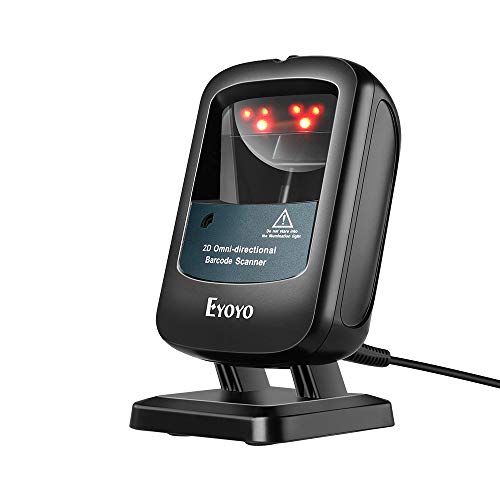
Designed for busy retail environments, the Eyoyo 2D Hands-Free Barcode Scanner stands out with its hands-free functionality, allowing automatic scanning when placed on a surface. This omnidirectional USB wired desktop reader efficiently captures 1D, 2D, PDF417, and Data Matrix barcodes from paper, labels, and screens. Its compact design fits perfectly in tight spaces, making it ideal for checkout counters and ticket windows. You’ll appreciate the manual sleep and wake mode, which conserves power and reduces eye strain. With no software required, it enhances transaction speed and productivity, making it a must-have for any small business.
Best For: Retail businesses and small enterprises seeking an efficient, hands-free barcode scanning solution to enhance transaction speed and productivity.
Pros:
- Efficient Scanning: Capable of capturing a wide range of barcode types quickly and accurately.
- Compact Design: Fits well in limited spaces, making it ideal for small retail environments.
- User-Friendly: No software or drivers required, allowing for easy setup and operation.
Cons:
- Wired Connection: Limited mobility due to the USB wired setup compared to wireless options.
- No Advanced Features: Lacks advanced features found in some higher-end models, such as wireless connectivity or extensive customization options.
- Potential Eye Strain: Although it has a manual sleep mode, prolonged use of bright LED lights may still cause eye strain for some users.
Epson RapidReceipt RR-600W Wireless Document & Tax Receipt Scanner

The Epson RapidReceipt RR-600W Wireless Document & Tax Receipt Scanner stands out as an ideal choice for small businesses needing efficient document management. With its wireless capabilities and a 100-page auto document feeder, you can quickly scan up to 35 pages per minute. Its ScanSmart AI PRO technology converts scanned data into smart digital formats, perfect for tools like QuickBooks and TurboTax. The intuitive 4.3-inch color touchscreen makes operation a breeze, allowing you to scan directly to email or cloud storage without a computer. Rated 4.3 stars, this compact scanner is a powerful addition to your office.
Best For: Small businesses and individuals seeking an efficient, wireless solution for document scanning and management.
Pros:
- Fast duplex scanning at up to 35 pages per minute, increasing productivity.
- Wireless functionality allows for PC-free operation and direct scanning to email or cloud storage.
- User-friendly 4.3-inch color touchscreen simplifies the scanning process.
Cons:
- Weighs 8.2 pounds, which may be bulky for some users.
- Limited to document scanning; not suitable for scanning larger items or photos.
- Initial setup may require some technical knowledge for optimal use.
Factors to Consider When Choosing a Scanner for Small Business
When you’re choosing a scanner for your small business, consider how fast it needs to scan and what types of documents you’ll be handling. Think about the connectivity options that suit your workflow and whether you need a portable, space-efficient model. User-friendly features can also make a big difference in how smoothly your operations run.
Scanning Speed Requirements
Scanning speed is an essential factor for small businesses, directly affecting productivity and overall workflow. Many scanners operate between 5.5 pages per minute (ppm) and over 45 ppm, which can greatly impact your daily operations. If you process a high volume of documents, look for models that support duplex scanning, allowing you to capture both sides simultaneously and effectively double your scanning speed. Faster scanners reduce time spent on document management, letting your team focus on vital tasks. Consider options with automatic document feeders (ADFs) that handle multiple pages at once, further enhancing efficiency. Align your scanner’s speed with your document volume to guarantee you’re making the right choice for your business needs.
Document Types Compatibility
Choosing a scanner that accommodates various document types is essential for small businesses, as it guarantees you can efficiently handle everything from standard letter-sized pages to receipts and business cards. Look for models that offer duplex scanning; this feature allows you to scan both sides of documents simultaneously, saving you time. An automatic document feeder (ADF) is another valuable addition, especially for multi-page documents, as it streamlines the scanning process. Don’t forget to assess the scanner’s ability to handle thicker items like ID cards or specialty media. Finally, make sure the scanner supports a range of image formats and resolutions, enabling high-quality scans for archiving, digital sharing, or printing. This versatility will cater to your diverse business needs.
Connectivity Options Available
After confirming your scanner can handle various document types, it’s time to contemplate how it connects to your existing systems. Look for USB connections for reliable, high-speed data transfer directly to your computer. Wireless options, like Wi-Fi, allow you to scan remotely and send documents straight to cloud services without needing a computer nearby. If you’re often on the go, consider a scanner that supports Bluetooth, making it easy to pair with your mobile devices. Verify the scanner is compatible with multiple operating systems, such as Windows and Mac, for seamless integration. Finally, advanced features like TWAIN driver support can broaden compatibility with various document management software, enhancing your overall productivity.
Portability and Space Efficiency
When you’re operating a small business, portability and space efficiency in a scanner can make a significant difference. Look for lightweight options that weigh as little as 9.4 ounces, easily fitting into bags or even pockets for on-the-go scanning. Compact scanners are designed to occupy minimal desk space, allowing you to maximize your limited office environment while still delivering robust functionality. Many portable document scanners are USB-powered, so you won’t need extra batteries or power outlets, enhancing usability in various settings. Additionally, features like automatic feeding modes can streamline the scanning process, saving you time and effort. A lightweight design and hands-free operation provide greater flexibility, helping you boost overall productivity in different workspaces.
User-Friendly Features
User-friendly features can greatly enhance your scanning experience, making it easier to manage documents efficiently. Look for scanners with intuitive touchscreen interfaces; they simplify operation and give you quick access to various settings. Customizable scanning profiles allow you to streamline your workflow by selecting preferred settings for different document types. Additionally, a Quick Menu feature enhances usability with easy drag-and-drop functionality for sending scanned documents to your favorite applications. Scanners that offer automatic file optimization and organization save you time and reduce manual effort. Finally, guarantee compatibility with popular cloud storage services, so you can access and share scanned files from multiple devices without needing a computer. These features collectively boost your productivity and make scanning hassle-free.
Software Integration Capabilities
Choosing the right scanner for your small business goes beyond just user-friendly features; software integration capabilities play a significant role in optimizing your workflow. Look for scanners that seamlessly communicate with your document management systems, reducing manual data entry and improving efficiency. Many devices support Optical Character Recognition (OCR), letting you convert scanned documents into searchable and editable formats for easy retrieval. Compatibility with cloud storage services like Dropbox and Google Drive enhances accessibility and collaboration among team members. Some scanners even come with proprietary software that offers automatic file naming and organization tailored to your needs. Make sure the scanner includes TWAIN drivers for broad software compatibility, allowing you to smoothly integrate your scanning solutions into your existing digital workflows.
Budget and Cost Considerations
While evaluating scanners for your small business, establishing a clear budget is essential for balancing initial purchase costs with ongoing expenses. Scanners typically range from about $100 to over $500, varying in features like scanning speed and duplex capabilities. Consider how a higher-quality scanner can enhance productivity and efficiency, offering a better return on investment in the long run. Don’t forget to factor in consumables, such as replacement parts or software subscriptions, as these can impact your total cost of ownership. Additionally, evaluate the warranty and customer support offerings, since reliable service can save you money on repairs or service needs over time. Being mindful of these factors will help you make an informed decision.