
A good standing desk does more than raise and lower your workspace—it should also help keep cords, chargers, and peripherals organized. That matters even more when your setup includes multiple monitors, docking stations, and accessories.
This roundup focuses on the best standing desk with cable management options for 2026, with an eye on workspace cleanliness, adjustability, size, and overall value.
Best 10 Standing Desk with Cable Management Picks for 2026
Quiet Lifter
ErGear 48-Inch Electric Standing Desk

- Quiet motor with 4 memory presets
- Stable steel frame with aerospace-grade columns
- 176 lb capacity for work, study, or gaming
Best For: Compact home offices that want simple electric height adjustment
Clean Power Desk
48-Inch Standing Desk with Wheels and Cable Management

- Built-in cable box, routing area, and clip
- USB-C port plus memory and timer functions
- 176 lb capacity with anti-collision protection
Best For: People who want better cord control and easy charging
Power Hub Workstation
FLEXISPOT EN2 55-Inch Standing Desk with Power Strip

- Removable outlet with 3 AC and 2 USB ports
- Cable management device included
- Large 55 x 28-inch one-piece desktop
Best For: Spacious desks with integrated charging and cable control
Work Zone Organizer
SIAGO 63-Inch Standing Desk with Cable Management

- Cable tray and hooks help keep accessories organized
- 63-inch desktop gives plenty of workspace
- 200 lb capacity with quiet motor and 3 presets
Best For: Large workstations that need cable storage and extra surface area
Corner Office Upgrade
Agilestic 63 x 48 Inch L Shaped Standing Desk

- L-shaped design maximizes corner space
- Built-in power strip with USB and Type-C
- Cable tray, clips, and organizers included
Best For: Corner offices and clutter-free multitasking
Clutter-Free Workhorse
60 x 30 Inch Electric Standing Desk with Flip-Top Cable Management

- Dual-beam frame supports up to 250 lbs
- Flip-top rear panel simplifies cord access
- Storage baskets and routing lane reduce clutter
Best For: Stable home offices and gaming setups with lots of gear
Hidden Cable Pro
VIVO White 60 x 30 in Standing Desk
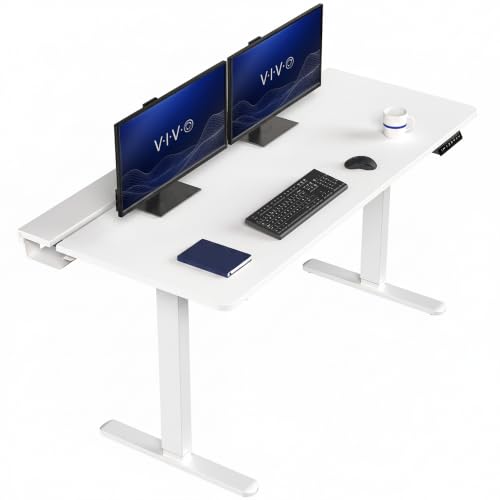
- Two under-desk trays hide cords and power strips
- Flip-top covers keep the desktop cleaner
- All-steel frame supports up to 220 lbs
Best For: Neat office setups with hidden cable storage
Best Heavy-Duty Pick
FLEXISPOT Desk with Monitor Riser

- Built-in monitor riser and cable tray help hide cables.
- One-piece 55 x 28-inch desktop gives you more workspace.
- 1-inch thick top and 176 lb support add everyday stability.
Best For: Buyers who want a larger workstation with a built-in monitor riser and cable management.
Hidden-Route Favorite
Lightwood Standing Desk with Cable Tray

- Under-desk tray and top opening help route cables cleanly.
- Dual crossbars support up to 176 lbs for steadier use.
- Three memory presets and safety features add convenience.
Best For: Small home offices that need hidden cable routing and a compact sit-stand desk.
Quiet Lifter – ErGear 48-Inch Electric Standing Desk
If you want a straightforward standing desk with cable management built into the setup, this ErGear model keeps the focus on smooth height changes and a clean workspace. The 48 x 24-inch surface fits a typical home office or gaming station, while the memory presets make it easy to move between sitting and standing without redoing your setup.
Best For: Home office users who want a compact electric desk with dependable height presets and a stable frame.
Pros:
- Quiet electric motor with 4 memory presets for quick position changes
- Steel frame and aerospace-grade lifting columns for added stability
- 176 lb weight capacity supports everyday work, study, or gaming gear
- Low-VOC materials and included tools help keep setup simple
Cons:
- No built-in cable tray or outlet system is listed in the supplied details
- 48 x 24 inches may feel tight for larger multi-monitor layouts
Overall, this is a practical pick if you want an electric sit-stand desk that emphasizes stability and easy adjustment over extra add-ons. It’s a strong fit for smaller workspaces that still need daily comfort and reliable performance.
Clean Power Desk – 48-Inch Standing Desk with Wheels and Cable Management
This standing desk with cable management is designed for people who want a tidier desktop without losing convenience. The under-desk metal box, rear routing area, and clip give you multiple ways to organize cords, while the USB-C port and height memory functions make it more useful for a busy office or home setup.
Best For: Users who want built-in cable storage, charging convenience, and a mobile desk with wheels.
Pros:
- Built-in cable management box, routing area, and cable clip help reduce clutter
- USB-C charging port adds handy device charging at the controller
- Anti-collision protection and adjustable leveling feet improve everyday use
- Heavy-duty steel frame supports up to 176 lbs with strong stability
Cons:
- 48 x 24-inch surface is better for moderate setups than oversized workstations
- Assembly is quick, but two-person setup is recommended in the details
For buyers prioritizing cable control, this desk stands out because the organization features are integrated rather than added later. The result is a cleaner-looking workspace that still includes the core comforts of an electric standing desk.
Power Hub Workstation – FLEXISPOT EN2 55-Inch Standing Desk with Power Strip
If you need a larger standing desk with cable management and built-in power, the FLEXISPOT EN2 gives you a roomy one-piece top and a removable desktop outlet. The 55 x 28-inch surface offers more space for a full work setup, and the included power strip bundle helps keep chargers and accessories organized.
Best For: Buyers who want a spacious desk with integrated charging and a clean desktop layout.
Pros:
- Removable power outlet with 3 AC outlets and 2 USB ports
- Included cable management device helps tidy the workspace
- Large one-piece FSC-certified desktop provides generous room
- Quiet motor with 4 memory presets supports easy sit-stand changes
Cons:
- Arrives in two separate packages, which may not come together
- Assembly may require an electric drill, which is not included
This is a strong option when you want your desk to do more than just move up and down. The built-in power and cable management features make it especially appealing for workstations with multiple devices.
Work Zone Organizer – SIAGO 63-Inch Standing Desk with Cable Management
For shoppers looking for a standing desk with cable management and more workspace, this SIAGO model combines a wide 63 x 24-inch desktop with a built-in tray and hooks. It’s aimed at keeping cords, headphones, and bags in order while still giving you enough room for dual monitors and everyday office work.
Best For: Users who need a long desktop, tidy cable storage, and a sturdy electric lift system.
Pros:
- Integrated cable management tray plus hooks for headphones or bags
- 63-inch desktop offers ample room for office and gaming equipment
- Commercial-grade frame and 200 lb capacity support heavier setups
- Quiet motor, 3 presets, and child lock add convenience and peace of mind
Cons:
- Top is not the whole-piece version on the 63-inch model, per the notes
- Single-person assembly is possible, but the size may still be more involved than smaller desks
Compared with smaller desks, this SIAGO stands out for giving you more working room without sacrificing organization. It’s a solid pick if you want a clean, functional setup that can handle larger equipment loads.
Corner Office Upgrade – Agilestic 63 x 48 Inch L Shaped Standing Desk
If you want a standing desk with cable management that also makes better use of corner space, this L-shaped Agilestic model is built for that job. The integrated power strip, wire clips, organizers, and power tray help keep cords under control while the large desktop leaves room for monitors, a laptop, and daily work gear.
Best For: Corner workspaces, multitaskers, and anyone who wants built-in power plus a cleaner desk layout.
Pros:
- L-shaped top fits neatly into corners and expands usable workspace.
- Built-in charging station includes 3 AC outlets, 1 USB port, and 1 Type-C port.
- Complete cable management system helps hide and organize cords.
- Smooth electric height adjustment with 3 memory presets.
Cons:
- Requires corner space, so it is less flexible than a straight desk.
- Heavier workstation setups may be limited by the 176 lb support rating.
This is a practical pick if you want a tidy, power-ready standing desk for a productive corner setup. It focuses on workspace efficiency and cord control without giving up adjustment convenience.
Clutter-Free Workhorse – 60 x 30 Inch Electric Standing Desk with Flip-Top Cable Management
This standing desk with cable management is a strong fit if you want a cleaner setup without sacrificing stability. The flip-top rear panel, dual storage baskets, and built-in cable-routing lane make it easier to keep power strips and cords accessible but out of the way.
Best For: Home offices and gaming setups that need a sturdy desk with practical hidden cable storage.
Pros:
- Reinforced dual-beam steel frame supports up to 250 lbs.
- Flip-top rear panel gives quick access to cords and power strips.
- Dual storage baskets help hide chargers and accessories.
- 3 memory presets and quiet electric adjustment add convenience.
Cons:
- Rectangular layout may not use corner space as efficiently as an L-shaped desk.
- The cable-management features are useful, but they still rely on keeping items organized behind the desk.
Overall, this desk is a solid choice if stability and cable organization are your top priorities. It offers a sensible mix of workspace size, storage, and built-in cord control for everyday use.
Hidden Cable Pro – VIVO White 60 x 30 in Standing Desk
If cable control matters most, this VIVO standing desk with cable management is designed to keep the back of your workspace neat. The two under-desk cable trays, flip-top covers, and open center section create a more organized layout for cords, power strips, and monitor mounting.
Best For: Clean, organized office setups that need hidden cable storage and a simple white finish.
Pros:
- Two under-desk trays conceal cables, cords, and power strips.
- Three flip-top covers keep the top surface tidy.
- All-steel frame supports up to 220 lbs for solid stability.
- Includes a full-size desk pad for smoother mouse use.
Cons:
- No drawer storage options are included.
- Assembly is easier with two people, according to the product notes.
This desk is a practical fit for buyers who want a simple workstation with built-in cable concealment. It balances a clean look with strong frame support and a useful sit-stand range.
Stability-First Pick – FEZIBO L-Shaped Crossbar Standing Desk
If you want a standing desk with cable management that also feels sturdy at standing height, this FEZIBO model is built around both priorities. The L-shaped crossbar is designed to reduce wobble, while the built-in pegboard and magnetic cable track help keep cords organized and out of sight for a cleaner home office or gaming setup.
Best For: Users who want a compact sit-stand desk with better stability and integrated wire control.
Pros:
- L-shaped crossbar adds structural stability and helps minimize wobble.
- Integrated pegboard and magnetic cable track keep cables neatly managed.
- Three memory presets make sit-stand changes quick and easy.
- Quiet motor is rated under 45dB for less disruptive adjustment.
Cons:
- 48 x 24-inch surface is compact for larger multi-monitor setups.
- Best fit is a more streamlined workspace rather than a very large desk layout.
Overall, this is a practical choice if you value cable control and a more rigid frame in a smaller footprint. It keeps the essentials simple while still covering everyday sit-stand use well.
Best Heavy-Duty Pick – FLEXISPOT Desk with Monitor Riser
This standing desk with cable management is a strong option if you want a cleaner desktop and a more organized monitor setup. The built-in riser and cable tray help hide wiring, while the one-piece 55 x 28-inch desktop gives you plenty of room for work or study without visual clutter.
Best For: Home office users who want a larger desk with built-in screen elevation and cable hiding.
Pros:
- Integrated monitor riser and cable tray reduce clutter on the desktop.
- One-piece solid desktop offers a smooth, crack-free surface.
- 1-inch thick board is designed for better firmness and stability.
- Supports up to 176 lbs for dual monitors, laptops, and accessories.
Cons:
- At 82 pounds, it is relatively heavy compared with smaller desks.
- The 55 x 28-inch footprint may be too large for tight spaces.
For buyers who want a more polished workstation, this FLEXISPOT desk combines a spacious surface with useful cable-hiding features. It makes the most sense if you need room for multiple devices and prefer a built-in organizer feel.
Hidden-Route Favorite – Lightwood Standing Desk with Cable Tray
If cable routing is your main concern, this standing desk with hidden cable management makes setup straightforward. It combines an under-desk cable tray with a trapezoid desktop opening, so monitor and charger cables can be routed neatly while the 48 x 24-inch top stays practical for daily work.
Best For: Smaller home offices that need tidy cable routing and reliable sit-stand performance.
Pros:
- Hidden cable management includes a 31.5-inch under-desk tray and top opening.
- Quiet electric adjustment runs under 45dB.
- Dual crossbars and 176 lb support improve stability.
- Three memory presets, anti-collision safety, and a sit-stand reminder add convenience.
Cons:
- 48 x 24-inch desktop is compact for users with lots of accessories.
- Assembly is recommended and the package may require more than one person.
This is a solid fit if you want a tidy desk without giving up the flexibility of electric height adjustment. It focuses on practical cable routing and stability in a footprint that works well in smaller rooms.
How We Picked the Best Standing Desk with Cable Management
We looked for desks that balance height adjustability, usable desktop space, and practical cable control features. Priority went to models with built-in routing, power-strip integration, hidden compartments, flip-top access, or layouts that make it easier to keep cables off the floor and away from moving parts.
We also considered stability, memory presets, size options, and whether the desk suits a simple home office or a more demanding multi-device setup.
Quick Comparison
If you want the cleanest look, choose a desk with a hidden channel, cable tray, or integrated power solution. If you need more flexibility for larger gear, L-shaped or wider desktops usually make cable placement easier because devices can spread out without crowding the rear edge.
For smaller rooms, a compact Standing Desk with Cable Management may be the better fit, especially if you need a tidy footprint with fewer visible wires.
Key Buying Factors for a Standing Desk with Cable Management
Cable Routing Type
Look for built-in trays, grommets, flip-top covers, or concealed channels. Simple clips can help, but they are usually less effective than integrated routing when you frequently raise and lower the desk.
Desktop Size and Shape
Measure your monitor setup before buying. A 48-inch desk works for tighter spaces, while 55-inch, 60-inch, or L-shaped designs are better for dual monitors, printers, or extra accessories.
Stability at Full Height
Cable management only helps if the desk remains steady while in motion. Strong legs, a solid frame, and a reasonable weight capacity matter for long-term use.
Power Access
Built-in USB ports or bundled power strips can reduce clutter, but check placement carefully so plugs do not interfere with leg clearance or height adjustment.
Memory Presets and Adjustability
Presets are especially useful if multiple people share the desk or if you switch positions often throughout the day.
Who Should Buy Which Standing Desk with Cable Management?
If you want a compact, budget-friendly setup, a smaller Standing Desk with Cable Management is usually enough. If you run dual monitors or need extra room for docking stations and accessories, choose a wider rectangular desk or an L-shaped model. If your priority is a polished, minimal look, focus on desks with hidden routing, integrated power, or enclosed cable systems. If you need frequent height changes, memory presets and strong stability should be at the top of your list.
In short, the best choice depends on your space, gear, and how tidy you want the finished setup to look.