
If you’re looking to enhance your business operations, exploring the best touchscreen POS systems of 2026 can be a game changer. These advanced solutions offer features like high-resolution displays and seamless software integration, tailored for various industries. Understanding which system fits your needs can greatly impact customer engagement and efficiency. Let’s uncover the top options available and how they can transform your business landscape.
Orders.co POS — Touchscreen Restaurant POS Built for Connected Operations
Orders.co POS is a touchscreen restaurant POS system built for food businesses that want to manage in-store orders, online orders, payments, delivery, promotions, and menu updates from one connected platform. Unlike basic touchscreen registers that only handle checkout, Orders.co combines POS hardware, order management, delivery tools, menu syncing, loyalty, and marketing into one system designed specifically for restaurants.
The system includes flexible touchscreen hardware options, including a full POS station with a 16-inch display, 12-inch customer-facing display, and built-in ticket printer. Restaurants can also choose a 12-inch tablet POS with a detachable, portable setup and swivel-head stand, making it useful for counters, quick-service setups, food trucks, and restaurants that need a smaller or more flexible checkout station. POS hardware bundles start at $499, giving restaurants a flat-price setup option for getting started.
Orders.co is especially useful for restaurants that need their touchscreen POS to do more than process payments. It consolidates major online ordering platforms into one interface, helping reduce missed orders and eliminating the need to manage multiple tablets. The platform also supports real-time menu management, so restaurants can update online menus, pricing, and availability across platforms from one place.
The delivery features also make Orders.co a strong option for restaurants with dine-in, takeout, delivery, and catering operations. Restaurants can assign in-house drivers, use third-party fulfillment during busy hours, or rely on automated AI dispatch to assign drivers based on cost and availability. Drivers can receive SMS delivery details with the address, payment status, and order information, helping restaurants keep fulfillment moving smoothly.
Key Features:
Touchscreen POS hardware options, including a 16-inch POS station and 12-inch tablet POS.
12-inch customer-facing display and built-in ticket printer available with the POS station.
Detachable and portable tablet POS setup with swivel-head stand.
In-store and online order management from one connected system.
Order integration that consolidates major online ordering platforms into one interface.
Menu management with real-time updates across online platforms.
Marketing tools, including automated SMS, email marketing, and in-store plus online loyalty.
Flexible delivery management with in-house dispatch, third-party fulfillment, and AI-powered dispatch.
SMS delivery details for drivers, including delivery address, payment status, and order information.
Merchant service plan options, including Standard, Split, and Cash Discount structures.
POS hardware bundles starting at $499.
Best For: Restaurants that want a touchscreen POS system built specifically for food service operations. It is a good fit for independent restaurants, pizzerias, food trucks, quick-service restaurants, catering businesses, virtual kitchens, and small to mid-sized restaurant groups that need one POS system for checkout, orders, delivery, payments, menu management, and customer loyalty.
Pros:
Touchscreen POS options for both full counter stations and tablet-based setups.
Combines POS, online ordering, delivery, payments, menu management, loyalty, and marketing in one platform.
Helps reduce missed orders by consolidating online order channels.
Supports flexible restaurant setups, from fixed checkout counters to portable tablet use.
Real-time menu management helps keep online platforms consistent.
AI dispatch can assign drivers based on cost and availability.
Built-in loyalty, SMS marketing, and email marketing help support repeat business.
Hardware bundles start at $499.
Limitations:
Enterprise-level customization may be more limited compared to some larger POS systems.
Pricing Overview: Orders.co POS hardware bundles start at $499. Merchant service plans include Standard, Split, and Cash Discount options, with the Standard plan listed at 2.6% + 10¢ per transaction.
The Bottom Line: Orders.co is a strong touchscreen POS system for restaurants that need more than a simple checkout device. Its touchscreen POS station, tablet POS option, customer display, built-in printer, order integration, AI-powered delivery dispatch, menu management, and marketing tools make it a practical choice for restaurants that want to manage both front-of-house and online operations from one connected system.
MUNBYN 17-inch POS Touch Screen Monitor

The MUNBYN 17-inch POS Touch Screen Monitor stands out as the ideal choice for small businesses looking to enhance their point-of-sale systems in 2026. With its multi-touch capability and bright 400 nits display, you’ll enjoy clear visuals and responsive interactions. Its durable, waterproof design guarantees it thrives in demanding environments like restaurants and kitchens. You can easily connect it using HDMI or VGA inputs, compatible with various operating systems. Plus, its lifespan exceeds 50,000 hours, making it a reliable investment. By integrating MUNBYN into your POS system, you’ll streamline operations and improve efficiency effortlessly.
Best For: Small businesses in the hospitality and retail sectors looking for a reliable and durable POS touch screen solution.
Pros:
- Multi-touch capability allows for responsive interactions with up to 10 simultaneous touch points.
- Waterproof and dustproof design certified with IP54 Grade, perfect for high-demand environments like restaurants and kitchens.
- Long lifespan of over 50,000 hours ensures durability and reduces the need for frequent replacements.
Cons:
- Limited to 1280×1024 resolution, which may not meet the needs of businesses requiring higher display quality.
- The removable base may require additional installation steps for VESA mounting.
- Compatibility issues may arise for users with older operating systems not supported by the firmware upgrade tool.
Square Register – Powered by Square POS

If you’re looking for a seamless all-in-one solution for your business, Square Register powered by Square POS could be your ideal match. It integrates payment processing, POS software, and hardware without needing extra tablets or terminals. With dual touchscreen displays, you can engage customers effortlessly. Plus, funds can hit your bank account as fast as the next business day, and the Offline Mode means you won’t miss sales without Wi-Fi. You’ll also enjoy expert phone support, a 2-year warranty, and compatibility with various hardware. This setup is designed to help your business grow efficiently and effectively.
Best For: Small to medium-sized businesses looking for a comprehensive point-of-sale solution that simplifies payment processing and customer engagement.
Pros:
- Integrates payment processing, POS software, and hardware in one device, eliminating the need for extra tablets or terminals.
- Fast funds transfer to bank accounts, often as soon as the next business day, enhancing cash flow.
- Offline Mode allows for continued sales processing even without an internet connection.
Cons:
- Initial investment might be higher compared to traditional POS systems that require separate components.
- Limited customization options for the software compared to some competitors.
- Depending on the business type, additional hardware like receipt printers may incur extra costs.
All-in-One SmartPOS NX Professional Cash Register for Small Business

Designed specifically for small businesses, the All-in-One SmartPOS NX Professional Cash Register provides an intuitive 15.6″ touchscreen that enhances the checkout experience. With WiFi connectivity, a customer-facing VFD display, and a cash drawer, it’s ready to streamline your operations. You won’t encounter hidden fees or forced subscriptions, and setup includes a free initial call for personalized assistance. You’ll also enjoy over 50 card processor integrations, giving you the flexibility to choose what works best for your business. Plus, the free Retail360 mobile app makes inventory management and price adjustments a breeze, ensuring efficiency at every transaction.
Best For: Small businesses looking for an all-in-one cash register solution that enhances the checkout experience without hidden fees.
Pros:
- User-friendly 15.6″ touchscreen interface simplifies transaction processing.
- No hidden fees or forced subscriptions, making it easy to budget.
- Flexible payment options with over 50 card processor integrations.
Cons:
- Initial setup may require a call, which could be inconvenient for some users.
- Dependent on WiFi connectivity for optimal performance.
- Limited advanced features compared to more complex POS systems for larger businesses.
MUNBYN 12-inch POS Touchscreen Monitor

For small businesses, the MUNBYN 12-inch POS Touchscreen Monitor stands out as an ideal solution to streamline operations. Its compact design fits perfectly in tight spaces, while the advanced ten-point multi-touch functionality guarantees smooth interactions. You’ll appreciate the seamless connectivity with Mini PCs, desktops, and laptops, especially with HDMI and VGA ports for versatile options. The monitor’s crisp image resolution of 1280 x 800 pixels and brightness of 250 candela enhance visibility. Plus, it requires no drivers for setup and comes with a 2-year warranty, making it a reliable choice for retail, restaurants, and bars alike.
Best For: Small businesses, retail, restaurants, and bars looking for a compact and efficient touchscreen monitor solution.
Pros:
- Compact 12-inch design fits seamlessly into space-constrained environments.
- Advanced ten-point multi-touch functionality provides smooth and responsive interactions.
- No driver required for setup simplifies installation and usability.
Cons:
- Limited image resolution of 1280 x 800 pixels may not meet high-end display needs.
- Brightness of 250 candela might be insufficient in very bright environments.
- Weight of 7.24 pounds could be cumbersome for frequent relocation.
Point of Sale Windows with 15.6-Inch Touchscreen POS

The 15.6-inch Touchscreen POS is perfect for retail, hospitality, and service businesses looking for a reliable and efficient point of sale solution. With a 4th generation Intel i5 processor and 8GB RAM, it guarantees smooth performance for inventory management and payment processing. Its large touchscreen provides clear visibility for menus and transaction details. Compact yet durable, the aluminum alloy design withstands daily wear and tear. Plus, it offers multiple connectivity options, making integration with various POS software and peripherals a breeze. With a solid warranty policy, you can trust this system for long-term reliability in demanding environments.
Best For: Retail, hospitality, and service businesses seeking a reliable and efficient point of sale solution.
Pros:
- Smooth performance with a 4th generation Intel i5 processor and 8GB RAM for efficient inventory and payment processing.
- Durable aluminum alloy construction designed to withstand daily wear and tear in demanding commercial environments.
- Multiple connectivity options for easy integration with various POS software and peripherals.
Cons:
- Limited storage capacity with only 128GB ROM, which may not be sufficient for businesses with extensive data needs.
- Compact size may limit the size of the touchscreen interface for some users.
- Warranty policy may include conditions for returns and restocking fees, which could complicate the return process.
MUNBYN 15-inch POS Touch Screen Monitor

Retailers and restaurateurs seeking a reliable, user-friendly solution will find the MUNBYN 15-inch POS Touch Screen Monitor to be an invaluable asset. Its true flat seamless design and heavy-duty metal stand guarantee stability, perfect for bustling environments. You can easily connect it to a computer host, laptop, or mini PC using HDMI or VGA, making it versatile for any setup. Plus, with plug-and-play functionality, you won’t need to mess with driver installations. Enjoy peace of mind with a 2-year warranty and direct messaging support, assuring your operations run smoothly without interruptions.
Best For: Retailers and restaurateurs looking for a stable and user-friendly POS touchscreen solution to enhance their operations.
Pros:
- True flat seamless design for easy cleaning and maintenance.
- Heavy-duty metal stand provides excellent stability, ideal for high-traffic environments.
- Plug-and-play setup allows for quick installation without the need for driver installation.
Cons:
- No built-in operating system, which may require additional setup for users.
- Limited to compatible Windows operating systems, potentially excluding some users.
- Replacement policy only covers non-human-induced failures, which may be a concern for some customers.
ANGEL POS Commercial Grade 17.3 Inch Touchscreen POS Monitor

Designed for high-traffic environments, the ANGEL POS Commercial Grade 17.3 Inch Touchscreen POS Monitor stands out with its rugged construction and seamless flat screen. With a stunning 1920 x 1080 FHD resolution, you’ll enjoy crystal-clear visuals for transactions and menus. Its 10-point multi-touch capability means multiple users can interact simultaneously, enhancing efficiency. The solid metal stand guarantees stability, preventing tipping in busy spaces. Plus, the monitor’s plug-and-play design makes installation a breeze on various Windows versions. Ideal for retail, restaurants, and more, this monitor delivers durability and performance that keeps your operations running smoothly.
Best For: Retailers, restaurants, and educational institutions looking for a durable and high-performing touchscreen monitor for high-traffic environments.
Pros:
- Rugged construction enhances durability for continuous use in demanding settings.
- 10-point multi-touch capability allows multiple users to interact simultaneously, improving operational efficiency.
- Seamless flat design prevents dirt and moisture accumulation, ideal for cleanliness in busy environments.
Cons:
- Limited compatibility with older Windows versions (only single-touch on Windows 7/XP/2000).
- The larger size may require more desk space compared to smaller monitors.
- Price may be higher than non-commercial grade monitors, which might deter budget-conscious buyers.
15.6″ Touchscreen POS Monitor with FHD IPS Display
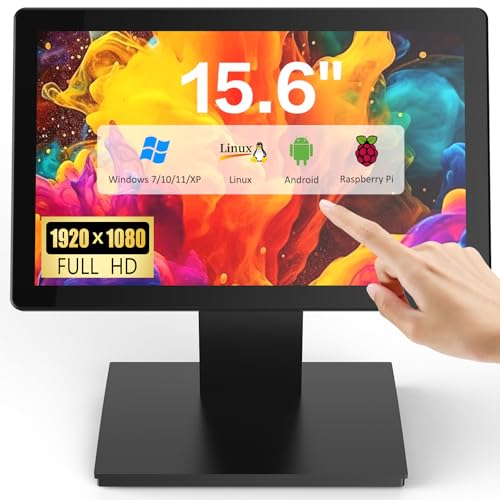
For businesses seeking a compact yet powerful solution, the 6″ Touchscreen POS Monitor with FHD IPS Display stands out as an ideal choice. Its vibrant Full HD resolution guarantees that transaction details and menus are clear and easy to read. The monitor supports multiple touch points, allowing for interactive experiences that boost customer engagement. With seamless connectivity options including USB and HDMI, it integrates effortlessly with various systems. Designed for durability, it withstands high-traffic environments, preventing damage while maintaining stability. Perfect for retail or hospitality, this monitor enhances productivity and provides a sleek, modern touch to your operations.
Best For: Retailers, hospitality businesses, and educational institutions looking for an efficient and interactive touchscreen solution.
Pros:
- High-resolution display: FHD 1080p ensures clear and sharp visuals for better readability.
- Multi-touch functionality: Supports up to 10 simultaneous touch points for enhanced interactivity.
- Durable design: Built to withstand high-traffic environments with resistance to water and dust.
Cons:
- Size limitations: The 15.6″ screen may be too small for some applications requiring larger displays.
- Potential compatibility issues: Although versatile, some users may experience integration challenges with less common systems.
- Fixed resolution: Full HD may not be sufficient for highly detailed graphics or specialized applications.
19 inch POS Touch Screen Monitor with Full HD Capacitive Touchscreen

The NewHail 19-inch POS Touch Screen Monitor is the perfect choice for businesses seeking a reliable and efficient solution for high-traffic environments. With its Full HD resolution of 1280 x 1024 and 10-point capacitive touchscreen, you’ll enjoy precise touch recognition. The monitor’s robust design includes a heavy-duty metal stand and enhanced resistance to water and dust, making it ideal for retail, restaurants, and gyms. It supports multiple operating systems and offers seamless connectivity via USB, HDMI, and VGA ports. Plus, its plug-and-play setup means you can start using it right away, ensuring smooth operations for your business.
Best For: Businesses in high-traffic environments such as retail stores, restaurants, and gyms looking for a durable and efficient POS solution.
Pros:
- High-resolution display with Full HD 1280 x 1024 for clear visuals.
- Robust and durable design with water and dust resistance, suitable for continuous use.
- Plug-and-play setup for easy installation without the need for driver installation.
Cons:
- Limited USB ports with only one available for touch connectivity.
- Heavier weight at 13.9 pounds may not be ideal for portable setups.
- Aspect ratio of 4:3 may not be compatible with all modern applications or content formats.
POS Cash Register 15” Touch Screen with Built-in Thermal Receipt Printer

With its 15” touch screen and built-in thermal receipt printer, the MEETSUN Cash Register is an excellent choice for small business owners looking to streamline their operations. Featuring an 11.6” customer display, this system runs on Windows, eliminating monthly fees with a one-time purchase for lifetime use. It’s perfect for various retail environments, including supermarkets and pharmacies. The Intel Celeron I5 processor, 8GB RAM, and 128GB SSD guarantee smooth performance. Plus, with sales, inventory management, and reporting features, you’ll have everything you need at your fingertips. Enjoy a 90-day hardware warranty and free lifetime software support, enhancing your peace of mind.
Best For: Small business owners looking for an efficient and cost-effective cash register solution without ongoing fees.
Pros:
- User-friendly 15” touch screen interface simplifies transaction processes.
- Built-in thermal printer eliminates the need for separate printing devices, saving space and costs.
- Comprehensive features for sales, inventory, and reporting enhance operational efficiency.
Cons:
- Limited warranty of 90 days may not be sufficient for some users.
- Dependence on Windows may not appeal to those preferring other operating systems.
- Best Sellers Rank indicates it may not be as widely recognized compared to competitors.
Factors to Consider When Choosing a Touchscreen POS System
When you’re choosing a touchscreen POS system, several key factors can make all the difference. You’ll want to take into account screen size options, durability, and how well it integrates with your existing software. Connectivity features and the type of touchscreen technology also play an essential role in ensuring smooth operations.
Screen Size Options
Choosing the right screen size for your touchscreen POS system is essential, as it directly impacts user experience and operational efficiency. Screen sizes typically range from 12 to 19 inches, catering to different business environments and space constraints. Larger screens, like 17-inch and 19-inch models, provide better visibility for transaction details and product catalogs—perfect for busy locations. On the other hand, 12-inch screens are ideal for compact spaces, maintaining multi-touch functionality for retail and hospitality. Don’t forget to take into account resolution; options like 1280×1024 and Full HD (1920×1080) affect clarity. Finally, guarantee ergonomic features, such as adjustable angles and responsive touch, enhance user comfort during transactions. Choose wisely to optimize your operations!
Durability and Reliability
To guarantee smooth operations, durability and reliability are key factors in selecting a touchscreen POS system. You want a system that can endure high-traffic environments and constant use, with some models rated for over 50,000 hours of operation and over 100,000 touch interactions. Look for commercial-grade monitors featuring heavy-duty metal stands that provide stability and prevent wobbling. Consider systems with waterproof and dustproof ratings, like IP54 certification, which ascertain they perform well in challenging settings, such as kitchens or retail spaces. Opt for a plug-and-play design for easy setup, and choose screens with high brightness levels—around 400 nits—to maintain ideal visibility in well-lit areas. This will enhance user satisfaction and operational consistency.
Software Compatibility
Ensuring your touchscreen POS system is compatible with existing software applications is essential for seamless operations. Look for systems that work well with your current inventory management, payment processing, and customer relationship management tools. Many POS systems support various operating systems like Windows, Linux, and Android, giving you flexibility in your software environment. Integration with third-party applications is vital for smooth data transfer and enhanced functionality. Always check if the POS software receives regular updates to maintain compatibility with the latest tech and security standards, preventing potential conflicts. Additionally, consider systems offering customizable software solutions, allowing you to tailor features to your unique business needs, ultimately improving efficiency and user experience.
Connectivity Features
When selecting a touchscreen POS system, it is vital to prioritize connectivity features that fit your business needs. Look for systems with multiple connectivity options like HDMI and VGA to guarantee compatibility with various hardware setups. It’s also important that your POS works seamlessly with different operating systems, including Windows (7/10/11), Linux, and Raspberry Pi. Devices offering plug-and-play functionality can simplify your setup, eliminating the hassle of driver installations. Additionally, make sure the system supports USB connections for the touchscreen interface, facilitating effective interaction. Finally, consider VESA wall mount compatibility for flexible installation options, especially in space-constrained environments. Choosing the right connectivity features will enhance your overall operational efficiency.
Touchscreen Technology
Selecting the right touchscreen technology for your POS system involves several key factors that can impact performance and user experience. You’ll want to choose between capacitive and resistive screens, with capacitive options offering multi-touch capabilities for smoother interactions. In high-traffic environments, this can streamline workflows considerably.
Brightness levels are vital too; higher brightness guarantees visibility in well-lit spaces, so look for monitors with higher nits. Durability matters as well, especially in demanding settings like restaurants, so consider screens with waterproof and dustproof certifications. Finally, the resolution impacts clarity—aim for Full HD (1920 x 1080) displays for the best viewing experience. By considering these factors, you can enhance both functionality and user satisfaction.