
USB-C KVM extenders make it easier to share displays, peripherals, and control between computers without constantly reconnecting cables. The right setup can support a clean desk, a conference room, or a remote workstation spread across a longer distance.
We selected 10 options covering HDBaseT transmission, dual-monitor docking, USB expansion, Power Delivery, Ethernet, and fast switching. Use the guide below to match features such as resolution, cable range, host compatibility, and charging capacity to your setup.
Best 10 USB C Kvm Extenders Picks for 2026
Best Long-Range Choice

- Extends USB-C video and USB 2.0 data up to 230 feet
- Supports 4K/60Hz, HDR, and 18Gbps bandwidth
- Includes USB ports, RS-232, and 24V PoC
Best For: Long-distance conference room and professional AV installations
Best Dual-Laptop Dock

- Switches two USB-C laptops across two monitors
- Supports dual 4K/60Hz output on compatible laptops
- Includes four USB 3.2 ports and 100W PD input
Best For: Windows dual-monitor home and office workstations
Best USB 3.2 Distance Extender
330ft USB-C and USB-A Extender
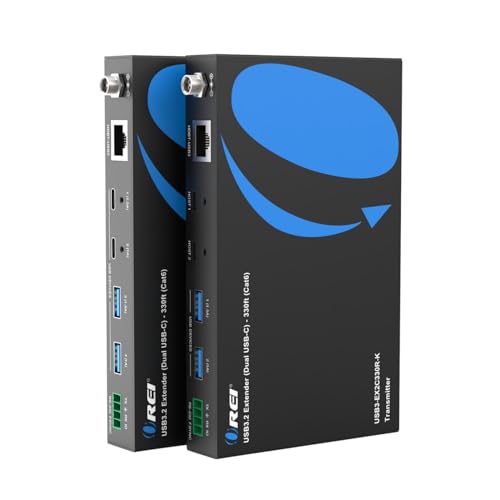
- Extends USB connections up to 330 feet over Cat6
- Supports up to 5Gbps and USB 3.0/2.0/1.1 devices
- Provides dual USB-C and dual USB-A receiver ports
Best For: Long-distance USB peripherals, cameras, and AV equipment
Best Feature-Rich Workstation KVM

- Switches two laptops with dual 4K/60Hz display support
- Includes EDID, Gigabit Ethernet, SDXC, and multiple USB ports
- Supports up to 100W charging with external USB-C chargers
Best For: Feature-rich hybrid-work and professional workstation setups
Best Long-Range Wall-Plate KVM
4K HDBaseT HDMI & USB-C Extender

- 330-foot HDBaseT transmission over one Cat cable
- 4K60 HDR video with advanced audio support
- Two-host switching with USB peripherals and PoC
Best For: Professional AV and in-wall conference-room installations
Best Desktop USB4 Switch
20Gbps USB-C KVM for Two Computers

- Shares one USB-C or Thunderbolt 4 display or dock
- Supports up to 8K30 Windows video output
- Provides up to 140W charging pass-through
Best For: Two-laptop desks using a compatible USB-C monitor or dock
Best Dual-Display Extender

- Extends USB 3.2 up to 330 feet over Cat6A/7
- Drives two 4K60 HDMI displays with DisplayLink
- Carries USB, Ethernet, audio, RS232, and FSYNC
Best For: Professional conference rooms and hybrid-work AV systems
Best USB-C Dock Sharing Pick

- Shares one compatible monitor or dock between two laptops
- Supports up to 8K@60Hz and 140W PD pass-through
- RF remote and built-in cables streamline switching
Best For: Desk setups using compatible USB-C or Thunderbolt monitors and docks
Best Long-Range HDMI KVM Pick

- Carries 4K@60Hz up to 330 feet over CAT6A/7
- Reaches up to 490 feet at 1080p@60Hz
- Uses HDBaseT 3.0 for zero-latency transmission
Best For: Long-distance HDMI and USB 2.0 KVM installations
Best Conference Room Pick
Dual-Monitor USB-C KVM Extender

- Switches between USB-C and USB-B hosts
- Extends dual 4K@60Hz displays up to 330 feet
- Adds USB 3.2, Ethernet, RS232, GPIO, and 100W PD
Best For: BYOM conference rooms and hybrid meeting installations
Best Long-Range Choice – 4K HDBaseT USB-C KVM Extender
For installations where USB-C video, peripherals, and control signals need to travel a long distance, this OREI model is a strong option among USB C KVM extenders. It sends USB-C video and USB 2.0 data over a single Cat6a/7 cable, reaching up to 230 feet at 4K/30Hz or 130 feet at 4K/60Hz.
Best For: Conference rooms, classrooms, and professional AV systems requiring long-distance 4K extension.
Pros:
- Supports up to 4K/60Hz with 18Gbps bandwidth and 4:4:4 color.
- Extends USB-C video and USB 2.0 data over one Cat6a/7 cable.
- Includes multiple USB ports, RS-232 pass-through, and bi-directional 24V PoC.
- Supports HDR formats and advanced audio, including Dolby Atmos and DTS:X.
Cons:
- 4K/60Hz range is limited to 130 feet; the maximum 230-foot distance applies at 4K/30Hz.
- USB extension is limited to USB 2.0 data speeds.
This is the better fit when distance and AV integration matter more than high-speed USB transfers. Its PoC design can also simplify installation by requiring only one power source.
Best Dual-Laptop Dock – 2-Monitor 4K MST USB-C KVM
This compact dock-style option is designed for users comparing USB C KVM extenders for a two-laptop, two-monitor desk. It switches two USB-C laptops between two displays and shared peripherals, with dual 4K/60Hz output through MST on compatible systems.
Best For: Windows users who want one workspace for two laptops, dual monitors, and USB peripherals.
Pros:
- Shares two monitors and four USB 3.2 ports between two laptops.
- Supports simultaneous dual 4K/60Hz output on compatible systems.
- Provides up to 100W PD input, with 45W charging per device.
- Offers push-button and wired-remote switching without drivers.
Cons:
- Mac OS supports mirror mode only and not extended display mode.
- Laptops must support USB-C DP Alt Mode, video, data, and PD; 11th-generation-or-newer CPUs are recommended.
- EDID emulation and hotkey switching are not supported.
Its combination of dual-monitor MST and shared USB 3.2 connectivity makes it practical for a work-from-home or office setup. Check laptop compatibility and use the included high-speed USB-C cables to help avoid display issues.
Best USB 3.2 Distance Extender – 330ft USB-C and USB-A Extender
When the priority is moving USB devices rather than extending a display signal, this OREI unit stands out among USB C KVM extenders. It carries USB-C or USB-A connections up to 330 feet over one Cat6 cable, with throughput up to 5Gbps and support for USB 3.0, 2.0, and 1.1 devices.
Best For: Conference rooms, classrooms, kiosks, PTZ cameras, capture devices, and other long-distance USB installations.
Pros:
- Reaches up to 330 feet over Cat6 while supporting up to 5Gbps.
- Provides two USB-C and two USB-A ports on the receiver.
- Supports automatic or manual switching between two USB-C hosts.
- Offers RS-232 pass-through and plug-and-play operation without drivers.
Cons:
- This is a USB extender, not a complete video KVM extender.
- The supplied operating-system compatibility is listed as Windows-family support.
- Receiver ports have different power ratings, with two up to 1.5A and two up to 1A.
Choose this model when fast, long-distance USB connectivity is the main requirement. Its mixed USB-C/USB-A ports and host-switching modes make it flexible for peripherals, cameras, and control equipment.
Best Feature-Rich Workstation KVM – Dual-Monitor USB-C Dock
This AV Access model is a full workstation dock for comparing USB C KVM extenders that prioritize productivity features. It switches two USB-C laptops through shared displays, peripherals, networking, and accessories, while supporting dual 4K/60Hz displays on compatible Windows systems.
Best For: Hybrid workers, programmers, designers, and IT users who need a centralized dual-laptop desk setup.
Pros:
- Supports two independent 4K/60Hz displays through MST on compatible Windows laptops.
- Includes EDID emulation to help reduce window reshuffling during switching.
- Offers Gigabit Ethernet, SDXC, USB 3.0, USB 2.0, and USB-C data connectivity.
- Includes wired-remote switching and up to 100W charging support for each laptop with external chargers.
Cons:
- Dual extended displays depend on USB-C DP Alt Mode and MST compatibility.
- The notes primarily identify Windows laptops and compatible DP Alt Mode devices rather than broad platform support.
- External USB-C chargers are required for the stated laptop charging support.
Its broad port selection and EDID support make it especially useful for a permanent productivity station. Verify that both laptops support the required display features before purchasing.
Best Long-Range Wall-Plate KVM – 4K HDBaseT HDMI & USB-C Extender
For installations that need USB C KVM extenders over a long cable run, the OREI combines HDMI and USB-C host connectivity with HDBaseT transmission up to 330 feet. Its wall-plate design, 4K60 support, and manual or automatic switching make it well suited to professional AV environments.
Best For: Conference rooms, control centers, home theaters, and clean in-wall installations requiring long-distance KVM control.
Pros:
- Extends HDMI and USB-C signals up to 330 feet over one Cat6/6a/7 cable.
- Supports 4K at 60Hz, 18Gbps bandwidth, HDR10/HDR10+, and advanced surround formats.
- Provides two-host switching, USB 2.0 peripheral extension, USB-C charging, and PoC power.
Cons:
- Its dedicated wall-plate format may be less convenient for portable or desktop setups.
- Requires compatible structured cabling and a more involved installation than a short USB-C switch.
The OREI is a strong choice when distance, professional installation, and HDMI-based KVM control matter most. It offers a broad feature set, though its installation-oriented design may be more than a simple desk setup requires.
Best Desktop USB4 Switch – 20Gbps USB-C KVM for Two Computers
The Cable Matters 20Gbps USB-C KVM switch is designed for sharing a USB-C or Thunderbolt 4 monitor or dock between two computers. It is a practical option among USB C KVM extenders for desk users who want high-speed data, display switching, and up to 140W power pass-through in a compact setup.
Best For: Users switching one USB-C monitor or compatible docking station between two laptops or computers.
Pros:
- Shares a USB-C or Thunderbolt 4 monitor or dock between two computers.
- Supports data transfer up to 20Gbps and video up to 8K at 30Hz on Windows.
- Offers up to 140W power-delivery pass-through to the active computer.
Cons:
- Requires the included USB4 20Gbps cables; substitute Thunderbolt cables are not recommended.
- Its 20Gbps bandwidth may limit displays or refresh rates compared with 40Gbps dock setups.
- macOS supports 4K at 60Hz on a single monitor, and dock compatibility depends on a detachable host cable.
This switch is a good fit for a straightforward two-computer workspace centered on one USB-C display or dock. Check cable and dock compatibility carefully before buying, especially if you need multiple displays or maximum Thunderbolt performance.
Best Dual-Display Extender – USB 3.2 HDBaseT Wallplate KVM
The J-Tech Digital JTECH-U3EXW-DKIT is a feature-rich choice for USB C KVM extenders in conference rooms and hybrid workspaces. It carries USB 3.2, dual HDMI video, USB peripherals, audio, Ethernet, RS232, and FSYNC over a single Cat6A/7 cable up to 330 feet.
Best For: Conference rooms, video conferencing systems, and professional AV installations needing dual 4K displays and extensive pass-through connectivity.
Pros:
- Extends USB 3.2 signals up to 330 feet with up to 5Gbps data transfer.
- Supports two HDMI displays at up to 4K60 4:4:4 through DisplayLink.
- Combines KVM functions with USB, audio, 1G Ethernet, RS232, and FSYNC pass-through.
- Includes one-way/two-way PoH support, a wall-mount design, and lifetime technical support.
Cons:
- Its extensive professional features may be unnecessary for a basic single-monitor setup.
- Dual-display output relies on DisplayLink, so host and software requirements should be reviewed.
- The system requires Cat6A/7 cabling for its stated long-distance extension capability.
With dual-display support and numerous control and connectivity interfaces, this J-Tech kit is aimed at demanding commercial installations rather than casual desktop use. It is particularly compelling when a single cable must carry video, USB, networking, and control signals across a room or facility.
Best USB-C Dock Sharing Pick – 40Gbps Laptop KVM Switch
For short-distance USB C KVM extenders and desk setups, this Cable Matters switch shares one compatible USB-C or Thunderbolt monitor or dock between two laptops. It supports up to 40Gbps, high-resolution video, and charging pass-through, while its built-in cables help keep the setup tidy.
Best For: MacBook or Windows users sharing a USB-C, USB4, or Thunderbolt monitor or detachable-host dock between two laptops.
Pros:
- Supports up to 40Gbps bandwidth and video up to 8K at 60Hz with compatible equipment.
- Passes through up to 140W Power Delivery to the active laptop when supported by the source.
- RF remote switching and built-in input and output cables simplify desk setups.
Cons:
- Requires a compatible dock with a detachable host cable; built-in, non-detachable host cables are not supported.
- An 80Gbps dock is limited to 40Gbps through the switch.
- The built-in cable path is already 1.8m, so a USB-C extension cable should not be used.
This is a focused desktop KVM rather than a long-distance room-to-room extender. Its strongest advantage is combining fast USB-C switching, high-resolution display support, and laptop charging in a compact setup, provided your monitor or dock meets the compatibility requirements.
Best Long-Range HDMI KVM Pick – 330ft HDBaseT Extender
Among USB C KVM extenders, this OREI model is aimed at installations that need HDMI video and USB 2.0 KVM signals carried over existing CAT6A or CAT7 cabling. HDBaseT 3.0 provides 4K at 60Hz over distances up to 330 feet, with longer 1080p reach.
Best For: Long-distance TV or display installations requiring 4K video and USB 2.0 KVM extension over CAT6A or CAT7 cable.
Pros:
- Extends 4K at 60Hz up to 330 feet and 1080p at 60Hz up to 490 feet.
- HDBaseT 3.0 is designed for lossless, zero-latency transmission.
- Includes dual-voltage power support with an adapter/converter for international use.
Cons:
- Uses HDMI and USB 2.0 extension rather than the higher USB 3.x bandwidth offered by some newer systems.
- Requires a CAT6A or CAT7 Ethernet cable run for its long-distance range.
- The supplied notes identify television compatibility, so broader device compatibility should be verified before purchase.
This OREI extender makes the most sense for structured AV installations where distance matters more than high-speed USB peripheral performance. It is a practical choice for reliable 4K60 transport over a long CAT cable run.
Best Conference Room Pick – Dual-Monitor USB-C KVM Extender
For conference rooms and hybrid meeting spaces, this AV Access unit is a professional USB C KVM extender that switches between a USB-C laptop and a USB-B desktop. It sends dual 4K display output, USB 3.2, Ethernet, audio, RS232, and power up to 330 feet over one CAT6A or CAT7 cable.
Best For: BYOM conference rooms that need two-host switching, dual displays, camera and speakerphone support, and centralized installation.
Pros:
- Supports two hosts and extends two 4K displays at 60Hz over up to 100m/330ft.
- Provides USB 3.2 Gen 1 up to 5Gbps for cameras, speakerphones, and storage.
- Includes 1Gb Ethernet, RS232, GPIO, 100W charging, and PoH+ through a single CAT cable.
- Built-in DisplayLink supports multi-display output on devices with limited native display support.
Cons:
- Designed for installed conference-room systems rather than a simple personal desk setup.
- DisplayLink is integrated into the unit, so the system’s multi-display behavior may differ from native video output.
- Its 100W charging capability depends on the connected equipment and installation.
This is the most capable option here for professional collaboration spaces. Its long-distance dual-display extension, host switching, high-speed USB, and control-signal support justify the more installation-focused design when a room needs a complete BYOM workflow.
How We Picked the Best USB C Kvm Extenders
We focused on the features that most affect everyday usability: supported resolution and refresh rate, USB bandwidth, switching behavior, host compatibility, cable distance, and power delivery. The selection includes both true long-range HDBaseT extenders for remote displays and desk-focused USB-C KVM docks for switching between two laptops.
We also considered practical extras such as HDR support, RS-232, Ethernet, USB-A and USB-C peripheral ports, MST dual-display support, wall-plate installation, and compatibility with Thunderbolt systems. Because USB-C implementations vary, buyers should confirm the host computer’s video-output, USB-data, and charging capabilities before ordering.
Quick Comparison
- Best for long cable runs: HDBaseT models supporting up to 230 or 330 feet over Cat6 or Cat6A.
- Best for desk switching: USB-C KVM docks designed for two laptops and one or two monitors.
- Best for high-bandwidth connections: 20Gbps and 40Gbps USB-C switches, including Thunderbolt-compatible options.
- Best for installed spaces: Wall-plate extenders with PoC, RS-232, and structured-cabling support.
- Best for laptop charging: Models offering 100W or 140W Power Delivery, subject to the computer and charger’s limits.
Key Buying Factors for USB-C KVM Extenders
Distance and Cabling
For short desk connections, a USB-C KVM dock is usually simpler. For a conference room, control room, or remote workstation, choose an HDBaseT extender rated for the required distance and use properly installed Cat6 or Cat6A cable. Actual range can vary with resolution, cable quality, connectors, and interference.
Video Support
Check whether the unit supports 4K at 60Hz, HDR formats, dual monitors, and the connection standard used by your displays. MST-based products may require operating-system and graphics-hardware support, while some extenders use HDMI at the receiver end rather than USB-C.
USB and KVM Performance
USB 3.2 is important for storage, webcams, and other high-throughput devices; USB 2.0 is often sufficient for keyboards and mice. Confirm the number and type of shared USB ports, switching method, and whether both computers can remain connected without reconnecting accessories.
Power Delivery and Compatibility
Power Delivery ratings such as 100W or 140W describe the maximum pass-through capability, not necessarily the power delivered to every laptop. Verify the included power supply, laptop charging requirements, USB-C port functions, and Thunderbolt or DisplayPort Alt Mode compatibility.
Who Should Buy Which USB C Kvm Extenders?
Choose a long-range OREI or J-Tech Digital HDBaseT model if your displays and computers must be separated by a room or installation cable. Select a Cable Matters or AV Access desktop KVM dock when two laptops sit beside one or two monitors and quick switching is the priority. Pick a higher-bandwidth model for external SSDs and demanding peripherals, and choose a wall-plate design when clean, permanent installation matters more than portability.