
A usb hub with ethernet adds a wired network connection and extra ports through a single laptop or desktop connection. It can be a useful fix when your computer lacks RJ45 or you need more room for peripherals.
The best choice depends on your computer’s USB port, the devices you connect, and whether you also need HDMI or charging. This roundup covers compact adapters and larger multiport hubs so you can match the hub to your setup.
Best 10 USB Hub with Ethernet Picks for 2026
Most Data Ports
ABFCRTTW 7-in-1 USB-C Ethernet Hub

- Four USB-A and two USB-C data ports
- Gigabit Ethernet; up to 5Gbps USB data
- No video output or PD charging
Best For: Desks with multiple USB accessories
Best for Displays and Cards

- 4K@60Hz HDMI and 1Gbps Ethernet
- Up to 100W pass-through PD charging
- SD and microSD readers
Best For: Laptop workstations with a monitor and camera media
Best Dual-Connector Pick

- Connects to USB-A or USB-C hosts
- Gigabit Ethernet plus three USB-A ports
- No HDMI, USB-C data, or PD charging
Best For: Sharing one adapter across USB-A and USB-C devices
Streamlined Dock Pick
UGREEN Revodok 6-in-1 USB-C Hub

- Gigabit Ethernet and 4K@30Hz HDMI
- Up to 85W pass-through charging
- Three USB-A data ports; USB-C is charging-only
Best For: A single-display USB-C laptop workstation
Best for USB-C Workstations
Anker 6-in-1 USB-C Ethernet Hub

- Ethernet, HDMI, and three USB data ports
- Up to 4K at 30Hz display output
- Up to 65W pass-through charging with a wall charger
Best For: USB-C laptop desk setups needing a monitor and charging
Best for Powered Peripherals
UGREEN 5-in-1 USB Ethernet Hub
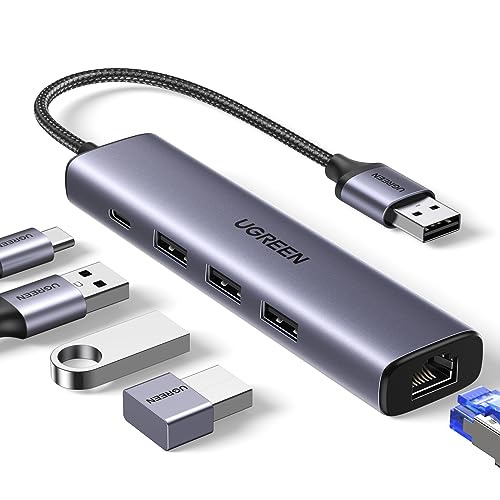
- Gigabit Ethernet and three USB 3.0 ports
- USB-C input powers peripherals, not the laptop
- Driver-free on newer Windows, macOS, and Chrome OS
Best For: Wired networking with multiple USB peripherals
Best for Simple USB-A Expansion
ABLEWE USB 3.0 Gigabit Ethernet Hub

- Gigabit RJ45 and three USB 3.0 ports
- All hub ports can work simultaneously
- Compact aluminum case
Best For: USB 3.0 computers needing Ethernet and extra USB ports
Best for Fast Transfers

- Three data ports rated up to 10 Gbps
- HDMI up to 4K at 60Hz with DP 1.4
- Up to 85W pass-through charging
Best For: USB-C laptops needing fast peripherals and wired networking
Best USB-A Option
Amazon Basics 4-Port USB 3.0 Ethernet Hub
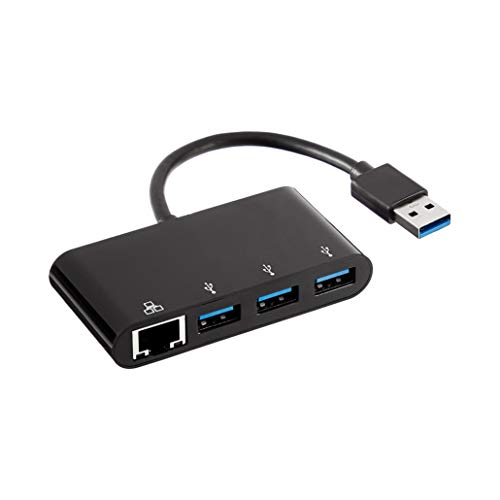
- Three USB-A 3.0 ports
- 10/100/1000 Mbps Ethernet port
- Slim, travel-friendly case
Best For: USB-A laptops needing extra ports and wired Ethernet
Best for MacBook Setups
UGREEN Revodok Pro 9-in-1 USB-C Hub

- Gigabit RJ45 Ethernet
- HDMI supports 4K at 60Hz
- Up to 85W pass-through charging
Best For: Compatible MacBooks needing Ethernet, HDMI, and charging
Most Data Ports – ABFCRTTW 7-in-1 USB-C Ethernet Hub
This usb hub with ethernet is a practical pick when you need plenty of data connections rather than display output or laptop charging. It adds four USB-A ports, two USB-C data ports, and Gigabit Ethernet through a 30 cm cable.
Best For: Desks with several USB accessories and a need for wired internet.
Pros:
- Six data ports support speeds up to 5Gbps.
- Ethernet supports 10/100/1000Mbps connections.
- Plug-and-play design; the 30 cm cable helps keep ports within reach.
Cons:
- USB-C ports do not support video output or PD charging.
- Optional 5V/3A power requires a cable and adapter that are not included.
Choose this one for USB expansion and a wired network connection, not as a full laptop dock.
Best for Displays and Cards – Hiearcool 8-in-1 USB-C Hub
This usb hub with ethernet combines wired networking with the connections useful for a laptop workstation: 4K@60Hz HDMI, three USB-A 3.0 ports, SD and microSD readers, and up to 100W pass-through PD charging.
Best For: USB-C laptop users who want a monitor connection, card readers, and wired internet in one hub.
Pros:
- HDMI output supports up to 4K@60Hz.
- Includes 1Gbps Ethernet and up to 100W pass-through charging.
- SD and microSD slots add convenient access to camera media.
Cons:
- Only three USB-A ports, with no additional USB-C data port listed.
It is the more versatile workstation option here if display output and card access matter as much as Ethernet.
Best Dual-Connector Pick – Acer USB-A/USB-C Ethernet Hub
This usb hub with ethernet suits mixed-device setups because its host connector works with USB-A or USB-C. It provides one Gigabit Ethernet port and three USB-A 3.0 ports without adding display or charging features you may not need.
Best For: People switching the same Ethernet-and-USB adapter between USB-A and USB-C devices.
Pros:
- Dual host connectors accommodate USB-A and USB-C devices.
- Gigabit Ethernet and all three USB-A ports can be used at the same time.
- USB-A 3.0 ports offer a combined bandwidth of up to 5Gbps.
Cons:
- No HDMI, USB-C data port, or PD charging.
- Windows XP or 7 may require a driver; older systems may not recognize the USB 3.0 chip.
This is a focused adapter for wired networking and USB-A accessories, particularly if your devices have different host-port types.
Streamlined Dock Pick – UGREEN Revodok 6-in-1 USB-C Hub
This usb hub with ethernet covers the main laptop-dock essentials: Gigabit Ethernet, 4K@30Hz HDMI, three USB-A 3.0 ports, and USB-C power pass-through. It is a straightforward choice when you want a wired connection and one external display.
Best For: USB-C laptop users who need Ethernet, HDMI, charging, and USB-A accessories together.
Pros:
- Provides Gigabit Ethernet and 4K@30Hz HDMI output.
- Supports up to 85W pass-through laptop charging from a 100W PD input.
- Three USB-A ports support data transfers up to 5Gbps.
Cons:
- HDMI does not support HDR or 3D.
- The USB-C port is for charging only, not data or video.
Its feature mix is useful for a compact workstation; check whether 4K@30Hz meets your display needs before choosing it.
Best for USB-C Workstations – Anker 6-in-1 USB-C Ethernet Hub
This USB hub with Ethernet suits a USB-C laptop setup that also needs an external display, USB accessories, and charging through one adapter. Its six ports include Ethernet, HDMI, a USB-C data port, two USB-A data ports, and a Power Delivery input.
Best For: USB-C laptop users building a compact desk setup with a wired connection and an external monitor.
Pros:
- HDMI supports displays up to 4K at 30Hz.
- Supports up to 65W pass-through charging when connected to a 65W wall charger.
- Includes both USB-C and two USB-A data ports.
Cons:
- 4K display output is limited to 30Hz.
- Pass-through charging requires a separate wall charger.
Choose this Anker hub when display output and laptop charging matter alongside Ethernet; if you only need extra USB ports and a wired connection, its broader port mix may be unnecessary.
Best for Powered Peripherals – UGREEN 5-in-1 USB Ethernet Hub
This USB hub with Ethernet adds a gigabit wired connection and three USB 3.0 ports to a computer through USB. Its separate USB-C power input can supply demanding peripherals, such as external hard drives, but does not charge the host laptop.
Best For: Users who want wired networking and several USB accessories, including peripherals that may benefit from extra power.
Pros:
- Ethernet supports network speeds up to 1000Mbps.
- Three USB 3.0 ports support data transfer up to 5Gbps.
- Plug and play on Windows 11/10/8.1, macOS, and Chrome OS.
Cons:
- The USB-C power input cannot charge the host device.
- Windows XP/7/8/Vista and Linux require a driver installation.
The dedicated peripheral power input distinguishes this UGREEN model from a basic Ethernet-and-USB adapter. Check your operating system before buying if driver-free setup is important.
Best for Simple USB-A Expansion – ABLEWE USB 3.0 Gigabit Ethernet Hub
This USB hub with Ethernet turns one USB 3.0 connection into a gigabit RJ45 port and three USB 3.0 ports. It is a straightforward choice for a laptop or desktop that needs wired networking and room for everyday USB accessories.
Best For: Computers with a USB 3.0 port that need Ethernet plus three additional USB connections.
Pros:
- All three USB ports and the Ethernet port can work simultaneously.
- USB 3.0 supports data transfer up to 5Gbps.
- Compact aluminum design is easy to carry.
Cons:
- No HDMI output or laptop pass-through charging is listed.
- It requires an available USB 3.0 port for the intended connection.
ABLEWE keeps the focus on wired networking and USB expansion rather than display or charging features. It makes sense when those four connections are exactly what your setup lacks.
Best for Fast Transfers – Anker 555 8-in-1 USB-C Hub
The Anker 555 is a USB hub with Ethernet for laptops that need wired networking alongside fast peripheral connections. Its two USB-A data ports and USB-C data port support up to 10 Gbps, while HDMI, card readers, and pass-through charging cover common desk setups.
Best For: USB-C laptop users who want fast data ports, wired Ethernet, and a single external display connection.
Pros:
- USB-A and USB-C data ports support transfers up to 10 Gbps.
- HDMI supports 4K at 60Hz with a DP 1.4 laptop, or 4K at 30Hz with DP 1.2.
- Includes SD and microSD readers and up to 85W pass-through charging.
Cons:
- Requires a 100W PD charger and cable to provide adequate power for the hub and charging.
- USB-C data port does not output video; the hub is not compatible with Linux.
Choose this if 10 Gbps peripherals matter as much as Ethernet. Check your laptop’s DisplayPort capability before counting on 4K at 60Hz.
Best USB-A Option – Amazon Basics 4-Port USB 3.0 Ethernet Hub
If your laptop connects through USB-A, this straightforward USB hub with Ethernet adds three USB 3.0 ports and an RJ45 port without the display and charging features of a USB-C dock. Its slim case is suited to a compact desk or travel setup.
Best For: Laptops that need additional USB-A connections and wired Gigabit Ethernet, but not HDMI or USB-C charging.
Pros:
- Combines three USB 3.0 ports with a 10/100/1000 Mbps Ethernet port.
- USB 3.0 supports up to 5 Gbps and is backward compatible with USB 2.0.
- Slim design takes up little desk space.
Cons:
- No HDMI, card reader, or USB-C power delivery.
- Actual Ethernet speeds depend on the rest of your network setup.
This is the focused pick when you need USB-A expansion and a wired connection. Confirm operating-system compatibility if your laptop runs something other than the listed Windows or Mac OS versions.
Best for MacBook Setups – UGREEN Revodok Pro 9-in-1 USB-C Hub
The UGREEN Revodok Pro is a USB hub with Ethernet that brings wired networking, HDMI, card readers, and data ports to one USB-C connection. Its listed compatibility focuses on MacBook Air and Pro models, making it a practical option for an expanded laptop workstation.
Best For: Compatible MacBook users who want Gigabit Ethernet, an external display, and pass-through charging from one hub.
Pros:
- Gigabit RJ45 Ethernet port supports up to 1000 Mbps.
- HDMI output supports up to 4K at 60Hz.
- Includes SD/TF readers, data transfer up to 10 Gbps, and up to 85W pass-through charging.
Cons:
- Charging USB-C port does not support data transfer or video output.
- 15W of the 100W PD input is reserved for hub operation.
This model suits a MacBook desk setup that needs several connection types at once. Check the listed macOS requirement before buying, and use the HDMI port—not the charging port—for video.
How We Picked the Best USB Hub with Ethernet
We selected 10 options spanning USB-A and USB-C connections, simple Ethernet-and-USB adapters, and multiport hubs with HDMI. The comparison focuses on stated port layouts, advertised Gigabit Ethernet support, and features that address common laptop and desktop setups. A listing’s specifications are a starting point, not a guarantee of real-world speed or compatibility; confirm the current product details before buying.
Quick Comparison: Which Type Fits?
For a computer with USB-A but no Ethernet port, start with the Acer, ABLEWE, Amazon Basics, or UGREEN USB-to-Ethernet options. They focus on adding a wired connection alongside USB ports. If your laptop has USB-C and you want an external display, look at the Hiearcool, Anker, or UGREEN Revodok models that list HDMI. The seven-port USB-C hub offers a different mix: four USB-A ports and two USB-C ports alongside Ethernet. For a broader desk setup, compare the eight- and nine-in-one models against the devices you actually plan to connect.
Key Buying Factors for a USB Hub with Ethernet
Host Connection and Compatibility
Check whether the plug going into your computer is USB-A or USB-C. A USB-C shape alone does not confirm video output or charging support: those depend on both the hub and your computer’s port. Check operating-system compatibility, especially for older machines or managed work devices.
Ethernet and USB Bandwidth
These products advertise Gigabit Ethernet, but actual network speed also depends on your router or switch, cable, internet plan, and the computer connection. On a hub, connected devices share the available USB bandwidth. If you routinely transfer large files while using the network, check the stated USB speed and consider which ports you will use simultaneously.
Display, Charging, and Port Layout
If you need HDMI, check the resolution and refresh rate you want against both the hub’s listing and your laptop’s video capabilities. Do not assume an HDMI-equipped hub supports every display mode. Similarly, verify whether a USB-C port is for data, power input, or both before counting on it to charge your laptop. Count the USB-A ports your keyboard, mouse, drives, and other accessories need, and leave room for future devices.
Who Should Buy Which USB Hub with Ethernet?
Choose a straightforward USB-A adapter if wired networking and a few peripheral ports are all you need. Pick a compact USB-C hub with HDMI for a travel or hybrid-work laptop that also connects to a monitor. Consider a larger eight- or nine-in-one hub when several accessories stay connected at a desk—but compare its exact port functions before paying for more ports. If reliable Ethernet is the priority, buy for host compatibility and a usable port layout first; extra display and charging features only matter if your computer supports them.