
In 2026, choosing the right video conferencing system for your conference room can transform your meetings from mundane to impactful. You’ll find a variety of options that cater to different room sizes and participant needs. From advanced audio technology to seamless integration with popular platforms, these systems are designed to enhance collaboration. But what features should you prioritize to guarantee your meetings are as productive as possible? Let’s explore the top contenders.
Yealink MeetingBar A10 Conference Room Webcam

The Yealink MeetingBar A10 Conference Room Webcam is perfect for businesses looking to streamline their video conferencing setup. This all-in-one system integrates everything you need—camera, microphones, speaker, and more—resulting in minimal cable clutter. With its 4K camera and 120° wide-angle lens, everyone in the room is visible without constant adjustments. The AI features like Auto Framing and Speaker Tracking enhance your meetings by focusing on active participants. Plus, the advanced audio technology guarantees crystal-clear communication. For a prime experience, consider the A10-020 kit, which includes a dedicated controller tablet, making it even easier to manage your video calls.
Best For: Businesses seeking an all-in-one video conferencing solution that minimizes cable clutter and enhances communication efficiency.
Pros:
- Integrates multiple components (camera, microphones, speaker) into a single unit, reducing cable mess.
- Features a 4K camera with a 120° wide-angle lens, ensuring all participants are visible without adjustments.
- AI capabilities like Auto Framing and Speaker Tracking improve focus on active speakers, enhancing meeting engagement.
Cons:
- Requires a dedicated controller and professional IT setup for optimal performance.
- The advanced features may be more than necessary for smaller meetings or less tech-savvy users.
- The cost may be higher compared to simpler video conferencing solutions.
Yealink 4K USB Video Conference Camera

For teams seeking a seamless video conferencing experience, the Yealink UVC34 4K USB Video Conference Camera stands out with its all-in-one design that integrates a high-resolution camera, microphones, and speakers. You’ll enjoy stunning 4K resolution at 30FPS and a 120° wide-angle lens, perfect for capturing everyone in the room. The built-in 8-microphone array and high-fidelity speakers guarantee crystal-clear audio. With AI features like auto framing and low-light optimization, your meetings will be more engaging. It’s easy to set up via USB, making it an excellent choice for small spaces or home offices. Elevate your conferencing today!
Best For: Teams and individuals seeking a high-quality video conferencing solution that integrates advanced audio and video technology in a compact design.
Pros:
- High-Resolution Imaging: 4K resolution at 30FPS with a 120° wide-angle lens for clear visuals.
- Superior Audio Quality: Built-in 8-microphone array and high-fidelity speakers ensure excellent sound clarity.
- AI Features: Auto framing and low-light optimization enhance the meeting experience.
Cons:
- Weight: At 3.57 pounds, it may be heavier than some competitors’ models.
- Limited Compatibility: While certified for major platforms, it may not support all video conferencing applications.
- Return Policy Restrictions: Specific conditions apply for returns, which may be inconvenient for customers.
Logitech MeetUp Video Conferencing System (Ultra HD 4K)

Designed specifically for small conference and huddle rooms, the Logitech MeetUp Video Conferencing System delivers exceptional Ultra HD 4K quality that guarantees every participant is seen and heard clearly. Its compact, all-in-one design makes setup a breeze, while the 120° field of view and 5x HD zoom assure everyone is in focus. With three beamforming microphones capturing voices up to 4m away, you won’t miss a word. Plus, it connects easily to your devices with USB plug-and-play functionality. Compatible with major software like Zoom and Microsoft Teams, the MeetUp enhances your meeting experience effortlessly.
Best For: Small conference and huddle rooms that require high-quality video and audio for effective meetings.
Pros:
- Ultra HD 4K resolution provides crystal-clear video quality for all participants.
- Compact all-in-one design simplifies installation and saves space in small rooms.
- Wide field of view and motorized pan/tilt feature ensure everyone in the room is captured in the frame.
Cons:
- Limited range of built-in microphones may require an additional expansion mic for larger rooms.
- Requires USB 3.0 for 4K video, which may not be available on all devices.
- Expansion microphone sold separately, increasing the overall cost for a complete setup.
TONGVEO All-in-One Conference Room Video Camera System

With its HD 1080p AI Auto-Tracking PTZ camera, TONGVEO All-in-One Conference Room Video Camera System is perfect for small to medium-sized meeting spaces, ensuring that everyone stays in focus during discussions. This system boasts a 3x optical zoom and a wide 114° field of view, delivering crisp 1920x1080p video at 60fps. The integrated Bluetooth speakerphone offers hands-free connectivity, covering up to 16.4ft. Plus, its plug-and-play setup simplifies installation with USB 3.0 or HDMI options. Compatible with major conferencing apps, TONGVEO guarantees a seamless experience, making your meetings more productive and engaging.
Best For: Professionals seeking an all-in-one video conferencing solution for small to medium meeting spaces.
Pros:
- High-definition 1080p video quality with smooth 60fps performance.
- AI auto-tracking technology ensures speakers are always in focus.
- Easy setup with plug-and-play functionality and compatibility with major conferencing applications.
Cons:
- The PTZ camera is wired, limiting placement flexibility.
- The Bluetooth speakerphone has a limited pickup range of 16.4ft.
- Battery life of the speakerphone may not be sufficient for longer meetings, lasting only 6-8 hours.
Logitech Group Video Conferencing Bundle with Expansion Mics

The Logitech Group Video Conferencing Bundle is perfect for large teams needing seamless communication during meetings. With its HD video camera, business-grade speakerphone, and expansion mics, you’ll engage up to 20 participants effortlessly. The audio range extends 28 feet, ensuring everyone can be heard clearly. Enjoy razor-sharp 1080p video with autofocus and premium Zeiss-certified optics, enhancing your visual experience. This bundle is compatible with Mac and PC, and it works seamlessly with various UC and cloud communication apps, including Microsoft Lync and Skype for Business. Elevate your conference room experience with this all-in-one solution for effective collaboration.
Best For: Large teams looking for a comprehensive video conferencing solution that ensures clear communication and high-quality visuals during meetings.
Pros:
- High-definition 1080p video quality with autofocus and premium optics enhances visual clarity.
- Supports up to 20 participants with a 28 ft. audio range, making it ideal for big meeting rooms.
- Compatible with multiple operating systems and popular communication apps, providing flexibility for users.
Cons:
- Setup may require additional configuration for some users, particularly with specific software.
- The system might be more expensive compared to basic video conferencing solutions.
- Limited portability may not suit teams that need a solution for smaller or mobile setups.
Owl Labs Meeting Owl 3 Conference Room Camera

For teams that thrive on collaboration, the Owl Labs Meeting Owl 3 Conference Room Camera stands out with its 360° video and audio capabilities, ensuring everyone in the room is heard and seen. It captures stunning 1080p HD video and audio up to 18 feet, automatically focusing on speakers to enhance engagement. The award-winning Owl Intelligence System uses visual and audio cues for seamless hybrid discussions. With a quick plug-and-play setup, you can go from unboxing to your first meeting in just 6 minutes. Plus, it’s compatible with major platforms like Microsoft Teams, Zoom, and Google Meet, making it incredibly versatile.
Best For: Teams seeking an effective solution for hybrid meetings that require high-quality video and audio collaboration.
Pros:
- 360° video and audio capabilities ensure all participants are engaged, regardless of their location in the room.
- Quick and easy setup allows users to start meetings within minutes with a plug-and-play design.
- Compatibility with major platforms like Microsoft Teams, Zoom, and Google Meet enhances versatility for various meeting environments.
Cons:
- Limited audio range of up to 18 feet may not suffice for larger conference rooms without additional equipment.
- Dependency on USB connection could limit placement options or require additional cables for some setups.
- Higher price point compared to standard webcams may not fit all budgets, especially for smaller teams.
Camera 360 4K Video Conference Room Camera System

Experience seamless collaboration in conference rooms with the Camera 360 4K Video Conference Room Camera System, ideal for businesses that prioritize immersive meetings. This all-in-one solution delivers a 360° view and stunning 4K resolution, making everyone feel present. Its AI-driven speaker tracking focuses on active participants, while eight high-quality microphones capture clear audio from up to 15 feet away. Setting up is a breeze with secure USB plug-and-play functionality, compatible with popular platforms like Zoom and Google Meet. With built-in privacy features and dedicated customer support, you’ll enhance your meetings effortlessly and confidently. Elevate your conferencing experience today!
Best For: Businesses seeking an immersive video conferencing solution that enhances collaboration and communication in conference rooms.
Pros:
- Supports 360° view and 4K resolution for an immersive meeting experience.
- AI-driven speaker tracking and high-quality microphones ensure clear audio and focus on active participants.
- Easy setup with secure USB plug-and-play functionality, compatible with popular meeting platforms.
Cons:
- May require a larger conference room to fully utilize the 360° capabilities.
- Limited to a physical USB connection, which may not suit all setups.
- Higher price point compared to traditional webcams may be a consideration for budget-conscious buyers.
Meeting Owl 4+ Smart Video Conference Camera

Designed for seamless collaboration, the Meeting Owl 4+ Smart Video Conference Camera is perfect for teams looking to enhance their hybrid meetings. With its 360-degree 4K video and audio capabilities, it captures everyone in the room and automatically focuses on the current speaker. The award-winning Owl Intelligence System guarantees that remote participants feel engaged. It’s a plug-and-play device, ready for use in just six minutes, and works with major platforms like Microsoft Teams and Zoom. Plus, you can easily expand your setup by pairing it with additional devices, making it ideal for larger conference spaces.
Best For: Teams seeking an all-in-one solution for engaging hybrid meetings with seamless video and audio capabilities.
Pros:
- 360-degree 4K video ensures everyone is captured during meetings for better engagement.
- Automatic speaker tracking enhances collaboration by focusing on the current speaker.
- Easy deployment with plug-and-play functionality, ready for use in just six minutes.
Cons:
- Higher cost compared to traditional webcams may not fit all budgets.
- Limited range of audio capture (up to 18′ or 5.5m) may require additional microphones for larger spaces.
- Requires reliable internet connection for optimal performance, which could be a downside in certain environments.
Poly Studio X50 Conferencing System with TC8 Touch Controller

The Poly Studio X50 Conferencing System with TC8 Touch Controller stands out as the ideal choice for mid-size meeting rooms, where seamless collaboration is essential. With its all-in-one 4K video and audio bar, you’ll enjoy production-quality sound and clear visuals. The system’s NoiseBlockAI technology eliminates distractions, ensuring your meetings remain focused. Set up is a breeze, accommodating up to ten participants and allowing dual display connections for enhanced engagement. Plus, you can wirelessly share content without hassle. Compatible with popular cloud video apps like Zoom and Microsoft Teams, it integrates smoothly into your existing setup while offering flexible mounting options.
Best For: The Poly Studio X50 Conferencing System is best for mid-size meeting rooms that require high-quality video and audio for seamless collaboration among up to ten participants.
Pros:
- Production-quality audio and video with integrated machine learning technology for distraction-free communication.
- Easy setup and flexible mounting options allow for quick deployment and optimal space utilization in various room configurations.
- Wide compatibility with popular cloud video applications like Zoom and Microsoft Teams, eliminating the need for a PC.
Cons:
- Limited to mid-size meeting rooms, which may not be suitable for larger gatherings.
- Potentially higher cost compared to basic conferencing solutions, which may not be justified for smaller teams or infrequent users.
- Dependence on wireless connectivity for content sharing, which may pose issues in environments with unreliable networks.
All-in-One Conference Room PTZ Camera 4K UHD System
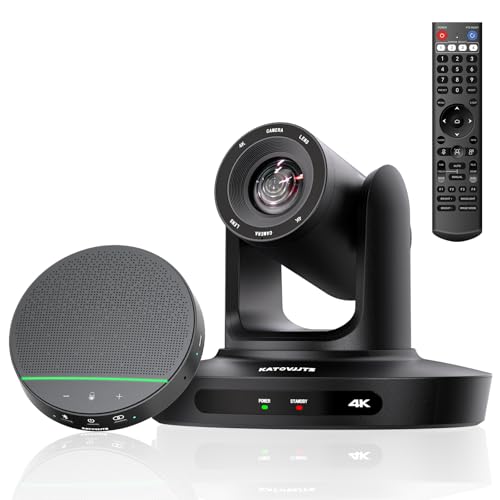
For small to medium-sized meeting rooms, the All-in-One Conference Room PTZ Camera 4K UHD System stands out as an ideal choice, thanks to its impressive 4K UHD video quality and versatile connectivity options. With a 70° wide-angle view and 10X optical zoom, you’ll capture every detail with stunning clarity. It supports seamless integration with platforms like Zoom, Skype, and Microsoft Teams, making setup a breeze with HDMI and USB connections. Plus, its live streaming capabilities guarantee low latency and high-quality broadcasts on platforms like YouTube Live and Facebook Live. Elevate your video conferences effortlessly with this all-in-one solution.
Best For: Professionals seeking a high-quality video conferencing solution for small to medium-sized meeting rooms.
Pros:
- Supports stunning 4K UHD video quality with 10X optical zoom for detailed presentations.
- Easy plug-and-play setup with HDMI and USB connections, compatible with major conferencing platforms.
- Live streaming capabilities ensure low latency and high-quality broadcasts on popular platforms.
Cons:
- May be overkill for very small or informal meeting spaces.
- Requires a stable internet connection for optimal live streaming performance.
- The price point may be higher compared to basic camera options.
Factors to Consider When Choosing a Video Conferencing System for Conference Room
When choosing a video conferencing system for your conference room, you need to think about several key factors. Video quality and audio performance are essential for effective communication, while ease of setup can save you time. Additionally, make sure the system is compatible with your software and suits your room size for the best experience.
Video Quality Requirements
Choosing a video conferencing system for your conference room requires careful consideration of video quality requirements to guarantee effective communication. Aim for at least 1080p high-definition video to promote clear visibility of participants and presentations. A wide-angle lens of 120° or more captures all attendees in the room, minimizing the need for constant camera adjustments. Advanced features like 4K resolution and AI-driven image optimization enhance video clarity, even in varying lighting conditions. Consider systems with auto-framing technology that adjusts focus based on the number of speakers, fostering dynamic conversations. Additionally, optical zoom capabilities allow for detailed visibility of presentation materials and participants’ expressions, greatly improving communication and understanding during your meetings.
Audio Performance Considerations
While video quality lays the foundation for effective communication, audio performance plays an equally important role in ensuring your meetings run smoothly. High-quality audio is essential for clear conversations, so look for systems with features like beamforming microphones and acoustic echo cancellation to enhance sound clarity and minimize background noise. A full-duplex audio system allows everyone to speak and listen simultaneously, avoiding interruptions. If you’re in a larger conference room, opt for systems with multiple microphones to capture voices from various areas. Noise cancellation technology is critical for eliminating distractions, ensuring only relevant sounds are transmitted. Finally, consider systems that allow you to extend microphone range or add expansion mics for better audio coverage.
Ease of Setup
Setting up a video conferencing system should be as simple as possible, ideally requiring just a few straightforward steps. Look for systems with plug-and-play functionality, allowing you to install them quickly without extensive technical know-how. Opt for models that minimize cabling by integrating multiple components into a single device, reducing clutter and complexity. User-friendly interfaces and straightforward connectivity options like USB or HDMI enhance your setup experience. Ascertain that the system comes with thorough setup documentation and reliable customer support, so you can address any issues that might arise. A seamless setup will not only save you time but also let you focus on what really matters: productive meetings and collaboration.
Compatibility With Software
When selecting a video conferencing system for your conference room, guaranteeing compatibility with various software platforms is essential for effortless communication. You should prioritize systems that work seamlessly with major platforms like Microsoft Teams, Zoom, Google Meet, and Cisco Webex. Look for solutions that provide plug-and-play functionality to simplify setup and integrate smoothly with your existing hardware. It’s also wise to choose systems that support multiple operating systems, including Windows, macOS, and Chrome OS, which accommodates diverse user environments. Additionally, checking for certifications or compatibility assurances can enhance performance and reliability during meetings. Finally, verify that the system can manage a range of conferencing formats, including H.323 and SIP protocols, to ensure broader connectivity options.
Room Size Suitability
Choosing the right video conferencing system hinges greatly on the size of your conference room, as each space has unique requirements that impact functionality. For larger rooms, you’ll need systems with extended microphone pickup ranges and wider camera fields of view to guarantee everyone is included. In smaller spaces, opt for compact systems with built-in microphones and cameras to keep things tidy while maintaining excellent audio and video quality. Mid-size rooms usually accommodate 10-20 participants and may benefit from multiple mounting options. Make sure the system can cover the entire room; a 120° field of view or a pickup range of at least 25 feet is ideal. Finally, consider systems that allow for expansion as your needs grow.
Budget Constraints
Budget constraints play an essential role in selecting the right video conferencing system for your conference room, especially since both initial costs and ongoing expenses can add up quickly. Start by establishing a clear budget that includes not just the purchase price but also maintenance, software subscriptions, and potential upgrades. Consider the total cost of ownership, which encompasses installation, training, and support, as these can greatly affect your long-term budget. Research various systems within your budget to guarantee you’re getting the best value for features like video quality and integration capabilities. Don’t forget to factor in scalability; investing in a system that grows with your organization can save you money in the future. Remember, quality often trumps price when it comes to reliability.