
When it comes to delivering impactful presentations, the right wireless presentation system can make all the difference. You need a tool that not only enhances your delivery but also keeps your audience engaged. From intuitive clickers to advanced collaboration systems, there’s a wealth of options tailored to your needs. Let’s explore the top contenders that can elevate your meetings and guarantee you leave a lasting impression.
Logitech Wireless Presenter R400 PowerPoint Clicker

If you’re looking for a reliable tool to elevate your presentations, the Logitech Wireless Presenter R400 is an excellent choice. This USB-A PowerPoint clicker features intuitive touch keys for seamless slideshow control and a bright red laser pointer, ensuring your audience stays engaged. With a wireless range of up to 50 feet, you can move freely while presenting. Plus, it’s easy to set up—just plug the receiver into a USB port, and you’re good to go. The built-in docking bay makes storage a breeze, perfect for presenters on the move. Just grab some AAA batteries, and you’re ready to impress!
Best For: Professionals and educators who frequently deliver presentations and need a reliable, portable clicker with laser pointer functionality.
Pros:
- Intuitive touch keys offer seamless control over presentations.
- Up to 50-foot wireless range allows for freedom of movement while presenting.
- Built-in docking bay provides convenient storage for the receiver.
Cons:
- Requires AAA batteries, which may need to be replaced periodically.
- Limited compatibility with non-USB-A devices without an adapter.
- Laser pointer visibility may vary depending on the presentation environment.
Kensington Wireless Presenter with Red Laser Pointer (K33272WW)

The Kensington Wireless Presenter with Red Laser Pointer (K33272WW) is an excellent choice for professionals who frequently deliver presentations and need to engage their audience effectively. Its intuitive four-button layout makes maneuvering through PowerPoint or Keynote slides a breeze. With a 2.4GHz wireless connection and a 65-foot range, you can move freely while presenting. The red laser pointer helps highlight key points, enhancing your delivery. Security is a priority, featuring AES 128-bit encryption to protect your data. Plus, the compact USB receiver stores conveniently in the battery compartment, ensuring you’re always prepared. With a 3-year warranty and lifetime support, it’s a reliable choice.
Best For: Professionals who frequently deliver presentations and need an effective tool for engaging their audience.
Pros:
- Intuitive four-button layout for easy navigation through slides.
- 65-foot wireless range allows for freedom of movement during presentations.
- AES 128-bit encryption ensures secure data transmission.
Cons:
- The need for batteries may require replacements over time.
- Limited to PowerPoint and Keynote compatibility; may not support other presentation software.
- The compact design may feel small for users with larger hands.
Logitech Spotlight Presentation Remote – Wireless Clicker with Laser Pointer
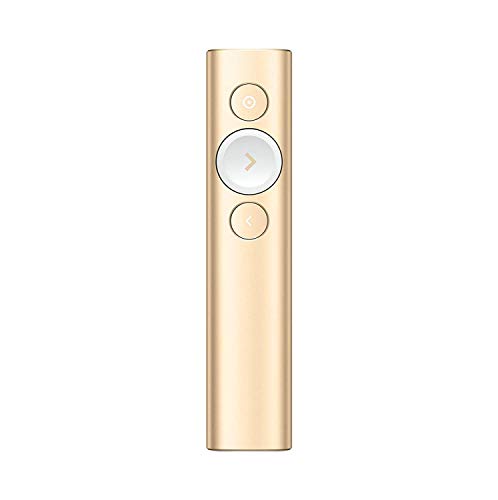
For professionals seeking seamless control during their presentations, the Logitech Spotlight Presentation Remote stands out with its advanced digital highlighting feature. You can easily highlight and magnify content, ensuring your audience stays engaged whether you’re presenting in-person, virtually, or in a hybrid setting. With a 30-meter range and dual connectivity options, you’ll never feel tethered. The mouse-like cursor control lets you play or pause videos and interact with various content effortlessly. Plus, customizable timing alerts from the Logi Options+ App help you manage your presentation effectively. With its sleek design, this remote combines functionality and style for any presentation.
Best For: Professionals and educators who need a reliable and feature-rich presentation remote for engaging their audience effectively.
Pros:
- Advanced digital highlighting and magnification features enhance audience engagement.
- Dual connectivity options (USB-A receiver and Bluetooth) provide flexibility and convenience.
- Customizable timing alerts help manage presentation time effectively.
Cons:
- Price may be higher compared to basic presentation remotes.
- Some users may require time to familiarize themselves with all features.
- Limited compatibility with certain older presentation software versions.
Barco ClickShare C-10 Wireless Presentation and Collaboration System

Designed with hybrid meetings in mind, the Barco ClickShare C-10 Wireless Presentation and Collaboration System is ideal for medium to large meeting rooms. You can effortlessly share content in full HD, allowing two users to present side by side without needing cables or downloads. This system supports Microsoft Teams, Zoom, and Webex, ensuring seamless integration. Enjoy interactive features like selective sharing, annotation, and touch back support. Plus, its IT-grade security and remote management capabilities make it perfect for enterprises. With simple plug-and-play operation and compatibility across devices, the C-10 evolves with your business needs, making it a valuable investment.
Best For: The Barco ClickShare C-10 is best for medium to large enterprises looking to enhance their hybrid meeting experience with seamless wireless presentation capabilities.
Pros:
- Supports multiple conferencing platforms like Microsoft Teams, Zoom, and Webex for versatile meeting options.
- Interactive features such as selective sharing, annotation, and touch back support enhance collaboration during presentations.
- Enhanced security and remote management capabilities make it suitable for enterprise environments.
Cons:
- Limited to indoor use, which may not be ideal for outdoor or offsite presentations.
- Initial setup may require technical assistance for optimal integration within existing systems.
- Weight of 1.23 kg may be cumbersome for some users who prefer a more portable solution.
Barco CSE-200 Wireless Presentation System (Renewed)

Ideal for small to medium-sized meeting rooms, the Barco CSE-200 Wireless Presentation System simplifies group collaboration with its user-friendly ClickShare Button. Just plug the USB device into your laptop or Mac, click the button, and you’re ready to share content seamlessly. With support for up to 2 simultaneous users and 16 connections, everyone can get involved. Plus, the ClickShare App allows you to share from mobile devices effortlessly. Enhanced security features let you adjust settings based on your company’s policies, ensuring secure collaboration. Certified refurbished, it looks and works like new, making it a smart choice for your meetings.
Best For: Small to medium-sized businesses looking for an easy-to-use wireless presentation system to enhance collaboration during meetings.
Pros:
- User-friendly: The ClickShare Button allows quick and easy connection to share content without complicated setup.
- Multiple connections: Supports up to 2 simultaneous users and 16 total connections, promoting teamwork and engagement.
- Enhanced security: Adjustable security settings ensure that sharing complies with company policies.
Cons:
- Limited simultaneous users: Only two users can present at the same time, which may be restrictive for larger groups.
- Refurbished condition: Being a renewed product, there may be concerns about long-term reliability compared to brand new items.
- Weight and size: At 3.8 pounds and dimensions of 11 x 8 x 8 inches, it may be less portable for some users compared to lighter alternatives.
ViewSonic ViewShare WPD-900 Wireless Presentation System

The ViewSonic ViewShare WPD-900 Wireless Presentation System stands out with its plug-and-play setup, making it perfect for busy professionals seeking seamless collaboration in team meetings. It supports 1080p Full HD, Miracast, and AirPlay, allowing you to share your screen instantly using USB-C, HDMI, or USB inputs. With no need for network setup or app downloads, it’s compatible with nearly all modern devices. Enjoy stable and secure presentations through peer-to-peer technology, without requiring internet access. Plus, its long-range wireless transmission of up to 98 feet makes it ideal for larger spaces, accommodating up to eight presenters simultaneously.
Best For: Busy professionals and teams looking for a seamless and efficient wireless presentation solution.
Pros:
- Easy plug-and-play setup with no network or app required, ensuring quick deployment.
- Supports a wide range of modern devices and formats, including Miracast and AirPlay.
- Long-range wireless transmission up to 98 feet, suitable for large meeting spaces.
Cons:
- Limited to eight USB-C transmitters for multi-presenter scenarios, which may not be enough for larger teams.
- May not support some older devices that lack HDMI or USB-C connectivity.
- Customer reviews indicate potential issues with streaming certain DRM-protected content in specific scenarios.
Wireless HDMI Transmitter and Receiver 4K Kit

For those who value seamless connectivity during presentations, the Wireless HDMI Transmitter and Receiver 4K Kit stands out with its impressive support for video resolutions up to 4K@30Hz. It lets you wirelessly mirror video and audio to large screens without messy cables. With easy plug-and-play functionality, you won’t need any drivers or apps to set up. The kit’s built-in chip guarantees clear images with minimal delay, ideal for meetings, gaming, or family gatherings. Plus, its lightweight design and compatibility with devices like MacBook Pro and iPad make it a versatile choice for any setting. Enjoy a stable signal up to 165FT!
Best For: Those seeking a reliable and easy-to-use wireless solution for mirroring video and audio during presentations, meetings, or family gatherings.
Pros:
- Supports high video resolutions up to 4K@30Hz, ensuring clear and sharp visuals.
- Plug-and-play functionality eliminates the need for additional software or complicated setups.
- Lightweight and portable design makes it ideal for both indoor and outdoor use.
Cons:
- Signal transmission may be affected by physical barriers like cement walls, limiting range in certain conditions.
- Requires a charger with 5V1A or above to avoid interruptions or lag during use.
- Maximum effective distance can be reduced to 3-5 meters in challenging environments.
Microsoft Presenter+ Wireless Presentation Clicker

Designed for professionals who rely on seamless presentations, the Microsoft Presenter+ Wireless Presentation Clicker enhances your PowerPoint experience with its certified compatibility for Microsoft Teams. This sleek, black clicker offers advanced features like slide advancement, backward navigation, and a digital pointer with PowerPoint Live. You’ll appreciate the integrated mute control and quick meeting-joining button, which streamline your workflow. With a reliable control range and a battery life of up to six days, you can confidently present from anywhere in the room. Weighing just 4.6 ounces, it’s a must-have tool for impressing your audience.
Best For: Professionals who frequently deliver presentations and require seamless integration with Microsoft Teams and PowerPoint.
Pros:
- Certified for Microsoft Teams, ensuring compatibility with popular presentation and meeting apps.
- Offers advanced features such as slide advancement, backward navigation, and a digital pointer.
- Long battery life of up to 6 days, providing reliable performance without frequent recharging.
Cons:
- Limited to wireless and Bluetooth connectivity, which may not suit all users’ preferences.
- The weight of 4.6 ounces might feel slightly bulky for some users who prefer ultra-light devices.
- May have a higher price point compared to basic presentation clickers on the market.
Kensington Wireless Presenter Pro with Green Laser
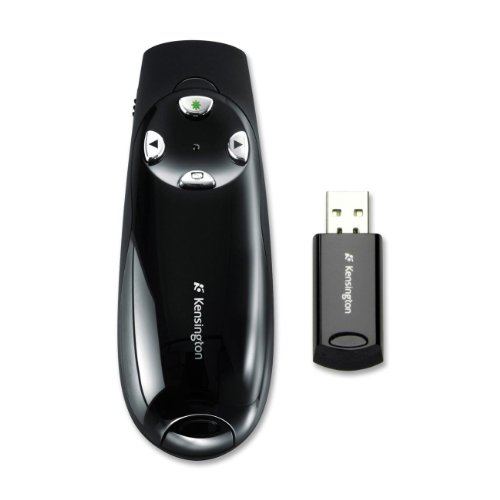
Elevate your presentations with the Kensington Wireless Presenter Pro featuring an ultra-bright green laser, perfect for anyone needing visibility on various screen types. This Class 2 laser pointer guarantees your audience can easily follow along, no matter the distance. With 2.4 GHz wireless technology, you can confidently move up to 150 feet away while maintaining control. Its ergonomic design fits comfortably in your hand, and the intuitive four-button layout makes navigation a breeze. Plus, it’s compatible with Windows 8, guaranteeing seamless integration into your setup. Make your next meeting impactful with this reliable presentation tool.
Best For: Professionals and educators who require a reliable and visible presentation tool for engaging their audience effectively.
Pros:
- Ultra-bright green laser ensures visibility on all screen types, enhancing audience engagement.
- Extended wireless range of up to 150 feet allows for freedom of movement during presentations.
- Ergonomic design and intuitive four-button layout make it easy to use, even during long sessions.
Cons:
- Limited compatibility as it only works with Windows 8, which may exclude users on other operating systems.
- Batteries required for operation, which may need to be replaced periodically.
- Potential interference with other wireless devices operating on the same frequency.
Kensington Presenter Expert™ Wireless with Red Laser – Rose Gold (K75772WW)

The Kensington Presenter Expert™ Wireless with Red Laser in rose gold is perfect for professionals who want to make an impression during their presentations. Its bright red laser pointer helps you highlight key areas effortlessly. With an intuitive four-button layout, you can easily navigate through your slides, activate the laser, or hide your screen. The 2.4GHz wireless connection offers a 150-foot range, secured with AES 128-bit encryption, ensuring reliability. Plus, the internal receiver storage keeps your USB receiver safe. It even comes with a carrying case for protection on the go, making it a stylish and functional choice for any presenter.
Best For: Professionals looking to enhance their presentations with a stylish and functional wireless presenter.
Pros:
- Intuitive four-button layout allows for easy navigation through slides.
- Bright red laser pointer effectively highlights key areas of a presentation.
- Secure 2.4GHz wireless connection with a 150-foot range ensures reliable performance.
Cons:
- The rose gold color may not appeal to all users.
- Requires a USB port for the wireless receiver, which may be a limitation for some devices.
- The carrying case, while convenient, adds extra bulk for portability.
Factors to Consider When Choosing a Wireless Presentation System for Meetings
When choosing a wireless presentation system for your meetings, you should consider several key factors. Think about the connectivity options, range of operation, and security features that best fit your needs. Don’t forget to check compatibility with your devices and how portable the system is for easy storage.
Connectivity Options Available
Choosing the right connectivity options is essential for an effective wireless presentation system. Many systems use 2.4GHz wireless technology, providing reliable connectivity without requiring software installations. Look for devices that offer dual connectivity options, like USB-A and Bluetooth, guaranteeing compatibility with laptops, tablets, and smartphones. Advanced systems support multiple screen mirroring technologies such as AirPlay, GoogleCast, and Miracast, allowing you to share content effortlessly from various platforms. Also, consider security features like AES 128-bit encryption to protect your data during transmission. By evaluating these connectivity options, you can guarantee a smooth and professional presentation that keeps your audience engaged and impressed.
Range of Operation
Understanding the range of operation is essential for maximizing your wireless presentation system’s effectiveness. Wireless systems typically offer connectivity from 50 to over 150 feet. A longer range gives you the freedom to engage your audience dynamically without being tied to one spot. However, remember that obstacles like walls or furniture can impact this effective range, so consider your meeting space’s layout. Additionally, many systems use advanced technology like 2.4GHz RF or Bluetooth, which can influence both range and connection reliability. Finally, verify that your chosen system is compatible with various devices and presentation software, as this compatibility can also affect operational range and ease of use during your presentations.
Security Features Included
Security features are essential in guaranteeing that your wireless presentation system protects sensitive information during meetings. Look for systems that incorporate AES 128-bit encryption, a standard recognized by the U.S. government, to safeguard your data from hackers. If you’re in an enterprise setting, choose systems that provide unique pairing between the receiver and presenter, preventing unauthorized access. IT-grade security and compliance with standards like ISO27001 are also vital for robust data protection. Enhanced features may include remote management capabilities, allowing IT departments to monitor devices effectively. Additionally, systems using peer-to-peer (P2P) connection technology eliminate the need for internet access, further reducing vulnerabilities. Prioritize these features to guarantee a secure presentation experience.
Compatibility With Devices
When selecting a wireless presentation system, compatibility with various devices is a key factor that can greatly impact the effectiveness of your meetings. Verify the system works seamlessly with both Windows and Mac OS to avoid technical hiccups. It’s also essential to check support for popular presentation software like PowerPoint, Keynote, and Google Slides, as this will make navigation smoother. Look for systems that allow multiple devices to connect simultaneously, enabling different users to share content without hassle. Additionally, support for mobile devices like smartphones and tablets enhances flexibility in content sharing. Finally, make certain the system offers secure connections, such as AES encryption, to protect any sensitive data exchanged during your presentations.
Portability and Storage
Choosing a wireless presentation system that’s easy to transport and store can greatly enhance your meeting experience. When selecting, look for models with built-in storage for the USB receiver, guaranteeing it stays secure and doesn’t get lost. Compact and lightweight designs are ideal, making it simpler to carry your system to various locations. Protective carrying cases add extra safety during travel. Systems with easily accessible battery compartments can save time when replacing batteries on the go. Finally, opt for presenters with intuitive button layouts, allowing you to navigate smoothly without fumbling with multiple devices. By considering these factors, you can guarantee your presentation system is not only effective but also convenient for your busy schedule.
User-Friendly Interface
After considering portability and storage, the next key aspect to evaluate is the user-friendly interface of a wireless presentation system. Look for intuitive navigation controls that let you easily advance or rewind slides without any confusion. Clear labeling of buttons and functions will enhance usability, reducing the learning curve for you and new users during presentations. Visual indicators, like status lights, can inform you about battery life and connectivity status, boosting your confidence while presenting. Also, verify compatibility with popular presentation software so you can shift seamlessly between platforms without extensive training. A compact design with built-in storage for the receiver further enhances portability, making it easier for you to manage your presentation tools effectively.