
Small offices need network upgrades that are fast, simple, and easy to scale. That is where 2.5Gb switches for small offices stand out: they deliver a major speed boost over standard gigabit gear without the cost and complexity of full 10Gb switching.
Below, we focus on practical options for shared workspaces, NAS access, Wi‑Fi backhaul, and mixed desktop setups—so you can match the switch to your office size, port needs, and uplink requirements.
Best 10 2.5gb Switches for Small Offices Picks for 2026
Best for NAS Expansion
UGREEN 6-Port 2.5Gb Switch with 10Gb SFP+

- 5 x 2.5Gb ports plus 1 x 10Gb SFP+ uplink
- Link aggregation and VLAN modes add useful flexibility
- Metal build with wall-mount support and lightning protection
Best For: Small offices and NAS users who want fast 2.5Gb switching with a 10Gb upgrade path.
Best for High-Port Multi-Gig
TRENDnet 28-Port Multi-Gig Switch

- 24 x 2.5GbE ports for dense office connectivity
- 4 x 10G SFP+ uplinks for fast backbone links
- Lifetime protection with NDAA/TAA compliance
Best For: Small offices that need a lot of 2.5Gb ports and fast 10G uplinks for growth.
Best for Easy 2.5G Upgrade

- 5 x 2.5Gb ports with up to 25Gbps switching
- Plug-and-play unmanaged setup with no software
- Fanless, quiet design for desk or wall mounting
Best For: Small offices that want a simple, silent 2.5Gb network upgrade.
Best for Quiet Offices
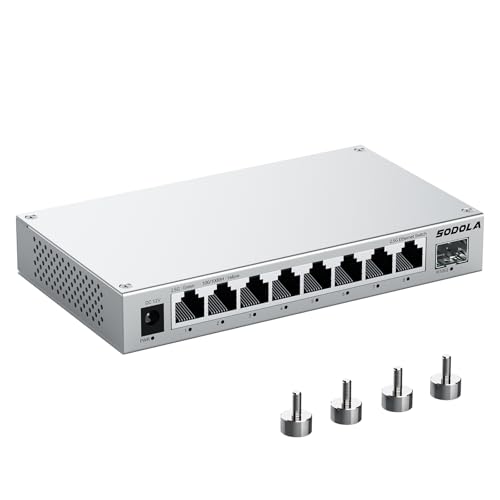
- 8× 2.5GbE ports plus 1× 10G SFP+ for flexible expansion
- Fanless aluminum housing keeps operation quiet and cool
- Magnetic mounting makes placement easy in tight spaces
Best For: Small offices that need quiet, plug-and-play 2.5GbE networking with expansion headroom.
Best for Easy VLAN & Aggregation

- Eight 2.5GbE ports for multi-gig office devices
- Static link aggregation and VLAN via hardware toggle
- Fanless metal design for quiet desktop or wall mounting
Best For: Small offices and NAS setups that need simple multi-gig switching with VLAN and aggregation support.
Best for Port-Dense Small Offices
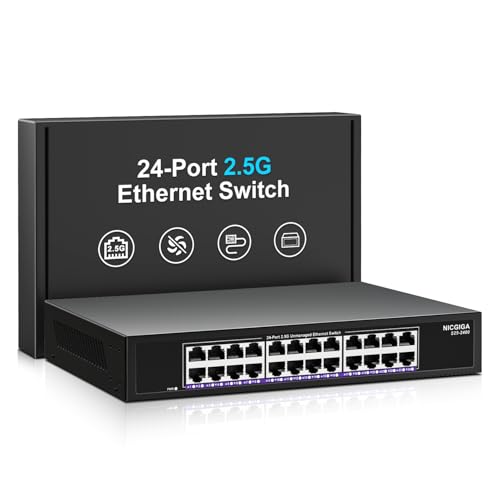
- 24-port 2.5G capacity for growing office setups
- Unmanaged plug-and-play operation
- Fanless metal build with lightning protection
Best For: Small offices that need lots of 2.5G ports and a simple, low-maintenance setup.
Best for Compact 2.5Gb Expansion

- Eight 2.5Gb ports for flexible small-office expansion
- Unmanaged plug-and-play setup with no configuration
- Fanless, compact design for quiet desk or wall placement
Best For: Small offices that want simple, quiet 2.5GbE expansion for multiple wired devices.
Best for Dense Wired Drops
YuanLey 16-Port 2.5G Unmanaged Switch

- 16 x 2.5GbE ports for high-density office connectivity
- Fanless metal design helps keep noise low
- Unmanaged setup is fast and uncomplicated
Best For: Small offices that need lots of simple, quiet 2.5GbE ports.
Best for Easy Setup

- All 5 ports run at 2.5GbE
- Fanless and quiet for desktop use
- Plug-and-play with no setup needed
Best For: Small offices that want simple multi-gig wired networking without management overhead.
Best High-Port Count
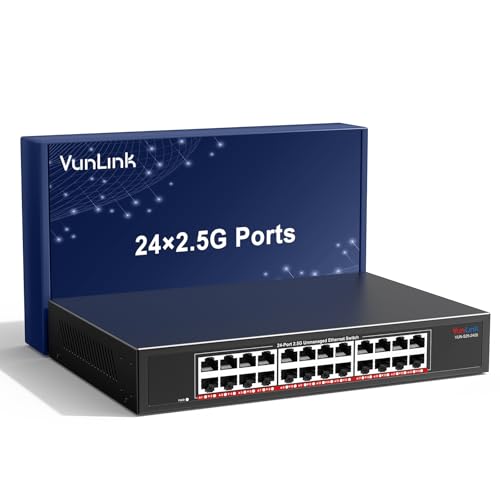
- 24 multi-gig ports for dense small-office expansions
- Fanless metal build for quiet office or rack use
- Plug-and-play setup with no configuration required
Best For: Small offices that need lots of 2.5GbE ports with zero setup fuss.
Best for NAS Expansion – UGREEN 6-Port 2.5Gb Switch with 10Gb SFP+
If you want one of the more flexible 2.5gb switches for small offices, this UGREEN model stands out for its 5x 2.5Gb ports, 10Gb SFP+ uplink, and simple plug-and-play setup. It is a practical fit for teams that move large files, run a NAS, or want faster wired connections without adding complicated management overhead.
Best For: Small offices, home offices, and NAS setups that need a fast 2.5Gb switching hub with an optional 10Gb backbone.
Pros:
- 5 x 2.5Gb ports plus 1 x 10Gb SFP+ port for flexible expansion
- Link aggregation can combine ports 4 and 5 for up to 5Gbps to supported devices
- VLAN mode helps isolate traffic and improve basic network organization
- Metal housing with wall-mount support and 4KV lightning protection
Cons:
- SFP+ transceiver modules are not included
- Unmanaged design means no advanced software configuration
- Most small offices will not need the 10Gb uplink unless they already have faster backbone gear
Overall, this is a strong pick if you want a straightforward upgrade path for 2.5gb switches for small offices and care about NAS performance, link aggregation, and future-ready uplink options. It is less about advanced admin tools and more about delivering fast, reliable wired speed where it matters.
Best for High-Port Multi-Gig – TRENDnet 28-Port Multi-Gig Switch
If you need one of the more scalable 2.5gb switches for small offices, the TRENDnet TEG-S50284 stands out with 24 2.5GbE RJ45 ports plus 4 x 10G SFP+ uplinks. It is a practical fit for wiring many workstations, access points, and shared devices without forcing a full cabling overhaul.
Best For: Small offices that want lots of 2.5Gb connections today, with room to add 10G uplinks for servers, NAS, or downstream switches.
Pros:
- 24 x 2.5Gb RJ45 ports make it easy to connect a dense office network.
- Four 10G SFP+ ports add fast uplinks for backbone or expansion.
- Rack-mount-ready metal design suits structured office installs.
- Lifetime protection and NDAA/TAA compliance add peace of mind for business buyers.
Cons:
- No PoE, so powered devices still need injectors or separate power.
- More capacity than many very small offices will actually use.
- Smart fans may be noticeable in quiet rooms.
For buyers comparing 2.5gb switches for small offices, this model makes sense when port count and future growth matter more than a compact desktop footprint. The mix of multi-gig access ports and 10G uplinks gives it a strong office-networking balance.
Best for Easy 2.5G Upgrade – UGREEN 5-Port 2.5Gb Switch
If you want one of the most straightforward 2.5gb switches for small offices, this UGREEN 5-port model is an easy way to move workstations, NAS boxes, and game consoles up to 2.5Gb without changing your network habits. It’s unmanaged, backward compatible, and built for plug-and-play use, so it fits well in simple office setups that just need faster wired connectivity.
Best For: Small offices, home offices, and teams that want a silent, no-fuss 2.5Gb upgrade for a few wired devices.
Pros:
- All five ports support 2.5Gb for up to 25Gbps of switching bandwidth.
- Plug-and-play design with no drivers or configuration required.
- Fanless and quiet, making it easy to place on a desk or wall.
- Backward compatible with 1Gb and 100Mbps devices.
Cons:
- Unmanaged design offers no VLAN, QoS, or advanced controls.
- Only five ports, so it may be too small for growing offices.
- Best performance requires matching 2.5Gb-capable equipment.
This is a practical choice if you need 2.5gb switches for small offices and care more about simple setup, quiet operation, and fast file transfers than enterprise features. It delivers a clean upgrade path for compact networks that just need speed and reliability.
Best for Quiet Offices – SODOLA 9-Port 2.5Gb Switch
If you’re comparing 2.5gb switches for small offices, the SODOLA 9-port model stands out for its mix of 8× 2.5GBASE-T ports, 1× 10G SFP+ uplink, and fanless metal build. It’s a simple plug-and-play option for fast file transfers, Wi‑Fi APs, NAS devices, and everyday office networking without the noise or setup hassle of a managed switch.
Best For: Small offices that want quiet 2.5GbE expansion with an optional 10G fiber uplink.
Pros:
- 8× 2.5GbE ports plus 1× 10G SFP+ port for flexible growth
- Fanless aluminum alloy design helps keep things cool and quiet
- Magnetic mounting and compact size make it easy to place on desks, racks, or cabinets
- Unmanaged setup keeps installation straightforward
Cons:
- No web management or advanced VLAN/QoS controls
- SFP+ uplink requires compatible optics or module hardware
- Overkill if your office only needs basic gigabit speeds
For small teams that want a quiet, no-fuss upgrade, this is one of the more practical 2.5gb switches for small offices thanks to its port mix and easy placement options. It’s a strong fit when you need faster wired networking now, with room to expand later.
Best for Easy VLAN & Aggregation – BrosTrend 8-Port 2.5Gb Switch
If you’re comparing 2.5gb switches for small offices, this BrosTrend model is a straightforward way to add multi-gig speed across eight wired devices without a complicated setup. It’s unmanaged at heart, but the hardware toggle gives you standard switching, static link aggregation, or VLAN mode, which is handy for a small team that needs a little flexibility.
Best For: Small offices, NAS users, and teams that want simple 2.5Gb networking with VLAN and link aggregation support.
Pros:
- Eight 2.5GbE ports with up to 40Gbps switching capacity
- Hardware switch for Standard, Static Link Aggregation, and VLAN modes
- Static aggregation can combine two ports for faster NAS or server transfers
- Fanless metal build keeps noise low and cooling simple
Cons:
- Does not support dynamic link aggregation protocols like LACP
- No advanced software management or monitoring features
- Overkill if your office only needs basic gigabit speeds
For buyers focused on 2.5gb switches for small offices, this is a practical middle ground: fast enough for modern PCs, access points, and NAS devices, but still easy to deploy. It stands out most when you want multi-gig performance plus simple VLAN or aggregation options without paying for a fully managed switch.
Best for Port-Dense Small Offices – NICGIGA 24-Port 2.5G Switch
If you need one of the most practical 2.5gb switches for small offices, this 24-port unmanaged model gives you plenty of room to grow without adding setup complexity. It supports 100M, 1G, and 2.5G devices automatically, so mixed office gear like Wi‑Fi 6 access points, NAS units, and workstations can all share the same switch.
Best For: Small offices that need a high-port-count 2.5G switch for simple expansion, faster local transfers, and plug-and-play deployment.
Pros:
- 24 2.5G RJ45 ports provide strong headroom for busy office networks
- Unmanaged, plug-and-play design keeps installation fast and easy
- Fanless metal housing helps reduce noise and improve reliability
- 4KV lightning protection adds a useful durability bonus
Cons:
- No managed features like VLANs, QoS tuning, or port monitoring
- Overkill for very small teams that only need a handful of ports
- Rack-mount size may take more space than compact desktop switches
Overall, this is a strong fit for buyers who want straightforward expansion and lots of 2.5G ports in one box. For 2.5gb switches for small offices, it stands out more for scale and simplicity than for advanced network controls.
Best for Compact 2.5Gb Expansion – BrosTrend 8-Port 2.5Gb Switch
If you need a simple, no-fuss upgrade for 2.5gb switches for small offices, this BrosTrend 8-port model gives you a straightforward way to add faster wired connections for PCs, NAS devices, and other shared equipment without moving to a managed setup.
Best For: Small offices, home offices, and mixed-device setups that want plug-and-play 2.5GbE performance with minimal maintenance.
Pros:
- Eight 2.5Gb ports provide plenty of room for a growing office network.
- Unmanaged plug-and-play design keeps setup fast and simple.
- Fanless desktop or wall-mount build fits quietly into tight workspaces.
- Useful for NAS, workstations, game consoles, and other bandwidth-hungry devices.
Cons:
- No management features for VLANs, traffic control, or advanced monitoring.
- Overkill if you only need a couple of faster wired ports.
For buyers comparing 2.5gb switches for small offices, this is a practical pick when you want more ports than a basic desktop switch and prefer easy setup over advanced networking features. It’s a clean fit for teams that just want faster wired throughput and reliable expansion.
Best for Dense Wired Drops – YuanLey 16-Port 2.5G Unmanaged Switch
If you need a simple way to add lots of high-speed ports without complex management, this YuanLey model is a practical fit for 2.5gb switches for small offices. Its 16 x 2.5G Base-T ports give you plenty of room for PCs, access points, NAS devices, and shared workstations while keeping setup straightforward.
Best For: Small offices, studios, and mixed wired networks that need a large number of 2.5GbE connections with plug-and-play operation.
Pros:
- 16 multi-gig ports make it easy to expand a growing office network.
- Unmanaged design keeps installation simple with no configuration required.
- Fanless metal build is a good match for quiet office spaces.
- Supports 100/1000/2500Mbps devices for flexible compatibility.
Cons:
- No advanced management features for VLANs, QoS tuning, or monitoring.
- Overkill for very small offices that only need a few ports.
For teams that want more 2.5GbE ports than a typical desktop switch provides, this is a straightforward, workspace-friendly option. It stands out among 2.5gb switches for small offices when port count and quiet operation matter more than advanced network controls.
Best for Easy Setup – BrosTrend 5-Port 2.5G Switch
If you want a no-fuss upgrade for wired devices, this 5-port model is a practical pick among 2.5gb switches for small offices. It gives every port 2.5GbE, so a handful of PCs, NAS units, access points, or workstations can share more bandwidth without the learning curve of a managed switch.
Best For: Small offices, home workspaces, and mixed-device setups that need simple multi-gig connectivity without extra configuration.
Pros:
- All 5 ports support 2.5GbE for faster wired connections
- Unmanaged, plug-and-play setup keeps installation simple
- Fanless design runs quietly on a desk or wall mount
- Good value for small networks that do not need SFP ports
Cons:
- No management features like VLANs or QoS controls
- Only 5 ports, so it may be limiting as a network grows
- No PoE support for powering devices like access points or cameras
For buyers comparing 2.5gb switches for small offices, this BrosTrend unit stands out for simplicity and full-speed ports rather than advanced controls. It is a sensible choice when you mainly want fast, quiet, plug-and-play connectivity for a few critical devices.
Best High-Port Count – VunLink 24-Port 2.5G Switch
If you need one of the most straightforward 2.5gb switches for small offices, this VunLink unit stands out for pure port count and simple deployment. It gives you 24 multi-gig RJ45 ports, so you can connect PCs, NAS devices, WiFi 6/6E access points, cameras, and workstations without worrying about setup or software.
Best For: Small offices, NAS-heavy workspaces, and teams that need a large number of 2.5GbE ports in an unmanaged switch.
Pros:
- 24× 2.5GbE ports provide plenty of headroom for growing office networks.
- Unmanaged plug-and-play design keeps installation fast and simple.
- Fanless metal housing supports quiet operation for desks or racks.
- Rackmount ears included for flexible office or closet installation.
Cons:
- No management features like VLANs, QoS tuning, or traffic monitoring.
- Overkill for very small setups that only need a handful of ports.
For buyers comparing 2.5gb switches for small offices, this is a practical choice when expansion matters more than advanced controls. It offers a lot of multi-gig connectivity in a silent, easy-to-deploy package, making it especially useful for shared workspaces and network upgrades.
How We Picked the Best 2.5gb Switches for Small Offices
For 2.5gb Switches for Small Offices, the most useful models balance port count, real-world expandability, and easy deployment. We looked for switches that offer 2.5GbE on the majority of ports, include useful uplink options like 10G SFP+, and use fanless or low-noise designs where possible. We also favored metal builds, wall/rack flexibility, and simple unmanaged operation for offices that do not need full network administration.
Quick Comparison
In a small office, the right choice usually comes down to scale. Five-port models fit a few workstations, a NAS, and a router. Eight- and nine-port switches are better for growing teams with printers, access points, and conference-room devices. Sixteen- and 24-port units make more sense when you want one central switch for multiple desks, shared storage, and a clean rack or closet install.
Key Buying Factors for 2.5gb Switches for Small Offices
Port Count and Growth
Count current devices, then add room for at least 25% growth. A small office with a NAS and two access points may need only five ports now, but eight ports often prevents an immediate replacement later.
Uplinks and Backhaul
If the switch feeds a router, another switch, or a fast NAS, look for 10G SFP+ or at least a dedicated high-speed uplink. This keeps the 2.5Gb LAN from bottlenecking at the core.
Managed Vs. Unmanaged
Most buyers will be fine with unmanaged switches because they are plug-and-play and low-maintenance. If you need traffic separation, VLANs, or link aggregation, choose a model that explicitly supports those features.
Noise, Placement, and Power
Fanless designs are ideal for desks, reception areas, and open offices. Larger multi-port switches may be better suited to closets or racks, especially if they prioritize cooling and port density over silence.
Build Quality and Mounting
Metal housings, wall-mount options, and rack compatibility help in real office environments where hardware needs to stay secure and organized.
Who Should Buy Which 2.5gb Switches for Small Offices?
If you are wiring a very small office or a single department, a 5-port switch is the simplest fit. For most growing teams, 8- or 9-port options offer the best balance of price and flexibility. If you are consolidating multiple desks, APs, and NAS devices into one location, 16-port or 24-port models are the better long-term choice. Offices that need segmentation or aggregated links should prioritize switches with VLAN and link-aggregation support; everyone else can save money with straightforward plug-and-play designs.