
Choosing the right router can make a small office feel faster, safer, and easier to manage. The best options balance stable wired performance, strong security features, and enough flexibility for today’s cloud apps, phones, and guest devices.
In this roundup, we focus on practical routers for small business offices that can handle everyday workloads without unnecessary complexity.
Best 9 Routers for Small Business Offices Picks for 2026
Best for Multi-WAN Failover
TP-Link ER605 V2 Wired Gigabit VPN Router

- Up to 3 WAN Ethernet ports plus USB WAN
- Omada SDN integration for easier business management
- SPI firewall, load balancing, and lightning protection
Best For: Small offices needing affordable wired reliability with backup internet options.
Best for Multi-Gig Upgrades
NETGEAR Nighthawk RS200 WiFi 7 Router

- WiFi 7 speeds up to 6.5 Gbps
- Coverage up to 2,500 sq. ft. for 80 devices
- 2.5 Gig port for modern internet plans
Best For: Small offices that want a fast WiFi 7 router for multi-gig internet and many devices.
Best for Multi-WAN Flexibility
TP-Link ER7206 Omada VPN Router

- Up to four WAN ports for load balancing and failover
- Broad VPN support for secure remote access and site links
- Omada SDN management with cloud or controller options
Best For: Small offices that need a wired router with WAN redundancy, VPN support, and centralized network management.
Best Portable Privacy Router
Deeper Connect Air Portable WiFi Router
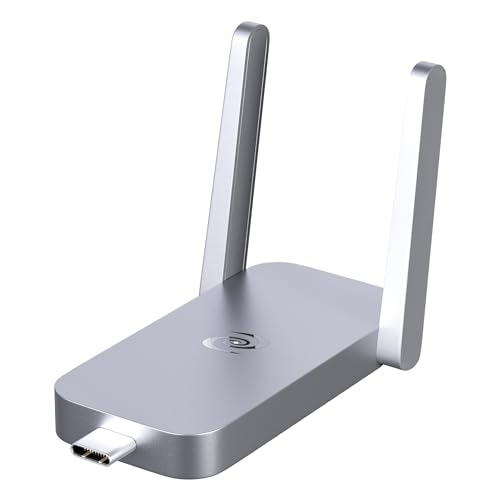
- Lifetime privacy features with no subscription
- Compact plug-and-play setup for travel and remote work
- Ad blocking and basic threat filtering included
Best For: Remote workers and small office users who want portable privacy for light use.
Best Multi-Gig WAN
TP-Link ER707-M2 Omada VPN Router

- Dual 2.5GbE WAN support
- High session and client capacity
- Omada cloud-managed VPN features
Best For: Small offices that need multi-gig WAN flexibility and centralized VPN management.
Best for Easy Setup

- Wi‑Fi 6 AX1800 performance for everyday office use
- Easy Mesh, VPN support, and gigabit ports
- Simple fit for small teams and mixed device loads
Best For: Small offices that want an easy-to-manage Wi‑Fi 6 router with good coverage.
Best for Comfort
Cudy Gigabit Multi-WAN VPN Router R700

- 4 WAN ports with load balancing
- WireGuard, OpenVPN, and IPsec support
- SMB firewall for office network security
Best For: Small offices that need internet backup, VPN access, and simple network security.
Best for Wi‑Fi 6E Performance
TP-Link Archer AXE75 WiFi 6E Router

- Tri-band Wi‑Fi 6E with a fast 6GHz band
- 2.5Gbps WAN port for higher-speed internet plans
- VPN support and WPA3 security for small office use
Best For: Small offices that want fast, low-latency Wi‑Fi with modern security and VPN support.
Best for Secure Multi-WAN
ASUS ExpertWiFi EBG15 Gigabit VPN Router

- Up to 3 WAN ports with load balancing
- Business security with IPS and Layer 7 firewall
- USB backup WAN for added connection stability
Best For: Small offices that need secure wired networking, multi-WAN load balancing, and simple remote management.
Best for Multi-WAN Failover – TP-Link ER605 V2 Wired Gigabit VPN Router
The TP-Link ER605 V2 is a practical pick for routers for small business offices that need dependable wired networking, VPN support, and flexible internet redundancy without paying for a full enterprise stack. With up to 3 WAN Ethernet ports plus 1 USB WAN, it’s built to keep a small office online and balanced across multiple connections.
Best For: Small offices that want affordable multi-WAN failover, simple centralized management, and a solid security-focused wired router.
Pros:
- Supports multiple WAN connections for load balancing and backup internet
- Omada SDN integration makes it easier to manage in a business network
- Gigabit wired ports and SPI firewall suit everyday office traffic
- Lightning protection adds a useful durability safeguard
Cons:
- No built-in Wi-Fi, so you’ll need access points for wireless coverage
- Best suited to users comfortable with router/network setup
For offices that care more about uptime, control, and wired reliability than all-in-one convenience, the ER605 V2 is a strong fit. It stands out among routers for small business offices when multi-WAN support and centralized management matter most.
Best for Multi-Gig Upgrades – NETGEAR Nighthawk RS200 WiFi 7 Router
The NETGEAR Nighthawk RS200 is a strong fit for routers for small business offices that need faster wireless performance, a modern 2.5 Gig port, and broad coverage without stepping up to a full enterprise system. It is a router only, so you’ll need a separate modem if your internet service requires one.
Best For: Small offices with multi-gig internet plans, lots of connected devices, and a need for dependable WiFi 7 speed.
Pros:
- WiFi 7 speeds up to 6.5 Gbps for heavier office traffic
- Coverage up to 2,500 sq. ft. and support for up to 80 devices
- 2.5 Gig internet port for newer cable or fiber plans
- Compact design with free expert help
Cons:
- Router only; it does not include a built-in cable modem
- To use multi-gig service, your modem and plan may also need to support 2.5 Gbps
For offices that want a future-ready wireless upgrade, the RS200 offers a compelling mix of speed, range, and device capacity. It is especially attractive for routers for small business offices that rely on video calls, cloud apps, and many connected endpoints.
Best for Multi-WAN Flexibility – TP-Link ER7206 Omada VPN Router
The TP-Link ER7206 is a strong fit for small offices that want more control over internet redundancy, VPN access, and basic network security. Among routers for small business offices, it stands out for its multi-WAN design, Omada SDN integration, and high VPN capacity without moving into complex enterprise pricing.
Best For: Small teams that need a wired business router with load balancing, VPN support, and centralized management through Omada.
Pros:
- Up to four WAN ports for load balancing and failover flexibility
- Supports a large VPN mix, including IPsec, OpenVPN, L2TP, and PPTP
- Omada SDN support enables centralized cloud or controller-based management
- Built-in firewall and filtering tools add practical security for office networks
Cons:
- Wired router only, so it needs separate access points for Wi-Fi
- Omada features are most useful if you plan to use the broader TP-Link ecosystem
- Advanced setup may be more involved than a simple plug-and-play router
For small businesses that value uptime and manageability, the ER7206 is a smart middle ground between consumer gear and heavier enterprise hardware. If you’re comparing routers for small business offices, this one is especially appealing when VPN access, WAN backup, and centralized control matter more than built-in wireless.
Best Portable Privacy Router – Deeper Connect Air Portable WiFi Router
If you need a compact networking option that adds privacy features on the road, the Deeper Connect Air is a niche pick to consider among routers for small business offices. It is better suited to solo work, travel, and light device loads than to a full office setup, but its built-in VPN, ad blocking, and plug-and-play hotspot use make it appealing for secure everyday connectivity.
Best For: Solo remote workers, frequent travelers, and small office users who want portable privacy protection for light internet use.
Pros:
- Built-in lifetime VPN-style privacy with no subscription required
- Compact and easy to use for hotel, café, or public Wi‑Fi
- Ad blocking and basic threat filtering add a layer of protection
Cons:
- Not designed to replace a traditional office router for heavier workloads
- Best performance is limited to 1–3 small devices
For routers for small business offices, this model makes the most sense as a portable privacy layer rather than a primary network hub. If your priority is secure browsing, quick setup, and keeping a few devices protected while working remotely, it offers a useful specialist feature set.
Best Multi-Gig WAN – TP-Link ER707-M2 Omada VPN Router
If you need routers for small business offices that can handle faster internet plans and multiple users at once, the TP-Link ER707-M2 is built around multi-gig connectivity, centralized Omada cloud management, and a strong VPN feature set. It’s a practical fit for teams that want business-grade control without moving into a full enterprise appliance.
Best For: Small offices that need dual 2.5GbE WAN capacity, VPN support, and Omada-managed network control.
Pros:
- Dual 2.5GbE WAN options plus additional Gigabit and SFP ports for flexible uplinks
- Supports up to 500,000 concurrent sessions and 1000+ clients for growing offices
- Strong VPN support with IPsec, OpenVPN, L2TP, and PPTP connectivity
- Omada SDN integration enables centralized cloud management across sites
Cons:
- Best suited to users already invested in the Omada ecosystem
- Advanced features may be more than a very small office needs
- USB LTE backup requires compatible dongle support
Overall, the ER707-M2 stands out among routers for small business offices that need multi-gig headroom, remote management, and secure site-to-site or remote-access VPN capability. It’s a strong choice when your network is growing faster than a typical consumer router can handle.
Best for Easy Setup – TP-Link AX1800 WiFi 6 Router
If you want a straightforward upgrade among routers for small business offices, the TP-Link Archer AX21 V5 delivers Wi‑Fi 6 speeds, broad device support, and solid coverage without a complicated setup process. It’s a practical fit for teams that need dependable everyday internet for browsing, video calls, cloud apps, and light streaming.
Best For: Small offices that want an easy-to-manage Wi‑Fi 6 router with good coverage and room for multiple users.
Pros:
- Wi‑Fi 6 with AX1800 speeds helps improve performance and reduce congestion
- OFDMA and Beamforming support multiple devices and better range
- Gigabit ports, Easy Mesh, and VPN server support add flexibility
- Works with most major ISPs and includes expert support
Cons:
- Dual-band only, so there’s no 6 GHz band
- Not ideal for larger offices with heavier network demands
For small teams that need a reliable, affordable networking upgrade, this router covers the core basics well. It’s especially appealing if you’re comparing routers for small business offices and want a balance of simple setup, modern Wi‑Fi 6 features, and enough capacity for everyday work.
Best for Comfort – Cudy Gigabit Multi-WAN VPN Router R700
If you need a practical, security-minded pick among routers for small business offices, the Cudy R700 stands out for its four WAN ports, load balancing, and VPN support. It’s a solid fit for teams that want flexible internet redundancy and remote access features without moving into enterprise-only pricing.
Best For: Small offices that want multi-WAN backup, basic firewall protection, and VPN connectivity for shared business internet.
Pros:
- 4 WAN ports with load balancing for better uptime and traffic distribution
- Supports WireGuard, OpenVPN, and IPsec for secure remote access
- Includes SMB-oriented firewall and office network security features
- Useful for small teams that need flexible wired internet failover
Cons:
- Not a Wi-Fi router, so you’ll need separate access points for wireless coverage
- May be more feature-rich than very small offices need
For buyers comparing routers for small business offices, the Cudy R700 is appealing because it emphasizes resilience and VPN tools over consumer extras. If your priority is keeping the office online and segmenting access cleanly, it’s a strong networking foundation.
Best for Wi‑Fi 6E Performance – TP-Link Archer AXE75 WiFi 6E Router
If you need one of the faster routers for small business offices, the TP-Link Archer AXE75 is a strong fit thanks to its tri-band Wi‑Fi 6E design, 2.5Gbps WAN port, and support for many connected devices. It’s a practical choice for teams that want better speed, lower latency, and reliable coverage for everyday work, video calls, and cloud apps.
Best For: Small offices that want a fast Wi‑Fi 6E router with room for multitasking, secure VPN use, and future-proof connectivity.
Pros:
- Tri-band Wi‑Fi 6E adds the 6GHz band for faster, less congested connections
- 2.5Gbps WAN port and 160MHz support help unlock higher-speed internet plans
- OFDMA, dual-core processing, and strong RAM improve performance with multiple users
- VPN server/client support and WPA3 security suit business networking needs
Cons:
- Coverage may still require a mesh extender in larger office layouts
- Most internet providers still require a separate modem
- Security and advanced controls are more basic unless you use paid HomeShield features
Overall, the Archer AXE75 stands out among routers for small business offices that prioritize speed and responsiveness over full enterprise features. It’s a solid middle-ground option for compact workplaces that want modern wireless performance without jumping to a much more expensive business-class system.
Best for Secure Multi-WAN – ASUS ExpertWiFi EBG15 Gigabit VPN Router
The ASUS ExpertWiFi EBG15 is a practical choice for routers for small business offices that need wired reliability, stronger network controls, and flexible internet failover. With up to three WAN Ethernet ports, USB backup WAN support, and business-focused security tools, it’s built for offices that want stable connectivity without jumping to a complex enterprise setup.
Best For: Small offices that need secure wired networking, multi-WAN load balancing, and simple remote management.
Pros:
- Up to 3 WAN Ethernet ports plus USB backup WAN for better uptime
- AiProtection Pro, IPS, and Layer 7 firewall features for stronger security
- VLAN support helps segment office traffic and improve network control
- App and browser setup make it easier to manage remotely
Cons:
- Wired-only design means you’ll need separate access points for Wi-Fi
- More advanced features may be more than very small teams need
- Best results depend on the rest of the network hardware and ISP setup
Overall, the EBG15 stands out among routers for small business offices that prioritize security, failover options, and easy admin tools over built-in wireless. If your team needs a dependable wired gateway that can scale with switches and access points, this is a smart business-first pick.
How We Picked These Routers for Small Business Offices
We prioritized models that fit real office needs: dependable wired throughput, multiple WAN options for failover or load balancing, business-friendly security tools, and easy network management. We also looked for models that make sense for smaller teams that may not have a dedicated IT staff.
Quick Comparison of the Key Differences
The strongest split in this group is between wired VPN routers and Wi‑Fi routers. Wired business models are usually the better fit when you already have access points and want stability, segmentation, and failover control. Wi‑Fi models are better when you need an all-in-one solution for a smaller office or mixed home-office setup.
Key Buying Factors for Routers for Small Business Offices
WAN and Failover Support
If uptime matters, choose a router with at least dual-WAN support. Multi-WAN can keep your internet online if one connection drops and can also help spread traffic across multiple lines.
Security Features
Look for SPI firewall, VPN support, and, where available, intrusion prevention or VLAN-style segmentation. These features help protect point-of-sale systems, workstations, and guest traffic.
Management and Scalability
Business routers are easier to live with when they support centralized management platforms or simple web-based setup. That matters if you may add access points, more users, or additional sites later.
Speed and Port Selection
For Routers for Small Business Offices, match the port and Wi‑Fi standard to your internet plan and devices. Gigabit is still fine for many small teams, but multi-gig ports are worth considering if you expect heavier local transfers or faster broadband service.
Who Should Buy Which Routers for Small Business Offices?
If your office already uses separate access points, a wired multi-WAN VPN router is often the smartest buy. If you need one device to cover a compact workspace, a modern Wi‑Fi 6 or Wi‑Fi 6E router may be the easier choice. Teams that rely on remote access or sensitive data should put security and VPN features near the top of the list.
For most buyers, the best pick is the router that matches your current setup first, then leaves room to grow. That usually means reliable failover, solid admin controls, and enough speed to avoid becoming the bottleneck in your network.