
When it comes to equipping your office with reliable connectivity, choosing the right 24-port network switch is essential. In 2026, several models stand out for their performance and energy efficiency. You’ll find options that not only support Power over Ethernet but also enhance network security. As you consider your choices, you might wonder which models truly deliver on their promises and fit your specific needs. Let’s explore the top contenders.
TP-Link 24 Port Gigabit Ethernet Switch (TL-SG1024S)

If you’re looking for a reliable and efficient network solution for your office, the TP-Link 24 Port Gigabit Ethernet Switch (TL-SG1024S) could be your best choice. With 24 RJ45 ports supporting speeds of 10/100/1000Mbps, it delivers a data transfer rate of 48 Gigabits per second. Its robust metal casing guarantees durability and effective heat dissipation while fitting perfectly in a standard 1U rackmount. Plus, you’ll appreciate its energy efficiency and fanless design for quiet operation. Installation is a breeze with plug-and-play functionality, letting you get connected immediately. Backed by a 3-year warranty, it’s a top-rated choice among users.
Best For: Businesses and offices looking for a reliable, high-performance network switch to support multiple devices with minimal setup.
Pros:
- High-speed performance with 24 ports supporting up to 1000Mbps for efficient data transfer.
- Durable metal casing ensures longevity and effective heat dissipation, suitable for various environments.
- Energy-efficient design with a fanless operation, making it quiet and reducing power consumption.
Cons:
- Limited features compared to more advanced managed switches, which may not suit all networking needs.
- No advanced management options, which could be a drawback for IT professionals looking for more control.
- Weight may be a factor for those needing a lightweight option for mounting or portability.
TP-Link TL-SG1428PE 24 Port Gigabit PoE+ Switch

The TP-Link TL-SG1428PE 24 Port Gigabit PoE+ Switch is an excellent choice for businesses that require robust network capabilities with Power over Ethernet (PoE) support. It features 24 PoE+ ports, offering up to 30W each, and a total power budget of 250W, ideal for powering devices like IP cameras and phones. With two non-PoE Gigabit ports and two SFP slots, you can enjoy high-speed connections. Its web-based management interface makes configuration easy, while VLAN support enhances security. Rated 4.7 stars, this switch is a reliable option for your office, ensuring smooth and efficient network performance.
Best For: Businesses and offices needing a reliable and powerful networking solution with PoE support for devices like IP cameras and VoIP phones.
Pros:
- Easy web-based management for straightforward configuration and monitoring.
- High total power budget of 250W allows for powering multiple PoE devices simultaneously.
- High customer rating of 4.7 stars, indicating strong reliability and performance.
Cons:
- Limited to a maximum of 30W per PoE port, which may not suffice for some high-power devices.
- Requires configuration for auto recovery feature, which might be complex for non-technical users.
- Heavier than some competitors, which may affect installation in certain situations.
TP-Link 24 Port Gigabit Switch (TL-SG1024DE)

For small to medium-sized offices seeking reliable and efficient networking solutions, the TP-Link 24 Port Gigabit Switch (TL-SG1024DE) stands out with its easy smart management features. This switch offers 24 Gigabit ports, guaranteeing fast file transfers and enhanced performance with 9K Jumbo frames. You’ll appreciate its robust metal construction, suitable for desktop or rackmount use. With abundant VLAN options, your network security improves considerably, while IGMP Snooping optimizes multicast applications. Plus, port and tag-based QoS ensures smooth handling of latency-sensitive traffic. Enjoy simple plug-and-play setup, backed by a 3-year warranty and free technical support during business hours.
Best For: Small to medium-sized offices seeking reliable and efficient networking solutions.
Pros:
- Easy smart management features for straightforward network control.
- 24 Gigabit ports enable fast data transfers, ideal for large file handling.
- Robust metal construction ensures durability for desktop or rackmount use.
Cons:
- May be overkill for very small offices or home use.
- Limited advanced features compared to higher-end managed switches.
- Technical support is only available during business hours.
TP-Link 24 Port Gigabit Ethernet Switch

Looking for a reliable solution to boost your office network? The TP-Link 24 Port Gigabit Ethernet Switch (TL-SG1024) is an excellent choice. This unmanaged switch offers a plug-and-play setup, making installation effortless. With 24 10/100/1000M RJ45 ports, you’ll experience fast and efficient connectivity. Its sturdy metal construction guarantees durability, while the fanless design keeps your workspace quiet. Plus, it’s rack-mountable, fitting seamlessly into standard 19-inch racks. You can trust its performance, as it supports full-duplex transfer modes and includes a 3-year manufacturer warranty for peace of mind. Upgrade your network today with this dependable solution!
Best For: Businesses seeking a reliable and efficient networking solution with high-speed connectivity.
Pros:
- Durable Construction: Sturdy metal casing ensures longevity and reliability in various office environments.
- Quiet Operation: Fanless design minimizes noise, making it suitable for quiet workspaces.
- Plug-and-Play Setup: Easy installation with no configuration required, allowing for quick deployment.
Cons:
- Unmanaged Switch: Lacks advanced features and configuration options compared to managed switches.
- Limited Port Count: May not meet the needs of larger networks requiring more than 24 ports.
- No Power over Ethernet (PoE): Does not support PoE, which could limit some networking applications.
NETGEAR 24-Port Gigabit Ethernet Unmanaged Switch (GS324)

With its plug-and-play setup, the NETGEAR 24-Port Gigabit Ethernet Unmanaged Switch (GS324) is an ideal choice for small to medium-sized offices seeking hassle-free connectivity. You’ll appreciate its 24 Gigabit Ethernet ports and compact design, perfect for desktop, wall, or rackmount use. The rugged metal enclosure guarantees durability, while silent, fanless operation keeps your workspace quiet. Plus, features like auto-MDI/MDIX and jumbo packet support optimize your connection speeds. Energy-efficient technology helps you save power, and it comes with a solid 3-year limited hardware warranty. With a 4.6-star rating, it’s clearly a favorite among users.
Best For: Small to medium-sized offices seeking a reliable and easy-to-use networking solution.
Pros:
- Plug-and-play setup allows for simple installation without the need for configuration.
- Rugged metal enclosure ensures durability and longevity in various environments.
- Silent, fanless operation makes it suitable for noise-sensitive workspaces.
Cons:
- Unmanaged switch means no advanced features like VLAN support or traffic management.
- Limited support options may not meet the needs of larger networks requiring extensive troubleshooting.
- No PoE (Power over Ethernet) support, which could limit connectivity options for devices that require power through Ethernet cables.
TP-Link Omada SG3428 24 Port Gigabit Switch

The TP-Link Omada SG3428 24 Port Gigabit Switch stands out as an ideal choice for businesses seeking robust performance and advanced management capabilities. With 24 RJ45 ports and 4 SFP slots, you can easily connect multiple devices while ensuring high-speed connections. Its L2+ smart managed features, including IPv6 support and static routing, enhance your network efficiency. You’ll appreciate the Omada SDN support, which integrates switches, APs, and gateways for seamless management. Plus, advanced security features protect your network, and remote access via the Omada app offers centralized control. With a 5-year warranty, you’ll have peace of mind for your investment.
Best For: Businesses looking for a reliable and advanced network switch with robust management and security features.
Pros:
- High Performance: 24 gigabit ports and 4 SFP slots ensure fast and efficient connectivity for multiple devices.
- Advanced Management: Supports Omada SDN for seamless integration and centralized control of network devices.
- Enhanced Security: Offers multiple advanced security features to protect network integrity.
Cons:
- Cost: May be more expensive than basic unmanaged switches, which could be a consideration for smaller businesses.
- Complex Setup: Initial configuration may be challenging for users without networking experience.
- Limited Support Hours: Technical support is only available during specific hours, which may not suit all users.
Omada 24-Port Gigabit Easy Managed Switch

For businesses seeking seamless connectivity and centralized control, the Omada 24-Port Gigabit Easy Managed Switch stands out as an ideal solution. It offers plug-and-play simplicity, making installation a breeze. With centralized cloud management accessible via the web or the Omada app, you can monitor your network effortlessly. The durable metal casing guarantees longevity, while the fanless design assures silent operation, perfect for any office environment. Featuring automatic loop prevention and IGMP snooping, it enhances network efficiency. Weighing just 4.11 pounds and compact in size, it’s easy to mount on a desktop or rack, delivering reliable performance for all your networking needs.
Best For: Businesses and surveillance systems that require reliable, easy-to-manage network connectivity.
Pros:
- Centralized cloud management allows for easy monitoring and control via web or app.
- Fanless design ensures silent operation, making it suitable for office environments.
- Plug-and-play functionality simplifies installation and setup.
Cons:
- Limited to 24 ports, which may not suffice for larger networks.
- Weight of 4.11 pounds could be considered heavy for some desktop setups.
- Customer reviews indicate a moderate rating of 3.9 out of 5 stars, suggesting potential areas for improvement.
NETGEAR 24 Port PoE Gigabit Switch (GS324P)

If you’re looking for a reliable networking solution that won’t break the bank, the NETGEAR 24 Port PoE Gigabit Switch (GS324P) stands out with its 16 PoE+ ports and a generous power budget of 190W. This unmanaged plug-and-play switch makes setup a breeze—just connect your devices and power them up without any complex configuration. It supports a range of IEEE 802.3at devices like IP cameras and VoIP phones. Plus, with its desktop or rackmount installation options, it fits seamlessly into your office environment. You’ll also enjoy peace of mind with a 3-year limited warranty and energy-efficient performance.
Best For: Small to medium-sized businesses looking for an efficient and budget-friendly networking solution with PoE capabilities.
Pros:
- Plug-and-play design allows for easy setup without any configuration required.
- Generous power budget of 190W supports multiple PoE+ devices, enhancing operational flexibility.
- Desktop or rackmount installation options provide versatility in deployment.
Cons:
- Unmanaged switch may not offer advanced features for network management and monitoring.
- Limited to U.S. and CA compliance, which may not suit international users.
- No advanced security features for network protection compared to managed switches.
TP-Link 16 Port Gigabit Ethernet Network Switch (TL-SG116)

Designed for small to medium-sized offices, the TP-Link 16 Port Gigabit Ethernet Network Switch (TL-SG116) offers a perfect blend of performance and simplicity. With 16 ports supporting data transfer rates of 1000 Mbps, it guarantees reliable connections for all your devices. The plug-and-play design means you can set it up quickly without any software installation. This fanless switch operates quietly and features energy-efficient technology, reducing your power consumption. Plus, it supports various operating systems like Windows, Mac, and Linux. Backed by a 3-year warranty, it’s a solid choice for your networking needs.
Best For: Small to medium-sized offices looking for a reliable and easy-to-use networking solution.
Pros:
- Plug-and-play design allows for quick and hassle-free installation without the need for software.
- Energy-efficient technology helps reduce power consumption, making it an eco-friendly choice.
- Supports multiple operating systems, ensuring compatibility with Windows, Mac, and Linux devices.
Cons:
- Limited advanced features compared to more expensive managed switches, which may be necessary for larger networks.
- No built-in redundancy or failover capabilities, making it less suitable for mission-critical applications.
- Fanless design may lead to overheating in extremely high-temperature environments if not properly ventilated.
NETGEAR 24-Port Gigabit Ethernet Smart Switch (GS724T)
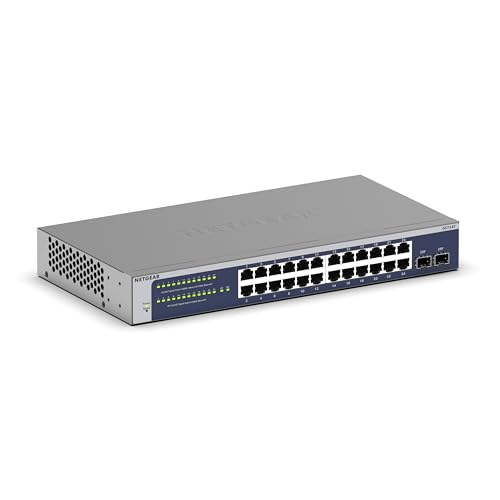
The NETGEAR 24-Port Gigabit Ethernet Smart Switch (GS724T) stands out as an ideal choice for small to medium-sized offices looking for robust network management and efficiency. With 24 Gigabit Ethernet ports and 2 x 1G SFP ports, it offers flexibility and speed. Its smart software provides an easy-to-use interface for secure setups and SNMP management capabilities. You can also manage it remotely with a one-year NETGEAR Insight subscription. It supports desktop or rackmount placement, includes all necessary hardware, and features a lifetime limited warranty with next business day replacement. Plus, it’s energy-efficient and operates quietly, ensuring minimal disruption.
Best For: Small to medium-sized offices seeking a reliable and efficient network management solution.
Pros:
- Easy-to-use smart software allows for secure setups and SNMP management.
- Remote management capability with a one-year NETGEAR Insight subscription.
- Lifetime limited warranty with next business day replacement ensures peace of mind.
Cons:
- Initial setup may require technical knowledge for optimal configuration.
- Optional Insight Cloud Management incurs an additional cost after the first year.
- Limited to 24 ports, which may not be sufficient for larger networks.
Factors to Consider When Choosing a 24 Port Network Switch for Office
When choosing a 24-port network switch for your office, it’s vital to take into account several factors. You’ll want to evaluate the types of ports available, whether the switch supports Power Over Ethernet, and the management features it offers. Additionally, don’t overlook the warranty and support options, as well as energy efficiency standards, to guarantee you make the best choice for your needs.
Port Types Available
Choosing the right port types for your 24-port network switch can greatly impact your office’s connectivity and efficiency. Look for 10/100/1000 Mbps RJ45 ports that support both standard Ethernet and Gigabit connections for fast data transfer. If you plan to use devices like IP cameras or VoIP phones, consider switches with PoE+ ports to simplify installations. Many models also feature Auto MDI/MDIX functionality, which automatically adjusts cable types, eliminating the hassle of crossover cables. Additionally, SFP slots are beneficial for connecting fiber optic cables, extending your network’s reach. Remember to check the total power budget for PoE ports, as it determines how many devices can be powered and their compatibility.
Power Over Ethernet Support
If you want to streamline your office setup, consider a 24-port network switch with Power over Ethernet (PoE) support. This feature allows you to deliver both data and electrical power through the same Ethernet cable, simplifying your cable management and cutting installation costs. With a PoE switch, you can easily power devices like IP cameras, VoIP phones, and wireless access points, eliminating the hassle of needing separate power sources. Be mindful of the PoE standards; for instance, IEEE 802.3af provides up to 15.4W per port, while IEEE 802.3at (PoE+) offers up to 30W. Verify your switch has a sufficient total power budget, like 250W, to support multiple devices without overloading. Plus, centralized power management boosts energy efficiency.
Management Features Offered
Understanding the management features offered by a 24-port network switch is essential for enhancing your office network. Managed switches provide advanced capabilities, like VLAN support, which helps you segment traffic and improve security. You’ll appreciate features such as SNMP (Simple Network Management Protocol), allowing you to efficiently monitor and manage your network’s performance and health. Many managed switches also come with web-based management interfaces, making configuration and monitoring straightforward from any browser. Additionally, auto recovery functions can detect and reboot unresponsive PoE devices, ensuring your network remains stable. Some models even support centralized cloud management, giving you remote access and control over your network devices from anywhere, making it easier to maintain peak performance.
Warranty and Support Options
When evaluating a 24-port network switch for your office, warranty and support options play an essential role in your decision-making process. A robust warranty period of 3 to 5 years guarantees long-term reliability for your investment. Make sure the manufacturer provides free technical support during business hours, so you can get help with troubleshooting or configuration issues. Consider brands that offer next business day replacement services to minimize downtime if hardware fails. Additionally, check for thorough support resources like online documentation and FAQs to facilitate problem-solving. Finally, customer ratings and reviews can give you valuable insights into the effectiveness of the warranty and support services for specific switch models.
Energy Efficiency Standards
Choosing a 24-port network switch that meets energy efficiency standards can greatly impact your office’s operational costs. Look for switches compliant with IEEE 802.3az, which helps reduce power consumption during low data traffic periods. Many modern switches automatically adjust power usage based on active ports and connected devices, enhancing energy efficiency. A fanless design is another great feature, as it reduces power needs for cooling while minimizing noise in your workspace. Additionally, switches with Auto MDI/MDIX eliminate the need for crossover cables, ensuring ideal power use. By selecting an energy-efficient switch, you’ll benefit from significant cost savings over time, thanks to lower electricity consumption and reduced operational expenses.
Physical Size and Design
Physical size and design play an essential role in selecting a 24-port network switch for your office. You’ll find that these switches come in various dimensions, with standard rackmount options typically measuring around 17.3 inches long and 1.7 inches high. If space is tight, consider a compact desktop model, while rackmount switches may need extra hardware for installation. The weight can range from about 2.86 to over 6 pounds, so make sure your mounting surface can support it. Look for metal casings that enhance durability and aid in heat dissipation, especially in warmer environments. Finally, consider whether you want a fanless design to minimize noise in sensitive areas, as this can greatly impact your office’s atmosphere.
Installation and Setup Ease
Installation and setup ease can make a significant difference in how quickly your office network becomes operational. Look for switches that offer plug-and-play functionality, allowing you to get started right away without software installation. Features like auto-negotiation and auto MDI/MDIX simplify the process by automatically detecting the best connection type, so you won’t need crossover cables. Evaluate whether the switch’s physical design suits your office space—desktop or rackmount options might be important for you. Choose devices with user-friendly management interfaces or web-based configuration utilities to streamline setup and management. Finally, fanless designs not only operate silently but also simplify installation by reducing cooling requirements. Prioritizing these factors will lead to a smoother setup experience.