
If you’re looking to boost connectivity and efficiency in your office, choosing the right PoE network switch is essential. With so many options on the market, you might find it challenging to pinpoint the best fit for your specific needs. From compact models to high-capacity solutions, these switches not only provide power to your devices but also enhance overall network performance. Let’s explore some of the top contenders that could transform your office setup.
TP-Link LS108GP 8 Port PoE Gigabit Ethernet Switch

If you’re looking for a reliable and efficient network switch for your office, the TP-Link LS108GP 8 Port PoE Gigabit Ethernet Switch is an excellent choice. With eight PoE+ ports, it delivers up to 30W per port, ensuring your devices stay powered. Its switching capacity reaches 16 Gbps, making data transfers seamless. Plus, the plug-and-play setup means you can connect it instantly without any hassle. Ideal for quiet environments, its fanless design operates silently. Weighing just 1.48 pounds, you can easily mount it on a desk or wall. Enjoy peace of mind with its impressive customer rating of 4.7 stars!
Best For: Small to medium-sized offices seeking a reliable and efficient network switch with Power over Ethernet capabilities.
Pros:
- Easy Setup: Plug-and-play design allows for instant connectivity without configuration.
- Silent Operation: Fanless design ensures quiet performance, perfect for noise-sensitive environments.
- High Performance: 8 PoE+ ports provide ample power and a switching capacity of up to 16 Gbps for seamless data transfers.
Cons:
- Limited PoE Power Budget: Total PoE power budget of 65W may not support multiple high-power devices simultaneously.
- Temperature Limits: Maximum operating temperature of 40 degrees Celsius may restrict placement options in warm environments.
- No Advanced Features: Lacks management features found in more advanced switches, which may be necessary for larger networks.
NETGEAR 8 Port PoE Gigabit Ethernet Switch (GS308EP)

The NETGEAR 8 Port PoE Gigabit Ethernet Switch (GS308EP) is an excellent choice for businesses looking to streamline their network with ease. With eight Gigabit Ethernet and PoE+ ports, it supports devices like VoIP phones and IP cameras effortlessly. The Easy Smart Managed Essentials software lets you manage and monitor your network simply, guaranteeing optimized performance. Its compact design allows for desktop or wall mounting, while the 62W power budget ensures you can power multiple devices without hassle. Rated 4.7 out of 5 stars by over 2,000 users, it’s a reliable option for enhancing your office connectivity.
Best For: Businesses seeking to enhance their network infrastructure with reliable PoE support for devices like VoIP phones and IP cameras.
Pros:
- Easy Smart Managed Essentials software simplifies network management and monitoring.
- Compact design allows for versatile installation options, including desktop and wall mounting.
- High customer satisfaction with a rating of 4.7 out of 5 stars from over 2,000 reviews.
Cons:
- Limited to a total power budget of 62W, which may not be sufficient for larger setups.
- Plastic casing may not provide the same durability as metal alternatives.
- Advanced features may be limited compared to fully managed switches.
TP-Link TL-SG1428PE 24 Port Gigabit PoE+ Switch

For offices looking to streamline their network setup, the TP-Link TL-SG1428PE 24 Port Gigabit PoE+ Switch stands out with its 24 PoE+ ports, each delivering up to 30W of power. It features a total power budget of 250W, ensuring reliable device performance. With an easy web-based management interface, you can configure and secure your network effortlessly. The VLAN capabilities enhance security through traffic segmentation, while the auto recovery function helps reboot unresponsive devices automatically. Weighing just 3.1 kg, this switch is compact yet powerful, making it a top choice for efficient office connectivity. Plus, it comes with a 3-year warranty.
Best For: Offices looking for a reliable and efficient network solution with PoE capabilities for powering devices.
Pros:
- 24 PoE+ ports provide ample power for devices like IP cameras and phones.
- Easy web-based management interface allows for simple configuration and monitoring.
- Automatic recovery feature reboots unresponsive devices, minimizing downtime.
Cons:
- Limited to 250W power budget, which may not suffice for high-demand setups.
- Weight of 3.1 kg may be considered heavy for wall mounting.
- VLAN configuration may require some networking knowledge for optimal use.
Yuanley 24 Port PoE Switch (Unmanaged, 400W Power)

With its 400W power budget and 24 PoE+ ports, the Yuanley 24 Port PoE Switch is an excellent choice for small to medium-sized offices that need reliable and efficient connectivity for multiple devices. This unmanaged switch offers a simple plug-and-play setup, so you won’t waste time on configurations. With support for VLAN isolation, you can enhance security and manage traffic more effectively. Its robust design includes an industrial fan for ideal heat dissipation, ensuring reliable performance even at temperatures up to 55 degrees Celsius. Rated 4.4 stars by users, it’s perfect for IP cameras, access points, and more.
Best For: The Yuanley 24 Port PoE Switch is best for small to medium-sized offices requiring efficient and reliable network connectivity for multiple devices.
Pros:
- Easy Installation: Plug-and-play design eliminates the need for complicated configurations.
- VLAN Support: Enhances security and traffic management with VLAN isolation capabilities.
- High Power Budget: 400W power budget allows sufficient power delivery to devices like IP cameras and access points.
Cons:
- Unmanaged Switch: Lack of advanced features may limit control over network settings.
- Maximum Operating Temperature: May not be suitable for environments exceeding 55 degrees Celsius.
- Weight: At 2.04 kg, it may be heavier than some alternatives, potentially affecting installation options.
Linksys LGS116P 16 Port Gigabit PoE Network Switch

Ideal for small to medium-sized businesses, the Linksys LGS116P 16 Port Gigabit PoE Network Switch offers eight PoE+ ports, making it perfect for powering devices like IP cameras and wireless access points directly through the Ethernet cable. With a power budget of 80W, you can efficiently manage your connected devices. It supports wired transfer speeds up to 1,000 Mbps and boasts a non-blocking bandwidth of 32 Gbps. The durable metal housing allows for desktop or wall mounting, fitting seamlessly into your office environment. Plus, it’s backed by positive customer ratings, ensuring reliability for your networking needs.
Best For: Small to medium-sized businesses looking for an efficient and reliable network switch to power devices like IP cameras and wireless access points.
Pros:
- Supports up to 8 PoE+ ports with a power budget of 80W, ideal for powering multiple devices.
- Offers high-speed wired transfer rates of up to 1,000 Mbps and a non-blocking bandwidth of 32 Gbps for smooth data transfer.
- Durable metal housing allows for flexible installation options, including desktop or wall mounting.
Cons:
- Being an unmanaged switch, it lacks advanced features for network configuration and management.
- Limited to a maximum power budget, which may not suffice for setups requiring higher power for multiple devices.
- No return policy after 30 days, which may be a concern for customers wanting to test the product extensively.
24 Port PoE Ethernet Switch (Unmanaged)

If you’re looking for a reliable solution to power multiple devices in your office without the hassle of extra power cables, the 24 Port PoE Ethernet Switch (Unmanaged) is your top choice. With 24 PoE+ ports and a power budget of 280W, you can efficiently support devices up to 30W each. Its fanless design guarantees quiet operation, while the compact metal housing makes it perfect for any environment. Plug-and-play setup means you won’t deal with complicated configurations. Plus, with PD detection, it automatically allocates power to your devices, enhancing connectivity and efficiency seamlessly.
Best For: Businesses and offices looking to power multiple devices efficiently without the need for additional power cables.
Pros:
- Easy Installation: Plug-and-play setup with no software or configuration needed.
- Quiet Operation: Fanless design ensures silent performance, making it ideal for office environments.
- Automatic Power Allocation: PD detection feature automatically allocates power to connected devices for enhanced efficiency.
Cons:
- Unmanaged Switch: Lacks advanced management features for network monitoring and control.
- Limited Speed: Data transmission speed is reduced to 10Mbps when using the extend function.
- Weight: At 2.39 kg, it may be heavier compared to some competing models.
NETGEAR 16-Port PoE+ Gigabit Ethernet Switch (GS316P)

The NETGEAR 16-Port PoE+ Gigabit Ethernet Switch (GS316P) is perfect for small to medium-sized offices that require reliable power and data connectivity. With 16 Gigabit Ethernet and PoE+ ports, it offers a total power budget of 115W, ensuring your devices stay powered. Installation is a breeze—just plug it in, and you’re ready to go, with no software needed. Its energy-efficient design complies with IEEE802.3az, while the silent operation makes it ideal for noise-sensitive environments. Plus, you’ll benefit from a 3-year limited hardware warranty, ensuring peace of mind. This switch is exclusively compatible with U.S. and Canadian markets.
Best For: Small to medium-sized offices seeking reliable power and data connectivity without complex setup requirements.
Pros:
- 16 Gigabit Ethernet and PoE+ ports ensure ample connectivity options for multiple devices.
- Energy-efficient design compliant with IEEE802.3az helps to reduce power consumption.
- Plug-and-play installation eliminates the need for software, making it user-friendly.
Cons:
- Limited compatibility as it is only designed for use in the U.S. and Canada.
- Unmanaged switch may not offer advanced features like VLAN support or traffic management.
- Total power budget of 115W might not be sufficient for high-demand devices if all ports are in use.
NETGEAR 5-Port PoE Gigabit Ethernet Switch (GS305P)

For small offices looking to enhance their network capabilities without the hassle of complex setups, the NETGEAR 5-Port PoE Gigabit Ethernet Switch (GS305P) is a fantastic choice. It features five Gigabit Ethernet ports, including four PoE+ ports that provide a total power budget of 63W. The plug-and-play setup allows you to get connected quickly, with no software installation required. Its energy-efficient design complies with IEEE802.3az, ensuring silent operation—perfect for noise-sensitive environments. Plus, with a three-year limited hardware warranty, you’ll have peace of mind knowing support is readily available if needed.
Best For: Small offices seeking an easy-to-install network solution with Power over Ethernet capabilities.
Pros:
- Plug-and-play setup allows for quick and hassle-free installation without any software.
- Energy-efficient design compliant with IEEE802.3az, ensuring lower power consumption and silent operation.
- Includes a 3-year limited hardware warranty for reliable support and peace of mind.
Cons:
- Limited to U.S. & CA compatibility, which may restrict use in other regions.
- Unmanaged switch may not offer advanced features like VLAN support or traffic management.
- Only four PoE+ ports, which may not be sufficient for extensive PoE device deployments.
BV-Tech 6 Port PoE+ Switch
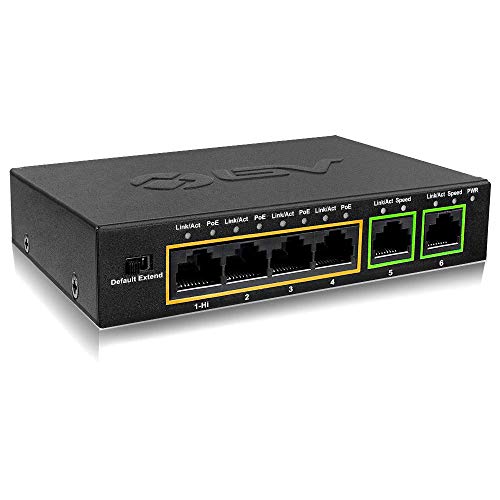
Looking for a reliable and compact solution to power your office devices? The BV-Tech 6 Port PoE+ Switch is an unmanaged switch that fits perfectly on your desktop. With a sturdy, fanless design, it offers 60W of total PoE power across four PoE+ ports. Each of these ports can deliver up to 30W, while the high-power port provides up to 60W. Plus, its extend function allows you to increase transmission distance to 250 meters. With a 4.6-star rating and a 30-day satisfaction guarantee, this switch is a solid choice for enhancing your office’s connectivity and efficiency.
Best For: Small to medium-sized offices looking for an efficient and compact PoE solution to power multiple devices.
Pros:
- Compact and sturdy design: The fanless, metal housing makes it suitable for desktop use without taking up much space.
- High total PoE power: With 60W available, it can efficiently power multiple devices simultaneously.
- Extended transmission distance: The extend function allows for PoE transmission up to 250 meters, ideal for larger setups.
Cons:
- Unmanaged switch limitations: As an unmanaged switch, it lacks advanced features for traffic management and network monitoring.
- Reduced data speed in extend mode: When using the extend function, data transmission speed is reduced to 10Mbps.
- Limited port options: With only 6 ports, it may not suffice for larger networks requiring more connections.
UGREEN 10-Port PoE Ethernet Switch

Designed specifically for security camera systems, the UGREEN 10-Port PoE Ethernet Switch offers robust power management and high-speed connectivity that meet the demands of modern office environments. With eight PoE+ ports delivering up to 30W each and two gigabit uplink ports, you’ll enjoy seamless data transmission. Its intelligent power management automatically prioritizes power distribution, ensuring efficient operation. Plus, features like PoE Auto Recovery and multiple operational modes, including Extend Mode for long-range coverage, make troubleshooting easy. Compact and durable, this switch excels in enhancing your office’s networking capabilities while maintaining a user-friendly setup.
Best For: The UGREEN 10-Port PoE Ethernet Switch is best for businesses and organizations that require reliable and efficient power distribution for security camera systems and other PoE devices.
Pros:
- High Power Output: Each of the eight PoE+ ports can deliver up to 30W, supporting a variety of devices.
- Intelligent Power Management: Automatically prioritizes power distribution and features PoE Auto Recovery for enhanced device reliability.
- Multiple Operational Modes: Offers flexibility with Standard, VLAN, and Extend modes, catering to different networking needs.
Cons:
- Limited Power Budget: The total power budget of 60W may restrict the number of high-power devices that can be connected simultaneously.
- Weight: At 1.79 pounds, it may be heavier compared to other lightweight networking switches.
- VLAN Isolation Complexity: While beneficial for management, VLAN settings may require additional configuration knowledge for optimal use.
Factors to Consider When Choosing a Poe Network Switch for Office
When choosing a PoE network switch for your office, you’ll want to take into account several key factors. Think about the power budget capacity, the number and types of ports you need, and any management features that could benefit your setup. Don’t forget to check the installation ease and verify the switch is compatible with your existing devices.
Power Budget Capacity
Understanding the power budget capacity of a PoE network switch is crucial, as it directly impacts the performance and reliability of your office’s connected devices. The power budget determines the total wattage available for all your PoE devices. Each PoE+ port can deliver up to 30W, so if you have multiple ports in use, the total budget must accommodate the combined wattage of active devices. Confirm this budget exceeds the power needs of all connected devices to avoid downtime or failure. Some switches offer intelligent power management, prioritizing power distribution when the budget is limited. A higher power budget grants you flexibility, allowing you to connect power-hungry devices like IP cameras or access points without hitting capacity limits.
Port Count and Types
Choosing the right PoE network switch for your office involves considering the number of ports and their types to meet your needs. Options typically range from 5 to 28 ports, so assess how many devices you’ll connect. Guarantee the switch has enough PoE+ ports, as these provide up to 30W each—vital for powering IP cameras and VoIP phones. Don’t forget to evaluate the total PoE power budget, which usually ranges from 60W to 400W. A mix of PoE and non-PoE ports offers flexibility for future growth, allowing you to connect both powered and non-powered devices. Finally, opt for Gigabit Ethernet ports (1 Gbps) to guarantee high data transfer rates and efficient performance in your office setup.
Management Features Available
While evaluating PoE network switches for your office, consider the management features that can greatly enhance your network’s performance and reliability. Smart managed switches, like those with Easy Smart Managed Essentials software, provide essential management, configuration, security, and monitoring capabilities. VLAN features allow you to segment traffic, improving security by isolating different data types. Look for switches with Auto Recovery functionality that can automatically reboot unresponsive PoE devices, minimizing downtime. Intelligent power management is another key feature, automatically cutting power to lower-priority ports when the power budget is exceeded. Finally, advanced switches offer operational modes such as Standard, VLAN, and Extend, allowing you to tailor performance to your specific needs for improved efficiency.
Installation and Setup Ease
When selecting a PoE network switch for your office, the ease of installation and setup can greatly impact your overall experience. Look for switches that offer plug-and-play installation, allowing you to connect devices immediately without complex configurations. Consider models with mounting options like desktop or wall mount, which can simplify integration into your office space. Choosing a fanless switch is ideal for noise-sensitive areas, guaranteeing a quiet work environment. Additionally, opt for switches that support PoE auto recovery features, automatically rebooting unresponsive devices to minimize manual intervention. Finally, check the dimensions and weight specifications to verify the switch fits comfortably within your intended installation area, making your setup process smoother and more efficient.
Device Compatibility Requirements
To guarantee seamless operation in your office, it’s essential to take into account device compatibility requirements when selecting a PoE network switch. First, verify the switch supports the PoE standards your devices need, like IEEE 802.3af for standard PoE or IEEE 802.3at for PoE+, which delivers up to 30W per port. Next, check the total power budget to confirm it can power all connected devices without exceeding limits. You’ll also need to verify the number of PoE ports available to accommodate current and future devices. Don’t forget to assess data transfer rates; Gigabit Ethernet speeds are vital for peak performance. Finally, consider management capabilities, as some devices may need advanced features for effective network management and security.
Cooling and Noise Levels
Selecting the right PoE network switch goes beyond device compatibility; cooling and noise levels are also key factors. In noise-sensitive environments, consider fanless designs that operate silently. If your office tends to get warm, look for high-temperature rated switches that can handle up to 40 degrees Celsius or more, as this impacts cooling efficiency. The material matters too; metal casings typically manage heat better than plastic ones. Opt for switches with built-in heat dissipation features, like industrial fans or vents, to maintain ideal temperatures during extended use. Finally, verify the switch is energy-efficient and compliant with standards like IEEE802.3az to reduce heat generation and extend its lifespan. Your office environment will benefit greatly from these considerations.
Warranty and Support Options
While evaluating PoE network switches, warranty and support options can greatly influence your decision. Consider the warranty duration; longer warranties often reflect the manufacturer’s confidence in their product’s reliability. Look for switches that offer thorough support, like technical assistance via phone or email, to help you troubleshoot issues during installation or operation. It’s also wise to evaluate the return policy, especially for new products, ensuring you can get a full refund or replacement if needed. Check for any additional services included with the warranty, such as free technical support, which can be invaluable for ongoing maintenance. Finally, investigate customer feedback regarding warranty claims and support experiences to gauge the manufacturer’s responsiveness and effectiveness.