
When it comes to optimizing your business’s labeling processes, the right barcode label printer can make all the difference. With so many models available, you need options that are reliable, efficient, and tailored to your specific needs. From advanced connectivity to high-speed printing, these printers offer features designed to enhance productivity. Curious about which printers stand out in 2026? Let’s explore the top choices that can elevate your operations.
Brother P-touch PT-D610BT Label Maker
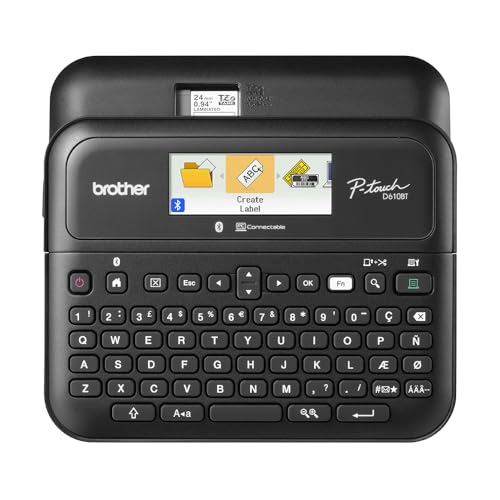
The Brother P-touch PT-D610BT Label Maker is perfect for busy professionals who need efficient labeling solutions in fast-paced environments. With Bluetooth and USB connections, you can easily create and print labels from your computer or mobile device, accommodating multiple users seamlessly. Enjoy 17 fonts, 17 styles, and 900 symbols to craft custom labels up to 1 inch wide. Its large LCD display helps you preview labels for accuracy, while built-in memory stores up to 90 frequently used labels for quick reprints. Plus, access 175 business-specific templates for asset management, ensuring your organization stays on track and professional.
Best For: Busy professionals and teams needing efficient and customizable labeling solutions in dynamic business environments.
Pros:
- Bluetooth and USB connectivity allows for easy label creation from various devices.
- Large LCD display provides a clear preview of labels, ensuring accuracy before printing.
- Built-in memory stores frequently used labels for quick reprinting, enhancing productivity.
Cons:
- Limited to labels up to 1 inch wide, which may not suit all labeling needs.
- Customization options may require additional software, which could be an extra step for some users.
- Initial setup and learning curve for new users may take time to get accustomed to the features.
Phomemo M110 Bluetooth Label Maker

For small business owners looking to streamline their labeling process, the Phomemo M110 Bluetooth Label Maker stands out with its portable design and versatile printing capabilities. This compact thermal printer connects easily to your mobile device via Bluetooth, allowing you to print clothing, address, barcode, and sticker labels from a range of templates. With a label width of 20mm to 50mm, it’s perfect for quick, self-adhesive labels—ideal for busy seasons. Plus, its OCR feature converts images to editable text in seconds. For best results, use Phomemo-branded thermal paper to guarantee clear, reliable prints every time.
Best For: Small business owners looking for an efficient and portable labeling solution.
Pros:
- Easy Bluetooth connectivity for quick pairing with mobile devices.
- Multiple label templates and custom label creation for various applications.
- OCR feature allows for fast text recognition from images, enhancing productivity.
Cons:
- Not suitable for shipping labels, limiting its use for certain businesses.
- Requires Phomemo-branded thermal paper for optimal performance, which may increase operational costs.
- Limited to a maximum printable width of 48mm, which may not accommodate larger labels.
Westinghouse Thermal Shipping Label Printer (USB, 4×6)

Ideal for personal and small business use, the Westinghouse Thermal Shipping Label Printer stands out with its USB connectivity and compatibility across major shipping platforms like USPS, UPS, and Amazon. It prints labels at a speedy 6 inches per second with a sharp 203 DPI resolution, ensuring your text and graphics are clear. You’ll appreciate its versatility, supporting fanfold labels and rolls up to 4.25 inches wide. While it’s not Bluetooth-capable, it works seamlessly with Windows, macOS, and Linux. Plus, it comes with starter labels and essential accessories to get you started right away.
Best For: The Westinghouse Thermal Shipping Label Printer is best for personal users, small businesses, and eCommerce sellers looking for efficient and high-quality label printing.
Pros:
- High-speed printing: Delivers labels at a rapid speed of 6 inches per second.
- Sharp print quality: Offers a print resolution of 203 DPI for clear text and graphics.
- Versatile media support: Compatible with both fanfold labels and rolls up to 4.25 inches wide.
Cons:
- No Bluetooth capability: Limited to USB connectivity, which may restrict placement options.
- Ethernet speed limitations: Only supports router speeds under 1GHz for network connectivity.
- Additional purchases required: USB-C cable and adapter sold separately, which may increase initial setup costs.
CLABEL Thermal Barcode Printer for Small Business
Designed specifically for small businesses, the CLABEL Thermal Barcode Printer offers a cost-effective solution for all your labeling needs. With Bluetooth and USB connectivity, it supports various label sizes from 0.98″ to 1.96″. You can save money by using any brand of thermal paper, avoiding pricey proprietary options. This printer excels in creating address labels, barcodes, gift tags, and more for both workplace and home. The user-friendly Clabel app lets you set up in minutes, providing ready-to-use templates and custom designs. Plus, its Direct Thermal Technology guarantees high-quality, inkless printing for professional results every time.
Best For: Small businesses looking for a versatile and cost-effective labeling solution that supports various applications.
Pros:
- Cost-efficient: Eliminates the need for expensive proprietary label paper, allowing the use of any brand of thermal paper.
- Versatile applications: Ideal for creating a wide range of labels including address labels, barcodes, and gift tags for both workplace and home use.
- User-friendly app: Quick setup with ready-to-use templates and custom design options available on the Clabel app.
Cons:
- Not suitable for shipping labels: This printer does not cater to shipping label needs.
- Limited label size range: Only supports label sizes from 0.98″ to 1.96″, which may not accommodate larger labeling requirements.
- Dependence on technology: Users must rely on the Clabel app for design, which may not suit those less comfortable with technology.
Bluetooth Thermal Shipping Label Printer (4×6 Wireless Label Maker)

The Bluetooth Thermal Shipping Label Printer (4×6 Wireless Label Maker) is perfect for small businesses looking to streamline their shipping processes. It’s compatible with various label sizes and works seamlessly with devices like Windows, iOS, and Android. While Mac and Chromebook users will need to connect via USB, the printer boasts an impressive speed of 72 labels per minute and delivers high-resolution prints at 203 dpi. You can easily print labels for platforms such as Amazon, eBay, and Shopify. Plus, with dedicated customer support, you’ll have assistance whenever you need it. This printer enhances efficiency and reduces downtime.
Best For: Small businesses looking to improve their shipping efficiency with a reliable and fast label printing solution.
Pros:
- High-speed printing capability at 72 labels per minute, enhancing operational efficiency.
- Compatible with a variety of devices, including Windows, iOS, and Android.
- Supports multiple marketplaces and shipping platforms, making it versatile for various shipping needs.
Cons:
- Mac and Chromebook users must connect via USB as Bluetooth printing is not supported.
- Limited to thermal labels with widths from 1.57 to 4.3 inches, which may not meet all label size requirements.
- Customer support is only available during specific hours, which may not be convenient for all users.
Brother QL-800 High-Speed Professional Printer

For businesses that demand speed and efficiency, the Brother QL-800 High-Speed Professional Printer stands out with its impressive capability to churn out 93 labels per minute. With a print resolution of 300 dpi, you’ll get sharp, clear labels every time. Its Plug & Label technology makes setup a breeze, and you’ll appreciate the included USB cable. The dual-color printing feature allows you to create eye-catching labels in black and red, perfect for shipping labels or name badges. Plus, it integrates seamlessly with Windows and Mac, so you can print directly from Microsoft Word, Excel, or Outlook.
Best For: Businesses that require fast, efficient, and high-quality label printing for various applications such as shipping, organization, and identification.
Pros:
- High-speed printing: Delivers 93 labels per minute, enhancing productivity.
- Versatile usage: Suitable for multiple applications including shipping labels, file folders, and name badges.
- Dual-color printing: Allows for eye-catching black and red labels, making them stand out.
Cons:
- Limited color options: Only supports black and red printing, which may not meet all design needs.
- Dependency on specific labels: Requires Brother Genuine DK pre-sized labels and continuous-length tapes, limiting label choices.
- No wireless connectivity: Lacks wireless printing capabilities, which may be less convenient for some users.
Nelko P21 Bluetooth Label Maker Machine
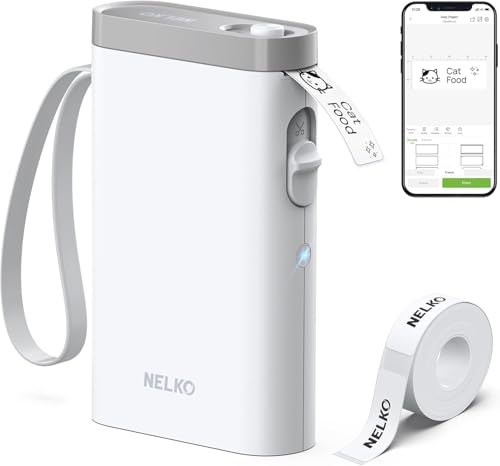
With its Bluetooth connectivity and compact design, the Nelko P21 Bluetooth Label Maker Machine is perfect for anyone seeking a portable and user-friendly labeling solution. Weighing half as much as traditional models, it’s easy to take anywhere. Simply download the Nelko app, install the thermal label paper, connect via Bluetooth, and start creating labels. The high-quality, monochrome prints use BPA-Free Direct Thermal Technology, ensuring crisp text without messy ink. You’ll enjoy access to over 90 fonts and various templates for all your labeling needs, whether for home organization, office tasks, or school projects. Just remember, don’t remove the green sticker on the label strip!
Best For: Those looking for a portable and efficient labeling solution for home, office, or school use.
Pros:
- Compact and lightweight design makes it easy to carry and store.
- High-quality monochrome prints using BPA-Free Direct Thermal Technology, eliminating the need for messy ink.
- User-friendly app with over 90 fonts and various templates for versatile labeling options.
Cons:
- Not compatible with Google phones running on Android 14, limiting some users.
- Fixed label lengths may not suit all labeling needs and require specific tape sizes.
- Continuous label tapes are not supported, which may restrict creativity for some users.
SUPVAN T50M Pro Bluetooth Label Maker Machine

Looking to streamline your home organization or boost your small business’s efficiency? The SUPVAN T50M Pro Bluetooth Label Maker Machine is your perfect companion. It comes with three tapes and prints labels ranging from 3/4 to 2 inches wide, making it versatile for various tasks. Ideal for labeling storage boxes, shipping addresses, or even QR codes, it caters to both home and small business needs. With a user-friendly app featuring over 30 fonts and 660 icons, creating high-quality labels is a breeze. Plus, its inkless operation means you’ll save time and money while staying organized!
Best For: The SUPVAN T50M Pro Bluetooth Label Maker Machine is best for individuals and small businesses looking to enhance organization and efficiency through versatile labeling solutions.
Pros:
- Easy to use with auto label size recognition for quick setup.
- Inkless operation saves costs and eliminates the need for toner or ink replacements.
- Versatile app features allow for creative label designs with a wide selection of fonts and icons.
Cons:
- Limited to printing labels within the size range of 3/4 to 2 inches wide.
- Requires Bluetooth connectivity, which may not be compatible with all devices.
- Initial cost may be higher compared to basic label makers.
CLABEL Desk Bluetooth Barcode Label Printer (221D)
The CLABEL Desk Bluetooth Barcode Label Printer (221D) stands out as an ideal choice for small business owners and home users seeking efficiency and professionalism in their labeling tasks. With its compact design, you can easily move and store it. Setup takes less than five minutes—just download the software, connect, and power on. It prints self-adhesive labels from 20 to 50 mm wide and 15 to 150 mm high, allowing you to reuse rolls and save costs. The CLABEL app offers extensive customization, supporting various fonts, templates, and barcode printing, making it perfect for all your labeling needs.
Best For: Small business owners and home users looking for efficient and professional labeling solutions.
Pros:
- Compact and lightweight design makes it easy to move and store.
- Quick setup process takes less than five minutes, allowing for immediate use.
- Extensive label customization options available through the CLABEL app, enhancing versatility.
Cons:
- Limited to direct thermal printing, which may not be suitable for all label types.
- Requires specific label sizes (20–50 mm wide and 15–150 mm high) which may not fit all needs.
- No built-in battery, meaning it must be plugged into a power source for operation.
DYMO Label Writer 450 Twin Turbo Label Printer
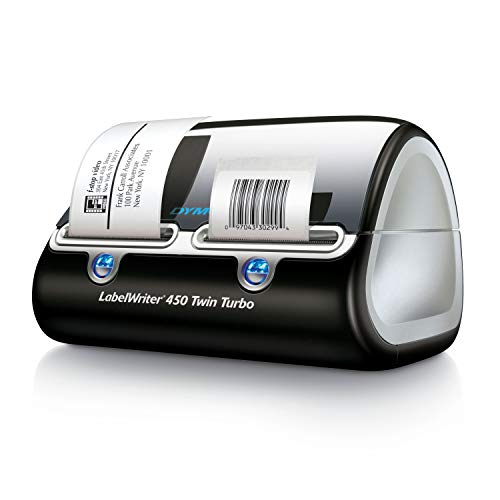
For those seeking a reliable solution for their labeling needs, the DYMO LabelWriter 450 Twin Turbo Label Printer stands out as a top choice. This direct thermal printer delivers fast, efficient printing ideal for labeling, shipping, and barcodes. You can quickly switch between two rolls of labels, boosting your productivity without the hassle of swapping rolls. Plus, with direct thermal technology, you won’t need to buy ink or toner, saving you money. Easily customize labels from Microsoft Word, Excel, Outlook, or Google Contacts. For best results, use authentic DYMO labels available in various sizes. Enhance your organization today!
Best For: The DYMO LabelWriter 450 Twin Turbo Label Printer is best for home and office users looking for a fast and efficient labeling solution.
Pros:
- Quickly switch between two rolls of labels, enhancing productivity and efficiency.
- Cost-effective printing with no need for ink or toner, reducing ongoing costs.
- Customizable labels can be easily created from popular applications like Microsoft Word, Excel, and Google Contacts.
Cons:
- Limited to direct thermal printing, which may not be suitable for all label types or long-term durability.
- Requires authentic DYMO labels for optimal performance, which could limit label options.
- Initial investment cost may be higher compared to basic label printers.
Factors to Consider When Choosing a Barcode Label Printer
When choosing a barcode label printer, you’ll want to take into account several key factors to guarantee it meets your needs. Think about the printing technology options, label size compatibility, and available connectivity features. Also, don’t forget to evaluate the speed, efficiency, and cost of consumables to make an informed decision.
Printing Technology Options
Choosing the right printing technology for your barcode label printer can greatly impact your operational efficiency and label quality. You’ll primarily encounter direct thermal printing, which eliminates the need for ink or toner, reducing operating costs and maintenance. Alternatively, thermal transfer printing uses a ribbon to provide durable prints resistant to fading or smudging, making it ideal for long-term applications. Pay attention to print resolution, as higher DPI values, like 203 or 300 DPI, guarantee sharper barcodes essential for scanning accuracy. Also, consider connectivity options such as USB, Bluetooth, and Ethernet, as they can streamline integration with various devices and software, enhancing overall efficiency in your labeling tasks.
Label Size Compatibility
Label size compatibility plays a significant role in the effectiveness of your barcode label printer. When you choose a printer, consider the range of label sizes it supports. Many printers accommodate widths from 0.98 inches to 4.6 inches, giving you the flexibility to print everything from small address labels to larger shipping labels. However, some printers are limited to specific sizes, like the common 4×6 inches, which can restrict your applications. Additionally, check the maximum and minimum thickness of labels the printer can handle, as this affects quality and durability. Finally, the option to use both fanfold labels and rolls can enhance your workflow and storage efficiency, making your choice even more critical.
Connectivity Features Available
Considering the variety of connectivity options available for barcode label printers can greatly influence your workflow efficiency. When choosing a printer, think about Bluetooth, USB, and Ethernet capabilities. Bluetooth lets you print wirelessly from mobile devices, enhancing portability in dynamic settings. USB connections offer stable and swift data transfer, perfect for desktop use and reducing potential connectivity problems. Additionally, verify the printer is compatible with your operating system, whether it’s Windows, macOS, or Linux, to integrate smoothly into your existing setup. Also, check if it supports cloud connectivity or app integration, which can streamline remote printing and expand your label design options. With the right connectivity features, you can optimize your printing tasks effectively.
Speed and Efficiency
When evaluating barcode label printers, speed and efficiency are essential factors that can directly impact your operations. Look for models that print at high speeds, ideally up to 6 inches per second, to boost productivity during busy periods. Features like automatic label cutting and the ability to print multiple labels in quick succession can greatly reduce downtime. Many printers also support bulk printing tasks, allowing you to print large quantities from Excel without manual intervention. Pay attention to print resolution; higher DPI (203 to 300) guarantees clearer barcodes and text for better scanability. Finally, consider direct thermal printing technology, which streamlines the process by eliminating the need for ink or toner, further enhancing efficiency.
Cost of Consumables
The cost of consumables plays a critical role in your choice of a barcode label printer, as it can greatly affect your overall budget. Thermal printers, for instance, usually have lower ongoing costs since they don’t require ink or toner. If you opt for a direct thermal printer, you’ll eliminate these expenses, especially beneficial for high-volume printing. Keep in mind that some models need proprietary label paper, which can drive up costs, while others accept generic or third-party rolls, offering more affordable options. Label roll prices range from $10 to $50 based on size and quality, so always consider the total cost of consumables, including any additional materials, to accurately assess long-term expenses.