
When it comes to optimizing your warehouse operations, choosing the right label printer is vital. You need a device that balances efficiency with precision, making your labeling tasks seamless. With various options available, it’s essential to identify the features that truly matter for your specific needs. Let’s explore the top contenders that promise to enhance your workflow while ensuring accuracy in every label you print.
Rollo USB Shipping Label Printer – Commercial Grade 4×6 Thermal Label Printer

If you’re running a busy warehouse and need a reliable printing solution, the Rollo USB Shipping Label Printer is your best choice. This commercial-grade 4×6 thermal printer delivers high-speed printing at 150mm/s, producing one label per second. With its advanced direct thermal technology, you’ll get clear, scannable labels every time. It accommodates various label sizes, letting you create barcodes, product labels, and more. Plus, you won’t need to worry about ink costs, as it operates without toner. It integrates smoothly with major shipping platforms and ecommerce sites, making your shipping process efficient and hassle-free.
Best For: The Rollo USB Shipping Label Printer is best for businesses and warehouses that require high-speed, reliable label printing for shipping and product management.
Pros:
- High-speed printing of one label per second, enhancing workflow efficiency.
- Cost-effective operation with no need for ink or toner, reducing overall printing expenses.
- Versatile compatibility with major shipping platforms and ecommerce marketplaces, streamlining the shipping process.
Cons:
- Limited to printing labels up to 4.1 inches in width, which may not suit all label sizes.
- Requires a USB connection, which may limit placement options in some setups.
- Initial setup may require some technical know-how, particularly for integration with various platforms.
Brother P-touch PT-D610BT Label Maker
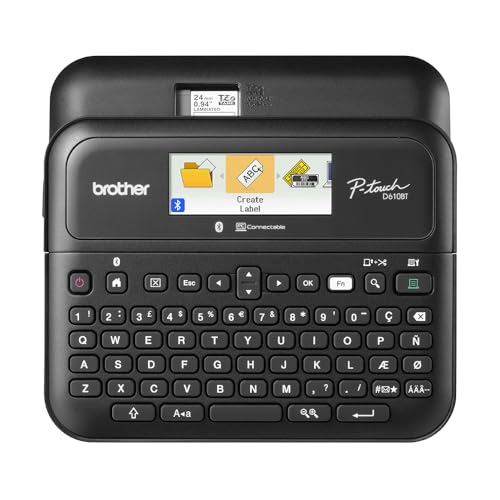
For busy warehouse environments, the Brother P-touch PT-D610BT Label Maker stands out with its Bluetooth and USB connectivity options, making it an ideal choice for teams who need to create and print labels on the go. With 17 fonts, 160 frames, and access to 175 business-specific templates, you can customize labels for asset management and inventory tracking. The large 20-character, 2-line LCD display helps you preview labels, ensuring accuracy and reducing waste. Plus, the built-in memory stores up to 90 frequently used labels, while the automatic cutter and QWERTY keyboard streamline your labeling workflow for maximum efficiency.
Best For: Teams in busy warehouse environments that require efficient label creation and printing on the go.
Pros:
- Bluetooth and USB connectivity options facilitate easy label printing from multiple devices.
- Large color LCD display allows for accurate previewing of labels, reducing waste.
- Built-in memory for storing frequently used labels enhances productivity.
Cons:
- Limited to labels up to 1 inch wide, which may not meet all labeling needs.
- Requires Brother P-Touch Editor software for extensive customization, adding an extra step.
- The device may be more complex for users unfamiliar with technology or label makers.
Bluetooth Thermal Label Printer for Shipping Packages
Bluetooth Thermal Label Printers are perfect for small businesses looking to streamline their shipping processes. These printers support wireless printing from your iPhone, Android, Windows, or macOS devices, making it easy to print labels for platforms like Amazon and eBay. With a speed of up to 72 labels per minute at 150 mm/s, you’ll get sharp barcodes and text every time. They’re compatible with various label sizes, ensuring you can handle all your shipping needs. Plus, their compact design makes them ideal for any workspace. Enjoy hassle-free setup and responsive customer support to keep your operations running smoothly.
Best For: Small businesses looking for an efficient and cost-effective solution for printing shipping labels.
Pros:
- High-speed printing of up to 72 labels per minute, ensuring quick and efficient shipping operations.
- Compatible with multiple platforms and devices, including iPhone, Android, Windows, and macOS.
- Compact and lightweight design makes it suitable for various workspaces, from home offices to retail stores.
Cons:
- Limited to direct thermal printing, which may not be ideal for certain label types requiring color.
- Bluetooth connectivity may have compatibility issues with older devices or operating systems.
- Some users may find the initial setup process challenging without adequate guidance.
Makeid D50 Industrial Label Printer

The Makeid D50 Industrial Label Printer stands out as an ideal choice for warehouse professionals who need reliable and durable labeling solutions. With its 2-inch print head, it’s perfect for cable labels, asset tracking, and safety identification. You’ll appreciate the thermal transfer technology that delivers sharp prints at 300 DPI, lasting up to five years without fading. The automatic cutter and quick consumable changes enhance your workflow efficiency. Plus, mobile app connectivity and a powerful 2600mAh battery guarantee you stay connected and operational for up to 90 days. Its strong acrylic adhesive ensures labels adhere securely, even in tough conditions.
Best For: Warehouse professionals seeking reliable and durable labeling solutions for various applications.
Pros:
- High-quality prints with thermal transfer technology ensure clarity for up to five years.
- Efficient workflow with an automatic cutter and quick consumable changes in just 5 seconds.
- Strong adhesive ensures labels adhere securely to rough surfaces and withstand harsh environments.
Cons:
- Limited print head width may not accommodate larger label sizes.
- Battery life may vary based on usage and printing frequency.
- Mobile app connectivity may require initial setup and compatibility checks.
DYMO LabelWriter Wireless Label Printer

With its built-in Wi-Fi, the DYMO LabelWriter Wireless Label Printer is perfect for busy warehouse environments where cable-free operation is essential. You can easily print shipping labels, barcodes, and name badges directly from your Mac, PC, smartphone, or tablet. Its thermal technology cuts costs by eliminating the need for expensive ink or toner. Plus, the free DYMO Label software and mobile app allow for quick label design and printing, enhancing your workflow. With Microsoft Office plugins, you can print directly from Word, Excel, or Outlook, making it an incredibly versatile tool for all your labeling needs.
Best For: The DYMO LabelWriter Wireless Label Printer is best for busy professionals and organizations seeking efficient, cable-free label printing solutions for shipping, barcoding, and office organization.
Pros:
- Cable-free operation: Built-in Wi-Fi allows for easy printing from multiple devices without the need for cables.
- Cost-efficient: Utilizes thermal printing technology, eliminating the need for expensive ink or toner.
- Versatile software options: Includes free DYMO Label software and mobile app, along with Microsoft Office plugins for direct printing from popular applications.
Cons:
- Limited to thermal printing: Cannot print in color or on specialty labels that require different printing technologies.
- Dependency on Wi-Fi: Requires a stable Wi-Fi connection for optimal performance, which may be an issue in some environments.
- Potential compatibility issues: May not be compatible with all operating systems or devices, leading to potential connectivity challenges.
iDPRT Industrial High-Speed Thermal Printer for Large Warehouses & Logistics
Engineered for high-demand environments, the iDPRT Industrial High-Speed Thermal Printer is perfect for large warehouses and logistics operations. With an impressive printing speed of 8 inches per second and a resolution of 203 DPI, it delivers crisp labels quickly. You’ll appreciate the USB and Ethernet connectivity, which makes integration seamless. This printer accommodates 4.25-inch wide labels, ideal for shipping, barcodes, and receipts. Its compact design fits well in any workspace, while the complete setup package guarantees you can start printing right away. Plus, no ribbons or inks are needed, enhancing your efficiency in busy settings.
Best For: The iDPRT Industrial High-Speed Thermal Printer is best for large warehouses and logistics operations that require efficient and reliable label printing.
Pros:
- High-speed printing at 8 inches per second, enhancing workflow efficiency.
- No need for ribbons or inks, reducing ongoing costs and maintenance.
- Versatile compatibility with various label types, including shipping and barcodes.
Cons:
- Limited to 4.25-inch wide labels, which may not suit all labeling needs.
- USB and Ethernet connectivity only, lacking wireless options for modern setups.
- Compact design may not accommodate larger rolls or extensive label printing tasks effectively.
Bluetooth Thermal Shipping Label Printer for Small Business

For small businesses seeking efficiency in shipping, the KNAON Bluetooth Thermal Shipping Label Printer stands out with its seamless compatibility across various platforms like eBay and Shopify. This portable 4×6 printer connects wirelessly via Bluetooth using the FlashLabel Pro App for both iOS and Android, while also supporting USB connections for Windows and Mac. With over 3,000 templates and 5,000 icons, you can easily create custom labels. Its compact design and fast printing speed of up to 180 mm/s make it an ideal choice. Plus, it comes with 10 test print papers to get you started right away.
Best For: Small businesses looking for an efficient and versatile solution for printing shipping labels.
Pros:
- Wide compatibility with major platforms like eBay, Shopify, and USPS.
- Fast printing speed of up to 180 mm/s, enhancing productivity.
- Large collection of templates and icons for customizable labeling options.
Cons:
- Limited to specific apps for Mac users with M1/M2/M3/M4 processors.
- Requires installation of FlashLabel extension for ChromeOS users.
- Initial setup may require additional steps for some operating systems.
LabelTac Pro X Industrial Label Printer

The LabelTac Pro X Industrial Label Printer is your ideal solution if you need a reliable, high-performance printer for creating a wide range of essential safety labels in a fast-paced warehouse environment. This 4″ printer supports on-demand printing of OSHA, pipe, electrical, and warning labels, turning your workstation into a personal print shop. With the included LabelSuite Design and Print Software, label creation becomes effortless, thanks to a user-friendly interface and a library of templates. Its durable design guarantees longevity, and the color LCD screen keeps you informed about ribbon levels, minimizing downtime for an efficient workflow.
Best For: The LabelTac Pro X Industrial Label Printer is best for warehouses and industrial environments that require efficient, on-demand printing of safety labels.
Pros:
- Supports a wide variety of label types, including OSHA and warning labels, enhancing workplace safety.
- User-friendly design software simplifies the label creation process with customizable templates.
- Durable construction with a lifetime warranty ensures long-term reliability.
Cons:
- May require a learning curve for users unfamiliar with label printing software.
- Limited to 4-inch wide labels, which may not meet all labeling needs.
- The initial investment may be higher compared to basic label printers.
Bluetooth Thermal Shipping Label Printer (4×6 Wireless Label Maker)

Small businesses looking to streamline their shipping processes will find the Bluetooth Thermal Shipping Label Printer (4×6 Wireless Label Maker) an ideal solution, thanks to its high-speed printing capability of up to 72 labels per minute. This printer supports multiple label sizes, including 4×6 and custom options, ensuring flexibility for your needs. It’s compatible with various devices like Windows, iOS, and Android, although Mac and Chromebook users will need to connect via USB. With high-resolution prints and waterproof label paper included, you can efficiently print labels for platforms like Amazon and eBay, enhancing your operational efficiency.
Best For: Small businesses looking to enhance their shipping efficiency with a high-speed label printing solution.
Pros:
- High-speed printing capability of up to 72 labels per minute, improving operational efficiency.
- Compatibility with multiple devices, including Windows, iOS, and Android, for versatile usage.
- Includes waterproof label paper, ensuring durability and quality for various shipping applications.
Cons:
- Mac and Chromebook users must connect via USB, limiting Bluetooth printing options for these devices.
- Limited customer support hours for phone assistance, which may be inconvenient for some users.
- Potential learning curve for new users unfamiliar with thermal printing technology.
Honeywell PC45T Thermal Transfer Label Printer

Designed for high-volume operations, the Honeywell PC45T Thermal Transfer Label Printer stands out with its 300 DPI resolution, guaranteeing you get crisp, clear labels every time. This printer produces durable labels perfect for warehouse inventory, retail pricing, and shipping tasks. With high-clarity text, barcodes, and graphics, it enhances your logistics and asset tracking efforts. The user-friendly LCD interface simplifies setup, while the integrated Real-Time Clock allows for accurate time-stamping on labels. Plus, its fast Ethernet connectivity guarantees seamless integration with your warehouse management systems, boosting efficiency and streamlining your operational workflow.
Best For: Businesses in high-volume operations needing efficient and durable labeling solutions for warehouse, retail, and shipping environments.
Pros:
- Produces high-quality, long-lasting labels with 300 DPI resolution.
- User-friendly LCD interface simplifies setup and operation.
- Fast Ethernet connectivity allows seamless integration with various software systems.
Cons:
- May be more expensive than entry-level label printers.
- Requires thermal transfer supplies which can add to ongoing costs.
- Limited to specific label sizes and types, potentially restricting customization options.
Factors to Consider When Choosing a Label Printer for Warehouse
When choosing a label printer for your warehouse, consider several key factors that can impact your operations. You’ll want to evaluate printing speed, connectivity options, and label size compatibility to find the best fit for your needs. Additionally, think about print quality and ease of setup to guarantee a smooth integration into your workflow.
Printing Speed Requirements
Selecting the right label printer for your warehouse is vital, and one of the most important factors to take into account is printing speed. Look for models that deliver high speeds, typically measured in labels per minute (LPM). Printers capable of 150mm/s can produce about one 4×6 label per second, helping you avoid bottlenecks during peak shipping hours. Aim for printers that support speeds up to 72 labels per minute to keep your operations running smoothly in busy environments. Also, verify the printer’s resolution is at least 203 DPI to maintain clarity and scannability without compromising speed. Faster printing enhances productivity, particularly in high-volume tasks like shipping and inventory management, where quick turnaround is vital.
Connectivity Options Available
Understanding the connectivity options available for label printers is essential for streamlining your warehouse operations. You’ll find various choices, including USB, Bluetooth, and Ethernet, which allow flexible integration into your work environment. USB connections are straightforward, providing a stable link to computers for reliable desktop use. Bluetooth, however, enhances mobility, letting you print wirelessly from mobile devices and computers, perfect for dynamic settings. Ethernet connectivity is vital for integrating with warehouse management systems (WMS), ensuring high-speed data transfer during high-volume labeling tasks. Additionally, check if the printer supports multiple operating systems, as compatibility with devices like Windows, macOS, iOS, and Android accommodates diverse user needs, making your operation even more efficient.
Label Size Compatibility
Label size compatibility is an essential factor in choosing the right label printer for your warehouse. You’ll want a printer that supports a range of label sizes, typically from 1.54 inches to 4.1 inches in width, to meet various labeling needs. Look for models that can handle both fanfold and roll labels, enhancing versatility and reducing operational downtime. If you require custom label sizes, opt for printers that can accommodate them for specialized shipping, barcode, and inventory labels. High-speed printing capabilities, ideally up to 150mm/s, are critical for maintaining efficiency in a busy environment. Finally, verify the printer supports various label materials, like waterproof and heavy-duty adhesive labels, to tackle diverse warehouse conditions.
Print Quality and Resolution
Print quality and resolution play an essential role in the effectiveness of your warehouse labeling system. Look for printers with a DPI of at least 203, though 300 DPI is preferable for sharper, more detailed labels. Clear barcodes and text are vital for fast scanning and reducing errors during inventory and shipping. Consider the print technology too; thermal transfer prints generally resist fading better than direct thermal, making them ideal for long-term use. Guarantee consistent print quality across various label materials, whether glossy or matte, to maintain a professional look. Finally, choose a printer that can deliver high-quality output at different speeds, as your warehouse often needs quick printing without compromising clarity.
Ease of Setup
When you’re selecting a label printer for your warehouse, ease of setup can greatly impact your efficiency. Look for printers that offer plug-and-play setup, so you can start printing quickly without complicated configurations. Make sure the printer supports multiple connectivity options like USB and Bluetooth, making it easy to connect with various devices. An intuitive interface, such as a color LCD display, will guide you through the setup process and provide real-time feedback on printing status. Opt for models with pre-loaded drivers and software to streamline installation, cutting down your setup time. Finally, choose printers with robust customer support resources, including tutorials and responsive assistance, to help you troubleshoot any setup issues effectively.
Durability and Reliability
Choosing a durable and reliable label printer is essential for maintaining efficiency in a warehouse environment. You need a printer that can withstand harsh conditions, including extreme temperatures, dust, and moisture. Look for reliable models that offer high-speed printing capabilities, ideally 150 mm/s or more, to keep up with busy shipping operations. High-resolution printing, at 300 DPI or higher, guarantees your barcodes and text remain clear, reducing errors in inventory management. Opt for industrial-grade printers designed for high-volume tasks, featuring robust construction for minimal maintenance. Additionally, consider a warranty or support service, providing peace of mind that any durability or reliability issues can be addressed promptly by the manufacturer.
Cost Efficiency Considerations
Cost efficiency plays an essential role in selecting a label printer for your warehouse, as it directly impacts your bottom line. Opting for thermal printing technology can save you money since it eliminates costly ink or toner replacements. These printers often deliver high-speed printing, boosting productivity and lowering labor costs by speeding up label production. You should also consider printers that accommodate various label sizes and types, allowing you to use more economical materials. Look for built-in efficiency features like automatic cutters and memory for frequently used labels to streamline workflows and reduce waste. Finally, guarantee your printer integrates with shipping platforms and eCommerce marketplaces to cut software costs and enhance operational efficiency.