
In 2026, choosing the right ceiling-mounted WiFi access point can make all the difference for seamless connectivity in your space. With so many options available, it’s essential to understand the features that matter most, like Wi-Fi 6 and Wi-Fi 7 technology. You’ll want to know which models offer the best performance and security. Let’s explore the top contenders that could elevate your network experience.
TP-Link EAP650 Ultra-Slim Wireless Access Point (WiFi 6 AX3000)

If you’re looking for a sleek and efficient WiFi solution for modern spaces like offices or cafés, the TP-Link EAP650 Ultra-Slim Wireless Access Point is an excellent choice. This compact device utilizes Wi-Fi 6 technology, delivering dual-band speeds up to 2976 Mbps, ensuring ultra-fast connectivity. It seamlessly integrates into the Omada SDN platform, allowing you to manage multiple sites effortlessly via the Omada app. With advanced features like Mesh WiFi, WPA3 security, and seamless roaming, the EAP650 enhances user experience. Plus, it supports various powering options and comes with a 5-year warranty, making it a reliable investment for your connectivity needs.
Best For: Businesses and venues that require a sleek, high-performance WiFi solution with advanced management capabilities.
Pros:
- Ultra-fast dual-band speeds of up to 2976 Mbps, ensuring reliable connectivity for multiple users.
- Seamless integration with the Omada SDN platform for easy management across multiple sites.
- Advanced wireless technologies like Mesh WiFi, WPA3 security, and seamless roaming enhance user experience.
Cons:
- Requires an Omada SDN controller for full functionality of advanced features like seamless roaming.
- Installation may need technical expertise for optimal setup and integration.
- Some users may find the compact design limits the range in larger spaces without additional access points.
TP-Link AX3000 PoE Mesh WiFi (Deco X50-PoE)

For those seeking robust and reliable WiFi coverage in larger spaces, the TP-Link AX3000 PoE Mesh WiFi (Deco X50-PoE) stands out as an excellent choice. With dual-band WiFi 6 technology, you’ll enjoy speeds up to 2402 Mbps on 5 GHz and 574 Mbps on 2.4 GHz. Installation is flexible; you can mount it on the ceiling or wall using PoE+ for a clean setup. The AI-driven Mesh optimizes performance, while the Deco app simplifies management. Plus, TP-Link’s HomeShield guarantees your network remains secure, making this device ideal for streaming, gaming, and connecting multiple devices seamlessly.
Best For: Users in larger spaces looking for high-speed, reliable WiFi coverage with advanced security features.
Pros:
- Supports dual-band WiFi 6 technology for exceptional speeds and performance.
- Flexible installation options with ceiling or wall mounting capabilities.
- AI-driven Mesh technology optimizes network performance for seamless connectivity.
Cons:
- Requires a PoE+ switch for optimal multi-Gig backhaul (not included).
- May be more complex to set up for users unfamiliar with networking equipment.
- Limited to TP-Link’s ecosystem for full compatibility and features.
TP-Link WiFi 7 Wireless Access Point (EAP723)

The TP-Link WiFi 7 Wireless Access Point (EAP723) stands out as an exceptional choice for businesses and homes that demand high-speed connectivity. With dual-band speeds of up to 4324 Mbps on 5 GHz and 688 Mbps on 2.4 GHz, it’s perfect for bandwidth-intensive tasks like 4K streaming and real-time gaming. Its seamless roaming and centralized management guarantee uninterrupted connectivity across your space. Plus, the easy setup and 2.5G Ethernet port enhance performance with multiple devices. Weighing just 14.4 ounces, it’s compact yet powerful, backed by a 5-year warranty to secure your investment.
Best For: The TP-Link WiFi 7 Wireless Access Point (EAP723) is best for users seeking high-speed connectivity for demanding activities like 4K streaming, real-time gaming, and large file transfers.
Pros:
- High dual-band speeds of up to 4324 Mbps on 5 GHz and 688 Mbps on 2.4 GHz for optimal performance.
- Features seamless roaming and centralized management for uninterrupted connectivity throughout the coverage area.
- Compact design and easy setup with a 2.5G Ethernet port enhance versatility for multiple devices.
Cons:
- The product may require a more complex setup for users unfamiliar with networking equipment.
- Limited to a single 2.5G Ethernet port, which may not be sufficient for larger setups needing multiple wired connections.
- Some users may experience a learning curve with remote management features.
TP-Link Omada EAP673 Wireless Access Point

Organizations seeking high-performance and reliable wireless connectivity will find the TP-Link Omada EAP673 an exceptional choice. With dual-band speeds reaching up to 5400 Mbps, this Wi-Fi 6 access point guarantees robust performance. Its 2.5G PoE+ connectivity simplifies installation while supporting advanced features like Mesh, Seamless Roaming, and MU-MIMO. You’ll appreciate the centralized management options through the Omada SDN platform, allowing remote access via the Omada app. Plus, with a solid 5-year warranty and excellent customer support, you can invest in this solution with confidence. Elevate your network experience with the EAP673’s innovative technology and superior performance.
Best For: Organizations seeking high-performance wireless connectivity with advanced management capabilities.
Pros:
- High-speed performance with dual-band speeds up to 5400 Mbps ensures fast and reliable internet access.
- Advanced features like Mesh, Seamless Roaming, and MU-MIMO enhance network efficiency and user experience.
- Centralized management options via the Omada SDN platform allow for easy remote access and control.
Cons:
- No DC adapter included, which may require additional purchases for some users.
- Requires Omada SDN controllers for full functionality of certain features like Seamless Roaming.
- Weight and size may make installation more challenging in certain environments.
TP-Link EAP235-Wall Omada AC1200 Wireless Gigabit Access Point

Designed with modern businesses in mind, the TP-Link EAP235-Wall Omada AC1200 Wireless Gigabit Access Point delivers exceptional performance in environments like office cubicles and hotel rooms. This in-wall access point supports dual-band Wi-Fi speeds up to 1200 Mbps, utilizing MU-MIMO and Beamforming technologies for ideal coverage. With four Gigabit Ethernet ports, including PoE pass-through, you can easily power other wired devices. Integrated into the Omada SDN platform, you have multiple network management options, from hardware to cloud-based controllers. Plus, you’ll benefit from a 5-year warranty and free technical support to guarantee seamless connectivity.
Best For: The TP-Link EAP235-Wall Omada AC1200 is best for businesses needing reliable and high-performance Wi-Fi solutions in office cubicles and hotel rooms.
Pros:
- Supports dual-band Wi-Fi speeds up to 1200 Mbps, ensuring fast and stable connections.
- Equipped with multiple Gigabit Ethernet ports and PoE pass-through for powering additional devices.
- Integrated with the Omada SDN platform for flexible and centralized network management options.
Cons:
- Installation may require professional assistance for in-wall deployment.
- Limited to environments like office cubicles and hotel rooms, not suitable for larger spaces without additional units.
- Requires a compatible PoE switch for optimal functionality if not using PoE power directly.
TP-Link AC1200 WiFi Extender (RE315)
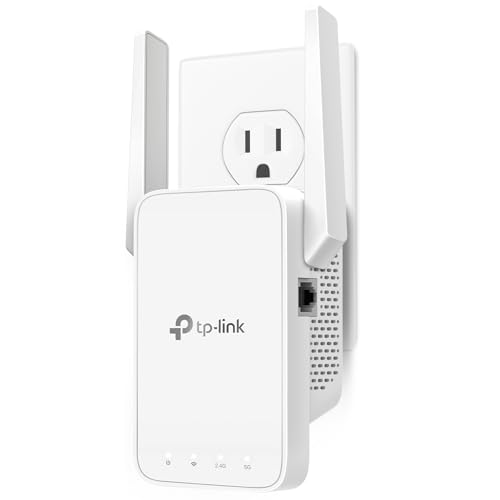
For those seeking reliable WiFi coverage in larger spaces, the TP-Link AC1200 WiFi Extender (RE315) stands out with its impressive range of up to 1500 square feet. This dual-band extender offers a robust total bandwidth of 1.2 Gbps, ensuring smooth connectivity for up to 32 devices. Its Adaptive Path Selection connects you to the strongest signal, providing uninterrupted performance. Setting it up is a breeze with the One-Touch Connection and TP-Link Tether app. Plus, the intelligent signal indicator helps you find the best placement. With an Ethernet port and security features, it’s a solid choice for enhancing your network.
Best For: Those needing reliable WiFi coverage in larger spaces, accommodating multiple devices seamlessly.
Pros:
- Dual-band support with a total bandwidth of 1.2 Gbps for smooth connectivity.
- Covers up to 1500 sq. ft. with adjustable antennas, ideal for larger homes.
- Easy setup and management through the TP-Link Tether app and One-Touch Connection.
Cons:
- Designed to enhance coverage, not to directly increase internet speed.
- May not be compatible with mesh WiFi systems like Deco.
- Limited to a maximum of 32 connected devices, which may be insufficient for very large households.
TP-Link Long Range Outdoor Access Point (EAP225-Outdoor)

If you need reliable outdoor Wi-Fi coverage, the TP-Link Long Range Outdoor Access Point (EAP225-Outdoor) is an excellent choice. This AC1200 dual-band device delivers speeds up to 1200 Mbps and covers distances of over 200m at 2.4GHz and 300m at 5GHz. With a weatherproof rating of IP65, it withstands harsh conditions. You’ll appreciate features like MU-MIMO technology, seamless roaming, and centralized cloud management via the Omada app. Plus, it supports multiple SSIDs and flexible power options for easy installation. With a solid customer rating of 4.3 stars, it’s a reliable pick for your outdoor connectivity needs.
Best For: Those seeking robust and reliable outdoor Wi-Fi coverage for large areas, such as gardens, parks, and commercial outdoor spaces.
Pros:
- High Speed: Dual-band speeds up to 1200 Mbps for seamless connectivity.
- Long Range: Covers distances over 200m at 2.4GHz and 300m at 5GHz, ideal for expansive outdoor settings.
- Durable Design: Weatherproof IP65 rating ensures resilience against harsh weather conditions.
Cons:
- Installation Complexity: May require technical knowledge for optimal setup and configuration.
- Power Requirements: Requires PoE or passive PoE which may necessitate additional equipment.
- Limited Indoor Use: Primarily designed for outdoor environments, less effective for indoor applications.
Ubiquiti Networks UniFi 7 Pro WiFi 7 Access Point

The Ubiquiti Networks UniFi 7 Pro WiFi 7 Access Point stands out as an exceptional choice for large-scale environments that require robust and reliable wireless connectivity. With its six spatial streams and 6 GHz support, it guarantees interference-free WiFi, making it perfect for busy settings. Measuring 8.1 x 8.1 x 1.8 inches and weighing just 1.5 pounds, it’s easy to mount on ceilings without taking up much space. Rated 4.6 out of 5 stars from 519 reviews, its popularity speaks volumes. Just keep in mind that the PoE+ adapter isn’t included, so you’ll need to purchase that separately.
Best For: Large-scale environments that require robust and reliable wireless connectivity without interference.
Pros:
- High-performance: Features six spatial streams and 6 GHz support for superior connectivity.
- Compact design: Ceiling-mounted design that takes up minimal space.
- Positive customer feedback: High rating of 4.6 out of 5 stars from 519 reviews indicates customer satisfaction.
Cons:
- No PoE+ adapter included: Requires a separate purchase for the power adapter.
- Ceiling mounting only: May not be suitable for users seeking a versatile mounting option.
- Limited to large-scale environments: Not ideal for small spaces or basic home use.
Ubiquiti U6+ Dual Band Wireless Access Point

Designed for high-demand environments, the Ubiquiti U6+ Dual Band Wireless Access Point offers an impressive data transfer rate of up to 3 Gbit/s, making it ideal for businesses or homes with multiple devices. Supporting IEEE 802.11 a/b/g/n/ac/ax standards, it operates on both 2.40 GHz and 5 GHz frequency bands for reliable connectivity. With MIMO technology and a Gigabit Ethernet port, you’ll experience ultra-fast wired network speeds. Security is a priority, featuring data encryption to protect against unauthorized access. Plus, its WPS setup makes installation a breeze. Lightweight and versatile, it’s perfect for wall or ceiling mounting.
Best For: The Ubiquiti U6+ Dual Band Wireless Access Point is best for businesses or homes with multiple devices requiring high-speed and reliable wireless connectivity.
Pros:
- High data transfer rate of up to 3 Gbit/s, ideal for high-demand environments.
- Supports dual-band frequencies (2.40 GHz and 5 GHz) for enhanced connectivity options.
- Easy installation with WPS setup and versatile mounting options.
Cons:
- Limited to one Gigabit Ethernet port, which may not suffice for all setups.
- Requires PoE+ for powering, potentially necessitating additional equipment.
- Some users may find the weight and size less convenient for certain mounting locations.
TP-Link Omada WiFi 7 Wall Plate Wireless Access Point (EAP725-Wall)

For businesses and organizations seeking robust wireless connectivity, the TP-Link Omada WiFi 7 Wall Plate Wireless Access Point (EAP725-Wall) offers an impressive dual-band performance with speeds reaching up to 4324 Mbps on 5 GHz and 688 Mbps on 2.4 GHz. It features a 2.5G PoE input port and two Gigabit RJ45 downlink ports for versatile connectivity options. With a 240 MHz bandwidth, you can enjoy increased simultaneous transmissions. Plus, its centralized management, mesh networking, and seamless roaming capabilities guarantee a smooth user experience. Backed by a 5-year warranty, this access point is a reliable choice for your network needs.
Best For: Businesses and organizations looking for high-performance wireless connectivity with advanced management features.
Pros:
- High-speed performance with dual-band capabilities, offering up to 4324 Mbps on 5 GHz.
- Flexible connectivity options with a 2.5G PoE input port and multiple Gigabit RJ45 downlink ports.
- Advanced features like centralized management, mesh networking, and seamless roaming for enhanced user experience.
Cons:
- Installation may require professional assistance due to wall plate design.
- Higher cost compared to basic access points, which may not be suitable for small home users.
- Limited to indoor use due to wall plate design, potentially restricting placement options.
Factors to Consider When Choosing a Ceiling Mounted Wifi Access Point
When choosing a ceiling-mounted WiFi access point, you need to think about several key factors. Coverage area requirements, speed and performance, and installation flexibility can greatly impact your network’s effectiveness. Additionally, consider the powering options available and the security features offered to guarantee you make the right choice for your needs.
Coverage Area Requirements
Choosing the right ceiling-mounted WiFi access point hinges on understanding your coverage area requirements. First, assess the distance you need to cover, as some models can reach up to 300 meters outdoors. Consider how many simultaneous users and devices you’ll have; higher-capacity access points handle more connections effectively. Think about your bandwidth needs too—if you’re into 4K streaming or gaming, opt for models that support higher speeds, like 5400 Mbps. Environmental factors matter as well; walls and obstructions can weaken signals, so look for features like Beamforming or MU-MIMO for enhanced performance. Finally, analyze your space’s layout, including ceiling height and potential interference sources, to guarantee ideal placement for maximum coverage.
Speed and Performance
To guarantee a seamless online experience, speed and performance are essential factors to evaluate in a ceiling-mounted WiFi access point. First, consider dual-band capabilities; access points supporting both 2.4 GHz and 5 GHz bands can reduce interference and enhance performance. Look for the latest Wi-Fi standards, like Wi-Fi 6 or Wi-Fi 7, which provide higher data rates and improved efficiency. Aim for models with maximum speed ratings of 5400 Mbps or more to support bandwidth-heavy applications such as 4K streaming and online gaming. Evaluate how many simultaneous connections the access point can handle, as technologies like MU-MIMO and OFDMA boost performance in busy environments. Finally, confirm the access point offers extensive coverage and reliable connectivity through obstacles.
Installation Flexibility Options
Considering the various environments where ceiling-mounted WiFi access points might be installed, it’s crucial to evaluate the installation flexibility they offer. Look for models that support both wall and ceiling mounting, giving you the freedom to deploy them as needed. Many access points utilize Power over Ethernet (PoE), allowing you to simplify the installation process by using a single cable for both power and data. Features like adjustable brackets or mounting kits can further ease setup in commercial or residential spaces. If you’re considering outdoor installation, choose weatherproof-rated models for reliable performance in challenging conditions. Finally, advanced models with mesh networking capabilities can enhance coverage and flexibility across larger areas, ensuring seamless connectivity throughout your space.
Powering Options Available
While evaluating ceiling-mounted WiFi access points, understanding the available powering options is essential for ensuring a smooth installation process. You’ll find that many models support 802.3at PoE+ (Power over Ethernet Plus), which simplifies installations by eliminating the need for extra power outlets. Additionally, some units offer passive PoE, allowing for flexibility based on your specific environment. If you prefer a direct electrical connection, a DC power supply option is also available. These powering choices can considerably impact installation costs and complexity, as PoE minimizes the need for extensive wiring. Opting for an access point with multiple powering options enhances deployment flexibility across various settings, such as offices, classrooms, or even outdoor areas.
Security Features Offered
When selecting a ceiling-mounted WiFi access point, security features should be a top priority. Look for advanced encryption protocols like WPA3, which provide enhanced protection against unauthorized access. Guest network segregation is another vital feature, letting visitors connect without accessing your main network and safeguarding sensitive data. Some devices come with integrated cybersecurity measures, including parental controls and intrusion detection systems, to help you monitor potential threats effectively. Additionally, support for Virtual Private Networks (VPNs) guarantees secure remote access for users working from various locations. Finally, don’t overlook the importance of regular firmware updates; they often include patches for vulnerabilities and improvements to existing security features, keeping your network secure and dependable.
Management and Control Solutions
Choosing the right ceiling-mounted WiFi access point involves more than just security features; management and control solutions play a significant role in guaranteeing your network runs smoothly. Look for centralized management options that let you control multiple devices from a single interface, simplifying monitoring. Cloud-based solutions enhance flexibility, allowing you to manage your network remotely. Some access points integrate with software-defined networking (SDN) platforms, offering advanced features like load balancing and seamless roaming to enhance user experience. Mobile apps can make setup and real-time management hassle-free, giving you control at your fingertips. Ascertain compatibility with various management controllers, whether hardware, software, or cloud-based, to find the best fit for your network environment.