Accurate color starts with reliable measurement. The best compact color calibration tools help photographers, videographers, designers, and creators reduce guesswork across displays, cameras, lighting, and physical color samples.
This roundup covers monitor colorimeters, camera targets, white-balance tools, and portable color sensors, so you can choose the right solution for your workflow without paying for features you will not use.
Best 10 Compact Color Calibration Tools Picks for 2026
On-Set Passport

- Combines color, white-balance, and video targets
- Supports matching multiple cameras
- Portable case with lanyard
Best For: Mobile photo and video production
Video Reference Target
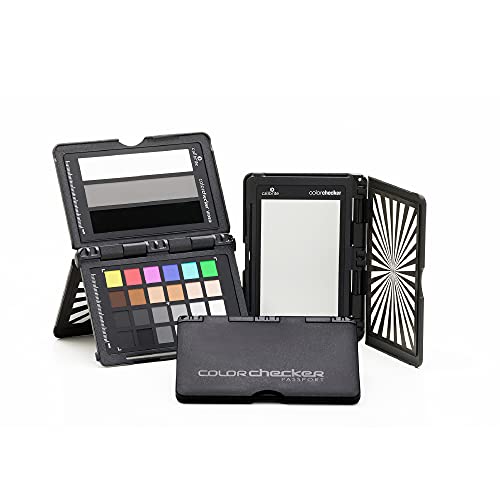
- Designed for waveform and vectorscope workflows
- Includes skin-tone, gray, highlight, and shadow chips
- Provides white, 40 IRE, and black references
Best For: Video crews managing exposure and color on set
Best Portable Paint Matcher

- Matches scans to 300,000+ brand-name paints
- Provides RGB, HEX, CMYK, Pantone, RAL, and NCS values
- No calibration required; IPX4 dust and splash resistance
Best For: DIY painters, decorators, and on-site color matching
Best Camera Color Reference

- Provides 48 color targets plus a gray card
- Creates HSL presets for popular editing workflows
- Supports white balance and changing-light consistency
Best For: Photographers using multiple cameras or lighting setups
Best Simple Monitor Calibrator

- Guided 1-2-3 calibration workflow
- Supports up to two displays
- Compact USB-C colorimeter with before-and-after check
Best For: Photographers and creators calibrating home or studio monitors
RAW Reference Precision

- Sets RAW white balance, exposure, contrast, and black point
- 3D design reveals lighting and includes a black trap
- Useful for applying consistent settings across a series
Best For: RAW photographers needing a compact capture reference
Travel Color Consistency

- Pocket-size 24-patch color reference target
- Supports white balance, exposure, and color grading
- Enables custom DNG and ICC profiles with PROFILER
Best For: Location photographers and video creators
Capture-to-Edit Control

- Includes Display Pro HL and ColorChecker Passport Photo 2
- Calibrates modern displays and profiles RAW camera output
- Provides PROFILER controls for white point and gamma
Best For: Photographers building a consistent capture-to-edit workflow
High-Brightness Pro – Display Pro HL
For photographers, designers, and editors comparing compact color calibration tools, the Calibrite Display Pro HL is built for modern high-brightness displays. Its sensor measures up to 3000 nits and supports LCD, mini-LED, OLED, Apple XDR, and compatible projectors.
Best For: Creative professionals calibrating bright, HDR-capable, or multiple displays.
Pros:
- Measures displays up to 3000 nits, including modern high-brightness panels.
- PROFILER software offers basic and advanced controls for custom presets.
- Includes validation, uniformity, flare-correction, and multi-display tools.
- Compact design includes USB-C connectivity, adapter, mount thread, and travel pouch.
Cons:
- Its advanced controls may be more than casual users need.
- Requires a Mac or Windows computer and compatible software.
The Display Pro HL is a strong choice when accurate profiling across bright, varied, or multiple screens matters more than choosing the simplest entry-level tool.
On-Set Passport – ColorChecker Passport Video 2
The ColorChecker Passport Video 2 is one of the most portable compact color calibration tools for camera work. It combines a 24-patch ColorChecker Classic target, a white-balance target, and two video targets in a protective case for use on location or in post-production.
Best For: Videographers and photographers matching cameras across changing or mixed lighting.
Pros:
- Includes targets for color profiling, white balance, and video editing workflows.
- Helps produce similar color rendition across multiple cameras.
- Portable protective case adjusts for different scene positions.
- Includes a lanyard and Camera Calibration software for DNG or ICC profiles.
Cons:
- It is a capture-side reference target, not a monitor calibrator.
- The included software’s custom profiles are described for photo users.
This Passport 2 makes practical sense for mobile production teams that need a small, durable reference for consistent color before and during editing.
Easy Screen Setup – Spyder Monitor Calibrator
The Datacolor Spyder offers a straightforward option among compact color calibration tools for laptop and desktop users. Its software supports OLED, mini-LED, and Apple Liquid Retina XDR displays, with a preset calibration option and a reported setup time of about 90 seconds.
Best For: Beginners and creators who want quick, guided monitor calibration.
Pros:
- Calibrates a broad range of current laptop and desktop display types.
- Fast workflow provides an accurate starting point in about 90 seconds.
- Preset and customizable modes accommodate different experience levels.
- Ambient light sensing can guide or automate adjustments as room lighting changes.
Cons:
- DevicePreview is identified as a beta feature.
- Requires a nonstandard battery according to the supplied details.
Spyder is a practical fit for users who value speed and approachable software while still wanting options for display-specific calibration and changing room light.
Video Reference Target – ColorChecker Video Target
For camera crews seeking compact color calibration tools, the Calibrite ColorChecker Video target provides visual references designed for scopes and exposure checks. Its layout includes chromatic colors, skin tones, grays, highlights, shadows, and dedicated white, midtone, and black reference patches.
Best For: Video production teams setting white balance, exposure, and color in camera or post.
Pros:
- Optimized for vectorscope, waveform, and RGB parade workflows.
- Includes skin tones, chromatic colors, grays, highlights, and shadow references.
- Three-step exposure references include white, 40 IRE gray, and glossy black.
- Adjustable positioning, hard-shell case, and lanyard support on-set use.
Cons:
- It is intended for camera and post-production reference rather than monitor calibration.
- Glossy surfaces may require careful positioning to avoid unwanted reflections.
This target is a focused production aid for crews that want repeatable exposure and color decisions supported by familiar video scopes.
Best Portable Paint Matcher – Nix Mini 3 Color Sensor
The Nix Mini 3 is one of the most versatile compact color calibration tools for matching physical surfaces and translating them into digital color values. Scan an object or paint sample to receive matches from more than 300,000 brand-name paints, along with RGB, HEX, and CMYK values.
Best For: DIY painters, decorators, and creators who need portable paint matching and quick digital color readings.
Pros:
- Matches scans to more than 300,000 brand-name paints.
- Provides RGB, HEX, CMYK, Pantone, RAL, and NCS color options.
- Requires no calibration and has an IPX4 dust and splash-resistant design.
Cons:
- Paint libraries vary by country or region.
- Results are better with matte samples.
Choose the Nix Mini 3 when your priority is identifying colors from real-world surfaces rather than calibrating a camera or monitor. Its broad paint database and compact, resistant design make it particularly practical for on-site color matching.
Best Camera Color Reference – Datacolor Spyder Checkr
The Datacolor Spyder Checkr is a compact color calibration tool for photographers who need consistent camera color across different lighting conditions and bodies. Its 48 targets and gray card provide a practical reference for white balance, exposure, and editing adjustments.
Best For: Photographers working with multiple cameras, changing light, portraits, or studio and location shoots.
Pros:
- Includes 48 spectrally engineered targets, including skin-tone and near-white or black tones.
- Software can create HSL presets for Lightroom Classic, Adobe Camera Raw, and Hasselblad Phocus.
- Gray chart supports in-camera white balance and records scene light data.
- Durable self-casing construction includes a tripod mount and a fade indicator.
Cons:
- Its larger 7.29 x 1.58 x 13-inch dimensions and 1-pound weight are less pocket-friendly than smaller tools.
- The target cards need replacement when the light-sensitive patch indicates fading.
The Spyder Checkr is a strong choice when color consistency begins at capture. It offers more control than a simple gray card, especially for photographers who want a repeatable editing workflow and references for skin tones and subtle tonal areas.
Best Simple Monitor Calibrator – Calibrite Display 123
The Calibrite Display 123 is a straightforward monitor-focused option among compact color calibration tools. Its guided 1-2-3 software workflow, USB-C connection, and small 34mm-by-37mm body make it approachable for photographers and creators who want more reliable screen color without complicated settings.
Best For: Photo editors and creative users calibrating one or two displays in a home or studio workspace.
Pros:
- Compact body measures approximately 34mm tall by 37mm in diameter and weighs 4.8 ounces.
- Guided workflow simplifies monitor calibration for approachable setup.
- Supports up to two displays for more consistent multi-screen viewing.
- Includes brightness targets and a before-and-after comparison check.
Cons:
- Designed for monitor calibration rather than physical paint or camera-target matching.
- USB-C connection may require an adapter with devices lacking USB-C ports.
Pick the Display 123 if your main concern is getting monitors to show more consistent color and contrast. Its dual-display support and comparison view are useful for checking the result, while the guided workflow keeps routine calibration manageable.
RAW Reference Precision – SpyderCube
The Datacolor SpyderCube is one of the more distinctive compact color calibration tools for photographers who want a practical RAW reference. Its 3D design helps establish white balance, exposure, contrast, and black-point settings for images captured under the same lighting.
Best For: RAW photographers who want to create a repeatable reference and apply corrections across a series.
Pros:
- Supports white balance, exposure, contrast, and black-point adjustments.
- 3D design shows primary and secondary light sources.
- Black trap provides an absolute black reference.
- Can be used as a preset reference in Adobe Photoshop, Lightroom, and Premiere Pro workflows.
Cons:
- Its main workflow is geared toward RAW processing rather than full monitor calibration.
- Requires interpretation of the cube’s faces, chrome ball, and black trap during editing.
The SpyderCube is a useful compact reference for consistent RAW adjustments, especially when processing a full shoot under similar lighting. Choose it when capture-side exposure and color decisions matter more than calibrating the display itself.
Travel Color Consistency – ColorChecker Classic Mini
The Calibrite ColorChecker Classic Mini is a pocket-size choice among compact color calibration tools. Its 24 color patches provide a consistent reference for white balance, exposure evaluation, color grading, and custom camera-profile creation during travel or location work.
Best For: Photographers and video creators who need a portable color target for changing locations and fast-paced production.
Pros:
- Compact 24-patch target is easy to carry.
- Supports white balance and exposure evaluation under the subject’s lighting.
- Works with Calibrite PROFILER for custom DNG and ICC camera profiles.
- Helps maintain color continuity across cameras and scenes.
Cons:
- Camera profiling requires Calibrite PROFILER software.
- It is a capture reference, not a monitor-calibration colorimeter.
The Classic Mini makes sense when portability is the priority but you still want an objective reference for editing. Photograph it under the same light as the subject, then use it to reduce color-cast corrections and improve consistency across a shoot.
Capture-to-Edit Control – Calibrite Photo Kit
The Calibrite Photo Kit combines a Display Pro HL monitor colorimeter with ColorChecker Passport Photo 2, making it a comprehensive option among compact color calibration tools. It connects camera profiling and display calibration for photographers who want a more consistent capture-to-edit workflow.
Best For: Photo editors who need both custom RAW camera profiles and calibration for modern high-luminance displays.
Pros:
- Combines monitor calibration with camera profiling in one kit.
- Display Pro HL supports mini LED, OLED, and Apple XDR displays.
- ColorChecker Passport Photo 2 supports RAW profiles, white balance, and exposure reference.
- Calibrite PROFILER offers presets and adjustable white-point and gamma targets.
Cons:
- More expensive and involved than a standalone color reference target.
- Designed around photo workflows, so it may be more equipment than casual users need.
This kit is the strongest all-around option of the three for users who need confidence in both what the camera captures and what the display shows. Its broader workflow makes it particularly suitable for serious RAW editing on newer display technologies.
How We Picked These Compact Color Calibration Tools
We grouped the selection by the job each tool performs: calibrating a monitor, setting camera color and white balance, checking RAW exposure and color, or matching physical paint and other surfaces. We considered portability, software or target compatibility, measurement range, workflow simplicity, durability, and suitability for photo or video production.
Some products are complete systems, while others are reference targets that work with a camera and editing software. That distinction matters: a monitor colorimeter measures the display itself, whereas a color chart helps create a repeatable capture and correction process.
Quick Comparison
| Best For | Product Type | What to Look For |
|---|---|---|
| Bright modern displays | Display colorimeter | High brightness support and current profiling software |
| Simple monitor calibration | Display colorimeter | Easy guided workflow and USB compatibility |
| Photo and video capture | Color target | Accurate patches, white-balance reference, and editing support |
| RAW photography | White-balance or exposure tool | Neutral references and repeatable field use |
| Paint and surface matching | Portable color sensor | App support, durability, and matching database access |
Key Buying Factors for Compact Color Calibration Tools
Match the Tool to the Color Problem
For print, photo editing, or color-critical design, prioritize a monitor colorimeter. For video, a chart such as a ColorChecker-style target can help balance cameras and establish consistent color across multiple shots. A SpyderCube-style tool is more useful when RAW exposure, black levels, and white balance are central to the workflow. A portable sensor is the better fit for identifying or matching paint and physical materials.
Check Display and Software Compatibility
Before buying, confirm support for your operating system, monitor connection, and display type. OLED, Mini LED, wide-gamut, and very bright HDR screens may require a newer colorimeter and software capable of handling higher luminance levels. Also check whether the product uses USB-C directly or needs an adapter.
Consider Portability and Repeatability
Small targets and sensors are convenient on location, but they must remain clean, neutral, and easy to position. Protective cases, splash resistance, calibration references, and clear instructions can make a meaningful difference for field work. For studio workflows, software integration and the ability to save or reuse profiles may matter more than the smallest size.
Who Should Buy Which Compact Color Calibration Tools?
Choose a monitor colorimeter if your main goal is consistent on-screen color for editing, design, or viewing. Models with stronger brightness support are preferable for modern HDR and OLED displays.
Choose a camera color target if you use multiple cameras, change lighting often, or need consistent skin tones and product color in video or photography. A compact chart is usually the most practical starting point.
Choose a white-balance or RAW reference tool if you shoot on location and want a fast, repeatable reference for exposure and neutral color.
Choose a portable color sensor if you need to identify and match paint or other real-world surfaces rather than calibrate a screen. If you need both capture and display accuracy, a bundle combining a monitor colorimeter with a camera target can provide the most complete workflow.