
Choosing among the best computer air coolers is mainly about matching cooling capacity, noise levels, case space, and platform compatibility to your system. The right model can keep temperatures under control without the cost, maintenance, or pump noise associated with liquid cooling.
This roundup covers compact single-tower coolers, high-capacity dual-tower designs, laptop cooling pads, and feature-rich options for modern AMD and Intel builds.
Best 10 Computer Air Coolers Picks for 2026
Best Value Dual-Tower Cooler

- Dual towers and six heat pipes
- Two 120mm PWM fans
- Supports AM4, AM5, LGA 1700, and 1851
Best For: Performance-focused desktop builds with adequate clearance
Best Laptop Cooling Pad
Razer Adaptive Smart Cooling Pad

- Adaptive fan control up to 3000 RPM
- Fits most 14- to 18-inch laptops
- Three-port USB hub and Chroma RGB
Best For: Laptop users wanting smart cooling and connectivity
Best Quiet Premium Cooler
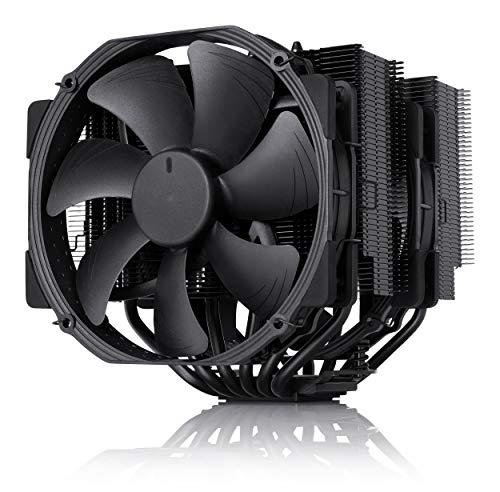
- Dual 140mm fans and six heat pipes
- Low-noise accessories included
- Six-year warranty and broad socket support
Best For: Quiet, high-performance desktop builds
Best Compact Tower Cooler

- 148mm-tall compact tower design
- Four heat pipes and one 120mm PWM fan
- Supports AM4, AM5, LGA 1700, and 1851
Best For: Mainstream desktops and medium-sized cases
Premium Quiet Pick

- Dual 120mm PWM fans
- 158mm design with full RAM compatibility
- Six-year warranty and NT-H1 paste included
Best For: Quiet, high-performance builds with limited RAM clearance
Strong Value Tower
be quiet! Pure Rock Pro 3 Silver

- 250W TDP-rated cooling
- Six heat pipes and two 120mm PWM fans
- Offset design improves RAM and VRM clearance
Best For: Demanding systems and overclocked CPUs
Ultimate Air Cooling
Noctua NH-D15 G2 chromax.Black

- Eight heat pipes and 20% more surface area
- Dual 140mm PWM fans
- 168mm enthusiast-grade dual-tower design
Best For: High-end CPUs and quiet, maximum-capacity air cooling
Best Feature-Rich Cooler
Peerless Assassin 120 Vision MAX White

- 5-inch IPS monitoring display with TRCC customization
- Dual-tower design with six heat pipes and dual fans
- 69 CFM airflow and broad Intel/AMD compatibility
Best For: Showcase PCs needing strong cooling and onboard monitoring
Best Practical Performance
be quiet! Pure Rock Pro 3 Black

- Supports CPUs up to 250W TDP
- Six heat pipes and two 120mm PWM fans
- Offset design improves RAM and VRM clearance
Best For: Demanding desktop systems with flexible component-clearance needs
Best Black Display Cooler
Peerless Assassin 120 Vision MAX Black

- Programmable 5-inch IPS system-monitoring display
- AGHP heat pipes with dual 2150 RPM fans
- Offset design supports RAM and GPU clearance
Best For: Dark-themed performance builds with monitoring features
Best Value Dual-Tower Cooler – Peerless Assassin 120 SE
The Thermalright Peerless Assassin 120 SE is a strong choice for shoppers comparing computer air coolers for compatible AMD or Intel desktop builds. Its dual-tower design, six heat pipes, and two PWM fans are built for high cooling performance, while the 155mm height makes case compatibility an important consideration.
Best For: Performance-focused desktop builders who have room for a dual-tower cooler.
Pros:
- Dual-tower heatsink with six 6mm heat pipes and two 120mm PWM fans.
- Supports AMD AM4/AM5 and several Intel sockets, including LGA 1700 and 1851.
- Fans provide up to 66.17 CFM airflow with a stated noise level of up to 25.6 dB(A).
Cons:
- Its 155mm height requires checking case and motherboard clearance.
- The larger dual-tower format may be excessive for compact systems.
- AMD installation uses the motherboard’s original backplate, which is not included.
Choose this model when cooling capacity and broad socket support matter more than a compact footprint. Verify your case and RAM clearance before purchasing.
Best Laptop Cooling Pad – Razer Adaptive Smart Cooling Pad
The Razer Adaptive Smart Cooling Pad is a laptop-focused option for shoppers seeking computer air coolers that adjust to changing workloads. Its airtight pressure chamber, 140mm fan, interchangeable magnetic frames, and software-controlled fan curves are designed for laptops from 14 to 18 inches.
Best For: Laptop users who want automatic temperature management, adjustable cooling, and extra USB connectivity.
Pros:
- Automatically changes fan speed based on system settings and workload.
- Airtight pressure chamber and 140mm fan spinning up to 3000 RPM help direct cool air.
- Includes three USB Type-A ports, customizable controls, and Chroma RGB lighting.
- Supports most laptops and MacBooks from 14 to 18 inches with magnetic frames.
Cons:
- Its 2.61kg weight makes it less portable than a basic cooling pad.
- Advanced fan curves and remapping require Razer Synapse.
- Designed for laptops rather than desktop CPU cooling.
This is a feature-rich choice for users who want more than passive laptop support. Its strongest advantages are adaptive control, a sealed airflow design, and built-in peripherals connectivity.
Best Quiet Premium Cooler – Noctua NH-D15 chromax.Black
The Noctua NH-D15 chromax.Black is a premium computer air cooler for desktop builders who prioritize quiet operation and high cooling capacity. Its wide dual-tower heatsink, six heat pipes, and two 140mm PWM fans are paired with a 168mm height, so case clearance should be checked carefully.
Best For: Enthusiasts and quiet-PC builders who want a premium dual-fan air cooler.
Pros:
- Dual-tower design with six heat pipes and two 140mm NF-A15 fans.
- Includes Low-Noise Adaptors, PWM speed control, NT-H1 thermal paste, and SecuFirm2 mounting hardware.
- Supports Intel LGA1851, LGA1700, LGA1200, LGA115x, and AMD AM4/AM5.
- Backed by a six-year manufacturer’s warranty.
Cons:
- The 168mm height can limit compatibility with smaller computer cases.
- Its 1.3kg weight and wide dual-tower design require careful installation planning.
- Premium features may be unnecessary for basic desktop cooling needs.
The NH-D15 chromax.Black stands out for its accessory package, long warranty, and emphasis on quiet performance. It is best suited to spacious systems where its size is not a concern.
Best Compact Tower Cooler – Assassin X120 Refined SE
The Thermalright Assassin X120 Refined SE is a compact computer air cooler for desktop users who want a straightforward upgrade without the footprint of a dual-tower model. Its 148mm height, four heat pipes, and 120mm PWM fan suit many medium-sized cases, while support covers common AMD and Intel sockets.
Best For: Mainstream desktop builds and medium-sized cases needing a compact tower cooler.
Pros:
- Compact 148mm-tall design is suited to medium-sized computer cases.
- Four 6mm heat pipes and a 120mm PWM fan provide up to 66.17 CFM airflow.
- Supports AMD AM4/AM5 and Intel sockets including LGA 1700 and 1851.
- Fan uses an S-FDB bearing with a stated service life of up to 20,000 hours.
Cons:
- Single-fan, four-heat-pipe design offers less cooling hardware than larger dual-tower models.
- Its 148mm height still requires checking case clearance.
- The fan’s stated noise level is up to 25.6 dB(A).
This model makes sense when you want a smaller, simpler alternative to oversized computer air coolers. Confirm socket and case compatibility, then choose it for balanced everyday desktop cooling.
Premium Quiet Pick – Noctua NH-U12A chromax.Black
For builders seeking premium computer air coolers without a bulky footprint, the Noctua NH-U12A chromax.Black combines dual 120mm fans with a 158mm tower height. It is designed for broad Intel and AMD compatibility, while its layout avoids overhanging RAM slots.
Best For: Quiet, high-performance desktop builds that need strong cooling and excellent memory clearance.
Pros:
- Dual NF-A12x25 120mm PWM fans deliver up to 102.1 CFM of airflow.
- 158mm height fits most tower cases and the cooler does not overhang RAM slots.
- Includes NT-H1 thermal paste, SecuFirm2 mounting hardware, and a six-year warranty.
Cons:
- Its 158mm height still requires checking case clearance.
- Premium features may be more than needed for basic desktop systems.
The NH-U12A is a well-rounded choice when low noise, compatibility, and premium build quality matter more than choosing the largest possible heatsink.
Strong Value Tower – be quiet! Pure Rock Pro 3 Silver
The be quiet! Pure Rock Pro 3 Silver is a practical option among computer air coolers for demanding systems and overclocked CPUs. Its double-tower design uses six copper heat pipes and two 120mm PWM fans, while an offset layout helps preserve RAM and VRM compatibility.
Best For: Performance-focused Intel or AMD systems that need up to 250W TDP cooling in a compact double-tower format.
Pros:
- Six nickel-plated 6mm copper heat pipes support high cooling performance.
- Two Pure Wings 3 120mm PWM fans provide adjustable airflow.
- Offset design and adjustable front fan improve RAM and VRM clearance.
Cons:
- At 34.8 dB, it is rated louder than the Noctua options in this roundup.
- Its 6.1-inch height requires confirming case compatibility.
With a 250W TDP rating and flexible fan placement, the Pure Rock Pro 3 Silver suits buyers who want substantial air cooling and useful installation flexibility without moving to liquid cooling.
Ultimate Air Cooling – Noctua NH-D15 G2 chromax.Black
The Noctua NH-D15 G2 chromax.Black is built for shoppers who want maximum air-cooling capability from a large dual-tower cooler. It adds eight heat pipes, 20% more surface area, and two 140mm fans while retaining PWM control and an all-black finish.
Best For: High-end Intel and AMD desktop processors where cooling capacity and low operating noise take priority.
Pros:
- Eight heat pipes and expanded surface area support powerful cooling.
- Dual NF-A14x25r G2 140mm fans provide up to 155.6 m³/h airflow.
- Offset design clears the top PCIe x16 slot on most current motherboards.
Cons:
- Its 168mm height and 1.81kg weight demand careful case and motherboard checks.
- RAM clearance is 32mm with both fans installed, according to the supplied specifications.
The NH-D15 G2 is the enthusiast choice here: larger and heavier than the other options, but equipped for demanding processors and tuned for quiet operation.
Best Feature-Rich Cooler – Peerless Assassin 120 Vision MAX White
For builders who want strong cooling plus a visual upgrade, this computer air cooler combines a twin-tower heatsink with dual 2150 RPM fans and a built-in 5-inch IPS display. Its white finish and ARGB support make it especially suited to showcase-oriented desktop builds.
Best For: Performance-focused builds that benefit from system monitoring and a distinctive white aesthetic.
Pros:
- 5-inch 480×854 IPS screen supports real-time monitoring and custom backgrounds through TRCC software.
- Six copper heat pipes, a nickel-plated copper base, and dual fans provide substantial air-cooling capacity.
- Rated for up to 69 CFM airflow with operating noise of 27 dB(A) or less.
- Supports current Intel and AMD platforms, including LGA1851, LGA1700, AM4, and AM5.
Cons:
- At 164mm tall, it requires a case with adequate CPU-cooler clearance.
- The display requires a motherboard 9-pin USB connection and TRCC software setup.
- AMD installation uses the motherboard’s original backplate, which is not included.
The white Peerless Assassin 120 Vision MAX is a practical choice when cooling performance and customization matter equally. Confirm case clearance and available USB connectivity before installation.
Best Practical Performance – be quiet! Pure Rock Pro 3 Black
The be quiet! Pure Rock Pro 3 is a straightforward computer air cooler for demanding desktop systems. Its compact offset dual-tower design, six heat pipes, and two 120mm PWM fans target high thermal performance while improving access around RAM and VRM coolers.
Best For: High-performance Intel or AMD systems that need a capable dual-tower cooler with flexible memory clearance.
Pros:
- Six nickel-plated copper heat pipes support cooling for CPUs rated up to 250W TDP.
- Includes two Pure Wings 3 120mm PWM fans with airflow-focused blade and outlet design.
- Offset layout improves RAM and VRM compatibility, and the front fan height can be adjusted.
- Mounting kit supports Intel sockets 1851/1700/1200/115x and AMD AM5/AM4, with AM5 offset mounting.
Cons:
- Its listed noise level is 34.8 dB, higher than some quieter air-cooling alternatives.
- The 155mm height still requires checking case compatibility before purchase.
- As a dual-tower cooler, it may be less suitable for compact cases than a smaller single-tower model.
Choose the Pure Rock Pro 3 when you want a performance-oriented cooler without adding a display or software layer. Its offset structure is a useful advantage for builds with taller memory or larger VRM heatsinks.
Best Black Display Cooler – Peerless Assassin 120 Vision MAX Black
This black computer air cooler pairs a twin-tower heatsink with dual high-speed fans and a programmable 5-inch IPS screen. It is a strong fit for builders who want a dark, understated cooler that can still display system information or custom visuals.
Best For: Black-themed performance PCs where cooling, monitoring, and GPU or RAM clearance are priorities.
Pros:
- Built-in 480×854 IPS display provides real-time monitoring, custom backgrounds, and video playback through TRCC.
- Six AGHP Gen 5.0 copper heat pipes and a nickel-plated copper base support efficient heat transfer.
- Dual 120mm fans reach 2150 RPM, deliver up to 69 CFM airflow, and are rated at 27 dB(A) or less.
- Offset dual-tower construction is designed to accommodate tall RAM and GPU installations.
Cons:
- The 164mm-tall design may not fit every PC case.
- Screen operation requires a motherboard 9-pin USB connection and additional software.
- The AMD mounting setup requires the original motherboard backplate, which is not supplied.
The black Vision MAX delivers the same display-led feature set as a performance cooler while blending more easily into dark builds. Check both CPU-cooler height and internal USB support before ordering.
How We Picked the Best Computer Air Coolers
We selected these models based on cooling design, fan performance, installation compatibility, noise-conscious operation, expected build quality, and practical value. The lineup includes entry-level and premium tower coolers, plus a laptop cooling pad for buyers who need portable airflow rather than a desktop CPU heatsink.
Because specifications such as supported sockets, cooler height, RAM clearance, and rated thermal design limits can vary by revision, verify the manufacturer’s compatibility list and your case dimensions before buying.
Quick Comparison
| Type | Best For | Typical Strength |
|---|---|---|
| Single-tower air cooler | Budget and mainstream desktops | Simple installation and broad compatibility |
| Dual-tower air cooler | High-performance CPUs | Greater heatsink area and stronger sustained cooling |
| Laptop cooling pad | Gaming and demanding laptop use | Additional airflow beneath the computer |
| Feature-rich dual-tower cooler | Showcase builds | High airflow with lighting or display features |
Key Buying Factors for Computer Air Coolers
CPU Workload and Cooling Capacity
Match the cooler to how you use the computer. A compact four-heat-pipe tower is often enough for office work, gaming, and moderate productivity. High-core-count processors, sustained rendering, and heavy compiling benefit from larger dual-tower designs with multiple fans.
Case Clearance and Memory Compatibility
Measure the maximum CPU-cooler height supported by your case. Large tower coolers may also overhang the memory slots, so check RAM height and whether the front fan can be raised without exceeding the case limit.
Socket Support and Installation
Confirm support for your exact AMD or Intel socket before ordering. Consider the mounting system, included brackets, fan clips, thermal compound, and access around the motherboard, especially for an upgrade inside a compact case.
Noise, Airflow, and Maintenance
Larger fans can move air at lower speeds, potentially reducing noise during normal use. Look for PWM control, accessible dust-cleaning points, and replacement fan availability. Keep filters and heatsink fins clear to preserve performance over time.
Extra Features and Appearance
ARGB lighting and integrated displays can suit a themed build, but they do not necessarily improve cooling. Prioritize heatsink size, fan quality, clearance, and mounting reliability before paying for visual extras.
Who Should Buy Which Computer Air Coolers?
- For an affordable mainstream desktop: Choose a compact single-tower model such as the Thermalright Assassin X120 Refined SE.
- For strong value and demanding gaming: A Thermalright Peerless Assassin 120 SE offers the larger dual-tower format many performance-focused builds need.
- For quiet premium cooling: Consider Noctua’s NH-D15, NH-D15 G2, or NH-U12A designs, depending on your case and memory clearance.
- For a balanced alternative: be quiet!’s Pure Rock Pro 3 models suit buyers who want substantial cooling capacity with a restrained design.
- For a showcase PC: The Peerless Assassin Vision MAX ARGB versions add lighting and an integrated display alongside dual-tower cooling.
- For a gaming laptop: The Razer Laptop Cooling Pad is the relevant choice, since desktop CPU coolers cannot be installed on notebooks.
Before checkout, compare the cooler’s dimensions with your case, review socket support, and confirm that the included fan layout will not interfere with your RAM or graphics card.