
Choosing the right liquid cooler can help a gaming PC maintain lower CPU temperatures, steadier boost clocks, and quieter operation under demanding workloads. The best choice depends on your processor, case clearance, noise priorities, and budget.
This roundup compares 10 AIO CPU coolers across 120mm, 240mm, and 360mm formats, including models with addressable RGB lighting, LCD displays, and high-capacity radiators.
Best 10 Computer Liquid Coolers for Gaming PCs Picks for 2026
Best Overall Cooling
ARCTIC Liquid Freezer III Pro 360 A-RGB

- Native offset mount for Intel and AMD CPUs
- P12 PRO fans with up to 3000 rpm
- Integrated VRM fan and cable management
Best For: High-performance gaming PCs with compatible Intel or AMD CPUs
Best LCD Value
Thermalright Frozen Warframe 360 SE ARGB V2

- Customizable 2-inch LCD for stats or images
- Daisy-chain PWM fans reduce cable clutter
- Supports current AMD and Intel desktop sockets
Best For: Gamers wanting a customizable LCD-equipped 360mm AIO
Best Compact Pick
Cooler Master MasterLiquid ML240L RGB V2

- Space-saving 240mm closed-loop design
- Third-generation dual-chamber pump
- SickleFlow PWM ARGB fans
Best For: Mainstream gaming PCs and smaller cases
Best Display Performance
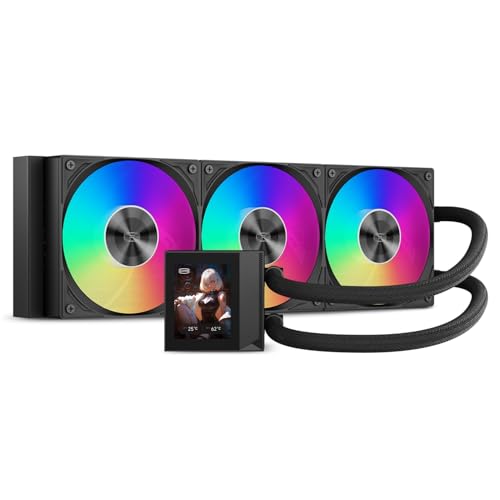
- 310W-rated 360mm cooling capacity
- 2.4-inch IPS monitoring and customization screen
- High-airflow ARGB FDB fans
Best For: High-end gaming and creator PCs with display-focused builds
High-Airflow TUF Cooling
ASUS TUF Gaming LC III 360 ARGB

- 360mm radiator with three pre-installed ARGB fans
- Supports Intel LGA 1851/1700/1200 and AMD AM5/AM4
- 400mm reinforced tubing with Aura Sync support
Best For: Large gaming builds seeking airflow and TUF styling
Quiet Heat Transfer
ARCTIC Liquid Freezer III Pro 360

- Three P12 PRO 120mm fans for high-load cooling
- Offset mounting targets Intel and AMD CPU hotspots
- Integrated VRM fan and radiator cable management
Best For: High-load desktops needing focused thermal performance
Best Value 360mm Cooling

- 360mm radiator with three PWM ARGB fans
- Supports Intel LGA1851/1700 and AMD AM4/AM5
- Up to 66.17 CFM airflow at 25.6 dBA listed noise
Best For: Gamers wanting capable 360mm cooling with customizable ARGB lighting
Best Premium Display AIO
ROG Ryujin III ARGB Extreme 360

- 3.5-inch 640x480 LCD for GIFs and live monitoring
- Asetek Gen8 V2 pump with integrated VRM fan
- Magnetic ARGB fans and six-year warranty
Best For: Enthusiasts building premium systems with monitoring and display features
Best Compact AIO

- Space-saving 120mm liquid-cooling design
- Fourth-generation pump with up to 2800 RPM
- Supports Intel LGA1851/1700 and AMD AM4/AM5
Best For: Compact gaming PCs needing ARGB liquid cooling in limited space
Best Overall Cooling – ARCTIC Liquid Freezer III Pro 360 A-RGB
For shoppers comparing computer liquid coolers for gaming pcs, the ARCTIC Liquid Freezer III Pro 360 A-RGB is a performance-focused 360mm option with a native offset mount, integrated VRM fan, and high-speed P12 PRO radiator fans. It supports current Intel and AMD platforms, including LGA1851, LGA1700, AM4, and AM5.
Best For: High-performance gaming PCs using compatible Intel or AMD processors.
Pros:
- Native offset mounting is designed to improve heat transfer at the CPU hotspot.
- P12 PRO fans offer high airflow, a 3000 rpm maximum speed, and quieter low-speed operation than the standard P12.
- Integrated VRM fan and radiator-fan cable management help keep the build organized.
- Six-year warranty provides long-term coverage.
Cons:
- The 360mm radiator requires a case with adequate mounting space.
- Its feature set is more focused on cooling performance than display customization.
This is a strong choice when sustained CPU cooling and thoughtful motherboard-area design matter more than a built-in LCD. Confirm 360mm case clearance and socket compatibility before purchase.
Best LCD Value – Thermalright Frozen Warframe 360 SE ARGB V2
The Thermalright Frozen Warframe 360 SE ARGB V2 combines a 360mm radiator with a customizable 2-inch LCD screen, making it a visually focused option among computer liquid coolers for gaming pcs. Its daisy-chain fans can simplify wiring while supporting current AMD and Intel desktop sockets.
Best For: Gamers who want an LCD-equipped 360mm cooler with customizable system visuals.
Pros:
- 2-inch LCD supports system information, custom images, and animated GIFs.
- Three PWM daisy-chain fans help reduce cable clutter.
- 3000 rpm pump and 360mm radiator are suited to gaming and creator desktop builds.
- Supports AMD AM5/AM4 and Intel LGA1851, 1700, 1200, and 115X platforms.
Cons:
- The LCD and software add setup considerations beyond a basic AIO.
- Its 360mm radiator needs a compatible case layout.
- The supplied notes list a three-year manufacturer warranty, shorter than some competing options.
Choose this model if screen customization and cleaner fan wiring are priorities. It offers a practical blend of cooling hardware, ARGB lighting, and personalization, provided your case supports a 360mm radiator.
Best Compact Pick – Cooler Master MasterLiquid ML240L RGB V2
The Cooler Master MasterLiquid ML240L RGB V2 is a 240mm closed-loop cooler for builders who want liquid cooling without moving to a larger 360mm radiator. It pairs a third-generation dual-chamber pump with SickleFlow 120 PWM ARGB fans and broad older-and-newer socket support.
Best For: Mainstream gaming PCs and compact builds that can accommodate a 240mm radiator.
Pros:
- 240mm format can fit cases that do not support 360mm radiators.
- Third-generation dual-chamber pump is designed for cooling efficiency.
- SickleFlow PWM ARGB fans combine customizable lighting with airflow performance.
- Industrial-grade EPDM sealing is intended to improve longevity and leak resistance.
Cons:
- Its 240mm radiator provides less radiator surface area than the 360mm models here.
- The listed two-year warranty is relatively short for an AIO cooler.
- It lacks the LCD display features offered by the other featured options.
This is a sensible space-conscious choice for a gaming system that needs a straightforward 240mm AIO and RGB lighting. Match it to your processor, case airflow, and socket requirements rather than choosing it solely by appearance.
Best Display Performance – PCCOOLER DC360 Pro 360mm AIO
The PCCOOLER DC360 Pro is a high-capacity 360mm option for shoppers evaluating computer liquid coolers for gaming pcs with an interest in both thermal headroom and presentation. It combines a claimed 310W cooling capacity with a 2.4-inch IPS display, high-airflow ARGB fans, and a ceramic pump.
Best For: High-end gaming, streaming, and content-creation systems that benefit from an LCD display.
Pros:
- Rated for up to 310W of cooling and equipped with a 360mm radiator.
- 2.4-inch IPS screen supports hardware monitoring, custom images, and animated content.
- Three PWM FDB fans provide up to 90.56 CFM airflow and 4.07 mmH2O static pressure.
- Supports Intel LGA1851/1700/1200/115X and AMD AM5/AM4 platforms.
Cons:
- The 360mm radiator requires sufficient case clearance.
- Display and ARGB features may require extra setup for users seeking a simple installation.
- The supplied notes do not specify a warranty length.
For builders who want a prominent hardware display without giving up a large radiator, the DC360 Pro is a feature-rich candidate. Its broad socket support makes it versatile, but verify case space and motherboard lighting compatibility first.
High-Airflow TUF Cooling – ASUS TUF Gaming LC III 360 ARGB
The ASUS TUF Gaming LC III 360 ARGB is a feature-rich option for computer liquid coolers for gaming pcs, pairing a 360mm radiator with three pre-installed ARGB fans. Its reinforced tubing, broad socket support, and TUF-focused software make it practical for performance-oriented builds.
Best For: Gaming PCs using compatible Intel or AMD sockets that need high airflow, ARGB customization, and a large 360mm radiator.
Pros:
- Pre-installed fans simplify installation while providing up to 90.78 CFM of airflow.
- Supports Intel LGA 1851, 1700, and 1200 plus AMD AM5 and AM4.
- 400mm reinforced, sleeved tubing improves durability and chassis compatibility.
- TUF Gaming software and Aura Sync support enable monitoring and lighting customization.
Cons:
- The 397mm radiator requires a case with adequate 360mm radiator clearance.
- Reported fan noise reaches 37.4 dB(A), which may not suit noise-sensitive builds.
Choose this cooler when you want strong airflow, TUF styling, and extensive current-platform compatibility. Its size and noise rating should be checked against your case and acoustic priorities.
Quiet Heat Transfer – ARCTIC Liquid Freezer III Pro 360
The ARCTIC Liquid Freezer III Pro 360 is built for demanding computer liquid coolers for gaming pcs, with three 120mm P12 PRO fans and offset cold-plate mounting. Its integrated VRM fan, Intel contact frame, and concealed fan cabling add practical advantages for compatible desktop builds.
Best For: High-load gaming desktops using Intel LGA1851/LGA1700 or AMD AM4/AM5 processors.
Pros:
- P12 PRO fans offer high-speed cooling with an emphasis on quieter low-speed operation.
- Native offset mounting targets the CPU hotspot for more efficient heat transfer.
- Integrated PWM-controlled VRM fan helps cool the motherboard voltage converters.
- Radiator fan cables are integrated into the hose sheathing for cleaner cable management.
Cons:
- The 360mm format requires suitable case space and radiator support.
- Its specialized Intel contact frame and offset mounting may be more than needed for basic systems.
This is a strong fit for builders prioritizing thermal-focused design and tidy installation details. Confirm your case clearance and processor socket before choosing this large AIO.
Compact ARGB Value – Cooler Master 240 Core II
The Cooler Master 240 Core II is a compact choice among computer liquid coolers for gaming pcs, combining a 240mm radiator with two low-noise ARGB PWM fans. Its dual-chamber pump, infinity mirror, and current Intel and AMD bracket support suit gaming systems where visual appeal and easier installation matter.
Best For: Gaming PCs with AM4, AM5, LGA 1700, or LGA 1851 sockets that need a smaller 240mm AIO with customizable lighting.
Pros:
- 240mm design is more accessible for cases that cannot fit a 360mm radiator.
- Dual-chamber pump directs water flow toward the CPU hotspot.
- Infinity mirror ARGB lighting can be customized through motherboard control.
- Includes CryoFuze thermal paste and mounting support for AM4/AM5 and LGA 1700/1851.
Cons:
- Its 240mm radiator provides less radiator area than the larger 360mm options.
- The listed 1,750 RPM fan maximum may appeal less to users seeking extreme fan speeds.
Pick the 240 Core II for a balanced, visually focused build where radiator space is limited. Its stated 30 dB noise level and ARGB design make it especially appealing for quieter-looking gaming setups.
Best Value 360mm Cooling – Aqua Elite 360 ARGB
The Thermalright Aqua Elite 360 ARGB is a practical choice among computer liquid coolers for gaming pcs when you want a large 360mm radiator, three PWM fans, and customizable lighting. Its copper cold plate, 1550 RPM fans, and broad Intel and AMD socket support make it suitable for performance-focused desktop builds.
Best For: Gamers seeking strong 360mm AIO cooling and ARGB lighting without unnecessary extras.
Pros:
- 360mm radiator paired with three 120mm PWM ARGB fans.
- Supports Intel LGA1851/1700 and AMD AM4/AM5 platforms.
- Fans offer up to 66.17 CFM airflow with a listed noise level of 25.6 dBA.
- 5V 3-pin ARGB synchronization supports motherboard lighting control.
Cons:
- Requires a case wider than 250mm for proper installation.
- A 360mm radiator may not fit compact cases.
Choose this model if radiator capacity and straightforward RGB customization matter more than display features. Confirm your case clearance and motherboard ARGB header before buying.
Best Premium Display AIO – ROG Ryujin III ARGB Extreme 360
The ASUS ROG Ryujin III ARGB Extreme 360 stands out among computer liquid coolers for gaming pcs with its Asetek Gen8 V2 pump, 3.5-inch LCD, magnetic ARGB fans, and integrated VRM fan. It is designed for builders who want advanced monitoring and a highly configurable visual centerpiece.
Best For: Enthusiasts who want premium cooling hardware, on-pump monitoring, and extensive software-controlled customization.
Pros:
- Uses an Asetek Emma Gen8 V2 pump with a 3-phase motor.
- 3.5-inch 640×480 LCD supports animated GIFs and live system monitoring.
- Embedded pump-housing fan helps cool motherboard VRMs.
- Supports Intel LGA1700/1851 and AMD AM4/AM5 platforms.
Cons:
- Its feature-rich design may be excessive for buyers seeking a basic AIO.
- The 360mm radiator requires a compatible case.
- Advanced features depend on software configuration.
This is the most feature-heavy option in the group, especially if a customizable display and motherboard-area cooling are priorities. It makes the most sense for premium gaming builds where visual presentation and monitoring are part of the experience.
Best Compact AIO – Aqua Elite 120 V3
The Thermalright Aqua Elite 120 V3 is a compact option among computer liquid coolers for gaming pcs. Its 120mm radiator, 120mm ARGB PWM fan, fourth-generation pump head, and compatibility with current Intel and AMD sockets make it a fit for smaller desktop builds where larger radiators are impractical.
Best For: Compact gaming PCs and builders who need liquid cooling in a smaller case.
Pros:
- Compact 120mm liquid-cooling design for space-constrained cases.
- Supports Intel LGA1851/1700 and AMD AM4/AM5 platforms.
- 120mm fan provides up to 66.17 CFM airflow at a listed 25.6 dBA.
- ARGB pump head and fan can synchronize through a 5V 3-pin motherboard header.
Cons:
- A 120mm radiator has less radiator area than the 360mm options here.
- Only one 120mm fan is specified.
- Case compatibility still needs to be checked around the radiator and pump.
This model prioritizes installation flexibility over maximum radiator capacity. It is a sensible choice for a compact build, provided your processor and workload do not call for the extra cooling surface of a larger AIO.
How We Picked These Computer Liquid Coolers for Gaming PCs
We selected these coolers to represent the main options available to gaming PC builders: compact 120mm units, versatile 240mm radiators, and higher-capacity 360mm designs. We considered radiator size, pump design, fan configuration, socket compatibility, lighting and display features, installation flexibility, and overall value.
Compatibility matters as much as advertised cooling capacity. Before buying, confirm that the cooler supports your CPU socket and that your case has space for the radiator, fans, pump block, and tubing.
Quick Comparison
| Radiator size | Best suited for | Main advantage | Potential limitation |
|---|---|---|---|
| 120mm | Compact or smaller cases | Broad mounting flexibility | Less thermal headroom |
| 240mm | Mainstream gaming builds | Good balance of cooling and cost | May be tight in some cases |
| 360mm | High-performance CPUs | Greater cooling capacity | Requires substantial case space |
Key Buying Factors for Computer Liquid Coolers for Gaming PCs
Radiator Size and Case Fit
A 360mm AIO generally offers more cooling surface area and can run its fans at lower speeds, but it needs a compatible front, top, or side mount. A 240mm model is easier to fit and often suits mainstream gaming processors. A 120mm cooler is best reserved for space-constrained builds or CPUs with moderate heat output.
CPU Workload and Thermal Capacity
Gaming alone may not fully load every CPU, but streaming, compiling, rendering, and overclocking create sustained heat. Choose a larger radiator when using a high-wattage processor or when you want quieter fan operation during long sessions.
Socket and Motherboard Clearance
Check support for your exact Intel or AMD socket, including newer mounting standards. Also inspect RAM, VRM heatsink, and GPU clearance. Pump-block dimensions and tube orientation can affect installation even when the radiator technically fits.
Noise, Fans, and Controls
Look for PWM fan control and a pump design that can be regulated through the motherboard. ARGB lighting and LCD screens add visual appeal but should not outweigh reliable cooling, manageable acoustics, and straightforward software or header compatibility.
Maintenance and Warranty
Closed-loop coolers require little routine maintenance, but they still contain a pump and moving fans. Review the warranty, radiator construction, included mounting hardware, and replacement-fan availability before purchase.
Who Should Buy Which Computer Liquid Coolers for Gaming PCs?
- Choose a 360mm cooler for high-end gaming CPUs, heavy multitasking, overclocking, or quieter operation with additional thermal headroom.
- Choose a 240mm cooler for most mainstream and upper-midrange gaming systems where price, performance, and case compatibility need to stay balanced.
- Choose a 120mm cooler when compact dimensions are the priority and your processor does not produce sustained high heat.
- Choose an LCD-equipped model if system monitoring and customization are worth the added cost and software requirements.
- Choose a simpler ARGB AIO if you want coordinated lighting without paying extra for a display or premium control features.
Finally, compare total installation requirements—not just radiator size. A cooler that fits securely, supports your socket, and integrates cleanly with your motherboard is usually a better choice than a theoretically stronger model that creates clearance or cable-management problems.