
When it comes to delivering impactful presentations, having the right tools can make all the difference. In 2025, corporate presenter remotes have become more advanced, offering features that enhance your performance. From ergonomic designs to impressive wireless ranges, these devices are built for ease of use. You might be curious about which models stand out and why they’re essential for your next presentation. Let’s explore the top contenders and what sets them apart.
Logitech Wireless Presenter R400 with Laser Pointer

If you’re a corporate presenter looking for a reliable tool that enhances your delivery, the Logitech Wireless Presenter R400 with Laser Pointer is an excellent choice. This compact device features intuitive touch-keys for seamless slideshow control, allowing you to navigate effortlessly. Its bright red laser pointer is easily visible against most backgrounds, ensuring your audience stays focused. With a wireless range of up to 50 feet, you can move around freely during your presentations. Plus, it requires no software installation—just plug the receiver into your USB port, and you’re ready to go. The built-in docking bay makes it convenient for storage.
Best For: Corporate presenters seeking a reliable and user-friendly tool for effective slideshow delivery.
Pros:
- Intuitive touch-keys for seamless navigation during presentations.
- Bright red laser pointer enhances audience engagement by clearly highlighting key points.
- Up to 50-foot wireless range allows for freedom of movement while presenting.
Cons:
- Requires AAA batteries, which may need to be replaced frequently.
- Limited to 2.4GHz RF wireless technology, which may face interference in crowded environments.
- Compact design may be easy to misplace if not stored properly in the docking bay.
Logitech Wireless Presenter R500s with Laser Pointer

The Logitech Wireless Presenter R500s is an ideal choice for professionals seeking seamless control during presentations. With its built-in Class 1 red laser pointer, you can easily highlight key points, ensuring your audience stays engaged. The intuitive touch-keys allow for smooth slideshow navigation, while the wireless range of up to 20 meters lets you move freely. There’s no need for software installation; just plug the receiver into a USB port, and you’re ready to go. Plus, the compact design means you can store the receiver inside the presenter when not in use, making it a convenient tool for any presenter.
Best For: Professionals and educators looking for an easy-to-use wireless presenter to enhance their presentations.
Pros:
- Intuitive touch-keys make slideshow navigation smooth and effortless.
- Wireless range of up to 20 meters allows for freedom of movement during presentations.
- Compact design enables convenient storage of the USB receiver within the presenter.
Cons:
- Requires AAA batteries, which may need frequent replacement.
- Limited to basic presentation controls, lacking advanced features for complex presentations.
- No built-in rechargeable battery, necessitating the use of disposable batteries.
Wireless Presenter Clicker for PowerPoint

For professionals who need a reliable tool to enhance their presentations, the wireless presenter clicker stands out with its plug-and-play functionality. Just insert the USB receiver, and you’re good to go—no software required. This clicker lets you move through slides effortlessly, control volume, and even switch between windows. With a bright red pointer, you’ll easily capture your audience’s attention, while the wireless range of up to 100 feet allows you to roam freely. Its compact design and soft rubber buttons make it comfortable to use, and the energy-saving feature guarantees your battery lasts weeks, keeping you focused on your presentation.
Best For: Professionals and educators looking for a reliable and easy-to-use tool to enhance their presentations.
Pros:
- Plug-and-play functionality eliminates the need for software installation.
- Wireless range of up to 100 feet allows for greater mobility during presentations.
- Compact design with soft rubber buttons ensures comfortable handling and ease of use.
Cons:
- The bright red pointer may not be visible on LCD/LED/TV screens.
- Requires 1xAAA battery (not included), which adds an extra cost and maintenance aspect.
- Limited to basic presentation functions without advanced features like laser pointer options.
Logitech Wireless Presenter R800 with Green Laser Pointer

Looking to captivate your audience during presentations? The Logitech Wireless Presenter R800 is your ideal companion. This powerful clicker features a built-in green laser pointer, making your highlights visible against various backgrounds. With a wireless range of up to 100 feet, you can move freely while presenting. Its plug-and-play functionality means no software installation is required—just connect the USB receiver and you’re set. Weighing only 0.48 ounces, it’s lightweight and portable, perfect for on-the-go professionals. With a stellar customer rating of 4.7 out of 5, the R800 is a must-have for seamless presentations.
Best For: Professionals and educators looking for an efficient and reliable tool for delivering engaging presentations.
Pros:
- Built-in Green Laser Pointer: Ensures visibility against various backgrounds for effective highlighting.
- Wireless Freedom: Offers a 100-foot wireless range, allowing presenters to move freely without being tethered to their devices.
- Plug-and-Play Design: Easy setup with no software installation required, making it user-friendly for any level of tech-savviness.
Cons:
- Battery Requirement: Requires 2 AAA batteries, which may need to be replaced periodically.
- Limited Compatibility: Only compatible with specific Windows operating systems, which may not suit all users.
- Weight: While lightweight, some may prefer an even more compact design for ultimate portability.
DINOSTRIKE Wireless Presenter Remote with Air Mouse Control

Elevate your presentations with the DINOSTRIKE Wireless Presenter Remote, designed specifically for professionals who demand seamless control and versatility. With air mouse control and a rechargeable USB capability, it operates on reliable RF 2.4GHz technology, perfect for PowerPoint on any device. You’ll appreciate functions like black screen, volume control, and hyperlink opening, all compatible with popular software. With a wireless range of 164FT and a bright red light for visibility, you can move freely while engaging your audience. Plus, its built-in battery charges in just three hours, ensuring you’re always ready to present with confidence.
Best For: Professionals and educators looking for an efficient and versatile tool to enhance their presentations.
Pros:
- Easy plug-and-play functionality with no software installation required.
- Impressive wireless range of 164FT and a visibility range of 656FT for effective audience engagement.
- Rechargeable battery lasts for weeks on a single charge, with a quick charging time of only three hours.
Cons:
- Limited compatibility with older operating systems below Windows 7.
- The air mouse feature may require some practice for optimal use.
- Dependence on USB receiver storage could be a concern for those who frequently misplace small accessories.
Presentation Clicker with Case Storage for PowerPoint
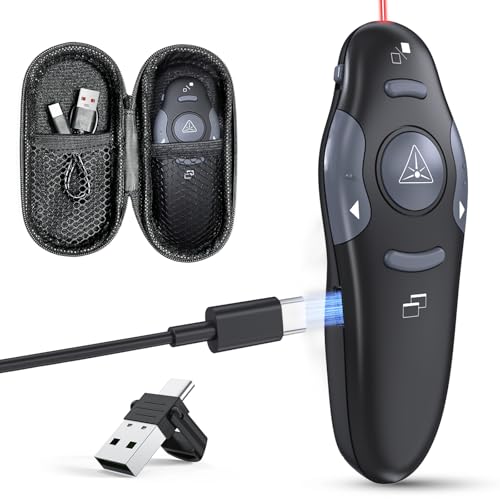
The Presentation Clicker with Case Storage is ideal for professionals who need seamless control during their PowerPoint presentations. With a wireless control distance of 98FT, you can move around freely while engaging your audience. Its plug-and-play functionality means no drivers are required; just connect the USB dongle and you’re set. The rechargeable design, powered via USB Type C, guarantees you won’t waste time replacing batteries. Plus, in just five minutes of charging, you get an hour of use. The clicker’s ergonomic, grippy texture prevents slipping, while its compact size makes it easy to store during Q&A sessions.
Best For: Professionals seeking a reliable and user-friendly tool for delivering impactful presentations.
Pros:
- Plug and Play functionality allows for quick setup with no drivers needed.
- Rechargeable design eliminates the hassle of battery replacements, with a quick charge feature for convenience.
- Ergonomic and compact design ensures a comfortable grip and easy storage during presentations.
Cons:
- Wireless control distance may not be sufficient for very large venues.
- Limited compatibility with some proprietary presentation software not mentioned.
- The red laser pointer may not be as effective in brightly lit environments.
DinoFire USB Type C Wireless Presenter Remote Clicker

For professionals seeking an effective tool to enhance their presentations, the DinoFire USB Type C Wireless Presenter Remote Clicker stands out with its versatile compatibility, featuring both USB-A and USB-C connections. You’ll appreciate its user-friendly design, allowing easy page navigation, volume control, and window switching—all without needing drivers. The bright red laser helps engage your audience, while the impressive control range of up to 165 feet keeps you mobile. With a compact design and a pen clip for portability, it’s perfect for classroom or conference settings. Elevate your presentation game with this efficient and convenient clicker.
Best For: Professionals and educators looking for a reliable and user-friendly remote clicker for presentations.
Pros:
- Versatile Compatibility: Works with both USB-A and USB-C connections, making it suitable for various devices.
- User-Friendly Design: Plug and play functionality allows for easy setup without the need for drivers.
- Impressive Control Range: Operates effectively at distances of up to 165 feet, enhancing mobility during presentations.
Cons:
- Limited Laser Compatibility: The red laser is not suitable for use on LED or LCD screens.
- Mac Setup Required: Some simple setup is necessary for Mac users, which may be inconvenient.
- Potential Battery Life Concerns: Depending on usage, the battery life may not last through extended presentations without replacement.
QUI Presentation Clicker for PowerPoint

Looking for a reliable remote that enhances your presentation experience? The QUI Presentation Clicker for PowerPoint is an excellent choice. Its RF 2.4GHz USB wireless connectivity means you can easily plug and play without any software hassles. Compatible with Mac, Windows, and various software like PowerPoint and Google Slides, you’ll enjoy a seamless setup. With a range of up to 328 feet, you can engage your audience from anywhere in the room. Plus, intuitive buttons and a bright red laser pointer help you navigate effectively. Lightweight and portable, it’s perfect for any presenter on the go.
Best For: The QUI Presentation Clicker is best for presenters who seek a reliable and user-friendly remote to enhance their presentation experience across various platforms.
Pros:
- Easy to use: Plug and play functionality with no software installation required.
- Long range: Connects up to 328 feet (100 meters), allowing freedom of movement during presentations.
- Intuitive controls: Features user-friendly buttons for seamless navigation and a bright red laser pointer for emphasis.
Cons:
- Limited compatibility: While it works with many software, some specific applications may not be supported.
- Battery dependency: Requires batteries, which could lead to inconvenience if they run out unexpectedly.
- No advanced features: Lacks additional features found in more expensive presentation clickers, such as customizable buttons or advanced laser options.
Presentation Clicker Wireless Presenter Remote for PowerPoint

Designed with versatility in mind, the Presentation Clicker Wireless Presenter Remote (Model E600) is perfect for professionals who often present using Mac computers or laptops. This remote supports volume control, window switching, and full/black screen options, allowing you to navigate effortlessly during your presentation. Its dual-head design features USB and Type-C ports, ensuring compatibility with various devices. You’ll appreciate the bright red laser pointer, which highlights key points, even in low-light settings. With a wireless range of up to 100 feet, you can engage your audience while moving around confidently, enhancing overall interactivity during your lectures.
Best For: Professionals and educators who frequently use Mac computers or laptops for presentations.
Pros:
- Supports volume control and window switching for seamless presentation navigation.
- Bright red laser pointer enhances visibility of key points in low-light conditions.
- Wireless range of up to 100 feet allows for greater audience engagement.
Cons:
- Limited compatibility with devices that do not have USB or Type-C ports.
- May require batteries, which can be inconvenient if they run out unexpectedly.
- Some users may prefer additional features or customization options not available with this model.
Wireless Presenter Remote Clicker for PowerPoint and Keynote

The Wireless Presenter Remote Clicker stands out as an essential tool for anyone who regularly delivers PowerPoint or Keynote presentations. With its multifunctional capabilities, you can easily navigate through slides, control volume, and switch windows. It works seamlessly with various operating systems and requires no software installation—just plug and play! Enjoy the freedom to move up to 100 meters away, while the bright red laser guarantees your audience stays engaged. Whether you’re teaching, presenting in meetings, or looking for a thoughtful gift, this clicker enhances your presentation experience and keeps everything under your control.
Best For: Individuals who frequently give presentations, such as educators, business professionals, or anyone needing a reliable way to navigate slides.
Pros:
- Versatile compatibility with various operating systems and presentation software, ensuring usability across different devices.
- Long control range of up to 100 meters, allowing presenters to engage with their audience from a distance.
- User-friendly plug and play design requires no software installation, making setup quick and simple.
Cons:
- May require a simple setup for Mac users, which could be a minor inconvenience for some.
- Powered by a single AAA battery, which could require replacements over time.
- Some users may find the red laser light less effective on certain backgrounds, potentially affecting visibility.
Factors to Consider When Choosing a Corporate Presenter Remote
When you’re choosing a corporate presenter remote, consider several key factors to guarantee a smooth presentation. Think about the wireless range, laser pointer visibility, and compatibility with your devices. You’ll also want to evaluate battery life and how easy the remote is to use during your talk.
Wireless Range Capabilities
Choosing the right corporate presenter remote means considering its wireless range capabilities, as this feature greatly impacts your mobility during presentations. If you’re often in small meeting rooms, a range of 50 feet should suffice. However, for larger venues or auditoriums, opt for a remote with a range of 100 feet or more. Look for models that utilize 2.4GHz RF technology, as they typically offer reliable connectivity and a consistent signal. Also, check if the remote’s range remains effective in environments with potential interference from other wireless devices. This way, you can guarantee smooth delivery and engagement with your audience, no matter where you stand in the room.
Laser Pointer Visibility
Visibility is essential for effective presentations, and the type of laser pointer in your corporate presenter remote plays a significant role in that. You’ll find laser pointers in red or green, with green lasers typically offering better visibility against various backgrounds, especially in well-lit spaces. A bright red laser can be seen up to 328 feet, while a green one shines at distances of up to 656 feet, making it ideal for larger rooms. Keep in mind that background color and lighting can affect visibility; red lasers may falter on bright surfaces. Opting for a Class 1 green laser enhances audience attention, so focus on brightness and wavelength when selecting your remote for maximum impact during presentations.
Compatibility With Devices
Selecting the right corporate presenter remote goes beyond just laser pointer visibility; compatibility with your devices is equally important. First, confirm the remote works with your operating systems, like Windows, Mac OS, or Linux, to prevent connectivity issues. Check if it’s compatible with popular software applications such as PowerPoint, Keynote, and Google Slides, as some remotes offer enhanced features for these programs. Also, consider whether it includes both USB-A and USB-C connections, accommodating various devices like laptops and tablets. Look for plug-and-play functionality, which simplifies setup without needing extra software. Finally, verify the wireless range, since distance and signal strength can impact your ability to move freely while presenting.
Battery Life and Type
When it comes to corporate presenter remotes, battery life and type play an essential role in ensuring your presentations run smoothly. Most remotes use AAA batteries, with some requiring two and others featuring rechargeable options via USB or Type-C ports. If you opt for a remote with energy-saving features like auto-sleep modes, you can enjoy weeks of use on a single charge. Standard AAA batteries can last several months depending on usage and design. Rechargeable models often offer quick charge options, providing hours of use after just a short charging session. It’s vital to reflect on whether the remote’s battery type is easily replaceable or rechargeable, as this impacts long-term usability and convenience during your presentations.
Ease of Use
Choosing the right corporate presenter remote can greatly enhance your presentation experience, especially if you prioritize ease of use. Look for a remote with plug-and-play functionality, allowing you to connect the USB receiver effortlessly without software installation. An intuitive button layout with clear labels for page forward, page backward, and volume control makes navigation seamless. Verify the remote has a wireless range of at least 50 feet, giving you the freedom to engage with your audience. A design featuring a built-in docking bay for the USB receiver is handy for storage and prevents loss. Finally, check for battery life specs and opt for models with energy-saving features like auto-sleep modes for extended usability during long presentations.
Presentation Features Offered
A corporate presenter remote should offer a range of features that enhance your ability to deliver engaging presentations. Look for essential functions like page up/down, hyperlink navigation, and volume control to boost interactivity. Additional features such as black/full screen modes and window switching provide greater flexibility in how you present your content. A bright laser pointer is vital; it should be easily visible against various backgrounds, helping you emphasize key points effectively. Opt for a remote with a wireless range of at least 100 feet, allowing you to move freely and connect with your audience. Finally, choose models with plug-and-play functionality for a hassle-free setup, eliminating the need for complicated software installations.
Design and Portability
Selecting the right corporate presenter remote hinges on its design and portability. A compact design is essential for easy packing, allowing you to slip the remote conveniently into pockets or bags. Aim for a lightweight model, ideally around 0.5 ounces or less, to avoid fatigue during long presentations. Ergonomic features, like a smooth texture and curved grip, enhance comfort and prevent slipping, making it easier to handle. Look for a remote with a built-in storage compartment for the USB receiver, ensuring the dongle is secure when not in use. Additionally, a rechargeable battery option eliminates frequent battery replacements, providing a sustainable and user-friendly experience. These factors will greatly enhance your presentation experience.
Price and Value
While steering through the variety of corporate presenter remotes available, understanding the price and value associated with each model is essential. You’ll find options ranging from budget-friendly remotes at around $20 to advanced models exceeding $100. Evaluate features like wireless range, battery life, and added functionalities—these can greatly impact your presentation experience. Don’t forget to check for warranties or satisfaction guarantees; they enhance value by guaranteeing quality. Also, consider the cost of replacement batteries; rechargeable models often provide better long-term savings. Finally, look at user reviews to see if the price reflects the remote’s performance and reliability in real-world settings. Making an informed choice will guarantee you get the best value for your investment.