
When it comes to improving your workspace comfort, choosing the right ergonomic monitor arm can make all the difference. These versatile solutions allow you to customize your monitor’s height and angle, promoting better posture and reducing strain. With various options available, from dual setups to heavy-duty models, it’s essential to find one that fits your needs. Let’s explore the top contenders that can transform your workspace into a more efficient environment.
HUANUO Dual Monitor Stand for 13–32″ Computer Screens

If you’re looking to enhance your workspace with the HUANUO Dual Monitor Stand, it’s perfect for those who use monitors sized between 13 and 32 inches. This stand supports screens weighing 4.4 to 19.8 lbs and features VESA mounting holes for easy installation. Its dual C-clamp structure guarantees a secure attachment, while the full-motion adjustment allows for +85°/-50° tilt, ±90° swivel, and 360° rotation. Elevating your monitors not only frees up desk space but also promotes a tidy setup with built-in cable management. Enjoy reduced neck and back strain, making it ideal for work, gaming, or video calls.
Best For: Those who need an ergonomic and organized workspace with dual monitors sized 13 to 32 inches.
Pros:
- Enhances workspace organization by freeing up desk space and promoting a tidy setup.
- Offers full-motion adjustment for customizable viewing angles, reducing strain on neck and back.
- Sturdy dual C-clamp structure ensures secure attachment to desks.
Cons:
- Not suitable for desks made of plastic or glass; recommended only for wooden desks.
- Requires specific desk thickness (0.59 – 3.54 inches) for proper installation.
- Limited to monitors with VESA mounting holes of 75x75mm or 100x100mm.
HUANUO Single Monitor Mount (13 to 32 Inch)

The HUANUO Single Monitor Mount is an ideal choice for anyone looking to optimize their workspace and enhance their viewing comfort. It fits monitors ranging from 13 to 32 inches and supports weights up to 19.8 lbs. With full adjustability, you can tilt, swivel, and rotate your screen for the perfect angle, lifting it up to 39.6 cm above your desk. Installation is a breeze, taking only about three minutes, and you can choose between C-clamp or grommet mounts. Plus, it’s built to last, being 80% sturdier than many competitors. With over 15,000 positive reviews, it’s a reliable option.
Best For: Individuals seeking an ergonomic and adjustable monitor mount to improve their workspace efficiency and comfort.
Pros:
- Full adjustability with a wide range of motion for optimal viewing angles.
- Quick and easy installation process that can be completed in just three minutes.
- Sturdy construction ensures long-lasting durability and stability.
Cons:
- Limited to monitors weighing no more than 19.8 lbs, which may exclude some larger models.
- Installation is recommended only on wood tabletops without interfering beams or panels.
- May not fit all desk styles due to specific mounting requirements.
HUANUO Adjustable Single Monitor Arm (13-34 Inch)

For those seeking an ergonomic solution to enhance their workspace, the HUANUO Adjustable Single Monitor Arm supports monitors ranging from 13 to 34 inches and weighing between 4.4 to 22 pounds. Built with aerospace-grade aluminum alloy, it offers durability and a gas spring tested for over 20,000 cycles. The arm’s full motion capabilities—rotate 360°, tilt +90°/-35°, and swivel ±90°—make it perfect for multitasking or gaming. With easy installation options and US-based tech support available 24/7, you can quickly set it up on your solid wood or metal desk. Enjoy reduced neck strain and increased comfort during use!
Best For: Those seeking an ergonomic and flexible monitor setup to enhance comfort and productivity during work or gaming.
Pros:
- Durable construction with aerospace-grade aluminum alloy ensures long-lasting use.
- Full motion capabilities allow for versatile positioning, enhancing multitasking efficiency.
- Easy installation options with US-based tech support available 24/7 for assistance.
Cons:
- Not compatible with glass desks, limiting installation options.
- Weight limit of 22 lbs may not support larger, heavier monitors.
- Initial setup may require some time and effort despite pre-assembled parts.
Ergotron LX Monitor Arm for Single Monitor (Fits up to 34 Inches)

Designed to support flat, curved, and ultrawide monitors up to 34 inches, the Ergotron LX Monitor Arm is perfect for anyone seeking an adjustable and ergonomic workspace. It accommodates monitors weighing between 7 to 25 lbs and features versatile mounting options with a desk clamp or grommet mount. You can easily raise your monitor up to 17.3 inches, enjoying 360-degree rotation and 75 degrees of tilt for ideal viewing angles. Its sleek design enhances your workspace while built-in cable management keeps things tidy. With a 10-year warranty and expert support, you can trust Ergotron for quality and reliability.
Best For: Those looking to enhance their workspace ergonomics with an adjustable monitor mount for screens up to 34 inches.
Pros:
- Versatile mounting options with both desk clamp and grommet mount for different desk types.
- Significant adjustability allows for optimal viewing angles with 360-degree rotation and 75 degrees of tilt.
- Sleek design with built-in cable management that improves workspace aesthetics.
Cons:
- Installation may require tools and some effort, especially for the grommet mount.
- Weight limit of 25 lbs may not accommodate heavier monitors.
- Higher price point compared to basic monitor mounts on the market.
Gaming Monitor Arm for Flat/Ultrawide/Curved Monitors (27” to 50 inch)

If you’re a gamer or a professional using flat, ultrawide, or curved monitors between 27” and 50”, this Gaming Monitor Arm is an ideal solution. It supports 2 to 18 kg and is compatible with VESA 75/100 mm, ensuring stability. You’ll appreciate its adjustable height, swivel, tilt, and rotation features, allowing for personalized positioning. The ergonomic design enhances your posture, reducing discomfort in your spine, neck, and shoulders during long sessions. Plus, the built-in cable management keeps your workspace tidy. Installation is a breeze with included instructions and hardware, so you can set it up quickly and get back to gaming or working efficiently.
Best For: Gamers and professionals using flat, ultrawide, or curved monitors sized between 27” and 50” who seek ergonomic support and flexible positioning.
Pros:
- Adjustable Features: Offers height, tilt, rotation, and swivel adjustments for personalized monitor positioning.
- Ergonomic Design: Improves posture and reduces discomfort in the spine, neck, and shoulders during extended use.
- Cable Management: Built-in cable management system keeps workspace organized and clutter-free.
Cons:
- Load Capacity Limitations: Only supports monitors weighing between 2 to 18 kg, which may not accommodate heavier models.
- VESA Compatibility: Requires specific VESA 75/100 mm mounting, limiting compatibility with some monitor models.
- Installation Required: May require time and effort for setup, particularly for users unfamiliar with mounting hardware.
ASUS ROG Ergo Monitor Arm (AAS01)

The ASUS ROG Ergo Monitor Arm (AAS01) is an excellent choice for gamers and professionals who demand flexibility and comfort in their workspace. It accommodates monitors up to 39 inches and supports weights from 6.6 to 23.35 pounds for flat screens, ensuring compatibility with various setups. With its mechanical spring system, you’ll enjoy full range motion, including height, tilt, and swivel adjustments for the perfect viewing angle. The quick installation process and rigorous durability testing guarantee reliable performance. Plus, its integrated cable management system keeps your desk organized, promoting a neat and tidy workspace while enhancing your overall productivity.
Best For: Gamers and professionals seeking a flexible and ergonomic workspace with adjustable monitor positioning.
Pros:
- Full range of motion allows for height, tilt, and swivel adjustments to achieve optimal viewing angles.
- Supports various monitor sizes and weights, accommodating monitors up to 39 inches and a wide range of weights.
- Integrated cable management system helps maintain a clean and organized workspace.
Cons:
- May be overkill for users with smaller or lighter monitors, as it is designed for larger setups.
- Initial installation may require some time and tools, depending on the user’s experience.
- Price point may be higher compared to basic monitor arms that lack advanced features.
WALI Single Monitor Mount, Gas Spring Monitor Arm for 17-34 inch Screens

For anyone using a 17 to 34-inch flat or curved screen, the WALI Single Monitor Mount offers an exceptional solution to enhance your workspace. With a maximum load capacity of 26.4 lbs for flat screens and 19.8 lbs for curved ones, this mount provides stability and support. Its full adjustability allows you to swivel, tilt, and rotate your monitor for ideal viewing comfort. You can easily extend the screen out by 19.3 inches and raise it up to 17.3 inches. Plus, installation is straightforward with clamp or grommet options, ensuring your workspace stays organized and strain-free.
Best For: Those seeking an ergonomic solution for their 17 to 34-inch flat or curved monitors to enhance workspace organization and comfort.
Pros:
- Full adjustability allows for optimal viewing angles with swivel, tilt, and rotation capabilities.
- Sturdy construction supports up to 26.4 lbs for flat screens, ensuring stability.
- Easy installation with both clamp and grommet options makes setup hassle-free.
Cons:
- May require additional tools for installation not included in the package.
- Limited to a maximum load of 26.4 lbs for flat screens, which may not accommodate heavier monitors.
- Height adjustment may not be sufficient for very tall users or specific desk setups.
HUANUO Single Monitor Arm for 13-49 inch Screens
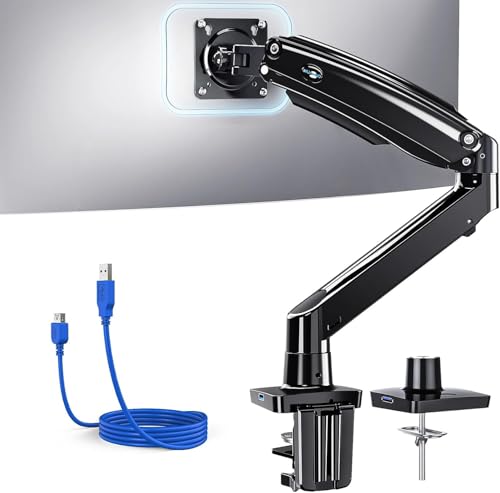
Designed for versatility, the HUANUO Single Monitor Arm excels for students, remote workers, and professionals who need flexibility in their workspace. It supports screens from 13 to 49 inches and handles weights up to 26.4 lbs, making it compatible with 95% of monitors. You’ll appreciate the impressive adjustability, with tilt, swivel, and rotation options, and a height adjustment of 21.1 inches. Plus, a built-in USB 3.0 port makes data transfers and charging a breeze. With durable aerospace-grade aluminum and easy installation, this monitor arm enhances your setup, saves desk space, and withstands daily use effortlessly.
Best For: The HUANUO Single Monitor Arm is best for students, remote workers, and professionals seeking a flexible and ergonomic workspace.
Pros:
- Versatile Compatibility: Supports monitors from 13 to 49 inches and is compatible with 95% of home and office monitors.
- Enhanced Adjustability: Offers extensive adjustability with tilt, swivel, rotation, and height adjustments for optimal viewing angles.
- Space-Saving Design: Integrated cable management and a built-in USB 3.0 port help reclaim desk space while providing convenient charging and data transfer.
Cons:
- Weight Limitations: Only supports monitors weighing up to 26.4 lbs, which may exclude some larger models.
- Installation Requirements: Requires a solid wood desk without crossbars for optimal stability, limiting its installation options.
- Potential Complexity for Beginners: While tools are included, beginners may still find the installation process slightly challenging without prior experience.
HUANUO Heavy Duty Monitor Arm for Ultrawide Screens

If you’re looking to optimize your workspace with an ergonomic solution, the HUANUO Heavy Duty Monitor Arm is perfect for ultrawide screens, accommodating monitors up to 49 inches. This robust arm holds up to 40 lbs, ensuring stability for both flat and curved displays. With a 19.5-inch height adjustment and a 360° rotation, you can easily customize your viewing angle. The installation is a breeze, thanks to clear instructions and a quick-install VESA head. Plus, its durable aluminum construction and 30-day return policy make it a reliable choice for enhancing your comfort and productivity.
Best For: Those seeking a sturdy and adjustable monitor arm for ultrawide screens, ideal for enhancing ergonomic comfort and workspace organization.
Pros:
- Supports a wide range of monitor sizes (17–49 inches) and weights (up to 40 lbs) for versatile use.
- Offers extensive adjustability with height, tilt, swivel, and rotation features for optimal viewing angles.
- Easy installation process with clear instructions and a quick-install VESA head for user convenience.
Cons:
- The arm may be too heavy for some users to install alone, requiring assistance.
- Limited VESA compatibility with only 75x75mm and 100x100mm patterns may not suit all monitors.
- The price point may be higher than other basic monitor stands on the market.
BenQ BSH02 Ergo Monitor Arm for Up to 45” Screens

The BenQ BSH02 Ergo Monitor Arm stands out as the ideal choice for those seeking flexibility and support for larger screens, accommodating monitors up to 45 inches and weighing between 4 to 44 lbs. Its optimized tilt structure, tested for 25,000 cycles, guarantees reliable support without sagging. You’ll appreciate the steel reinforcement plate that protects your desk from scratches and deformation. Installation is a breeze with the top-mounting C Clamp or grommet, and the quick-release VESA plate makes adjustments simple. With adjustable extension, tilt, swivel, and built-in cable management, it promotes an organized, ergonomic workspace.
Best For: Those looking for a versatile and sturdy monitor arm to support larger screens while maintaining an organized and ergonomic workspace.
Pros:
- Supports a wide range of monitor sizes (up to 45 inches) and weights (4 to 44 lbs).
- Features built-in cable management to keep your desk clutter-free.
- Easy installation with multiple mounting options and quick adjustments.
Cons:
- May require additional effort for installation on thicker desks.
- Gas spring mechanism might need occasional recalibration for optimal performance.
- Limited VESA compatibility (only 75x75mm and 100x100mm).
Factors to Consider When Choosing an Ergonomic Monitor Arm
When choosing an ergonomic monitor arm, you need to take into account several key factors to guarantee it meets your needs. Think about monitor size compatibility, weight capacity, and how adjustable or flexible the arm is for your workspace. Don’t forget to look at installation options and the materials used for durability as well.
Monitor Size Compatibility
How do you guarantee your ergonomic monitor arm fits your setup perfectly? First, check the monitor size compatibility. Most arms support screens ranging from 13 to 49 inches, so make certain your monitor falls within that range. Next, look for VESA mounting patterns, typically 75x75mm or 100x100mm, which dictate how the monitor attaches to the arm. Don’t forget to take into account the weight; monitor arms generally support weights between 4.4 to 26.4 lbs. Additionally, think about whether your monitor is flat or curved, as this can affect compatibility. Finally, verify the arm’s height adjustment range can accommodate your monitor size for ideal viewing angles. All these factors will help you create a comfortable and efficient workspace.
Weight Capacity Considerations
Ensuring your ergonomic monitor arm fits your setup isn’t just about size and compatibility; weight capacity plays a significant role too. When choosing an arm, check that it supports your monitor’s weight, as capacities typically range from 4.4 lbs to 44 lbs. Each arm is designed for specific weight limits, so consulting the manufacturer’s specifications is essential to avoid damage or instability. Generally, heavier-duty arms use materials like aluminum or steel for added durability. Remember that many monitor arms list weight capacities for flat and curved monitors separately, since curved designs may need extra support. Also, consider any accessories like camera mounts or lighting, as they can impact the overall weight and stability of your setup.
Adjustability and Flexibility
Choosing an ergonomic monitor arm that offers adjustability and flexibility is essential for creating a comfortable workspace. Look for an arm with full motion capabilities, including a tilt range of -50° to +85°, ±90° swivel, and 360° rotation. This will help you find the perfect viewing angle for various tasks. The height should be adjustable, ideally allowing the screen to rise up to 25.6 inches or more, promoting better posture and reducing neck strain. Flexibility in extension is vital too; an arm that extends at least 15 inches forward lets you position your monitor comfortably. Many models feature gas spring mechanisms for smooth adjustments, supporting screens weighing between 4.4 to 26.4 lbs while integrating cable management to keep your workspace tidy.
Installation Options Available
When selecting an ergonomic monitor arm, you’ll want to contemplate the installation options that best suit your workspace. Many monitor arms offer C-clamp and grommet mounts, each catering to different desk setups. C-clamp mounts fit desk thicknesses from 0.4 to 3.5 inches, attaching securely without drilling. On the other hand, grommet mounts require a pre-drilled hole and typically support desks up to 2.25 inches thick, making them ideal for heavier monitors. Some models come pre-assembled with clear instructions, allowing you to install them in as little as three minutes. It’s important to verify compatibility with your desk material—solid wood or metal is preferred, while glass or plastic may not provide enough support for certain monitor arms.
Material and Durability
The material used in ergonomic monitor arms plays a crucial role in their overall durability and performance. Options like aerospace-grade aluminum alloy offer long-term reliability and resistance to wear and tear. If you want a monitor arm that can handle extensive movement, consider those made from automotive-grade components, which endure over 20,000 motion cycles. Heavy-duty constructions with reinforced VESA heads and lock rings support larger monitors weighing up to 40 lbs or more. Arms made from steel or high-strength aluminum alloys typically hold up to 80% more weight than standard models, ensuring your monitor stays in place. Look for models that have undergone durability tests, like 50,000 cycle motion tests, to guarantee they can withstand prolonged use without losing structural integrity.