
If you work with two screens, the right converter can make your desk feel bigger, cleaner, and far more comfortable. The best models raise your setup smoothly without sacrificing stability or workspace.
Below, we’ve narrowed the field to the strongest desk converters for dual monitors, with options for compact home offices, heavier monitor setups, and electric height adjustment.
Best 10 Desk Converters for Dual Monitors Picks for 2026
Compact Manual Converter
TechOrbits 32" Standing Desk Converter

- 32-inch surface fits dual monitors and accessories
- Mostly assembled with minimal setup
- Adjusts from 4.3" to 19.7"
Best For: Small offices and buyers who want a simple manual dual-monitor converter
Wide Electric Riser
VIVO 42" Electric Desk Converter

- 42-inch top suits dual monitors and a laptop
- Electric lift adjusts with the push of a button
- Supports up to 50 lbs
Best For: Users who want a roomy electric converter for dual-monitor setups
Value-Focused Lift Desk
G-Pack Pro 38" Standing Desk Converter

- 38-inch surface fits dual monitors and accessories
- Gas spring lift adjusts up to 17.3"
- Heavy-duty steel frame supports up to 33 lbs
Best For: Value shoppers who want a stable 38-inch dual-monitor converter
Space-Saving Riser
VIVO 32" Standing Desk Converter

- Compact 31.5" x 15.8" surface
- Pneumatic lift from 4.9" to 19.7"
- Very minimal assembly
Best For: Small desks and lighter dual-monitor setups
Electric Dual-Monitor Workstation
VERSADESK PowerPro 36" Electric Desk Riser

- Push-button electric height adjustment
- Split-level layout for dual monitors plus keyboard
- Built-in USB port; ships fully assembled
Best For: People who want a motorized dual-monitor desk converter with minimal setup
Wide Surface Manual Riser
VIVO 42" Standing Desk Converter

- 42-inch surface fits dual monitors well
- Manual lift with synchronized keyboard tray
- Minimal assembly and sturdy steel frame
Best For: Buyers who want a wide, easy-to-use manual dual-monitor converter
Dual-Monitor Mount Riser
Mount-It! 36" Standing Desk Converter
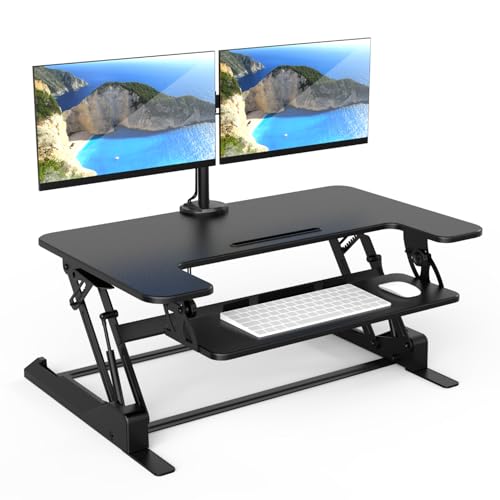
- Integrated mount for two monitors up to 32 inches
- Gas spring lift with tilt, swivel, and rotation
- Cable management and organized keyboard tray
Best For: People who want an integrated dual-monitor mount with their desk converter
Dual-Monitor Riser
VIVO 32 in Standing Desk Converter
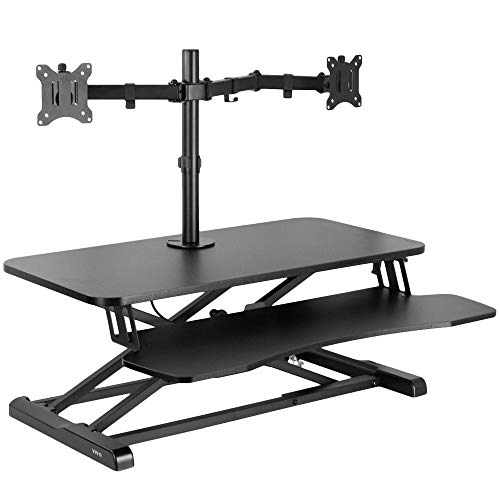
- Fits two 13" to 30" monitors.
- Manual height range from 4.5" to 20".
- Full-motion VESA mount with tilt, swivel, and rotation.
Best For: A compact manual converter with an integrated dual-monitor mount.
Gas-Spring Workstation
Mount-It! Dual Monitor Desk Riser

- Gas spring lift from 5.7" to 17.1".
- Supports two 32" monitors up to 22 lbs each.
- Includes keyboard tray, wrist pad, and cable management.
Best For: A compact dual-monitor riser with smooth manual height changes.
Electric XL Converter
Mount-It! Dual Monitor Desk Riser

- One-touch electric height adjustment.
- Wide 47.2" desktop with USB charging.
- Supports two 32" monitors on a dual arm.
Best For: A large electric converter for a two-monitor workstation.
Compact Manual Converter – TechOrbits 32" Standing Desk Converter
If you want desk converters for dual monitors without giving up too much space, the TechOrbits 32-inch model is a straightforward manual option. Its height range from 4.3″ to 19.7″ gives you room to switch between sitting and standing, while the dual-monitor-friendly surface and keyboard tray make it practical for everyday office use.
Best For: Small workspaces, home offices, and users who want a manual sit-stand converter with a dual-monitor layout.
Pros:
- 32-inch work surface fits a dual monitor display plus keyboard, mouse, and accessories.
- Mostly assembled with minimal setup; keyboard tray attaches with included tools.
- Pneumatic lift and aluminum frame support up to 33 lbs.
- Adjusts from 4.3″ to 19.7″ for flexible sit-to-stand positioning.
Cons:
- Manual height adjustment may be less convenient than electric models.
- 33 lb capacity is lower than some larger converters.
Overall, this is a space-conscious converter that covers the essentials well. It suits buyers who want a simple, mostly assembled workstation for dual monitors and light accessories.
Wide Electric Riser – VIVO 42" Electric Desk Converter
For desk converters for dual monitors with a more effortless lift, the VIVO 42-inch electric desk converter stands out. The wide 42″ x 15.7″ top gives you generous room for a dual monitor and laptop setup, and the electric motor lets you raise the workstation with the push of a button.
Best For: Buyers who want a wide electric sit-to-stand converter for dual monitors and a laptop.
Pros:
- 42-inch surface offers ample room for dual monitors and a laptop.
- Electric lift adjusts smoothly from 5.7″ to 19.5″ with button control.
- 50 lb capacity supports heavier workstation setups.
- Keyboard tray raises in sync with the top for a more comfortable setup.
Cons:
- Electric mechanism adds complexity compared with manual risers.
- Wide footprint may be too large for very compact desks.
This model is a strong pick if you want convenience and more surface area. It balances an easy lift system with enough room for a serious dual-monitor workspace.
Value-Focused Lift Desk – G-Pack Pro 38" Standing Desk Converter
If you’re comparing desk converters for dual monitors and want a larger surface without overhauling your office, the G-Pack Pro 38-inch model is built for that job. It uses a gas spring system, stays within its own footprint as it moves, and includes a removable keyboard tray for a cleaner desktop layout.
Best For: Budget-conscious shoppers who need a stable 38-inch converter for dual monitors and accessories.
Pros:
- 38-inch work surface gives room for dual monitors and accessories.
- Gas spring lift adjusts up to 17.3″ for sit-and-stand flexibility.
- Heavy-duty steel frame supports up to 33 lbs.
- Includes a removable keyboard tray and non-slip silicon pads.
Cons:
- Manual lift requires a bit of clearance and moves slightly outward.
- Not as effortless as an electric desk converter.
This is a practical middle-ground option with useful features and a space-efficient design. It works well for buyers who want a larger dual-monitor converter at a value-oriented price point.
Space-Saving Riser – VIVO 32" Standing Desk Converter
For smaller desks, this VIVO model is one of the more compact desk converters for dual monitors. The 31.5″ x 15.8″ surface is designed to maximize space while still giving you a workable setup, and the pneumatic lift makes standing transitions simple.
Best For: Compact workstations and users who need a smaller dual-monitor riser with minimal assembly.
Pros:
- Space-efficient 32-inch surface helps fit dual-monitor or laptop-monitor setups.
- Pneumatic spring lift raises straight up from 4.9″ to 19.7″.
- Keyboard tray raises in sync with the top surface.
- Very minimal assembly; attach the tray and start using it.
Cons:
- 26 lb desktop capacity is lower than larger converters.
- Smaller surface may feel tight for fuller dual-monitor builds.
This converter is best when desk space is limited and you want a simple setup. It keeps the footprint small while still offering core sit-stand functionality for lighter dual-monitor use.
Electric Dual-Monitor Workstation – VERSADESK PowerPro 36" Electric Desk Riser
If you want desk converters for dual monitors with the least manual effort, this electric VERSADESK model makes sit-to-stand changes simple. It uses a push-button motorized lift, has a split-level layout for screens and keyboard space, and includes a built-in USB charging port for a cleaner setup.
Best For: Users who want an electric, fully assembled standing desk converter for dual monitors and a laptop.
Pros:
- Push-button electric height adjustment with a quiet motorized lift
- Spacious dual-monitor layout with a split-level ergonomic design
- Built-in USB charging port helps reduce cable clutter
- Ships fully assembled and supports up to 80 lbs
Cons:
- Monitor arms are sold separately
- Requires power for electric adjustment
- Larger footprint may not suit very tight desks
This is the most convenience-focused option in the group, especially if you value smooth height changes and a sturdy, ready-to-use build. It’s a strong pick for dual-monitor home office setups where stability and speed matter.
Wide Surface Manual Riser – VIVO 42" Standing Desk Converter
Among desk converters for dual monitors, this VIVO riser stands out for its wide 42-inch surface and straightforward manual lift design. It gives you a roomy top deck and synchronized keyboard tray so you can switch between sitting and standing without a complicated setup.
Best For: Shoppers who want a simple, wide manual standing desk converter for dual monitors.
Pros:
- 42-inch top surface offers plenty of room for dual monitors
- Keyboard tray rises in sync with the desktop for consistent ergonomics
- Strong steel frame and scratch-resistant construction
- Very minimal assembly; nearly ready out of the box
Cons:
- 33 lb desktop weight limit is lower than some heavier-duty options
- Manual lift is less convenient than electric adjustment
- Keyboard tray has a relatively small weight capacity
This is a practical choice if you want a large work area without extra complexity. The wide surface and quick setup make it a solid everyday converter for dual-monitor workstations.
Dual-Monitor Mount Riser – Mount-It! 36" Standing Desk Converter
If you’re comparing desk converters for dual monitors and want the screens mounted as part of the riser, this Mount-It! model is built around that idea. It includes two monitor mounts, a gas spring lift, and an organized work surface that helps keep a dual-screen setup tidy and ergonomic.
Best For: Users who want an all-in-one standing desk converter with built-in dual monitor mounts.
Pros:
- Integrated dual monitor mount supports two screens up to 32 inches
- Adjustable tilt, swivel, and rotation help dial in viewing angles
- Gas spring height adjustment makes sit-to-stand transitions smoother
- Built-in cable management helps keep the setup clean
Cons:
- Desktop and monitor arm weight limits are relatively specific
- Heavier unit at 46.1 pounds
- Monitor configuration may be less flexible than separate arms
This model is a good fit if you want the monitor support built into the converter itself rather than adding separate hardware. It’s especially appealing for users who want ergonomic screen positioning with a more integrated workspace.
Dual-Monitor Riser – VIVO 32 in Standing Desk Converter
If you’re shopping for desk converters for dual monitors, this VIVO model stands out for combining a 32-inch sit-stand surface with an integrated dual monitor mount. It is built for two 13″ to 30″ screens and adds full-motion adjustment, so you can dial in a setup that fits your desk and viewing angle.
Best For: Users who want a compact standing desk converter with a built-in dual monitor arm and manual height adjustment.
Pros:
- Supports two 13″ to 30″ monitors up to 17.6 lbs each.
- Height adjusts from 4.5″ to 20″ with a lock mechanism.
- Full-motion mount offers tilt, swivel, rotation, and pole height adjustment.
- Steel frame with padding helps protect your desk surface.
Cons:
- Top surface is fairly compact at 31.5″ x 15.7″.
- Assembly is minimal, but it still requires attaching multiple components.
Overall, this is a practical pick if you want a sturdy dual-monitor riser without moving to a full electric desk. Its strength is the built-in monitor mounting system, which helps keep screens secure while giving you flexibility in how you position them.
Gas-Spring Workstation – Mount-It! Dual Monitor Desk Riser
This Mount-It! option is a straightforward choice for desk converters for dual monitors when you want a smooth sit-to-stand transition and a smaller footprint. The gas spring lift makes height changes easy, while the included monitor mount supports two large displays for a more ergonomic setup.
Best For: Buyers who want a space-saving dual-monitor converter with easy gas-spring height adjustment.
Pros:
- Gas spring lift adjusts from 5.7″ to 17.1″ smoothly.
- Supports two monitors up to 32″ and 22 lbs each.
- Includes a large keyboard tray with a soft gel wrist pad.
- Built-in cable management helps keep the desk tidy.
Cons:
- Top platform is smaller than the overall workstation footprint suggests.
- Maximum height is more limited than taller converter designs.
For people who want an ergonomic converter without a bulky desktop takeover, this model keeps the essentials in reach. Its combination of smooth lifting, dual-monitor support, and tray comfort makes it a solid all-around office upgrade.
Electric XL Converter – Mount-It! Dual Monitor Desk Riser
If you want desk converters for dual monitors with the easiest adjustment experience, this electric Mount-It! model is the most convenient of the group. It offers one-touch height changes, a large work surface, and a dual arm mount that supports two screens up to 32 inches each.
Best For: Users who want a large electric standing desk converter with dual-monitor support and minimal effort.
Pros:
- Electric height adjustment from 6.3″ to 19.3″.
- Supports two monitors up to 32″ and 22 lbs each.
- Large 47.2″ x 23.2″ desktop surface provides extra room.
- Includes a USB charger and built-in device channel.
Cons:
- Requires assembly, even though setup is meant to be simple.
- Bulkier size may not suit smaller desks or tighter office spaces.
This is the strongest fit for shoppers who value convenience and workspace size over compactness. The electric lift and wide desktop make it easier to move between sitting and standing while keeping two monitors and accessories organized.
How We Picked the Best Desk Converters for Dual Monitors
We focused on Desk Converters for Dual Monitors that balance stability, height range, usable surface area, and ease of adjustment. We also looked for models that can support common dual-screen setups without excessive wobble, awkward cable routing, or cramped workspace layouts.
Quick Comparison
The main differences come down to size, lifting style, and how your monitors are mounted. Manual converters are usually simpler and more affordable, while electric options offer smoother transitions and often handle heavier setups better. Larger tops help if you want room for a keyboard, mouse, notebook, and accessories alongside two displays.
Key Buying Factors for Desk Converters for Dual Monitors
Weight Capacity and Stability
Check the total supported weight, including monitors, arms or stands, keyboard, mouse, and any laptop or docking gear. A strong base and sturdy lift mechanism matter more as screen size increases.
Top Surface Size
Two monitors can quickly crowd a small desktop riser. Look for enough width and depth to keep screens positioned comfortably while leaving space for typing and mousing.
Lift Type
Gas spring and manual-lift models are common and budget-friendly, while electric units are easier to raise and lower throughout the day. If you switch positions often, electric convenience can be worth the extra cost.
Monitor Mounting Options
Some models include fixed monitor stands or arms, which can improve ergonomics and free up surface space. Make sure the mounting style matches your displays, VESA pattern, and preferred viewing height.
Desk Footprint and Ergonomics
Measure your current desk before buying. The best converter should fit your workspace without blocking drawers, bumping into walls, or forcing you into an awkward typing position.
Who Should Buy Which Desk Converters for Dual Monitors?
If you want the simplest setup, choose a straightforward manual converter with enough room for two monitors and a keyboard. If you have heavier displays or adjust often, an electric model is usually the better long-term fit. For smaller desks, prioritize compact width and integrated monitor support. For larger workstations, choose a wide surface or dual-arm design so your Desk Converters for Dual Monitors feel organized, comfortable, and easy to use every day.