
Choosing a drawing tablet with pen pressure can make a bigger difference than most beginners expect. The right model gives you more control over line weight, shading, and natural-feeling brush work.
Below, we focus on practical picks for different budgets, desk setups, and skill levels so you can find a tablet that fits the way you actually draw.
Best 10 Drawing Tablet with Pen Pressure Picks for 2026
Editor’s Choice
XP-Pen Deco 01 V3 for Natural Shading

- 16,384 pressure levels with 60° tilt
- Large 10 x 6.25-inch active area
- 8 shortcut keys and battery-free pen
Best For: Beginners and students who want natural shading and an easy setup
Trusted Classic
Wacom Intuos Small for Precise Control

- Battery-free EMR pen with 4,096 levels
- Compact 6" x 3.7" active surface
- Includes software and online training
Best For: Students and teachers who want a compact, dependable tablet
Budget-Friendly Pick
XP-Pen Deco 01 V3 with 16K Pen Pressure

- 16,384 pressure levels with tilt support
- Large 10 x 6.25-inch drawing area
- Battery-free stylus with 8 shortcut keys
Best For: Beginners who want a roomy, responsive tablet with simple setup
Compact Pick
HUION H420X for Tight Desktops

- 8,192 pressure levels and 300 PPS
- Ultra-slim 7mm body at 167g
- Plug-and-play with Android, Windows, and Mac
Best For: Students and remote workers with limited desk space
Budget Pen Tablet
HUION Inspiroy H1060P 10x6.25 Graphics Tablet

- 8192 pressure levels with battery-free stylus
- Large 10 x 6.25 inch active area
- 12 press keys + 16 soft keys for shortcuts
Best For: Beginners and hobbyists who want a roomy non-screen tablet
Pen Display Pick
XP-PEN Artist12 11.6" FHD Drawing Monitor

- 11.6-inch full HD display for direct drawing
- 8192 pressure sensitivity with battery-free pen
- 6 shortcut keys and a programmable touch bar
Best For: Students and teachers who want an affordable pen display
Pro Pen Display
HUION Kamvas 13 Gen 3 16K Pressure

- 16384 pressure levels with PenTech 4.0
- Full-laminated anti-glare display with color calibration
- Dual dials and 5 silent press keys for control
Best For: Serious creators who want precision and better color fidelity
Portable Pen Tablet
HUION HS610 10x6.25 inch Drawing Tablet

- 8192 pen pressure with battery-free stylus
- 12 express keys and touch ring controls
- Works with Windows, Mac, Linux, and Android
Best For: Artists and students who want a portable non-display tablet
Premium Pen Display

- 16384 pressure levels with PenTech 4.0
- 2.5K QHD laminated display with anti-glare glass
- Dual dials and 6 customizable press keys
Best For: Artists who want a high-resolution pen display with strong color
Shortcut-Heavy Pen Tablet
HUION HS611 10x6 inch Drawing Tablet
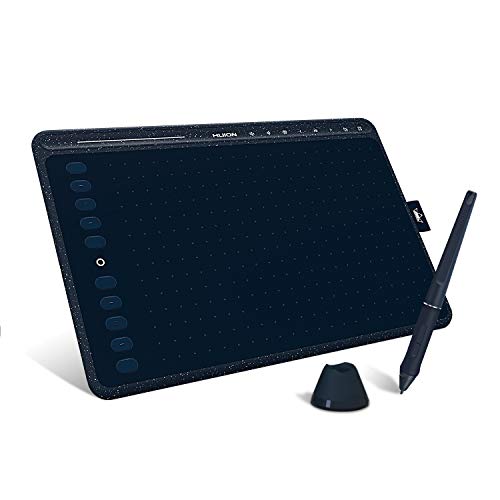
- 8192 pressure levels with battery-free pen
- 8 multimedia keys and 10 programmable keys
- Ultra-thin design with Android support
Best For: Creators who want a slim tablet with lots of shortcut controls
Editor’s Choice – XP-Pen Deco 01 V3 for Natural Shading
If you want a drawing tablet with pen pressure that feels comfortable for sketching, shading, and everyday digital art, the XP-Pen Deco 01 V3 is a strong pick. Its 16,384 pressure levels, 60-degree tilt support, and battery-free stylus are aimed at making line control feel more natural, especially for artists moving from paper to tablet.
Best For: Beginners, students, and hobbyists who want a larger active area, strong pen pressure, and easy shortcut access.
Pros:
- 16,384 pressure levels and tilt support help with smooth line variation and shading.
- 10 x 6.25-inch active area gives more room to draw comfortably.
- 8 customizable shortcut keys can reduce menu switching while you work.
- Battery-free pen and slim body make it easy to carry and use anywhere.
Cons:
- No built-in display, so you’ll be drawing on a separate screen.
- Best performance may require updated Windows or Mac versions.
Overall, this is a practical all-around tablet for artists who want responsive pen pressure without extra charging or a steep learning curve.
Trusted Classic – Wacom Intuos Small for Precise Control
The Wacom Intuos Small is a straightforward drawing tablet with pen pressure for users who want reliable control in a compact size. Its battery-free EMR pen, 4,096 pressure levels, and plug-and-play approach make it a practical choice for drawing, photo editing, and general creative work.
Best For: Students, teachers, and creators who want a compact tablet from a well-known brand with included software.
Pros:
- Battery-free EMR pen feels closer to writing on paper.
- 4,096 pressure levels support basic line variation and control.
- Works with a wide range of software for art, editing, and document markup.
- Includes software and training, which is helpful for first-time buyers.
Cons:
- Smaller active area may feel cramped for larger hand movements.
- Pressure sensitivity is lower than some newer competitors.
This is a solid no-frills option if you value brand trust, included extras, and a compact footprint over a bigger drawing surface.
Budget-Friendly Pick – XP-Pen Deco 01 V3 with 16K Pen Pressure
For shoppers comparing a drawing tablet with pen pressure on a budget, this XP-Pen Deco 01 V3 version focuses on the essentials: strong pressure response, tilt support, and a battery-free stylus. It is built to be simple to pick up, with 8 shortcut keys and broad compatibility for common art software and devices.
Best For: Beginners who want a large drawing area and responsive pen pressure without extra charging.
Pros:
- 16,384 pressure levels provide smooth control for sketching and shading.
- 60-degree tilt support adds more natural pen behavior.
- 10 x 6.25-inch working area gives plenty of room to draw.
- Battery-free stylus and USB-C connectivity simplify daily use.
Cons:
- No display, so you’ll need to work from your connected screen.
- Some users may need to update Windows or macOS for best performance.
It’s a practical pick if you want a beginner-friendly pen tablet with a large workspace and strong pressure sensitivity at the core.
Compact Pick – HUION H420X for Tight Desktops
The HUION H420X is a compact drawing tablet with pen pressure made for users who need a small footprint and quick setup. With 8,192 levels of pressure, a battery-free stylus, and no driver installation required, it’s geared toward drawing, note-taking, online teaching, and light creative work.
Best For: Students, remote workers, and beginners who need a tiny tablet for limited desk space or travel.
Pros:
- 8,192 pressure levels and 300 PPS reporting help lines feel smoother and more responsive.
- Very slim and lightweight design makes it easy to carry.
- Plug-and-play setup is convenient if you want minimal fuss.
- Compatible with Android, Windows, and Mac for flexible everyday use.
Cons:
- Small 4.17 x 2.6-inch active area may feel restrictive for larger art projects.
- Not compatible with iOS.
If you want the smallest practical tablet in this roundup, the H420X is a sensible choice for notes, signing, and basic drawing tasks.
Budget Pen Tablet – HUION Inspiroy H1060P 10×6.25 Graphics Tablet
If you want a drawing tablet with pen pressure for sketching, writing, and everyday digital art, the HUION Inspiroy H1060P is built around a roomy 10 x 6.25 inch active area and 8192 pressure levels. The battery-free stylus and 60° tilt support make it a practical pick for artists who want a natural pen feel without worrying about charging.
Best For: Beginners, hobbyists, and left-handed users who want a large non-screen tablet with shortcut control.
Pros:
- 8192 pressure levels with a battery-free stylus for consistent drawing control
- 10 x 6.25 inch working area with a slim, symmetrical design
- 12 programmable press keys plus 16 soft keys for faster workflow
- Works with Windows, macOS, Android, and Linux Ubuntu support
Cons:
- No built-in display, so you draw on the tablet while looking at your screen
- Mac connection requires a USB adapter
- iPhone and iPad are not supported
This is a solid value-focused pen tablet for users who care more about pressure sensitivity, shortcuts, and compatibility than about a screen. The large workspace and tilt support help it feel closer to a traditional drawing setup.
Pen Display Pick – XP-PEN Artist12 11.6" FHD Drawing Monitor
The XP-PEN Artist12 is a drawing tablet with pen pressure that also gives you an 11.6-inch full HD screen, making it a strong choice if you want to see your strokes directly on the display. With 8192 pressure sensitivity, a battery-free pen, and customizable shortcut controls, it suits artists who prefer an all-in-one pen display for drawing, sketching, and remote work.
Best For: Students, teachers, and creators who want an entry-level pen display for direct-on-screen drawing.
Pros:
- 11.6-inch 1920×1080 IPS display with 72% NTSC color gamut
- 8192 pressure sensitivity and a battery-free pen with eraser end
- 6 customizable shortcut keys plus a programmable touch bar
- Compatible with Windows, macOS, and Linux, and works with common creative apps
Cons:
- Must be connected to a computer to work
- Needs HDMI and USB-A ports, or an additional adapter if your device lacks them
- Smaller screen size may feel limited for detailed work
Overall, the Artist12 is a practical way to move from a standard pen tablet to a pen display without jumping to a larger setup. Its screen, shortcut controls, and included accessories make it especially useful for learning, teaching, and everyday creative tasks.
Pro Pen Display – HUION Kamvas 13 Gen 3 16K Pressure
If you are shopping for a drawing tablet with pen pressure and want a more advanced pen display, the HUION Kamvas 13 (Gen 3) stands out with 16K pressure sensitivity and PenTech 4.0. Its full-laminated Canvas Glass 2.0, anti-glare surface, and factory color calibration are designed to give artists a more accurate and immersive drawing experience.
Best For: Professional-minded artists, designers, and editors who want higher pressure sensitivity and stronger color accuracy.
Pros:
- 16384 pressure levels with PenTech 4.0 and 2g initial activation force
- Full-laminated Canvas Glass 2.0 with anti-glare, paper-textured feel
- 99% sRGB/Rec.709 and 90% Adobe RGB coverage with ΔE<1.5 calibration
- 2 dial controllers and 5 silent press keys for workflow control
Cons:
- Not a standalone tablet and must be connected to a computer or laptop
- Uses a more advanced setup than basic pen tablets
- Android support depends on USB3.1 GEN1 and DP1.2 compatibility
The Kamvas 13 (Gen 3) is the most refined option here for creators who care about precision, color, and on-screen control. Its higher-pressure pen, laminated display, and dual dials make it a strong pick for serious digital art workflows.
Portable Pen Tablet – HUION HS610 10×6.25 inch Drawing Tablet
If you want a drawing tablet with pen pressure that feels flexible enough for desk use and mobile sketching, the HUION HS610 is a practical pick. It offers 8192 levels of pressure, a battery-free stylus, and Android support, so you can move between PC and compatible mobile devices without changing your workflow.
Best For: Artists, students, and hobbyists who want a lightweight pen tablet with strong shortcut control and Android compatibility.
Pros:
- 8192 levels of pen pressure and 60° tilt support for natural line control.
- Battery-free PW100 stylus means no charging or pen downtime.
- 12 express keys plus a touch ring for zooming, scrolling, and custom shortcuts.
- Compatible with Windows, macOS, Linux, and Android 6.0+ devices.
Cons:
- No built-in display, so you draw on the tablet while looking at a separate screen.
- Android use depends on OTG support and compatible devices.
The HS610 focuses on portability and efficient controls rather than premium screen features. If you want a compact, pressure-sensitive tablet for drawing, design, and online class use, it covers the essentials well.
Premium Pen Display – HUION KAMVAS 16 (Gen 3) QHD
The HUION KAMVAS 16 (Gen 3) is a drawing tablet with pen pressure built for users who want a screen-based workflow. It combines 16K pressure sensitivity, a 2.5K QHD display, and a fully laminated canvas-style glass surface to give artists a more direct drawing experience.
Best For: Artists and designers who want a high-resolution pen display with accurate color and advanced shortcut controls.
Pros:
- PenTech 4.0 with 16384 levels of pressure and 60° tilt support.
- 2.5K QHD 15.8-inch display with 99% sRGB and 90% Adobe RGB coverage.
- Full lamination and nano-etched anti-glare glass for a paper-like feel.
- Two dial controllers and 6 silent press keys for faster workflow control.
Cons:
- Not a standalone tablet; it must be connected to a computer, laptop, or supported Android device.
- Requires more setup than a simple pen tablet because it is a display model.
This model stands out if you want pen pressure accuracy plus an on-screen drawing surface. For digital art, painting, and animation, it offers a more immersive and precise workflow than a basic tablet.
Shortcut-Heavy Pen Tablet – HUION HS611 10×6 inch Drawing Tablet
The HUION HS611 is a drawing tablet with pen pressure aimed at creators who value shortcut control as much as drawing performance. With 8192 pressure levels, a battery-free stylus, and both multimedia and programmable keys, it is designed to keep common editing actions close at hand.
Best For: Creators who want a slim pen tablet with lots of shortcut buttons for drawing, editing, and teaching.
Pros:
- 8192 levels of pressure sensitivity and 60° tilt support.
- 8 multimedia keys plus 10 programmable press keys for faster workflow control.
- Ultra-thin 7.3mm body and 550g weight make it easy to carry.
- Works with Windows, macOS, Linux, and Android 6.0+ devices.
Cons:
- No built-in screen, so it is a traditional pen tablet rather than a display tablet.
- SAMSUNG device compatibility is limited, with cursor support not available on most models.
If you want a pen tablet that balances pressure sensitivity with shortcut-rich controls, the HS611 is a strong everyday option. It is especially appealing for users who switch between drawing, editing, and presentation tasks.
How We Picked the Best Drawing Tablet with Pen Pressure
We prioritized Drawing Tablet with Pen Pressure models that offer reliable stylus responsiveness, solid build quality, usable shortcut layouts, and good value for the size and feature set. We also looked for options that suit both first-time buyers and artists who want a more capable upgrade.
Quick Comparison
In this lineup, compact wired tablets are the easiest and most affordable way to start, while larger pen tablets give you more active area for sketching and tablet displays add the most natural pen-on-screen experience. If you want portability, smaller models are appealing; if you draw for long sessions, a larger surface or display can be worth the extra cost.
Key Buying Factors for Drawing Tablet with Pen Pressure
Pressure Levels
Higher pressure counts can help with subtle line variation, but the real difference comes from tuning, pen feel, and software support. For most buyers, consistent response matters more than marketing numbers alone.
Active Area and Size
A larger drawing area usually feels more comfortable for illustration and handwriting, while smaller tablets are better for limited desks and travel. Match the active area to how much arm movement you prefer.
Pen Technology
Battery-free pens are the most convenient for everyday use. Look for good tilt response, comfortable grip, and low-latency tracking if you want smoother strokes.
Shortcut Controls and Connectivity
Express keys can speed up zooming, undo, brush changes, and canvas navigation. Wired models are simple and dependable, while screen tablets may need more desk space and setup attention.
Who Should Buy Which Drawing Tablet with Pen Pressure?
Beginners and students should focus on affordable, easy-to-set-up tablets with dependable pressure sensitivity. Frequent hobbyists may want a larger tablet with more shortcut keys for efficiency. If you want the closest feel to traditional drawing, a pen display is the best fit because you sketch directly on the screen.
If you are comparing options in this category, use your budget, desk space, and drawing style to narrow the field first. The best choice is usually the one that feels comfortable to use every day, not just the one with the biggest spec sheet.